Security in Node.JS and Express:
The bare minimum
Petros Demetrakopoulos
What we will talk about
• Server side JS injection
• “Use strict”
• Helmet
• Proper session management
• XSS attacks
• SQL and No-SQL injections
• RegEx Denial of Service
What we will talk about
• Cross-Site Request Forgery
• Rate Limiting
• Data Sanitisation
• Vulnerability testing
• Logging
• Filtering architecture
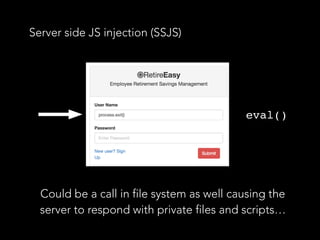
Server side JS injection (SSJS)
Could be a call in file system as well causing the
server to respond with private files and scripts…
eval()
How to prevent it
• Validate user input.
• Never use eval()-> JSON.parse() is much
safer
• setTimeout(), setInterval(),
Function() may have catastrophic results as
well
“Use strict”;
• At the beginning of every script
• Enables “strict mode”
• Does not allow some actions such as using a variable
without declaring it
• x = 5.2
• deleting objects, variables, functions etc.
• Limits eval() use cases
Helmet
• npm package
• Applies XSS protections
• Sets “Content-Security-Policy” header
• Prevents clickjacking
• Disables client-side caching
• It disables some sensitive HTTP Headers
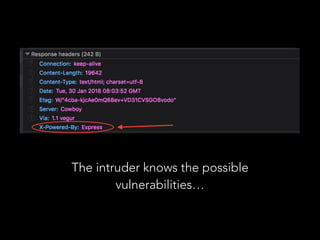
• X-Powered-By (you can also change that to anything you like)
The intruder knows the possible
vulnerabilities…
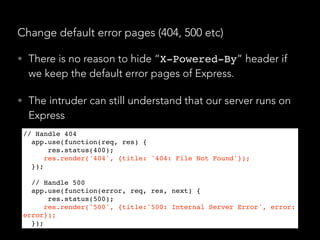
Change default error pages (404, 500 etc)
• There is no reason to hide “X-Powered-By” header if
we keep the default error pages of Express.
• The intruder can still understand that our server runs on
Express
// Handle 404
app.use(function(req, res) {
    res.status(400);
    res.render('404', {title: '404: File Not Found'});
});
// Handle 500
app.use(function(error, req, res, next) {
    res.status(500);
    res.render('500', {title:'500: Internal Server Error', error:
error});
});
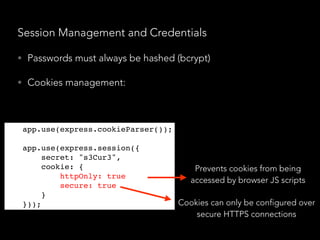
Session Management and Credentials
• Passwords must always be hashed (bcrypt)
• Cookies management:
Prevents cookies from being
accessed by browser JS scripts
Cookies can only be configured over
secure HTTPS connections
app.use(express.cookieParser());
app.use(express.session({
secret: "s3Cur3",
cookie: {
httpOnly: true,
secure: true
}
}));
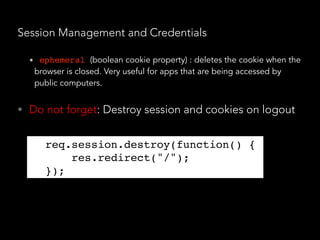
Session Management and Credentials
• ephemeral (boolean cookie property) : deletes the cookie when the
browser is closed. Very useful for apps that are being accessed by
public computers.
• Do not forget: Destroy session and cookies on logout
req.session.destroy(function() {
res.redirect("/");
});
XSS Attacks (Cross - Site Scripting)
“XSS attacks allows intruders to execute scripts in the
victims’ browser. In that way they can access cookies,
session tokens and other sensitive info or redirect
users to malicious sites. It is one of the most common
ways an intruder can take over a webpage.”
XSS Attacks (Cross - Site Scripting)
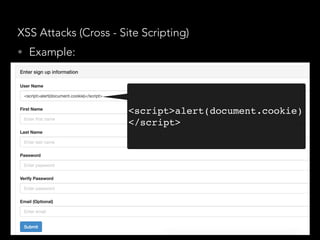
• Example:
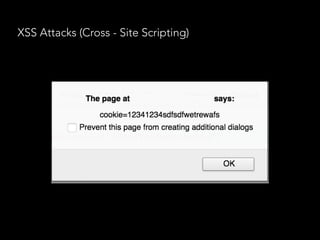
<script>alert(document.cookie)
</script>
XSS Attacks (Cross - Site Scripting)
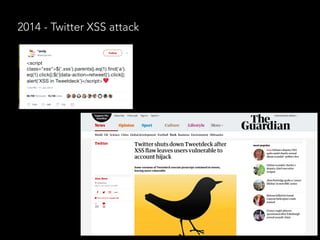
2014 - Twitter XSS attack
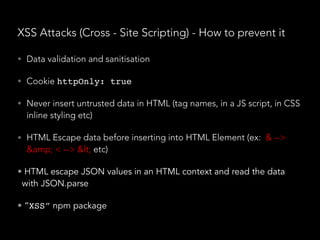
XSS Attacks (Cross - Site Scripting) - How to prevent it
• Data validation and sanitisation
• Cookie httpOnly: true
• Never insert untrusted data in HTML (tag names, in a JS script, in CSS
inline styling etc)
• HTML Escape data before inserting into HTML Element (ex: & -->
&amp; < --> &lt; etc)
• HTML escape JSON values in an HTML context and read the data
with JSON.parse
• “XSS” npm package
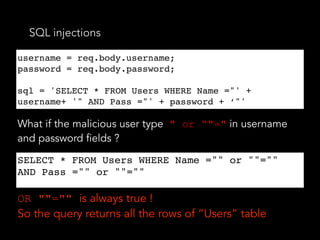
SQL injections
username = req.body.username;
password = req.body.password;
sql = 'SELECT * FROM Users WHERE Name ="' +
username+ '" AND Pass ="' + password + ‘"'
What if the malicious user type " or “"=" in username
and password fields ?
SELECT * FROM Users WHERE Name ="" or ""=""
AND Pass ="" or ""=""
OR ""="" is always true !
So the query returns all the rows of “Users” table
SQL injections - How to prevent it
• (Once again…) Data validation and sanitisation
• “sqlstring” npm package, it escapes user input
values.
var sql = SqlString.format('SELECT * FROM users WHERE
 id = ?', [userId]);
• “sql-query-builder” npm package
query().select([users.id.as('User'), users.id.count(1
)]).from(users).join(posts)
    .on(posts.user_id).equals(users.id)
    .groupBy(users.id);
• Far better than string concatenated SQL queries
var sql = SqlString.format('SELECT * FROM users WHERE
 id = ?', [userId]);
query().select([users.id.as('User'), users.id.count(
1)]).from(users).join(posts)
    .on(posts.user_id).equals(users.id)
    .groupBy(users.id);
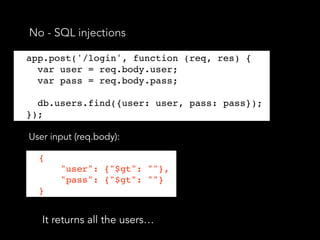
No - SQL injections
app.post('/login', function (req, res) {
var user = req.body.user;
User input (req.body):
It returns all the users…
{
"user": {"$gt": ""},
"pass": {"$gt": ""}
}
app.post('/login', function (req, res) {
var user = req.body.user;
var pass = req.body.pass;
db.users.find({user: user, pass: pass});
});
No - SQL injections
• We have not set explicitly the query selector, so the
malicious user specified one for himself
db.users.find({user: {$in: [user]}, pass: {$in:
[pass]}});
db.users.find({user: { $in: [{ '$gt': '' }] },
pass: { $in: [{ '$gt': '' }] }});
• Now the query will return nothing.
• So we should always explicitly set the query selector!
• “mongoose” npm package - it escapes many of the
things mentioned above
db.users.find({user: {$in: [user]}, pass: {$in:
[pass]}});
db.users.find({user: { $in: [{ '$gt': '' }] },
pass: { $in: [{ '$gt': '' }] }});
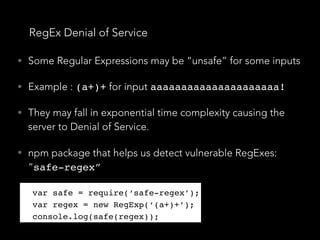
RegEx Denial of Service
• Some Regular Expressions may be “unsafe” for some inputs
• Example : (a+)+ for input aaaaaaaaaaaaaaaaaaaaa!
• They may fall in exponential time complexity causing the
server to Denial of Service.
• npm package that helps us detect vulnerable RegExes:
“safe-regex”
var safe = require(‘safe-regex’);
var regex = new RegExp(‘(a+)+’);
console.log(safe(regex));
var safe = require(‘safe-regex’);
var regex = new RegExp(‘(a+)+’);
console.log(safe(regex));
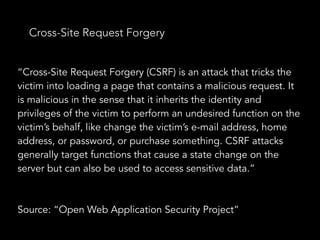
Cross-Site Request Forgery
“Cross-Site Request Forgery (CSRF) is an attack that tricks the
victim into loading a page that contains a malicious request. It
is malicious in the sense that it inherits the identity and
privileges of the victim to perform an undesired function on the
victim’s behalf, like change the victim’s e-mail address, home
address, or password, or purchase something. CSRF attacks
generally target functions that cause a state change on the
server but can also be used to access sensitive data.”
Source: “Open Web Application Security Project”
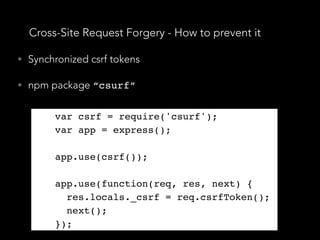
Cross-Site Request Forgery - How to prevent it
• Synchronized csrf tokens
• npm package “csurf”
var csrf = require('csurf');
var app = express();
app.use(csrf());
app.use(function(req, res, next) {
res.locals._csrf = req.csrfToken();
next();
});
var csrf = require('csurf');
var app = express();
app.use(csrf());
app.use(function(req, res, next) {
res.locals._csrf = req.csrfToken();
next();
});
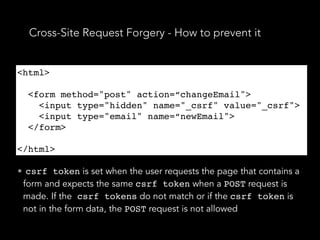
Cross-Site Request Forgery - How to prevent it
<html>
<form method="post" action=“changeEmail">
<input type="hidden" name="_csrf" value="_csrf">
<input type="email" name=“newEmail">
</form>
</html>
• csrf token is set when the user requests the page that contains a
form and expects the same csrf token when a POST request is
made. If the csrf tokens do not match or if the csrf token is
not in the form data, the POST request is not allowed
<html>
<form method="post" action=“changeEmail">
<input type="hidden" name="_csrf" value="_csrf">
<input type="email" name=“newEmail">
</form>
</html>
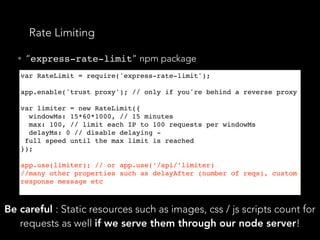
Rate Limiting
• “express-rate-limit” npm package
var RateLimit = require('express-rate-limit');
 
app.enable('trust proxy'); // only if you're behind a reverse proxy
 
var limiter = new RateLimit({
  windowMs: 15*60*1000, // 15 minutes
  max: 100, // limit each IP to 100 requests per windowMs
  delayMs: 0 // disable delaying -
 full speed until the max limit is reached
});
app.use(limiter); // or app.use(‘/api/’limiter)
//many other properties such as delayAfter (number of reqs), custom
response message etc
Be careful : Static resources such as images, css / js scripts count for
requests as well if we serve them through our node server!
Data Sanitisation and Validation
• Must take place in every endpoint where the user
interacts with the server by submitting data.
• It protects us from most of the flaws mentioned above
• We are interested in checks and validations like “Is it
an email?”, “Is it an Integer?”, “Is it a telephone
number?”
• npm package: “express-validator”
Data Sanitisation and Validation
• “express-validator” allows us to create “check
schemas” for each endpoint in pure JSON.
app.put('/user/:id/password', checkSchema({
id: {
// The location of the field, can be one or more of body, cookies, headers,
params or query.
// If omitted, all request locations will be checked
in: ['params', 'query'],
errorMessage: 'ID is wrong',
isInt: true,
},
password: {
isLength: {
errorMessage: 'Password should be at least 7 chars long',
// Multiple options would be expressed as an array
options: { min: 7 }
}
}
Data Sanitisation and Validation
• Many useful keys and functions such as isIn(),
exists(), isUUID(), isPostalCode(),
sanitizeBody(‘body_parameter_to_trim’)
.trim() etc.
• It also allows us to write custom validation and
sanitisation logics.
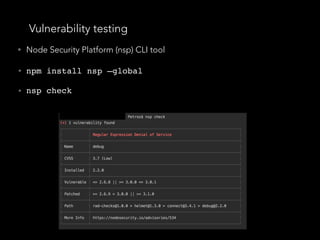
Vulnerability testing
• Node Security Platform (nsp) CLI tool
• npm install nsp —global
• nsp check
Vulnerability testing
• Retire.js CLI tool
• npm install -g retire
• retire
•The tool indicates any known vulnerable JS libraries used
in our node server
•“sqlmap”: python based pen-testing tool for sql injections
Logging
• Logging is critical during an attack and for
understanding “what went wrong” after an attack
• We must be sure that each and every request and
response to and from our server leaves a trace so
that we know “who” (user id) did it, “where it came
from” (IP address), “what he requested” (request
payload) and “what our server
responded” (response)
• This information must be stored in our database in
order to be able to be further examined.
Filtering architecture
• Custom middleware responsible for filtering and security,
applied in the “app level” (for each and every request)
• It handles data validation and sanitisation, logging,
injections detection etc.
• Endpoints white-list: An array with the known and used
endpoints of our server, if a user hits a non-white-listed
endpoint he will immediately get an HTTP 404 error
• In general: When a malicious request reaches the
middleware, the server will immediately respond with an
error code and the app router will never get “bothered”
Further reading and fun
• Open Web Application Security Project
• owasp.org
• NodeGoat
• https://github.com/OWASP/NodeGoat
Thank you!
Petros Demetrakopoulos
petros@psdapps.gr
@DemetrakoPetros
petrosDemetrakopoulos

Security in Node.JS and Express:

  • 1.
    Security in Node.JSand Express: The bare minimum Petros Demetrakopoulos
  • 2.
    What we willtalk about • Server side JS injection • “Use strict” • Helmet • Proper session management • XSS attacks • SQL and No-SQL injections • RegEx Denial of Service
  • 3.
    What we willtalk about • Cross-Site Request Forgery • Rate Limiting • Data Sanitisation • Vulnerability testing • Logging • Filtering architecture
  • 4.
    Server side JSinjection (SSJS) Could be a call in file system as well causing the server to respond with private files and scripts… eval()
  • 5.
    How to preventit • Validate user input. • Never use eval()-> JSON.parse() is much safer • setTimeout(), setInterval(), Function() may have catastrophic results as well
  • 6.
    “Use strict”; • Atthe beginning of every script • Enables “strict mode” • Does not allow some actions such as using a variable without declaring it • x = 5.2 • deleting objects, variables, functions etc. • Limits eval() use cases
  • 7.
    Helmet • npm package •Applies XSS protections • Sets “Content-Security-Policy” header • Prevents clickjacking • Disables client-side caching • It disables some sensitive HTTP Headers • X-Powered-By (you can also change that to anything you like)
  • 8.
    The intruder knowsthe possible vulnerabilities…
  • 9.
    Change default errorpages (404, 500 etc)
  • 10.
    Change default errorpages (404, 500 etc) • There is no reason to hide “X-Powered-By” header if we keep the default error pages of Express. • The intruder can still understand that our server runs on Express // Handle 404 app.use(function(req, res) {     res.status(400);     res.render('404', {title: '404: File Not Found'}); }); // Handle 500 app.use(function(error, req, res, next) {     res.status(500);     res.render('500', {title:'500: Internal Server Error', error: error}); });
  • 11.
    Session Management andCredentials • Passwords must always be hashed (bcrypt) • Cookies management: Prevents cookies from being accessed by browser JS scripts Cookies can only be configured over secure HTTPS connections app.use(express.cookieParser()); app.use(express.session({ secret: "s3Cur3", cookie: { httpOnly: true, secure: true } }));
  • 12.
    Session Management andCredentials • ephemeral (boolean cookie property) : deletes the cookie when the browser is closed. Very useful for apps that are being accessed by public computers. • Do not forget: Destroy session and cookies on logout req.session.destroy(function() { res.redirect("/"); });
  • 13.
    XSS Attacks (Cross- Site Scripting) “XSS attacks allows intruders to execute scripts in the victims’ browser. In that way they can access cookies, session tokens and other sensitive info or redirect users to malicious sites. It is one of the most common ways an intruder can take over a webpage.”
  • 14.
    XSS Attacks (Cross- Site Scripting) • Example: <script>alert(document.cookie) </script>
  • 15.
    XSS Attacks (Cross- Site Scripting)
  • 16.
    2014 - TwitterXSS attack
  • 17.
    XSS Attacks (Cross- Site Scripting) - How to prevent it • Data validation and sanitisation • Cookie httpOnly: true • Never insert untrusted data in HTML (tag names, in a JS script, in CSS inline styling etc) • HTML Escape data before inserting into HTML Element (ex: & --> &amp; < --> &lt; etc) • HTML escape JSON values in an HTML context and read the data with JSON.parse • “XSS” npm package
  • 18.
    SQL injections username =req.body.username; password = req.body.password; sql = 'SELECT * FROM Users WHERE Name ="' + username+ '" AND Pass ="' + password + ‘"' What if the malicious user type " or “"=" in username and password fields ? SELECT * FROM Users WHERE Name ="" or ""="" AND Pass ="" or ""="" OR ""="" is always true ! So the query returns all the rows of “Users” table
  • 19.
    SQL injections -How to prevent it • (Once again…) Data validation and sanitisation • “sqlstring” npm package, it escapes user input values. var sql = SqlString.format('SELECT * FROM users WHERE  id = ?', [userId]); • “sql-query-builder” npm package query().select([users.id.as('User'), users.id.count(1 )]).from(users).join(posts)     .on(posts.user_id).equals(users.id)     .groupBy(users.id); • Far better than string concatenated SQL queries var sql = SqlString.format('SELECT * FROM users WHERE  id = ?', [userId]); query().select([users.id.as('User'), users.id.count( 1)]).from(users).join(posts)     .on(posts.user_id).equals(users.id)     .groupBy(users.id);
  • 20.
    No - SQLinjections app.post('/login', function (req, res) { var user = req.body.user; User input (req.body): It returns all the users… { "user": {"$gt": ""}, "pass": {"$gt": ""} } app.post('/login', function (req, res) { var user = req.body.user; var pass = req.body.pass; db.users.find({user: user, pass: pass}); });
  • 21.
    No - SQLinjections • We have not set explicitly the query selector, so the malicious user specified one for himself db.users.find({user: {$in: [user]}, pass: {$in: [pass]}}); db.users.find({user: { $in: [{ '$gt': '' }] }, pass: { $in: [{ '$gt': '' }] }}); • Now the query will return nothing. • So we should always explicitly set the query selector! • “mongoose” npm package - it escapes many of the things mentioned above db.users.find({user: {$in: [user]}, pass: {$in: [pass]}}); db.users.find({user: { $in: [{ '$gt': '' }] }, pass: { $in: [{ '$gt': '' }] }});
  • 22.
    RegEx Denial ofService • Some Regular Expressions may be “unsafe” for some inputs • Example : (a+)+ for input aaaaaaaaaaaaaaaaaaaaa! • They may fall in exponential time complexity causing the server to Denial of Service. • npm package that helps us detect vulnerable RegExes: “safe-regex” var safe = require(‘safe-regex’); var regex = new RegExp(‘(a+)+’); console.log(safe(regex)); var safe = require(‘safe-regex’); var regex = new RegExp(‘(a+)+’); console.log(safe(regex));
  • 23.
    Cross-Site Request Forgery “Cross-SiteRequest Forgery (CSRF) is an attack that tricks the victim into loading a page that contains a malicious request. It is malicious in the sense that it inherits the identity and privileges of the victim to perform an undesired function on the victim’s behalf, like change the victim’s e-mail address, home address, or password, or purchase something. CSRF attacks generally target functions that cause a state change on the server but can also be used to access sensitive data.” Source: “Open Web Application Security Project”
  • 24.
    Cross-Site Request Forgery- How to prevent it • Synchronized csrf tokens • npm package “csurf” var csrf = require('csurf'); var app = express(); app.use(csrf()); app.use(function(req, res, next) { res.locals._csrf = req.csrfToken(); next(); }); var csrf = require('csurf'); var app = express(); app.use(csrf()); app.use(function(req, res, next) { res.locals._csrf = req.csrfToken(); next(); });
  • 25.
    Cross-Site Request Forgery- How to prevent it <html> <form method="post" action=“changeEmail"> <input type="hidden" name="_csrf" value="_csrf"> <input type="email" name=“newEmail"> </form> </html> • csrf token is set when the user requests the page that contains a form and expects the same csrf token when a POST request is made. If the csrf tokens do not match or if the csrf token is not in the form data, the POST request is not allowed <html> <form method="post" action=“changeEmail"> <input type="hidden" name="_csrf" value="_csrf"> <input type="email" name=“newEmail"> </form> </html>
  • 26.
    Rate Limiting • “express-rate-limit”npm package var RateLimit = require('express-rate-limit');   app.enable('trust proxy'); // only if you're behind a reverse proxy   var limiter = new RateLimit({   windowMs: 15*60*1000, // 15 minutes   max: 100, // limit each IP to 100 requests per windowMs   delayMs: 0 // disable delaying -  full speed until the max limit is reached }); app.use(limiter); // or app.use(‘/api/’limiter) //many other properties such as delayAfter (number of reqs), custom response message etc Be careful : Static resources such as images, css / js scripts count for requests as well if we serve them through our node server!
  • 27.
    Data Sanitisation andValidation • Must take place in every endpoint where the user interacts with the server by submitting data. • It protects us from most of the flaws mentioned above • We are interested in checks and validations like “Is it an email?”, “Is it an Integer?”, “Is it a telephone number?” • npm package: “express-validator”
  • 28.
    Data Sanitisation andValidation • “express-validator” allows us to create “check schemas” for each endpoint in pure JSON. app.put('/user/:id/password', checkSchema({ id: { // The location of the field, can be one or more of body, cookies, headers, params or query. // If omitted, all request locations will be checked in: ['params', 'query'], errorMessage: 'ID is wrong', isInt: true, }, password: { isLength: { errorMessage: 'Password should be at least 7 chars long', // Multiple options would be expressed as an array options: { min: 7 } } }
  • 29.
    Data Sanitisation andValidation • Many useful keys and functions such as isIn(), exists(), isUUID(), isPostalCode(), sanitizeBody(‘body_parameter_to_trim’) .trim() etc. • It also allows us to write custom validation and sanitisation logics.
  • 30.
    Vulnerability testing • NodeSecurity Platform (nsp) CLI tool • npm install nsp —global • nsp check
  • 31.
    Vulnerability testing • Retire.jsCLI tool • npm install -g retire • retire •The tool indicates any known vulnerable JS libraries used in our node server •“sqlmap”: python based pen-testing tool for sql injections
  • 32.
    Logging • Logging iscritical during an attack and for understanding “what went wrong” after an attack • We must be sure that each and every request and response to and from our server leaves a trace so that we know “who” (user id) did it, “where it came from” (IP address), “what he requested” (request payload) and “what our server responded” (response) • This information must be stored in our database in order to be able to be further examined.
  • 33.
    Filtering architecture • Custommiddleware responsible for filtering and security, applied in the “app level” (for each and every request) • It handles data validation and sanitisation, logging, injections detection etc. • Endpoints white-list: An array with the known and used endpoints of our server, if a user hits a non-white-listed endpoint he will immediately get an HTTP 404 error • In general: When a malicious request reaches the middleware, the server will immediately respond with an error code and the app router will never get “bothered”
  • 34.
    Further reading andfun • Open Web Application Security Project • owasp.org • NodeGoat • https://github.com/OWASP/NodeGoat
  • 35.