The document introduces CARP (CAPTCHA as Graphical Passwords), a new security primitive that combines captcha technology with graphical passwords to enhance security against various online attacks, including guessing and relay attacks. CARP offers improved usability and security compared to conventional text-based passwords by employing unique captcha challenges for each login attempt, thus making it more resistant to automated guessing attacks. Additionally, the document discusses different graphical password schemes and their vulnerabilities, emphasizing CARP's potential practicality for improving online security.
![ISSN 2350-1022
International Journal of Recent Research in Mathematics Computer Science and Information Technology
Vol. 2, Issue 1, pp: (66-71), Month: April 2015 – September 2015, Available at: www.paperpublications.org
Page | 66
Paper Publications
Security for Hard AI Problems Using CaRP
Authentication
1
Saranya V, 2
N. Sakthi Priya
1
PG Student, 2
Assistant Professor, Department of CSE, Bharath University, Chennai, India
Abstract: Using hard AI problems for security is emerging as an exciting new paradigm, but has been
underexplored. This approach present a new security primitive based on hard AI problems, namely, a novel family
of graphical password systems built on top of Captcha technology, which is called Captcha as graphical passwords
(CaRP). CaRP is both a Captcha and a graphical password scheme. CaRP addresses a number of security
problems altogether, such as online guessing attacks, relay attacks, and, if combined with dual-view technologies,
shoulder-surfing attacks. Notably, a CaRP password can be found only probabilistically by automatic online
guessing attacks even if the password is in the search set.
1. INTRODUCTION
Many security primitives are based on hard mathematical problems. Using hard AI problems for security is emerging as
an exciting new paradigm, but has been underexplored. This approach present a new security primitive based on hard AI
problems, namely, a novel family of graphical password systems built on top of Captcha technology, which is called
Captcha as graphical passwords (CaRP). CaRP is both a Captcha and a graphical password scheme. CaRP addresses a
number of security problems altogether, such as online guessing attacks, relay attacks, and, if combined with dual-view
technologies, shoulder-surfing attacks. Notably, a CaRP password can be found only probabilistically by automatic online
guessing attacks even if the password is in the search set. CaRP also offers a novel approach to address the well-known
image hotspot problem in popular graphical password systems, such as Pass Points, that often leads to weak password
choices. CaRP offers reasonable security and usability and appears to fit well with some practical applications for
improving online security.
2. LITERATURE SURVEY
Pass Points: Design and longitudinal evaluation of a graphical password system:
[1]Computer security depends largely on passwords to authenticate human users. However, users have difficulty
remembering passwords over time if they choose a secure password, i.e. a password that is long and random. Therefore,
they tend to choose short and insecure passwords. Graphical passwords, which consist of clicking on images rather than
typing alphanumeric strings, may help to overcome the problem of creating secure and memorable passwords. The
participants subsequently carried out three longitudinal trials to input their password over the course of 6 weeks. The
results show that the graphical password users created a valid password with fewer difficulties than the alphanumeric
users.
Investigating the Combination of Text and Graphical Passwords for a more secure and usable experience:
[2]Security has been an issue from the inception of computer systems and experts have related security issues with
usability. Secured systems must be usable to maintain intended security. Password Authentication Systems have either
been usable and not secure, or secure and not usable. Increasing either tends to complicate the other.](https://image.slidesharecdn.com/securityforhardaiproblemsusingcarpauthentication-221-170106073522/85/Security-for-Hard-AI-Problems-Using-CaRP-Authentication-1-320.jpg)
![ISSN 2350-1022
International Journal of Recent Research in Mathematics Computer Science and Information Technology
Vol. 2, Issue 1, pp: (66-71), Month: April 2015 – September 2015, Available at: www.paperpublications.org
Page | 66
Paper Publications
Security for Hard AI Problems Using CaRP
Authentication
1
Saranya V, 2
N. Sakthi Priya
1
PG Student, 2
Assistant Professor, Department of CSE, Bharath University, Chennai, India
Abstract: Using hard AI problems for security is emerging as an exciting new paradigm, but has been
underexplored. This approach present a new security primitive based on hard AI problems, namely, a novel family
of graphical password systems built on top of Captcha technology, which is called Captcha as graphical passwords
(CaRP). CaRP is both a Captcha and a graphical password scheme. CaRP addresses a number of security
problems altogether, such as online guessing attacks, relay attacks, and, if combined with dual-view technologies,
shoulder-surfing attacks. Notably, a CaRP password can be found only probabilistically by automatic online
guessing attacks even if the password is in the search set.
1. INTRODUCTION
Many security primitives are based on hard mathematical problems. Using hard AI problems for security is emerging as
an exciting new paradigm, but has been underexplored. This approach present a new security primitive based on hard AI
problems, namely, a novel family of graphical password systems built on top of Captcha technology, which is called
Captcha as graphical passwords (CaRP). CaRP is both a Captcha and a graphical password scheme. CaRP addresses a
number of security problems altogether, such as online guessing attacks, relay attacks, and, if combined with dual-view
technologies, shoulder-surfing attacks. Notably, a CaRP password can be found only probabilistically by automatic online
guessing attacks even if the password is in the search set. CaRP also offers a novel approach to address the well-known
image hotspot problem in popular graphical password systems, such as Pass Points, that often leads to weak password
choices. CaRP offers reasonable security and usability and appears to fit well with some practical applications for
improving online security.
2. LITERATURE SURVEY
Pass Points: Design and longitudinal evaluation of a graphical password system:
[1]Computer security depends largely on passwords to authenticate human users. However, users have difficulty
remembering passwords over time if they choose a secure password, i.e. a password that is long and random. Therefore,
they tend to choose short and insecure passwords. Graphical passwords, which consist of clicking on images rather than
typing alphanumeric strings, may help to overcome the problem of creating secure and memorable passwords. The
participants subsequently carried out three longitudinal trials to input their password over the course of 6 weeks. The
results show that the graphical password users created a valid password with fewer difficulties than the alphanumeric
users.
Investigating the Combination of Text and Graphical Passwords for a more secure and usable experience:
[2]Security has been an issue from the inception of computer systems and experts have related security issues with
usability. Secured systems must be usable to maintain intended security. Password Authentication Systems have either
been usable and not secure, or secure and not usable. Increasing either tends to complicate the other.](https://image.slidesharecdn.com/securityforhardaiproblemsusingcarpauthentication-221-170106073522/75/Security-for-Hard-AI-Problems-Using-CaRP-Authentication-1-2048.jpg)
![ISSN 2350-1022
International Journal of Recent Research in Mathematics Computer Science and Information Technology
Vol. 2, Issue 1, pp: (66-71), Month: April 2015 – September 2015, Available at: www.paperpublications.org
Page | 67
Paper Publications
Against Spyware Using CAPTCHA in Graphical Password Scheme:
[3]Text-based password schemes have inherent security and usability problems, leading to the development of graphical
password schemes. However, most of these alternate schemes are vulnerable to spyware attacks. A new scheme is
proposed, using CAPTCHA (Completely Automated Public Turing tests to tell Computers and Humans Apart) that
retaining the advantages of graphical password schemes, while simultaneously raising the cost of adversaries by orders of
magnitude. Furthermore, some primary experiments are conducted and the results indicate that the usability should be
improved in the future work.
CAPTCHA: Using Hard AI Problems for Security:
[4]Introducing here captcha, an automated test that humans can pass, but current computer programs can't pass: any
program that has high success over a captcha can be used to solve an unsolved Artificial Intelligence (AI) problem.
Attacks and Design of Image Recognition CAPTCHAs:
[5]The design of image recognition CAPTCHAs (IRCs) will be studied systematically by first reviewing and examining
all IRCs schemes known and evaluate each scheme against the practical requirements in CAPTCHA applications,
particularly in large-scale real-life applications such as Gmail and Hotmail. Then a security analysis of the representative
schemes which have identified will be presented.
On Predictive Models and User-Drawn Graphical Passwords:
[6]In commonplace text-based password schemes, users typically choose passwords that are easy to recall, exhibit
patterns, and are thus vulnerable to brute-force dictionary attacks. This leads us to ask whether other types of passwords
(e.g., graphical) are also vulnerable to dictionary attack due to users tending to choose memorable passwords.
Graphical Passwords: Learning from the First Twelve Years:
[9]Starting around 1999, a great many graphical password schemes have been proposed as alternatives to text-based
password authentication. This provides a comprehensive overview of published research in the area, covering usability
and security aspects, as well as system evaluation.
Revisiting Defenses against Large-Scale Online Password Guessing Attacks:
[10]Brute force and dictionary attacks on password-only remote login services are now widespread and ever increasing.
Enabling convenient login for legitimate users while preventing such attacks is a difficult problem.
Existing System:
Security primitives are based on hard mathematical problems. Using hard AI problems for security is emerging as an
exciting new paradigm, but has been underexplored. A fundamental task in security is to create cryptographic primitives
based on hard mathematical problems that are computationally intractable.
Proposed System:
A new security primitive based on hard AI problems, namely, a novel family of graphical password systems built on top
of Captcha technology, whichis called Captcha as graphical passwords (CaRP). CaRP is both a Captcha and a graphical
password scheme. CaRP addresses a number of security problems altogether, such as online guessing attacks, relay
attacks, and, if combined with dual-view technologies, shoulder-surfing attacks. Notably, a CaRP password can be found
only probabilistically by automatic online guessing attacks even if the password is in the search set.
CaRP also offers a novel approach to address the well-known image hotspot problem in popular graphical password
systems, such as Pass Points, that often leads to weak password choices.
CaRP is not a panacea, but it offers reasonable security and usability and appears to fit well with some practical
applications for improving online security.It presents exemplary CaRPs built on both text Captcha and image-recognition
Captcha. One of them is a text CaRP wherein a password is a sequence of characters like a text password, but entered by
clicking the right character sequence on CaRP images.](https://image.slidesharecdn.com/securityforhardaiproblemsusingcarpauthentication-221-170106073522/85/Security-for-Hard-AI-Problems-Using-CaRP-Authentication-2-320.jpg)
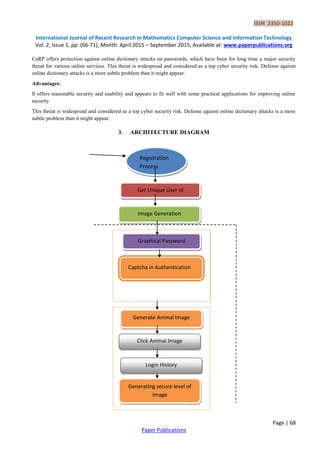
![ISSN 2350-1022
International Journal of Recent Research in Mathematics Computer Science and Information Technology
Vol. 2, Issue 1, pp: (66-71), Month: April 2015 – September 2015, Available at: www.paperpublications.org
Page | 70
Paper Publications
Click Animal is a recognition-based CaRP scheme built on top of Captcha Zoo, with an alphabet of similar animals such
as dog, horse, pig, etc. Its password is a sequence of animal names such as ρ = “Turkey, Cat, Horse, Dog,….” For each
animal, one or more 3D models are built.
Animal Grid:
The number of similar animals is much less than the number of available characters. Click Animal has a smaller alphabet,
and thus a smaller password space, thenClick Text. CaRP should have a sufficiently-large effective password space to
resist human guessing attacks. Animal Grid’s password space can be increased by combining it with a grid-based
graphical password, with the grid depending on the size of the selected animal.
Image Generation:
Text Points images look identical to Click Text images and are generated in the same way except that the locations of all
the clickable points are checked to ensure that none of them is occluded or its tolerance region overlaps another clickable
point’s. This simply generates another image if the check fails. As such failures occur rarely due to the fact that clickable
points are all internal points, the restriction due to the check has a negligible impact on the security of generated images.
Authentication:
When creating a password, all clickable points are marked on corresponding characters in a CaRP image for a user to
select. During authentication, the user first identifies her chosen characters, and clicks the password points on the right
characters. The authentication server maps each user-clicked point on the image to find the closest clickable point. If their
distance exceeds a tolerable range, login fails. Otherwise a sequence of clickable points is recovered, and its hash value is
computed to compare with the stored value.
Dynamic:
The locations of clickable points and their context (i.e., characters) vary from one image to another. The clickable points
in one image are computationally independent of the clickable points in another image, as it will be seen in Section VI-B.
Contextual:
Whether a similarly structured point is a clickable point or not depends on its context. It is only if within the right context,
i.e., at the right location of a right character.
5. CONCLUSION
This proposed CaRP, a new security primitive relying on unsolved hard AI problems. CaRP is both a Captcha and a
graphical password scheme. The notion of CaRP introduces a new family of graphical passwords, which adopts a new
approach to counter online guessing attacks: a new CaRP image, which is also a Captcha challenge, is used for every
login attempt to make trials of an online guessing attack computationally independent of each other. Animal Grid and
Click Text easier to use than Pass Points and a combination of text password and Captcha. Both Animal Grid and Click
Text had better password memorability than the conventional text passwords. On the other hand, the usability of CaRP
can be further improved by using images of different levels of difficulty based on the login history of the user and the
machine used to log in.
REFERENCES
[1] R. Biddle, S. Chiasson, and P. C. van Oorschot, “Graphical passwords:Learning from the first twelve years,” ACM
Comput. Surveys, vol. 44, no. 4, 2012.
[2] (2012, Feb.). The Science Behind Passfaces [Online]. Available: http://www.realuser.com/published/Science
BehindPassfaces.pdf
[3] Jermyn, A. Mayer, F. Monrose, M. Reiter, and A. Rubin, “The design and analysis of graphical passwords,” in
Proc. 8th USENIX Security Symp., 1999, pp. 1–15.](https://image.slidesharecdn.com/securityforhardaiproblemsusingcarpauthentication-221-170106073522/85/Security-for-Hard-AI-Problems-Using-CaRP-Authentication-5-320.jpg)
![ISSN 2350-1022
International Journal of Recent Research in Mathematics Computer Science and Information Technology
Vol. 2, Issue 1, pp: (66-71), Month: April 2015 – September 2015, Available at: www.paperpublications.org
Page | 71
Paper Publications
[4] H. Tao and C. Adams, “Pass-Go: A proposal to improve the usability of graphical passwords,” Int. J. Netw.
Security, vol. 7, no. 2, pp. 273–292, 2008.
[5] S. Wiedenbeck, J. Waters, J. C. Birget, A. Brodskiy, and N. Memon, “PassPoints: Design and longitudinal
evaluation of a graphical password system,” Int. J. HCI, vol. 63, pp. 102–127, Jul. 2005.
[6] P. C. van Oorschot and J. Thorpe, “On predictive models and user drawn graphical passwords,” ACM Trans. Inf.
Syst. Security, vol. 10, no. 4, pp. 1–33, 2008.
[7] K. Golofit, “Click passwords under investigation,” in Proc. ESORICS, 2007, pp. 343–358.
[8] .A. E. Dirik, N. Memon, and J.-C. Birget, “Modeling user choice in the passpoints graphical password scheme,” in
Proc. Symp. Usable Privacy Security, 2007, pp. 20–28.
[9] J. Thorpe and P. C. van Oorschot, “Human-seeded attacks and exploiting hot spots in graphical passwords,” in
Proc. USENIX Security, 2007, pp. 103–118.
[10] P. C. van Oorschot, A. Salehi-Abari, and J. Thorpe, “Purely automated attacks on passpoints-style graphical
passwords,” IEEE Trans. Inf. Forensics Security, vol. 5, no. 3, pp. 393–405, Sep. 2010.
[11] P. C. van Oorschot and J. Thorpe, “Exploiting predictability in click based graphical passwords,” J. Comput.
Security, vol. 19, no. 4, pp. 669–702, 2011.](https://image.slidesharecdn.com/securityforhardaiproblemsusingcarpauthentication-221-170106073522/85/Security-for-Hard-AI-Problems-Using-CaRP-Authentication-6-320.jpg)


![[Deck] What's New in Spark-Iceberg Integration via DSV2.pptx](https://cdn.slidesharecdn.com/ss_thumbnails/deckwhatsnewinspark-icebergintegrationviadsv2-260210005337-25955b12-thumbnail.jpg?width=640&height=640&fit=bounds)


