?? ?
?? ??
?
. . .
ashley123
3,400,523 views
Own IT. IT’s up to you.
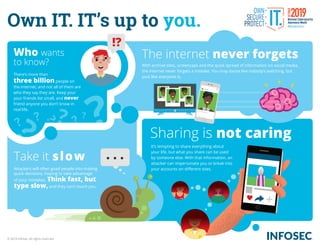
Attackers will often goad people into making
quick decisions, hoping to take advantage
of your mistakes. Think fast, but
type slow, and they can’t touch you.
Who wants
to know? With archive sites, screencaps and the quick spread of information on social media,
the internet never forgets a mistake. You may dance like nobody’s watching, but
post like everyone is.
It’s tempting to share everything about
your life, but what you share can be used
by someone else. With that information, an
attacker can impersonate you or break into
your accounts on different sites.
There’s more than
three billion people on
the internet, and not all of them are
who they say they are. Keep your
your friends list small, and never
friend anyone you don’t know in
real life.
Take it slow
The internet never forgets
Sharing is not caring
© 2019 Infosec. All rights reserved.
Own IT. IT’s up to you.
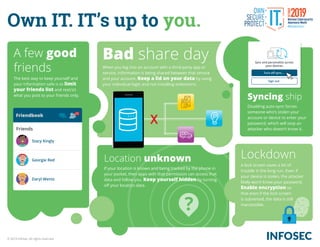
Lockdown
A lock screen saves a lot of
trouble in the long run. Even if
your device is stolen, the attacker
likely won’t know your password.
Enable encryption so
that even if the lock screen
is subverted, the data is still
inaccessible.
A few good
friends
The best way to keep yourself and
your information safe is to limit
your friends list and restrict
what you post to your friends only.
25
Stacy Kingly
Friends
Friendbook
Georgie Red
Daryl Wentz
Turn off sync...
Sign out
Sync and personalize across
your devices
Syncing ship
Disabling auto-sync forces
someone who’s stolen your
account or device to enter your
password, which will stop an
attacker who doesn’t know it.
Bad share day
When you log into an account with a third-party app or
service, information is being shared between that service
and your account. Keep a lid on your data by using
your individual login and not installing extensions.
Location unknown
If your location is known and being tracked by the phone in
your pocket, then apps with that permission can access that
data and follow you. Keep yourself hidden by turning
off your location data.
© 2019 Infosec. All rights reserved.
Download on the
App Store
Deceptive site ahead
Attackers on this website might try to trick you into doing something dangerous like installing
software or revealing your personal information (for example, passwords, messages, or credit
cards).
Back to safetyDetails
Allow Candy Kracker to
take pictures, make recordings and
access your calendar, photos, files,
contacts, microphone, sensors,
storage, call logs and search history?
DENY ALLOW
5-star | 0 reviews
Make Quik Cash
Free Cash App!
Connect to your bank
and make money NOW!
Install now
Own IT. IT’s up to you.
Spot the scam
There are several signs that an app
might be a scam or a disguised
attack. If it has a lot of five-star
ratings but no reviews, it could be a
scam. If the creator is suspiciously
silent or refuses to promote their
app, then you should be
cautious.
Beware
permissions
When you install an app, what permissions does it ask
for? A tracking app may want to know your location, but
a beauty app doesn’t need that information. Never give
network permissions to anything that doesn’t need it.
Source smart
Whenever possible, choose apps
from a reputable creator and
download only from the official app store.
Vaccinate your device
Every device needs an antivirus. Even if you end up
downloading a dangerous app, or a previously safe
app becomes infected, an antivirus will help to
secure the device.
© 2019 Infosec. All rights reserved.
Irezumi
Coelophysis
jst4sm4llt0wngrl!lvnngn4l0nelyw0rld!!
t00kth3mdnghttr4ng0ng4nwh3r3!!!_
Ditch the digits?
While your own organization’s rules may be
different, new federal guidance has advised
that forcing users to include lots of symbols
and numbers doesn’t necessarily increase
password security. Focus on length and
memorability instead.
Longer and
stronger
Shorter passwords are easier
for hackers to break. NIST, the
National Institute for Standards
and Technology, recommends that
passwords be anywhere from
8 to 64 characters long.
Thinking in sentences
How do you remember a password that’s 64 characters long? Think in sentences,
not words. A phrase or a sentence is easier to recall than a nonsensical
combination of letters and numbers, and provides that all-important length to
make it harder to crack.
Mix and match
Do you like mixing languages or
making up your own words? If
so, then you have an easy way to
improve your password. If it only
makes sense to you, it’s less
likely to appear in the cracked lists of
passwords hackers use.
Secure IT. IT’s up to you.
© 2019 Infosec. All rights reserved.
Secure IT. IT’s up to you.
***********
1V305Bz
***********
Two locks
are better
than one
Having two or more authentication steps
makes it harder for attackers to breach
an account. Most apps, devices and services
have the option to enable multi-factor
authentication, and it’s always smart
to use it.
To have and have not
There are three different types of authentication: what you know, what you have and what
you are. Mixing authentication types will give you stronger protection. If someone
has stolen your password but not your cell phone, they’re out of luck!
The eyes have it
Biometric authentication, the “something you are” factor, can be anything from a signature
match to a fingerprint, palm or even iris scan. Consider implementing biometrics to
provide an extra layer of security.
© 2019 Infosec. All rights reserved.
Secure IT. IT’s up to you.
getmoneynow.com
https://
Click here
http://filledwithviruses.com/haxyouraccounts/
Bookmarks
Social Media
School
Business
Don’t reuse passwords
Passwords get cracked all the time, and each broken
password is added to a hacker’s database of passwords to
use in the future. Always use unique passwords.
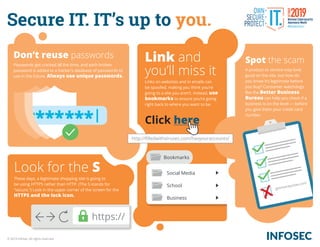
Link and
you’ll miss it
Links on websites and in emails can
be spoofed, making you think you’re
going to a site you aren’t. Instead, use
bookmarks to ensure you’re going
right back to where you want to be.
Look for the S
These days, a legitimate shopping site is going to
be using HTTPS rather than HTTP. (The S stands for
“secure.”) Look in the upper corner of the screen for the
HTTPS and the lock icon.
Spot the scam
A product or service may look
good on the site, but how do
you know it’s legitimate before
you buy? Consumer watchdogs
like the Better Business
Bureau can help you check if a
business is on the level — before
you give them your credit card
number.
© 2019 Infosec. All rights reserved.
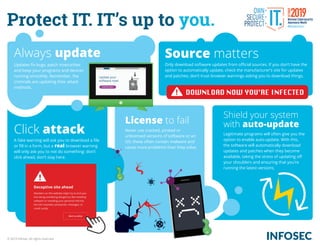
Protect IT. IT’s up to you.
Deceptive site ahead
Attackers on this website might try to trick you
into doing something dangerous like installing
software or revealing your personal informa
tion (for example, passwords, messages, or
credit cards).
Back to safety
DOWNLOAD NOW YOU’RE INFECTED
Always update Source matters
Only download software updates from official sources. If you don’t have the
option to automatically update, check the manufacturer’s site for updates
and patches; don’t trust browser warnings asking you to download things.
Click attack
A fake warning will ask you to download a file
or fill in a form, but a real browser warning
will only ask you to not do something: don’t
click ahead, don’t stay here.
License to fail
Never use cracked, pirated or
unlicensed versions of software or an
OS; these often contain malware and
cause more problems than they solve.
Shield your system
with auto-update
Legitimate programs will often give you the
option to enable auto-update. With this,
the software will automatically download
updates and patches when they become
available, taking the stress of updating off
your shoulders and ensuring that you’re
running the latest versions.
Updates fix bugs, patch insecurities
and keep your programs and devices
running smoothly. Remember, the
criminals are updating their attack
methods.
© 2019 Infosec. All rights reserved.
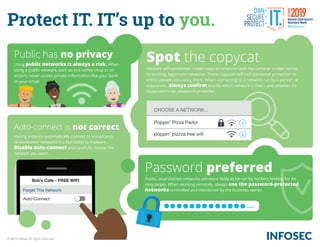
Protect IT. IT’s up to you.
Auto-Connect
Bob’s Cafe - FREE WIFI
Forget This Network
CHOOSE A NETWORK...
Poppin’ Pizza Parlor
poppin’ pizzza free wifi
Public has no privacy
Using public networks is always a risk. When
using a public network, such as in a coffee shop or an
airport, never access private information like your bank
or your email.
Auto-connect is not correct
Having a device automatically connect to known and
remembered networks is a fast ticket to malware.
Disable auto-connect and carefully choose the
network you want.
Spot the copycat
Hackers will sometimes create copycat networks with the same or similar names
to existing, legitimate networks. These copycats will lack password protection to
entice people into using them. When connecting to a network run by a person or
a business, always confirm exactly which network is theirs and whether it’s
supposed to be password-protected.
Password preferred
Public, unprotected networks are more likely to be run by hackers looking for an
easy target. When working remotely, always use the password-protected
networks controlled and monitored by the business owner.
© 2019 Infosec. All rights reserved.
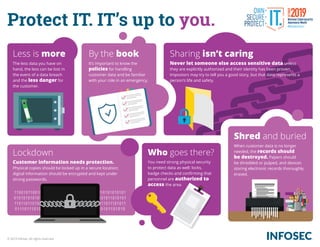
Protect IT. IT’s up to you.
1100101100101111010101011110111000101010101010101
0101010101010101010101010111111010000101011010101
1101101101010010101010101001110101010111011101011
011101110101010101011101010101011010101101010
Less is more
The less data you have on
hand, the less can be lost in
the event of a data breach
and the less danger for
the customer.
By the book
It’s important to know the
policies for handling
customer data and be familiar
with your role in an emergency.
Lockdown
Customer information needs protection.
Physical copies should be locked up in a secure location;
digital information should be encrypted and kept under
strong passwords.
Sharing isn’t caring
Never let someone else access sensitive data unless
they are explicitly authorized and their identity has been proven.
Impostors may try to tell you a good story, but that data represents a
person’s life and safety.
Who goes there?
You need strong physical security
to protect data as well: locks,
badge checks and confirming that
personnel are authorized to
access the area.
Shred and buried
When customer data is no longer
needed, the records should
be destroyed. Papers should
be shredded or pulped, and devices
storing electronic records thoroughly
erased.
© 2019 Infosec. All rights reserved.

Cybersecurity Awareness Infographics

  • 1.
    ?? ? ?? ?? ? .. . ashley123 3,400,523 views Own IT. IT’s up to you. Attackers will often goad people into making quick decisions, hoping to take advantage of your mistakes. Think fast, but type slow, and they can’t touch you. Who wants to know? With archive sites, screencaps and the quick spread of information on social media, the internet never forgets a mistake. You may dance like nobody’s watching, but post like everyone is. It’s tempting to share everything about your life, but what you share can be used by someone else. With that information, an attacker can impersonate you or break into your accounts on different sites. There’s more than three billion people on the internet, and not all of them are who they say they are. Keep your your friends list small, and never friend anyone you don’t know in real life. Take it slow The internet never forgets Sharing is not caring © 2019 Infosec. All rights reserved.
  • 2.
    Own IT. IT’sup to you. Lockdown A lock screen saves a lot of trouble in the long run. Even if your device is stolen, the attacker likely won’t know your password. Enable encryption so that even if the lock screen is subverted, the data is still inaccessible. A few good friends The best way to keep yourself and your information safe is to limit your friends list and restrict what you post to your friends only. 25 Stacy Kingly Friends Friendbook Georgie Red Daryl Wentz Turn off sync... Sign out Sync and personalize across your devices Syncing ship Disabling auto-sync forces someone who’s stolen your account or device to enter your password, which will stop an attacker who doesn’t know it. Bad share day When you log into an account with a third-party app or service, information is being shared between that service and your account. Keep a lid on your data by using your individual login and not installing extensions. Location unknown If your location is known and being tracked by the phone in your pocket, then apps with that permission can access that data and follow you. Keep yourself hidden by turning off your location data. © 2019 Infosec. All rights reserved.
  • 3.
    Download on the AppStore Deceptive site ahead Attackers on this website might try to trick you into doing something dangerous like installing software or revealing your personal information (for example, passwords, messages, or credit cards). Back to safetyDetails Allow Candy Kracker to take pictures, make recordings and access your calendar, photos, files, contacts, microphone, sensors, storage, call logs and search history? DENY ALLOW 5-star | 0 reviews Make Quik Cash Free Cash App! Connect to your bank and make money NOW! Install now Own IT. IT’s up to you. Spot the scam There are several signs that an app might be a scam or a disguised attack. If it has a lot of five-star ratings but no reviews, it could be a scam. If the creator is suspiciously silent or refuses to promote their app, then you should be cautious. Beware permissions When you install an app, what permissions does it ask for? A tracking app may want to know your location, but a beauty app doesn’t need that information. Never give network permissions to anything that doesn’t need it. Source smart Whenever possible, choose apps from a reputable creator and download only from the official app store. Vaccinate your device Every device needs an antivirus. Even if you end up downloading a dangerous app, or a previously safe app becomes infected, an antivirus will help to secure the device. © 2019 Infosec. All rights reserved.
  • 4.
    Irezumi Coelophysis jst4sm4llt0wngrl!lvnngn4l0nelyw0rld!! t00kth3mdnghttr4ng0ng4nwh3r3!!!_ Ditch the digits? Whileyour own organization’s rules may be different, new federal guidance has advised that forcing users to include lots of symbols and numbers doesn’t necessarily increase password security. Focus on length and memorability instead. Longer and stronger Shorter passwords are easier for hackers to break. NIST, the National Institute for Standards and Technology, recommends that passwords be anywhere from 8 to 64 characters long. Thinking in sentences How do you remember a password that’s 64 characters long? Think in sentences, not words. A phrase or a sentence is easier to recall than a nonsensical combination of letters and numbers, and provides that all-important length to make it harder to crack. Mix and match Do you like mixing languages or making up your own words? If so, then you have an easy way to improve your password. If it only makes sense to you, it’s less likely to appear in the cracked lists of passwords hackers use. Secure IT. IT’s up to you. © 2019 Infosec. All rights reserved.
  • 5.
    Secure IT. IT’sup to you. *********** 1V305Bz *********** Two locks are better than one Having two or more authentication steps makes it harder for attackers to breach an account. Most apps, devices and services have the option to enable multi-factor authentication, and it’s always smart to use it. To have and have not There are three different types of authentication: what you know, what you have and what you are. Mixing authentication types will give you stronger protection. If someone has stolen your password but not your cell phone, they’re out of luck! The eyes have it Biometric authentication, the “something you are” factor, can be anything from a signature match to a fingerprint, palm or even iris scan. Consider implementing biometrics to provide an extra layer of security. © 2019 Infosec. All rights reserved.
  • 6.
    Secure IT. IT’sup to you. getmoneynow.com https:// Click here http://filledwithviruses.com/haxyouraccounts/ Bookmarks Social Media School Business Don’t reuse passwords Passwords get cracked all the time, and each broken password is added to a hacker’s database of passwords to use in the future. Always use unique passwords. Link and you’ll miss it Links on websites and in emails can be spoofed, making you think you’re going to a site you aren’t. Instead, use bookmarks to ensure you’re going right back to where you want to be. Look for the S These days, a legitimate shopping site is going to be using HTTPS rather than HTTP. (The S stands for “secure.”) Look in the upper corner of the screen for the HTTPS and the lock icon. Spot the scam A product or service may look good on the site, but how do you know it’s legitimate before you buy? Consumer watchdogs like the Better Business Bureau can help you check if a business is on the level — before you give them your credit card number. © 2019 Infosec. All rights reserved.
  • 8.
    Protect IT. IT’sup to you. Deceptive site ahead Attackers on this website might try to trick you into doing something dangerous like installing software or revealing your personal informa tion (for example, passwords, messages, or credit cards). Back to safety DOWNLOAD NOW YOU’RE INFECTED Always update Source matters Only download software updates from official sources. If you don’t have the option to automatically update, check the manufacturer’s site for updates and patches; don’t trust browser warnings asking you to download things. Click attack A fake warning will ask you to download a file or fill in a form, but a real browser warning will only ask you to not do something: don’t click ahead, don’t stay here. License to fail Never use cracked, pirated or unlicensed versions of software or an OS; these often contain malware and cause more problems than they solve. Shield your system with auto-update Legitimate programs will often give you the option to enable auto-update. With this, the software will automatically download updates and patches when they become available, taking the stress of updating off your shoulders and ensuring that you’re running the latest versions. Updates fix bugs, patch insecurities and keep your programs and devices running smoothly. Remember, the criminals are updating their attack methods. © 2019 Infosec. All rights reserved.
  • 9.
    Protect IT. IT’sup to you. Auto-Connect Bob’s Cafe - FREE WIFI Forget This Network CHOOSE A NETWORK... Poppin’ Pizza Parlor poppin’ pizzza free wifi Public has no privacy Using public networks is always a risk. When using a public network, such as in a coffee shop or an airport, never access private information like your bank or your email. Auto-connect is not correct Having a device automatically connect to known and remembered networks is a fast ticket to malware. Disable auto-connect and carefully choose the network you want. Spot the copycat Hackers will sometimes create copycat networks with the same or similar names to existing, legitimate networks. These copycats will lack password protection to entice people into using them. When connecting to a network run by a person or a business, always confirm exactly which network is theirs and whether it’s supposed to be password-protected. Password preferred Public, unprotected networks are more likely to be run by hackers looking for an easy target. When working remotely, always use the password-protected networks controlled and monitored by the business owner. © 2019 Infosec. All rights reserved.
  • 10.
    Protect IT. IT’sup to you. 1100101100101111010101011110111000101010101010101 0101010101010101010101010111111010000101011010101 1101101101010010101010101001110101010111011101011 011101110101010101011101010101011010101101010 Less is more The less data you have on hand, the less can be lost in the event of a data breach and the less danger for the customer. By the book It’s important to know the policies for handling customer data and be familiar with your role in an emergency. Lockdown Customer information needs protection. Physical copies should be locked up in a secure location; digital information should be encrypted and kept under strong passwords. Sharing isn’t caring Never let someone else access sensitive data unless they are explicitly authorized and their identity has been proven. Impostors may try to tell you a good story, but that data represents a person’s life and safety. Who goes there? You need strong physical security to protect data as well: locks, badge checks and confirming that personnel are authorized to access the area. Shred and buried When customer data is no longer needed, the records should be destroyed. Papers should be shredded or pulped, and devices storing electronic records thoroughly erased. © 2019 Infosec. All rights reserved.