Being a Professional Secretary or Administrative Assistant Presented by Small Business Solutions Training Series
Objectives At the end of the lesson, students will be able to perform: Professional Duties Phone Etiquette Making Appointments Typing Correspondence Setting up Meetings
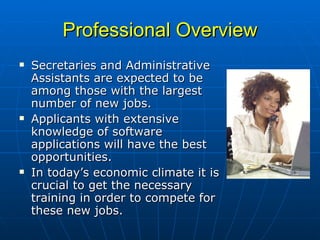
Professional Overview Secretaries and Administrative Assistants are expected to be among those with the largest number of new jobs.  Applicants with extensive knowledge of software applications will have the best opportunities.  In today’s economic climate it is crucial to get the necessary training in order to compete for these new jobs.
Professional Overview As the reliance on technology continues to expand in offices, the role of the office professional has greatly evolved. More and more, secretaries are assuming responsibilities once reserved for managerial and professional staff.  In spite of these changes, however, the core responsibilities for secretaries and administrative assistants have remained much the same.
Professional Duties Professional duties may include, but not limited to:  schedule meetings and appointments; organize and maintain paper and electronic files;  manage projects;  conduct research;  disseminate information by using the telephone, mail services, Web sites, and e-mail; and  handle travel and guest arrangements.
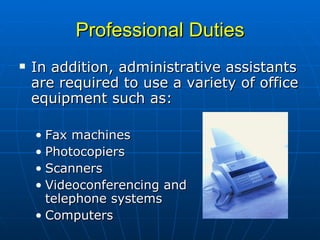
Professional Duties In addition, administrative assistants are required to use a variety of office equipment such as:  Fax machines Photocopiers Scanners Videoconferencing and  telephone systems Computers
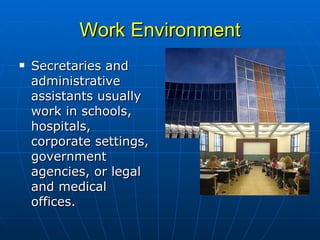
Work Environment Secretaries and administrative assistants usually work in schools, hospitals, corporate settings, government agencies, or legal and medical offices.
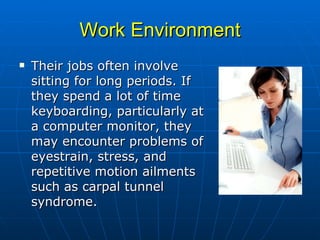
Work Environment Their jobs often involve sitting for long periods. If they spend a lot of time keyboarding, particularly at a computer monitor, they may encounter problems of eyestrain, stress, and repetitive motion ailments such as carpal tunnel syndrome.
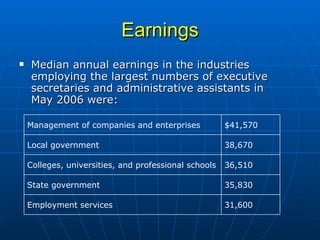
Earnings Median annual earnings in the industries employing the largest numbers of executive secretaries and administrative assistants in May 2006 were:  31,600 Employment services 35,830 State government 36,510 Colleges, universities, and professional schools 38,670 Local government $41,570 Management of companies and enterprises
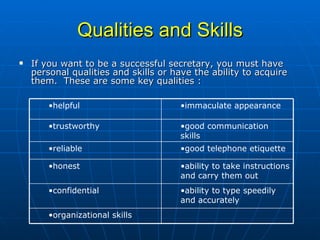
Qualities and Skills If you want to be a successful secretary, you must have personal qualities and skills or have the ability to acquire them.  These are some key qualities : organizational skills  ability to type speedily and accurately confidential  ability to take instructions and carry them out  honest  good telephone etiquette  reliable  good communication skills  trustworthy  immaculate appearance helpful
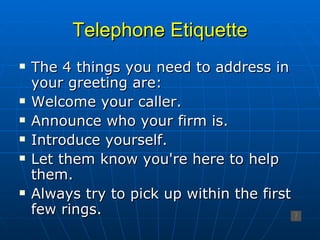
Telephone Etiquette The 4 things you need to address in your greeting are: Welcome your caller. Announce who your firm is. Introduce yourself.  Let them know you're here to help them. Always try to pick up within the first few rings.
Taking Messages It's most important that you get the following details from the caller:  name ,  phone numbers  - mobile, office or home,  what the call is about . Your written message should also contain:  date ,  time ,  and name  – so he knows who took the call. The caller may also give you additional information, such as:  times the caller will be unavailable ,  file reference  on a letter
Making Calls When possible, use speed dialing for the numbers you frequently call.  When the caller answers, always announce yourself and either say who you wish to speak to or what the matter is about.  If the caller isn't in, find out the most convenient time to try again, or have them return your call.  At all times always keep your cool even if the caller is being difficult.
Making Appointments Microsoft Outlook ®  is an efficient tool for scheduling appointments, and setting up meetings.  In order to make appointments effectively, you must know your boss’s availability as well as the client’s.  This will mean keeping your calendar updated with meetings, business trips away, and any public holidays.
Making Appointments (cont’d) The following are the questions you need to ask anyone who wants to make an appointment:  day, date, time, confirm 30 minutes is enough time, name, telephone contact, and subject of discussion .   Once you have this information, when finalizing the appointment, repeat the details back to the person.
Correspondence Letters, will be by far the biggest form of correspondence you will see pass over your desk.  You will learn how to draft and type correspondence by letter, e-mail or fax.
Inward Correspondence As a general rule, you can open any letters addressed to your boss unless it is marked  Private  or  Confidential .  For those you do open make sure you date stamp with the current date, put an action stamp on it if required, and pass all inward correspondence onto your boss so he knows what has come in for the day.  Usually when he is finished with it, he will give it to you to file.
Outward Correspondence Outward correspondence is always done on company letterhead.  To save time, it is prudent to set up a template to include certain reference information you type every time you do an outgoing letter.    These include:  current date ,  author’s initials ,  word processor’s (your) initials ,  contact officer  (author),  contact number , the  company’s file number ,  file number of the company you’re replying to , and a  footer with the file location  on the computer.
E-mail E-mail is equivalent to an official letter coming from your company.  Always be very wary of what you say in your e-mail.  This means your e-mail should not be written in an informal manner.  Always include the following in your outgoing e-mails:  your name ,  company’s name ,  e-mail address ,  contact number ,  fax number ,  disclaimer notice . With some of the e-mail software, such as  Microsoft Outlook ®, you can set up the auto signature to automatically insert this information for you.  It will save you lots of time.
Faxes Faxes play a big part in any office.  Some firms receive more inward correspondence by fax and e-mail than they do by postage.  You need to set up what they call a fax header sheet.  You can do this in  Microsoft Word®  which comes with several fax templates.
Faxes (cont’d) A fax cover sheet will include such details as: company name, address, general phone numbers, fax number, name for whom the fax is intended, name of whose sending the fax, number of pages, contact phone number should there be a problem with the fax, and a message.
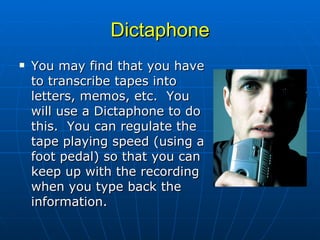
Dictaphone You may find that you have to transcribe tapes into letters, memos, etc.  You will use a Dictaphone to do this.  You can regulate the tape playing speed (using a foot pedal) so that you can keep up with the recording when you type back the information.
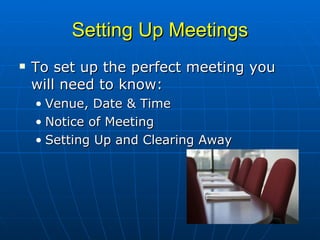
Setting Up Meetings To set up the perfect meeting you will need to know: Venue, Date & Time  Notice of Meeting  Setting Up and Clearing Away
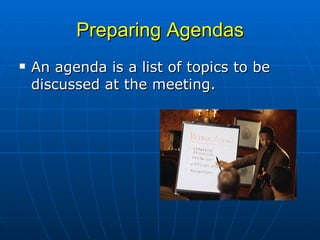
Preparing Agendas An agenda is a list of topics to be discussed at the meeting.
Taking Minutes Minutes are a record of the proceedings of a meeting e.g. who attended and did not, discussion that took place, action to be taken, time the meeting closed.
 

Secretary and administrative assistant

  • 1.
    Being a ProfessionalSecretary or Administrative Assistant Presented by Small Business Solutions Training Series
  • 2.
    Objectives At theend of the lesson, students will be able to perform: Professional Duties Phone Etiquette Making Appointments Typing Correspondence Setting up Meetings
  • 3.
    Professional Overview Secretariesand Administrative Assistants are expected to be among those with the largest number of new jobs. Applicants with extensive knowledge of software applications will have the best opportunities. In today’s economic climate it is crucial to get the necessary training in order to compete for these new jobs.
  • 4.
    Professional Overview Asthe reliance on technology continues to expand in offices, the role of the office professional has greatly evolved. More and more, secretaries are assuming responsibilities once reserved for managerial and professional staff. In spite of these changes, however, the core responsibilities for secretaries and administrative assistants have remained much the same.
  • 5.
    Professional Duties Professionalduties may include, but not limited to: schedule meetings and appointments; organize and maintain paper and electronic files; manage projects; conduct research; disseminate information by using the telephone, mail services, Web sites, and e-mail; and handle travel and guest arrangements.
  • 6.
    Professional Duties Inaddition, administrative assistants are required to use a variety of office equipment such as: Fax machines Photocopiers Scanners Videoconferencing and telephone systems Computers
  • 7.
    Work Environment Secretariesand administrative assistants usually work in schools, hospitals, corporate settings, government agencies, or legal and medical offices.
  • 8.
    Work Environment Theirjobs often involve sitting for long periods. If they spend a lot of time keyboarding, particularly at a computer monitor, they may encounter problems of eyestrain, stress, and repetitive motion ailments such as carpal tunnel syndrome.
  • 9.
    Earnings Median annualearnings in the industries employing the largest numbers of executive secretaries and administrative assistants in May 2006 were: 31,600 Employment services 35,830 State government 36,510 Colleges, universities, and professional schools 38,670 Local government $41,570 Management of companies and enterprises
  • 10.
    Qualities and SkillsIf you want to be a successful secretary, you must have personal qualities and skills or have the ability to acquire them. These are some key qualities : organizational skills ability to type speedily and accurately confidential ability to take instructions and carry them out honest good telephone etiquette reliable good communication skills trustworthy immaculate appearance helpful
  • 11.
    Telephone Etiquette The4 things you need to address in your greeting are: Welcome your caller. Announce who your firm is. Introduce yourself. Let them know you're here to help them. Always try to pick up within the first few rings.
  • 12.
    Taking Messages It'smost important that you get the following details from the caller: name , phone numbers - mobile, office or home, what the call is about . Your written message should also contain: date , time , and name – so he knows who took the call. The caller may also give you additional information, such as: times the caller will be unavailable , file reference on a letter
  • 13.
    Making Calls Whenpossible, use speed dialing for the numbers you frequently call. When the caller answers, always announce yourself and either say who you wish to speak to or what the matter is about. If the caller isn't in, find out the most convenient time to try again, or have them return your call. At all times always keep your cool even if the caller is being difficult.
  • 14.
    Making Appointments MicrosoftOutlook ® is an efficient tool for scheduling appointments, and setting up meetings. In order to make appointments effectively, you must know your boss’s availability as well as the client’s. This will mean keeping your calendar updated with meetings, business trips away, and any public holidays.
  • 15.
    Making Appointments (cont’d)The following are the questions you need to ask anyone who wants to make an appointment: day, date, time, confirm 30 minutes is enough time, name, telephone contact, and subject of discussion . Once you have this information, when finalizing the appointment, repeat the details back to the person.
  • 16.
    Correspondence Letters, willbe by far the biggest form of correspondence you will see pass over your desk.  You will learn how to draft and type correspondence by letter, e-mail or fax.
  • 17.
    Inward Correspondence Asa general rule, you can open any letters addressed to your boss unless it is marked Private or Confidential . For those you do open make sure you date stamp with the current date, put an action stamp on it if required, and pass all inward correspondence onto your boss so he knows what has come in for the day. Usually when he is finished with it, he will give it to you to file.
  • 18.
    Outward Correspondence Outwardcorrespondence is always done on company letterhead. To save time, it is prudent to set up a template to include certain reference information you type every time you do an outgoing letter. These include: current date , author’s initials , word processor’s (your) initials , contact officer (author), contact number , the company’s file number , file number of the company you’re replying to , and a footer with the file location on the computer.
  • 19.
    E-mail E-mail isequivalent to an official letter coming from your company.  Always be very wary of what you say in your e-mail.  This means your e-mail should not be written in an informal manner. Always include the following in your outgoing e-mails: your name , company’s name , e-mail address , contact number , fax number , disclaimer notice . With some of the e-mail software, such as Microsoft Outlook ®, you can set up the auto signature to automatically insert this information for you.  It will save you lots of time.
  • 20.
    Faxes Faxes play abig part in any office.  Some firms receive more inward correspondence by fax and e-mail than they do by postage. You need to set up what they call a fax header sheet. You can do this in Microsoft Word® which comes with several fax templates.
  • 21.
    Faxes (cont’d) Afax cover sheet will include such details as: company name, address, general phone numbers, fax number, name for whom the fax is intended, name of whose sending the fax, number of pages, contact phone number should there be a problem with the fax, and a message.
  • 22.
    Dictaphone You mayfind that you have to transcribe tapes into letters, memos, etc. You will use a Dictaphone to do this. You can regulate the tape playing speed (using a foot pedal) so that you can keep up with the recording when you type back the information.
  • 23.
    Setting Up MeetingsTo set up the perfect meeting you will need to know: Venue, Date & Time Notice of Meeting Setting Up and Clearing Away
  • 24.
    Preparing Agendas Anagenda is a list of topics to be discussed at the meeting.
  • 25.
    Taking Minutes Minutesare a record of the proceedings of a meeting e.g. who attended and did not, discussion that took place, action to be taken, time the meeting closed.
  • 26.

Editor's Notes

  • #12 Facilitate Activity One – Telephone Etiquette Role Play.
  • #13 Facilitate Activity Two – Taking Messages
  • #14 Facilitate Activity Three – Making Calls
  • #24 See Facilitator’s Guide -- Activity
  • #25 Facilitator’s Guide – Template Activity