COIC 101-O Introduction to Computers
Prof. María Isabel Neuman
Searching for meaningful
results
Content Objectives:
By the end of this workshop, the student will be able to:
1. Use efficiently an Internet browser and Google search engine.
2. Use Boolean Operators in Internet Search
3. Set up Google Alert for academic research
4. Use Google Scholar for academic research
Language Objectives
1. Read and interpret technical texts related to the contents of this
Workshop.
2. Write short essays in English to answer specific questions related to
the contents of this Workshop.
3. Participate in oral class discussions held in English.
4. Enhance your vocabulary with not less than ten technical terms
related to the subject of this workshop.
10 new words
1. Boolean
Operators
2. Google advanced
search
3. Google Alerts
4. Google Scholar
5. Keyword
6. Peer review
7. Academic
research
8. Index
9. Journal
10. Academic
database
• Searching for meaningful results
• Trustworthy sites
• Databases and indexes
Class practice: Go to UAGM Library
resources
• Boolean Operators
Boolean Operators are simple words (AND, OR, NOT or AND NOT) used
as conjunctions to combine or exclude keywords in a search, resulting
in more focused and productive results.
This should save time and effort by eliminating inappropriate hits that
must be scanned before discarding.
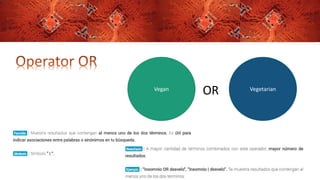
Vegan Vegetarian
OR
Vegan Vegetarian
NOT
Class practice
• Choose a topic and research about it in the web using Boolean
operators
• Make a search using quotation marcs “ ”
• Make a search using OR
• Make a search using NOT
Take a screen shot of the first page of results and paste it in a
Word document. When you have the 3 pages results document
upload it to Blackboard.
Google Advanced Search
• Go to https://www.google.com/advanced_search
Class Practice:
• Search the keywords of your topic looking only por .PDF
documents.
• Make a screenshot of the results and upload it as an
attachment in Blackboard
Google Alerts
• Go to https://www.google.com/alerts
Class Practice:
• Create an alert about your topic.
• Take a screenshot of the results preview and upload it to Blackboard
as an attachment
Google Scholar
• Go to https://scholar.google.com/
Class Practice:
• Using the keywords for your topic, search in Google Scholar
• Take a screenshot of the results and upload them to Blackboard
Ok, so we are done for today
In this class we
1. Used efficiently an Internet browser and Google search engine.
2. Used Boolean Operators in Internet Search
3. Set up Google Alert for academic research
4. Used Google Scholar for academic research
Exit Slip
Enter Blackboard and go to the bottom of today’s workshop.
Complete this Quiz about the workshop’s content
Thanks!
You are great
Meet you in
Blackboard

Searching for meaningful results

  • 1.
    COIC 101-O Introductionto Computers Prof. María Isabel Neuman Searching for meaningful results
  • 2.
    Content Objectives: By theend of this workshop, the student will be able to: 1. Use efficiently an Internet browser and Google search engine. 2. Use Boolean Operators in Internet Search 3. Set up Google Alert for academic research 4. Use Google Scholar for academic research
  • 3.
    Language Objectives 1. Readand interpret technical texts related to the contents of this Workshop. 2. Write short essays in English to answer specific questions related to the contents of this Workshop. 3. Participate in oral class discussions held in English. 4. Enhance your vocabulary with not less than ten technical terms related to the subject of this workshop.
  • 4.
    10 new words 1.Boolean Operators 2. Google advanced search 3. Google Alerts 4. Google Scholar 5. Keyword 6. Peer review 7. Academic research 8. Index 9. Journal 10. Academic database
  • 5.
    • Searching formeaningful results • Trustworthy sites • Databases and indexes Class practice: Go to UAGM Library resources
  • 6.
    • Boolean Operators BooleanOperators are simple words (AND, OR, NOT or AND NOT) used as conjunctions to combine or exclude keywords in a search, resulting in more focused and productive results. This should save time and effort by eliminating inappropriate hits that must be scanned before discarding.
  • 9.
  • 10.
  • 11.
    Class practice • Choosea topic and research about it in the web using Boolean operators • Make a search using quotation marcs “ ” • Make a search using OR • Make a search using NOT Take a screen shot of the first page of results and paste it in a Word document. When you have the 3 pages results document upload it to Blackboard.
  • 12.
    Google Advanced Search •Go to https://www.google.com/advanced_search Class Practice: • Search the keywords of your topic looking only por .PDF documents. • Make a screenshot of the results and upload it as an attachment in Blackboard
  • 13.
    Google Alerts • Goto https://www.google.com/alerts Class Practice: • Create an alert about your topic. • Take a screenshot of the results preview and upload it to Blackboard as an attachment
  • 14.
    Google Scholar • Goto https://scholar.google.com/ Class Practice: • Using the keywords for your topic, search in Google Scholar • Take a screenshot of the results and upload them to Blackboard
  • 15.
    Ok, so weare done for today In this class we 1. Used efficiently an Internet browser and Google search engine. 2. Used Boolean Operators in Internet Search 3. Set up Google Alert for academic research 4. Used Google Scholar for academic research
  • 16.
    Exit Slip Enter Blackboardand go to the bottom of today’s workshop. Complete this Quiz about the workshop’s content
  • 17.
    Thanks! You are great Meetyou in Blackboard