Speed Up Application Development
with Data Binding
Anokhin Mikle / Android Developer / MWDN Ltd.
First Part: Introduction
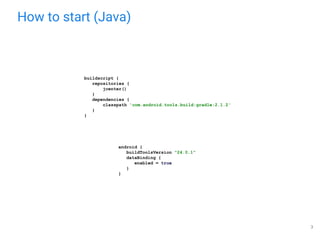
How to start (Java)
android {
buildToolsVersion "24.0.1"
dataBinding {
enabled = true
}
}
buildscript {
repositories {
jcenter()
}
dependencies {
classpath 'com.android.tools.build:gradle:2.1.2'
}
}
3
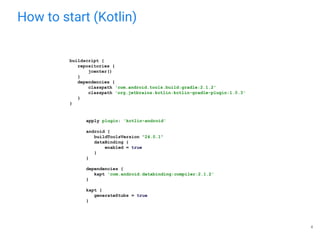
How to start (Kotlin)
apply plugin: 'kotlin-android'
android {
buildToolsVersion "24.0.1"
dataBinding {
enabled = true
}
}
dependencies {
kapt 'com.android.databinding:compiler:2.1.2'
}
kapt {
generateStubs = true
}
buildscript {
repositories {
jcenter()
}
dependencies {
classpath 'com.android.tools.build:gradle:2.1.2'
classpath 'org.jetbrains.kotlin:kotlin-gradle-plugin:1.0.3'
}
}
4
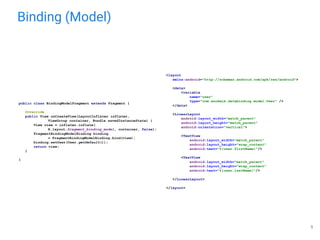
Binding (Model)
<layout
xmlns:android="http://schemas.android.com/apk/res/android">
<data>
<variable
name="user"
type="com.anokmik.databinding.model.User" />
</data>
<LinearLayout
android:layout_width="match_parent"
android:layout_height="match_parent"
android:orientation="vertical">
<TextView
android:layout_width="match_parent"
android:layout_height="wrap_content"
android:text="@{user.firstName}"/>
<TextView
android:layout_width="match_parent"
android:layout_height="wrap_content"
android:text="@{user.lastName}"/>
</LinearLayout>
</layout>
public class BindingModelFragment extends Fragment {
@Override
public View onCreateView(LayoutInflater inflater,
ViewGroup container, Bundle savedInstanceState) {
View view = inflater.inflate(
R.layout.fragment_binding_model, container, false);
FragmentBindingModelBinding binding
= FragmentBindingModelBinding.bind(view);
binding.setUser(User.getDefault());
return view;
}
}
5
Data Binding doesn’t handle view state
so you should specify id for such views as usual
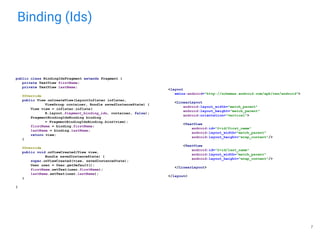
Binding (Ids)
public class BindingIdsFragment extends Fragment {
private TextView firstName;
private TextView lastName;
@Override
public View onCreateView(LayoutInflater inflater,
ViewGroup container, Bundle savedInstanceState) {
View view = inflater.inflate(
R.layout.fragment_binding_ids, container, false);
FragmentBindingIdsBinding binding
= FragmentBindingIdsBinding.bind(view);
firstName = binding.firstName;
lastName = binding.lastName;
return view;
}
@Override
public void onViewCreated(View view,
Bundle savedInstanceState) {
super.onViewCreated(view, savedInstanceState);
User user = User.getDefault();
firstName.setText(user.firstName);
lastName.setText(user.lastName);
}
}
<layout
xmlns:android="http://schemas.android.com/apk/res/android">
<LinearLayout
android:layout_width="match_parent"
android:layout_height="match_parent"
android:orientation="vertical">
<TextView
android:id="@+id/first_name"
android:layout_width="match_parent"
android:layout_height="wrap_content"/>
<TextView
android:id="@+id/last_name"
android:layout_width="match_parent"
android:layout_height="wrap_content"/>
</LinearLayout>
</layout>
7
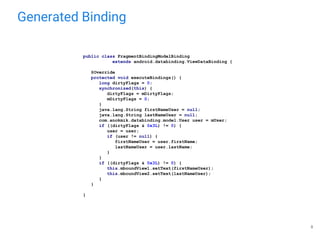
Generated Binding
8
public class FragmentBindingModelBinding
extends android.databinding.ViewDataBinding {
@Override
protected void executeBindings() {
long dirtyFlags = 0;
synchronized(this) {
dirtyFlags = mDirtyFlags;
mDirtyFlags = 0;
}
java.lang.String firstNameUser = null;
java.lang.String lastNameUser = null;
com.anokmik.databinding.model.User user = mUser;
if ((dirtyFlags & 0x3L) != 0) {
user = user;
if (user != null) {
firstNameUser = user.firstName;
lastNameUser = user.lastName;
}
}
if ((dirtyFlags & 0x3L) != 0) {
this.mboundView1.setText(firstNameUser);
this.mboundView2.setText(lastNameUser);
}
}
}
Bindings are generated at compile-time
Variables and Imports
<data>
<import type="android.graphics.drawable.Drawable" />
<import type="com.anokmik.databinding.model.User" />
<import type="android.util.SparseArray"/>
<import type="java.util.Map"/>
<import type="java.util.List"/>
<variable name="user" type="User" />
<variable name="image" type="Drawable" />
<variable name="text" type="String" />
<variable name="array" type="String[]" />
<variable name="list" type="List&lt;String>"/>
<variable name="sparse" type="SparseArray&lt;String>"/>
<variable name="map" type="Map&lt;String, String>"/>
<variable name="index" type="int"/>
<variable name="key" type="String"/>
</data>
<data>
<import type="android.app.Fragment"/>
<import type="android.support.v4.app.Fragment" alias="SupportFragment"/>
</data>
10
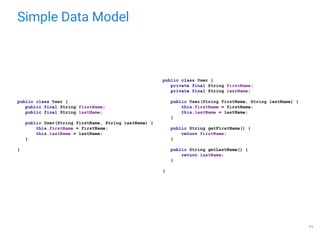
Simple Data Model
public class User {
private final String firstName;
private final String lastName;
public User(String firstName, String lastName) {
this.firstName = firstName;
this.lastName = lastName;
}
public String getFirstName() {
return firstName;
}
public String getLastName() {
return lastName;
}
}
public class User {
public final String firstName;
public final String lastName;
public User(String firstName, String lastName) {
this.firstName = firstName;
this.lastName = lastName;
}
}
11
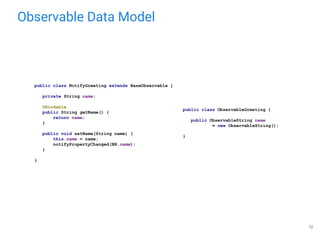
Observable Data Model
public class NotifyGreeting extends BaseObservable {
private String name;
@Bindable
public String getName() {
return name;
}
public void setName(String name) {
this.name = name;
notifyPropertyChanged(BR.name);
}
}
public class ObservableGreeting {
public ObservableString name
= new ObservableString();
}
12
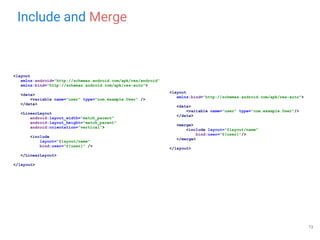
Include and Merge
<layout
xmlns:android="http://schemas.android.com/apk/res/android"
xmlns:bind="http://schemas.android.com/apk/res-auto">
<data>
<variable name="user" type="com.example.User" />
</data>
<LinearLayout
android:layout_width="match_parent"
android:layout_height="match_parent"
android:orientation="vertical">
<include
layout="@layout/name"
bind:user="@{user}" />
</LinearLayout>
</layout>
<layout
xmlns:bind="http://schemas.android.com/apk/res-auto">
<data>
<variable name="user" type="com.example.User"/>
</data>
<merge>
<include layout="@layout/name"
bind:user="@{user}"/>
</merge>
</layout>
13
Expressions
● mathematical +, -, /, *, %
● string concatenation +
● logical &&, ||
● binary &, |, ^
● unary +, -, !, ~
● shift >>, >>>, <<
● comparison ==, >, <, >=, <=
● instanceof
● grouping ()
● literals - character, String, numeric, null
● cast
● method calls
● field access
● array access []
● ternary operator ?:
android:enabled="@{communicator.isLoginValid &amp; communicator.isPasswordValid}"
14
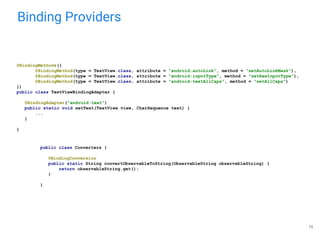
Binding Providers
15
@BindingMethods({
@BindingMethod(type = TextView.class, attribute = "android:autoLink", method = "setAutoLinkMask"),
@BindingMethod(type = TextView.class, attribute = "android:inputType", method = "setRawInputType"),
@BindingMethod(type = TextView.class, attribute = "android:textAllCaps", method = "setAllCaps")
})
public class TextViewBindingAdapter {
@BindingAdapter("android:text")
public static void setText(TextView view, CharSequence text) {
...
}
}
public class Converters {
@BindingConversion
public static String convertObservableToString(ObservableString observableString) {
return observableString.get();
}
}
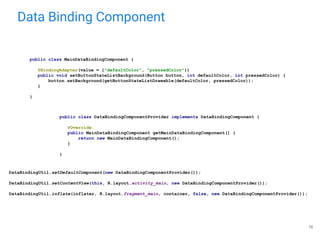
Data Binding Component
16
public class MainDataBindingComponent {
@BindingAdapter(value = {"defaultColor", "pressedColor"})
public void setButtonStateListBackground(Button button, int defaultColor, int pressedColor) {
button.setBackground(getButtonStateListDrawable(defaultColor, pressedColor));
}
}
public class DataBindingComponentProvider implements DataBindingComponent {
@Override
public MainDataBindingComponent getMainDataBindingComponent() {
return new MainDataBindingComponent();
}
}
DataBindingUtil.setDefaultComponent(new DataBindingComponentProvider());
DataBindingUtil.setContentView(this, R.layout.activity_main, new DataBindingComponentProvider());
DataBindingUtil.inflate(inflater, R.layout.fragment_main, container, false, new DataBindingComponentProvider());
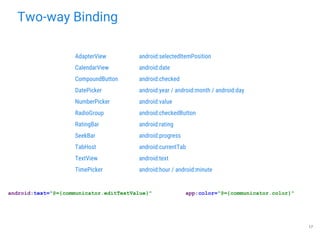
Two-way Binding
17
android:text="@={communicator.editTextValue}"
AdapterView android:selectedItemPosition
CalendarView android:date
CompoundButton android:checked
DatePicker android:year / android:month / android:day
NumberPicker android:value
RadioGroup android:checkedButton
RatingBar android:rating
SeekBar android:progress
TabHost android:currentTab
TextView android:text
TimePicker android:hour / android:minute
app:color="@={communicator.color}"
Two-way binding requires getters and setters for fields
Second Part: Typical Use Cases
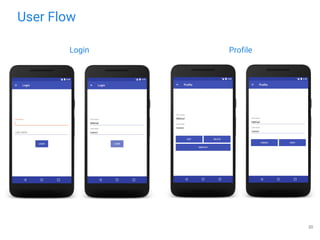
User Flow
20
Login Profile
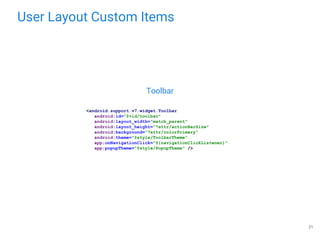
User Layout Custom Items
21
Toolbar
<android.support.v7.widget.Toolbar
android:id="@+id/toolbar"
android:layout_width="match_parent"
android:layout_height="?attr/actionBarSize"
android:background="?attr/colorPrimary"
android:theme="@style/ToolbarTheme"
app:onNavigationClick="@{navigationClickListener}"
app:popupTheme="@style/PopupTheme" />
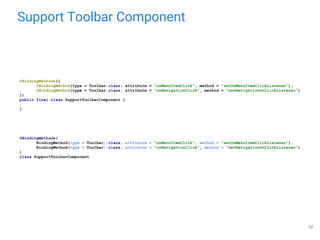
Support Toolbar Component
22
@BindingMethods({
@BindingMethod(type = Toolbar.class, attribute = "onMenuItemClick", method = "setOnMenuItemClickListener"),
@BindingMethod(type = Toolbar.class, attribute = "onNavigationClick", method = "setNavigationOnClickListener")
})
public final class SupportToolbarComponent {
}
@BindingMethods(
BindingMethod(type = Toolbar::class, attribute = "onMenuItemClick", method = "setOnMenuItemClickListener"),
BindingMethod(type = Toolbar::class, attribute = "onNavigationClick", method = "setNavigationOnClickListener")
)
class SupportToolbarComponent
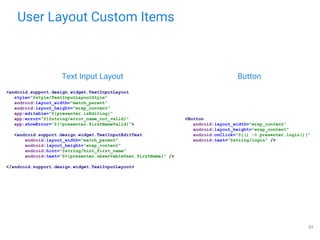
User Layout Custom Items
23
Text Input Layout Button
<Button
android:layout_width="wrap_content"
android:layout_height="wrap_content"
android:onClick="@{() -> presenter.login()}"
android:text="@string/login" />
<android.support.design.widget.TextInputLayout
style="@style/TextInputLayoutStyle"
android:layout_width="match_parent"
android:layout_height="wrap_content"
app:editable="@{presenter.isEditing}"
app:error="@{@string/error_name_not_valid}"
app:showError="@{!presenter.firstNameValid}">
<android.support.design.widget.TextInputEditText
android:layout_width="match_parent"
android:layout_height="wrap_content"
android:hint="@string/hint_first_name"
android:text="@={presenter.observableUser.firstName}" />
</android.support.design.widget.TextInputLayout>
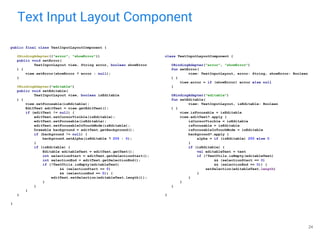
Text Input Layout Component
24
public final class TextInputLayoutComponent {
@BindingAdapter({"error", "showError"})
public void setError(
TextInputLayout view, String error, boolean showError
) {
view.setError(showError ? error : null);
}
@BindingAdapter("editable")
public void setEditable(
TextInputLayout view, boolean isEditable
) {
view.setFocusable(isEditable);
EditText editText = view.getEditText();
if (editText != null) {
editText.setCursorVisible(isEditable);
editText.setFocusable(isEditable);
editText.setFocusableInTouchMode(isEditable);
Drawable background = editText.getBackground();
if (background != null) {
background.setAlpha(isEditable ? 255 : 0);
}
if (isEditable) {
Editable editableText = editText.getText();
int selectionStart = editText.getSelectionStart();
int selectionEnd = editText.getSelectionEnd();
if (!TextUtils.isEmpty(editableText)
&& (selectionStart == 0)
&& (selectionEnd == 0)) {
editText.setSelection(editableText.length());
}
}
}
}
}
class TextInputLayoutComponent {
@BindingAdapter("error", "showError")
fun setError(
view: TextInputLayout, error: String, showError: Boolean
) {
view.error = if (showError) error else null
}
@BindingAdapter("editable")
fun setEditable(
view: TextInputLayout, isEditable: Boolean
) {
view.isFocusable = isEditable
view.editText?.apply {
isCursorVisible = isEditable
isFocusable = isEditable
isFocusableInTouchMode = isEditable
background?.apply {
alpha = if (isEditable) 255 else 0
}
if (isEditable) {
val editableText = text
if (!TextUtils.isEmpty(editableText)
&& (selectionStart == 0)
&& (selectionEnd == 0)) {
setSelection(editableText.length)
}
}
}
}
}
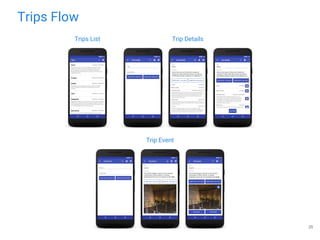
Trips Flow
25
Trips List
Trip Event
Trip Details
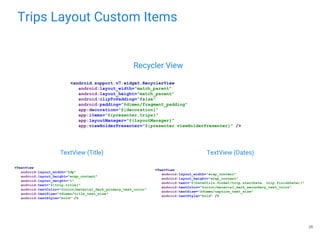
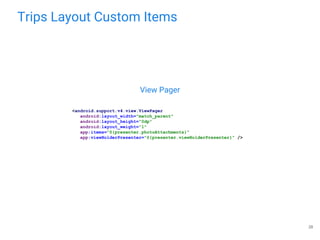
Trips Layout Custom Items
26
Recycler View
<android.support.v7.widget.RecyclerView
android:layout_width="match_parent"
android:layout_height="match_parent"
android:clipToPadding="false"
android:padding="@dimen/fragment_padding"
app:decoration="@{decoration}"
app:items="@{presenter.trips}"
app:layoutManager="@{layoutManager}"
app:viewHolderPresenter="@{presenter.viewHolderPresenter}" />
<TextView
android:layout_width="0dp"
android:layout_height="wrap_content"
android:layout_weight="1"
android:text="@{trip.title}"
android:textColor="@color/material_dark_primary_text_color"
android:textSize="@dimen/title_text_size"
android:textStyle="bold" />
<TextView
android:layout_width="wrap_content"
android:layout_height="wrap_content"
android:text="@{DateUtils.format(trip.startDate, trip.finishDate)}"
android:textColor="@color/material_dark_secondary_text_color"
android:textSize="@dimen/caption_text_size"
android:textStyle="bold" />
TextView (Title) TextView (Dates)
Recycler View Component
27
public final class RecyclerViewComponent {
@BindingAdapter({"items", "viewHolderPresenter"})
public void setContent(
final RecyclerView view,
List<?> list,
ViewHolderPresenter<?> viewHolderPresenter
) {
BinderRecyclerViewAdapter adapter = new BinderRecyclerViewAdapter(
LayoutInflater.from(view.getContext()),
list,
viewHolderPresenter
);
view.setAdapter(adapter);
if (list instanceof ObservableList) {
view.addOnAttachStateChangeListener(
new ObservableListAttachStateChangeListener(
(ObservableList) list,
new RecyclerViewListChangedCallback(adapter)
)
);
}
}
@BindingAdapter("decoration")
public void setDecoration(RecyclerView view,
RecyclerView.ItemDecoration decoration) {
view.addItemDecoration(decoration);
}
@BindingAdapter("decoration")
public void setDecoration(RecyclerView view,
RecyclerView.ItemDecoration[] decorations) {
for (RecyclerView.ItemDecoration decoration : decorations) {
view.addItemDecoration(decoration);
}
}
}
class RecyclerViewComponent {
@BindingAdapter("items", "viewHolderPresenter")
fun <T> setContent(
view: RecyclerView,
list: List<T>,
viewHolderPresenter: ViewHolderPresenter<T>
) {
val adapter = BinderRecyclerViewAdapter<T, ViewDataBinding>(
LayoutInflater.from(view.context),
list,
viewHolderPresenter
)
view.adapter = adapter
if (list is ObservableList<T>) {
view.addOnAttachStateChangeListener(
ObservableListAttachStateChangeListener(
list,
RecyclerViewListChangedCallback(adapter)
)
)
}
}
@BindingAdapter("decoration")
fun setDecoration(view: RecyclerView,
decoration: RecyclerView.ItemDecoration) {
view.addItemDecoration(decoration)
}
@BindingAdapter("decoration")
fun setDecoration(view: RecyclerView,
decorations: Array<RecyclerView.ItemDecoration>) {
for (decoration in decorations) {
view.addItemDecoration(decoration)
}
}
}
Trips Layout Custom Items
28
View Pager
<android.support.v4.view.ViewPager
android:layout_width="match_parent"
android:layout_height="0dp"
android:layout_weight="1"
app:items="@{presenter.photoAttachments}"
app:viewHolderPresenter="@{presenter.viewHolderPresenter}" />
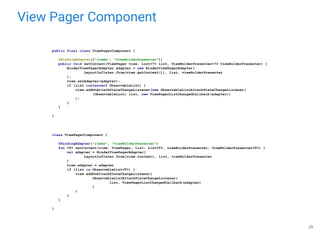
View Pager Component
29
class ViewPagerComponent {
@BindingAdapter("items", "viewHolderPresenter")
fun <T> setContent(view: ViewPager, list: List<T>, viewHolderPresenter: ViewHolderPresenter<T>) {
val adapter = BinderViewPagerAdapter(
LayoutInflater.from(view.context), list, viewHolderPresenter
)
view.adapter = adapter
if (list is ObservableList<T>) {
view.addOnAttachStateChangeListener(
ObservableListAttachStateChangeListener(
list, ViewPagerListChangedCallback(adapter)
)
)
}
}
}
public final class ViewPagerComponent {
@BindingAdapter({"items", "viewHolderPresenter"})
public void setContent(ViewPager view, List<?> list, ViewHolderPresenter<?> viewHolderPresenter) {
BinderViewPagerAdapter adapter = new BinderViewPagerAdapter(
LayoutInflater.from(view.getContext()), list, viewHolderPresenter
);
view.setAdapter(adapter);
if (list instanceof ObservableList) {
view.addOnAttachStateChangeListener(new ObservableListAttachStateChangeListener(
(ObservableList) list, new ViewPagerListChangedCallback(adapter))
);
}
}
}
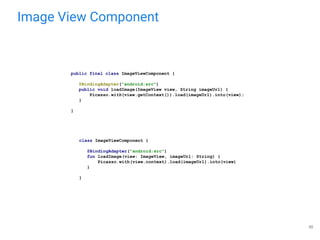
Image View Component
30
class ImageViewComponent {
@BindingAdapter("android:src")
fun loadImage(view: ImageView, imageUrl: String) {
Picasso.with(view.context).load(imageUrl).into(view)
}
}
public final class ImageViewComponent {
@BindingAdapter("android:src")
public void loadImage(ImageView view, String imageUrl) {
Picasso.with(view.getContext()).load(imageUrl).into(view);
}
}
Thanks for your attention!
sources:
first part: https://github.com/anokmik/data-binding
second part: https://github.com/anokmik/trip-assistant
mail: anokmik@gmail.com
skype: anokmik
References
● Data Binding Guide from Google (https://goo.gl/1yFPtt)
● No More findViewById (https://goo.gl/ugV86t)
● Android Data Binding: Adding Some Variability (https://goo.gl/aDTMmp)
● Android Data Binding: Express Yourself (https://goo.gl/NZ15Tz)
● Android Data Binding: Custom Setters (http://goo.gl/DnKgON)
● Android Data Binding: The Big Event (https://goo.gl/qcpdpU)
● Android Data Binding: That <include> Thing (https://goo.gl/QiqpQT)
● Android Data Binding: Let’s Flip This Thing (https://goo.gl/Gok1gv)
● Descent into Data Binding (https://goo.gl/1PTE7F)
● Two-way Data Binding (https://goo.gl/DQtRrh | https://goo.gl/KjY2Ze)
● Porting to Data Binding (https://goo.gl/7CA7vX)
● Advanced Data Binding (https://www.youtube.com/watch?v=DAmMN7m3wLU)
● Data Binding Techniques (https://www.youtube.com/watch?v=WdUbXWztKNY)
32
Q&A

SE2016 Android Mikle Anokhin "Speed up application development with data binding"

  • 1.
    Speed Up ApplicationDevelopment with Data Binding Anokhin Mikle / Android Developer / MWDN Ltd.
  • 2.
  • 3.
    How to start(Java) android { buildToolsVersion "24.0.1" dataBinding { enabled = true } } buildscript { repositories { jcenter() } dependencies { classpath 'com.android.tools.build:gradle:2.1.2' } } 3
  • 4.
    How to start(Kotlin) apply plugin: 'kotlin-android' android { buildToolsVersion "24.0.1" dataBinding { enabled = true } } dependencies { kapt 'com.android.databinding:compiler:2.1.2' } kapt { generateStubs = true } buildscript { repositories { jcenter() } dependencies { classpath 'com.android.tools.build:gradle:2.1.2' classpath 'org.jetbrains.kotlin:kotlin-gradle-plugin:1.0.3' } } 4
  • 5.
    Binding (Model) <layout xmlns:android="http://schemas.android.com/apk/res/android"> <data> <variable name="user" type="com.anokmik.databinding.model.User" /> </data> <LinearLayout android:layout_width="match_parent" android:layout_height="match_parent" android:orientation="vertical"> <TextView android:layout_width="match_parent" android:layout_height="wrap_content" android:text="@{user.firstName}"/> <TextView android:layout_width="match_parent" android:layout_height="wrap_content" android:text="@{user.lastName}"/> </LinearLayout> </layout> publicclass BindingModelFragment extends Fragment { @Override public View onCreateView(LayoutInflater inflater, ViewGroup container, Bundle savedInstanceState) { View view = inflater.inflate( R.layout.fragment_binding_model, container, false); FragmentBindingModelBinding binding = FragmentBindingModelBinding.bind(view); binding.setUser(User.getDefault()); return view; } } 5
  • 6.
    Data Binding doesn’thandle view state so you should specify id for such views as usual
  • 7.
    Binding (Ids) public classBindingIdsFragment extends Fragment { private TextView firstName; private TextView lastName; @Override public View onCreateView(LayoutInflater inflater, ViewGroup container, Bundle savedInstanceState) { View view = inflater.inflate( R.layout.fragment_binding_ids, container, false); FragmentBindingIdsBinding binding = FragmentBindingIdsBinding.bind(view); firstName = binding.firstName; lastName = binding.lastName; return view; } @Override public void onViewCreated(View view, Bundle savedInstanceState) { super.onViewCreated(view, savedInstanceState); User user = User.getDefault(); firstName.setText(user.firstName); lastName.setText(user.lastName); } } <layout xmlns:android="http://schemas.android.com/apk/res/android"> <LinearLayout android:layout_width="match_parent" android:layout_height="match_parent" android:orientation="vertical"> <TextView android:id="@+id/first_name" android:layout_width="match_parent" android:layout_height="wrap_content"/> <TextView android:id="@+id/last_name" android:layout_width="match_parent" android:layout_height="wrap_content"/> </LinearLayout> </layout> 7
  • 8.
    Generated Binding 8 public classFragmentBindingModelBinding extends android.databinding.ViewDataBinding { @Override protected void executeBindings() { long dirtyFlags = 0; synchronized(this) { dirtyFlags = mDirtyFlags; mDirtyFlags = 0; } java.lang.String firstNameUser = null; java.lang.String lastNameUser = null; com.anokmik.databinding.model.User user = mUser; if ((dirtyFlags & 0x3L) != 0) { user = user; if (user != null) { firstNameUser = user.firstName; lastNameUser = user.lastName; } } if ((dirtyFlags & 0x3L) != 0) { this.mboundView1.setText(firstNameUser); this.mboundView2.setText(lastNameUser); } } }
  • 9.
    Bindings are generatedat compile-time
  • 10.
    Variables and Imports <data> <importtype="android.graphics.drawable.Drawable" /> <import type="com.anokmik.databinding.model.User" /> <import type="android.util.SparseArray"/> <import type="java.util.Map"/> <import type="java.util.List"/> <variable name="user" type="User" /> <variable name="image" type="Drawable" /> <variable name="text" type="String" /> <variable name="array" type="String[]" /> <variable name="list" type="List&lt;String>"/> <variable name="sparse" type="SparseArray&lt;String>"/> <variable name="map" type="Map&lt;String, String>"/> <variable name="index" type="int"/> <variable name="key" type="String"/> </data> <data> <import type="android.app.Fragment"/> <import type="android.support.v4.app.Fragment" alias="SupportFragment"/> </data> 10
  • 11.
    Simple Data Model publicclass User { private final String firstName; private final String lastName; public User(String firstName, String lastName) { this.firstName = firstName; this.lastName = lastName; } public String getFirstName() { return firstName; } public String getLastName() { return lastName; } } public class User { public final String firstName; public final String lastName; public User(String firstName, String lastName) { this.firstName = firstName; this.lastName = lastName; } } 11
  • 12.
    Observable Data Model publicclass NotifyGreeting extends BaseObservable { private String name; @Bindable public String getName() { return name; } public void setName(String name) { this.name = name; notifyPropertyChanged(BR.name); } } public class ObservableGreeting { public ObservableString name = new ObservableString(); } 12
  • 13.
    Include and Merge <layout xmlns:android="http://schemas.android.com/apk/res/android" xmlns:bind="http://schemas.android.com/apk/res-auto"> <data> <variablename="user" type="com.example.User" /> </data> <LinearLayout android:layout_width="match_parent" android:layout_height="match_parent" android:orientation="vertical"> <include layout="@layout/name" bind:user="@{user}" /> </LinearLayout> </layout> <layout xmlns:bind="http://schemas.android.com/apk/res-auto"> <data> <variable name="user" type="com.example.User"/> </data> <merge> <include layout="@layout/name" bind:user="@{user}"/> </merge> </layout> 13
  • 14.
    Expressions ● mathematical +,-, /, *, % ● string concatenation + ● logical &&, || ● binary &, |, ^ ● unary +, -, !, ~ ● shift >>, >>>, << ● comparison ==, >, <, >=, <= ● instanceof ● grouping () ● literals - character, String, numeric, null ● cast ● method calls ● field access ● array access [] ● ternary operator ?: android:enabled="@{communicator.isLoginValid &amp; communicator.isPasswordValid}" 14
  • 15.
    Binding Providers 15 @BindingMethods({ @BindingMethod(type =TextView.class, attribute = "android:autoLink", method = "setAutoLinkMask"), @BindingMethod(type = TextView.class, attribute = "android:inputType", method = "setRawInputType"), @BindingMethod(type = TextView.class, attribute = "android:textAllCaps", method = "setAllCaps") }) public class TextViewBindingAdapter { @BindingAdapter("android:text") public static void setText(TextView view, CharSequence text) { ... } } public class Converters { @BindingConversion public static String convertObservableToString(ObservableString observableString) { return observableString.get(); } }
  • 16.
    Data Binding Component 16 publicclass MainDataBindingComponent { @BindingAdapter(value = {"defaultColor", "pressedColor"}) public void setButtonStateListBackground(Button button, int defaultColor, int pressedColor) { button.setBackground(getButtonStateListDrawable(defaultColor, pressedColor)); } } public class DataBindingComponentProvider implements DataBindingComponent { @Override public MainDataBindingComponent getMainDataBindingComponent() { return new MainDataBindingComponent(); } } DataBindingUtil.setDefaultComponent(new DataBindingComponentProvider()); DataBindingUtil.setContentView(this, R.layout.activity_main, new DataBindingComponentProvider()); DataBindingUtil.inflate(inflater, R.layout.fragment_main, container, false, new DataBindingComponentProvider());
  • 17.
    Two-way Binding 17 android:text="@={communicator.editTextValue}" AdapterView android:selectedItemPosition CalendarViewandroid:date CompoundButton android:checked DatePicker android:year / android:month / android:day NumberPicker android:value RadioGroup android:checkedButton RatingBar android:rating SeekBar android:progress TabHost android:currentTab TextView android:text TimePicker android:hour / android:minute app:color="@={communicator.color}"
  • 18.
    Two-way binding requiresgetters and setters for fields
  • 19.
  • 20.
  • 21.
    User Layout CustomItems 21 Toolbar <android.support.v7.widget.Toolbar android:id="@+id/toolbar" android:layout_width="match_parent" android:layout_height="?attr/actionBarSize" android:background="?attr/colorPrimary" android:theme="@style/ToolbarTheme" app:onNavigationClick="@{navigationClickListener}" app:popupTheme="@style/PopupTheme" />
  • 22.
    Support Toolbar Component 22 @BindingMethods({ @BindingMethod(type= Toolbar.class, attribute = "onMenuItemClick", method = "setOnMenuItemClickListener"), @BindingMethod(type = Toolbar.class, attribute = "onNavigationClick", method = "setNavigationOnClickListener") }) public final class SupportToolbarComponent { } @BindingMethods( BindingMethod(type = Toolbar::class, attribute = "onMenuItemClick", method = "setOnMenuItemClickListener"), BindingMethod(type = Toolbar::class, attribute = "onNavigationClick", method = "setNavigationOnClickListener") ) class SupportToolbarComponent
  • 23.
    User Layout CustomItems 23 Text Input Layout Button <Button android:layout_width="wrap_content" android:layout_height="wrap_content" android:onClick="@{() -> presenter.login()}" android:text="@string/login" /> <android.support.design.widget.TextInputLayout style="@style/TextInputLayoutStyle" android:layout_width="match_parent" android:layout_height="wrap_content" app:editable="@{presenter.isEditing}" app:error="@{@string/error_name_not_valid}" app:showError="@{!presenter.firstNameValid}"> <android.support.design.widget.TextInputEditText android:layout_width="match_parent" android:layout_height="wrap_content" android:hint="@string/hint_first_name" android:text="@={presenter.observableUser.firstName}" /> </android.support.design.widget.TextInputLayout>
  • 24.
    Text Input LayoutComponent 24 public final class TextInputLayoutComponent { @BindingAdapter({"error", "showError"}) public void setError( TextInputLayout view, String error, boolean showError ) { view.setError(showError ? error : null); } @BindingAdapter("editable") public void setEditable( TextInputLayout view, boolean isEditable ) { view.setFocusable(isEditable); EditText editText = view.getEditText(); if (editText != null) { editText.setCursorVisible(isEditable); editText.setFocusable(isEditable); editText.setFocusableInTouchMode(isEditable); Drawable background = editText.getBackground(); if (background != null) { background.setAlpha(isEditable ? 255 : 0); } if (isEditable) { Editable editableText = editText.getText(); int selectionStart = editText.getSelectionStart(); int selectionEnd = editText.getSelectionEnd(); if (!TextUtils.isEmpty(editableText) && (selectionStart == 0) && (selectionEnd == 0)) { editText.setSelection(editableText.length()); } } } } } class TextInputLayoutComponent { @BindingAdapter("error", "showError") fun setError( view: TextInputLayout, error: String, showError: Boolean ) { view.error = if (showError) error else null } @BindingAdapter("editable") fun setEditable( view: TextInputLayout, isEditable: Boolean ) { view.isFocusable = isEditable view.editText?.apply { isCursorVisible = isEditable isFocusable = isEditable isFocusableInTouchMode = isEditable background?.apply { alpha = if (isEditable) 255 else 0 } if (isEditable) { val editableText = text if (!TextUtils.isEmpty(editableText) && (selectionStart == 0) && (selectionEnd == 0)) { setSelection(editableText.length) } } } } }
  • 25.
  • 26.
    Trips Layout CustomItems 26 Recycler View <android.support.v7.widget.RecyclerView android:layout_width="match_parent" android:layout_height="match_parent" android:clipToPadding="false" android:padding="@dimen/fragment_padding" app:decoration="@{decoration}" app:items="@{presenter.trips}" app:layoutManager="@{layoutManager}" app:viewHolderPresenter="@{presenter.viewHolderPresenter}" /> <TextView android:layout_width="0dp" android:layout_height="wrap_content" android:layout_weight="1" android:text="@{trip.title}" android:textColor="@color/material_dark_primary_text_color" android:textSize="@dimen/title_text_size" android:textStyle="bold" /> <TextView android:layout_width="wrap_content" android:layout_height="wrap_content" android:text="@{DateUtils.format(trip.startDate, trip.finishDate)}" android:textColor="@color/material_dark_secondary_text_color" android:textSize="@dimen/caption_text_size" android:textStyle="bold" /> TextView (Title) TextView (Dates)
  • 27.
    Recycler View Component 27 publicfinal class RecyclerViewComponent { @BindingAdapter({"items", "viewHolderPresenter"}) public void setContent( final RecyclerView view, List<?> list, ViewHolderPresenter<?> viewHolderPresenter ) { BinderRecyclerViewAdapter adapter = new BinderRecyclerViewAdapter( LayoutInflater.from(view.getContext()), list, viewHolderPresenter ); view.setAdapter(adapter); if (list instanceof ObservableList) { view.addOnAttachStateChangeListener( new ObservableListAttachStateChangeListener( (ObservableList) list, new RecyclerViewListChangedCallback(adapter) ) ); } } @BindingAdapter("decoration") public void setDecoration(RecyclerView view, RecyclerView.ItemDecoration decoration) { view.addItemDecoration(decoration); } @BindingAdapter("decoration") public void setDecoration(RecyclerView view, RecyclerView.ItemDecoration[] decorations) { for (RecyclerView.ItemDecoration decoration : decorations) { view.addItemDecoration(decoration); } } } class RecyclerViewComponent { @BindingAdapter("items", "viewHolderPresenter") fun <T> setContent( view: RecyclerView, list: List<T>, viewHolderPresenter: ViewHolderPresenter<T> ) { val adapter = BinderRecyclerViewAdapter<T, ViewDataBinding>( LayoutInflater.from(view.context), list, viewHolderPresenter ) view.adapter = adapter if (list is ObservableList<T>) { view.addOnAttachStateChangeListener( ObservableListAttachStateChangeListener( list, RecyclerViewListChangedCallback(adapter) ) ) } } @BindingAdapter("decoration") fun setDecoration(view: RecyclerView, decoration: RecyclerView.ItemDecoration) { view.addItemDecoration(decoration) } @BindingAdapter("decoration") fun setDecoration(view: RecyclerView, decorations: Array<RecyclerView.ItemDecoration>) { for (decoration in decorations) { view.addItemDecoration(decoration) } } }
  • 28.
    Trips Layout CustomItems 28 View Pager <android.support.v4.view.ViewPager android:layout_width="match_parent" android:layout_height="0dp" android:layout_weight="1" app:items="@{presenter.photoAttachments}" app:viewHolderPresenter="@{presenter.viewHolderPresenter}" />
  • 29.
    View Pager Component 29 classViewPagerComponent { @BindingAdapter("items", "viewHolderPresenter") fun <T> setContent(view: ViewPager, list: List<T>, viewHolderPresenter: ViewHolderPresenter<T>) { val adapter = BinderViewPagerAdapter( LayoutInflater.from(view.context), list, viewHolderPresenter ) view.adapter = adapter if (list is ObservableList<T>) { view.addOnAttachStateChangeListener( ObservableListAttachStateChangeListener( list, ViewPagerListChangedCallback(adapter) ) ) } } } public final class ViewPagerComponent { @BindingAdapter({"items", "viewHolderPresenter"}) public void setContent(ViewPager view, List<?> list, ViewHolderPresenter<?> viewHolderPresenter) { BinderViewPagerAdapter adapter = new BinderViewPagerAdapter( LayoutInflater.from(view.getContext()), list, viewHolderPresenter ); view.setAdapter(adapter); if (list instanceof ObservableList) { view.addOnAttachStateChangeListener(new ObservableListAttachStateChangeListener( (ObservableList) list, new ViewPagerListChangedCallback(adapter)) ); } } }
  • 30.
    Image View Component 30 classImageViewComponent { @BindingAdapter("android:src") fun loadImage(view: ImageView, imageUrl: String) { Picasso.with(view.context).load(imageUrl).into(view) } } public final class ImageViewComponent { @BindingAdapter("android:src") public void loadImage(ImageView view, String imageUrl) { Picasso.with(view.getContext()).load(imageUrl).into(view); } }
  • 31.
    Thanks for yourattention! sources: first part: https://github.com/anokmik/data-binding second part: https://github.com/anokmik/trip-assistant mail: anokmik@gmail.com skype: anokmik
  • 32.
    References ● Data BindingGuide from Google (https://goo.gl/1yFPtt) ● No More findViewById (https://goo.gl/ugV86t) ● Android Data Binding: Adding Some Variability (https://goo.gl/aDTMmp) ● Android Data Binding: Express Yourself (https://goo.gl/NZ15Tz) ● Android Data Binding: Custom Setters (http://goo.gl/DnKgON) ● Android Data Binding: The Big Event (https://goo.gl/qcpdpU) ● Android Data Binding: That <include> Thing (https://goo.gl/QiqpQT) ● Android Data Binding: Let’s Flip This Thing (https://goo.gl/Gok1gv) ● Descent into Data Binding (https://goo.gl/1PTE7F) ● Two-way Data Binding (https://goo.gl/DQtRrh | https://goo.gl/KjY2Ze) ● Porting to Data Binding (https://goo.gl/7CA7vX) ● Advanced Data Binding (https://www.youtube.com/watch?v=DAmMN7m3wLU) ● Data Binding Techniques (https://www.youtube.com/watch?v=WdUbXWztKNY) 32
  • 33.