

Scripting
Agenda
• Introduction
• Built-in Language
• VBScript
• Q&A
Introduction
Introduction
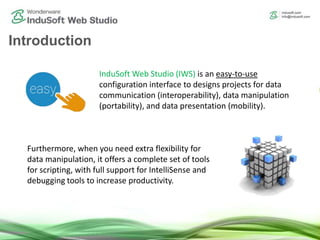
InduSoft Web Studio (IWS) is an easy-to-use
configuration interface to designs projects for data
communication (interoperability), data manipulation
(portability), and data presentation (mobility).
Furthermore, when you need extra flexibility for
data manipulation, it offers a complete set of tools
for scripting, with full support for IntelliSense and
debugging tools to increase productivity.
Native Languages
Built-In Language
 Portability across all platforms,
including Linux/VxWorks (IoTView)
 Support for all tags, and built-in
functions
 Simplest syntax
 Graphic: Screen Attributes
 Graphic: All animations (including
command)
 Task: All tasks (including Math and
Scheduler)
VBScript Language
 Flexible standard, supported by
different platforms
 Wide range of documentation and
examples
 Support for all tags, built-in
functions, variables, VBScript
functions, and COM objects.
 Simple syntax
 Graphic: Graphic Scripts, Screen
Scripts
 Graphic: Command, ActiveX, .NET
Controls, Custom Widgets
 Task: Script
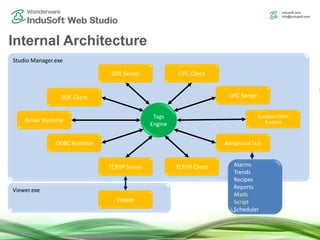
Internal Architecture
Viewer.exe
Studio Manager.exe
Tags
Engine
Driver Runtime
DDE Client
DDE Server OPC Client
OPC Server
Database Client
Runtime
ODBC Runtime Background Task
TCP/IP ClientTCP/IP Server
Viewer
Alarms
Trends
Recipes
Reports
Math
Script
Scheduler
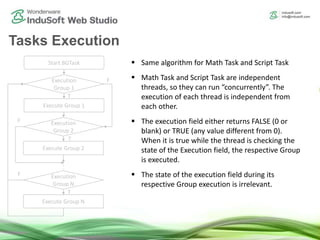
Tasks Execution
Start BGTask
Execution
Group 1
Execute Group 1
Execution
Group 2
Execute Group 2
Execution
Group N
Execute Group N
F
F
F
T
T
T
 Same algorithm for Math Task and Script Task
 Math Task and Script Task are independent
threads, so they can run “concurrently”. The
execution of each thread is independent from
each other.
 The execution field either returns FALSE (0 or
blank) or TRUE (any value different from 0).
When it is true while the thread is checking the
state of the Execution field, the respective Group
is executed.
 The state of the execution field during its
respective Group execution is irrelevant.
Built-In Language
Built-in Language Main Characteristics
 Support for all tags and 400+ built-n functions (Arithmetic, Statistical, String, File,
Loop, etc)
 Syntax for each field:
 Tag and/or Expression fields: Just write the expression. E.g.: Abs(TagA)
 Label, Caption, Hyperlink, Message, or File Name fields: Just write the expression
between curly brackets. E.g.: {Abs(TagA)}
 Value attribution: The equal sign (=) is NEVER used to assign a value. The equal sign
(=) is ALWAYS used for comparison. In order to assign a value, write the expression in
the EXPRESSION field and the tag that should receive the value in the TAG field (Math
and Scheduler groups).
VBScript Language
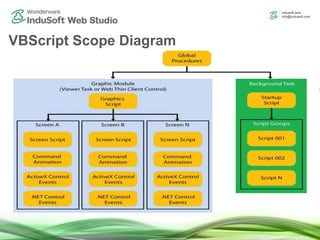
VBScript Scope Diagram
Interface
Library Execution Scope and Lifetime of
variables and
proceduresVariables Procedures
BGTask
(Server)
Viewer
(Local)
Global Procedures Yes Yes** Yes** Global
Graphic Scripts Yes Yes Yes
Graphic Script
*Screen Script
*Screen Controls
Screen Scripts Yes Yes Yes
Screen Script
Screen Controls
Screen Controls
(Command, ActiveX, .NET)
Yes Yes Screen Control itself
Startup Script Yes Yes Yes
Startup Script
Script Groups
Script Groups Yes Yes Script Group itself
* Using the Graphics.<Variable_or_Procedure_name> syntax.
** Global Procedures is a repository (library) of user-defined sub-routines and functions, which can be called
from any VBScript interface in the project. It is not an execution module (thread) by itself.
VBScript Scope Summary
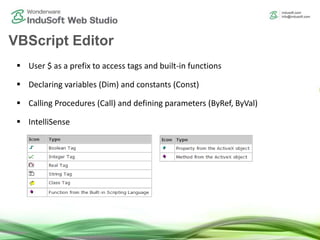
 User $ as a prefix to access tags and built-in functions
 Declaring variables (Dim) and constants (Const)
 Calling Procedures (Call) and defining parameters (ByRef, ByVal)
 IntelliSense
VBScript Editor
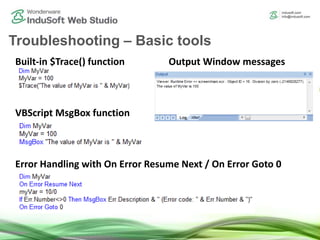
Built-in $Trace() function
VBScript MsgBox function
Error Handling with On Error Resume Next / On Error Goto 0
Output Window messages
Troubleshooting – Basic tools
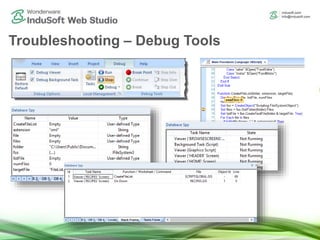
Troubleshooting – Debug Tools
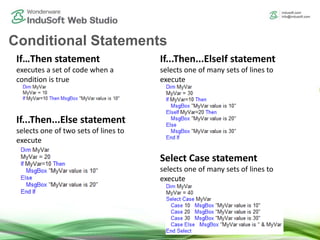
If…Then statement
executes a set of code when a
condition is true
If...Then...Else statement
selects one of two sets of lines to
execute
If...Then...ElseIf statement
selects one of many sets of lines to
execute
Select Case statement
selects one of many sets of lines to
execute
Conditional Statements
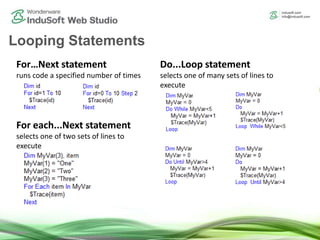
For…Next statement
runs code a specified number of times
For each...Next statement
selects one of two sets of lines to
execute
Do...Loop statement
selects one of many sets of lines to
execute
Looping Statements
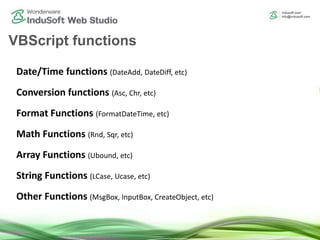
Date/Time functions (DateAdd, DateDiff, etc)
Conversion functions (Asc, Chr, etc)
Format Functions (FormatDateTime, etc)
Math Functions (Rnd, Sqr, etc)
Array Functions (Ubound, etc)
String Functions (LCase, Ucase, etc)
Other Functions (MsgBox, InputBox, CreateObject, etc)
VBScript functions
$RunGlobalProcedureOnServer()
$RunGlobalProcedureASync()
$RunGlobalProcedureASyncGetStatus()
$RunGlobalProcedureOnFalse()
$RunGlobalProcedureOnTrue()
$RunGlobalProcedureOnTrigger()
Advanced built-in functions
InduSoft Web Studio main Database/ERP built-in functions:
$DBExecute()
$DBCursorOpenSQL()
$DBCursorClose()
$DBCursorRowCount
$DBCursorGetValue()
$DBCursorNext()
Database Interface
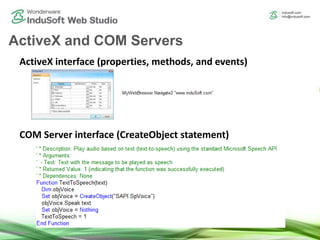
ActiveX interface (properties, methods, and events)
COM Server interface (CreateObject statement)
ActiveX and COM Servers
InduSoft Web Studio Technical Reference Manual (Help)
W3SCHOOLS Web Site
(http://w3schools.com/vbscript/default.asp)
Microsoft MSDN
(http://msdn.microsoft.com/en-us/library/t0aew7h6)
Additional References
Q & A
How to contact InduSoft
Email
(US) info@indusoft.com
(Brazil) info@indusoft.com.br
(Germany) info@indusoft.com.de
Support support@indusoft.com
Web site
(English) www.indusoft.com
(Portuguese) www.indusoft.com.br
(German) www.indusoft.com.de
Phone +1 (512) 349-0334 (US)
+55 (11) 3293-9139 (Brazil)
+49 (0) 6227-732510 (Germany)
Toll-Free 877-INDUSOFT (877-463-8763)
Fax +1 (512) 349-0375
Contact InduSoft Today
Germany
USA
Brazil
Thank you!

Scripting in InduSoft Web Studio

  • 1.
  • 2.
    Agenda • Introduction • Built-inLanguage • VBScript • Q&A
  • 3.
  • 4.
    Introduction InduSoft Web Studio(IWS) is an easy-to-use configuration interface to designs projects for data communication (interoperability), data manipulation (portability), and data presentation (mobility). Furthermore, when you need extra flexibility for data manipulation, it offers a complete set of tools for scripting, with full support for IntelliSense and debugging tools to increase productivity.
  • 5.
    Native Languages Built-In Language Portability across all platforms, including Linux/VxWorks (IoTView)  Support for all tags, and built-in functions  Simplest syntax  Graphic: Screen Attributes  Graphic: All animations (including command)  Task: All tasks (including Math and Scheduler) VBScript Language  Flexible standard, supported by different platforms  Wide range of documentation and examples  Support for all tags, built-in functions, variables, VBScript functions, and COM objects.  Simple syntax  Graphic: Graphic Scripts, Screen Scripts  Graphic: Command, ActiveX, .NET Controls, Custom Widgets  Task: Script
  • 6.
    Internal Architecture Viewer.exe Studio Manager.exe Tags Engine DriverRuntime DDE Client DDE Server OPC Client OPC Server Database Client Runtime ODBC Runtime Background Task TCP/IP ClientTCP/IP Server Viewer Alarms Trends Recipes Reports Math Script Scheduler
  • 7.
    Tasks Execution Start BGTask Execution Group1 Execute Group 1 Execution Group 2 Execute Group 2 Execution Group N Execute Group N F F F T T T  Same algorithm for Math Task and Script Task  Math Task and Script Task are independent threads, so they can run “concurrently”. The execution of each thread is independent from each other.  The execution field either returns FALSE (0 or blank) or TRUE (any value different from 0). When it is true while the thread is checking the state of the Execution field, the respective Group is executed.  The state of the execution field during its respective Group execution is irrelevant.
  • 8.
  • 9.
    Built-in Language MainCharacteristics  Support for all tags and 400+ built-n functions (Arithmetic, Statistical, String, File, Loop, etc)  Syntax for each field:  Tag and/or Expression fields: Just write the expression. E.g.: Abs(TagA)  Label, Caption, Hyperlink, Message, or File Name fields: Just write the expression between curly brackets. E.g.: {Abs(TagA)}  Value attribution: The equal sign (=) is NEVER used to assign a value. The equal sign (=) is ALWAYS used for comparison. In order to assign a value, write the expression in the EXPRESSION field and the tag that should receive the value in the TAG field (Math and Scheduler groups).
  • 10.
  • 11.
  • 12.
    Interface Library Execution Scopeand Lifetime of variables and proceduresVariables Procedures BGTask (Server) Viewer (Local) Global Procedures Yes Yes** Yes** Global Graphic Scripts Yes Yes Yes Graphic Script *Screen Script *Screen Controls Screen Scripts Yes Yes Yes Screen Script Screen Controls Screen Controls (Command, ActiveX, .NET) Yes Yes Screen Control itself Startup Script Yes Yes Yes Startup Script Script Groups Script Groups Yes Yes Script Group itself * Using the Graphics.<Variable_or_Procedure_name> syntax. ** Global Procedures is a repository (library) of user-defined sub-routines and functions, which can be called from any VBScript interface in the project. It is not an execution module (thread) by itself. VBScript Scope Summary
  • 13.
     User $as a prefix to access tags and built-in functions  Declaring variables (Dim) and constants (Const)  Calling Procedures (Call) and defining parameters (ByRef, ByVal)  IntelliSense VBScript Editor
  • 14.
    Built-in $Trace() function VBScriptMsgBox function Error Handling with On Error Resume Next / On Error Goto 0 Output Window messages Troubleshooting – Basic tools
  • 15.
  • 16.
    If…Then statement executes aset of code when a condition is true If...Then...Else statement selects one of two sets of lines to execute If...Then...ElseIf statement selects one of many sets of lines to execute Select Case statement selects one of many sets of lines to execute Conditional Statements
  • 17.
    For…Next statement runs codea specified number of times For each...Next statement selects one of two sets of lines to execute Do...Loop statement selects one of many sets of lines to execute Looping Statements
  • 18.
    Date/Time functions (DateAdd,DateDiff, etc) Conversion functions (Asc, Chr, etc) Format Functions (FormatDateTime, etc) Math Functions (Rnd, Sqr, etc) Array Functions (Ubound, etc) String Functions (LCase, Ucase, etc) Other Functions (MsgBox, InputBox, CreateObject, etc) VBScript functions
  • 19.
  • 20.
    InduSoft Web Studiomain Database/ERP built-in functions: $DBExecute() $DBCursorOpenSQL() $DBCursorClose() $DBCursorRowCount $DBCursorGetValue() $DBCursorNext() Database Interface
  • 21.
    ActiveX interface (properties,methods, and events) COM Server interface (CreateObject statement) ActiveX and COM Servers
  • 22.
    InduSoft Web StudioTechnical Reference Manual (Help) W3SCHOOLS Web Site (http://w3schools.com/vbscript/default.asp) Microsoft MSDN (http://msdn.microsoft.com/en-us/library/t0aew7h6) Additional References
  • 23.
  • 24.
  • 25.
    Email (US) info@indusoft.com (Brazil) info@indusoft.com.br (Germany)info@indusoft.com.de Support support@indusoft.com Web site (English) www.indusoft.com (Portuguese) www.indusoft.com.br (German) www.indusoft.com.de Phone +1 (512) 349-0334 (US) +55 (11) 3293-9139 (Brazil) +49 (0) 6227-732510 (Germany) Toll-Free 877-INDUSOFT (877-463-8763) Fax +1 (512) 349-0375 Contact InduSoft Today Germany USA Brazil
  • 26.