FreeBSD
FreeBSD
An Introduction for Linux Users
• Freely available Unix-like operating system
• Runs on x86, Alpha, Sparc64, IA-64, AMD64 architectures
• Over 11,000 software packages available
• Many commercial users
• Thousands of developers around the world contributing to it
• Used as an operating systems research platform
FreeBSD in a nutshell
FreeBSD History
FreeBSD History
• BSD developed at University of California, Berkeley, as
alterations to AT&T Unix
• Initial implementation of key Unix concepts, such as sockets,
virtual memory, and TCP/IP
• 386BSD developed to implement BSD Unix on x86
architecture in early 1990s
• FreeBSD developed from 386BSD project (as did NetBSD)
• Now has 350+ active developers, and 1,000's of contributors
Places you’ll find FreeBSD
• Powering websites
– Yahoo!
– Sony Japan
– Netcraft
– NTT/Verio
• “Grunt work”
– Disney
– Manex VFX
– NASA
• ISPs
– UUNet, Pair, Demon, EasyNet, …
• Embedded Systems
– IBM
– Intel
– Nokia
– Checkpoint
– Juniper Networks
– Coyote
• Other operating systems
– Mac OS X
– Embedded
Enterprise Use
Enterprise Use
• FreeBSD is used by some of the largest banks in
the world to process over 1.5 trillion US Dollars
(43,500,000,000,000 Rubles) of business to
business transactions per year.
• Perl, Apache, X11, and other Open Source software
also used in this application.
• FreeBSD Jails used for system security.
Factors that Help
Factors that Help
• Stability
• Source availability for helping understand and fix problems that occur (having the
source to the system helps you understand why your application does not do
what you expect)
• Excellent performance
• Easy hardware upgrade paths
• The application is spread over many servers. Need more power in one part? Add
more FreeBSD boxes.
• PC hardware sometimes is less than perfect, but at PC hardware prices, hot
spares are practical.
Internet Infrastructure
• BSD has existed since the last 1970's and was the testbed and reference
implementation for TCP/IP.
• The Internet Software Consortium (ISC) uses FreeBSD exclusively for f-
root domain servers (in 21 cities now, usually with 3 servers per city).
Refer: http://www.slashroot.in/dns-root-servers-most-critical-infrastructure-
internet
• Modern FreeBSD is extremely refined and mature.
• FreeBSD consistently placed at the top of the "uptime" lists produced by
Netcraft to measure the stability of the world's busiest websites.
Differences from
Differences from
Linux
Linux
FreeBSD Licensing Model
• FreeBSD distributed under "2 clause" BSD license as below:
Copyright © [year] [name]
All rights reserved
Redistribution in source and binary forms, with or without modification, are
permitted, provided that the following conditions are met:
1. Redistribution of source code must retain the above copyright notice, this
list of conditions, and the disclaimer.
2. Redistributions in binary form must reproduce the above copyright notice,
this list of conditions, and the following disclaimer in the documentation and/or
other materials provided with the distribution.
THIS SOFTWARE IS PROVIDED BY THE AUTHOR AND CONTRIBUTORS
"AS IS", AND ANY EXPRESS OR IMPLIED LIMITED WARANTIES...
FreeBSD Licensing Model
• Don't claim that you wrote the code
• Don't blame us if the code doesn't work
• Apart from that, do anything you want with the code
The GPL and BSD Licenses
• The GPL mandates that source code be disclosed
• The BSD License allows source code changes to be kept secret
• GPL is often categorised as "Copyleft", as distinct from "Copyright"
• BSD License is "Copycentre". We actively encourage third parties to use the source
code.
• Donating changes back is purely at the discretion of the party making the changes
Source Code Control
Source Code Control
• The entire source code for FreeBSD is stored in a
CVS repository
• The logs, and individual changes for each file can
be traced back to 1994.
• The source tree can be checked out at any state, or
corresponding to any release
• CDs are available taking the history back a further
20 years
Source Code Control
Source Code Control
• Changes to the FreeBSD tree are available in a
number of ways (CVS, CVSup, CTM (e-mail),
Web)
• It is possible to maintain a local mirror of the
complete CVS tree
• You can 'tag' a local copy of the tree as
buildable, and then selectively include changes
from FreeBSD
Source Code Distribution
• FreeBSD Source Code
– Available on CD (www.freebsdmall.com, others)
– Can be downloaded from ftp.freebsd.org
• Changes to the source code
– Can be updated using CVS
– Can be updated using CVSup (faster CVS)
– Changes can be automatically e-mailed in, and integrated
with your local source tree
• Can be browsed, with history, on the web, at
http://www.freebsd.org/cgi/cvsweb.cgi
Development Organization
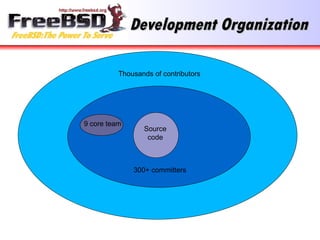
• Two layers of FreeBSD organization: The committers, and
everyone else
• Committers have write access to the source tree while
everyone else submits patches or bug reports using
FreeBSD's problem reporting system, and waits for a
committer to commit the change
• Individuals who submit many patches (that work) are invited
to become committers
• 9 committers form the elected "core team", for dispute
resolution
Development Organization
Source
code
9 core team
Thousands of contributors
300+ committers
FreeBSD is a complete OS
• FreeBSD consists of all the components needed for
a complete operating system including:
– kernel
– compiler
– include files
– libraries
– user-land utilities
• Kernel and userland are kept synchronized, and can
be built, from source, as a unit
FreeBSD Release Model
• FreeBSD releases maintained using CVS branches
• Head of the tree (-current) is now FreeBSD 11.0
• When 4.0 came out, a branch was created for “4-STABLE” and
minor releases up to 4.11 happened every 4 months.
• These minor releases (4.1, 4.2, etc) consist of bug fixes backported
from -CURRENT, and new features in -CURRENT that have been
extensively tested
• 5.0 process was a little different, and was not declared 5-STABLE
until 5.3, due to the number of advanced new features and
reimplementation of SMP introduced in FreeBSD 5.
FreeBSD Release Model
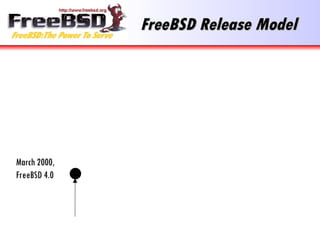
March 2000,
FreeBSD 4.0
FreeBSD Release Model
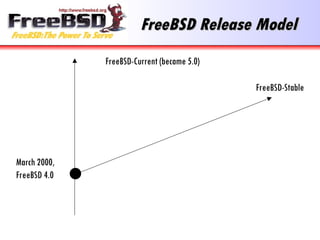
FreeBSD-Current (became 5.0)
March 2000,
FreeBSD 4.0
FreeBSD-Stable
FreeBSD Release Model
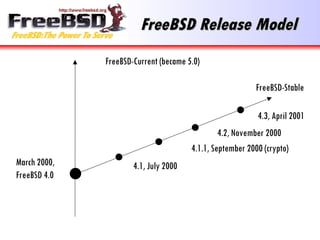
FreeBSD-Current (became 5.0)
March 2000,
FreeBSD 4.0
FreeBSD-Stable
4.2, November 2000
4.1.1, September 2000 (crypto)
4.1, July 2000
4.3, April 2001
Third Party Packages
• FreeBSD has over 11,000 applications available as
binary packages
• Linux has similar number of applications available in
a number of different binary formats (RPM, Deb,
and others, depending on the distribution).
• Packages are built from the “ports tree” which would
be talked about later
• FreeBSD and Linux roughly equal in this respect...
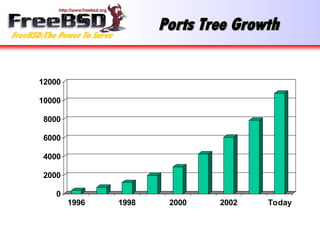
Ports Tree Growth
Ports Tree Growth
0
2000
4000
6000
8000
10000
12000
1996 1998 2000 2002 Today
Linux Compatibility
Linux Compatibility
• FreeBSD runs 95%+ of Linux binary applications as below:
– Oracle
– VMWare
– Netscape
– RealPlayer
– Flash
– NetBackup
– Quake III
– …
FreeBSD Technologies
• The Build System / Release System
• The Ports System
• Linux Compatibility
• NDISulator (Windows Driver Compatibility)
• FreeBSD tools and packages
The Build System
The Build System
Building World
Building World
The entire operating system, including all libraries and utilities can be
built with a single command : “make world”. However this command is
for experts and instead the “make installworld” should be used to
build sources, refer the following for the step-by-step details :
https://www.freebsd.org/doc/handbook/makeworld.html
•The source code for the system is placed in /usr/src during
installation.
•Much easier to secure a system if a bug is found in a key library like
OpenSSL.
•More information in build(7) and Handbook.
Building Releases
Building Releases
• You can even build a complete release of FreeBSD, including
FTP install directories, floppy images, and ISO images for
CDROMs with one command.
• “make release” is used by many large companies to produce
special versions of FreeBSD with special patches or additional
software installed by default. For more info, please refer:
https://www.freebsd.org/doc/en/articles/releng/release-build.html
• It is also the well documented way in which the release
engineering team makes all official releases of FreeBSD.
Release Engineering
Release Engineering
• “make release” makes it much easier to deploy thousands of systems pre-
configured for a specific environment.
• The release directory is: /usr/src/release
• The release engineering team for FreeBSD publishes schedules, identifies
QA issues that must be resolved before release, and publishes documents to
help other people build FreeBSD based products. The latest stable version of
FreeBSD is 10.3 and version 11 is expected to be released on Sep, 2016.
• See release(7) https://www.freebsd.org/cgi/man.cgi?
query=release&sektion=7&manpath=freebsd-release-ports
And www.freebsd.org/releng
The Ports System
FreeBSD Ports
FreeBSD Ports
The FreeBSD Ports and Packages Collection offers a simple way for users and administrators to install applications. There
are currently 25931 ports available.
The Ports Collection supports the latest release on the FreeBSD-CURRENT and FreeBSD-STABLE branches. Older releases are
not supported and may or may not work correctly with an up-to-date ports collection. Over time, changes to the ports
collection may rely on features that are not present in older releases. Wherever convenient, we try not to
gratuitously break support for recent releases, but it is sometimes unavoidable. When this occurs, patches
contributed by the user community to maintain support for older releases will usually be committed.
Each port listed here contains any patches necessary to make the original application source code compile and run on
FreeBSD. Installing an application is as simple as typing make install in the port directory. If you download the
framework for the entire list of ports by installing the ports hierarchy, you can have thousands of applications right
at your fingertips.
FreeBSD Ports
FreeBSD Ports
Each port's Makefile automatically fetches the application source code, either from a local disk, CD-ROM
or via ftp, unpacks it on your system, applies the patches, and compiles. If all went well, a simple
make install will install the application and register it with the package system.
For most ports, a precompiled package also exists, saving the user the work and time of having to
compile anything at all. Use pkg install to securely download and install the precompiled version of
a port. For more information see Using pkg for Binary Package Management. Eg: pkg install ctags.
Refer the following on more information regarding the same:
https://www.freebsd.org/doc/en_US.ISO8859-1/books/handbook/ports-using.html
Linux Compatibility
Linux Compatibility
Running a FreeBSD binary
• Code like
fd = open(“/etc/passwd”, O_RDONLY);
• Becomes
syscall(5, …)

Kernel knows it’s a FreeBSD binary, uses
freebsd_syscalls[] array:
freebsd_syscalls[5] = freebsd_open(…);
• File is opened
Running a Linux binary
• Code like
fd = open(“/etc/passwd”, O_RDONLY);

Becomes:
syscall(5, …)

Kernel knows it’s a Linux binary, uses linux_syscalls[] array
linux_syscalls[5] = linux_open(…);

Refer this for more info:
http://docs.cs.up.ac.za/programming/asm/derick_tut/syscalls.html

Then the password file is opened

All Linux file operations redirected to /compat/linux first
Running Linux binaries
• No slowdown; this is not emulation
• Efficiency of TCP/IP and VM system means
some Linux apps run faster
• SCO (ibcs2) compatibility handled in the same
way
NDISulator
NDISulator
Windows Network Device Driver Compatibility
NDISulator
NDISulator
• Compatibility layer for NDIS Windows Driver Kernel API.
• Allows driver “.inf” and “.sys” files to be turned into FreeBSD
loadable kernel modules.
• Can load and unload windows network device drivers in FreeBSD!
• Some wireless hardware vendors refuse to release specifications,
so this is the only method to use such cards with an open source
operating system.
• More information in ndis(9).
FreeBSD Tools and
FreeBSD Tools and
Packages
Packages
FreeBSD tools for
FreeBSD tools for
Development
Development
• The source code is a great reference
• Run standard development tools
– gcc
– gdb
– DDD (Data Display Debugger)
– (x)emacs
– make
Jails
Jails

One of the tools which can be used to enhance the security of a FreeBSD
system is jails mainly for system administrators.

Jails build upon the chroot(2) concept, which is used to change the root
directory of a set of processes. This creates a safe environment, separate
from the rest of the system. Processes created in the chrooted environment
can't access files or resources outside of it.

Jails have their own set of users and their own root account which are
limited to the jail environment. The root account of a jail is not allowed to
perform operations to the system outside of the associated jail
environment.

Jails expand this model by virtualizing access to the file system, the set of
users, and the networking subsystem. More fine-grained controls are
available for tuning the access of a jailed environment. Jails can be
considered as a type of operating system-level virtualization.
Jails
Jails
A jail is characterized by four elements:

A directory subtree: the starting point from which a jail is entered.
Once inside the jail, a process is not permitted to escape outside
of this subtree.

A hostname: which will be used by the jail.

An IP address: which is assigned to the jail. The IP address of a
jail is often an alias address for an existing network interface.

A command: the path name of an executable to run inside the jail.
The path is relative to the root directory of the jail environment.
Capsicum
Capsicum
Capsicum is a lightweight OS capability and sandbox framework implementing a
hybrid capability system model. It can be used for application and library
compartmentalization, the decomposition of larger bodies of software into
isolated (sandboxed) components in order to implement security policies and
limit the impact of software vulnerabilities.
In some cases, Capsicum requires use of alternatives to traditional POSIX
APIs in order to name objects using capabilities rather than global
namespaces:
1)process descriptors: File descriptors representing processes, allowing parent
processes to manage child processes without requiring access to the
PID namespace; described in greater detail in procdesc(4).
2) anonymous shared memory: An extension to the POSIX shared memory API
to support anonymous swap objects associated with file descriptors; described
in greater detail in shm_open(2).
Capsicum
Capsicum
Capsicum provides two core kernel primitives:
Capability Mode: A process mode, entered by invoking cap_enter(2), in
which access to global OS namespaces (such as the file system and PID
namespaces) is restricted; only explicitly delegated rights, referenced by
memory mappings or file descriptors, may be used. Once set, the flag is
inherited by future children processes, and may not be cleared.
Capabilities: Limit operations that can be called on file descriptors. For
example, a file descriptor returned by open(2) may be refined using
cap_rights_limit(2) so that only read(2) and write(2) can be called, but not
fchmod(2).
FreeBSD on the Desktop
• GNOME
• KDE
• StarOffice / OpenOffice
• Mozilla / Firefox
• WordPerfect
• VMWare
• GIMP
• XMMS
• CD recording
• MP3 ripping
• Gnutella
• Afterstep / Enlightenment
/ Sawfish / BlackBox /
IceWM …
• A great server OS is a great desktop OS
• FreeBSD runs all the desktop apps you’re
familiar with:
Kernel Configuration
Single text configuration file used to build kernels.
Not menu/GUI driven as configuration is not “yes/no”
FreeBSD supports boot-time device configuration (boot -c)
Versions 2.2.* allowed device configuration to be saved, not yet in 3.* kernels.
Can easily build multiple kernels in the same source tree.
Device Configuration
Some Loadable Kernel Module (LKM) support for devices.
Devices can be wired down.
sd0 at scsibus0 target 3
sd1 at scsibus0 target 0
Etc.
NetBSD/OpenBSD supports new-config with wildcards.
sd0 at scsibus* target 3
sd? at scsibus* target ?
Booting
Booting

Boot selector in MBR.

BSD’s use two stage boot.

Second stage understands Fast FileSystem (FFS)*.

Kernel selection not fixed.

I.e. you don’t need to re-run lilo if you’ve installed a new kernel.

Root on NFS - automatic detection.
Networking
Networking

No”Net2”, “Net3” separate TCP/IP versions.

mbufs are still used (some performance penalties). We will talk more
about the same when we study FreeBSD Kernel Networking.

And performance is often dependant on driver capabilities.
Firewall
Firewall

FreeBSD has three firewalls built into the base system: PF, IPFW, and IPFILTER, also
known as IPF.

FreeBSD also provides two traffic shapers for controlling bandwidth usage: altq(4) and
dummynet(4). ALTQ has traditionally been closely tied with PF and dummynet with IPFW.

Each firewall uses rules to control the access of packets to and from a FreeBSD system,
although they go about it in different ways and each has a different rule syntax.

IP Filter runs on all *BSD platforms. NetBSD,OpenBSD ship it as their native firewall
application.

BSD/OS 4.x has its own BPF based suite of tools.
FreeBSD uses ipfw (common ancestry with ipfwadm).

“divert” sockets used for NAT (natd = poor performance) improved syntax.
Security
Security
Some BSD bugs appear to be emulated in Linux :)
e.g. mmap(2) and file flags.
TCP wrappers provided.
OpenBSD - audited.
Bugs found in others - e.g. NetBSD - which aren’t fixed in OpenBSD.
Securelevels, file flags, etc.
Password Setup
Password Setup
Shadow password file: master.passed
/etc/passwd, pwd.db, spwd.db
Software Distributions

Entire OS is of the same release.

Applications are always in sync with the kernel.

Installation files available for all NetBSD platforms
from one central site.
Software Bundles
Software Bundles
X11R6
XFree86 used where applicable.
RPM-like package management available.
Tcsh, bash, etc.
More Information
More Information
• http://www.freebsd.org
• http://www.freebsd.org/docs.html
• FreeBSD Handbook
• Local User Groups, Mailing lists

FreeBSD Operating system overview Basics.ppt

  • 1.
    FreeBSD FreeBSD An Introduction forLinux Users An Introduction for Linux Users
  • 2.
    • Freely availableUnix-like operating system • Runs on x86, Alpha, Sparc64, IA-64, AMD64 architectures • Over 11,000 software packages available • Many commercial users • Thousands of developers around the world contributing to it • Used as an operating systems research platform FreeBSD in a nutshell FreeBSD in a nutshell
  • 3.
    FreeBSD History FreeBSD History •BSD developed at University of California, Berkeley, as alterations to AT&T Unix • Initial implementation of key Unix concepts, such as sockets, virtual memory, and TCP/IP • 386BSD developed to implement BSD Unix on x86 architecture in early 1990s • FreeBSD developed from 386BSD project (as did NetBSD) • Now has 350+ active developers, and 1,000's of contributors
  • 4.
    Places you’ll findFreeBSD Places you’ll find FreeBSD • Powering websites – Yahoo! – Sony Japan – Netcraft – NTT/Verio • “Grunt work” – Disney – Manex VFX – NASA • ISPs – UUNet, Pair, Demon, EasyNet, … • Embedded Systems – IBM – Intel – Nokia – Checkpoint – Juniper Networks – Coyote • Other operating systems – Mac OS X – Embedded
  • 5.
    Enterprise Use Enterprise Use •FreeBSD is used by some of the largest banks in the world to process over 1.5 trillion US Dollars (43,500,000,000,000 Rubles) of business to business transactions per year. • Perl, Apache, X11, and other Open Source software also used in this application. • FreeBSD Jails used for system security.
  • 6.
    Factors that Help Factorsthat Help • Stability • Source availability for helping understand and fix problems that occur (having the source to the system helps you understand why your application does not do what you expect) • Excellent performance • Easy hardware upgrade paths • The application is spread over many servers. Need more power in one part? Add more FreeBSD boxes. • PC hardware sometimes is less than perfect, but at PC hardware prices, hot spares are practical.
  • 7.
    Internet Infrastructure Internet Infrastructure •BSD has existed since the last 1970's and was the testbed and reference implementation for TCP/IP. • The Internet Software Consortium (ISC) uses FreeBSD exclusively for f- root domain servers (in 21 cities now, usually with 3 servers per city). Refer: http://www.slashroot.in/dns-root-servers-most-critical-infrastructure- internet • Modern FreeBSD is extremely refined and mature. • FreeBSD consistently placed at the top of the "uptime" lists produced by Netcraft to measure the stability of the world's busiest websites.
  • 8.
  • 9.
    FreeBSD Licensing Model FreeBSDLicensing Model • FreeBSD distributed under "2 clause" BSD license as below: Copyright © [year] [name] All rights reserved Redistribution in source and binary forms, with or without modification, are permitted, provided that the following conditions are met: 1. Redistribution of source code must retain the above copyright notice, this list of conditions, and the disclaimer. 2. Redistributions in binary form must reproduce the above copyright notice, this list of conditions, and the following disclaimer in the documentation and/or other materials provided with the distribution. THIS SOFTWARE IS PROVIDED BY THE AUTHOR AND CONTRIBUTORS "AS IS", AND ANY EXPRESS OR IMPLIED LIMITED WARANTIES...
  • 10.
    FreeBSD Licensing Model FreeBSDLicensing Model • Don't claim that you wrote the code • Don't blame us if the code doesn't work • Apart from that, do anything you want with the code
  • 11.
    The GPL andBSD Licenses The GPL and BSD Licenses • The GPL mandates that source code be disclosed • The BSD License allows source code changes to be kept secret • GPL is often categorised as "Copyleft", as distinct from "Copyright" • BSD License is "Copycentre". We actively encourage third parties to use the source code. • Donating changes back is purely at the discretion of the party making the changes
  • 12.
    Source Code Control SourceCode Control • The entire source code for FreeBSD is stored in a CVS repository • The logs, and individual changes for each file can be traced back to 1994. • The source tree can be checked out at any state, or corresponding to any release • CDs are available taking the history back a further 20 years
  • 13.
    Source Code Control SourceCode Control • Changes to the FreeBSD tree are available in a number of ways (CVS, CVSup, CTM (e-mail), Web) • It is possible to maintain a local mirror of the complete CVS tree • You can 'tag' a local copy of the tree as buildable, and then selectively include changes from FreeBSD
  • 14.
    Source Code Distribution SourceCode Distribution • FreeBSD Source Code – Available on CD (www.freebsdmall.com, others) – Can be downloaded from ftp.freebsd.org • Changes to the source code – Can be updated using CVS – Can be updated using CVSup (faster CVS) – Changes can be automatically e-mailed in, and integrated with your local source tree • Can be browsed, with history, on the web, at http://www.freebsd.org/cgi/cvsweb.cgi
  • 15.
    Development Organization Development Organization •Two layers of FreeBSD organization: The committers, and everyone else • Committers have write access to the source tree while everyone else submits patches or bug reports using FreeBSD's problem reporting system, and waits for a committer to commit the change • Individuals who submit many patches (that work) are invited to become committers • 9 committers form the elected "core team", for dispute resolution
  • 16.
    Development Organization Development Organization Source code 9core team Thousands of contributors 300+ committers
  • 17.
    FreeBSD is acomplete OS FreeBSD is a complete OS • FreeBSD consists of all the components needed for a complete operating system including: – kernel – compiler – include files – libraries – user-land utilities • Kernel and userland are kept synchronized, and can be built, from source, as a unit
  • 18.
    FreeBSD Release Model FreeBSDRelease Model • FreeBSD releases maintained using CVS branches • Head of the tree (-current) is now FreeBSD 11.0 • When 4.0 came out, a branch was created for “4-STABLE” and minor releases up to 4.11 happened every 4 months. • These minor releases (4.1, 4.2, etc) consist of bug fixes backported from -CURRENT, and new features in -CURRENT that have been extensively tested • 5.0 process was a little different, and was not declared 5-STABLE until 5.3, due to the number of advanced new features and reimplementation of SMP introduced in FreeBSD 5.
  • 19.
    FreeBSD Release Model FreeBSDRelease Model March 2000, FreeBSD 4.0
  • 20.
    FreeBSD Release Model FreeBSDRelease Model FreeBSD-Current (became 5.0) March 2000, FreeBSD 4.0 FreeBSD-Stable
  • 21.
    FreeBSD Release Model FreeBSDRelease Model FreeBSD-Current (became 5.0) March 2000, FreeBSD 4.0 FreeBSD-Stable 4.2, November 2000 4.1.1, September 2000 (crypto) 4.1, July 2000 4.3, April 2001
  • 22.
    Third Party Packages ThirdParty Packages • FreeBSD has over 11,000 applications available as binary packages • Linux has similar number of applications available in a number of different binary formats (RPM, Deb, and others, depending on the distribution). • Packages are built from the “ports tree” which would be talked about later • FreeBSD and Linux roughly equal in this respect...
  • 23.
    Ports Tree Growth PortsTree Growth 0 2000 4000 6000 8000 10000 12000 1996 1998 2000 2002 Today
  • 24.
    Linux Compatibility Linux Compatibility •FreeBSD runs 95%+ of Linux binary applications as below: – Oracle – VMWare – Netscape – RealPlayer – Flash – NetBackup – Quake III – …
  • 25.
  • 26.
    FreeBSD Technologies FreeBSD Technologies •The Build System / Release System • The Ports System • Linux Compatibility • NDISulator (Windows Driver Compatibility) • FreeBSD tools and packages
  • 27.
  • 28.
    Building World Building World Theentire operating system, including all libraries and utilities can be built with a single command : “make world”. However this command is for experts and instead the “make installworld” should be used to build sources, refer the following for the step-by-step details : https://www.freebsd.org/doc/handbook/makeworld.html •The source code for the system is placed in /usr/src during installation. •Much easier to secure a system if a bug is found in a key library like OpenSSL. •More information in build(7) and Handbook.
  • 29.
    Building Releases Building Releases •You can even build a complete release of FreeBSD, including FTP install directories, floppy images, and ISO images for CDROMs with one command. • “make release” is used by many large companies to produce special versions of FreeBSD with special patches or additional software installed by default. For more info, please refer: https://www.freebsd.org/doc/en/articles/releng/release-build.html • It is also the well documented way in which the release engineering team makes all official releases of FreeBSD.
  • 30.
    Release Engineering Release Engineering •“make release” makes it much easier to deploy thousands of systems pre- configured for a specific environment. • The release directory is: /usr/src/release • The release engineering team for FreeBSD publishes schedules, identifies QA issues that must be resolved before release, and publishes documents to help other people build FreeBSD based products. The latest stable version of FreeBSD is 10.3 and version 11 is expected to be released on Sep, 2016. • See release(7) https://www.freebsd.org/cgi/man.cgi? query=release&sektion=7&manpath=freebsd-release-ports And www.freebsd.org/releng
  • 31.
  • 32.
    FreeBSD Ports FreeBSD Ports TheFreeBSD Ports and Packages Collection offers a simple way for users and administrators to install applications. There are currently 25931 ports available. The Ports Collection supports the latest release on the FreeBSD-CURRENT and FreeBSD-STABLE branches. Older releases are not supported and may or may not work correctly with an up-to-date ports collection. Over time, changes to the ports collection may rely on features that are not present in older releases. Wherever convenient, we try not to gratuitously break support for recent releases, but it is sometimes unavoidable. When this occurs, patches contributed by the user community to maintain support for older releases will usually be committed. Each port listed here contains any patches necessary to make the original application source code compile and run on FreeBSD. Installing an application is as simple as typing make install in the port directory. If you download the framework for the entire list of ports by installing the ports hierarchy, you can have thousands of applications right at your fingertips.
  • 33.
    FreeBSD Ports FreeBSD Ports Eachport's Makefile automatically fetches the application source code, either from a local disk, CD-ROM or via ftp, unpacks it on your system, applies the patches, and compiles. If all went well, a simple make install will install the application and register it with the package system. For most ports, a precompiled package also exists, saving the user the work and time of having to compile anything at all. Use pkg install to securely download and install the precompiled version of a port. For more information see Using pkg for Binary Package Management. Eg: pkg install ctags. Refer the following on more information regarding the same: https://www.freebsd.org/doc/en_US.ISO8859-1/books/handbook/ports-using.html
  • 34.
  • 35.
    Running a FreeBSDbinary Running a FreeBSD binary • Code like fd = open(“/etc/passwd”, O_RDONLY); • Becomes syscall(5, …)  Kernel knows it’s a FreeBSD binary, uses freebsd_syscalls[] array: freebsd_syscalls[5] = freebsd_open(…); • File is opened
  • 36.
    Running a Linuxbinary Running a Linux binary • Code like fd = open(“/etc/passwd”, O_RDONLY);  Becomes: syscall(5, …)  Kernel knows it’s a Linux binary, uses linux_syscalls[] array linux_syscalls[5] = linux_open(…);  Refer this for more info: http://docs.cs.up.ac.za/programming/asm/derick_tut/syscalls.html  Then the password file is opened  All Linux file operations redirected to /compat/linux first
  • 37.
    Running Linux binaries RunningLinux binaries • No slowdown; this is not emulation • Efficiency of TCP/IP and VM system means some Linux apps run faster • SCO (ibcs2) compatibility handled in the same way
  • 38.
  • 39.
    NDISulator NDISulator • Compatibility layerfor NDIS Windows Driver Kernel API. • Allows driver “.inf” and “.sys” files to be turned into FreeBSD loadable kernel modules. • Can load and unload windows network device drivers in FreeBSD! • Some wireless hardware vendors refuse to release specifications, so this is the only method to use such cards with an open source operating system. • More information in ndis(9).
  • 40.
    FreeBSD Tools and FreeBSDTools and Packages Packages
  • 41.
    FreeBSD tools for FreeBSDtools for Development Development • The source code is a great reference • Run standard development tools – gcc – gdb – DDD (Data Display Debugger) – (x)emacs – make
  • 42.
    Jails Jails  One of thetools which can be used to enhance the security of a FreeBSD system is jails mainly for system administrators.  Jails build upon the chroot(2) concept, which is used to change the root directory of a set of processes. This creates a safe environment, separate from the rest of the system. Processes created in the chrooted environment can't access files or resources outside of it.  Jails have their own set of users and their own root account which are limited to the jail environment. The root account of a jail is not allowed to perform operations to the system outside of the associated jail environment.  Jails expand this model by virtualizing access to the file system, the set of users, and the networking subsystem. More fine-grained controls are available for tuning the access of a jailed environment. Jails can be considered as a type of operating system-level virtualization.
  • 43.
    Jails Jails A jail ischaracterized by four elements:  A directory subtree: the starting point from which a jail is entered. Once inside the jail, a process is not permitted to escape outside of this subtree.  A hostname: which will be used by the jail.  An IP address: which is assigned to the jail. The IP address of a jail is often an alias address for an existing network interface.  A command: the path name of an executable to run inside the jail. The path is relative to the root directory of the jail environment.
  • 44.
    Capsicum Capsicum Capsicum is alightweight OS capability and sandbox framework implementing a hybrid capability system model. It can be used for application and library compartmentalization, the decomposition of larger bodies of software into isolated (sandboxed) components in order to implement security policies and limit the impact of software vulnerabilities. In some cases, Capsicum requires use of alternatives to traditional POSIX APIs in order to name objects using capabilities rather than global namespaces: 1)process descriptors: File descriptors representing processes, allowing parent processes to manage child processes without requiring access to the PID namespace; described in greater detail in procdesc(4). 2) anonymous shared memory: An extension to the POSIX shared memory API to support anonymous swap objects associated with file descriptors; described in greater detail in shm_open(2).
  • 45.
    Capsicum Capsicum Capsicum provides twocore kernel primitives: Capability Mode: A process mode, entered by invoking cap_enter(2), in which access to global OS namespaces (such as the file system and PID namespaces) is restricted; only explicitly delegated rights, referenced by memory mappings or file descriptors, may be used. Once set, the flag is inherited by future children processes, and may not be cleared. Capabilities: Limit operations that can be called on file descriptors. For example, a file descriptor returned by open(2) may be refined using cap_rights_limit(2) so that only read(2) and write(2) can be called, but not fchmod(2).
  • 46.
    FreeBSD on theDesktop FreeBSD on the Desktop • GNOME • KDE • StarOffice / OpenOffice • Mozilla / Firefox • WordPerfect • VMWare • GIMP • XMMS • CD recording • MP3 ripping • Gnutella • Afterstep / Enlightenment / Sawfish / BlackBox / IceWM … • A great server OS is a great desktop OS • FreeBSD runs all the desktop apps you’re familiar with:
  • 47.
    Kernel Configuration Kernel Configuration Singletext configuration file used to build kernels. Not menu/GUI driven as configuration is not “yes/no” FreeBSD supports boot-time device configuration (boot -c) Versions 2.2.* allowed device configuration to be saved, not yet in 3.* kernels. Can easily build multiple kernels in the same source tree.
  • 48.
    Device Configuration Device Configuration SomeLoadable Kernel Module (LKM) support for devices. Devices can be wired down. sd0 at scsibus0 target 3 sd1 at scsibus0 target 0 Etc. NetBSD/OpenBSD supports new-config with wildcards. sd0 at scsibus* target 3 sd? at scsibus* target ?
  • 49.
    Booting Booting  Boot selector inMBR.  BSD’s use two stage boot.  Second stage understands Fast FileSystem (FFS)*.  Kernel selection not fixed.  I.e. you don’t need to re-run lilo if you’ve installed a new kernel.  Root on NFS - automatic detection.
  • 50.
    Networking Networking  No”Net2”, “Net3” separateTCP/IP versions.  mbufs are still used (some performance penalties). We will talk more about the same when we study FreeBSD Kernel Networking.  And performance is often dependant on driver capabilities.
  • 51.
    Firewall Firewall  FreeBSD has threefirewalls built into the base system: PF, IPFW, and IPFILTER, also known as IPF.  FreeBSD also provides two traffic shapers for controlling bandwidth usage: altq(4) and dummynet(4). ALTQ has traditionally been closely tied with PF and dummynet with IPFW.  Each firewall uses rules to control the access of packets to and from a FreeBSD system, although they go about it in different ways and each has a different rule syntax.  IP Filter runs on all *BSD platforms. NetBSD,OpenBSD ship it as their native firewall application.  BSD/OS 4.x has its own BPF based suite of tools. FreeBSD uses ipfw (common ancestry with ipfwadm).  “divert” sockets used for NAT (natd = poor performance) improved syntax.
  • 52.
    Security Security Some BSD bugsappear to be emulated in Linux :) e.g. mmap(2) and file flags. TCP wrappers provided. OpenBSD - audited. Bugs found in others - e.g. NetBSD - which aren’t fixed in OpenBSD. Securelevels, file flags, etc.
  • 53.
    Password Setup Password Setup Shadowpassword file: master.passed /etc/passwd, pwd.db, spwd.db
  • 54.
    Software Distributions Software Distributions  EntireOS is of the same release.  Applications are always in sync with the kernel.  Installation files available for all NetBSD platforms from one central site.
  • 55.
    Software Bundles Software Bundles X11R6 XFree86used where applicable. RPM-like package management available. Tcsh, bash, etc.
  • 56.
    More Information More Information •http://www.freebsd.org • http://www.freebsd.org/docs.html • FreeBSD Handbook • Local User Groups, Mailing lists