Secure Containers for Developers
Mathias Tausig
SBA Research gGmbH SBA Live Academy 2020
History
1
Container History I
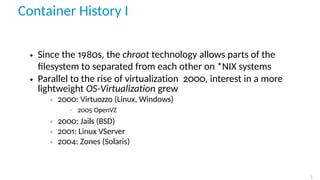
• Since the 1980s, the chroot technology allows parts of the
filesystem to separated from each other on *NIX systems
• Parallel to the rise of virtualization 2000, interest in a more
lightweight OS-Virtualization grew
◦ 2000: Virtuozzo (Linux, Windows)
− 2005 OpenVZ
◦ 2000: Jails (BSD)
◦ 2001: Linux VServer
◦ 2004: Zones (Solaris)
2
Container History II
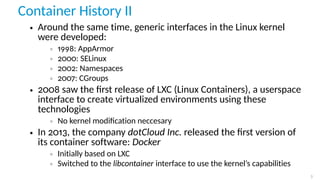
• Around the same time, generic interfaces in the Linux kernel
were developed:
◦ 1998: AppArmor
◦ 2000: SELinux
◦ 2002: Namespaces
◦ 2007: CGroups
• 2008 saw the first release of LXC (Linux Containers), a userspace
interface to create virtualized environments using these
technologies
◦ No kernel modification neccesary
• In 2013, the company dotCloud Inc. released the first version of
its container software: Docker
◦ Initially based on LXC
◦ Switched to the libcontainer interface to use the kernel’s capabilities
3
Containers
VM vs. Container
While a virtual machine is always running a full OS on virtual
hardware, a container is part of the current host system sharing its
resources (especially the kernel).
5
VM vs. Container
A container ist more lightweight than a VM.
• Less storage space
• Less memory
• Much faster creation and startup
These performance advantages are offset by a worse isolation. Since
all containers share the same kernel, an exploit on the kernel level
can comprosie all containers on the host.
6
System- vs. application-container
• An application container is used to run a single process. If that
process is stopped, the corresponding container is terminated as
well.
• A system container is able to run multiple processes while
keeping a persisten state over a long time.
7
Privileged containers
A privileged container is one running with root privileges on the host
system.1
An unprivileged container does not have those capabilities.2
1
Default for Docker
2
Default for LXC
8
Linux containment features
Namespaces
• Since kernel 3.12
• Used to isolate system ressources and processes
• Provides a certain ressource to a process in an abstracted
fashion
◦ pid: Container may administer their own process hierarchy while having
their own (logical) init process with PID 1
◦ user: Isolation of user- and group IDS (uid and gid) allows a process to
run processes as “root” without granting it elevated privileges on the
host system
◦ net: Provides separated network devices and configurations as well as
routing tables
◦ mnt: Each container can have their own view of the filesystem hierarchy
◦ ...
10
cgroups
To limit negative consequences to the host system by a container,
Control Groups (cgroups) may be used. They are built out of various
subsystems, each of which limits a certain resource for a container.
• blkio: Limits access to block devices
• cpu, cpuacct, cpusets: Limits CPU access
• devices: Access to devices can be granted
• freezer: Allows to stop and wakeup tasks
• hugetlb, memory: Limits available RAM
• net_cls, net_prio: Used for network priorisation
• perf_event: Used for process monitoring
11
SELinux / AppArmor
The kernel security modules SELinux and AppArmor greatly extends
the usual Discretionary Access Control (DAC) model of linux Access
Controll Policies with a much more advanced and powerful
Mandatory Access Controll (MAC) system.
The allows i.e to limit which files a certain process may access, or to
cut off its network access.
12
Linux Containers
What is LXC?
LXC is a userspace interface for the Linux kernel containment
features. Through a powerful API and simple tools, it lets Li-
nux users easily create and manage system or application
containers.
– https://linuxcontainers.org
14
Frontends
LXC container can be created and managed using different tools:
• Direct usage of liblxc and lxc-utils
• Usage of a frontend
◦ libvirt
◦ ProxMox
◦ LXD
15
LXD
LXD is a next generation system container manager. It offers
a user experience similar to virtual machines but using Linux
containers instead.
– https://linuxcontainers.org/lxd/introduction/
16
LXD Architecture
LXD is based on a daemon (which in turn is based on liblxc) which
provides a REST API.
This API is consumed by the command line tool lxc3
3
No typo. The tool is really named like this.
17
Images
New containers are not installedm they get cloned from a base
image, which is retrieved from a repository4
.
4
local or online
18
Use Cases Developer
• Isolated execution of applications
• Development environments with seperated dependencies
• Test environments
19
LXD Tutorial
Requirements
The following scenarios assume the following:
• Ubuntu 18.04 Bionic 64 bit is used
• Packages lxd, lxdtool are installedm
• User is part of the group lxd5
5
Disclaimer: As with docker, this is equivalent to giving the user root privileges on the system.
Take care.
21
Documentations
• Official documentation:
https://linuxcontainers.org/lxd/docs/master/
• Blog of Stéphane Graber:
https://stgraber.org/category/lxd/
22
Initialize
$ l x d i n i t
Would you l i k e to use LXD c l u s t e r i n g ? ( yes / no ) [ d e f a u l t =no ] : no
Do you want to c o n f i g u r e a new storage pool ? ( yes / no ) [ d e f a u l t = yes ] : yes
Name of the new storage pool [ d e f a u l t = d e f a u l t ] : mystorage
Would you l i k e to connect to a MAAS s e r v e r ? ( yes / no ) [ d e f a u l t =no ] : no
Would you l i k e to create a new l o c a l network bridge ? ( yes / no ) [ d e f a u l t = yes ] : yes
What should the new bridge be c a l l e d ? [ d e f a u l t = lxdbr0 ] : l x d l o c a l
What IPv4 address should be used ? ( CIDR subnet notation , " auto " or " none " )
[ d e f a u l t = auto ] : auto
What IPv6 address should be used ? ( CIDR subnet notation , " auto " or " none " )
[ d e f a u l t = auto ] : none
Would you l i k e LXD to be a v a i l a b l e over the network ? ( yes / no ) [ d e f a u l t =no ] : no
Would you l i k e s t a l e cached images to be updated a u t o m a t i c a l l y ? ( yes / no )
[ d e f a u l t = yes ] no
Would you l i k e a YAML " l x d i n i t " preseed to be p r i n t e d ? ( yes / no )
[ d e f a u l t =no ] : yes
23
Images
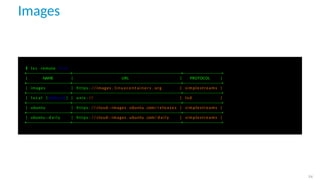
$ l x c remote l i s t
+−−−−−−−−−−−−−−−−−+−−−−−−−−−−−−−−−−−−−−−−−−−−−−−−−−−−−−−−−−−−+−−−−−−−−−−−−−−−+
| NAME | URL | PROTOCOL |
+−−−−−−−−−−−−−−−−−+−−−−−−−−−−−−−−−−−−−−−−−−−−−−−−−−−−−−−−−−−−+−−−−−−−−−−−−−−−+
| images | https : // images . l i n u x c o n t a i n e r s . org | simplestreams |
+−−−−−−−−−−−−−−−−−+−−−−−−−−−−−−−−−−−−−−−−−−−−−−−−−−−−−−−−−−−−+−−−−−−−−−−−−−−−+
| l o c a l ( d e f a u l t ) | unix : // | l x d |
+−−−−−−−−−−−−−−−−−+−−−−−−−−−−−−−−−−−−−−−−−−−−−−−−−−−−−−−−−−−−+−−−−−−−−−−−−−−−+
| ubuntu | https : // cloud−images . ubuntu . com/ r e l e a s e s | simplestreams |
+−−−−−−−−−−−−−−−−−+−−−−−−−−−−−−−−−−−−−−−−−−−−−−−−−−−−−−−−−−−−+−−−−−−−−−−−−−−−+
| ubuntu−d a i l y | https : // cloud−images . ubuntu . com/ d a i l y | simplestreams |
+−−−−−−−−−−−−−−−−−+−−−−−−−−−−−−−−−−−−−−−−−−−−−−−−−−−−−−−−−−−−+−−−−−−−−−−−−−−−+
24
Images
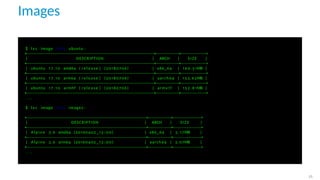
$ l x c image l i s t ubuntu :
+−−−−−−−−−−−−−−−−−−−−−−−−−−−−−−−−−−−−−−−−−−−−−−−−−+−−−−−−−−−+−−−−−−−−−−+
| DESCRIPTION | ARCH | SIZE |
+−−−−−−−−−−−−−−−−−−−−−−−−−−−−−−−−−−−−−−−−−−−−−−−−−+−−−−−−−−−+−−−−−−−−−−+
| ubuntu 1 7 . 1 0 amd64 ( r e l e a s e ) (20180706) | x86_64 | 1 6 9 . 5 1MB |
+−−−−−−−−−−−−−−−−−−−−−−−−−−−−−−−−−−−−−−−−−−−−−−−−−+−−−−−−−−−+−−−−−−−−−−+
| ubuntu 1 7 . 1 0 arm64 ( r e l e a s e ) (20180706) | aarch64 | 153.62MB |
+−−−−−−−−−−−−−−−−−−−−−−−−−−−−−−−−−−−−−−−−−−−−−−−−−+−−−−−−−−−+−−−−−−−−−−+
| ubuntu 1 7 . 1 0 armhf ( r e l e a s e ) (20180706) | armv7l | 1 5 2 . 8 1MB |
+−−−−−−−−−−−−−−−−−−−−−−−−−−−−−−−−−−−−−−−−−−−−−−−−−+−−−−−−−−−+−−−−−−−−−−+
. . .
$ l x c image l i s t images :
+−−−−−−−−−−−−−−−−−−−−−−−−−−−−−−−−−−−−−−−−−−−−−−+−−−−−−−−−+−−−−−−−−−−−+
| DESCRIPTION | ARCH | SIZE |
+−−−−−−−−−−−−−−−−−−−−−−−−−−−−−−−−−−−−−−−−−−−−−−+−−−−−−−−−+−−−−−−−−−−−+
| Alpine 3.6 amd64 (20190402 _13 :00) | x86_64 | 3 . 1 7MB |
+−−−−−−−−−−−−−−−−−−−−−−−−−−−−−−−−−−−−−−−−−−−−−−+−−−−−−−−−+−−−−−−−−−−−+
| Alpine 3.6 arm64 (20190402 _13 :00) | aarch64 | 3.07MB |
+−−−−−−−−−−−−−−−−−−−−−−−−−−−−−−−−−−−−−−−−−−−−−−+−−−−−−−−−+−−−−−−−−−−−+
. . .
25
Container lifecycle
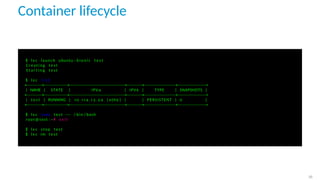
$ l x c launch ubuntu : b i o n i c t e s t
C r e a t i n g t e s t
S t a r t i n g t e s t
$ l x c l i s t
+−−−−−−+−−−−−−−−−+−−−−−−−−−−−−−−−−−−−−−+−−−−−−+−−−−−−−−−−−−+−−−−−−−−−−−+
| NAME | STATE | IPV4 | IPV6 | TYPE | SNAPSHOTS |
+−−−−−−+−−−−−−−−−+−−−−−−−−−−−−−−−−−−−−−+−−−−−−+−−−−−−−−−−−−+−−−−−−−−−−−+
| t e s t | RUNNING | 1 0 . 1 1 4 . 1 3 . 2 4 ( eth0 ) | | PERSISTENT | 0 |
+−−−−−−+−−−−−−−−−+−−−−−−−−−−−−−−−−−−−−−+−−−−−−+−−−−−−−−−−−−+−−−−−−−−−−−+
$ l x c exec t e s t −− / bin / bash
root@test : ~# e x i t
$ l x c stop t e s t
$ l x c rm t e s t
26
BTRFS storage
$ l x c storage create mybtrfs b t r f s source =/ dev / loop0
Storage pool mybtrfs created
$ df −h
F i l e s y s t e m S i z e Used A v a i l Use% Mounted on
udev 7 ,8G 0 7 ,8G 0% / dev
tmpfs 1 ,6G 2 ,0M 1 ,6G 1% / run
/ dev / sda2 1 1 7G 1 1 G 100G 10% /
[ . . . ]
/ dev / loop0 30G 17M 28G 1% / var / l i b / l x d / storage−pools / mybtrfs
$ l x c storage show mybtrfs
c o n f i g :
source : 031 d08f0−ed03−4f39 −8274−03fc4a12688c
v o l a t i l e . i n i t i a l _ s o u r c e : / dev / loop0
d e s c r i p t i o n : " "
name : mybtrfs
d r i v e r : b t r f s
used_by : [ ]
s t a t u s : Created
l o c a t i o n s :
− none
27
Profile
$ l x c p r o f i l e create myprof
$ cat lxd−p r o f i l e −myprof . yaml
c o n f i g :
user . vendor−data : |
# cloud−c o n f i g
users :
− name : ubuntu
ssh_authorized_keys :
− ssh−ed25519 AAAAC3Nza [ . . . ] oJmMZ7Y5YlrYA mat@office
s h e l l : / bin / bash
d e s c r i p t i o n : My brandnew LXD p r o f i l e
devices :
eth0 :
name : eth0
n i c t y p e : bridged
parent : l x d l o c a l
type : n i c
root :
path : /
pool : mybtrfs
type : d i s k
s i z e : 10GB
name : myprofile
$ l x c p r o f i l e e d i t myprof < lxd−p r o f i l e −myprof . yaml
28
Profile
$ l x c launch ubuntu : 1 8 . 0 4 web −−p r o f i l e myprof
$ l x c p r o f i l e show myprof
c o n f i g :
user . vendor−data : |
# cloud−c o n f i g
users :
− name : ubuntu
ssh_authorized_keys :
− ssh−ed25519 AAAAC3Nza [ . . . ] oJmMZ7Y5YlrYA mat@office
s h e l l : / bin / bash
group : sudo
d e s c r i p t i o n : My brandnew LXD p r o f i l e
devices :
eth0 :
name : eth0
n i c t y p e : bridged
parent : l x d l o c a l
type : n i c
root :
path : /
pool : mybtrfs
s i z e : 10GB
type : d i s k
name : myprof
used_by : [ web ]
29
Shared Disk
$ l x c c o n f i g device add t e s t s r c d i r d i s k path =/home/ ubuntu / s r c source =/home/my/ s r c
Device s r c d i r added to shared
$ ssh ubuntu@10 . 4 5 . 2 3 8 . 1 6 7
ubuntu@shared : ~$ mount
/ dev /dm−5 on / type b t r f s ( rw , relatime , ssd , [ . . . ] )
none on / dev type tmpfs ( rw , relatime , s i z e =492k , mode=755 , uid =165536 , gid =165536)
. . .
/ dev / mapper /myvg−home on /home/ ubuntu / s r c type ext4 ( rw , relatime , data = ordered )
. . .
ubuntu@shared : ~$ df
F i l e s y s t e m 1 K−blocks Used A v a i l a b l e Use% Mounted on
/ dev /dm−5 36700160 21135324 14910740 59% /
none 492 0 492 0% / dev
udev 3898488 0 3898488 0% / dev / t t y
tmpfs 100 0 100 0% / dev / l x d
tmpfs 100 0 100 0% / dev / . lxd−mounts
tmpfs 3930688 0 3930688 0% / dev /shm
tmpfs 3930688 172 3930516 1% / run
tmpfs 5120 0 5120 0% / run / l o c k
tmpfs 3930688 0 3930688 0% / sys / f s / cgroup
/ dev / mapper /myvg−home 95593892 85171544 5523328 94% /home/ ubuntu / s r c
tmpfs 786136 0 786136 0% / run / user /1000
30
Network
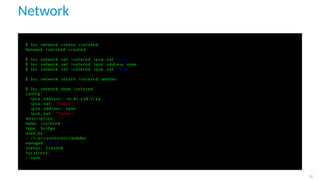
$ l x c network create i s o l a t e d
Network i s o l a t e d created
$ l x c network set i s o l a t e d ipv4 . nat f a l s e
$ l x c network set i s o l a t e d ipv6 . address none
$ l x c network set i s o l a t e d ipv6 . nat f a l s e
$ l x c network attach i s o l a t e d webdev
$ l x c network show i s o l a t e d
c o n f i g :
ipv4 . address : 1 0 . 8 1 . 2 3 8 . 1 / 2 4
ipv4 . nat : " f a l s e "
ipv6 . address : none
ipv6 . nat : " f a l s e "
d e s c r i p t i o n : " "
name : i s o l a t e d
type : bridge
used_by :
− / 1 . 0 / c o n t a i n e r s / webdev
managed : true
s t a t u s : Created
l o c a t i o n s :
− none
31
Privileged containers
$ l x c c o n f i g set webdev s e c u r i t y . p r i v i l e g e d true
$ l x c c o n f i g show webdev
a r c h i t e c t u r e : x86_64
c o n f i g :
image . a r c h i t e c t u r e : amd64
image . d e s c r i p t i o n : ubuntu 18.04 LTS amd64 ( r e l e a s e ) ( 2 0 1 9 0 8 1 3 . 1 )
[ . . . ]
s e c u r i t y . p r i v i l e g e d : " true "
[ . . . ]
v o l a t i l e . i s o l a t e d . hwaddr : 00:16:3 e :4 f : 4 7 : 1 5
v o l a t i l e . i s o l a t e d . name : eth1
v o l a t i l e . l a s t _ s t a t e . idmap : ’ [ { " I s u i d " : true , " I s g i d " : f a l s e , " Hostid " : 1 6 5 5 3 6 , [ . . . ] } ] ’
v o l a t i l e . l a s t _ s t a t e . power : RUNNING
devices :
i s o l a t e d :
n i c t y p e : bridged
parent : i s o l a t e d
type : n i c
ephemeral : f a l s e
p r o f i l e s :
− d e f a u l t
s t a t e f u l : f a l s e
d e s c r i p t i o n : " "
32
Privileged containers
$ l x c c o n f i g set webdev s e c u r i t y . p r i v i l e g e d true
$ l x c r e s t a r t webdev
$ l x c s h e l l webdev
root@webdev : ~# t a i l −f / var / log / s y s l o g &
Oct 1 1 16:30:30 webdev systemd [ 1 ] : Stopped t a r g e t Login Prompts .
[ . . . ]
root@webdev : ~# logout
$ ps aux | grep " t a i l −f "
root 19655 [ . . . ] 18:30 0:00 t a i l −f / var / log / s y s l o g
$ l x c c o n f i g set webdev s e c u r i t y . p r i v i l e g e d f a l s e
$ l x c r e s t a r t webdev
$ l x c s h e l l webdev
root@webdev : ~# t a i l −f / var / log / s y s l o g &
Oct 1 1 1 6 : 3 1 : 0 4 g i t o l i t e systemd [ 1 ] : S t a r t e d User Manager f o r UID 0.
[ . . . ]
root@webdev : ~# logout
$ ps aux | grep " t a i l −f "
165536 2 0 9 3 8 [ . . . ] 1 8 : 3 1 0:00 t a i l −f / var / log / s y s l o g
33
The End!
Klassifikation: Öffentlich 17
Professional Services
Penetration Testing
Architecture Reviews
Security Audit
Security Trainings
Incident Response Readiness
ISMS & ISO 27001 Consulting
Bridging Science and Industry
Applied Research
Industrial Security | IIoT Security |
Mathematics for Security Research |
Machine Learning | Blockchain | Network
Security | Sustainable Software Systems |
Usable Security
SBA Research
Knowledge Transfer
SBA Live Academy | sec4dev | Trainings |
Events | Teaching | sbaPRIME
Contact us: anfragen@sba-research.org

SBA Live Academy - Secure Containers for Developer by Mathias Tausig

  • 1.
    Secure Containers forDevelopers Mathias Tausig SBA Research gGmbH SBA Live Academy 2020
  • 2.
  • 3.
    Container History I •Since the 1980s, the chroot technology allows parts of the filesystem to separated from each other on *NIX systems • Parallel to the rise of virtualization 2000, interest in a more lightweight OS-Virtualization grew ◦ 2000: Virtuozzo (Linux, Windows) − 2005 OpenVZ ◦ 2000: Jails (BSD) ◦ 2001: Linux VServer ◦ 2004: Zones (Solaris) 2
  • 4.
    Container History II •Around the same time, generic interfaces in the Linux kernel were developed: ◦ 1998: AppArmor ◦ 2000: SELinux ◦ 2002: Namespaces ◦ 2007: CGroups • 2008 saw the first release of LXC (Linux Containers), a userspace interface to create virtualized environments using these technologies ◦ No kernel modification neccesary • In 2013, the company dotCloud Inc. released the first version of its container software: Docker ◦ Initially based on LXC ◦ Switched to the libcontainer interface to use the kernel’s capabilities 3
  • 5.
  • 6.
    VM vs. Container Whilea virtual machine is always running a full OS on virtual hardware, a container is part of the current host system sharing its resources (especially the kernel). 5
  • 7.
    VM vs. Container Acontainer ist more lightweight than a VM. • Less storage space • Less memory • Much faster creation and startup These performance advantages are offset by a worse isolation. Since all containers share the same kernel, an exploit on the kernel level can comprosie all containers on the host. 6
  • 8.
    System- vs. application-container •An application container is used to run a single process. If that process is stopped, the corresponding container is terminated as well. • A system container is able to run multiple processes while keeping a persisten state over a long time. 7
  • 9.
    Privileged containers A privilegedcontainer is one running with root privileges on the host system.1 An unprivileged container does not have those capabilities.2 1 Default for Docker 2 Default for LXC 8
  • 10.
  • 11.
    Namespaces • Since kernel3.12 • Used to isolate system ressources and processes • Provides a certain ressource to a process in an abstracted fashion ◦ pid: Container may administer their own process hierarchy while having their own (logical) init process with PID 1 ◦ user: Isolation of user- and group IDS (uid and gid) allows a process to run processes as “root” without granting it elevated privileges on the host system ◦ net: Provides separated network devices and configurations as well as routing tables ◦ mnt: Each container can have their own view of the filesystem hierarchy ◦ ... 10
  • 12.
    cgroups To limit negativeconsequences to the host system by a container, Control Groups (cgroups) may be used. They are built out of various subsystems, each of which limits a certain resource for a container. • blkio: Limits access to block devices • cpu, cpuacct, cpusets: Limits CPU access • devices: Access to devices can be granted • freezer: Allows to stop and wakeup tasks • hugetlb, memory: Limits available RAM • net_cls, net_prio: Used for network priorisation • perf_event: Used for process monitoring 11
  • 13.
    SELinux / AppArmor Thekernel security modules SELinux and AppArmor greatly extends the usual Discretionary Access Control (DAC) model of linux Access Controll Policies with a much more advanced and powerful Mandatory Access Controll (MAC) system. The allows i.e to limit which files a certain process may access, or to cut off its network access. 12
  • 14.
  • 15.
    What is LXC? LXCis a userspace interface for the Linux kernel containment features. Through a powerful API and simple tools, it lets Li- nux users easily create and manage system or application containers. – https://linuxcontainers.org 14
  • 16.
    Frontends LXC container canbe created and managed using different tools: • Direct usage of liblxc and lxc-utils • Usage of a frontend ◦ libvirt ◦ ProxMox ◦ LXD 15
  • 17.
    LXD LXD is anext generation system container manager. It offers a user experience similar to virtual machines but using Linux containers instead. – https://linuxcontainers.org/lxd/introduction/ 16
  • 18.
    LXD Architecture LXD isbased on a daemon (which in turn is based on liblxc) which provides a REST API. This API is consumed by the command line tool lxc3 3 No typo. The tool is really named like this. 17
  • 19.
    Images New containers arenot installedm they get cloned from a base image, which is retrieved from a repository4 . 4 local or online 18
  • 20.
    Use Cases Developer •Isolated execution of applications • Development environments with seperated dependencies • Test environments 19
  • 21.
  • 22.
    Requirements The following scenariosassume the following: • Ubuntu 18.04 Bionic 64 bit is used • Packages lxd, lxdtool are installedm • User is part of the group lxd5 5 Disclaimer: As with docker, this is equivalent to giving the user root privileges on the system. Take care. 21
  • 23.
    Documentations • Official documentation: https://linuxcontainers.org/lxd/docs/master/ •Blog of Stéphane Graber: https://stgraber.org/category/lxd/ 22
  • 24.
    Initialize $ l xd i n i t Would you l i k e to use LXD c l u s t e r i n g ? ( yes / no ) [ d e f a u l t =no ] : no Do you want to c o n f i g u r e a new storage pool ? ( yes / no ) [ d e f a u l t = yes ] : yes Name of the new storage pool [ d e f a u l t = d e f a u l t ] : mystorage Would you l i k e to connect to a MAAS s e r v e r ? ( yes / no ) [ d e f a u l t =no ] : no Would you l i k e to create a new l o c a l network bridge ? ( yes / no ) [ d e f a u l t = yes ] : yes What should the new bridge be c a l l e d ? [ d e f a u l t = lxdbr0 ] : l x d l o c a l What IPv4 address should be used ? ( CIDR subnet notation , " auto " or " none " ) [ d e f a u l t = auto ] : auto What IPv6 address should be used ? ( CIDR subnet notation , " auto " or " none " ) [ d e f a u l t = auto ] : none Would you l i k e LXD to be a v a i l a b l e over the network ? ( yes / no ) [ d e f a u l t =no ] : no Would you l i k e s t a l e cached images to be updated a u t o m a t i c a l l y ? ( yes / no ) [ d e f a u l t = yes ] no Would you l i k e a YAML " l x d i n i t " preseed to be p r i n t e d ? ( yes / no ) [ d e f a u l t =no ] : yes 23
  • 25.
    Images $ l xc remote l i s t +−−−−−−−−−−−−−−−−−+−−−−−−−−−−−−−−−−−−−−−−−−−−−−−−−−−−−−−−−−−−+−−−−−−−−−−−−−−−+ | NAME | URL | PROTOCOL | +−−−−−−−−−−−−−−−−−+−−−−−−−−−−−−−−−−−−−−−−−−−−−−−−−−−−−−−−−−−−+−−−−−−−−−−−−−−−+ | images | https : // images . l i n u x c o n t a i n e r s . org | simplestreams | +−−−−−−−−−−−−−−−−−+−−−−−−−−−−−−−−−−−−−−−−−−−−−−−−−−−−−−−−−−−−+−−−−−−−−−−−−−−−+ | l o c a l ( d e f a u l t ) | unix : // | l x d | +−−−−−−−−−−−−−−−−−+−−−−−−−−−−−−−−−−−−−−−−−−−−−−−−−−−−−−−−−−−−+−−−−−−−−−−−−−−−+ | ubuntu | https : // cloud−images . ubuntu . com/ r e l e a s e s | simplestreams | +−−−−−−−−−−−−−−−−−+−−−−−−−−−−−−−−−−−−−−−−−−−−−−−−−−−−−−−−−−−−+−−−−−−−−−−−−−−−+ | ubuntu−d a i l y | https : // cloud−images . ubuntu . com/ d a i l y | simplestreams | +−−−−−−−−−−−−−−−−−+−−−−−−−−−−−−−−−−−−−−−−−−−−−−−−−−−−−−−−−−−−+−−−−−−−−−−−−−−−+ 24
  • 26.
    Images $ l xc image l i s t ubuntu : +−−−−−−−−−−−−−−−−−−−−−−−−−−−−−−−−−−−−−−−−−−−−−−−−−+−−−−−−−−−+−−−−−−−−−−+ | DESCRIPTION | ARCH | SIZE | +−−−−−−−−−−−−−−−−−−−−−−−−−−−−−−−−−−−−−−−−−−−−−−−−−+−−−−−−−−−+−−−−−−−−−−+ | ubuntu 1 7 . 1 0 amd64 ( r e l e a s e ) (20180706) | x86_64 | 1 6 9 . 5 1MB | +−−−−−−−−−−−−−−−−−−−−−−−−−−−−−−−−−−−−−−−−−−−−−−−−−+−−−−−−−−−+−−−−−−−−−−+ | ubuntu 1 7 . 1 0 arm64 ( r e l e a s e ) (20180706) | aarch64 | 153.62MB | +−−−−−−−−−−−−−−−−−−−−−−−−−−−−−−−−−−−−−−−−−−−−−−−−−+−−−−−−−−−+−−−−−−−−−−+ | ubuntu 1 7 . 1 0 armhf ( r e l e a s e ) (20180706) | armv7l | 1 5 2 . 8 1MB | +−−−−−−−−−−−−−−−−−−−−−−−−−−−−−−−−−−−−−−−−−−−−−−−−−+−−−−−−−−−+−−−−−−−−−−+ . . . $ l x c image l i s t images : +−−−−−−−−−−−−−−−−−−−−−−−−−−−−−−−−−−−−−−−−−−−−−−+−−−−−−−−−+−−−−−−−−−−−+ | DESCRIPTION | ARCH | SIZE | +−−−−−−−−−−−−−−−−−−−−−−−−−−−−−−−−−−−−−−−−−−−−−−+−−−−−−−−−+−−−−−−−−−−−+ | Alpine 3.6 amd64 (20190402 _13 :00) | x86_64 | 3 . 1 7MB | +−−−−−−−−−−−−−−−−−−−−−−−−−−−−−−−−−−−−−−−−−−−−−−+−−−−−−−−−+−−−−−−−−−−−+ | Alpine 3.6 arm64 (20190402 _13 :00) | aarch64 | 3.07MB | +−−−−−−−−−−−−−−−−−−−−−−−−−−−−−−−−−−−−−−−−−−−−−−+−−−−−−−−−+−−−−−−−−−−−+ . . . 25
  • 27.
    Container lifecycle $ lx c launch ubuntu : b i o n i c t e s t C r e a t i n g t e s t S t a r t i n g t e s t $ l x c l i s t +−−−−−−+−−−−−−−−−+−−−−−−−−−−−−−−−−−−−−−+−−−−−−+−−−−−−−−−−−−+−−−−−−−−−−−+ | NAME | STATE | IPV4 | IPV6 | TYPE | SNAPSHOTS | +−−−−−−+−−−−−−−−−+−−−−−−−−−−−−−−−−−−−−−+−−−−−−+−−−−−−−−−−−−+−−−−−−−−−−−+ | t e s t | RUNNING | 1 0 . 1 1 4 . 1 3 . 2 4 ( eth0 ) | | PERSISTENT | 0 | +−−−−−−+−−−−−−−−−+−−−−−−−−−−−−−−−−−−−−−+−−−−−−+−−−−−−−−−−−−+−−−−−−−−−−−+ $ l x c exec t e s t −− / bin / bash root@test : ~# e x i t $ l x c stop t e s t $ l x c rm t e s t 26
  • 28.
    BTRFS storage $ lx c storage create mybtrfs b t r f s source =/ dev / loop0 Storage pool mybtrfs created $ df −h F i l e s y s t e m S i z e Used A v a i l Use% Mounted on udev 7 ,8G 0 7 ,8G 0% / dev tmpfs 1 ,6G 2 ,0M 1 ,6G 1% / run / dev / sda2 1 1 7G 1 1 G 100G 10% / [ . . . ] / dev / loop0 30G 17M 28G 1% / var / l i b / l x d / storage−pools / mybtrfs $ l x c storage show mybtrfs c o n f i g : source : 031 d08f0−ed03−4f39 −8274−03fc4a12688c v o l a t i l e . i n i t i a l _ s o u r c e : / dev / loop0 d e s c r i p t i o n : " " name : mybtrfs d r i v e r : b t r f s used_by : [ ] s t a t u s : Created l o c a t i o n s : − none 27
  • 29.
    Profile $ l xc p r o f i l e create myprof $ cat lxd−p r o f i l e −myprof . yaml c o n f i g : user . vendor−data : | # cloud−c o n f i g users : − name : ubuntu ssh_authorized_keys : − ssh−ed25519 AAAAC3Nza [ . . . ] oJmMZ7Y5YlrYA mat@office s h e l l : / bin / bash d e s c r i p t i o n : My brandnew LXD p r o f i l e devices : eth0 : name : eth0 n i c t y p e : bridged parent : l x d l o c a l type : n i c root : path : / pool : mybtrfs type : d i s k s i z e : 10GB name : myprofile $ l x c p r o f i l e e d i t myprof < lxd−p r o f i l e −myprof . yaml 28
  • 30.
    Profile $ l xc launch ubuntu : 1 8 . 0 4 web −−p r o f i l e myprof $ l x c p r o f i l e show myprof c o n f i g : user . vendor−data : | # cloud−c o n f i g users : − name : ubuntu ssh_authorized_keys : − ssh−ed25519 AAAAC3Nza [ . . . ] oJmMZ7Y5YlrYA mat@office s h e l l : / bin / bash group : sudo d e s c r i p t i o n : My brandnew LXD p r o f i l e devices : eth0 : name : eth0 n i c t y p e : bridged parent : l x d l o c a l type : n i c root : path : / pool : mybtrfs s i z e : 10GB type : d i s k name : myprof used_by : [ web ] 29
  • 31.
    Shared Disk $ lx c c o n f i g device add t e s t s r c d i r d i s k path =/home/ ubuntu / s r c source =/home/my/ s r c Device s r c d i r added to shared $ ssh ubuntu@10 . 4 5 . 2 3 8 . 1 6 7 ubuntu@shared : ~$ mount / dev /dm−5 on / type b t r f s ( rw , relatime , ssd , [ . . . ] ) none on / dev type tmpfs ( rw , relatime , s i z e =492k , mode=755 , uid =165536 , gid =165536) . . . / dev / mapper /myvg−home on /home/ ubuntu / s r c type ext4 ( rw , relatime , data = ordered ) . . . ubuntu@shared : ~$ df F i l e s y s t e m 1 K−blocks Used A v a i l a b l e Use% Mounted on / dev /dm−5 36700160 21135324 14910740 59% / none 492 0 492 0% / dev udev 3898488 0 3898488 0% / dev / t t y tmpfs 100 0 100 0% / dev / l x d tmpfs 100 0 100 0% / dev / . lxd−mounts tmpfs 3930688 0 3930688 0% / dev /shm tmpfs 3930688 172 3930516 1% / run tmpfs 5120 0 5120 0% / run / l o c k tmpfs 3930688 0 3930688 0% / sys / f s / cgroup / dev / mapper /myvg−home 95593892 85171544 5523328 94% /home/ ubuntu / s r c tmpfs 786136 0 786136 0% / run / user /1000 30
  • 32.
    Network $ l xc network create i s o l a t e d Network i s o l a t e d created $ l x c network set i s o l a t e d ipv4 . nat f a l s e $ l x c network set i s o l a t e d ipv6 . address none $ l x c network set i s o l a t e d ipv6 . nat f a l s e $ l x c network attach i s o l a t e d webdev $ l x c network show i s o l a t e d c o n f i g : ipv4 . address : 1 0 . 8 1 . 2 3 8 . 1 / 2 4 ipv4 . nat : " f a l s e " ipv6 . address : none ipv6 . nat : " f a l s e " d e s c r i p t i o n : " " name : i s o l a t e d type : bridge used_by : − / 1 . 0 / c o n t a i n e r s / webdev managed : true s t a t u s : Created l o c a t i o n s : − none 31
  • 33.
    Privileged containers $ lx c c o n f i g set webdev s e c u r i t y . p r i v i l e g e d true $ l x c c o n f i g show webdev a r c h i t e c t u r e : x86_64 c o n f i g : image . a r c h i t e c t u r e : amd64 image . d e s c r i p t i o n : ubuntu 18.04 LTS amd64 ( r e l e a s e ) ( 2 0 1 9 0 8 1 3 . 1 ) [ . . . ] s e c u r i t y . p r i v i l e g e d : " true " [ . . . ] v o l a t i l e . i s o l a t e d . hwaddr : 00:16:3 e :4 f : 4 7 : 1 5 v o l a t i l e . i s o l a t e d . name : eth1 v o l a t i l e . l a s t _ s t a t e . idmap : ’ [ { " I s u i d " : true , " I s g i d " : f a l s e , " Hostid " : 1 6 5 5 3 6 , [ . . . ] } ] ’ v o l a t i l e . l a s t _ s t a t e . power : RUNNING devices : i s o l a t e d : n i c t y p e : bridged parent : i s o l a t e d type : n i c ephemeral : f a l s e p r o f i l e s : − d e f a u l t s t a t e f u l : f a l s e d e s c r i p t i o n : " " 32
  • 34.
    Privileged containers $ lx c c o n f i g set webdev s e c u r i t y . p r i v i l e g e d true $ l x c r e s t a r t webdev $ l x c s h e l l webdev root@webdev : ~# t a i l −f / var / log / s y s l o g & Oct 1 1 16:30:30 webdev systemd [ 1 ] : Stopped t a r g e t Login Prompts . [ . . . ] root@webdev : ~# logout $ ps aux | grep " t a i l −f " root 19655 [ . . . ] 18:30 0:00 t a i l −f / var / log / s y s l o g $ l x c c o n f i g set webdev s e c u r i t y . p r i v i l e g e d f a l s e $ l x c r e s t a r t webdev $ l x c s h e l l webdev root@webdev : ~# t a i l −f / var / log / s y s l o g & Oct 1 1 1 6 : 3 1 : 0 4 g i t o l i t e systemd [ 1 ] : S t a r t e d User Manager f o r UID 0. [ . . . ] root@webdev : ~# logout $ ps aux | grep " t a i l −f " 165536 2 0 9 3 8 [ . . . ] 1 8 : 3 1 0:00 t a i l −f / var / log / s y s l o g 33
  • 35.
  • 36.
    Klassifikation: Öffentlich 17 ProfessionalServices Penetration Testing Architecture Reviews Security Audit Security Trainings Incident Response Readiness ISMS & ISO 27001 Consulting Bridging Science and Industry Applied Research Industrial Security | IIoT Security | Mathematics for Security Research | Machine Learning | Blockchain | Network Security | Sustainable Software Systems | Usable Security SBA Research Knowledge Transfer SBA Live Academy | sec4dev | Trainings | Events | Teaching | sbaPRIME Contact us: anfragen@sba-research.org