Copyright © 2017 nVisium LLC · www.nvisium.com
AWS Survival Guide
Ken Johnson, CTO
Copyright © 2017 nVisium LLC · www.nvisium.com
Before we get started…
Copyright © 2017 nVisium LLC · www.nvisium.com
About
• I’m the CTO of nVisium, a security company, and we use
AWS… and it is a challenge
• This my opportunity to share some of those experiences
• Prior US Navy
• Spoke a ton about (In)Security of:
• Rails
• DevOps
• Web Frameworks
• AWS (obviously)
• And… General Web Exploitation Concepts
Copyright © 2017 nVisium LLC · www.nvisium.com
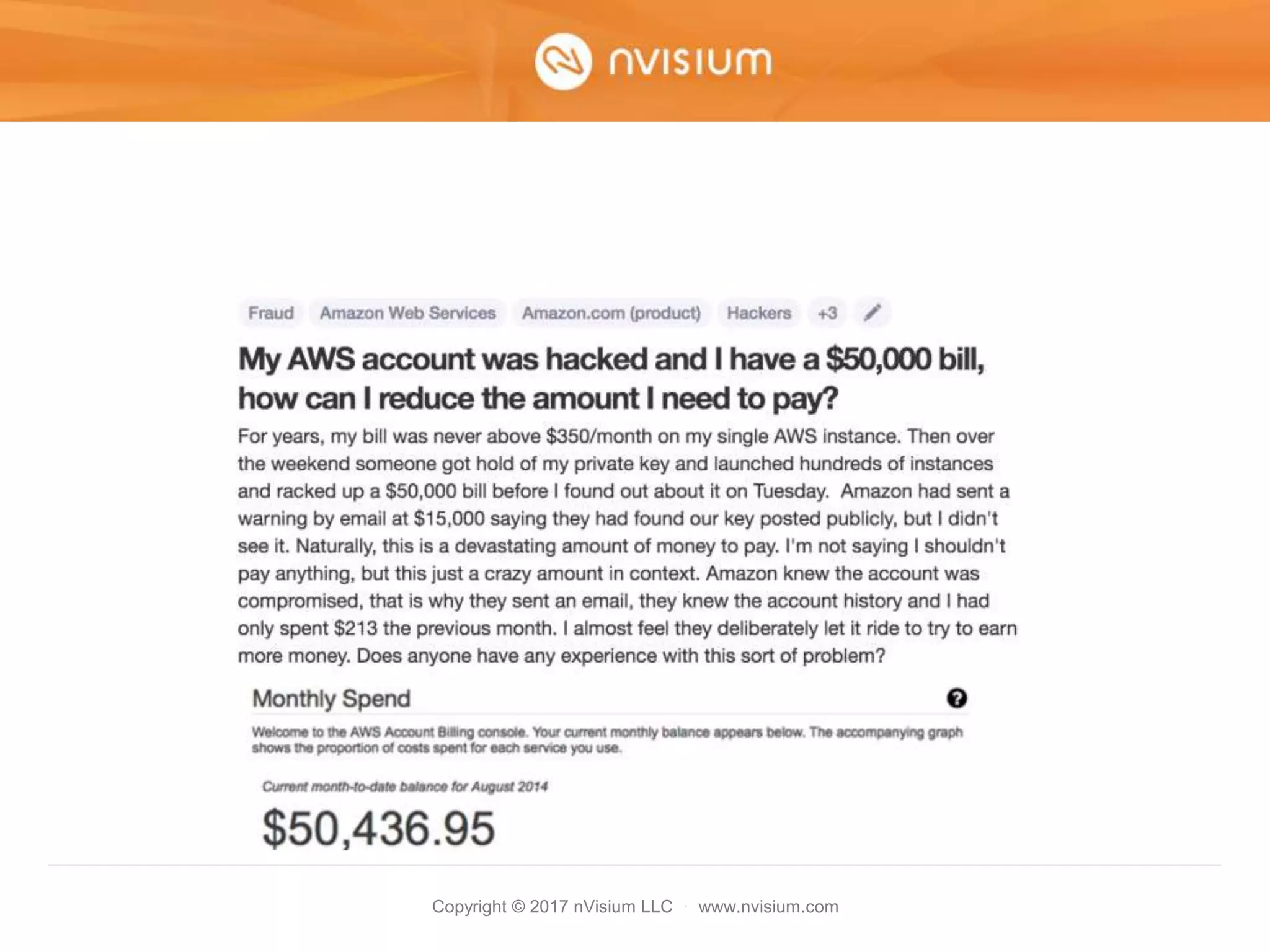
So how is this happening
• Exposed Credentials
• Misconfiguration
• Vulnerable Applications/Systems
Copyright © 2017 nVisium LLC · www.nvisium.com
Exposed Credentials
Copyright © 2017 nVisium LLC · www.nvisium.com
Exposed Credentials
• Keys are often stored on developer or ops
machines
• Typically can be found under
– ~/.aws/config
– ~/.bashrc
– ~/.zshrc
– ~/.elasticbeanstalk/aws_credential_file
Copyright © 2017 nVisium LLC · www.nvisium.com
Exposed Credentials
Copyright © 2017 nVisium LLC · www.nvisium.com
Exposed Credentials
Copyright © 2017 nVisium LLC · www.nvisium.com
Exposed Credentials
• Source code is leaked or otherwise
obtained
Copyright © 2017 nVisium LLC · www.nvisium.com
Misconfiguration
Copyright © 2017 nVisium LLC · www.nvisium.com
Misconfiguration
• S3 bucket with “any authenticated user”
permissions (credit: Chris Gates)
Copyright © 2017 nVisium LLC · www.nvisium.com
Misconfiguration
• Using AWS CLI to access bucket (credit:
Chris Gates)
Copyright © 2017 nVisium LLC · www.nvisium.com
Misconfiguration
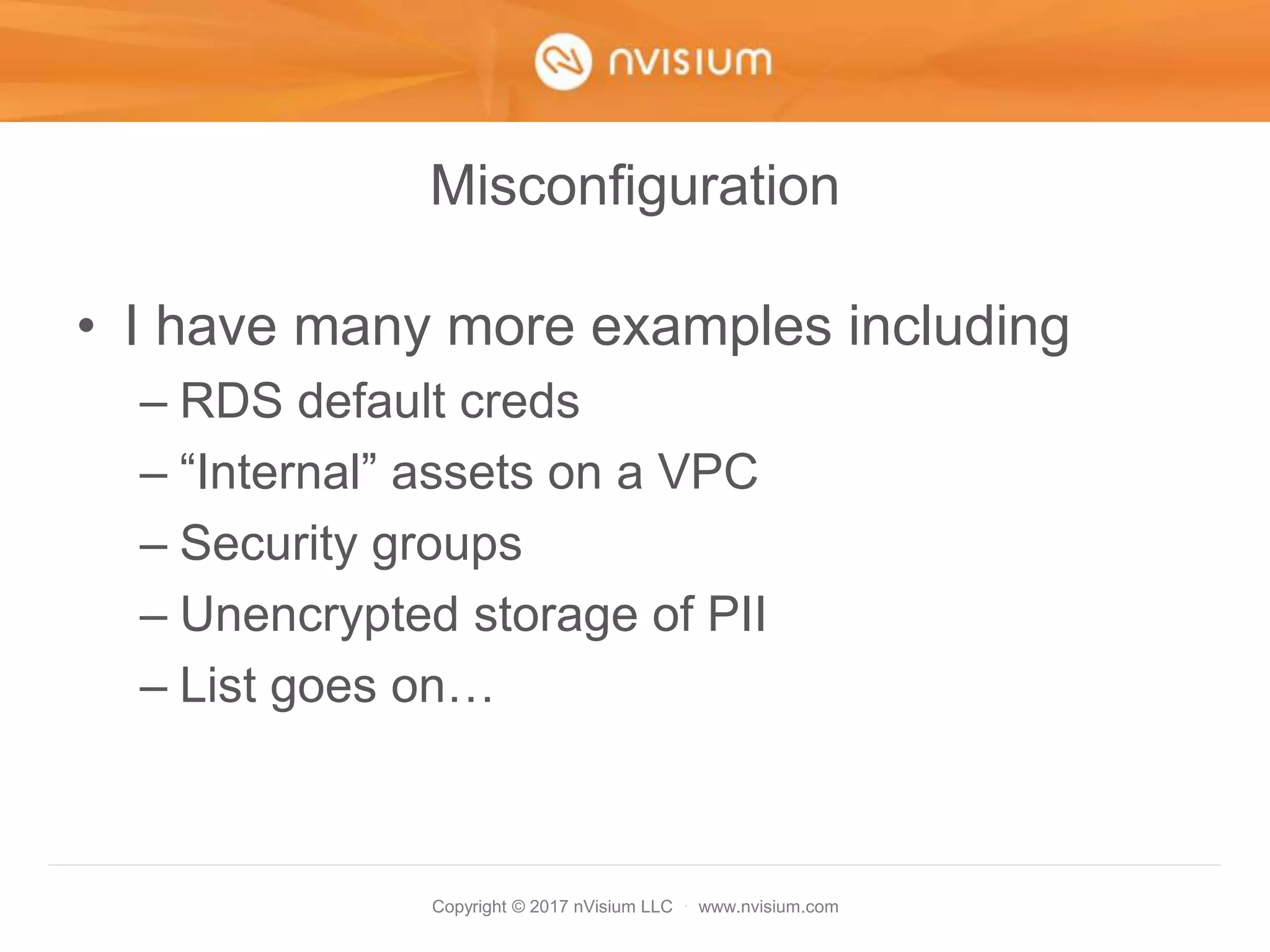
• I have many more examples including
– RDS default creds
– “Internal” assets on a VPC
– Security groups
– Unencrypted storage of PII
– List goes on…
Copyright © 2017 nVisium LLC · www.nvisium.com
Vulnerable Applications/Systems
Copyright © 2017 nVisium LLC · www.nvisium.com
Vulnerable Applications/Systems
1. Machine is compromised
2. Attacker grabs metadata info
3. Uses these credentials to pivot
Copyright © 2017 nVisium LLC · www.nvisium.com
Vulnerable Applications/Systems
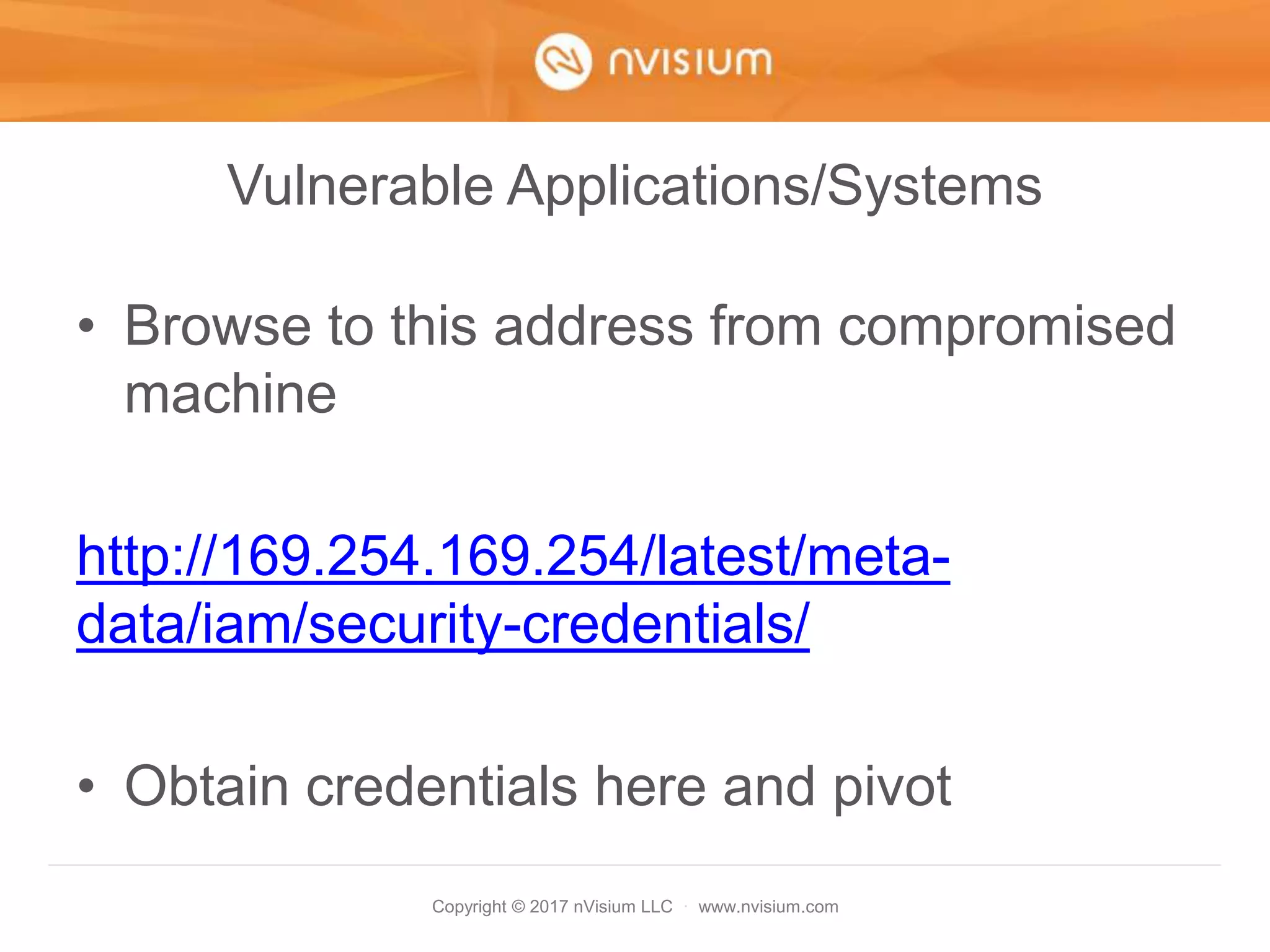
• Browse to this address from compromised
machine
http://169.254.169.254/latest/meta-
data/iam/security-credentials/
• Obtain credentials here and pivot
Copyright © 2017 nVisium LLC · www.nvisium.com
Vulnerable Applications/Systems
• Even a talk/tool to help with this
– https://www.blackhat.com/docs/us-
14/materials/us-14-Riancho-Pivoting-In-
Amazon-Clouds-WP.pdf
– https://andresriancho.github.io/nimbostratus/
Copyright © 2017 nVisium LLC · www.nvisium.com
Summary
• Plenty of ways to get in
• Plenty of ways to secure your
infrastructure
• Let’s get started shall we
Copyright © 2017 nVisium LLC · www.nvisium.com
Agenda
• Monitoring – Automating
• Hardening – Prevention of Attacks
• Q&A
Copyright © 2017 nVisium LLC · www.nvisium.com
Monitoring
Copyright © 2017 nVisium LLC · www.nvisium.com
Familiarize ourselves…
…with these basic services:
• CloudWatch – Monitoring service
• CloudTrail – Logs all AWS activity once
enabled
Copyright © 2017 nVisium LLC · www.nvisium.com
Cloudtrail
Copyright © 2017 nVisium LLC · www.nvisium.com
CloudTrail
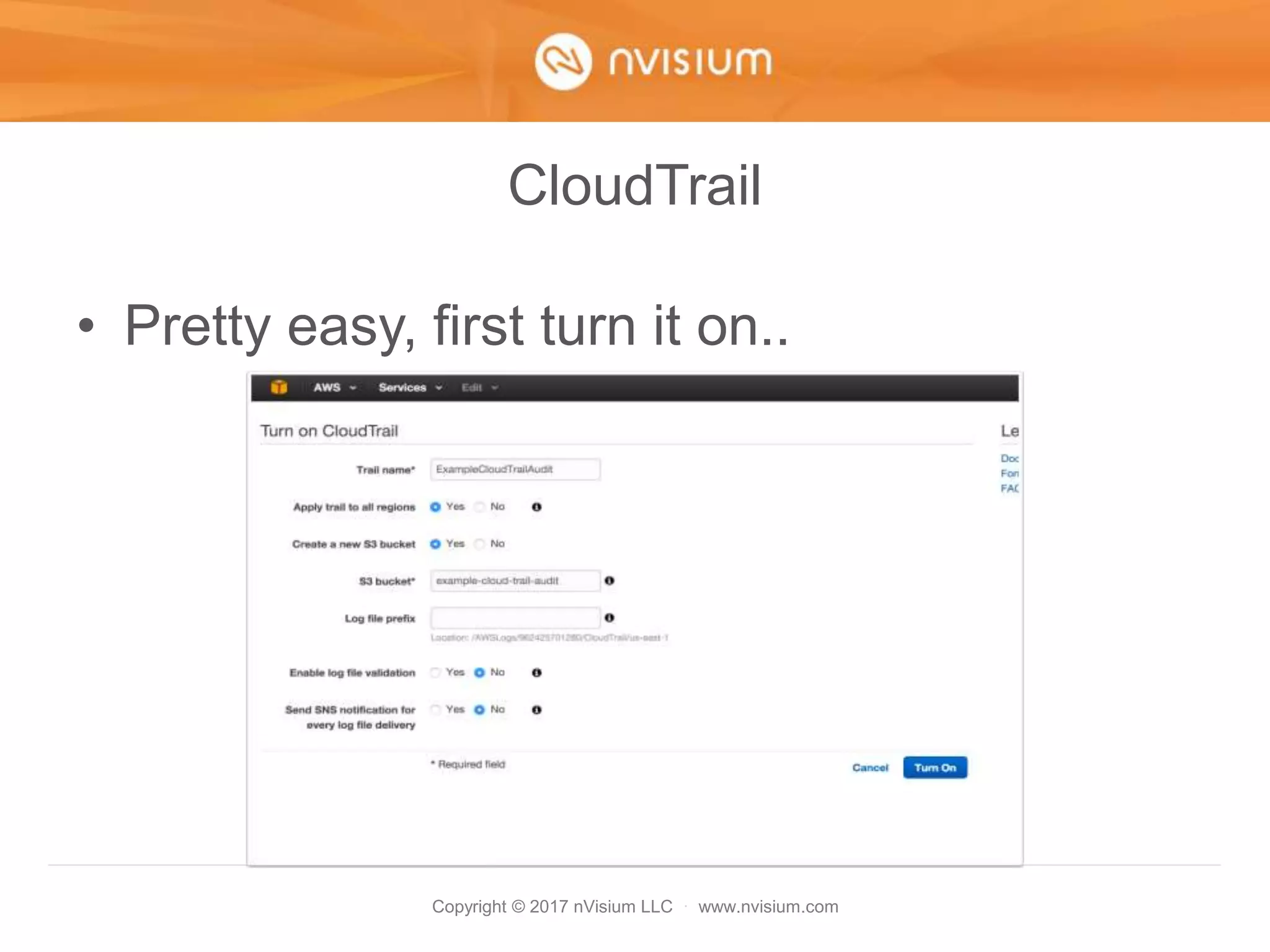
• Pretty easy, first turn it on..
Copyright © 2017 nVisium LLC · www.nvisium.com
CloudTrail
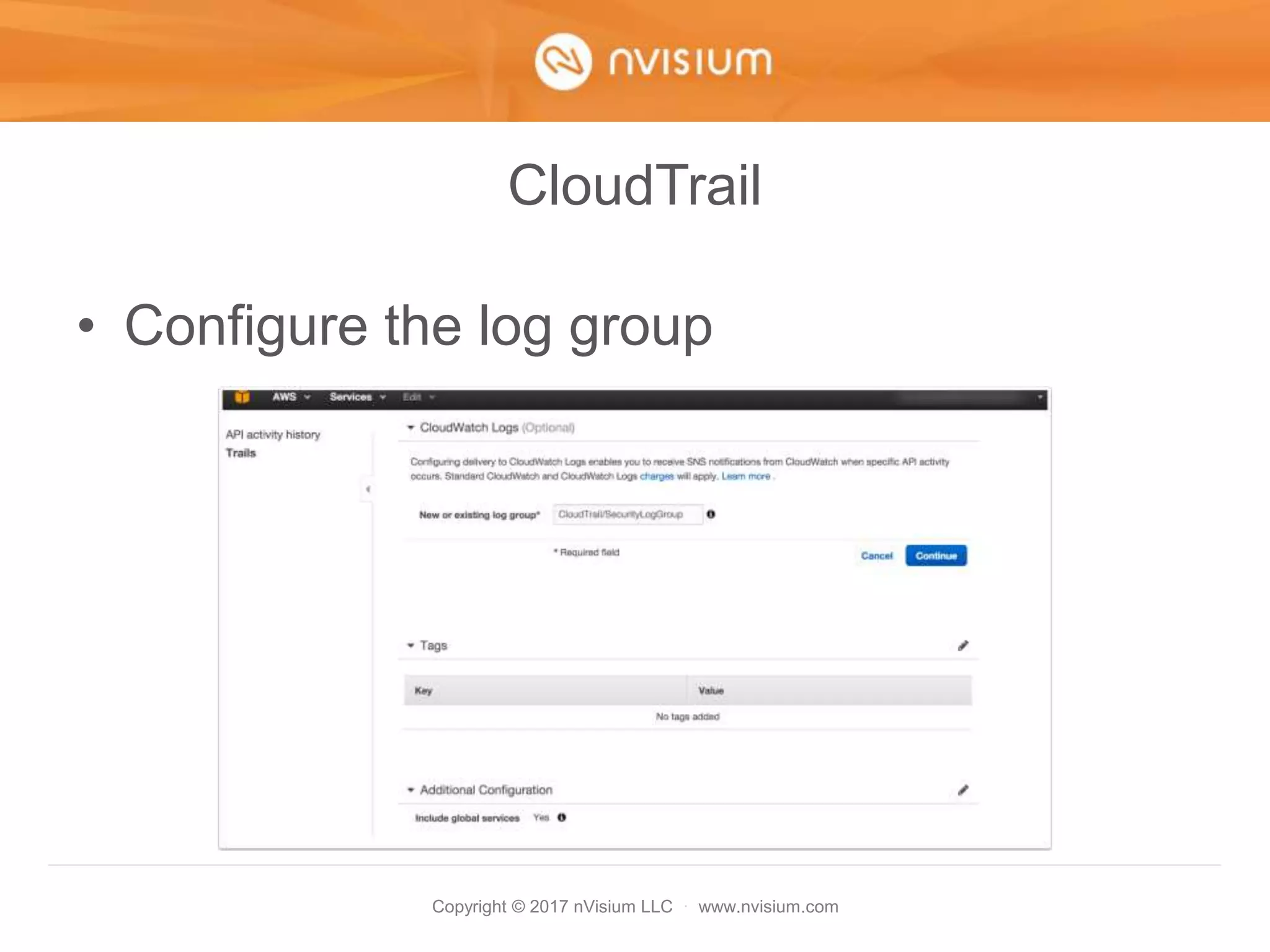
• Configure the log group
Copyright © 2017 nVisium LLC · www.nvisium.com
CloudTrail
• Allow the creation of an IAM role by
CloudTrail
Copyright © 2017 nVisium LLC · www.nvisium.com
Now for the fun stuff…
• Previous versions of this talk covered
configuring CloudWatch alarms
• Only one problem…
Copyright © 2017 nVisium LLC · www.nvisium.com
CloudWatch
• This alert doesn’t help much
Copyright © 2017 nVisium LLC · www.nvisium.com
CloudWatch
• I mean, its good to know someone is doing
something unauthorized but what we
REALLY want is…
Copyright © 2017 nVisium LLC · www.nvisium.com
Now we’re happy
Copyright © 2017 nVisium LLC · www.nvisium.com
CloudWatch Events & Alarms
• I learned the hard way so you don’t have
to
– Alarms filter for metric data and, when sent to
Lambda, SNS, etc. they only contain info on
the metric
– Events on the other hand, they send the
entire event data to Lambda (much more
detailed)
• Both are functions of CloudWatch
Copyright © 2017 nVisium LLC · www.nvisium.com
CloudWatch Agenda
• First we will setup an alarm for IAM
Unauthorized Activity
• Second, setup a similar alarm but for
events and with better, more granular
details
• Discuss other types of events to monitor
for
Copyright © 2017 nVisium LLC · www.nvisium.com
CloudWatch
• One last thing - you want both an alarm
and events… we have good reason
Copyright © 2017 nVisium LLC · www.nvisium.com
CloudWatch Alarm
• Choose log group, create metric
Copyright © 2017 nVisium LLC · www.nvisium.com
CloudWatch Alarm
• Define Pattern (what to grok for)
Copyright © 2017 nVisium LLC · www.nvisium.com
CloudWatch Alarm
• Assign a metric (naming conventions)
Copyright © 2017 nVisium LLC · www.nvisium.com
CloudWatch Alarm
• Click “Create Alarm”
Copyright © 2017 nVisium LLC · www.nvisium.com
CloudWatch Alarm
• Give it a name, desc, etc.
Copyright © 2017 nVisium LLC · www.nvisium.com
CloudWatch Alarm
• It works really really well
• No matter what event source the data
comes from, its parsed and recognized
correctly
• This means its safe
• But… those “details”…
Copyright © 2017 nVisium LLC · www.nvisium.com
CloudWatch Alarm
Copyright © 2017 nVisium LLC · www.nvisium.com
CloudWatch Alarm
• Super Helpful
Copyright © 2017 nVisium LLC · www.nvisium.com
CloudWatch Events
• But then I learned about CloudWatch
Events (Rules)!
• If something (Event) happens, you can
send that something to Lambda for
processing based on a rule (Rules)
Copyright © 2017 nVisium LLC · www.nvisium.com
CloudWatch Events
Copyright © 2017 nVisium LLC · www.nvisium.com
CloudWatch Events
• This what an event typically looks like
Copyright © 2017 nVisium LLC · www.nvisium.com
CloudWatch Events
• At first, I tried “How to Detect and
Automatically Revoke Unintended IAM
Access with Amazon CloudWatch Events”
https://aws.amazon.com/blogs/security/how-
to-detect-and-automatically-revoke-
unintended-iam-access-with-amazon-
cloudwatch-events/
Copyright © 2017 nVisium LLC · www.nvisium.com
CloudWatch Events
• Filters requests when event source = IAM
• Sends IAM event to Lambda
• Check user permissions
• Lacking administrative permissions?
=>Revoke access
Copyright © 2017 nVisium LLC · www.nvisium.com
CloudWatch Events
• Not exactly what I want although, cool stuff
• We are looking to alert on any
Unauthorized Activity error triggered by
AWS calls
Copyright © 2017 nVisium LLC · www.nvisium.com
Now for a brief interruption
Copyright © 2017 nVisium LLC · www.nvisium.com
Lambda & Slack
• Prior to Event Rule Creation
1. Configure Slack Webhook
2. KMS encrypt Slack Webhook URL
3. Create Lambda Function
Copyright © 2017 nVisium LLC · www.nvisium.com
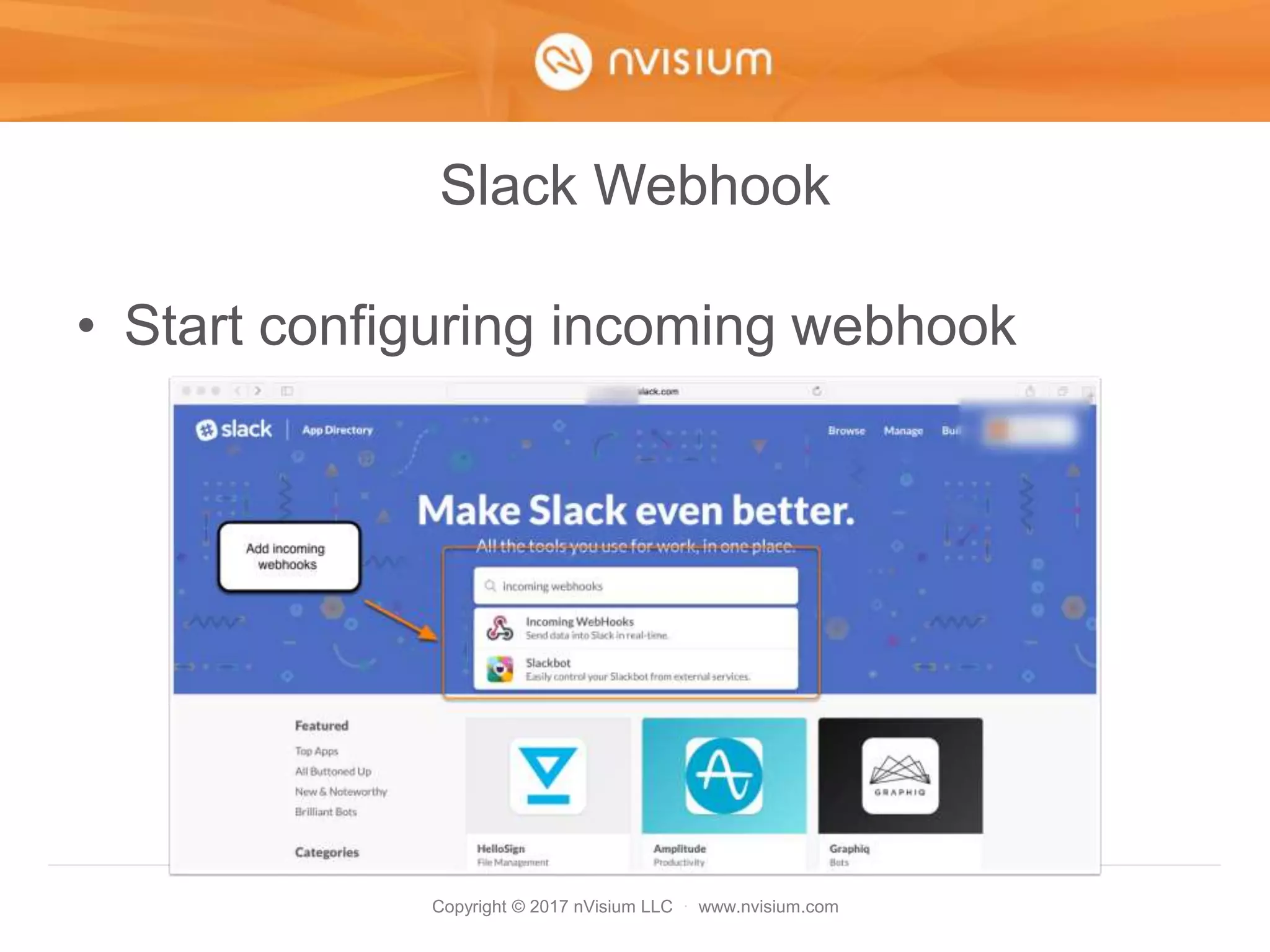
Slack Webhook
• Start configuring incoming webhook
Copyright © 2017 nVisium LLC · www.nvisium.com
Slack Webhook
• Add configuration inside of slack
Copyright © 2017 nVisium LLC · www.nvisium.com
Slack Webhook
• Choose the channel (choose pic, name,
etc.)
Copyright © 2017 nVisium LLC · www.nvisium.com
Slack Webhook
• Retrieve the webhook URL
Copyright © 2017 nVisium LLC · www.nvisium.com
KMS
• Create KMS key, later used to decrypt
Copyright © 2017 nVisium LLC · www.nvisium.com
KMS
• Name the key, follow steps 1 - 4
Copyright © 2017 nVisium LLC · www.nvisium.com
KMS
• Use the AWS KMS encrypt function to
encrypt the webhook URL
Copyright © 2017 nVisium LLC · www.nvisium.com
Lambda
• Next we will create the Lambda function
• We need the Base 64 encoded + KMS
encrypted URL from the previous slide
• This will be needed for our code to
securely retrieve the Slack Webhook URL
Copyright © 2017 nVisium LLC · www.nvisium.com
Lambda
• Select a blank function template
Copyright © 2017 nVisium LLC · www.nvisium.com
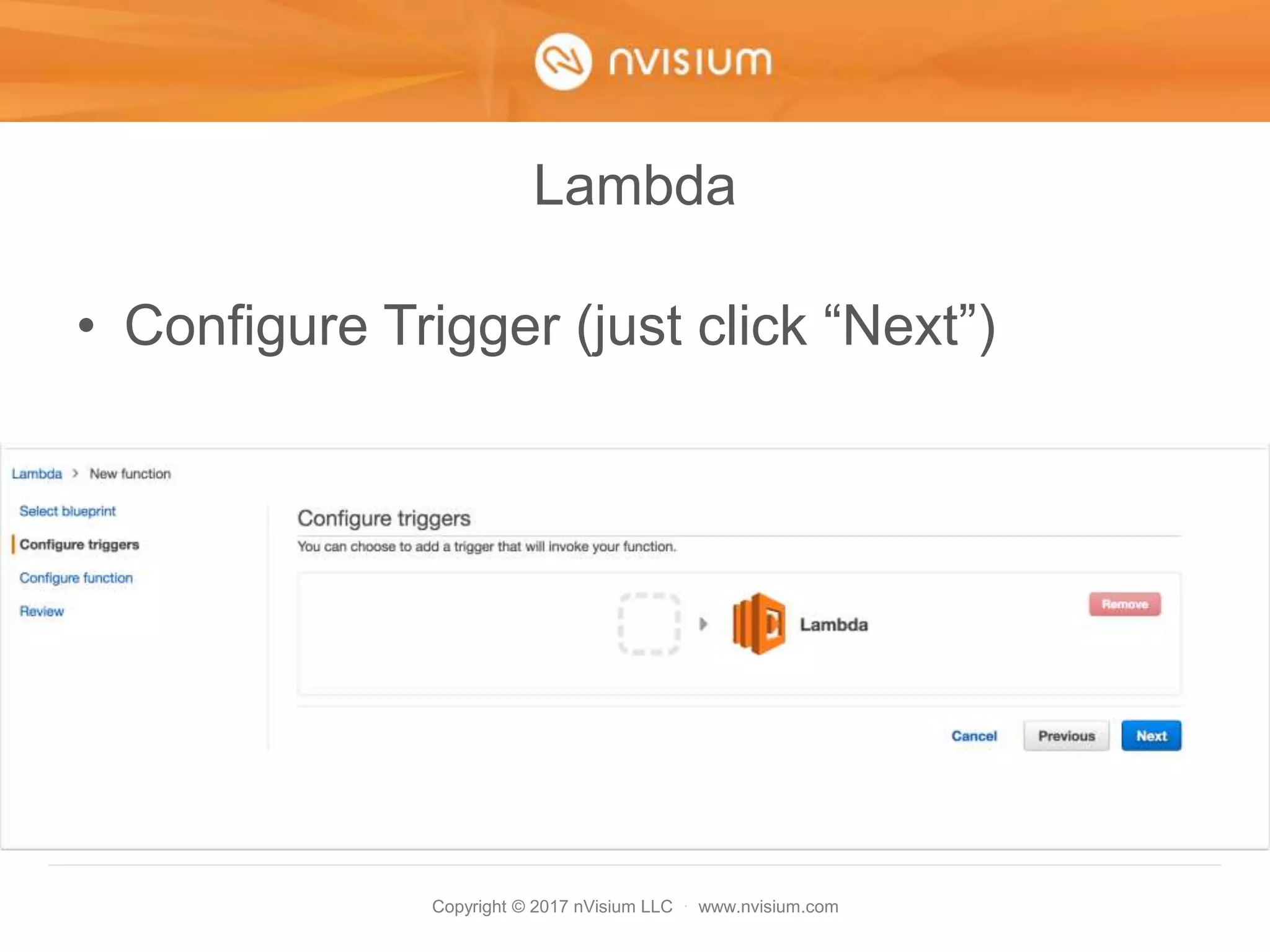
Lambda
• Configure Trigger (just click “Next”)
Copyright © 2017 nVisium LLC · www.nvisium.com
Lambda
• Place the following code into the function
https://gist.github.com/cktricky/8f4e9912f757
d1ccdcd00ad8e8630620
Copyright © 2017 nVisium LLC · www.nvisium.com
Lambda
• Use Base64+ KMS encrypted URL
Copyright © 2017 nVisium LLC · www.nvisium.com
Lambda
• Lastly, choose the slack service role
Copyright © 2017 nVisium LLC · www.nvisium.com
CloudWatch Events
• Let’s create the rule
Copyright © 2017 nVisium LLC · www.nvisium.com
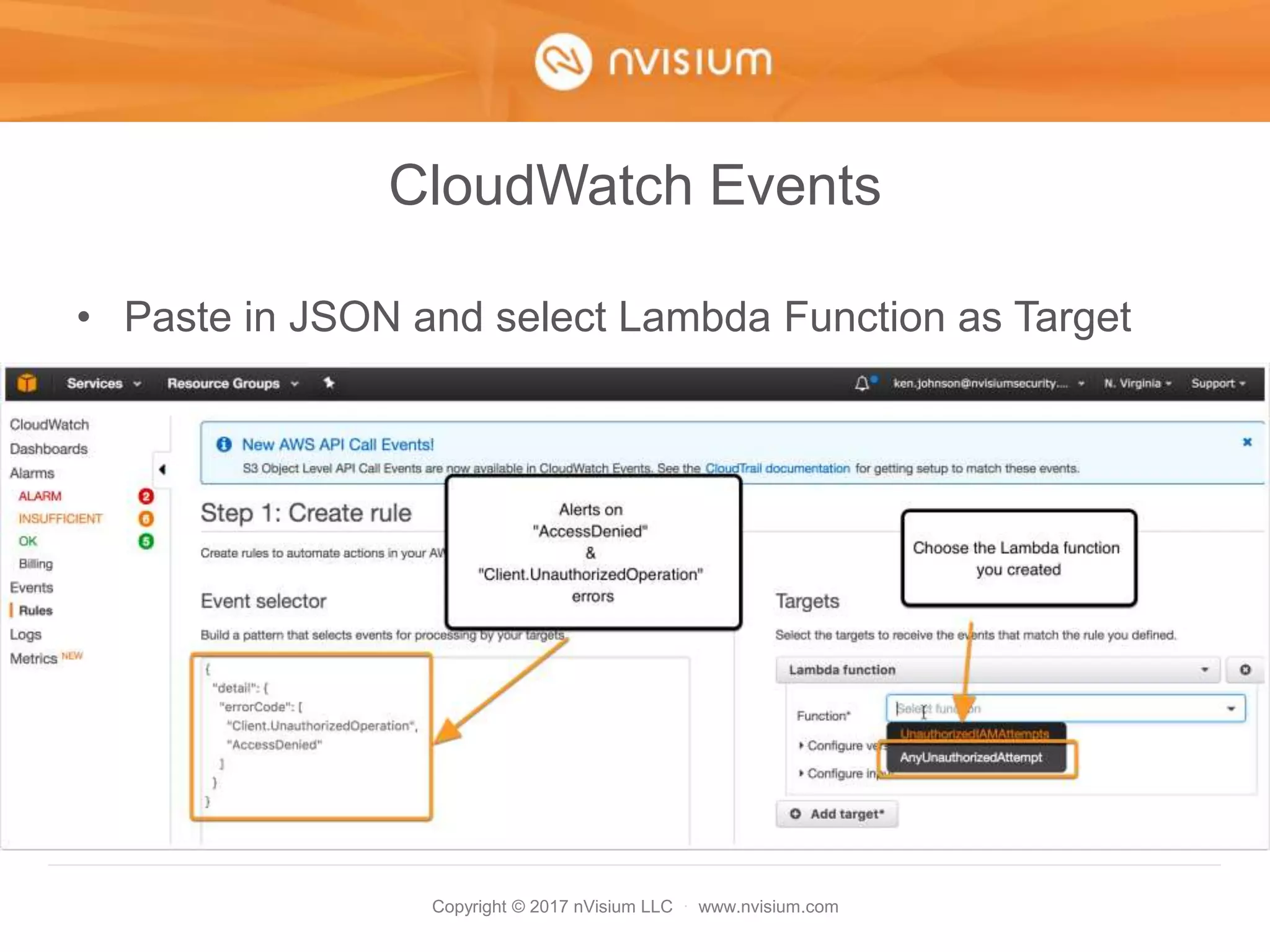
CloudWatch Events
• Directly edit the JSON
Copyright © 2017 nVisium LLC · www.nvisium.com
CloudWatch Events
• Paste in JSON and select Lambda Function as Target
Copyright © 2017 nVisium LLC · www.nvisium.com
CloudWatch Events
• FINISH IT
Copyright © 2017 nVisium LLC · www.nvisium.com
Lamba + Slack
• Time to test
Copyright © 2017 nVisium LLC · www.nvisium.com
WOOT!
Copyright © 2017 nVisium LLC · www.nvisium.com
CloudWatch Takeaways
• You can now unleash the power of Event
Rules for other alerts
• Simple as editing the JSON and parsing
the data via Lambda
• Use BOTH CloudWatch Alarms AND
Events
Copyright © 2017 nVisium LLC · www.nvisium.com
CloudWatch – Honorable Mention
• Previous versions of this talk show how to
configure Alerts for:
– Root account usage
– Billing Alerts (Exceed normal spend)
– Failed Login Attempts
https://www.youtube.com/watch?v=g-
wy9NdATtA&feature=youtu.be
Copyright © 2017 nVisium LLC · www.nvisium.com
Hardening
Copyright © 2017 nVisium LLC · www.nvisium.com
Amazon Information
• The AWS Security Fundamentals Course
provides the framework for your plan:
– You are responsible for leveraging the tools
AWS provides (financially)
– Your configuration… that is on you
https://aws.amazon.com/training/course-
descriptions/security-fundamentals/
Copyright © 2017 nVisium LLC · www.nvisium.com
IAM Hardening Checklist
1. Don’t Use The Root Account!
2. Audit IAM user policies
3. Multi-Factor Authentication
4. API + MFA
5. IAM Roles
6. Misc
Copyright © 2017 nVisium LLC · www.nvisium.com
AWS Root Account
Copyright © 2017 nVisium LLC · www.nvisium.com
Don’t Use the Root Account
• Every AWS environment has a root
account
– Root account is the king/god/all-powerful
– Use only when you absolutely must
– When those circumstances arise, notify your
team first
Copyright © 2017 nVisium LLC · www.nvisium.com
Remove Access Keys for Root Account
Simple steps:
– Disable or delete access keys if they exist:
– Implement verbal/written policy that states “we don’t
create access keys for the root account
– Use the CloudWatch Alarm I mention to alert on its
use
Copyright © 2017 nVisium LLC · www.nvisium.com
Auditing IAM Permissions
Copyright © 2017 nVisium LLC · www.nvisium.com
IAM Policy Management in a Nutshell
• A single IAM user can have…
– Multiple Managed Policies
– Multiple Inline Policies
– Belong to multiple IAM Groups which…
– Have multiple managed policies
– Have multiple inline policies
Copyright © 2017 nVisium LLC · www.nvisium.com
Audit IAM User Policies
• Explanation
– Managed Policies: Policies that can be
attached to multiple users, groups, or roles
– Inline Policies: Directly attached to a single
user, group, or role
Copyright © 2017 nVisium LLC · www.nvisium.com
Audit IAM User Policies
• Tool to inspect each user’s permissions:
– https://gist.github.com/cktricky/257990df2f36aa3a01a
8809777d49f5d
– Will create a CSV file
– Provides you with
• Usernames
• Inline Policies
• Managed Policies
• Groups
Copyright © 2017 nVisium LLC · www.nvisium.com
Audit IAM User Policies
• Tool Output
Copyright © 2017 nVisium LLC · www.nvisium.com
Audit IAM User Policies
• Closer look
Copyright © 2017 nVisium LLC · www.nvisium.com
Audit IAM User Policies
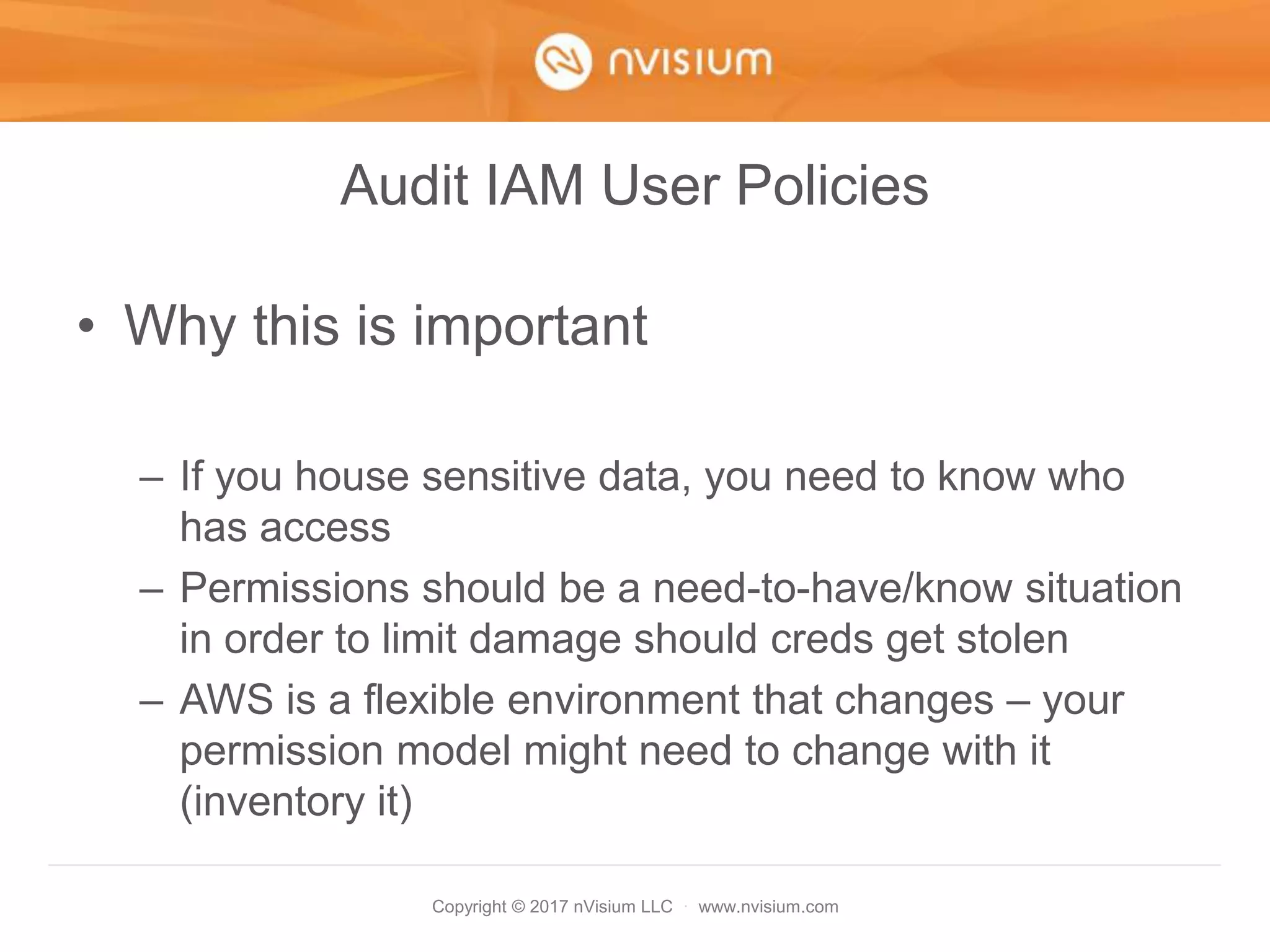
• Why this is important
– If you house sensitive data, you need to know who
has access
– Permissions should be a need-to-have/know situation
in order to limit damage should creds get stolen
– AWS is a flexible environment that changes – your
permission model might need to change with it
(inventory it)
Copyright © 2017 nVisium LLC · www.nvisium.com
Multi-Factor Authentication
(MFA)
Copyright © 2017 nVisium LLC · www.nvisium.com
MFA
• MFA == 2-Factor Authentication
• If credentials are stolen or guessed, we want a second
layer of protection
• You can use apps or hardware to do this
– Google Authenticator (Apps)
– Gemalto (Hardware)
• Find the full list of MFA devices here:
https://aws.amazon.com/iam/details/mfa/
Copyright © 2017 nVisium LLC · www.nvisium.com
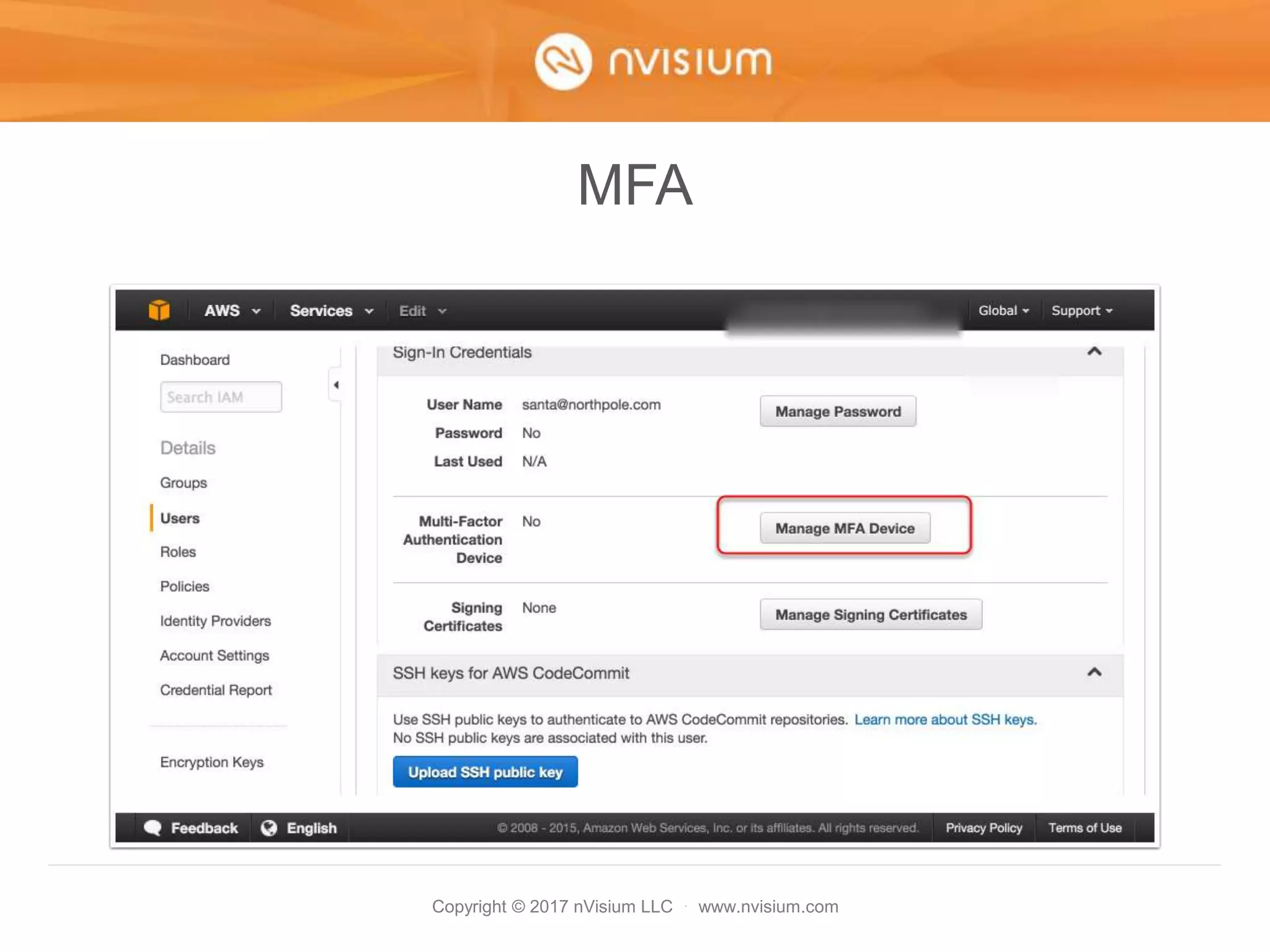
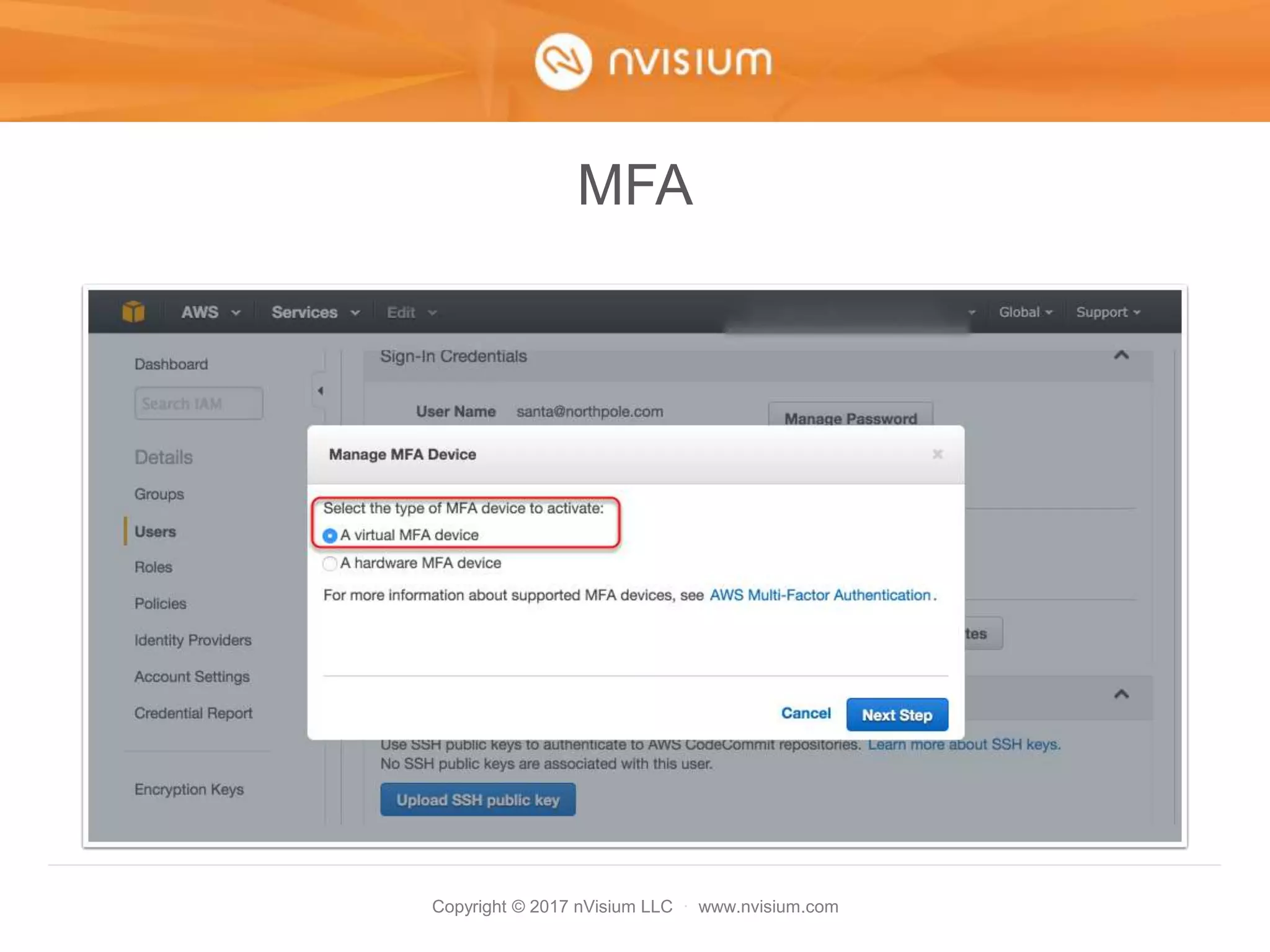
MFA
Let’s demonstrate enabling MFA using a
virtual device (app) on an IAM account
Copyright © 2017 nVisium LLC · www.nvisium.com
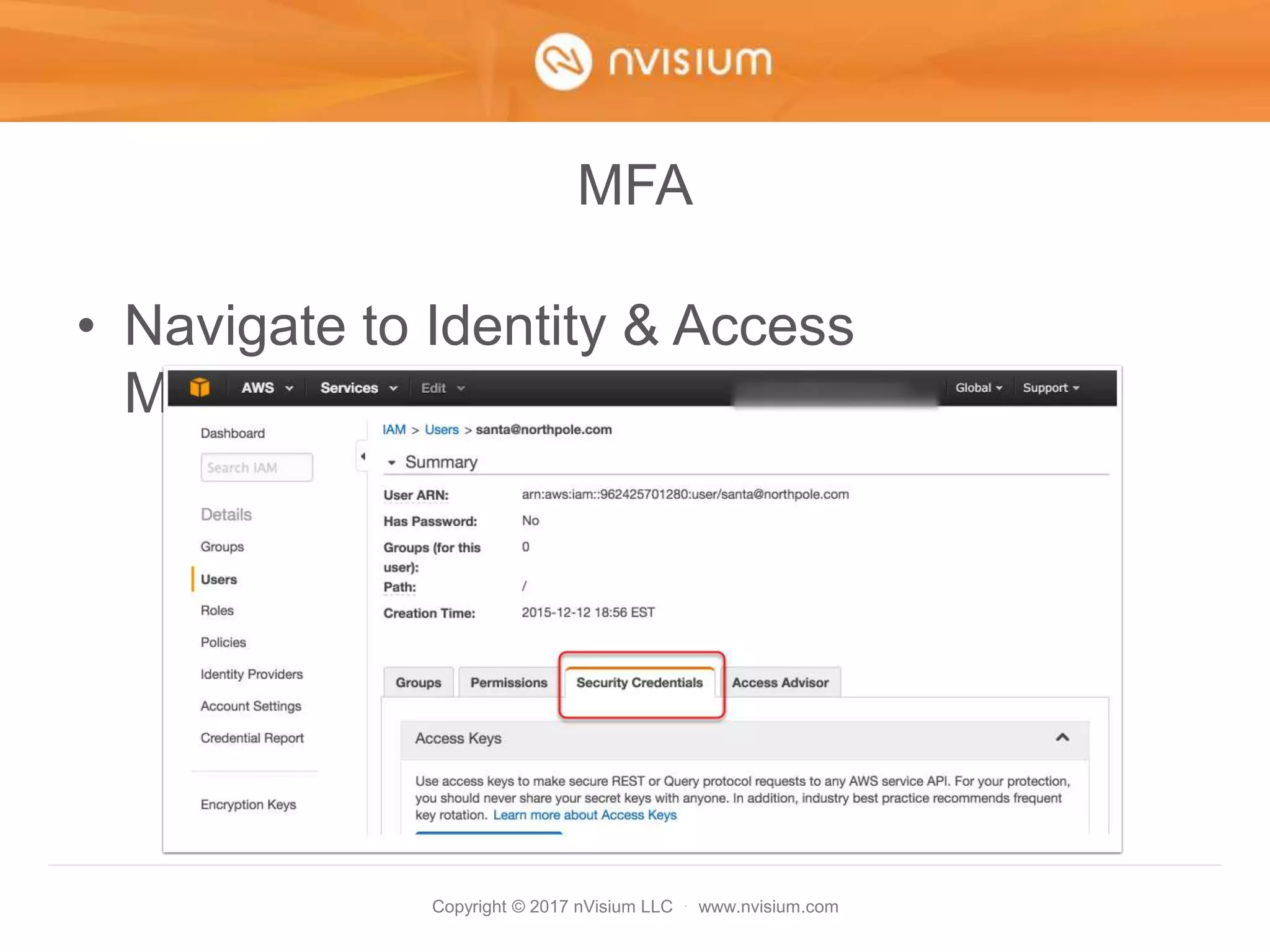
MFA
• Navigate to Identity & Access
Management
Copyright © 2017 nVisium LLC · www.nvisium.com
MFA
Copyright © 2017 nVisium LLC · www.nvisium.com
MFA
Copyright © 2017 nVisium LLC · www.nvisium.com
MFA
Copyright © 2017 nVisium LLC · www.nvisium.com
MFA
• At this point, its worth mentioning that non-
administrators or those without IAM
privileges cannot enable MFA on their own
account
• Why is this a problem? Well, they need to
be able to enable MFA on their own
device… not the administrator’s
• Fortunately, we have a solution!
Copyright © 2017 nVisium LLC · www.nvisium.com
MFA
Copyright © 2017 nVisium LLC · www.nvisium.com
MFA
• Okay so that wasn’t the easiest to read, so
here is the link:
http://docs.aws.amazon.com/IAM/latest/UserGui
de/id_credentials_delegate-
permissions_examples.html#creds-policies-mfa-
console
• Basically this IAM policy allows a user to
manage their *OWN* MFA device
Copyright © 2017 nVisium LLC · www.nvisium.com
MFA (for Root Account)
• Need a shared MFA for root? TOTP!
• Recommend using something like
1password for teams, can share the TOTP
code:
https://support.1password.com/guides/mac/totp.html
https://www.youtube.com/watch?v=eZyb-ArMK9g
Copyright © 2017 nVisium LLC · www.nvisium.com
API & MFA
Copyright © 2017 nVisium LLC · www.nvisium.com
API + MFA (101)
• This is the alternative to interacting with
the AWS environment via the web console
• Typically used for automated tasks
• Automated tasks means “code”.
Copyright © 2017 nVisium LLC · www.nvisium.com
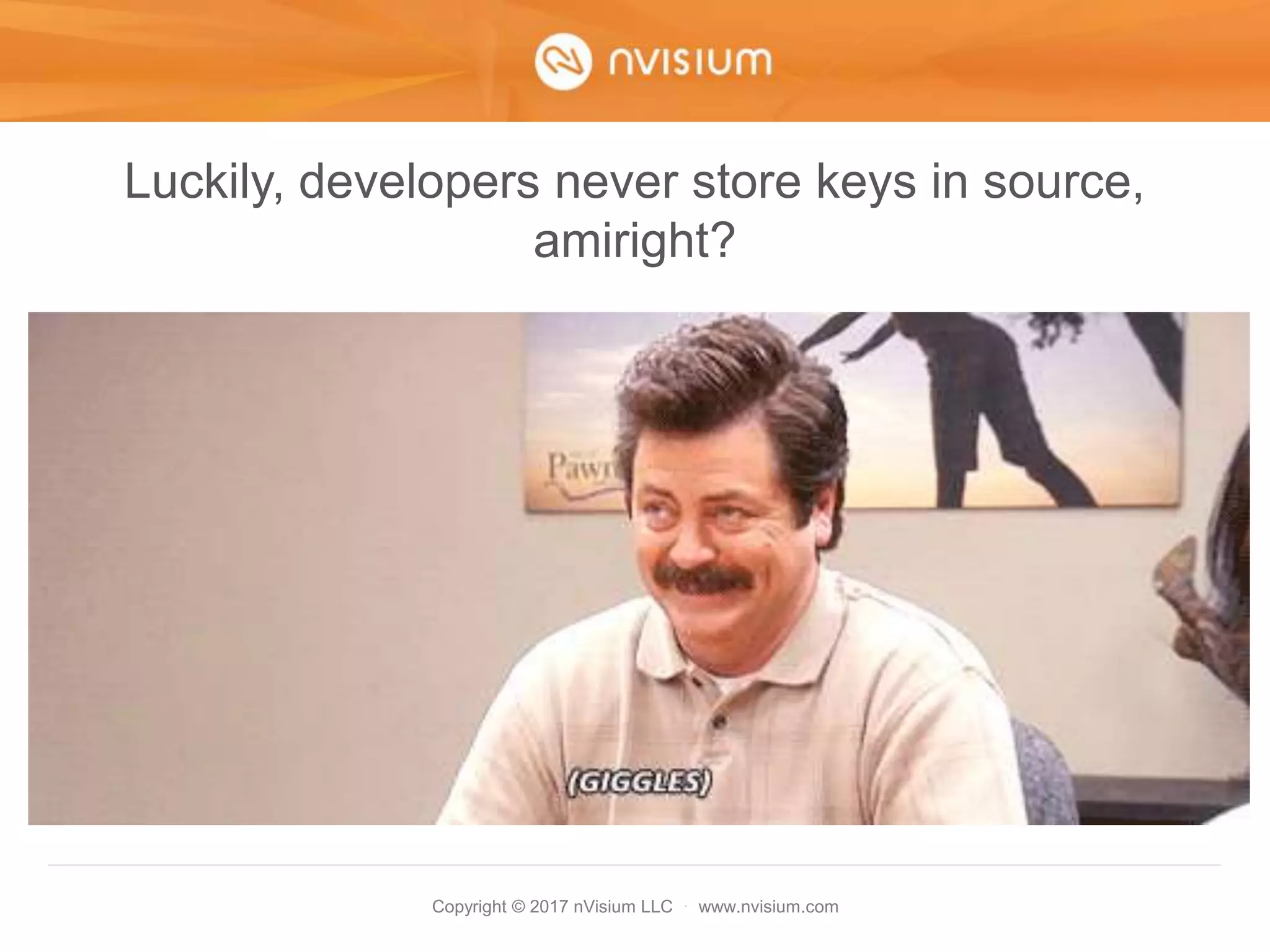
Luckily, developers never store keys in source,
amiright?
Copyright © 2017 nVisium LLC · www.nvisium.com
API + MFA
• At a minimum apply to those with IAM
permissions
Copyright © 2017 nVisium LLC · www.nvisium.com
API + MFA
• This entry requires MFA for Web/API
Copyright © 2017 nVisium LLC · www.nvisium.com
API + MFA
• Truth be told, doing this can be painful at
first
• Things that used to work, might not (via
the API)
• Fortunately, we have some answers for
you
• Firstly, let’s discuss STS or SecurityToken
Service
Copyright © 2017 nVisium LLC · www.nvisium.com
API + MFA
• Leverage STS in order to interact with the
AWS API should this MFA restriction be
placed on resources (and it should  )
• Example of using STS:
https://gist.github.com/cktricky/127be4e431563a986f0f
Copyright © 2017 nVisium LLC · www.nvisium.com
API + MFA
• Example of retrieving creds (in the gist)
Copyright © 2017 nVisium LLC · www.nvisium.com
API + MFA
• Output of script
Copyright © 2017 nVisium LLC · www.nvisium.com
API + MFA
• Use the creds to leverage tools like ec2-
api-tools
• (-O <access key id>–W <secret> and –T
<session token>)
Copyright © 2017 nVisium LLC · www.nvisium.com
API + MFA
• And in case you don’t like Ruby…
Copyright © 2017 nVisium LLC · www.nvisium.com
API + MFA
• Kidding… kinda
• https://github.com/jimbrowne/aws-sts-
helpers
Copyright © 2017 nVisium LLC · www.nvisium.com
API + MFA
• ElasticBeanstalk does not work with STS. Le
Terrible.
• However, there is a workaround, use
CodePipeline.
• Very simple process to setup but only works
with:
– GitHub
– AWS CodeCommit
– Amazon S3
Copyright © 2017 nVisium LLC · www.nvisium.com
API + MFA
Remember MFA only protects against the
web and NOT the API… unless you change
your policies and use STS
Copyright © 2017 nVisium LLC · www.nvisium.com
IAM Roles
Copyright © 2017 nVisium LLC · www.nvisium.com
IAM Roles
• Roles
• Is *like* a user but is not an IAM user
• Replaces the need for hardcoded Access
Key ID & Secret
• The extent of what a role can do is heavily
controlled by you, the administrator
Copyright © 2017 nVisium LLC · www.nvisium.com
IAM Roles
• Credentials automatically rotate via STS
• Available here on an EC2 instance:
http://169.254.169.254/latest/meta-data/iam/security-
credentials/
• If you’re using the AWS-SDK gem/egg/etc – credential
handling is built-in
• If you’re using something like Paperclip + Rails, try Fog
to leverage Roles
• https://github.com/thoughtbot/paperclip/issues/1591
Copyright © 2017 nVisium LLC · www.nvisium.com
IAM Roles
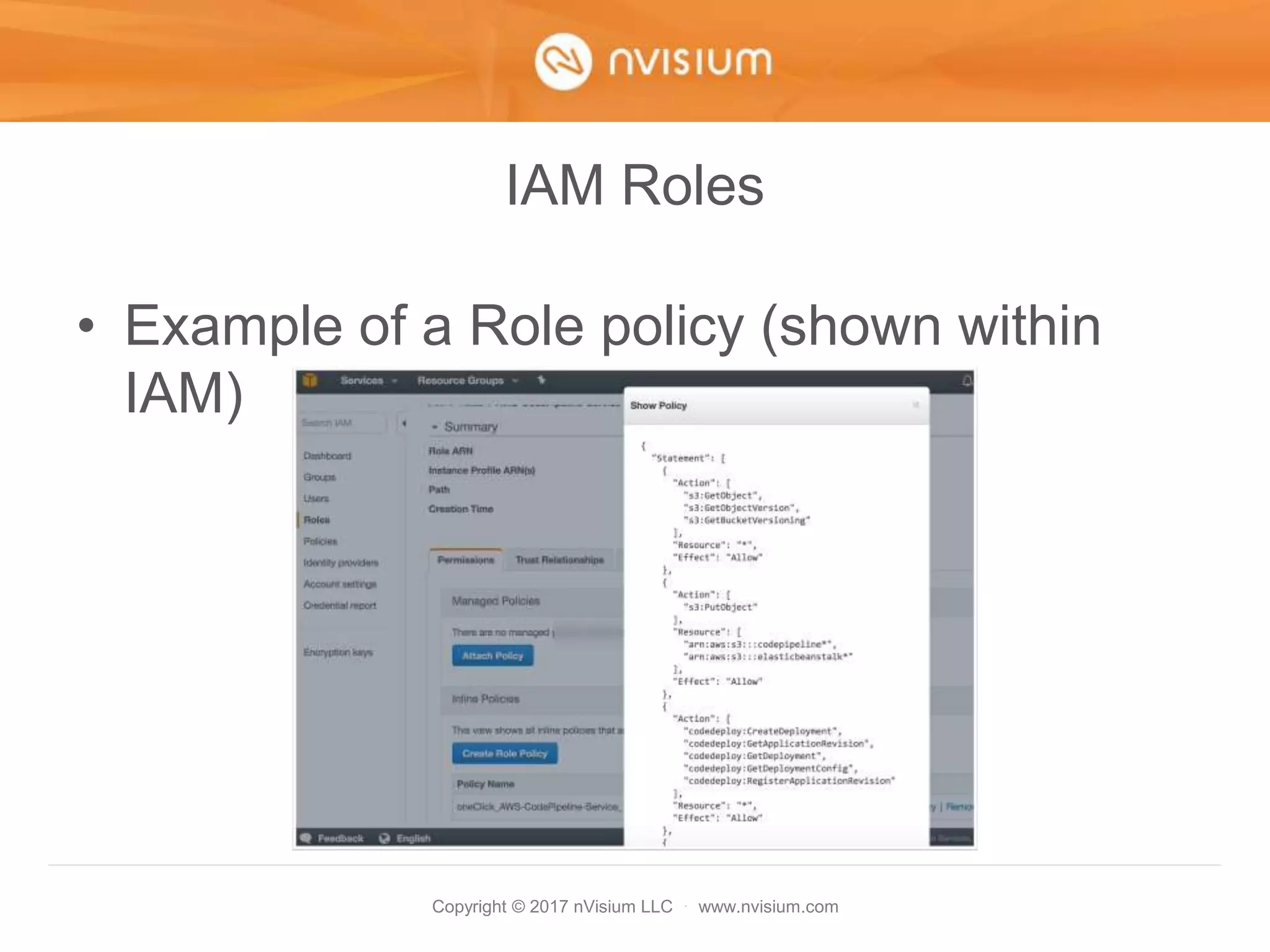
• Example of a Role policy (shown within
IAM)
Copyright © 2017 nVisium LLC · www.nvisium.com
IAM Roles
• Example attaching Role to
ElasticBeanstalk instance
Copyright © 2017 nVisium LLC · www.nvisium.com
Misc
Copyright © 2017 nVisium LLC · www.nvisium.com
Evaluate Volume Status
• Review AWS environment for Unencrypted
and Encrypted EBS Volumes
https://gist.github.com/cktricky/0fa3b13ca43
06bcd1ec384e88eac3f55
Copyright © 2017 nVisium LLC · www.nvisium.com
Evaluate S3 Bucket Status
• Review S3 buckets to determine security
policy
https://gist.github.com/cktricky/faf0f40116e5
35a055b7412458136917
Copyright © 2017 nVisium LLC · www.nvisium.com
Summary
Copyright © 2017 nVisium LLC · www.nvisium.com
Summary
• Hopefully, I’ve given you some ideas
• We talked about Monitoring & Hardening
• But we did NOT discuss recovery
(prepare for the worst)
– http://www.irongeek.com/i.php?page=videos/d
erbycon6/120-hardening-aws-environments-
and-automating-incident-response-for-aws-
compromises-andrew-krug-alex-mccormack
Copyright © 2017 nVisium LLC · www.nvisium.com
Q&A
Copyright © 2017 nVisium LLC · www.nvisium.com
Contact
@cktricky – Me Twitter
@nVisium – nVisium Twitter
https://www.nvisium.com - Site
LOL - MySpace

AWS Survival Guide

  • 1.
    Copyright © 2017nVisium LLC · www.nvisium.com AWS Survival Guide Ken Johnson, CTO
  • 2.
    Copyright © 2017nVisium LLC · www.nvisium.com Before we get started…
  • 3.
    Copyright © 2017nVisium LLC · www.nvisium.com
  • 4.
    Copyright © 2017nVisium LLC · www.nvisium.com
  • 5.
    Copyright © 2017nVisium LLC · www.nvisium.com
  • 6.
    Copyright © 2017nVisium LLC · www.nvisium.com
  • 7.
    Copyright © 2017nVisium LLC · www.nvisium.com About • I’m the CTO of nVisium, a security company, and we use AWS… and it is a challenge • This my opportunity to share some of those experiences • Prior US Navy • Spoke a ton about (In)Security of: • Rails • DevOps • Web Frameworks • AWS (obviously) • And… General Web Exploitation Concepts
  • 8.
    Copyright © 2017nVisium LLC · www.nvisium.com So how is this happening • Exposed Credentials • Misconfiguration • Vulnerable Applications/Systems
  • 9.
    Copyright © 2017nVisium LLC · www.nvisium.com Exposed Credentials
  • 10.
    Copyright © 2017nVisium LLC · www.nvisium.com Exposed Credentials • Keys are often stored on developer or ops machines • Typically can be found under – ~/.aws/config – ~/.bashrc – ~/.zshrc – ~/.elasticbeanstalk/aws_credential_file
  • 11.
    Copyright © 2017nVisium LLC · www.nvisium.com Exposed Credentials
  • 12.
    Copyright © 2017nVisium LLC · www.nvisium.com Exposed Credentials
  • 13.
    Copyright © 2017nVisium LLC · www.nvisium.com Exposed Credentials • Source code is leaked or otherwise obtained
  • 14.
    Copyright © 2017nVisium LLC · www.nvisium.com Misconfiguration
  • 15.
    Copyright © 2017nVisium LLC · www.nvisium.com Misconfiguration • S3 bucket with “any authenticated user” permissions (credit: Chris Gates)
  • 16.
    Copyright © 2017nVisium LLC · www.nvisium.com Misconfiguration • Using AWS CLI to access bucket (credit: Chris Gates)
  • 17.
    Copyright © 2017nVisium LLC · www.nvisium.com Misconfiguration • I have many more examples including – RDS default creds – “Internal” assets on a VPC – Security groups – Unencrypted storage of PII – List goes on…
  • 18.
    Copyright © 2017nVisium LLC · www.nvisium.com Vulnerable Applications/Systems
  • 19.
    Copyright © 2017nVisium LLC · www.nvisium.com Vulnerable Applications/Systems 1. Machine is compromised 2. Attacker grabs metadata info 3. Uses these credentials to pivot
  • 20.
    Copyright © 2017nVisium LLC · www.nvisium.com Vulnerable Applications/Systems • Browse to this address from compromised machine http://169.254.169.254/latest/meta- data/iam/security-credentials/ • Obtain credentials here and pivot
  • 21.
    Copyright © 2017nVisium LLC · www.nvisium.com Vulnerable Applications/Systems • Even a talk/tool to help with this – https://www.blackhat.com/docs/us- 14/materials/us-14-Riancho-Pivoting-In- Amazon-Clouds-WP.pdf – https://andresriancho.github.io/nimbostratus/
  • 22.
    Copyright © 2017nVisium LLC · www.nvisium.com Summary • Plenty of ways to get in • Plenty of ways to secure your infrastructure • Let’s get started shall we
  • 23.
    Copyright © 2017nVisium LLC · www.nvisium.com Agenda • Monitoring – Automating • Hardening – Prevention of Attacks • Q&A
  • 24.
    Copyright © 2017nVisium LLC · www.nvisium.com Monitoring
  • 25.
    Copyright © 2017nVisium LLC · www.nvisium.com Familiarize ourselves… …with these basic services: • CloudWatch – Monitoring service • CloudTrail – Logs all AWS activity once enabled
  • 26.
    Copyright © 2017nVisium LLC · www.nvisium.com Cloudtrail
  • 27.
    Copyright © 2017nVisium LLC · www.nvisium.com CloudTrail • Pretty easy, first turn it on..
  • 28.
    Copyright © 2017nVisium LLC · www.nvisium.com CloudTrail • Configure the log group
  • 29.
    Copyright © 2017nVisium LLC · www.nvisium.com CloudTrail • Allow the creation of an IAM role by CloudTrail
  • 30.
    Copyright © 2017nVisium LLC · www.nvisium.com Now for the fun stuff… • Previous versions of this talk covered configuring CloudWatch alarms • Only one problem…
  • 31.
    Copyright © 2017nVisium LLC · www.nvisium.com CloudWatch • This alert doesn’t help much
  • 32.
    Copyright © 2017nVisium LLC · www.nvisium.com CloudWatch • I mean, its good to know someone is doing something unauthorized but what we REALLY want is…
  • 33.
    Copyright © 2017nVisium LLC · www.nvisium.com Now we’re happy
  • 34.
    Copyright © 2017nVisium LLC · www.nvisium.com CloudWatch Events & Alarms • I learned the hard way so you don’t have to – Alarms filter for metric data and, when sent to Lambda, SNS, etc. they only contain info on the metric – Events on the other hand, they send the entire event data to Lambda (much more detailed) • Both are functions of CloudWatch
  • 35.
    Copyright © 2017nVisium LLC · www.nvisium.com CloudWatch Agenda • First we will setup an alarm for IAM Unauthorized Activity • Second, setup a similar alarm but for events and with better, more granular details • Discuss other types of events to monitor for
  • 36.
    Copyright © 2017nVisium LLC · www.nvisium.com CloudWatch • One last thing - you want both an alarm and events… we have good reason
  • 37.
    Copyright © 2017nVisium LLC · www.nvisium.com CloudWatch Alarm • Choose log group, create metric
  • 38.
    Copyright © 2017nVisium LLC · www.nvisium.com CloudWatch Alarm • Define Pattern (what to grok for)
  • 39.
    Copyright © 2017nVisium LLC · www.nvisium.com CloudWatch Alarm • Assign a metric (naming conventions)
  • 40.
    Copyright © 2017nVisium LLC · www.nvisium.com CloudWatch Alarm • Click “Create Alarm”
  • 41.
    Copyright © 2017nVisium LLC · www.nvisium.com CloudWatch Alarm • Give it a name, desc, etc.
  • 42.
    Copyright © 2017nVisium LLC · www.nvisium.com CloudWatch Alarm • It works really really well • No matter what event source the data comes from, its parsed and recognized correctly • This means its safe • But… those “details”…
  • 43.
    Copyright © 2017nVisium LLC · www.nvisium.com CloudWatch Alarm
  • 44.
    Copyright © 2017nVisium LLC · www.nvisium.com CloudWatch Alarm • Super Helpful
  • 45.
    Copyright © 2017nVisium LLC · www.nvisium.com CloudWatch Events • But then I learned about CloudWatch Events (Rules)! • If something (Event) happens, you can send that something to Lambda for processing based on a rule (Rules)
  • 46.
    Copyright © 2017nVisium LLC · www.nvisium.com CloudWatch Events
  • 47.
    Copyright © 2017nVisium LLC · www.nvisium.com CloudWatch Events • This what an event typically looks like
  • 48.
    Copyright © 2017nVisium LLC · www.nvisium.com CloudWatch Events • At first, I tried “How to Detect and Automatically Revoke Unintended IAM Access with Amazon CloudWatch Events” https://aws.amazon.com/blogs/security/how- to-detect-and-automatically-revoke- unintended-iam-access-with-amazon- cloudwatch-events/
  • 49.
    Copyright © 2017nVisium LLC · www.nvisium.com CloudWatch Events • Filters requests when event source = IAM • Sends IAM event to Lambda • Check user permissions • Lacking administrative permissions? =>Revoke access
  • 50.
    Copyright © 2017nVisium LLC · www.nvisium.com CloudWatch Events • Not exactly what I want although, cool stuff • We are looking to alert on any Unauthorized Activity error triggered by AWS calls
  • 51.
    Copyright © 2017nVisium LLC · www.nvisium.com Now for a brief interruption
  • 52.
    Copyright © 2017nVisium LLC · www.nvisium.com Lambda & Slack • Prior to Event Rule Creation 1. Configure Slack Webhook 2. KMS encrypt Slack Webhook URL 3. Create Lambda Function
  • 53.
    Copyright © 2017nVisium LLC · www.nvisium.com Slack Webhook • Start configuring incoming webhook
  • 54.
    Copyright © 2017nVisium LLC · www.nvisium.com Slack Webhook • Add configuration inside of slack
  • 55.
    Copyright © 2017nVisium LLC · www.nvisium.com Slack Webhook • Choose the channel (choose pic, name, etc.)
  • 56.
    Copyright © 2017nVisium LLC · www.nvisium.com Slack Webhook • Retrieve the webhook URL
  • 57.
    Copyright © 2017nVisium LLC · www.nvisium.com KMS • Create KMS key, later used to decrypt
  • 58.
    Copyright © 2017nVisium LLC · www.nvisium.com KMS • Name the key, follow steps 1 - 4
  • 59.
    Copyright © 2017nVisium LLC · www.nvisium.com KMS • Use the AWS KMS encrypt function to encrypt the webhook URL
  • 60.
    Copyright © 2017nVisium LLC · www.nvisium.com Lambda • Next we will create the Lambda function • We need the Base 64 encoded + KMS encrypted URL from the previous slide • This will be needed for our code to securely retrieve the Slack Webhook URL
  • 61.
    Copyright © 2017nVisium LLC · www.nvisium.com Lambda • Select a blank function template
  • 62.
    Copyright © 2017nVisium LLC · www.nvisium.com Lambda • Configure Trigger (just click “Next”)
  • 63.
    Copyright © 2017nVisium LLC · www.nvisium.com Lambda • Place the following code into the function https://gist.github.com/cktricky/8f4e9912f757 d1ccdcd00ad8e8630620
  • 64.
    Copyright © 2017nVisium LLC · www.nvisium.com Lambda • Use Base64+ KMS encrypted URL
  • 65.
    Copyright © 2017nVisium LLC · www.nvisium.com Lambda • Lastly, choose the slack service role
  • 66.
    Copyright © 2017nVisium LLC · www.nvisium.com CloudWatch Events • Let’s create the rule
  • 67.
    Copyright © 2017nVisium LLC · www.nvisium.com CloudWatch Events • Directly edit the JSON
  • 68.
    Copyright © 2017nVisium LLC · www.nvisium.com CloudWatch Events • Paste in JSON and select Lambda Function as Target
  • 69.
    Copyright © 2017nVisium LLC · www.nvisium.com CloudWatch Events • FINISH IT
  • 70.
    Copyright © 2017nVisium LLC · www.nvisium.com Lamba + Slack • Time to test
  • 71.
    Copyright © 2017nVisium LLC · www.nvisium.com WOOT!
  • 72.
    Copyright © 2017nVisium LLC · www.nvisium.com
  • 73.
    Copyright © 2017nVisium LLC · www.nvisium.com CloudWatch Takeaways • You can now unleash the power of Event Rules for other alerts • Simple as editing the JSON and parsing the data via Lambda • Use BOTH CloudWatch Alarms AND Events
  • 74.
    Copyright © 2017nVisium LLC · www.nvisium.com CloudWatch – Honorable Mention • Previous versions of this talk show how to configure Alerts for: – Root account usage – Billing Alerts (Exceed normal spend) – Failed Login Attempts https://www.youtube.com/watch?v=g- wy9NdATtA&feature=youtu.be
  • 75.
    Copyright © 2017nVisium LLC · www.nvisium.com Hardening
  • 76.
    Copyright © 2017nVisium LLC · www.nvisium.com Amazon Information • The AWS Security Fundamentals Course provides the framework for your plan: – You are responsible for leveraging the tools AWS provides (financially) – Your configuration… that is on you https://aws.amazon.com/training/course- descriptions/security-fundamentals/
  • 77.
    Copyright © 2017nVisium LLC · www.nvisium.com IAM Hardening Checklist 1. Don’t Use The Root Account! 2. Audit IAM user policies 3. Multi-Factor Authentication 4. API + MFA 5. IAM Roles 6. Misc
  • 78.
    Copyright © 2017nVisium LLC · www.nvisium.com AWS Root Account
  • 79.
    Copyright © 2017nVisium LLC · www.nvisium.com Don’t Use the Root Account • Every AWS environment has a root account – Root account is the king/god/all-powerful – Use only when you absolutely must – When those circumstances arise, notify your team first
  • 80.
    Copyright © 2017nVisium LLC · www.nvisium.com Remove Access Keys for Root Account Simple steps: – Disable or delete access keys if they exist: – Implement verbal/written policy that states “we don’t create access keys for the root account – Use the CloudWatch Alarm I mention to alert on its use
  • 81.
    Copyright © 2017nVisium LLC · www.nvisium.com Auditing IAM Permissions
  • 82.
    Copyright © 2017nVisium LLC · www.nvisium.com IAM Policy Management in a Nutshell • A single IAM user can have… – Multiple Managed Policies – Multiple Inline Policies – Belong to multiple IAM Groups which… – Have multiple managed policies – Have multiple inline policies
  • 83.
    Copyright © 2017nVisium LLC · www.nvisium.com
  • 84.
    Copyright © 2017nVisium LLC · www.nvisium.com Audit IAM User Policies • Explanation – Managed Policies: Policies that can be attached to multiple users, groups, or roles – Inline Policies: Directly attached to a single user, group, or role
  • 85.
    Copyright © 2017nVisium LLC · www.nvisium.com Audit IAM User Policies • Tool to inspect each user’s permissions: – https://gist.github.com/cktricky/257990df2f36aa3a01a 8809777d49f5d – Will create a CSV file – Provides you with • Usernames • Inline Policies • Managed Policies • Groups
  • 86.
    Copyright © 2017nVisium LLC · www.nvisium.com Audit IAM User Policies • Tool Output
  • 87.
    Copyright © 2017nVisium LLC · www.nvisium.com Audit IAM User Policies • Closer look
  • 88.
    Copyright © 2017nVisium LLC · www.nvisium.com
  • 89.
    Copyright © 2017nVisium LLC · www.nvisium.com Audit IAM User Policies • Why this is important – If you house sensitive data, you need to know who has access – Permissions should be a need-to-have/know situation in order to limit damage should creds get stolen – AWS is a flexible environment that changes – your permission model might need to change with it (inventory it)
  • 90.
    Copyright © 2017nVisium LLC · www.nvisium.com Multi-Factor Authentication (MFA)
  • 91.
    Copyright © 2017nVisium LLC · www.nvisium.com MFA • MFA == 2-Factor Authentication • If credentials are stolen or guessed, we want a second layer of protection • You can use apps or hardware to do this – Google Authenticator (Apps) – Gemalto (Hardware) • Find the full list of MFA devices here: https://aws.amazon.com/iam/details/mfa/
  • 92.
    Copyright © 2017nVisium LLC · www.nvisium.com MFA Let’s demonstrate enabling MFA using a virtual device (app) on an IAM account
  • 93.
    Copyright © 2017nVisium LLC · www.nvisium.com MFA • Navigate to Identity & Access Management
  • 94.
    Copyright © 2017nVisium LLC · www.nvisium.com MFA
  • 95.
    Copyright © 2017nVisium LLC · www.nvisium.com MFA
  • 96.
    Copyright © 2017nVisium LLC · www.nvisium.com MFA
  • 97.
    Copyright © 2017nVisium LLC · www.nvisium.com MFA • At this point, its worth mentioning that non- administrators or those without IAM privileges cannot enable MFA on their own account • Why is this a problem? Well, they need to be able to enable MFA on their own device… not the administrator’s • Fortunately, we have a solution!
  • 98.
    Copyright © 2017nVisium LLC · www.nvisium.com MFA
  • 99.
    Copyright © 2017nVisium LLC · www.nvisium.com MFA • Okay so that wasn’t the easiest to read, so here is the link: http://docs.aws.amazon.com/IAM/latest/UserGui de/id_credentials_delegate- permissions_examples.html#creds-policies-mfa- console • Basically this IAM policy allows a user to manage their *OWN* MFA device
  • 100.
    Copyright © 2017nVisium LLC · www.nvisium.com MFA (for Root Account) • Need a shared MFA for root? TOTP! • Recommend using something like 1password for teams, can share the TOTP code: https://support.1password.com/guides/mac/totp.html https://www.youtube.com/watch?v=eZyb-ArMK9g
  • 101.
    Copyright © 2017nVisium LLC · www.nvisium.com API & MFA
  • 102.
    Copyright © 2017nVisium LLC · www.nvisium.com API + MFA (101) • This is the alternative to interacting with the AWS environment via the web console • Typically used for automated tasks • Automated tasks means “code”.
  • 103.
    Copyright © 2017nVisium LLC · www.nvisium.com Luckily, developers never store keys in source, amiright?
  • 104.
    Copyright © 2017nVisium LLC · www.nvisium.com API + MFA • At a minimum apply to those with IAM permissions
  • 105.
    Copyright © 2017nVisium LLC · www.nvisium.com API + MFA • This entry requires MFA for Web/API
  • 106.
    Copyright © 2017nVisium LLC · www.nvisium.com API + MFA • Truth be told, doing this can be painful at first • Things that used to work, might not (via the API) • Fortunately, we have some answers for you • Firstly, let’s discuss STS or SecurityToken Service
  • 107.
    Copyright © 2017nVisium LLC · www.nvisium.com API + MFA • Leverage STS in order to interact with the AWS API should this MFA restriction be placed on resources (and it should  ) • Example of using STS: https://gist.github.com/cktricky/127be4e431563a986f0f
  • 108.
    Copyright © 2017nVisium LLC · www.nvisium.com API + MFA • Example of retrieving creds (in the gist)
  • 109.
    Copyright © 2017nVisium LLC · www.nvisium.com API + MFA • Output of script
  • 110.
    Copyright © 2017nVisium LLC · www.nvisium.com API + MFA • Use the creds to leverage tools like ec2- api-tools • (-O <access key id>–W <secret> and –T <session token>)
  • 111.
    Copyright © 2017nVisium LLC · www.nvisium.com API + MFA • And in case you don’t like Ruby…
  • 112.
    Copyright © 2017nVisium LLC · www.nvisium.com API + MFA • Kidding… kinda • https://github.com/jimbrowne/aws-sts- helpers
  • 113.
    Copyright © 2017nVisium LLC · www.nvisium.com API + MFA • ElasticBeanstalk does not work with STS. Le Terrible. • However, there is a workaround, use CodePipeline. • Very simple process to setup but only works with: – GitHub – AWS CodeCommit – Amazon S3
  • 114.
    Copyright © 2017nVisium LLC · www.nvisium.com API + MFA Remember MFA only protects against the web and NOT the API… unless you change your policies and use STS
  • 115.
    Copyright © 2017nVisium LLC · www.nvisium.com IAM Roles
  • 116.
    Copyright © 2017nVisium LLC · www.nvisium.com IAM Roles • Roles • Is *like* a user but is not an IAM user • Replaces the need for hardcoded Access Key ID & Secret • The extent of what a role can do is heavily controlled by you, the administrator
  • 117.
    Copyright © 2017nVisium LLC · www.nvisium.com IAM Roles • Credentials automatically rotate via STS • Available here on an EC2 instance: http://169.254.169.254/latest/meta-data/iam/security- credentials/ • If you’re using the AWS-SDK gem/egg/etc – credential handling is built-in • If you’re using something like Paperclip + Rails, try Fog to leverage Roles • https://github.com/thoughtbot/paperclip/issues/1591
  • 118.
    Copyright © 2017nVisium LLC · www.nvisium.com IAM Roles • Example of a Role policy (shown within IAM)
  • 119.
    Copyright © 2017nVisium LLC · www.nvisium.com IAM Roles • Example attaching Role to ElasticBeanstalk instance
  • 120.
    Copyright © 2017nVisium LLC · www.nvisium.com Misc
  • 121.
    Copyright © 2017nVisium LLC · www.nvisium.com Evaluate Volume Status • Review AWS environment for Unencrypted and Encrypted EBS Volumes https://gist.github.com/cktricky/0fa3b13ca43 06bcd1ec384e88eac3f55
  • 122.
    Copyright © 2017nVisium LLC · www.nvisium.com Evaluate S3 Bucket Status • Review S3 buckets to determine security policy https://gist.github.com/cktricky/faf0f40116e5 35a055b7412458136917
  • 123.
    Copyright © 2017nVisium LLC · www.nvisium.com Summary
  • 124.
    Copyright © 2017nVisium LLC · www.nvisium.com Summary • Hopefully, I’ve given you some ideas • We talked about Monitoring & Hardening • But we did NOT discuss recovery (prepare for the worst) – http://www.irongeek.com/i.php?page=videos/d erbycon6/120-hardening-aws-environments- and-automating-incident-response-for-aws- compromises-andrew-krug-alex-mccormack
  • 125.
    Copyright © 2017nVisium LLC · www.nvisium.com Q&A
  • 126.
    Copyright © 2017nVisium LLC · www.nvisium.com Contact @cktricky – Me Twitter @nVisium – nVisium Twitter https://www.nvisium.com - Site LOL - MySpace