Established as per the Section 2(f) of the UGC Act, 1956
Approved by AICTE, COA and BCI, New Delhi
SOFTWARE ENGINEERING
UNIT-3
S c h o o l o f C o m p u t e r S c i e n c e a n d A p p l i c a t i o n s
D r . G . K A D I R A V A N
ADENDA
 Design Concepts: The Design Process, Design Concepts, The Design
Model.
 User Interface Design: The Golden Rules, User Interface Design Patterns.
 WebApp Design: Design Goals, A design pyramid for web app, WebApp
interface design.
DESIGN PROCESS
3
DESIGN PROCESS
• Software design is an iterative process through
which requirements are translated into a ―blueprint
for constructing the software.
• Initially, the blueprint depicts a holistic view of
software.
• During the software design phase, the design
document is produced,
• Based on the customer requirements as
documented in the SRS document.
• Hence the aim of this phase is to transform the SRS
document into the design document.
4
DESIGN PROCESS
• The following items are designed and documented
during the design phase:
• Different modules required.
• Control relationships among modules.
• Interface among different modules.
• Data structure among the different modules.
• Algorithms required to implement among the
individual modules.
5
DESIGN PROCESS
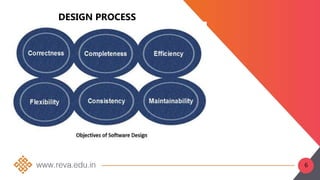
6
DESIGN PROCESS
Objectives of Software Design
• Correctness:
A good design should be correct i.e. it should
correctly implement all the functionalities of the
system.
• Efficiency:
A good software design should address the resources,
time and cost optimization issues.
• Understandability:
A good design should be easily understandable, for
which it should be modular and all the modules are
arranged in layers.
7
DESIGN PROCESS
Objectives of Software Design
• Completeness:
The design should have all the components like data
structures, modules, and external interfaces, etc.
• Maintainability:
A good software design should be easily amenable to
change whenever a change request is made from the
customer side.
8
9
10
DESIGN
• Architectural Design: Identify Subsystem
• Abstract Specification : Specify Subsystem
• Interface Design : Describe Subsystem Interface
• Component Design : Decompose subsystem into
components
• Data Structure Design: Design Data structures to
hold problem data
• Algorithm Design: Design algorithm for problem
functions.
11
DESIGN PROCESS
12
QUALITY PRINCIPLES
• A design should exhibit an architecture
• A design should be modular;
• A design should contain distinct representations of
data, architecture,interfaces, and components
• A design should lead to components that exhibit
independent functional characteristics.
• A design should lead to interfaces that reduce the
complexity of connections between components
• A design should be derived using a repeatable
method that is driven by information obtained during
software requirements analysis
13
QUALITY PRINCIPLES
• A design should be represented using a notation
that effectively communicates its meaning
14
QUALITY ATTRIBUTES
• Hewlett-Packard developed a set of software quality
• Attributes that has been given the acronym FURPS—
functionality, usability, reliability, performance, and
supportability. The FURPS quality attributes represent a target
for all software design:
• Functionality is assessed by evaluating the feature set and
capabilities of the program, the generality of the functions
that are delivered, and the security of the overall system.
• Usability is assessed by considering human factors (aesthetics,
consistency, and documentation.
• Reliability is evaluated by measuring the frequency and
severity of failure, the accuracy of output results, the mean-
time-to-failure (MTTF),
15
QUALITY ATTRIBUTES
• the ability to recover from failure, and the
predictability of the program.
• Performance is measured by processing speed,
response time, resource consumption, throughput,
and efficiency.
• Supportability combines the ability to extend the
program (extensibility),
• adaptability, serviceability—these three attributes
represent a more common term, maintainability—and
in addition, testability, compatibility, configurability
16
17
SOFTWARE DESIGN CONCEPTS
“Abstraction is one of the fundamental away that
we as humans cope with complexity.”
Software architecture alludes to “the overall
structure of the software and the ways in which that
structure provides conceptual integrity for a system”
• architecture is the structure or organization of
program components
• (modules), the manner in which these components
interact, and the structure of data
• that are used by the components.
18
• SOFTWARE DESIGN PATTERNS
A design pattern describes a design structure and that
structure solves a particular design problem in a specified
content.
• Modularity
A software is separately divided into name and addressable
components. Sometime they are called as modules which
integrate to satisfy the problem requirements.
• Information hiding
• Modules must be specified and designed so that the
information like algorithm and data presented in a module
is not accessible for other modules not requiring that
information.
19
• Functional independence:-The functional
independence is the concept of separation and
related to the concept of modularity, abstraction
and information hiding.
• Refinement: Refinement is a top-down design
approach.
• It is a process of elaboration.
• A program is established for refining levels of
procedural details.
20
• Refactoring : It is a reorganization technique which
simplifies the design of components without
changing its function behaviour.
• Refactoring is the process of changing the software
system in a way that it does not change the external
behaviour of the code still improves its internal
structure.
21
DESIGN MODEL
The design model can be viewed in two different
dimensions as illustrated in Figure 8.4.
• The process dimension indicates the evolution of the
design model as design tasks are executed as part of
the software process.
• The abstraction dimension represents the level of
detail as each element of the analysis model is
transformed into a design equivalent and then
refined iteratively
22
DIMENSION OF DESIGN MODEL
23
24
25
26
• It is Front end application
• User can manipulate and control s/w and h/w
• Eg: computer, mobile phones,
• It provide platform for human computational
The s/w become most popular, when?
• Attractive
• Simple to use
• Response to short time
• Clear to understand
Introduction
INTERFACE DESIGN
•Easy to learn?
•Easy to use?
•Easy to understand?
27
INTERFACE DESIGN
28
USER INTERFACE DESIGN: THE
GOLDEN RULES
User Interface Design: The Golden Rules
• Mandel’s Golden Rules
The golden rules are divided into three groups:
• Place Users in Control
• Reduce Users’ Memory Load
• Make the Interface Consistent
29
GOLDEN RULE 1
Place the User in Control
Define interaction modes in a way that does not force a
user into unnecessary or undesired actions.
Provide for flexible interaction.
Allow user interaction to be interruptible and
undoubtable.
Streamline interaction as skill levels advance and allow
the interaction to be customized.
Hide technical internals from the casual user.
Design for direct interaction with objects that appear on
the screen.
30
GOLDEN RULE 2
Reduce demand on short-term memory.
Reduce demand on short-term memory.
Establish meaningful defaults
.Define shortcuts that are intuitive.
The visual layout of the interface should be based on a
real-world metaphor.
Disclose information in a progressive fashion.
31
GOLDEN RULE 3
Make the Interface Consistent
Allow the user to put the current task into a
meaningful context.
Maintain consistency across a family of applications.
If past interactive models have created user
expectations, do not make changes unless there is a
compelling reason to do so.
32
USER INTERFACE ANALYSIS AND
DESIGN
Interface Analysis and Design Models
To build an effective user interface,
“all design should begin with an understanding of the
intended users, including profiles of their age, gender,
physical abilities, education, cultural or ethnic
background, motivation, goals and personality”users
can be categorized as:
Novices
Knowledgeable, intermittent users.
Knowledgeable, frequent users.
33
Novices: No syntactic knowledge of the system and
little semantic knowledge of the application
Knowledgeable, intermittent users: Reasonable
semantic knowledge of the application but relatively
low recall of syntactic information
Knowledgeable, frequent users: Good semantic
and syntactic knowledge that often leads to the
“power-user syndrome”;
34
USER INTERFACE DESIGN
PATTERNS
• User Interface Design Issues
• Response time.
• Help facilities.
• Error handling
• Menu and command labelling.
• Application accessibility.
• Internationalization.
35
USER INTERFACE DESIGN
PATTERNS
• User Interface Design Issues
• Response time: System response time is measured from
the point at which the user performs some control
action (e.g., hits the return key or clicks a mouse) until
the software responds with desired output or action
• Help facilities:Almost every user of an interactive,
computer-based system requires help now and then
modern software provides online help facilities
• Error handling:Error messages and warnings are “bad
news” delivered to users of interactive systems when
something has gone
36
USER INTERFACE DESIGN
PATTERNS
• User Interface Design Issues
Menu and command labeling:the use of window-
oriented, point-and pick interfaces has reduced reliance
on typed commands, but some power-users continue to
prefer a command-oriented mode of interaction
• Application accessibility:Accessibility for users (and
software engineers) who may be physically challenged is
an imperative
• Internationalization: The challenge for interface
designers is to create “globalized” software
37
• Anticipation
• Communication
• Consistency
• Controlled Autonomy
• Efficiency ,Flexibility
• Focus
• Fitt’s law
• Human interface objects
• Latency reduction
INTERFACE DESIGN PRINCIPLES
AND GUIDELINES
38
INTERFACE DESIGN PRINCIPLES
AND GUIDELINES
• Learnability
• Metaphors
• Maintain work
• Product integrity
• Readability
• Track state,
• Visible navigation
39
• Anticipation:A WebApp should be designed so that it
anticipates the user’s next move.
• Communication:The interface should communicate the
status of any activity initiated by the user.
• Consistency:The use of navigation controls, menus,
icons, and aesthetics (e.g., color, shape, layout) should
be consistent throughout the WebApp
• Controlled autonomy:The interface should facilitate
user movement throughout the WebApp,
• Efficiency :The design of the WebApp and its interface
should optimize the user’s work efficiency
INTERFACE DESIGN PRINCIPLES
AND GUIDELINES
40
Interface design principles and
guidelines
• Flexibility:The interface should be flexible enough to enable
some users to accomplish tasks directly
• Focus:The WebApp interface (and the content it presents)
should stay focused on the user task(s) at hand.
• Fitt’s law:“The time to acquire a target is a function of the
distance to and size of the target”
• Human interface objects:A vast library of reusable human
interface objects has been developed for WebApps.
• Latency reduction:Rather than making the user wait the
WebApp should use multitasking in a way that lets the user
proceed with work as if the operation has been completed
41
INTERFACE DESIGN PRINCIPLES
AND GUIDELINES
• Learnability:-A WebApp interface should be
designed to minimize learning time,
• Metaphors:- are an excellent idea because they
mirror real-world experience. Just be sure that the
metaphor you choose is well known to end users.
• Maintain work product integrity. A work product
(e.g., a form completed by the user, a user-specified
list) must be automatically saved so that it will not
be lost if an error occurs.
• Readability. All information presented through the
interface should be readable by young and old
42
INTERFACE DESIGN PRINCIPLES
AND GUIDELINES
• Track state. When appropriate, the state of the user
interaction should be tracked and stored so that a
user can logoff
• Visible navigation. A well-designed WebApp
interface provides “the illusion that users are in the
same place, with the work brought to them”
43
INTERFACE DESIGN WORKFLOW
FOR WEBAPPS
1. Review information contained in the requirements model
and refine as required
2. Develop a rough sketch of the WebApp interface layout
3. Map user objectives into specific interface actions
4. Define a set of user tasks that are associated with each
action
5. Storyboard screen images for each interface action
6. Refine interface layout and storyboards using input from
aesthetic design.
7. Identify user interface objects that are required to
implement the interface.
44
INTERFACE DESIGN WORKFLOW
FOR WEBAPPS
• Develop a procedural representation of the user’s
interaction with the interface
• Develop a behavioral representation of the interface.
• Describe the interface layout for each state
• Refine and review the interface design model
45
WEBAPP DESIGN: DESIGN GOALS
• Design Goals: Jean Kaiser suggests a set of design
goals that are applicable to virtually every WebApp
regardless of application domain, size, or complexity
• Simplicity :-Content should be informative but to
the point and should use a delivery mode (e.g., text,
graphics, video, audio) that is appropriate to the
information that is being delivered
• Consistency
• Content should be constructed consistently
• e.g., text formatting and font styles should be the
same across all text documents;
• Graphic art should have a consistent look, color
scheme, and style)
46
WEBAPP DESIGN: DESIGN GOALS
• Identity
– Establish an “identity” that is appropriate for the
business purpose
• Robustness (Strength)
– The user expects robust content and functions that are
relevant to the user’s needs.
• Navigability
– Navigation should be simple and consistent.
– It should also be designed in a manner that is
predictable.
– The user should understand how to move about the
WebApp without having to search for navigation links
or instructions.
47
WEBAPP DESIGN: DESIGN GOALS
• Visual appeal
– The look and feel of content, interface layout, color
coordination, the balance of text, graphics and other
media, navigation mechanisms must appeal to end-
users
• Compatibility
– WebApp will be used in a variety of environments (e.g.,
different hardware, Internet connection types, operating
systems, browsers)
– It must be designed to be compatible with each
48
A DESIGN PYRAMID FOR WEBAPPS
Webapp Interface Design
The objectives of a WebApp interface are to:
(1) establish a consistent window into the content and
functionality provided by the interface,
(2) guide the user through a series of interactions with
the WebApp
(3) organize the navigation options and content
available to the user. To achieve a consistent interface,
you should first use aesthetic design to establish a
coherent “look.”
49
A DESIGN PYRAMID FOR WEBAPPS
Webapp Interface Design
50
A DESIGN PYRAMID FOR WEBAPPS
Webapp Interface Design
• Navigation menus—keyword menus (organized
vertically or horizontally) that list key content and/or
functionality.
• Graphic icons—button, switches, and similar
graphical images that enable the user to select some
property or specify a decision.
• Graphic images—some graphical representation
that is selectable by the user and implements a link
to a content object or WebApp functionality
51
A DESIGN PYRAMID FOR WEBAPPS
AESTHETIC DESIGN
• Aesthetic design, also called graphic design, is an artistic
endeavor that complements the technical aspects of WebApp
design.
• Without it, a WebApp may be functional, but unappealing.
AESTHETIC DESIGN
• Don’t be afraid of white space.
• Emphasize content.
• Organize layout elements from top-left to bottom right.
• Group navigation, content, and function geographically within
the page.
• Don’t extend your real estate with the scrolling bar.
52
A DESIGN PYRAMID FOR WEBAPPS
Consider resolution and browser window size when
designing lay
CONTENT DESIGN
 Develops a design representation for content
objects
 A content object has attributes that include content
specific information and implementation-specific
attributes that are specified as part of design
 As content objects are designed, they are “chunked”
to form WebApp pages.
 The number of content objects incorporated into a
single page is a function of user needs,
53
A DESIGN PYRAMID FOR WEBAPPS
ARCHITECTURE DESIGN
WebApp architecture addresses the manner in which
the application is structured to manage user
interaction,
 handle internal processing tasks,
 effect navigation,
 and present content.
54
DESIGN PYRAMID FOR WEBAPPS
• Linear structures are encountered when a
predictable sequence of interactions (with some
variation or diversion) is common.
• Grid structures are an architectural option that you
can apply when WebApp content can be organized
categorically in two (or more) dimensions.
• Hierarchical structures are undoubtedly the most
common WebApp architecture.
• A networked or “pure web” structure is similar in
many ways to the architecture that evolves for object-
oriented systems. The architectural structures can be
combined to form composite structures.
55
56
57
DESIGN PYRAMID FOR WEBAPPS
ARCHITECTURE DESIGN
• The term information architecture is also used to connote
structures that lead to better organization, labeling,
navigation, and searching of content objects.
• WebApp architecture addresses the manner in which the
application is structured to manage user interaction,
handle internal processing tasks, effect navigation, and
present content.
• Architecture design is conducted in parallel with interface
design, aesthetic design and content design.
58
DESIGN PYRAMID FOR WEBAPPS
ARCHITECTURE DESIGN
• WebApp Architecture describes an infrastructure that
enables a Web-based system to achieve its business
objectives.
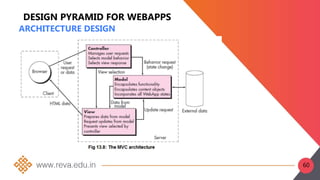
• The Model-View-Controller (MVC) is architectural pattern
that separates an application into three main logical
components: the model, the view, and the controller
• The Model-View-Controller (MVC) architecture
• The model contains all application specific content and
processing logic
• The view contains all interface specific functions.
• The controller manages access to the model and the view
and coordinates the flow of data between them
59
DESIGN PYRAMID FOR WEBAPPS
ARCHITECTURE DESIGN
60
DESIGN PYRAMID FOR WEBAPPS
NAVIGATION DESIGN
 NAVIGATION DESIGN Begins with a consideration of
the user hierarchy and related use-cases
 Each actor may use the WebApp somewhat differently
and therefore have different navigation requirements
 As each user interacts with the WebApp, she
encounters a series of navigation semantic units (NSUs)
 NSU—“a set of information and related navigation
structures that collaborate in the fulfillment of a subset
of related user requirements
61
DESIGN PYRAMID FOR WEBAPPS
NAVIGATION DESIGN
 Navigation Syntax: As design proceeds, your next
task is to define the mechanics of navigation.
 A number of options are available as you develop
an approach for implementing each NSU:
 Individual navigation link—includes text-based
links, icons, buttons and switches, and graphical
metaphors. You must choose navigation links that
are appropriate for the content and consistent with
the heuristics that lead to high-quality interface
design.
62
DESIGN PYRAMID FOR WEBAPPS
NAVIGATION DESIGN
 •As design proceeds, your next task is to define the
mechanics of navigation.
 Individual navigation link—includes text-based
links, icons, buttons and switches, and graphical
metaphors.
 Horizontal navigation bar—lists major content or
functional categories in a bar containing
appropriate links.
 Vertical navigation column—(1) lists major
content or functional categories, or (2) lists virtually
all major content objects within the WebApp.
63
DESIGN PYRAMID FOR WEBAPPS
NAVIGATION DESIGN
 NAVIGATION DESIGN Begins with a consideration of
the user hierarchy and related use-cases
 Each actor may use the WebApp somewhat differently
and therefore have different navigation requirements
 As each user interacts with the WebApp, she
encounters a series of navigation semantic units (NSUs)
 NSU—“a set of information and related navigation
structures that collaborate in the fulfillment of a subset
of related user requirements
64
• Tabs—a metaphor that is nothing more than a
variation of the navigation bar or column,
representing content or functional categories
as tab sheets that are selected when a link is
required.
• Site maps—provide an all-inclusive table of
contents for navigation to all content objects
and functionality contained within the WebApp
65
COMPONENT-LEVEL DESIGN
• WebApp components implement the following
functionality
• perform localized processing to generate
content and navigation capability in a dynamic
fashion
• provide computation or data processing
capability that are appropriate for the
WebApp’s business domain
• provide sophisticated database query and
access
• establish data interfaces with external corporate
systems
66
OBJECT-ORIENTED HYPERMEDIA
DESIGN METHOD (OOHDM)
• Object-Oriented Hypermedia Design Method
(OOHDM),which is composed of four different design
activities:
• conceptual design,
• navigational design,
• abstract interface design,
• and implementation.
• Conceptual Design for OOHDM: OOHDM
conceptual design creates a representation
• of the subsystems, classes, and relationships that
define the application domain for the WebApp.
67
68
•
69

B19CA4020_SE_Unit3.pptx

  • 1.
    Established as perthe Section 2(f) of the UGC Act, 1956 Approved by AICTE, COA and BCI, New Delhi SOFTWARE ENGINEERING UNIT-3 S c h o o l o f C o m p u t e r S c i e n c e a n d A p p l i c a t i o n s D r . G . K A D I R A V A N
  • 2.
    ADENDA  Design Concepts:The Design Process, Design Concepts, The Design Model.  User Interface Design: The Golden Rules, User Interface Design Patterns.  WebApp Design: Design Goals, A design pyramid for web app, WebApp interface design.
  • 3.
  • 4.
    DESIGN PROCESS • Softwaredesign is an iterative process through which requirements are translated into a ―blueprint for constructing the software. • Initially, the blueprint depicts a holistic view of software. • During the software design phase, the design document is produced, • Based on the customer requirements as documented in the SRS document. • Hence the aim of this phase is to transform the SRS document into the design document. 4
  • 5.
    DESIGN PROCESS • Thefollowing items are designed and documented during the design phase: • Different modules required. • Control relationships among modules. • Interface among different modules. • Data structure among the different modules. • Algorithms required to implement among the individual modules. 5
  • 6.
  • 7.
    DESIGN PROCESS Objectives ofSoftware Design • Correctness: A good design should be correct i.e. it should correctly implement all the functionalities of the system. • Efficiency: A good software design should address the resources, time and cost optimization issues. • Understandability: A good design should be easily understandable, for which it should be modular and all the modules are arranged in layers. 7
  • 8.
    DESIGN PROCESS Objectives ofSoftware Design • Completeness: The design should have all the components like data structures, modules, and external interfaces, etc. • Maintainability: A good software design should be easily amenable to change whenever a change request is made from the customer side. 8
  • 9.
  • 10.
  • 11.
    DESIGN • Architectural Design:Identify Subsystem • Abstract Specification : Specify Subsystem • Interface Design : Describe Subsystem Interface • Component Design : Decompose subsystem into components • Data Structure Design: Design Data structures to hold problem data • Algorithm Design: Design algorithm for problem functions. 11
  • 12.
  • 13.
    QUALITY PRINCIPLES • Adesign should exhibit an architecture • A design should be modular; • A design should contain distinct representations of data, architecture,interfaces, and components • A design should lead to components that exhibit independent functional characteristics. • A design should lead to interfaces that reduce the complexity of connections between components • A design should be derived using a repeatable method that is driven by information obtained during software requirements analysis 13
  • 14.
    QUALITY PRINCIPLES • Adesign should be represented using a notation that effectively communicates its meaning 14
  • 15.
    QUALITY ATTRIBUTES • Hewlett-Packarddeveloped a set of software quality • Attributes that has been given the acronym FURPS— functionality, usability, reliability, performance, and supportability. The FURPS quality attributes represent a target for all software design: • Functionality is assessed by evaluating the feature set and capabilities of the program, the generality of the functions that are delivered, and the security of the overall system. • Usability is assessed by considering human factors (aesthetics, consistency, and documentation. • Reliability is evaluated by measuring the frequency and severity of failure, the accuracy of output results, the mean- time-to-failure (MTTF), 15
  • 16.
    QUALITY ATTRIBUTES • theability to recover from failure, and the predictability of the program. • Performance is measured by processing speed, response time, resource consumption, throughput, and efficiency. • Supportability combines the ability to extend the program (extensibility), • adaptability, serviceability—these three attributes represent a more common term, maintainability—and in addition, testability, compatibility, configurability 16
  • 17.
  • 18.
    SOFTWARE DESIGN CONCEPTS “Abstractionis one of the fundamental away that we as humans cope with complexity.” Software architecture alludes to “the overall structure of the software and the ways in which that structure provides conceptual integrity for a system” • architecture is the structure or organization of program components • (modules), the manner in which these components interact, and the structure of data • that are used by the components. 18
  • 19.
    • SOFTWARE DESIGNPATTERNS A design pattern describes a design structure and that structure solves a particular design problem in a specified content. • Modularity A software is separately divided into name and addressable components. Sometime they are called as modules which integrate to satisfy the problem requirements. • Information hiding • Modules must be specified and designed so that the information like algorithm and data presented in a module is not accessible for other modules not requiring that information. 19
  • 20.
    • Functional independence:-Thefunctional independence is the concept of separation and related to the concept of modularity, abstraction and information hiding. • Refinement: Refinement is a top-down design approach. • It is a process of elaboration. • A program is established for refining levels of procedural details. 20
  • 21.
    • Refactoring :It is a reorganization technique which simplifies the design of components without changing its function behaviour. • Refactoring is the process of changing the software system in a way that it does not change the external behaviour of the code still improves its internal structure. 21
  • 22.
    DESIGN MODEL The designmodel can be viewed in two different dimensions as illustrated in Figure 8.4. • The process dimension indicates the evolution of the design model as design tasks are executed as part of the software process. • The abstraction dimension represents the level of detail as each element of the analysis model is transformed into a design equivalent and then refined iteratively 22
  • 23.
  • 24.
  • 25.
  • 26.
    26 • It isFront end application • User can manipulate and control s/w and h/w • Eg: computer, mobile phones, • It provide platform for human computational The s/w become most popular, when? • Attractive • Simple to use • Response to short time • Clear to understand Introduction
  • 27.
    INTERFACE DESIGN •Easy tolearn? •Easy to use? •Easy to understand? 27
  • 28.
  • 29.
    USER INTERFACE DESIGN:THE GOLDEN RULES User Interface Design: The Golden Rules • Mandel’s Golden Rules The golden rules are divided into three groups: • Place Users in Control • Reduce Users’ Memory Load • Make the Interface Consistent 29
  • 30.
    GOLDEN RULE 1 Placethe User in Control Define interaction modes in a way that does not force a user into unnecessary or undesired actions. Provide for flexible interaction. Allow user interaction to be interruptible and undoubtable. Streamline interaction as skill levels advance and allow the interaction to be customized. Hide technical internals from the casual user. Design for direct interaction with objects that appear on the screen. 30
  • 31.
    GOLDEN RULE 2 Reducedemand on short-term memory. Reduce demand on short-term memory. Establish meaningful defaults .Define shortcuts that are intuitive. The visual layout of the interface should be based on a real-world metaphor. Disclose information in a progressive fashion. 31
  • 32.
    GOLDEN RULE 3 Makethe Interface Consistent Allow the user to put the current task into a meaningful context. Maintain consistency across a family of applications. If past interactive models have created user expectations, do not make changes unless there is a compelling reason to do so. 32
  • 33.
    USER INTERFACE ANALYSISAND DESIGN Interface Analysis and Design Models To build an effective user interface, “all design should begin with an understanding of the intended users, including profiles of their age, gender, physical abilities, education, cultural or ethnic background, motivation, goals and personality”users can be categorized as: Novices Knowledgeable, intermittent users. Knowledgeable, frequent users. 33
  • 34.
    Novices: No syntacticknowledge of the system and little semantic knowledge of the application Knowledgeable, intermittent users: Reasonable semantic knowledge of the application but relatively low recall of syntactic information Knowledgeable, frequent users: Good semantic and syntactic knowledge that often leads to the “power-user syndrome”; 34
  • 35.
    USER INTERFACE DESIGN PATTERNS •User Interface Design Issues • Response time. • Help facilities. • Error handling • Menu and command labelling. • Application accessibility. • Internationalization. 35
  • 36.
    USER INTERFACE DESIGN PATTERNS •User Interface Design Issues • Response time: System response time is measured from the point at which the user performs some control action (e.g., hits the return key or clicks a mouse) until the software responds with desired output or action • Help facilities:Almost every user of an interactive, computer-based system requires help now and then modern software provides online help facilities • Error handling:Error messages and warnings are “bad news” delivered to users of interactive systems when something has gone 36
  • 37.
    USER INTERFACE DESIGN PATTERNS •User Interface Design Issues Menu and command labeling:the use of window- oriented, point-and pick interfaces has reduced reliance on typed commands, but some power-users continue to prefer a command-oriented mode of interaction • Application accessibility:Accessibility for users (and software engineers) who may be physically challenged is an imperative • Internationalization: The challenge for interface designers is to create “globalized” software 37
  • 38.
    • Anticipation • Communication •Consistency • Controlled Autonomy • Efficiency ,Flexibility • Focus • Fitt’s law • Human interface objects • Latency reduction INTERFACE DESIGN PRINCIPLES AND GUIDELINES 38
  • 39.
    INTERFACE DESIGN PRINCIPLES ANDGUIDELINES • Learnability • Metaphors • Maintain work • Product integrity • Readability • Track state, • Visible navigation 39
  • 40.
    • Anticipation:A WebAppshould be designed so that it anticipates the user’s next move. • Communication:The interface should communicate the status of any activity initiated by the user. • Consistency:The use of navigation controls, menus, icons, and aesthetics (e.g., color, shape, layout) should be consistent throughout the WebApp • Controlled autonomy:The interface should facilitate user movement throughout the WebApp, • Efficiency :The design of the WebApp and its interface should optimize the user’s work efficiency INTERFACE DESIGN PRINCIPLES AND GUIDELINES 40
  • 41.
    Interface design principlesand guidelines • Flexibility:The interface should be flexible enough to enable some users to accomplish tasks directly • Focus:The WebApp interface (and the content it presents) should stay focused on the user task(s) at hand. • Fitt’s law:“The time to acquire a target is a function of the distance to and size of the target” • Human interface objects:A vast library of reusable human interface objects has been developed for WebApps. • Latency reduction:Rather than making the user wait the WebApp should use multitasking in a way that lets the user proceed with work as if the operation has been completed 41
  • 42.
    INTERFACE DESIGN PRINCIPLES ANDGUIDELINES • Learnability:-A WebApp interface should be designed to minimize learning time, • Metaphors:- are an excellent idea because they mirror real-world experience. Just be sure that the metaphor you choose is well known to end users. • Maintain work product integrity. A work product (e.g., a form completed by the user, a user-specified list) must be automatically saved so that it will not be lost if an error occurs. • Readability. All information presented through the interface should be readable by young and old 42
  • 43.
    INTERFACE DESIGN PRINCIPLES ANDGUIDELINES • Track state. When appropriate, the state of the user interaction should be tracked and stored so that a user can logoff • Visible navigation. A well-designed WebApp interface provides “the illusion that users are in the same place, with the work brought to them” 43
  • 44.
    INTERFACE DESIGN WORKFLOW FORWEBAPPS 1. Review information contained in the requirements model and refine as required 2. Develop a rough sketch of the WebApp interface layout 3. Map user objectives into specific interface actions 4. Define a set of user tasks that are associated with each action 5. Storyboard screen images for each interface action 6. Refine interface layout and storyboards using input from aesthetic design. 7. Identify user interface objects that are required to implement the interface. 44
  • 45.
    INTERFACE DESIGN WORKFLOW FORWEBAPPS • Develop a procedural representation of the user’s interaction with the interface • Develop a behavioral representation of the interface. • Describe the interface layout for each state • Refine and review the interface design model 45
  • 46.
    WEBAPP DESIGN: DESIGNGOALS • Design Goals: Jean Kaiser suggests a set of design goals that are applicable to virtually every WebApp regardless of application domain, size, or complexity • Simplicity :-Content should be informative but to the point and should use a delivery mode (e.g., text, graphics, video, audio) that is appropriate to the information that is being delivered • Consistency • Content should be constructed consistently • e.g., text formatting and font styles should be the same across all text documents; • Graphic art should have a consistent look, color scheme, and style) 46
  • 47.
    WEBAPP DESIGN: DESIGNGOALS • Identity – Establish an “identity” that is appropriate for the business purpose • Robustness (Strength) – The user expects robust content and functions that are relevant to the user’s needs. • Navigability – Navigation should be simple and consistent. – It should also be designed in a manner that is predictable. – The user should understand how to move about the WebApp without having to search for navigation links or instructions. 47
  • 48.
    WEBAPP DESIGN: DESIGNGOALS • Visual appeal – The look and feel of content, interface layout, color coordination, the balance of text, graphics and other media, navigation mechanisms must appeal to end- users • Compatibility – WebApp will be used in a variety of environments (e.g., different hardware, Internet connection types, operating systems, browsers) – It must be designed to be compatible with each 48
  • 49.
    A DESIGN PYRAMIDFOR WEBAPPS Webapp Interface Design The objectives of a WebApp interface are to: (1) establish a consistent window into the content and functionality provided by the interface, (2) guide the user through a series of interactions with the WebApp (3) organize the navigation options and content available to the user. To achieve a consistent interface, you should first use aesthetic design to establish a coherent “look.” 49
  • 50.
    A DESIGN PYRAMIDFOR WEBAPPS Webapp Interface Design 50
  • 51.
    A DESIGN PYRAMIDFOR WEBAPPS Webapp Interface Design • Navigation menus—keyword menus (organized vertically or horizontally) that list key content and/or functionality. • Graphic icons—button, switches, and similar graphical images that enable the user to select some property or specify a decision. • Graphic images—some graphical representation that is selectable by the user and implements a link to a content object or WebApp functionality 51
  • 52.
    A DESIGN PYRAMIDFOR WEBAPPS AESTHETIC DESIGN • Aesthetic design, also called graphic design, is an artistic endeavor that complements the technical aspects of WebApp design. • Without it, a WebApp may be functional, but unappealing. AESTHETIC DESIGN • Don’t be afraid of white space. • Emphasize content. • Organize layout elements from top-left to bottom right. • Group navigation, content, and function geographically within the page. • Don’t extend your real estate with the scrolling bar. 52
  • 53.
    A DESIGN PYRAMIDFOR WEBAPPS Consider resolution and browser window size when designing lay CONTENT DESIGN  Develops a design representation for content objects  A content object has attributes that include content specific information and implementation-specific attributes that are specified as part of design  As content objects are designed, they are “chunked” to form WebApp pages.  The number of content objects incorporated into a single page is a function of user needs, 53
  • 54.
    A DESIGN PYRAMIDFOR WEBAPPS ARCHITECTURE DESIGN WebApp architecture addresses the manner in which the application is structured to manage user interaction,  handle internal processing tasks,  effect navigation,  and present content. 54
  • 55.
    DESIGN PYRAMID FORWEBAPPS • Linear structures are encountered when a predictable sequence of interactions (with some variation or diversion) is common. • Grid structures are an architectural option that you can apply when WebApp content can be organized categorically in two (or more) dimensions. • Hierarchical structures are undoubtedly the most common WebApp architecture. • A networked or “pure web” structure is similar in many ways to the architecture that evolves for object- oriented systems. The architectural structures can be combined to form composite structures. 55
  • 56.
  • 57.
  • 58.
    DESIGN PYRAMID FORWEBAPPS ARCHITECTURE DESIGN • The term information architecture is also used to connote structures that lead to better organization, labeling, navigation, and searching of content objects. • WebApp architecture addresses the manner in which the application is structured to manage user interaction, handle internal processing tasks, effect navigation, and present content. • Architecture design is conducted in parallel with interface design, aesthetic design and content design. 58
  • 59.
    DESIGN PYRAMID FORWEBAPPS ARCHITECTURE DESIGN • WebApp Architecture describes an infrastructure that enables a Web-based system to achieve its business objectives. • The Model-View-Controller (MVC) is architectural pattern that separates an application into three main logical components: the model, the view, and the controller • The Model-View-Controller (MVC) architecture • The model contains all application specific content and processing logic • The view contains all interface specific functions. • The controller manages access to the model and the view and coordinates the flow of data between them 59
  • 60.
    DESIGN PYRAMID FORWEBAPPS ARCHITECTURE DESIGN 60
  • 61.
    DESIGN PYRAMID FORWEBAPPS NAVIGATION DESIGN  NAVIGATION DESIGN Begins with a consideration of the user hierarchy and related use-cases  Each actor may use the WebApp somewhat differently and therefore have different navigation requirements  As each user interacts with the WebApp, she encounters a series of navigation semantic units (NSUs)  NSU—“a set of information and related navigation structures that collaborate in the fulfillment of a subset of related user requirements 61
  • 62.
    DESIGN PYRAMID FORWEBAPPS NAVIGATION DESIGN  Navigation Syntax: As design proceeds, your next task is to define the mechanics of navigation.  A number of options are available as you develop an approach for implementing each NSU:  Individual navigation link—includes text-based links, icons, buttons and switches, and graphical metaphors. You must choose navigation links that are appropriate for the content and consistent with the heuristics that lead to high-quality interface design. 62
  • 63.
    DESIGN PYRAMID FORWEBAPPS NAVIGATION DESIGN  •As design proceeds, your next task is to define the mechanics of navigation.  Individual navigation link—includes text-based links, icons, buttons and switches, and graphical metaphors.  Horizontal navigation bar—lists major content or functional categories in a bar containing appropriate links.  Vertical navigation column—(1) lists major content or functional categories, or (2) lists virtually all major content objects within the WebApp. 63
  • 64.
    DESIGN PYRAMID FORWEBAPPS NAVIGATION DESIGN  NAVIGATION DESIGN Begins with a consideration of the user hierarchy and related use-cases  Each actor may use the WebApp somewhat differently and therefore have different navigation requirements  As each user interacts with the WebApp, she encounters a series of navigation semantic units (NSUs)  NSU—“a set of information and related navigation structures that collaborate in the fulfillment of a subset of related user requirements 64
  • 65.
    • Tabs—a metaphorthat is nothing more than a variation of the navigation bar or column, representing content or functional categories as tab sheets that are selected when a link is required. • Site maps—provide an all-inclusive table of contents for navigation to all content objects and functionality contained within the WebApp 65
  • 66.
    COMPONENT-LEVEL DESIGN • WebAppcomponents implement the following functionality • perform localized processing to generate content and navigation capability in a dynamic fashion • provide computation or data processing capability that are appropriate for the WebApp’s business domain • provide sophisticated database query and access • establish data interfaces with external corporate systems 66
  • 67.
    OBJECT-ORIENTED HYPERMEDIA DESIGN METHOD(OOHDM) • Object-Oriented Hypermedia Design Method (OOHDM),which is composed of four different design activities: • conceptual design, • navigational design, • abstract interface design, • and implementation. • Conceptual Design for OOHDM: OOHDM conceptual design creates a representation • of the subsystems, classes, and relationships that define the application domain for the WebApp. 67
  • 68.
  • 69.