How to validate SDTM SUPPQUAL
Data set
May 24th, 2010 by Kevin Lee

1
Covance Periapproval Services

GM, every1
(Good Morning, Everyone)

2
Covance Periapproval Services

What will be discussed
The Introduction of SUPPQUAL
The Issues in validating SUPPQUAL
The Recommendation
SDTM+SUPP procedure
Overall steps for Validation
Concerns
Conclusion

3
Covance Periapproval Services

Introduction of SUPPQUAL
The SDTM does not allow any new variables
beside ones assigned to each SDTM domain.
So, the supplemental data set is introduced to
supplement each SDTM domain.
Its type:
• a single SUPPQUAL dataset
• The separate supplementary data sets (SUPP)
such as SUPPDM, SUPPAE, and SUPPEX.

4
Covance Periapproval Services

Structure of SUPPQUAL
Name

Label

Type

Role

Codelist

Mandatory

STUDYID

Study Identifier

Text

Identifier

NONE

Req

RDOMAIN

Related Domain
Abbreviation

Text

Identifier

DOMAIN

Req

USUBJID

Unique Subject Identifier

Text

Identifier

NONE

Req

IDVAR

Identifying Variable

Text

Identifier

NONE

Req

IDVARVAL

Identifying Variable Value

Text

Topic

NONE

Req

QNAM

Qualifier Variable Name

Text

Record Qualifier

NONE

Req

QLABEL

Qualifier Variable Label

Text

Record Qualifier

NONE

Req

QVAL

Data Value

Text

Qualifier

NONE

Req

QORIG

Origin

Text

Qualifier

NONE

Req

QEVAL

Evaluator

Text

Qualifier

NONE

Perm

5
Covance Periapproval Services

The Relation of SUPPQUAL to each domain
The SUPPQUAL data set is linked back to a
parent record using RDOMAIN, USUBJID,
IDVAR and IDVARVAL. IDVAR and IDVARVAL
is usually the sequence number (ex. AESEQ,
VSSEQ and so on) except DM and SV.

6
Covance Periapproval Services

The Issues in Validating SUPPQUAL
Some of SUPPQUAL variables could be
originally captured as numeric – for example,
QVAL and IDVARVAL.
SUPPQUAL data set could be very large
•
•

For example, DM – 417KB, but SUPPQUAL –
858,529KB
The running Time in PC could be 0.5 to 1 hour.

It is really difficult to visually link the
SUPPQUAL data back to a parent record for
the review.
7
Covance Periapproval Services

The recommendation
For QVAL and IDVARVAL
• Consistent conversion from numeric to character
type – using the same format on input statement
• All the converted variables should be leftaligned.
Better hardware (Unix is known more than 2 time
faster than PC)
Create the separate SUPP for each domain for
easier validation, not just a single SUPPQUAL.
Set up the friendly environment for the validation –
SDTM+SUPP procedure/data sets.
8
Covance Periapproval Services

Advantage to create individual
SUPP data sets
The supplementary data sets won’t be as big as
a single SUPPQUAL, so it takes less time to
review, to update, and to validate.

9
Covance Periapproval Services

The Advantages to create
SDTM+SUPP data sets
SDTM+SUPP keeps all the variables related to
SDTM domain.
Much easier to link back to a parent record of
the supplementary variables.
Much easier when creating ADaM Data set.

10
Covance Periapproval Services

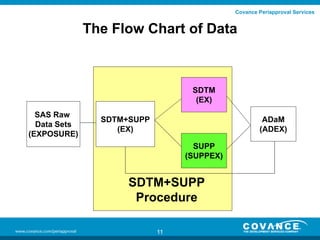
The Flow Chart of Data

SDTM
(EX)
SAS Raw
Data Sets
(EXPOSURE)

SDTM+SUPP
(EX)

ADaM
(ADEX)
SUPP
(SUPPEX)

SDTM+SUPP
Procedure
11
Covance Periapproval Services

The Options to validate SUPPQUAL
Validate all 3 of them - EX in SDTM+SUPP, EX
and SUPPEX.
Validate only 2 SDTM data sets – EX and
SUPPEX
Validate only EX in SDTM+SUPP
Our recommendation is to validate all 3 of
them. However, the best way to validate is to
start validating EX in SDTM+SUPP in the initial
stage and validating all 3 of them in the later
stage of the trials.
12
Covance Periapproval Services

The advantages in validating
SDTM+SUPP data sets
much easier to validate the numeric
supplementary variables.
Less time to validate.
If there are any issues in the supplementary
variables, it is much easier to link back to
parent records for the review.

13
Covance Periapproval Services

The automatic procedure to
create SDTM and SUPP
The flag document (the best option is to create
the flag variable column in Define document)
The macro that split SDTM and SUPP from
SDTM+SUPP according to the flag document.

14
Covance Periapproval Services

The sample Define Doc
Domain

Name

Label

Type

Role

Codelist

Core

Origin

EX

STUDYID

Study Identifier

Char

Identifier

NONE

Req

CRF

EX

DOMAIN

Domain Abbreviation

Char

Identifier

DOMAIN

Req

Derived

EX

USUBJID

Unique Subject Identifier

Char

Identifier

NONE

Req

Sponsor Defined

EX

EXSEQ

Sequence Number

Num

Identifier

NONE

Req

Derived

EX

EXTRT

Name of Actual Treatment

Char

Topic

NONE

Req

Derived

EX

EXDOSE

Dose per Administration

Num

Record Qualifier

NONE

Perm

CRF

EX

EXDOSU

Dose Units

Char

Variable Qualifier

DOSU

Exp

CRF

EX

EXDOSFRQ

Dosing Frequency Per Interval

Char

Variable Qualifier

DOSFRQ

Perm

Derived

EX

EXROUTE

Route of Administration

Char

Variable Qualifier

ROUTE

Perm

CRF

EX

EXSTDTC

Start Date/Time of Treatment

Char

Timing

ISO8601

Perm

CRF

EX

VISIT

Visit Name

Char

Timing

NONE

Perm

Derived

EX

VISITNUM

Visit Number

Num

Timing

NONE

Perm

Derived

EX

TAETORD

Order of Element within Arm

Num

Timing

NONE

Perm

Derived

EX

EPOCH

Trial Epoch

Char

Timing

EPOCH

Perm

Derived

EX

EXSPID2

Vial or Component ID

Char

Plus

NONE

Perm

Derived

Y

EX

EXSTDTI

Start Date/Time of Treatment Imputed

Char

Plus

ISO8601

Perm

Derived

Y

EX

ELEMENT

Description of Element

Char

Plus

NONE

Perm

Derived

Y

EX

ETCD

Element Code

Char

Plus

NONE

Perm

Derived

Y

EX

STDYRLEP

Start Day Rel to Epoch

Num

Plus

NONE

Perm

Derived

Y

15

Suppqual
Flag
Covance Periapproval Services

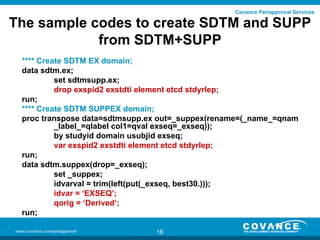
The sample codes to create SDTM and SUPP
from SDTM+SUPP
**** Create SDTM EX domain;
data sdtm.ex;
set sdtmsupp.ex;
drop exspid2 exstdti element etcd stdyrlep;
run;
**** Create SDTM SUPPEX domain;
proc transpose data=sdtmsupp.ex out=_suppex(rename=(_name_=qnam
_label_=qlabel col1=qval exseq=_exseq));
by studyid domain usubjid exseq;
var exspid2 exstdti element etcd stdyrlep;
run;
data sdtm.suppex(drop=_exseq);
set _suppex;
idvarval = trim(left(put(_exseq, best30.)));
idvar = ‘EXSEQ’;
qorig = ‘Derived’;
run;
16
Covance Periapproval Services

Overall steps to validate in using
SDTM+SUPP
Create the Define document including the flags
to indicate the supplementary variables.
Create the macro that split SDTM+SUPP data
sets into SDTM and SUPP.
Create SDTM+SUPP data sets and using the
macro and Define document, create SDTM and
SUPP from SDTM+SUPP.
Validate SDTM+SUPP data sets first and then
SDTM and SUPP.
17
Covance Periapproval Services

Concerns for SDTM+SUPP procedure
One single SUPPQUAL is requested by a
sponsor.
• Special attention on the truncations.
One to many relationship between a parent
record to corresponding supplementary
variables
• When SUPP and SDTM are split by macro,
the SAS programmer puts the procedure that
the duplicate records be removed from
SDTM.
• When annotating eCRF, the SAS programmer
do not include one to many relationship in the
SDTM+SUPP.
18
Covance Periapproval Services

Conclusions
The validation of SUPPQUAL data set takes a
lot of time and resource because of its size and
complexity. However, through the automatic
procedure and a special attention on possible
SUPPQAUL related issues, the validation will
take less time and less resource.

19
Covance Periapproval Services

Contact Information
Kevin Lee
Covance Periapproval Services.
555 North Lane
Suite 6000
Conshohocken, PA
(610) 832 - 5751
Email:Kevin.lee@covance.com

20
Covance Periapproval Services

Thanks and any Question???

21

How to validate sdtm suppqual

  • 1.
    How to validateSDTM SUPPQUAL Data set May 24th, 2010 by Kevin Lee 1
  • 2.
    Covance Periapproval Services GM,every1 (Good Morning, Everyone) 2
  • 3.
    Covance Periapproval Services Whatwill be discussed The Introduction of SUPPQUAL The Issues in validating SUPPQUAL The Recommendation SDTM+SUPP procedure Overall steps for Validation Concerns Conclusion 3
  • 4.
    Covance Periapproval Services Introductionof SUPPQUAL The SDTM does not allow any new variables beside ones assigned to each SDTM domain. So, the supplemental data set is introduced to supplement each SDTM domain. Its type: • a single SUPPQUAL dataset • The separate supplementary data sets (SUPP) such as SUPPDM, SUPPAE, and SUPPEX. 4
  • 5.
    Covance Periapproval Services Structureof SUPPQUAL Name Label Type Role Codelist Mandatory STUDYID Study Identifier Text Identifier NONE Req RDOMAIN Related Domain Abbreviation Text Identifier DOMAIN Req USUBJID Unique Subject Identifier Text Identifier NONE Req IDVAR Identifying Variable Text Identifier NONE Req IDVARVAL Identifying Variable Value Text Topic NONE Req QNAM Qualifier Variable Name Text Record Qualifier NONE Req QLABEL Qualifier Variable Label Text Record Qualifier NONE Req QVAL Data Value Text Qualifier NONE Req QORIG Origin Text Qualifier NONE Req QEVAL Evaluator Text Qualifier NONE Perm 5
  • 6.
    Covance Periapproval Services TheRelation of SUPPQUAL to each domain The SUPPQUAL data set is linked back to a parent record using RDOMAIN, USUBJID, IDVAR and IDVARVAL. IDVAR and IDVARVAL is usually the sequence number (ex. AESEQ, VSSEQ and so on) except DM and SV. 6
  • 7.
    Covance Periapproval Services TheIssues in Validating SUPPQUAL Some of SUPPQUAL variables could be originally captured as numeric – for example, QVAL and IDVARVAL. SUPPQUAL data set could be very large • • For example, DM – 417KB, but SUPPQUAL – 858,529KB The running Time in PC could be 0.5 to 1 hour. It is really difficult to visually link the SUPPQUAL data back to a parent record for the review. 7
  • 8.
    Covance Periapproval Services Therecommendation For QVAL and IDVARVAL • Consistent conversion from numeric to character type – using the same format on input statement • All the converted variables should be leftaligned. Better hardware (Unix is known more than 2 time faster than PC) Create the separate SUPP for each domain for easier validation, not just a single SUPPQUAL. Set up the friendly environment for the validation – SDTM+SUPP procedure/data sets. 8
  • 9.
    Covance Periapproval Services Advantageto create individual SUPP data sets The supplementary data sets won’t be as big as a single SUPPQUAL, so it takes less time to review, to update, and to validate. 9
  • 10.
    Covance Periapproval Services TheAdvantages to create SDTM+SUPP data sets SDTM+SUPP keeps all the variables related to SDTM domain. Much easier to link back to a parent record of the supplementary variables. Much easier when creating ADaM Data set. 10
  • 11.
    Covance Periapproval Services TheFlow Chart of Data SDTM (EX) SAS Raw Data Sets (EXPOSURE) SDTM+SUPP (EX) ADaM (ADEX) SUPP (SUPPEX) SDTM+SUPP Procedure 11
  • 12.
    Covance Periapproval Services TheOptions to validate SUPPQUAL Validate all 3 of them - EX in SDTM+SUPP, EX and SUPPEX. Validate only 2 SDTM data sets – EX and SUPPEX Validate only EX in SDTM+SUPP Our recommendation is to validate all 3 of them. However, the best way to validate is to start validating EX in SDTM+SUPP in the initial stage and validating all 3 of them in the later stage of the trials. 12
  • 13.
    Covance Periapproval Services Theadvantages in validating SDTM+SUPP data sets much easier to validate the numeric supplementary variables. Less time to validate. If there are any issues in the supplementary variables, it is much easier to link back to parent records for the review. 13
  • 14.
    Covance Periapproval Services Theautomatic procedure to create SDTM and SUPP The flag document (the best option is to create the flag variable column in Define document) The macro that split SDTM and SUPP from SDTM+SUPP according to the flag document. 14
  • 15.
    Covance Periapproval Services Thesample Define Doc Domain Name Label Type Role Codelist Core Origin EX STUDYID Study Identifier Char Identifier NONE Req CRF EX DOMAIN Domain Abbreviation Char Identifier DOMAIN Req Derived EX USUBJID Unique Subject Identifier Char Identifier NONE Req Sponsor Defined EX EXSEQ Sequence Number Num Identifier NONE Req Derived EX EXTRT Name of Actual Treatment Char Topic NONE Req Derived EX EXDOSE Dose per Administration Num Record Qualifier NONE Perm CRF EX EXDOSU Dose Units Char Variable Qualifier DOSU Exp CRF EX EXDOSFRQ Dosing Frequency Per Interval Char Variable Qualifier DOSFRQ Perm Derived EX EXROUTE Route of Administration Char Variable Qualifier ROUTE Perm CRF EX EXSTDTC Start Date/Time of Treatment Char Timing ISO8601 Perm CRF EX VISIT Visit Name Char Timing NONE Perm Derived EX VISITNUM Visit Number Num Timing NONE Perm Derived EX TAETORD Order of Element within Arm Num Timing NONE Perm Derived EX EPOCH Trial Epoch Char Timing EPOCH Perm Derived EX EXSPID2 Vial or Component ID Char Plus NONE Perm Derived Y EX EXSTDTI Start Date/Time of Treatment Imputed Char Plus ISO8601 Perm Derived Y EX ELEMENT Description of Element Char Plus NONE Perm Derived Y EX ETCD Element Code Char Plus NONE Perm Derived Y EX STDYRLEP Start Day Rel to Epoch Num Plus NONE Perm Derived Y 15 Suppqual Flag
  • 16.
    Covance Periapproval Services Thesample codes to create SDTM and SUPP from SDTM+SUPP **** Create SDTM EX domain; data sdtm.ex; set sdtmsupp.ex; drop exspid2 exstdti element etcd stdyrlep; run; **** Create SDTM SUPPEX domain; proc transpose data=sdtmsupp.ex out=_suppex(rename=(_name_=qnam _label_=qlabel col1=qval exseq=_exseq)); by studyid domain usubjid exseq; var exspid2 exstdti element etcd stdyrlep; run; data sdtm.suppex(drop=_exseq); set _suppex; idvarval = trim(left(put(_exseq, best30.))); idvar = ‘EXSEQ’; qorig = ‘Derived’; run; 16
  • 17.
    Covance Periapproval Services Overallsteps to validate in using SDTM+SUPP Create the Define document including the flags to indicate the supplementary variables. Create the macro that split SDTM+SUPP data sets into SDTM and SUPP. Create SDTM+SUPP data sets and using the macro and Define document, create SDTM and SUPP from SDTM+SUPP. Validate SDTM+SUPP data sets first and then SDTM and SUPP. 17
  • 18.
    Covance Periapproval Services Concernsfor SDTM+SUPP procedure One single SUPPQUAL is requested by a sponsor. • Special attention on the truncations. One to many relationship between a parent record to corresponding supplementary variables • When SUPP and SDTM are split by macro, the SAS programmer puts the procedure that the duplicate records be removed from SDTM. • When annotating eCRF, the SAS programmer do not include one to many relationship in the SDTM+SUPP. 18
  • 19.
    Covance Periapproval Services Conclusions Thevalidation of SUPPQUAL data set takes a lot of time and resource because of its size and complexity. However, through the automatic procedure and a special attention on possible SUPPQAUL related issues, the validation will take less time and less resource. 19
  • 20.
    Covance Periapproval Services ContactInformation Kevin Lee Covance Periapproval Services. 555 North Lane Suite 6000 Conshohocken, PA (610) 832 - 5751 Email:Kevin.lee@covance.com 20
  • 21.