TEC118 –
How Do You Manage
the Configuration of
Your Environments
from Metal to
Application
SAP TechEd 2013
Las Vegas
Chris Kernaghan
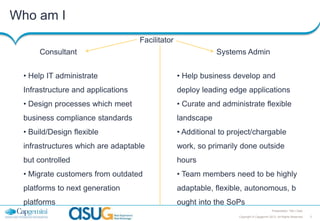
Who am I
Facilitator
Consultant

Systems Admin

• Help IT administrate

• Help business develop and

Infrastructure and applications

deploy leading edge applications

• Design processes which meet

• Curate and administrate flexible

business compliance standards

landscape

• Build/Design flexible

• Additional to project/chargable

infrastructures which are adaptable

work, so primarily done outside

but controlled

hours

• Migrate customers from outdated

• Team members need to be highly

platforms to next generation

adaptable, flexible, autonomous, b

platforms

ought into the SoPs
Presentation Title | Date
Copyright © Capgemini 2013. All Rights Reserved

2
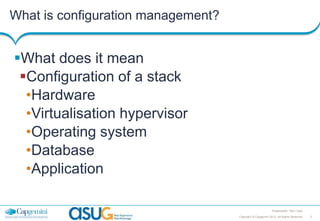
What is configuration management?

What does it mean
Configuration of a stack
•Hardware
•Virtualisation hypervisor
•Operating system
•Database
•Application
Presentation Title | Date
Copyright © Capgemini 2013. All Rights Reserved

3
In the beginning

Configuring your applications was easy
SCP/XCOPY – Application deployment
SSH/RDP – Configuration management
Then things got a little more complex

Presentation Title | Date
Copyright © Capgemini 2013. All Rights Reserved

4
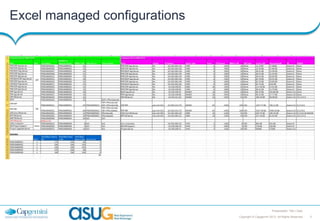
Excel managed configurations

Presentation Title | Date
Copyright © Capgemini 2013. All Rights Reserved

5
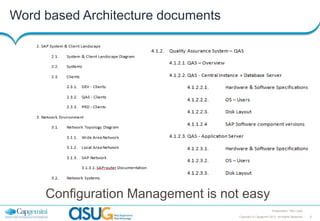
Word based Architecture documents

Configuration Management is not easy
Presentation Title | Date
Copyright © Capgemini 2013. All Rights Reserved

6
How do you achieve configuration management

Infrastructure as code
Presentation Title | Date
Copyright © Capgemini 2013. All Rights Reserved

7
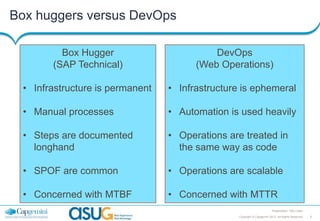
Box huggers versus DevOps
Box Hugger
(SAP Technical)

DevOps
(Web Operations)

• Infrastructure is permanent

• Infrastructure is ephemeral

• Manual processes

• Automation is used heavily

• Steps are documented
longhand

• Operations are treated in
the same way as code

• SPOF are common

• Operations are scalable

• Concerned with MTBF

• Concerned with MTTR
Presentation Title | Date
Copyright © Capgemini 2013. All Rights Reserved

8
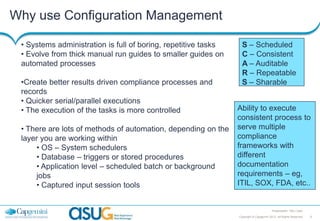
Why use Configuration Management
• Systems administration is full of boring, repetitive tasks
• Evolve from thick manual run guides to smaller guides on
automated processes
•Create better results driven compliance processes and
records
• Quicker serial/parallel executions
• The execution of the tasks is more controlled
• There are lots of methods of automation, depending on the
layer you are working within
• OS – System schedulers
• Database – triggers or stored procedures
• Application level – scheduled batch or background
jobs
• Captured input session tools

S – Scheduled
C – Consistent
A – Auditable
R – Repeatable
S – Sharable
Ability to execute
consistent process to
serve multiple
compliance
frameworks with
different
documentation
requirements – eg,
ITIL, SOX, FDA, etc..

Presentation Title | Date
Copyright © Capgemini 2013. All Rights Reserved

9
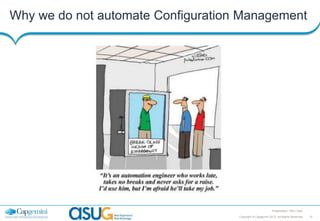
Why we do not automate Configuration Management

Presentation Title | Date
Copyright © Capgemini 2013. All Rights Reserved

10
What can be managed through code
• Virtualisation hypervisor
– Parameters
– Creation of new hosts
• Operating system
– Parameters
– Users
– File system permissions
– Software Installs
• Database
– Patches
–Parameters
Presentation Title | Date
Copyright © Capgemini 2013. All Rights Reserved

11
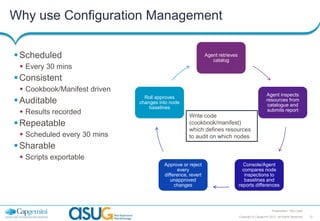
Why use Configuration Management
 Scheduled

Agent retrieves
catalog

 Every 30 mins

 Consistent
 Cookbook/Manifest driven

 Auditable
 Results recorded

 Repeatable
 Scheduled every 30 mins

Agent inspects
resources from
catalogue and
submits report

Roll approves
changes into node
baselines

Write code
(cookbook/manifest)
which defines resources
to audit on which nodes

 Sharable
 Scripts exportable
Approve or reject
every
difference, revert
unapproved
changes

Console/Agent
compares node
inspections to
baselines and
reports differences

Presentation Title | Date
Copyright © Capgemini 2013. All Rights Reserved

12
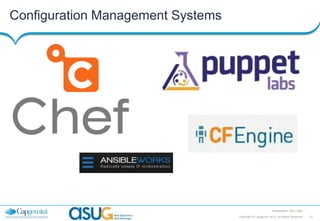
Configuration Management Systems

Presentation Title | Date
Copyright © Capgemini 2013. All Rights Reserved

13
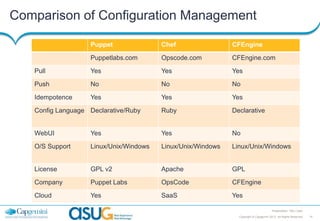
Comparison of Configuration Management
Puppet

Chef

CFEngine

Puppetlabs.com

Opscode.com

CFEngine.com

Pull

Yes

Yes

Yes

Push

No

No

No

Idempotence

Yes

Yes

Yes

Config Language Declarative/Ruby

Ruby

Declarative

WebUI

Yes

Yes

No

O/S Support

Linux/Unix/Windows

Linux/Unix/Windows

Linux/Unix/Windows

License

GPL v2

Apache

GPL

Company

Puppet Labs

OpsCode

CFEngine

Cloud

Yes

SaaS

Yes
Presentation Title | Date
Copyright © Capgemini 2013. All Rights Reserved

14
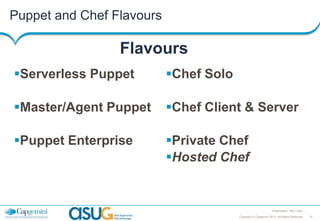
Puppet and Chef Flavours

Flavours
Serverless Puppet

Chef Solo

Master/Agent Puppet

Chef Client & Server

Puppet Enterprise

Private Chef
Hosted Chef

Presentation Title | Date
Copyright © Capgemini 2013. All Rights Reserved

15
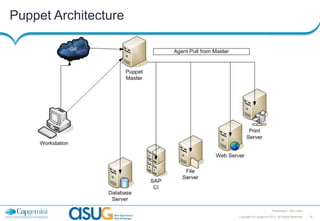
Puppet Architecture

Presentation Title | Date
Copyright © Capgemini 2013. All Rights Reserved

16
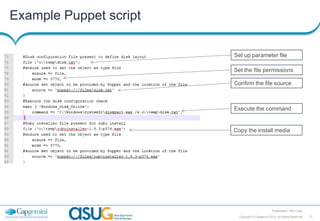
Example Puppet script
Set up parameter file
Set the file permissions
Confirm the file source

Execute the command

Copy the install media

Presentation Title | Date
Copyright © Capgemini 2013. All Rights Reserved

17
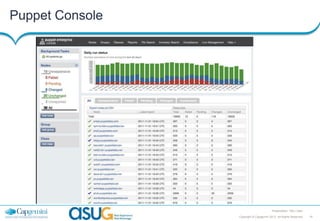
Puppet Console

Presentation Title | Date
Copyright © Capgemini 2013. All Rights Reserved

18
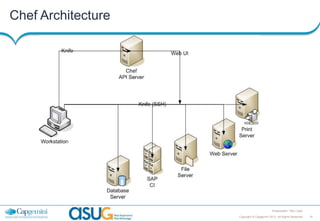
Chef Architecture

Presentation Title | Date
Copyright © Capgemini 2013. All Rights Reserved

19
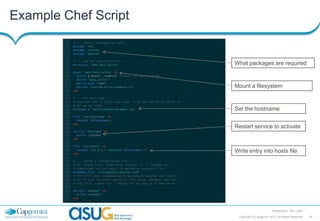
Example Chef Script

What packages are required

Mount a filesystem

Set the hostname
Restart service to activate

Write entry into hosts file

Presentation Title | Date
Copyright © Capgemini 2013. All Rights Reserved

20
Puppet Demo

Presentation Title | Date
Copyright © Capgemini 2013. All Rights Reserved

21
Chef Demo

Presentation Title | Date
Copyright © Capgemini 2013. All Rights Reserved

22
About Capgemini
With more than 120,000 people in 40 countries, Capgemini is one
of the world's foremost providers of consulting, technology and
outsourcing services. The Group reported 2011 global revenues
of EUR 9.7 billion.
Together with its clients, Capgemini creates and delivers
business and technology solutions that fit their needs and drive
the
results
they
want.
A
deeply
multicultural
organization, Capgemini has developed its own way of
working, the Collaborative Business ExperienceTM, and draws on
Rightshore ®, its worldwide delivery model.
Rightshore® is a trademark belonging to Capgemini

www.capgemini.com

The information contained in this presentation is proprietary.
© 2013 Capgemini. All rights reserved.

SAP TechEd 2013 session Tec118 managing your-environment

  • 1.
    TEC118 – How DoYou Manage the Configuration of Your Environments from Metal to Application SAP TechEd 2013 Las Vegas Chris Kernaghan
  • 2.
    Who am I Facilitator Consultant SystemsAdmin • Help IT administrate • Help business develop and Infrastructure and applications deploy leading edge applications • Design processes which meet • Curate and administrate flexible business compliance standards landscape • Build/Design flexible • Additional to project/chargable infrastructures which are adaptable work, so primarily done outside but controlled hours • Migrate customers from outdated • Team members need to be highly platforms to next generation adaptable, flexible, autonomous, b platforms ought into the SoPs Presentation Title | Date Copyright © Capgemini 2013. All Rights Reserved 2
  • 3.
    What is configurationmanagement? What does it mean Configuration of a stack •Hardware •Virtualisation hypervisor •Operating system •Database •Application Presentation Title | Date Copyright © Capgemini 2013. All Rights Reserved 3
  • 4.
    In the beginning Configuringyour applications was easy SCP/XCOPY – Application deployment SSH/RDP – Configuration management Then things got a little more complex Presentation Title | Date Copyright © Capgemini 2013. All Rights Reserved 4
  • 5.
    Excel managed configurations PresentationTitle | Date Copyright © Capgemini 2013. All Rights Reserved 5
  • 6.
    Word based Architecturedocuments Configuration Management is not easy Presentation Title | Date Copyright © Capgemini 2013. All Rights Reserved 6
  • 7.
    How do youachieve configuration management Infrastructure as code Presentation Title | Date Copyright © Capgemini 2013. All Rights Reserved 7
  • 8.
    Box huggers versusDevOps Box Hugger (SAP Technical) DevOps (Web Operations) • Infrastructure is permanent • Infrastructure is ephemeral • Manual processes • Automation is used heavily • Steps are documented longhand • Operations are treated in the same way as code • SPOF are common • Operations are scalable • Concerned with MTBF • Concerned with MTTR Presentation Title | Date Copyright © Capgemini 2013. All Rights Reserved 8
  • 9.
    Why use ConfigurationManagement • Systems administration is full of boring, repetitive tasks • Evolve from thick manual run guides to smaller guides on automated processes •Create better results driven compliance processes and records • Quicker serial/parallel executions • The execution of the tasks is more controlled • There are lots of methods of automation, depending on the layer you are working within • OS – System schedulers • Database – triggers or stored procedures • Application level – scheduled batch or background jobs • Captured input session tools S – Scheduled C – Consistent A – Auditable R – Repeatable S – Sharable Ability to execute consistent process to serve multiple compliance frameworks with different documentation requirements – eg, ITIL, SOX, FDA, etc.. Presentation Title | Date Copyright © Capgemini 2013. All Rights Reserved 9
  • 10.
    Why we donot automate Configuration Management Presentation Title | Date Copyright © Capgemini 2013. All Rights Reserved 10
  • 11.
    What can bemanaged through code • Virtualisation hypervisor – Parameters – Creation of new hosts • Operating system – Parameters – Users – File system permissions – Software Installs • Database – Patches –Parameters Presentation Title | Date Copyright © Capgemini 2013. All Rights Reserved 11
  • 12.
    Why use ConfigurationManagement  Scheduled Agent retrieves catalog  Every 30 mins  Consistent  Cookbook/Manifest driven  Auditable  Results recorded  Repeatable  Scheduled every 30 mins Agent inspects resources from catalogue and submits report Roll approves changes into node baselines Write code (cookbook/manifest) which defines resources to audit on which nodes  Sharable  Scripts exportable Approve or reject every difference, revert unapproved changes Console/Agent compares node inspections to baselines and reports differences Presentation Title | Date Copyright © Capgemini 2013. All Rights Reserved 12
  • 13.
    Configuration Management Systems PresentationTitle | Date Copyright © Capgemini 2013. All Rights Reserved 13
  • 14.
    Comparison of ConfigurationManagement Puppet Chef CFEngine Puppetlabs.com Opscode.com CFEngine.com Pull Yes Yes Yes Push No No No Idempotence Yes Yes Yes Config Language Declarative/Ruby Ruby Declarative WebUI Yes Yes No O/S Support Linux/Unix/Windows Linux/Unix/Windows Linux/Unix/Windows License GPL v2 Apache GPL Company Puppet Labs OpsCode CFEngine Cloud Yes SaaS Yes Presentation Title | Date Copyright © Capgemini 2013. All Rights Reserved 14
  • 15.
    Puppet and ChefFlavours Flavours Serverless Puppet Chef Solo Master/Agent Puppet Chef Client & Server Puppet Enterprise Private Chef Hosted Chef Presentation Title | Date Copyright © Capgemini 2013. All Rights Reserved 15
  • 16.
    Puppet Architecture Presentation Title| Date Copyright © Capgemini 2013. All Rights Reserved 16
  • 17.
    Example Puppet script Setup parameter file Set the file permissions Confirm the file source Execute the command Copy the install media Presentation Title | Date Copyright © Capgemini 2013. All Rights Reserved 17
  • 18.
    Puppet Console Presentation Title| Date Copyright © Capgemini 2013. All Rights Reserved 18
  • 19.
    Chef Architecture Presentation Title| Date Copyright © Capgemini 2013. All Rights Reserved 19
  • 20.
    Example Chef Script Whatpackages are required Mount a filesystem Set the hostname Restart service to activate Write entry into hosts file Presentation Title | Date Copyright © Capgemini 2013. All Rights Reserved 20
  • 21.
    Puppet Demo Presentation Title| Date Copyright © Capgemini 2013. All Rights Reserved 21
  • 22.
    Chef Demo Presentation Title| Date Copyright © Capgemini 2013. All Rights Reserved 22
  • 23.
    About Capgemini With morethan 120,000 people in 40 countries, Capgemini is one of the world's foremost providers of consulting, technology and outsourcing services. The Group reported 2011 global revenues of EUR 9.7 billion. Together with its clients, Capgemini creates and delivers business and technology solutions that fit their needs and drive the results they want. A deeply multicultural organization, Capgemini has developed its own way of working, the Collaborative Business ExperienceTM, and draws on Rightshore ®, its worldwide delivery model. Rightshore® is a trademark belonging to Capgemini www.capgemini.com The information contained in this presentation is proprietary. © 2013 Capgemini. All rights reserved.