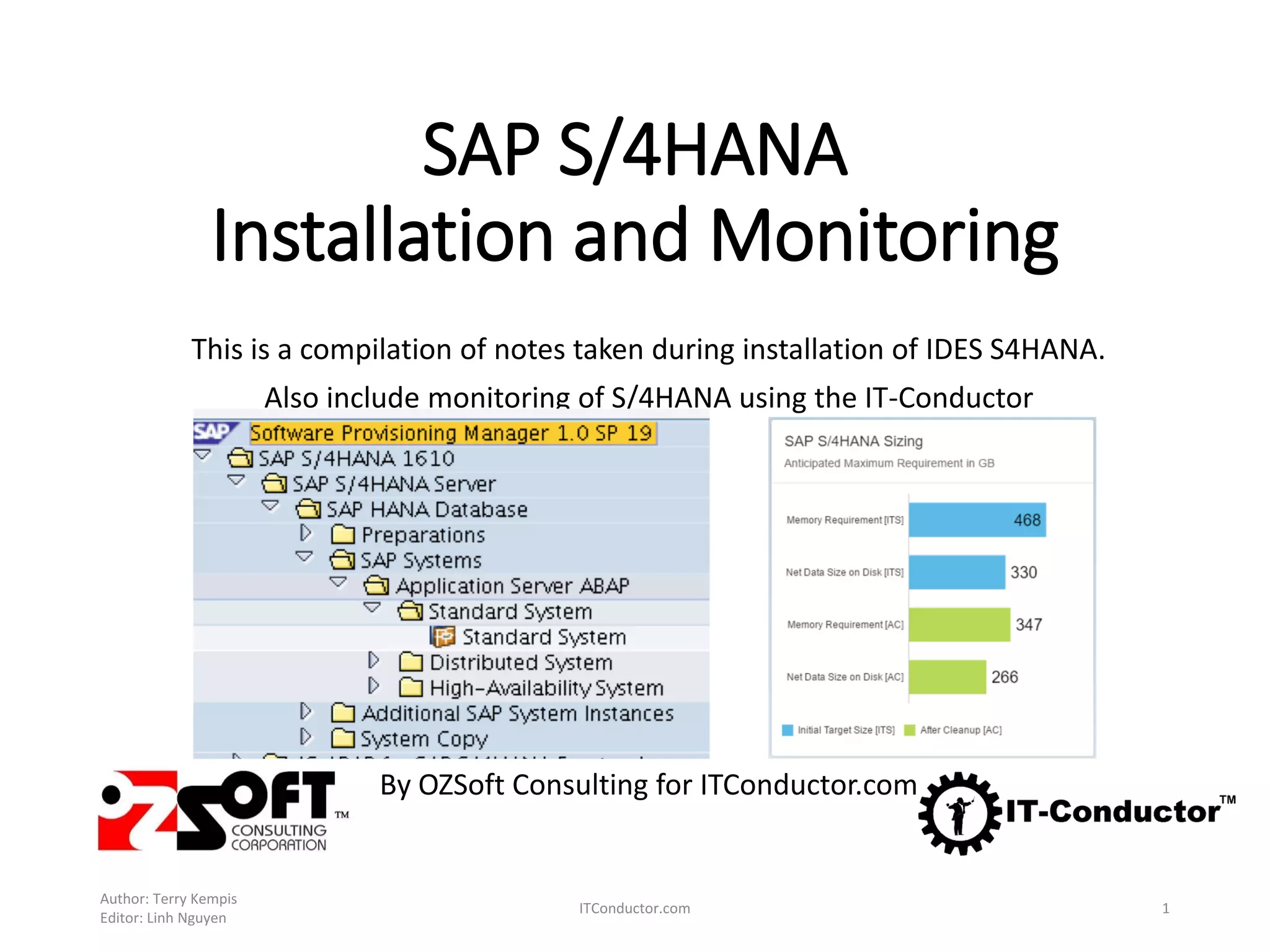
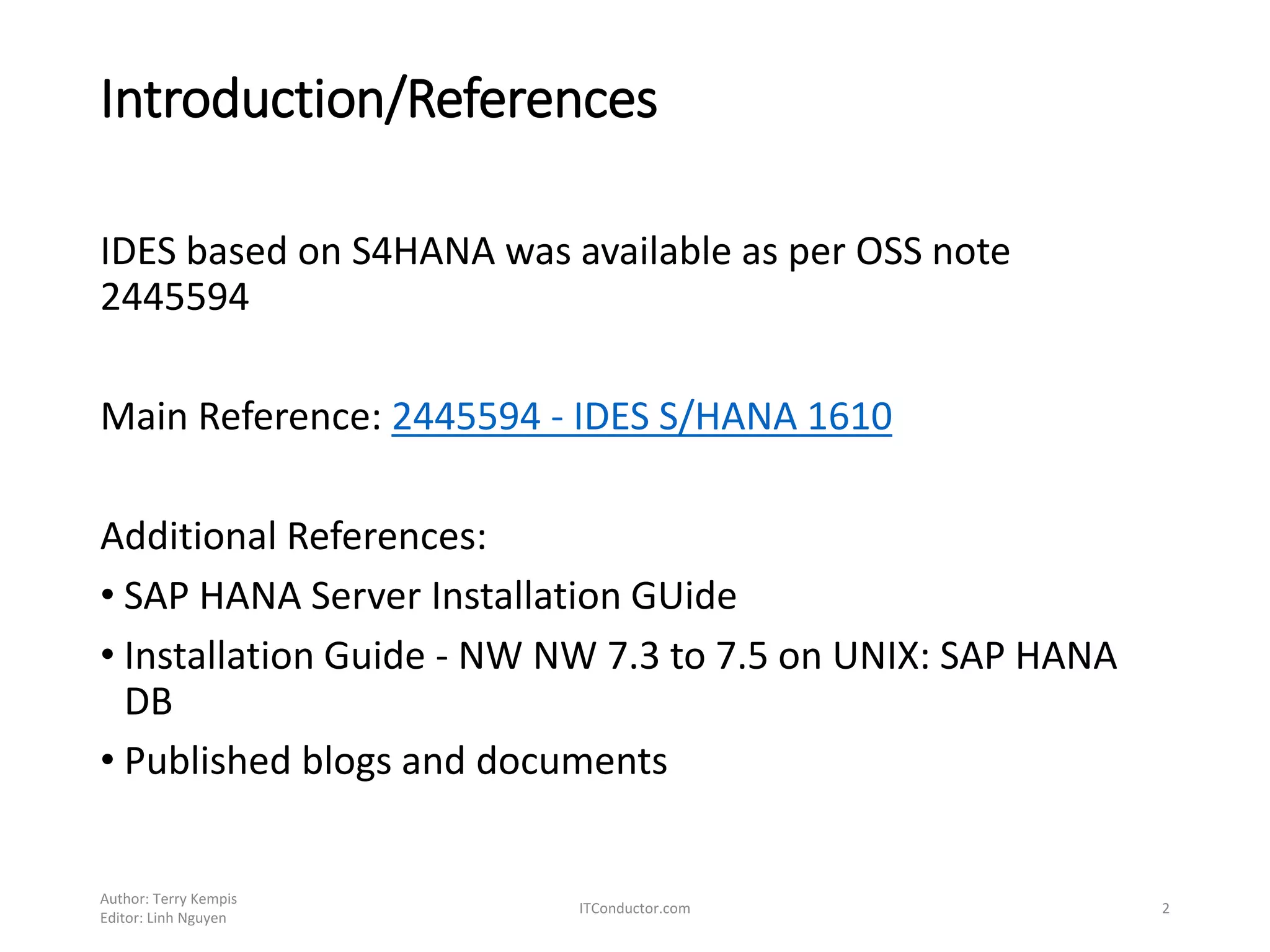

SAP S/4HANA
Installation and Monitoring
This is a compilation of notes taken during installation of IDES S4HANA.
Also include monitoring of S/4HANA using the IT-Conductor
By OZSoft Consulting for ITConductor.com
Author: Terry Kempis
Editor: Linh Nguyen
ITConductor.com 1
Introduction/References
IDES based on S4HANA was available as per OSS note
2445594
Main Reference: 2445594 - IDES S/HANA 1610
Additional References:
• SAP HANA Server Installation GUide
• Installation Guide - NW NW 7.3 to 7.5 on UNIX: SAP HANA
DB
• Published blogs and documents
Author: Terry Kempis
Editor: Linh Nguyen
ITConductor.com 2
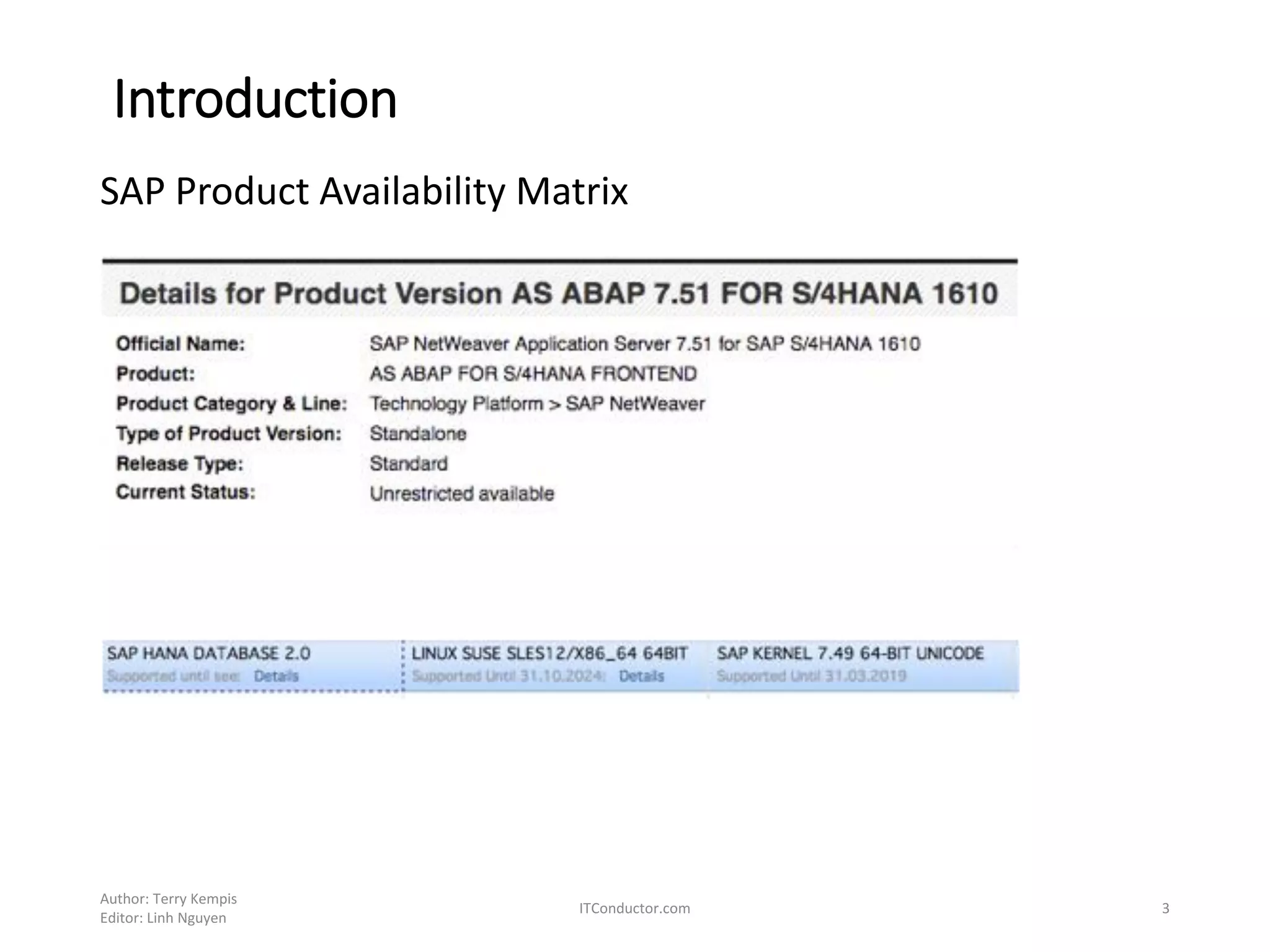
Introduction
SAP Product Availability Matrix
Author: Terry Kempis
Editor: Linh Nguyen
ITConductor.com 3
Installation
The IDES S4HANA was installed with/on the following
• AS ABAP 7.51 for S/4HANA 1610
• SAP Kernel 7.49 64-BIT UNICODE
• SAP HANA Database 2.0 (SPS00)
• Linux SUSE SLES 12/X86-64 64BIT
SAP HANA and The SAP NW AS ABAP server were deployed on
one server
The installation’s general steps
1. Install the HANA server
2. Install the NW ABAP server
Author: Terry Kempis
Editor: Linh Nguyen
ITConductor.com 4
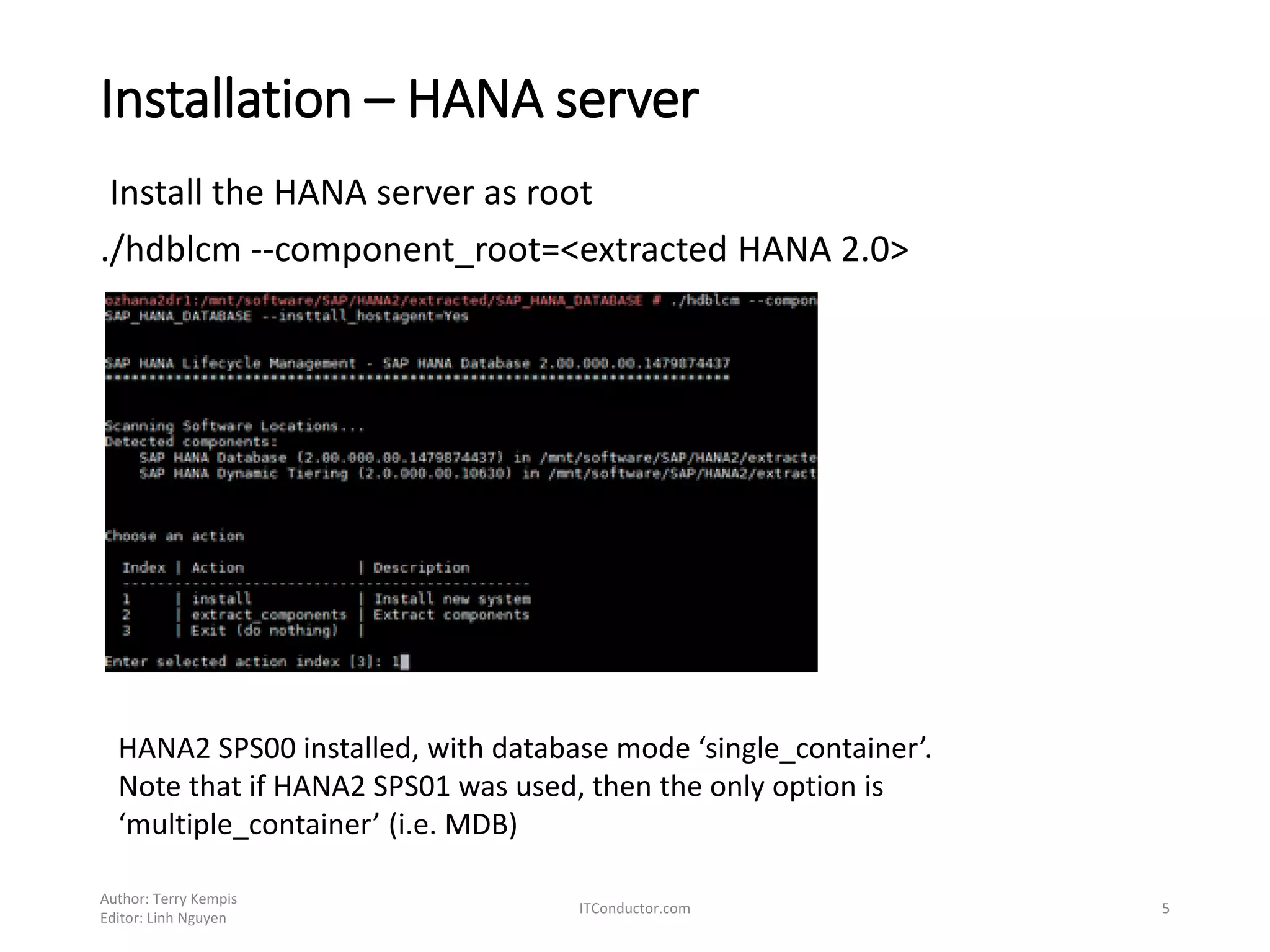
Installation – HANA server
Install the HANA server as root
./hdblcm --component_root=<extracted HANA 2.0>
Author: Terry Kempis
Editor: Linh Nguyen
ITConductor.com 5
HANA2 SPS00 installed, with database mode ‘single_container’.
Note that if HANA2 SPS01 was used, then the only option is
‘multiple_container’ (i.e. MDB)
Installation – HANA server
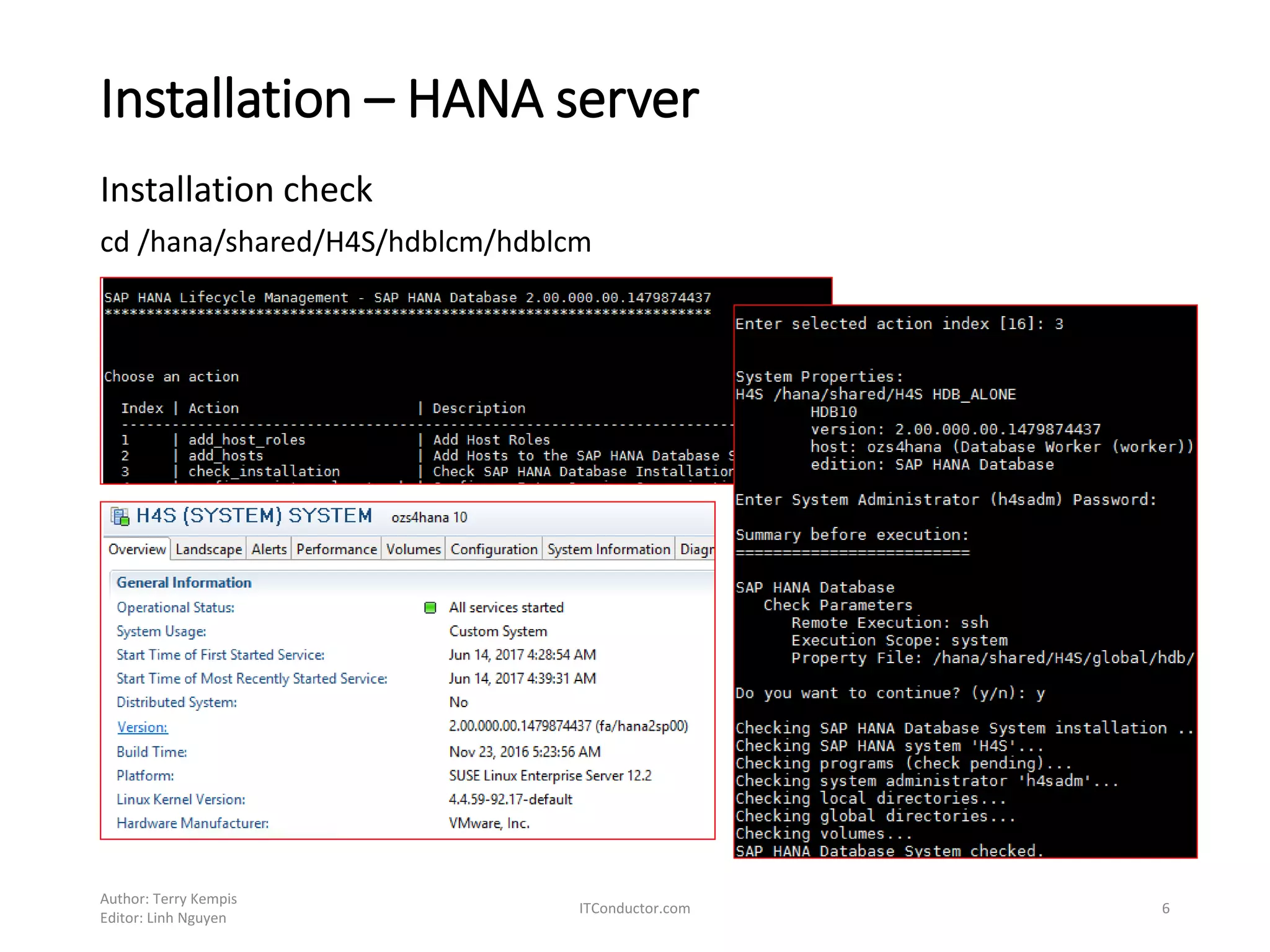
Installation check
cd /hana/shared/H4S/hdblcm/hdblcm
Author: Terry Kempis
Editor: Linh Nguyen
ITConductor.com 6
Installation – NW ABAP server
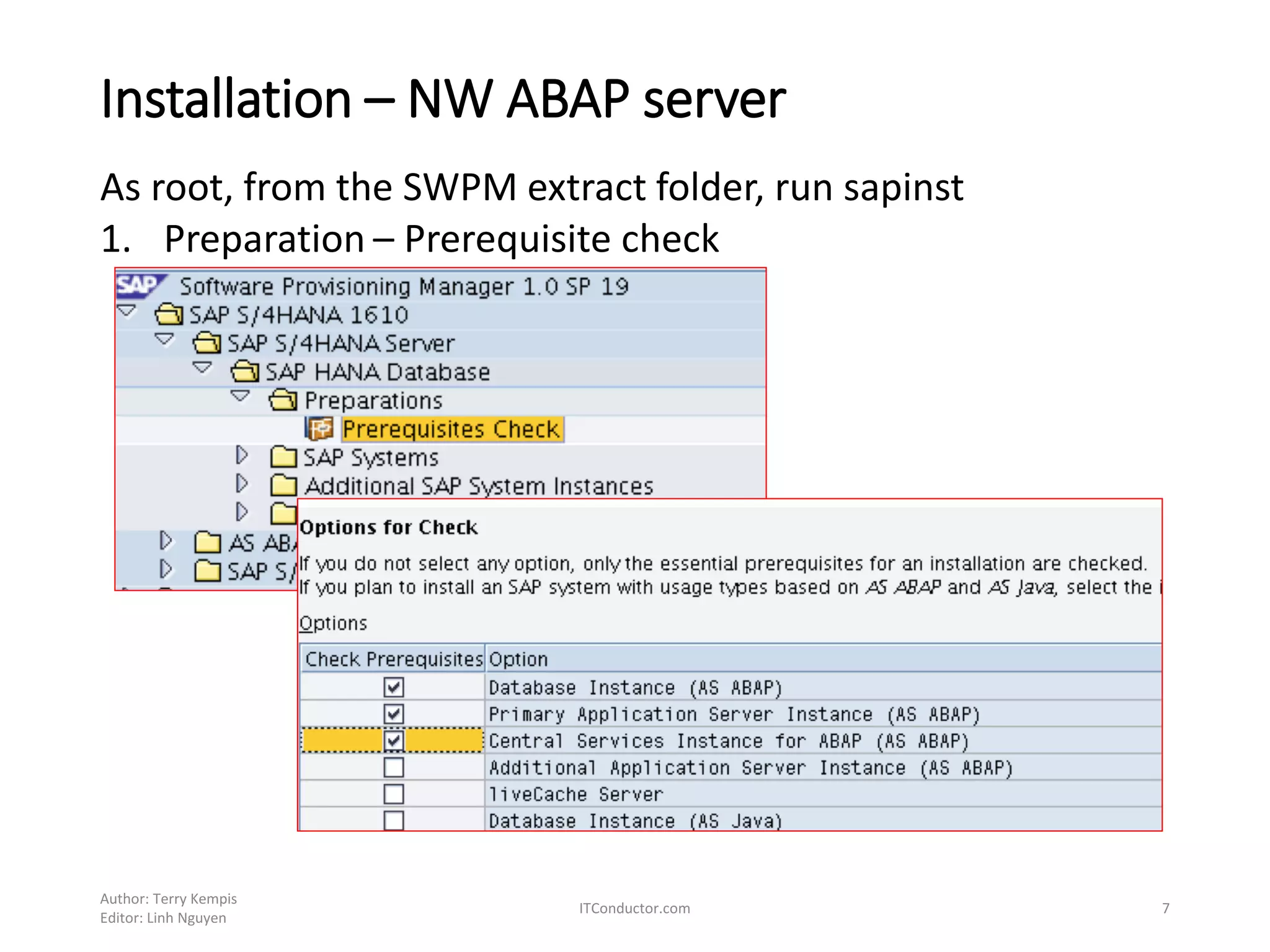
As root, from the SWPM extract folder, run sapinst
1. Preparation – Prerequisite check
Author: Terry Kempis
Editor: Linh Nguyen
ITConductor.com 7
Installation – NW ABAP server
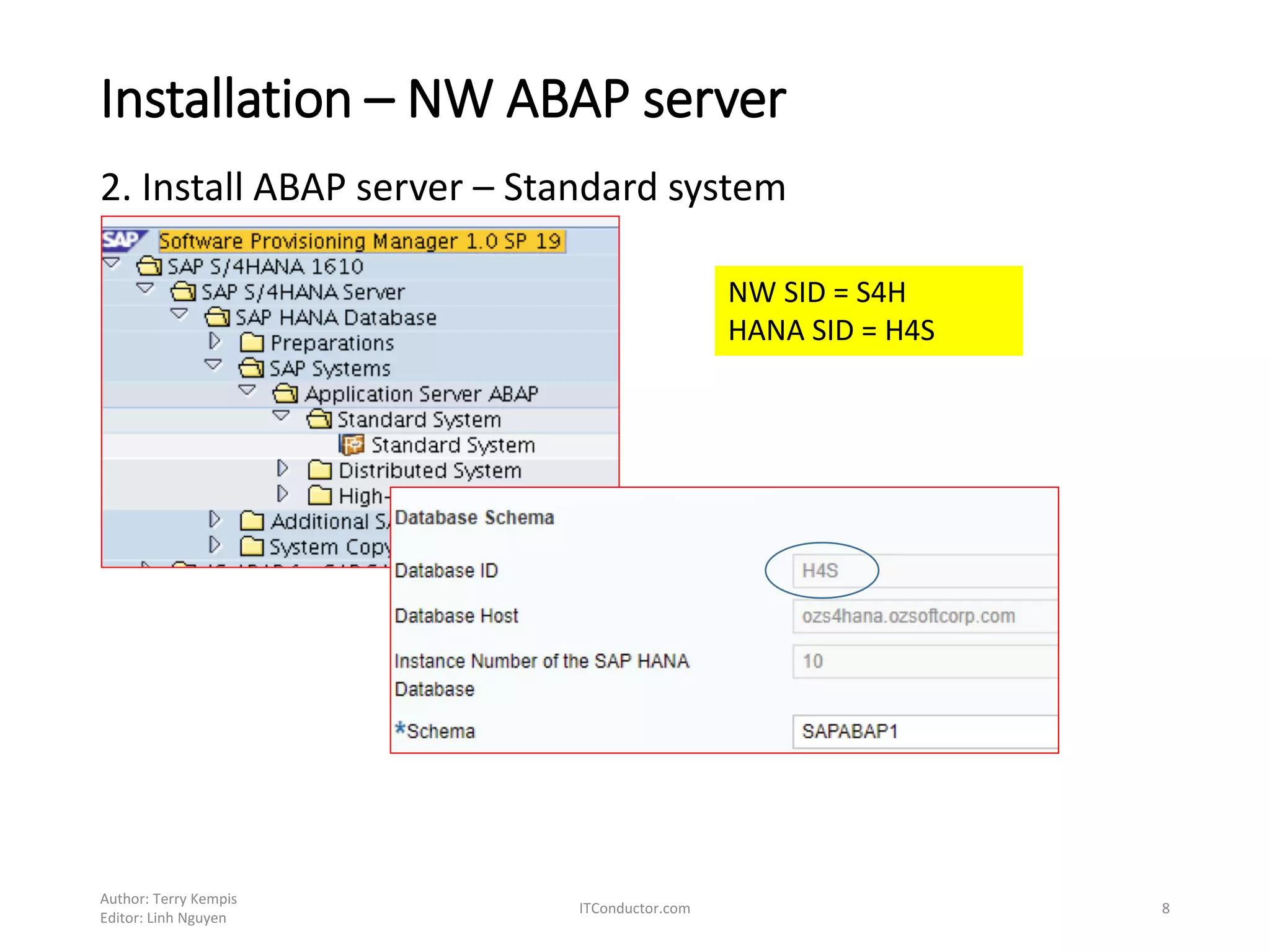
2. Install ABAP server – Standard system
Author: Terry Kempis
Editor: Linh Nguyen
ITConductor.com 8
NW SID = S4H
HANA SID = H4S
Installation – NW ABAP server
Author: Terry Kempis
Editor: Linh Nguyen
ITConductor.com 9
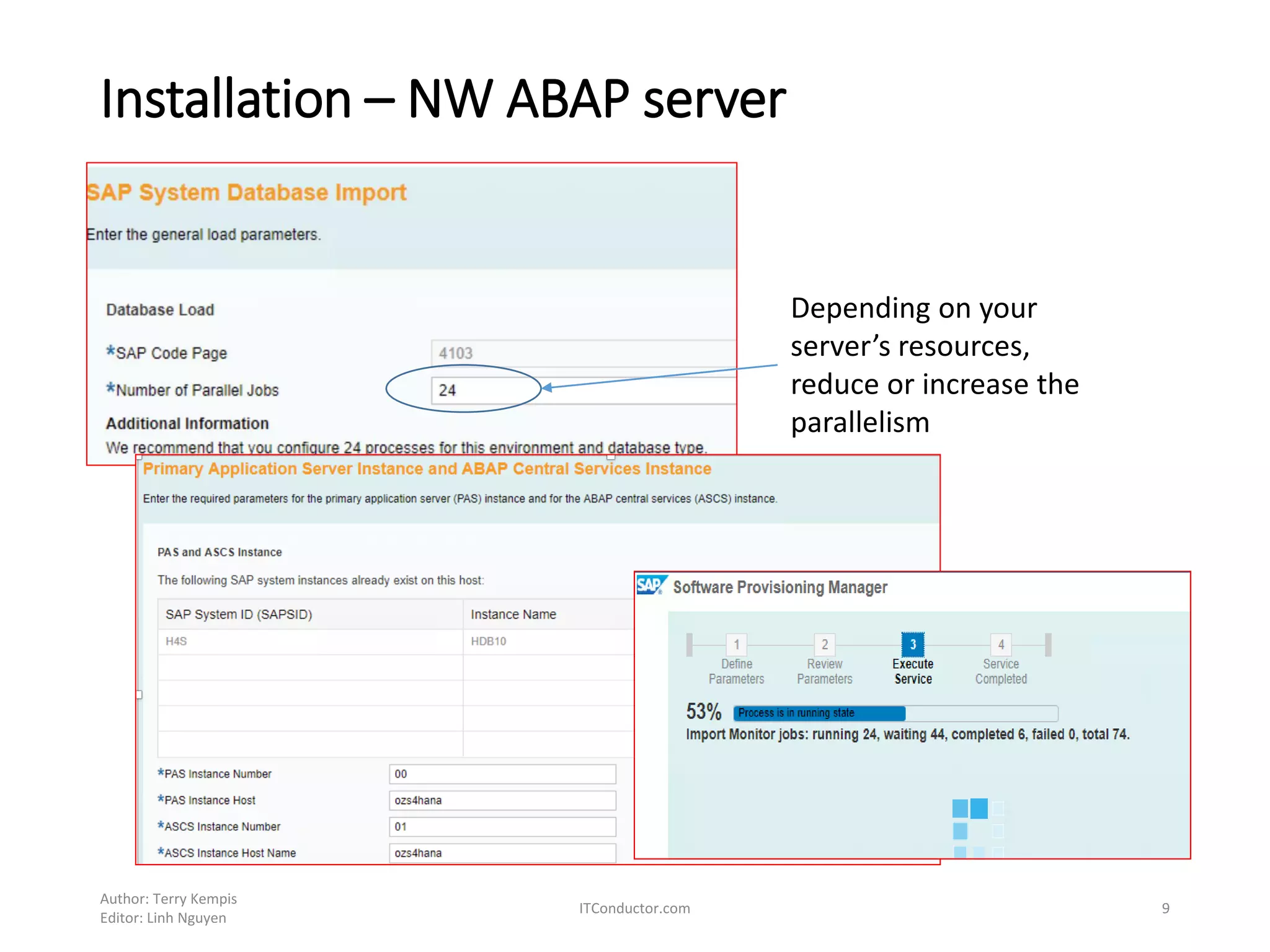
Depending on your
server’s resources,
reduce or increase the
parallelism
Installation – NW ABAP server
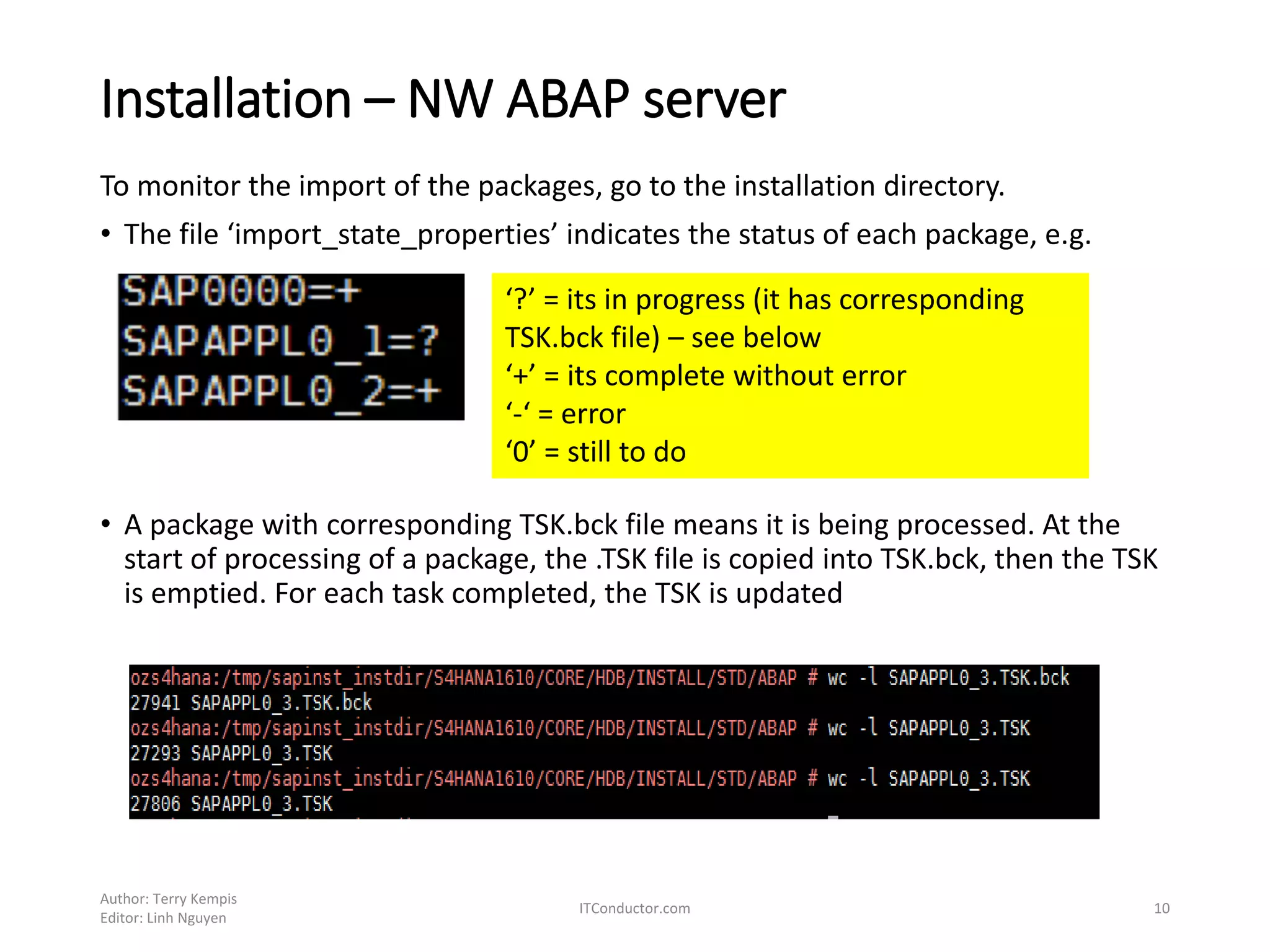
To monitor the import of the packages, go to the installation directory.
• The file ‘import_state_properties’ indicates the status of each package, e.g.
• A package with corresponding TSK.bck file means it is being processed. At the
start of processing of a package, the .TSK file is copied into TSK.bck, then the TSK
is emptied. For each task completed, the TSK is updated
Author: Terry Kempis
Editor: Linh Nguyen
ITConductor.com 10
‘?’ = its in progress (it has corresponding
TSK.bck file) – see below
‘+’ = its complete without error
‘-‘ = error
‘0’ = still to do
Installation – NW ABAP server
Author: Terry Kempis
Editor: Linh Nguyen
ITConductor.com 11
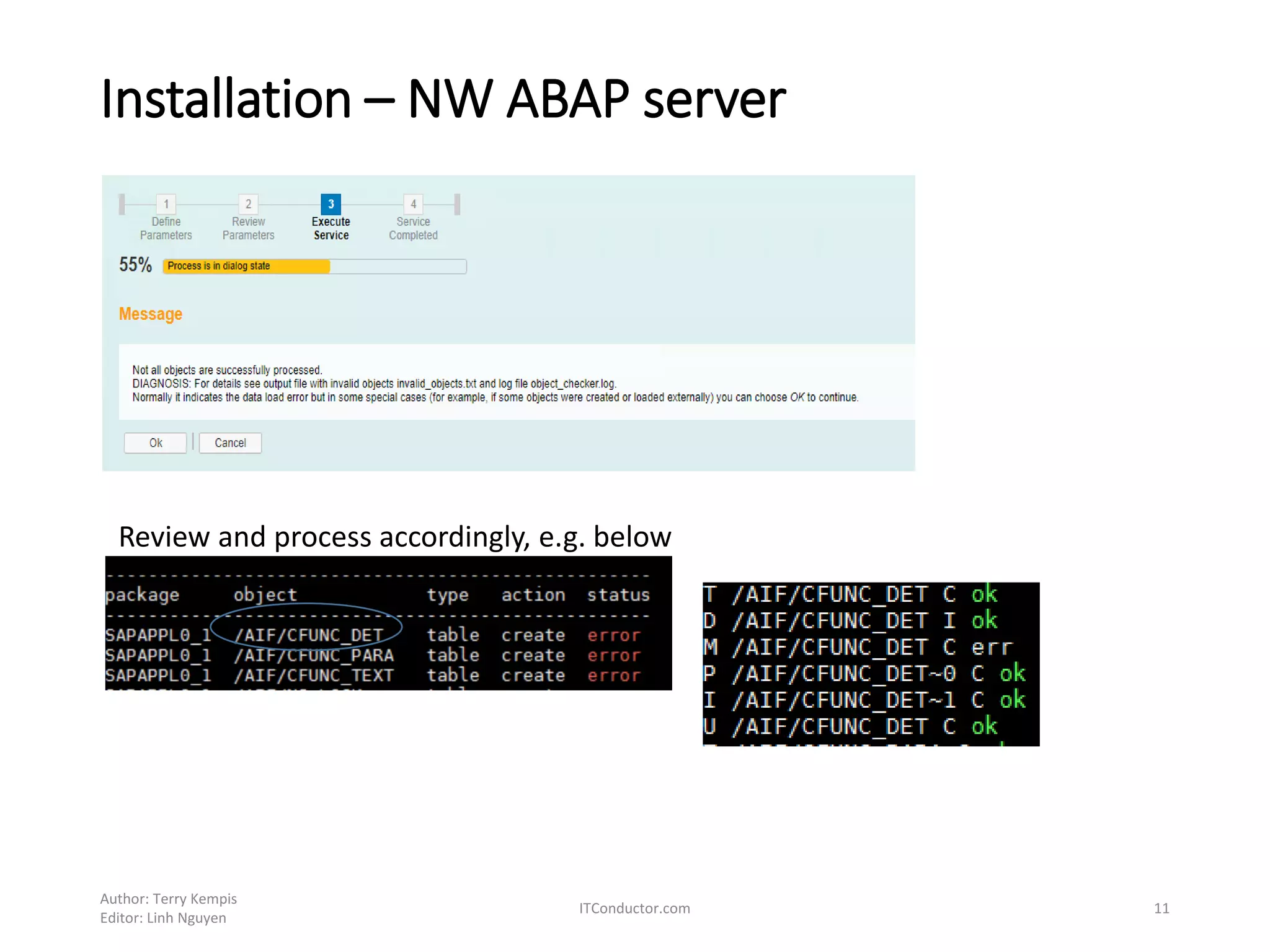
Review and process accordingly, e.g. below
Installation – NW ABAP server
Author: Terry Kempis
Editor: Linh Nguyen
ITConductor.com 12
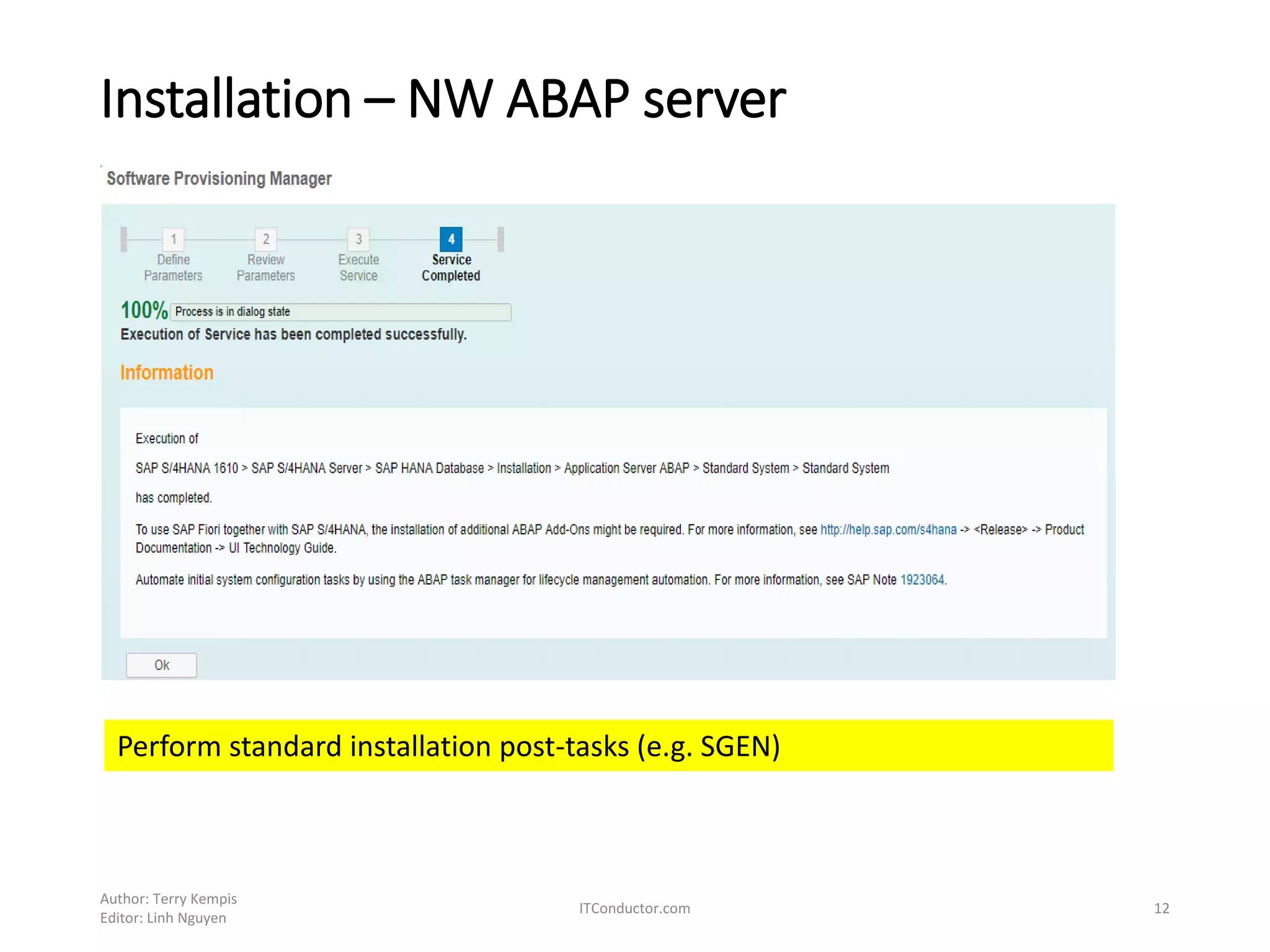
Perform standard installation post-tasks (e.g. SGEN)
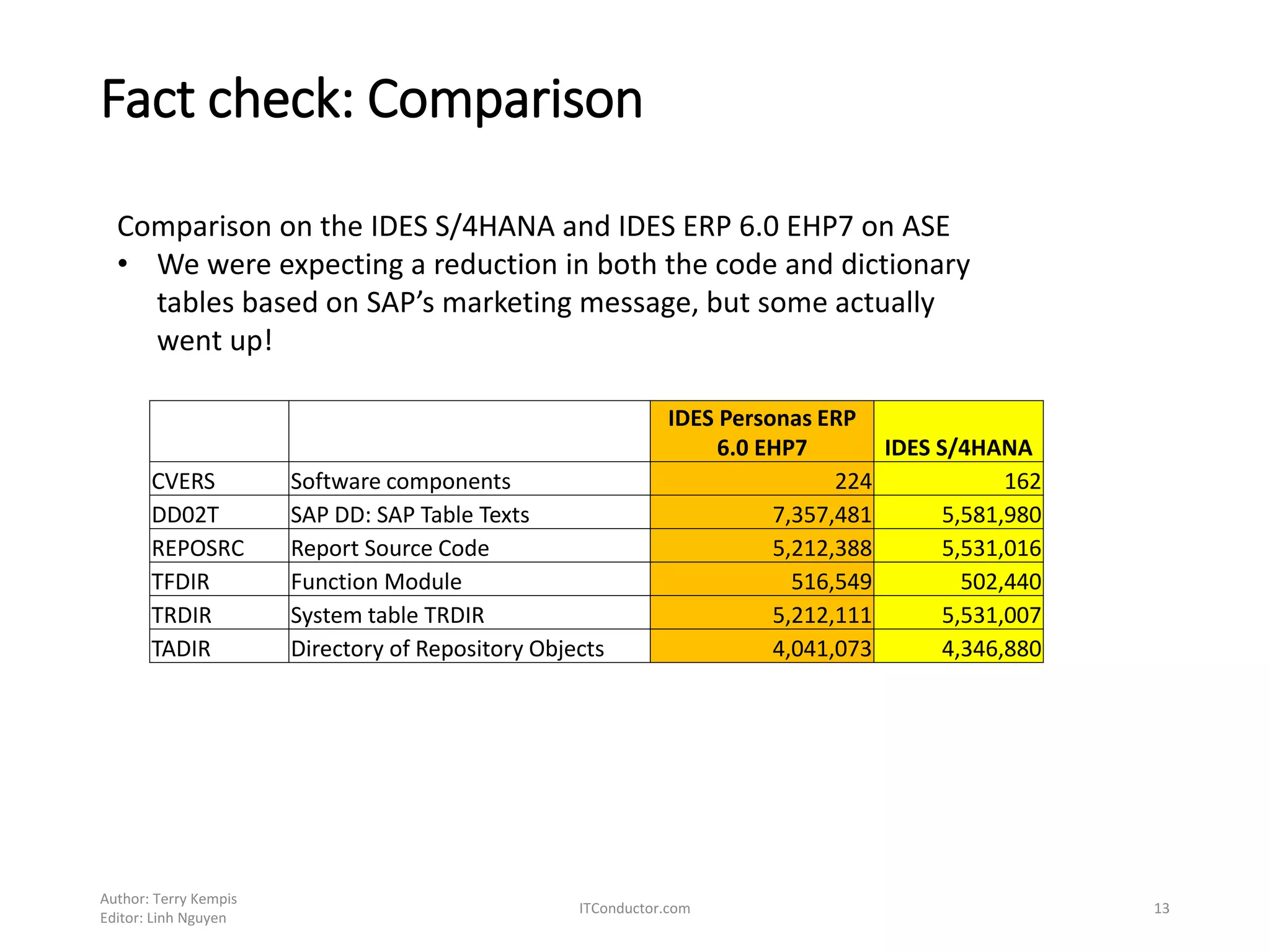
Fact check: Comparison
Author: Terry Kempis
Editor: Linh Nguyen
ITConductor.com 13
IDES Personas ERP
6.0 EHP7 IDES S/4HANA
CVERS Software components 224 162
DD02T SAP DD: SAP Table Texts 7,357,481 5,581,980
REPOSRC Report Source Code 5,212,388 5,531,016
TFDIR Function Module 516,549 502,440
TRDIR System table TRDIR 5,212,111 5,531,007
TADIR Directory of Repository Objects 4,041,073 4,346,880
Comparison on the IDES S/4HANA and IDES ERP 6.0 EHP7 on ASE
• We were expecting a reduction in both the code and dictionary
tables based on SAP’s marketing message, but some actually
went up!
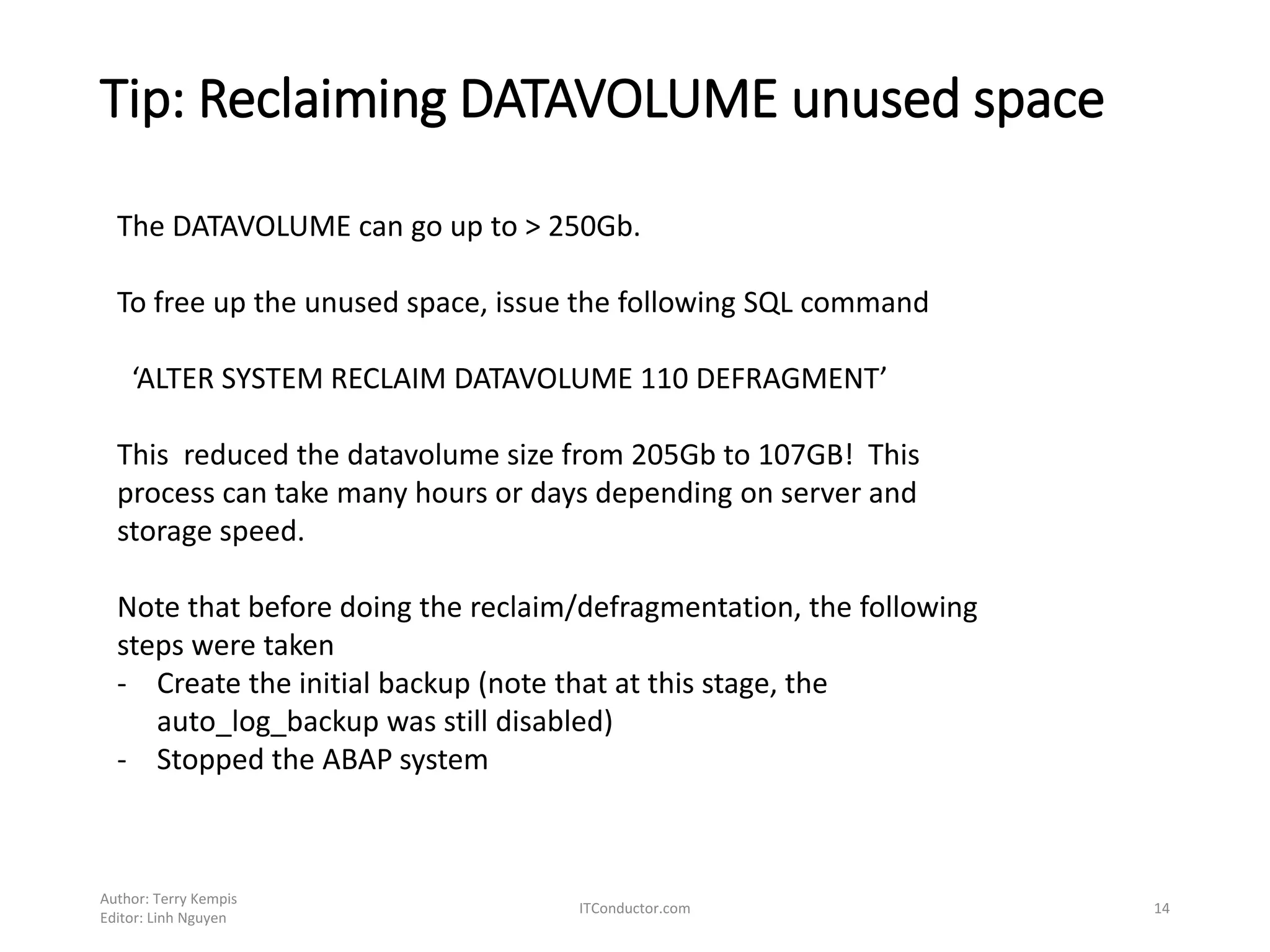
Tip: Reclaiming DATAVOLUME unused space
Author: Terry Kempis
Editor: Linh Nguyen
ITConductor.com 14
The DATAVOLUME can go up to > 250Gb.
To free up the unused space, issue the following SQL command
‘ALTER SYSTEM RECLAIM DATAVOLUME 110 DEFRAGMENT’
This reduced the datavolume size from 205Gb to 107GB! This
process can take many hours or days depending on server and
storage speed.
Note that before doing the reclaim/defragmentation, the following
steps were taken
- Create the initial backup (note that at this stage, the
auto_log_backup was still disabled)
- Stopped the ABAP system
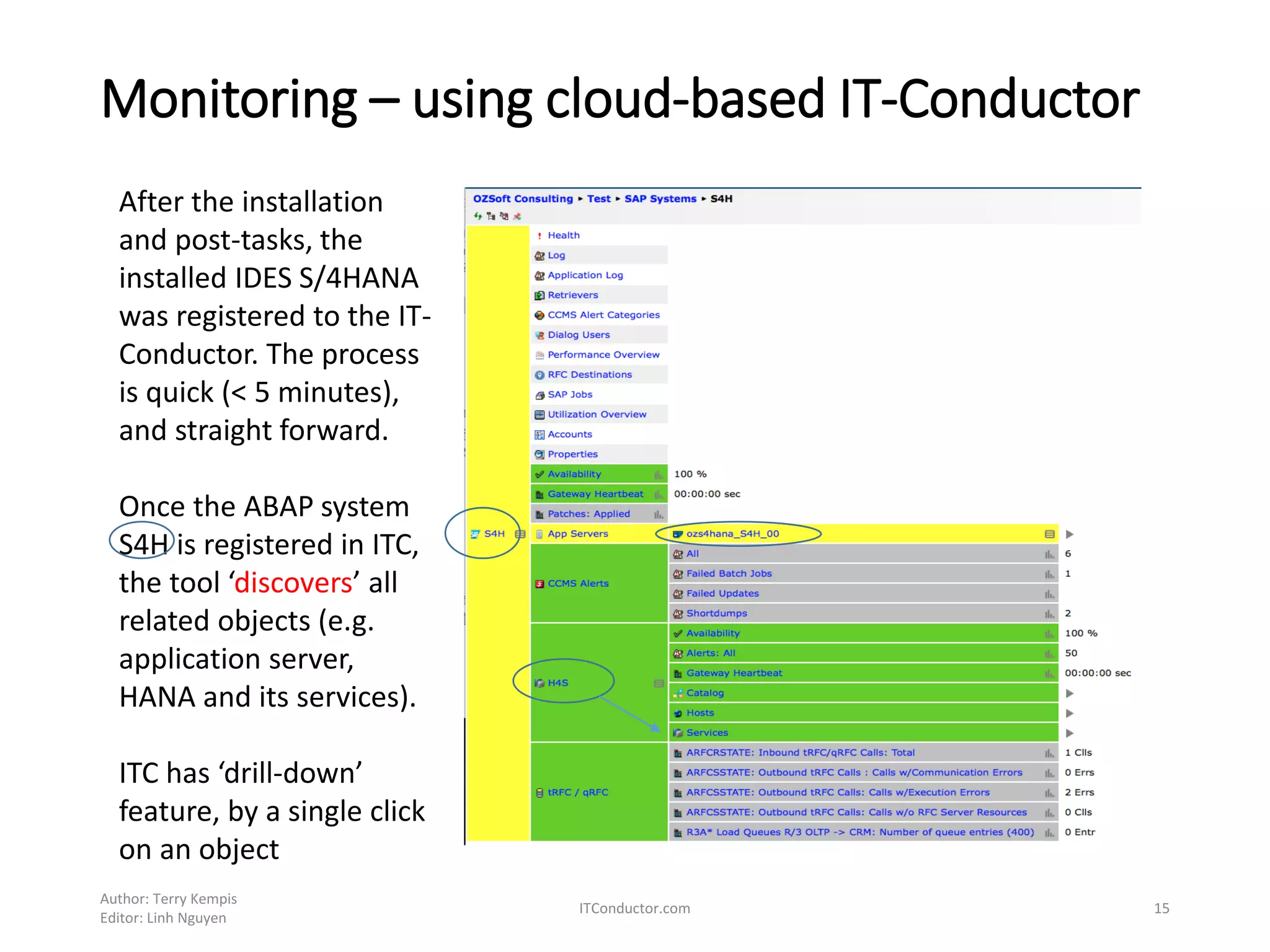
Monitoring – using cloud-based IT-Conductor
Author: Terry Kempis
Editor: Linh Nguyen
ITConductor.com 15
After the installation
and post-tasks, the
installed IDES S/4HANA
was registered to the IT-
Conductor. The process
is quick (< 5 minutes),
and straight forward.
Once the ABAP system
S4H is registered in ITC,
the tool ‘discovers’ all
related objects (e.g.
application server,
HANA and its services).
ITC has ‘drill-down’
feature, by a single click
on an object
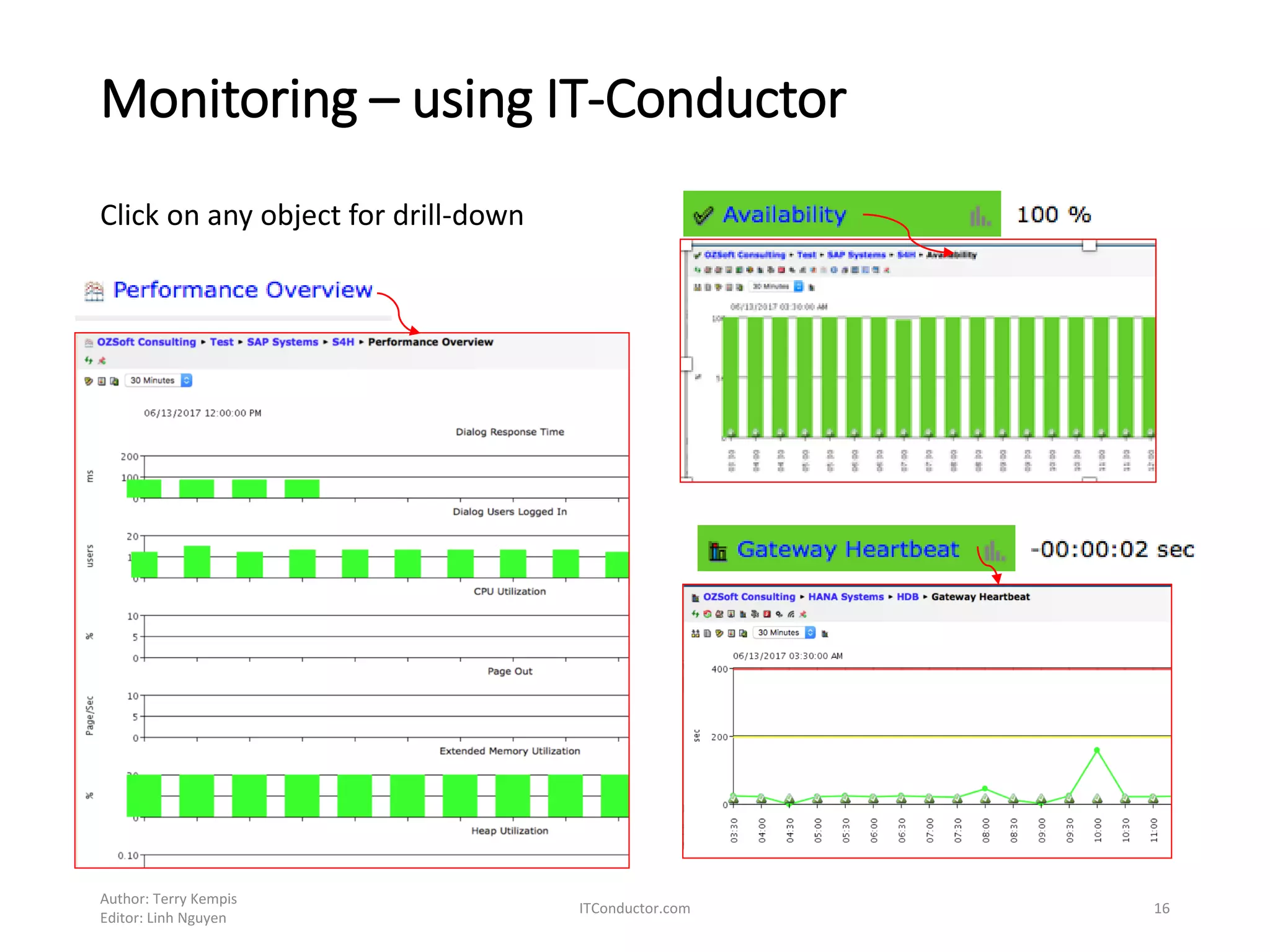
Monitoring – using IT-Conductor
Author: Terry Kempis
Editor: Linh Nguyen
ITConductor.com 16
Click on any object for drill-down
Monitoring – using IT-Conductor
Author: Terry Kempis
Editor: Linh Nguyen
ITConductor.com 17
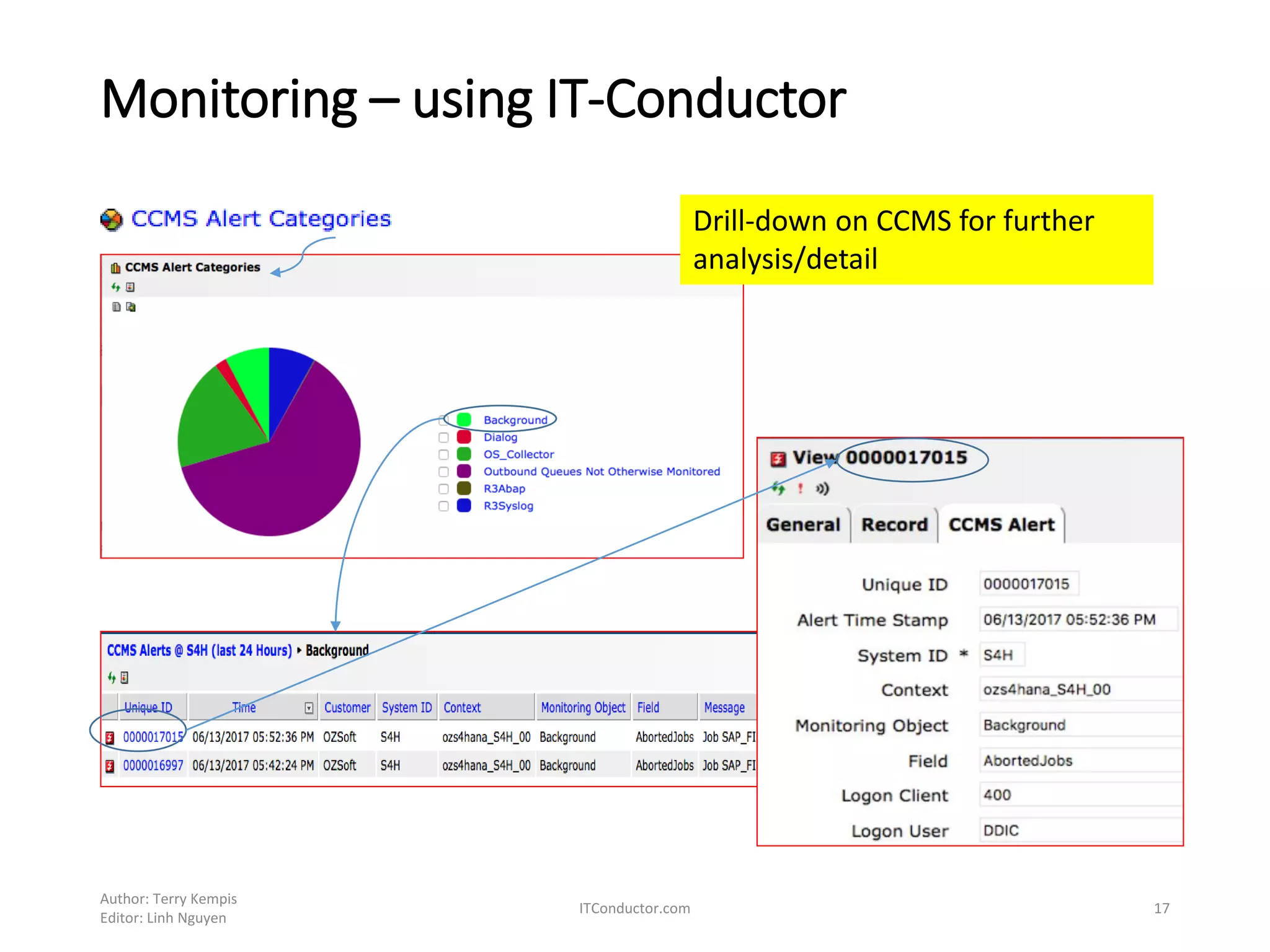
Drill-down on CCMS for further
analysis/detail
Monitoring – using IT-Conductor
Author: Terry Kempis
Editor: Linh Nguyen
ITConductor.com 18
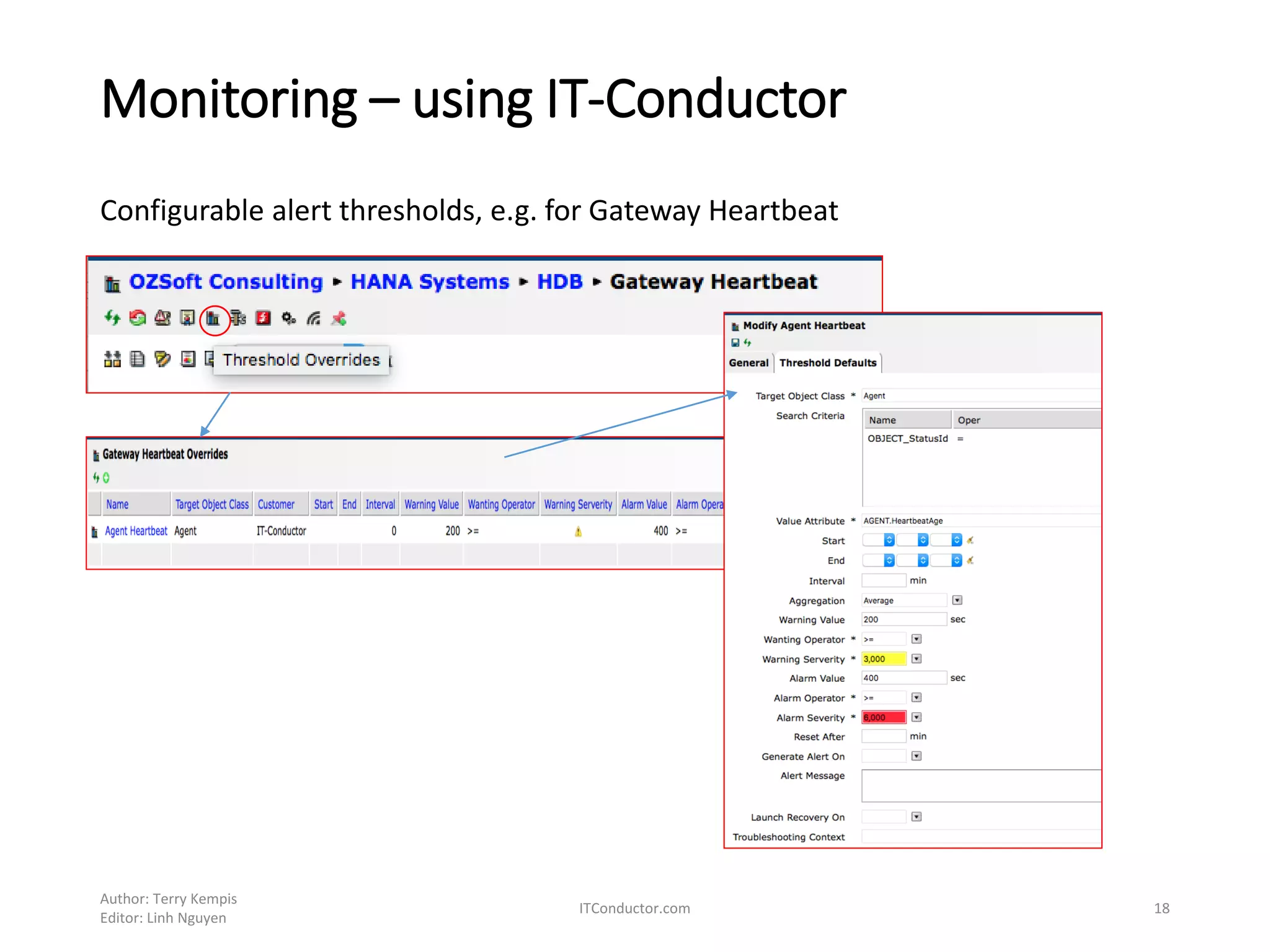
Configurable alert thresholds, e.g. for Gateway Heartbeat
Monitoring – using IT-Conductor
Author: Terry Kempis
Editor: Linh Nguyen
ITConductor.com 19
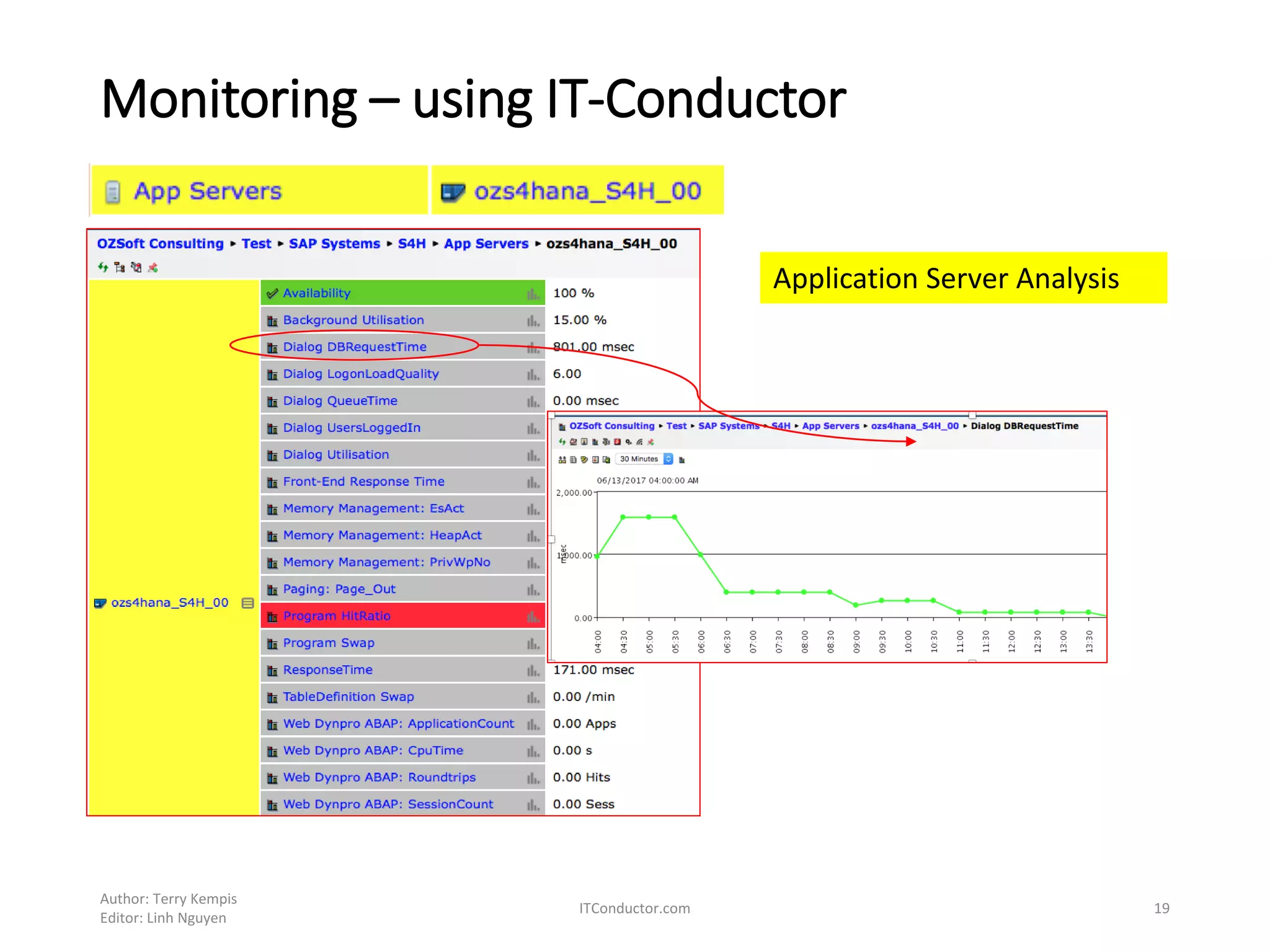
Application Server Analysis
Monitoring – using IT-Conductor
Author: Terry Kempis
Editor: Linh Nguyen
ITConductor.com 20
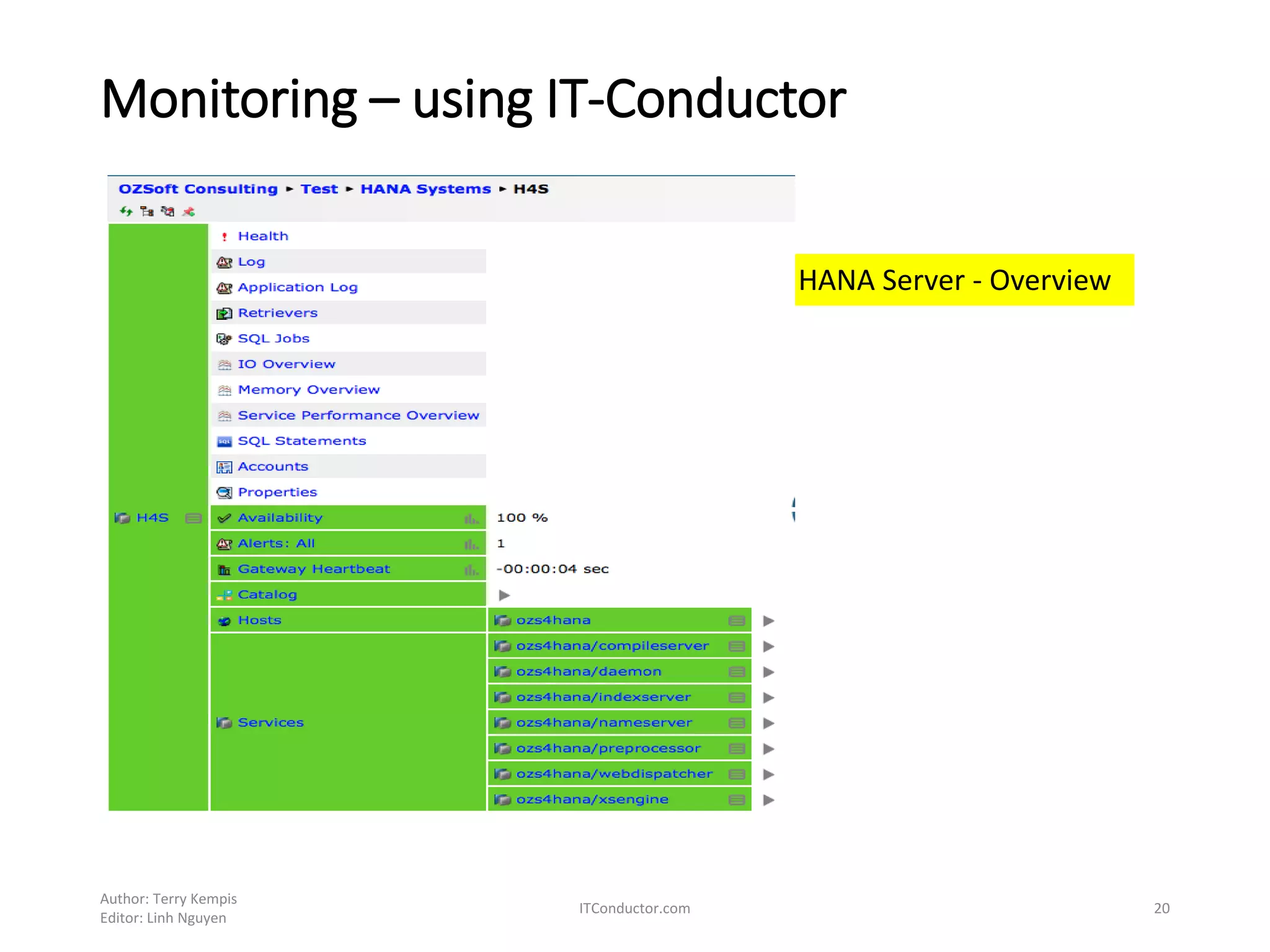
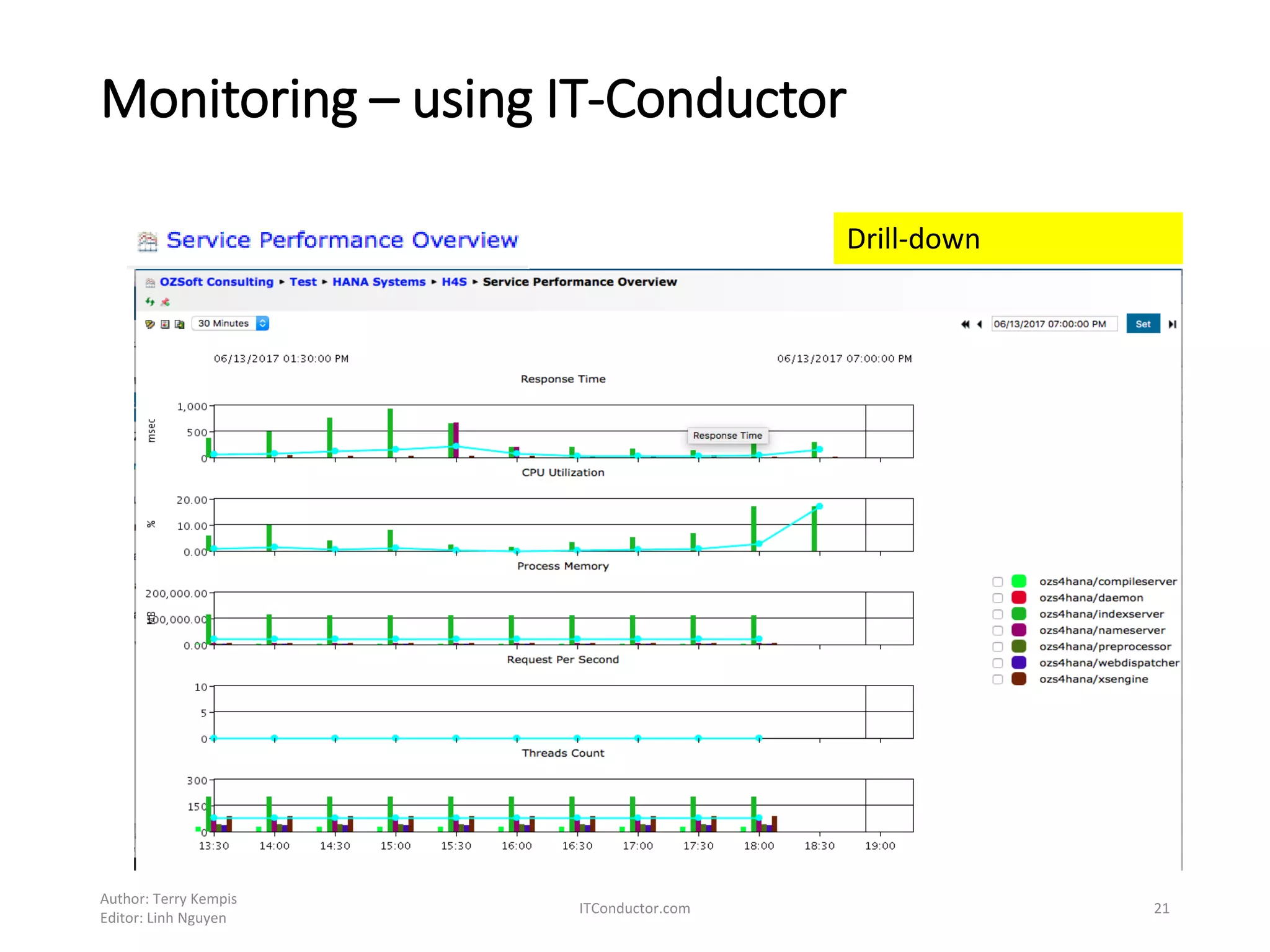
HANA Server - Overview
Monitoring – using IT-Conductor
Author: Terry Kempis
Editor: Linh Nguyen
ITConductor.com 21
Drill-down
Monitoring – using IT-Conductor
Author: Terry Kempis
Editor: Linh Nguyen
ITConductor.com 22
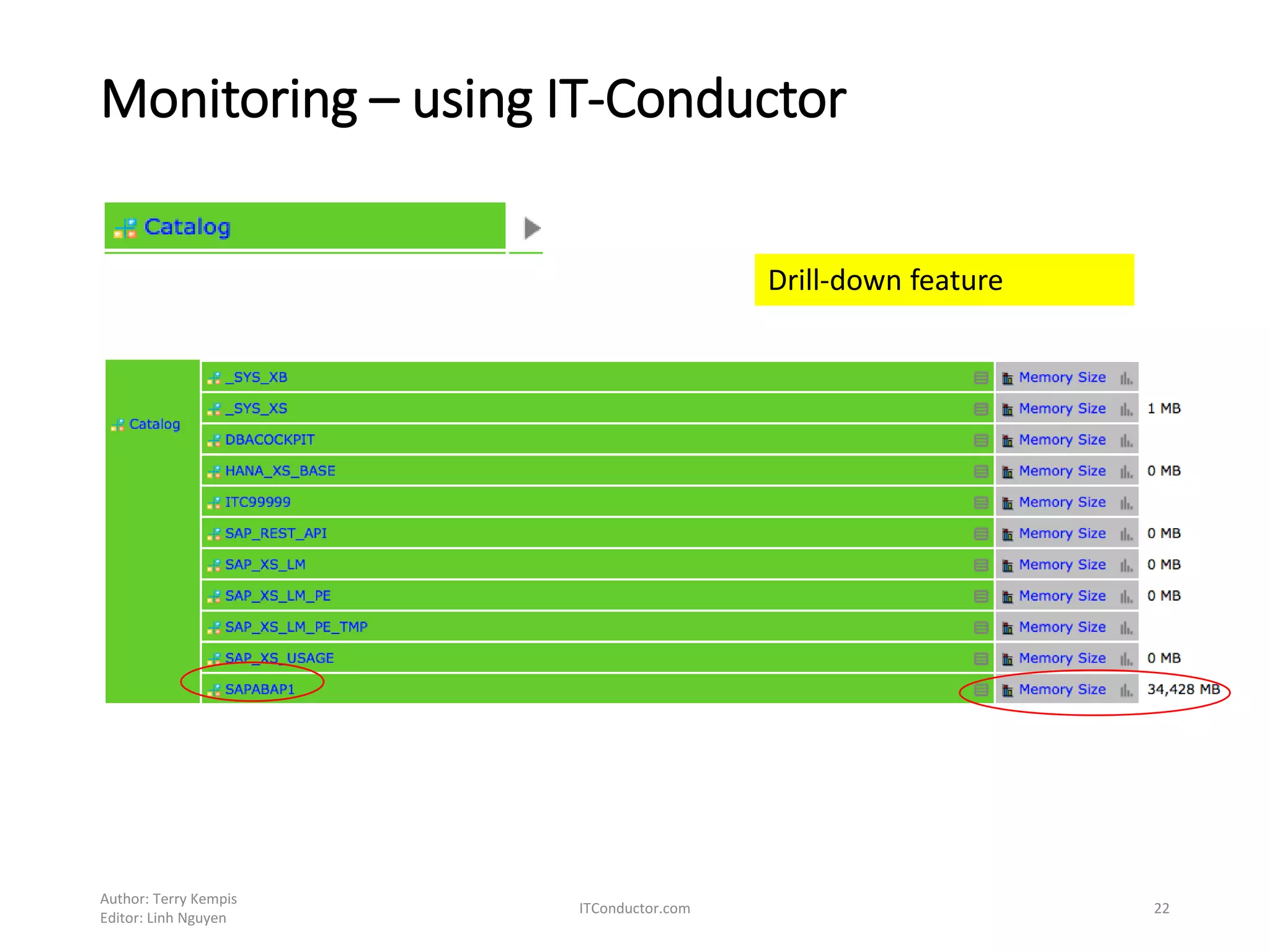
Drill-down feature
Monitoring – using IT-Conductor
Author: Terry Kempis
Editor: Linh Nguyen
ITConductor.com 23
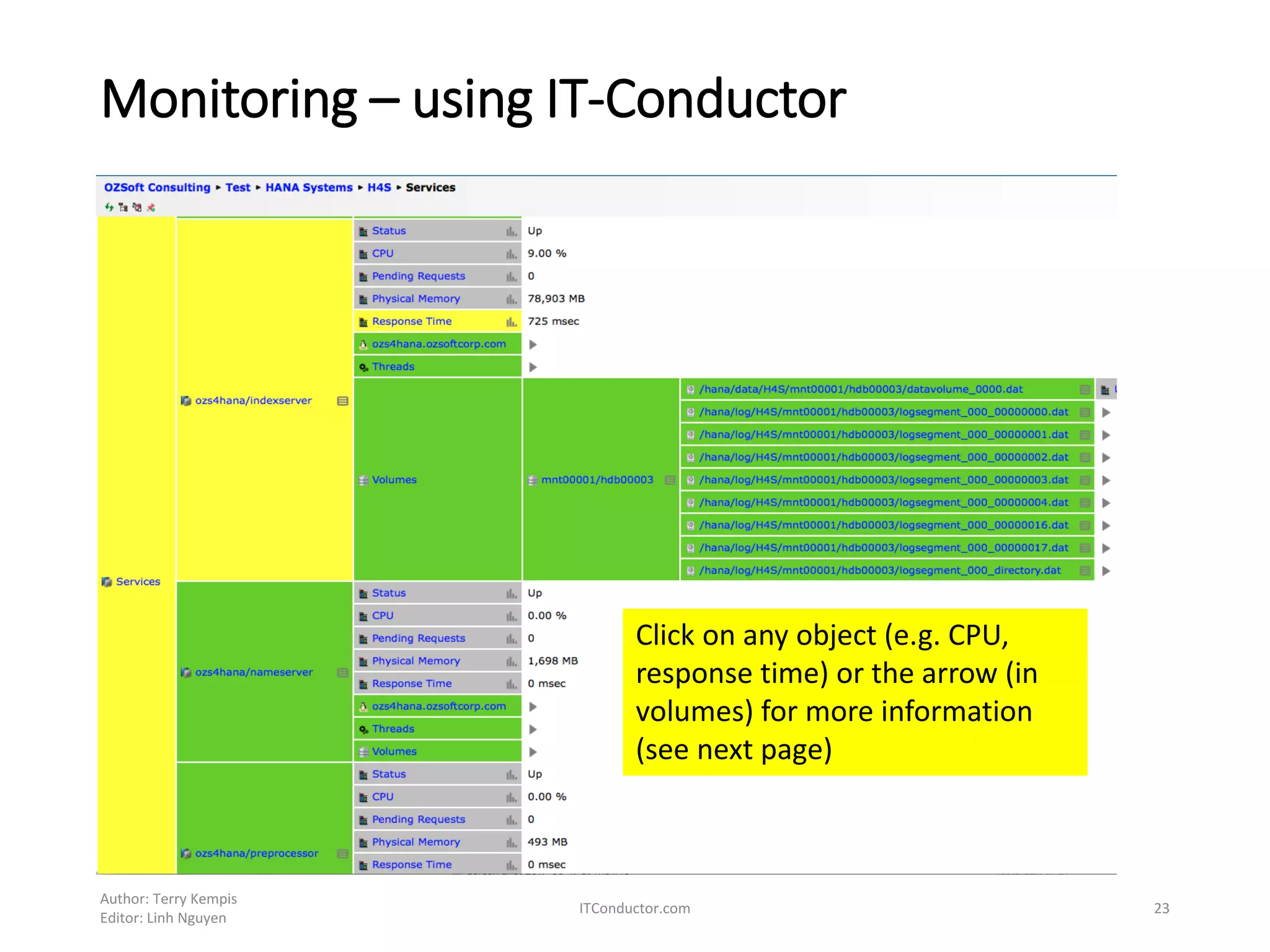
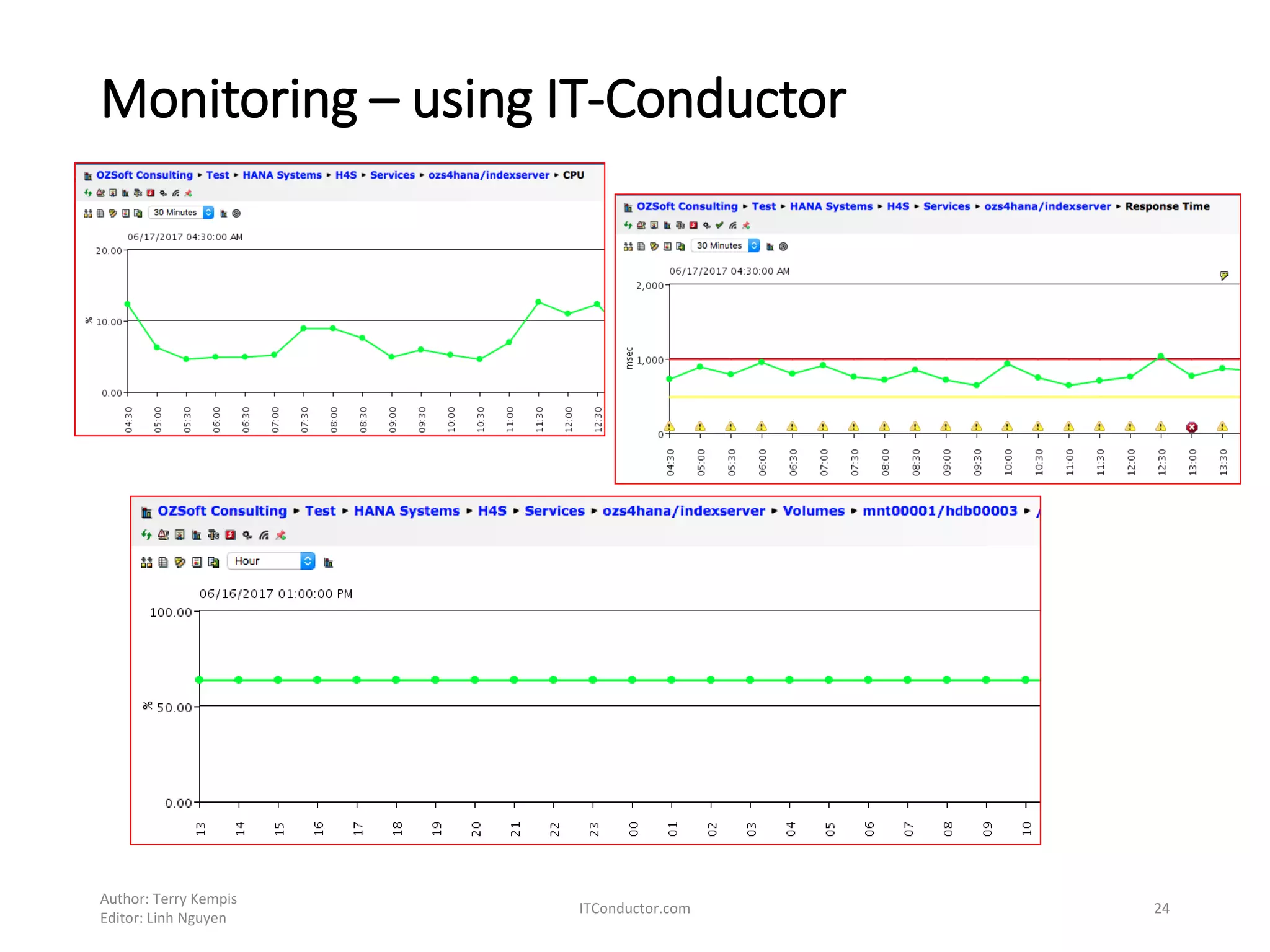
Click on any object (e.g. CPU,
response time) or the arrow (in
volumes) for more information
(see next page)
Monitoring – using IT-Conductor
Author: Terry Kempis
Editor: Linh Nguyen
ITConductor.com 24
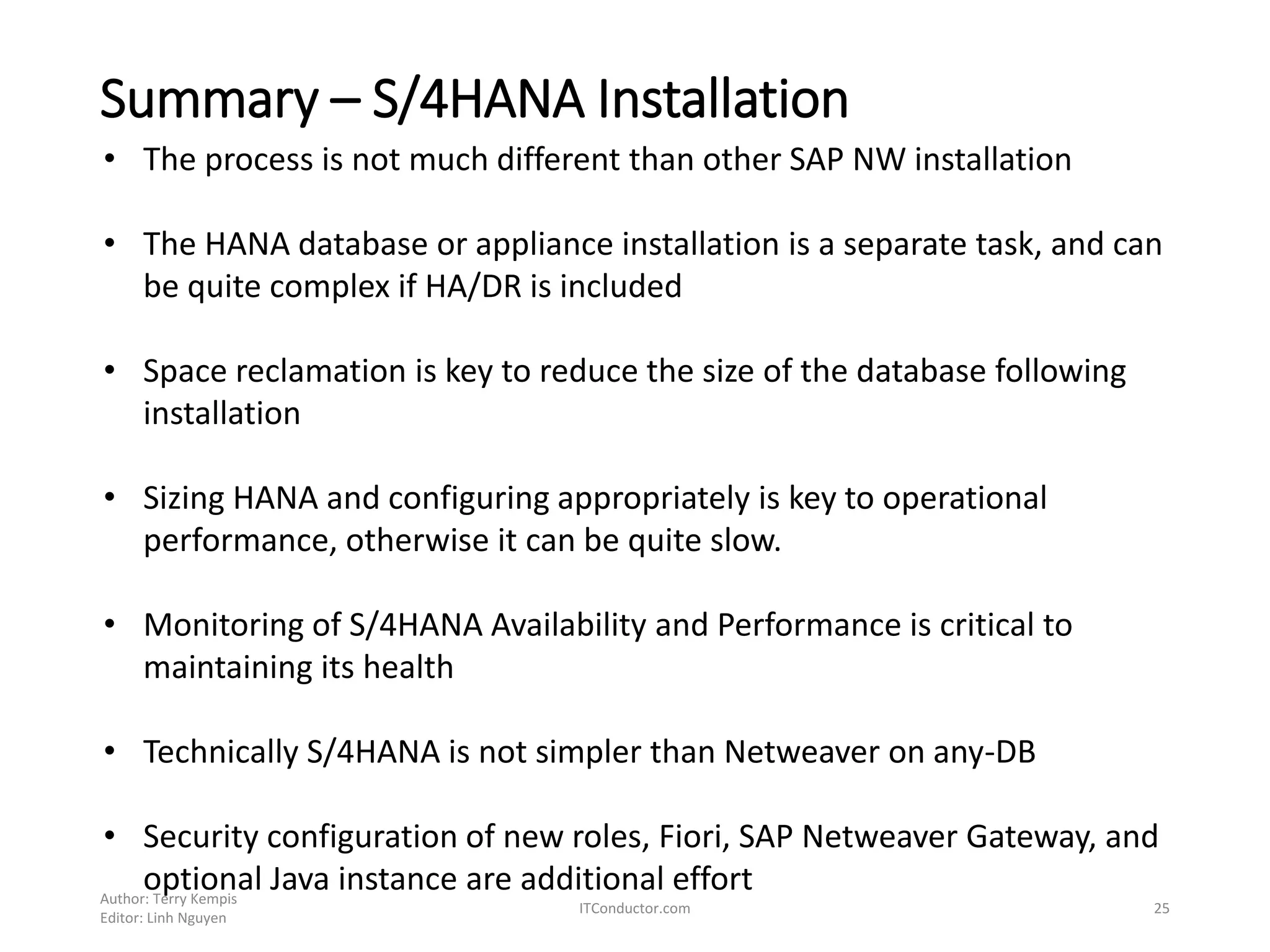
Summary – S/4HANA Installation
Author: Terry Kempis
Editor: Linh Nguyen
ITConductor.com 25
• The process is not much different than other SAP NW installation
• The HANA database or appliance installation is a separate task, and can
be quite complex if HA/DR is included
• Space reclamation is key to reduce the size of the database following
installation
• Sizing HANA and configuring appropriately is key to operational
performance, otherwise it can be quite slow.
• Monitoring of S/4HANA Availability and Performance is critical to
maintaining its health
• Technically S/4HANA is not simpler than Netweaver on any-DB
• Security configuration of new roles, Fiori, SAP Netweaver Gateway, and
optional Java instance are additional effort
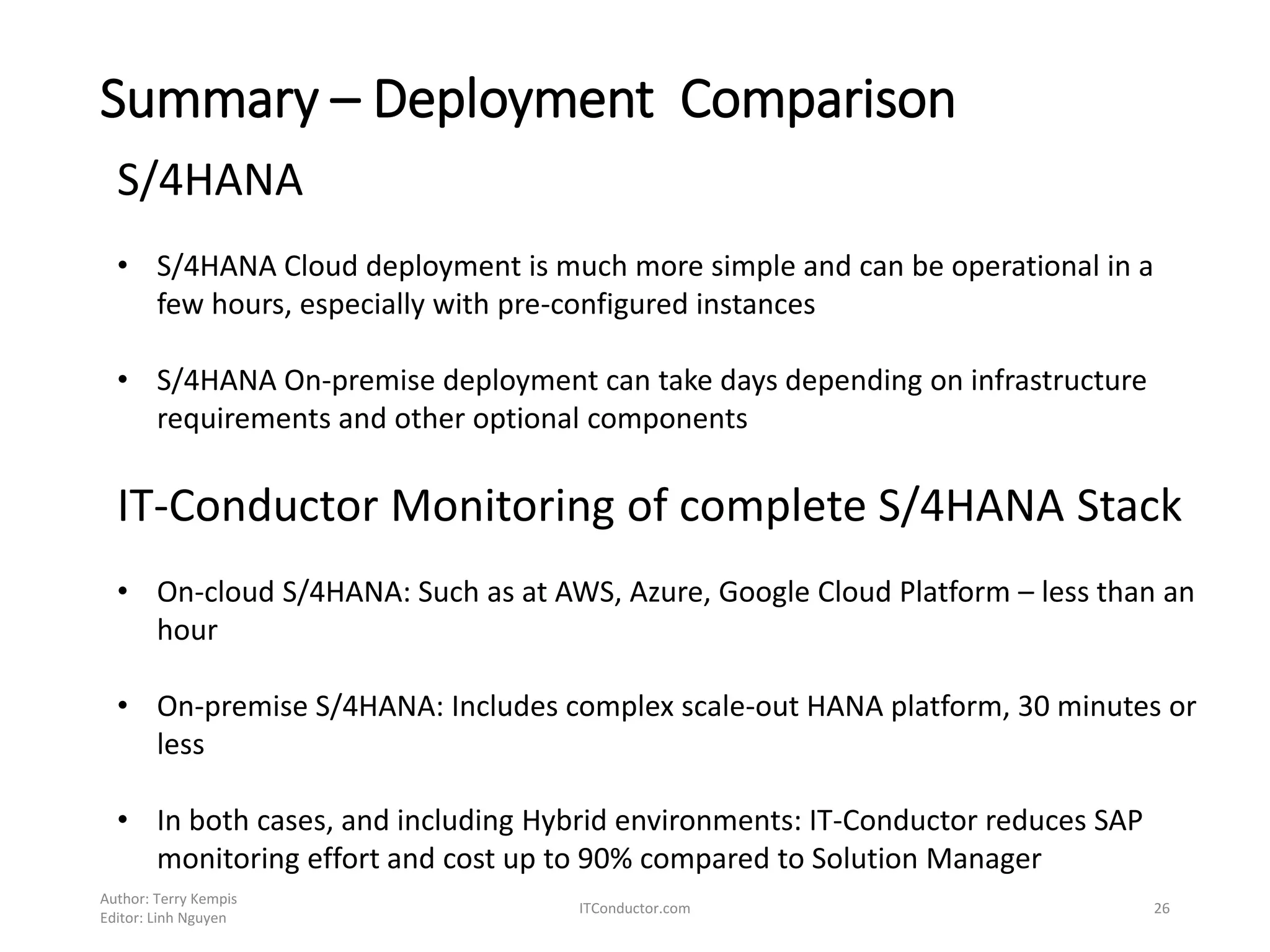
Summary – Deployment Comparison
Author: Terry Kempis
Editor: Linh Nguyen
ITConductor.com 26
S/4HANA
• S/4HANA Cloud deployment is much more simple and can be operational in a
few hours, especially with pre-configured instances
• S/4HANA On-premise deployment can take days depending on infrastructure
requirements and other optional components
IT-Conductor Monitoring of complete S/4HANA Stack
• On-cloud S/4HANA: Such as at AWS, Azure, Google Cloud Platform – less than an
hour
• On-premise S/4HANA: Includes complex scale-out HANA platform, 30 minutes or
less
• In both cases, and including Hybrid environments: IT-Conductor reduces SAP
monitoring effort and cost up to 90% compared to Solution Manager
• Any Questions?
• Contact Info:
Linh Nguyen linh.nguyen@itconductor.com
Terry Kempis terry.kempis@itconductor.com
Let
itconductor.com
@itconductor

S/4HANA Installation Quickstart Guide and Monitoring S/4HANA

  • 1.
    SAP S/4HANA Installation andMonitoring This is a compilation of notes taken during installation of IDES S4HANA. Also include monitoring of S/4HANA using the IT-Conductor By OZSoft Consulting for ITConductor.com Author: Terry Kempis Editor: Linh Nguyen ITConductor.com 1
  • 2.
    Introduction/References IDES based onS4HANA was available as per OSS note 2445594 Main Reference: 2445594 - IDES S/HANA 1610 Additional References: • SAP HANA Server Installation GUide • Installation Guide - NW NW 7.3 to 7.5 on UNIX: SAP HANA DB • Published blogs and documents Author: Terry Kempis Editor: Linh Nguyen ITConductor.com 2
  • 3.
    Introduction SAP Product AvailabilityMatrix Author: Terry Kempis Editor: Linh Nguyen ITConductor.com 3
  • 4.
    Installation The IDES S4HANAwas installed with/on the following • AS ABAP 7.51 for S/4HANA 1610 • SAP Kernel 7.49 64-BIT UNICODE • SAP HANA Database 2.0 (SPS00) • Linux SUSE SLES 12/X86-64 64BIT SAP HANA and The SAP NW AS ABAP server were deployed on one server The installation’s general steps 1. Install the HANA server 2. Install the NW ABAP server Author: Terry Kempis Editor: Linh Nguyen ITConductor.com 4
  • 5.
    Installation – HANAserver Install the HANA server as root ./hdblcm --component_root=<extracted HANA 2.0> Author: Terry Kempis Editor: Linh Nguyen ITConductor.com 5 HANA2 SPS00 installed, with database mode ‘single_container’. Note that if HANA2 SPS01 was used, then the only option is ‘multiple_container’ (i.e. MDB)
  • 6.
    Installation – HANAserver Installation check cd /hana/shared/H4S/hdblcm/hdblcm Author: Terry Kempis Editor: Linh Nguyen ITConductor.com 6
  • 7.
    Installation – NWABAP server As root, from the SWPM extract folder, run sapinst 1. Preparation – Prerequisite check Author: Terry Kempis Editor: Linh Nguyen ITConductor.com 7
  • 8.
    Installation – NWABAP server 2. Install ABAP server – Standard system Author: Terry Kempis Editor: Linh Nguyen ITConductor.com 8 NW SID = S4H HANA SID = H4S
  • 9.
    Installation – NWABAP server Author: Terry Kempis Editor: Linh Nguyen ITConductor.com 9 Depending on your server’s resources, reduce or increase the parallelism
  • 10.
    Installation – NWABAP server To monitor the import of the packages, go to the installation directory. • The file ‘import_state_properties’ indicates the status of each package, e.g. • A package with corresponding TSK.bck file means it is being processed. At the start of processing of a package, the .TSK file is copied into TSK.bck, then the TSK is emptied. For each task completed, the TSK is updated Author: Terry Kempis Editor: Linh Nguyen ITConductor.com 10 ‘?’ = its in progress (it has corresponding TSK.bck file) – see below ‘+’ = its complete without error ‘-‘ = error ‘0’ = still to do
  • 11.
    Installation – NWABAP server Author: Terry Kempis Editor: Linh Nguyen ITConductor.com 11 Review and process accordingly, e.g. below
  • 12.
    Installation – NWABAP server Author: Terry Kempis Editor: Linh Nguyen ITConductor.com 12 Perform standard installation post-tasks (e.g. SGEN)
  • 13.
    Fact check: Comparison Author:Terry Kempis Editor: Linh Nguyen ITConductor.com 13 IDES Personas ERP 6.0 EHP7 IDES S/4HANA CVERS Software components 224 162 DD02T SAP DD: SAP Table Texts 7,357,481 5,581,980 REPOSRC Report Source Code 5,212,388 5,531,016 TFDIR Function Module 516,549 502,440 TRDIR System table TRDIR 5,212,111 5,531,007 TADIR Directory of Repository Objects 4,041,073 4,346,880 Comparison on the IDES S/4HANA and IDES ERP 6.0 EHP7 on ASE • We were expecting a reduction in both the code and dictionary tables based on SAP’s marketing message, but some actually went up!
  • 14.
    Tip: Reclaiming DATAVOLUMEunused space Author: Terry Kempis Editor: Linh Nguyen ITConductor.com 14 The DATAVOLUME can go up to > 250Gb. To free up the unused space, issue the following SQL command ‘ALTER SYSTEM RECLAIM DATAVOLUME 110 DEFRAGMENT’ This reduced the datavolume size from 205Gb to 107GB! This process can take many hours or days depending on server and storage speed. Note that before doing the reclaim/defragmentation, the following steps were taken - Create the initial backup (note that at this stage, the auto_log_backup was still disabled) - Stopped the ABAP system
  • 15.
    Monitoring – usingcloud-based IT-Conductor Author: Terry Kempis Editor: Linh Nguyen ITConductor.com 15 After the installation and post-tasks, the installed IDES S/4HANA was registered to the IT- Conductor. The process is quick (< 5 minutes), and straight forward. Once the ABAP system S4H is registered in ITC, the tool ‘discovers’ all related objects (e.g. application server, HANA and its services). ITC has ‘drill-down’ feature, by a single click on an object
  • 16.
    Monitoring – usingIT-Conductor Author: Terry Kempis Editor: Linh Nguyen ITConductor.com 16 Click on any object for drill-down
  • 17.
    Monitoring – usingIT-Conductor Author: Terry Kempis Editor: Linh Nguyen ITConductor.com 17 Drill-down on CCMS for further analysis/detail
  • 18.
    Monitoring – usingIT-Conductor Author: Terry Kempis Editor: Linh Nguyen ITConductor.com 18 Configurable alert thresholds, e.g. for Gateway Heartbeat
  • 19.
    Monitoring – usingIT-Conductor Author: Terry Kempis Editor: Linh Nguyen ITConductor.com 19 Application Server Analysis
  • 20.
    Monitoring – usingIT-Conductor Author: Terry Kempis Editor: Linh Nguyen ITConductor.com 20 HANA Server - Overview
  • 21.
    Monitoring – usingIT-Conductor Author: Terry Kempis Editor: Linh Nguyen ITConductor.com 21 Drill-down
  • 22.
    Monitoring – usingIT-Conductor Author: Terry Kempis Editor: Linh Nguyen ITConductor.com 22 Drill-down feature
  • 23.
    Monitoring – usingIT-Conductor Author: Terry Kempis Editor: Linh Nguyen ITConductor.com 23 Click on any object (e.g. CPU, response time) or the arrow (in volumes) for more information (see next page)
  • 24.
    Monitoring – usingIT-Conductor Author: Terry Kempis Editor: Linh Nguyen ITConductor.com 24
  • 25.
    Summary – S/4HANAInstallation Author: Terry Kempis Editor: Linh Nguyen ITConductor.com 25 • The process is not much different than other SAP NW installation • The HANA database or appliance installation is a separate task, and can be quite complex if HA/DR is included • Space reclamation is key to reduce the size of the database following installation • Sizing HANA and configuring appropriately is key to operational performance, otherwise it can be quite slow. • Monitoring of S/4HANA Availability and Performance is critical to maintaining its health • Technically S/4HANA is not simpler than Netweaver on any-DB • Security configuration of new roles, Fiori, SAP Netweaver Gateway, and optional Java instance are additional effort
  • 26.
    Summary – DeploymentComparison Author: Terry Kempis Editor: Linh Nguyen ITConductor.com 26 S/4HANA • S/4HANA Cloud deployment is much more simple and can be operational in a few hours, especially with pre-configured instances • S/4HANA On-premise deployment can take days depending on infrastructure requirements and other optional components IT-Conductor Monitoring of complete S/4HANA Stack • On-cloud S/4HANA: Such as at AWS, Azure, Google Cloud Platform – less than an hour • On-premise S/4HANA: Includes complex scale-out HANA platform, 30 minutes or less • In both cases, and including Hybrid environments: IT-Conductor reduces SAP monitoring effort and cost up to 90% compared to Solution Manager
  • 27.
    • Any Questions? •Contact Info: Linh Nguyen linh.nguyen@itconductor.com Terry Kempis terry.kempis@itconductor.com Let itconductor.com @itconductor