© 2013 EDB All rights reserved 8.1. 1
Integration:
EDB Postgres Cloud Management &
Pivotal Cloud Foundry
Lenley Hensarling
SVP Product Management EnterpriseDB
© 2013 EDB All rights reserved 8.1. 2
• The “why” and what we are trying to accomplish
• EDB Postgres Cloud Management – a DBaaS enablement console
• The Integration with Pivotal Cloud Foundry
− Shared instance – setup and binding to an existing EDB Postgres DB
− Private instance – provisioning of a Postgres cluster from within CF
using EDB Postgres Cloud Management
What we’ll cover
© 2013 EDB All rights reserved 8.1. 3
• For many enterprises there is a tension between IT and new efforts in app
development for digital business initiatives
− Inventory of licenses
− Control of resources versus enablement of agile development
− The need for fluid and agile development motions
• We want to bridge that divide
− Allow the IT side of the house visibility
− Give them the ability to set up templates and control access
− But not slow things down
• We want to give developers, quality engineers, and ops the ability to
manage all of this in a hybrid cloud environment without lock-in
Why and what we are trying to accomplish
© 2013 EDB All rights reserved 8.1. 4
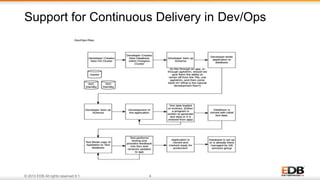
Support for Continuous Delivery in Dev/Ops
© 2013 EDB All rights reserved 8.1. 5
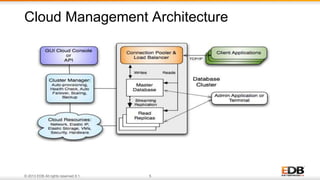
Cloud Management Architecture
© 2013 EDB All rights reserved 8.1. 6
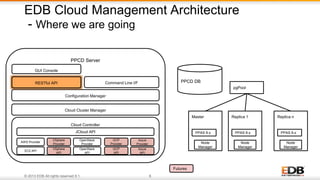
EDB Cloud Management Architecture
- Where we are going
PPCD Server
Cloud Controller
JCloud API
Cloud Cluster Manager
Configuration Manager
AWS Provider
OpenStack
Provider
OpenStack
API
EC2 API
PPCD DB
Futures
VSphere
Provider
VSphere
API
pgPool
Master
PPAS 9.x
Node
Manager
Replica 1
PPAS 9.x
Node
Manager
Replica n
PPAS 9.x
Node
Manager
GCP
Provider
GCP
API
Azure
Provider
Azure
API
Command Line I/FRESTful API
GUI Console
© 2013 EDB All rights reserved 8.1. 7
Quality Management
Production
Developers
Test
Development
Users
Operations / DBAs
One-click provisioning
of database clusters
with backup / restore
and high availability
Define templates on size
and capability, manage
backups and restores,
monitor databases, manage
license inventory.
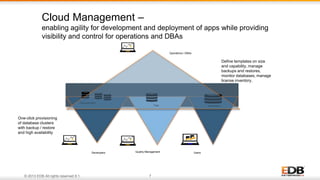
Cloud Management –
enabling agility for development and deployment of apps while providing
visibility and control for operations and DBAs
© 2013 EDB All rights reserved 8.1. 8
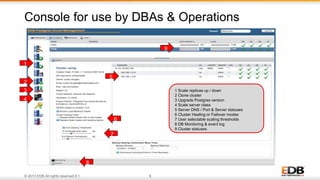
Console for use by DBAs & Operations
1
2
3
4
7
6
5
8
1 Scale replicas up / down
2 Clone cluster
3 Upgrade Postgres version
4 Scale server class
5 Server DNS / Port & Server statuses
6 Cluster Healing or Failover modes
7 User selectable scaling thresholds
8 DB Monitoring & event log
9 Cluster statuses
9
© 2013 EDB All rights reserved 8.1. 9
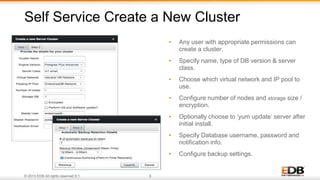
• Any user with appropriate permissions can
create a cluster.
• Specify name, type of DB version & server
class.
• Choose which virtual network and IP pool to
use.
• Configure number of nodes and storage size /
encryption.
• Optionally choose to ‘yum update’ server after
initial install.
• Specify Database username, password and
notification info.
• Configure backup settings.
Self Service Create a New Cluster
© 2013 EDB All rights reserved 8.1. 10
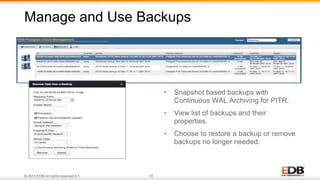
• Snapshot based backups with
Continuous WAL Archiving for PITR.
• View list of backups and their
properties.
• Choose to restore a backup or remove
backups no longer needed.
Manage and Use Backups
© 2013 EDB All rights reserved 8.1. 11
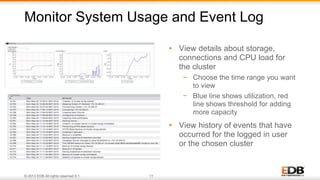
• View details about storage,
connections and CPU load for
the cluster
− Choose the time range you want
to view
− Blue line shows utilization, red
line shows threshold for adding
more capacity
• View history of events that have
occurred for the logged in user
or the chosen cluster
Monitor System Usage and Event Log
© 2013 EDB All rights reserved 8.1. 12
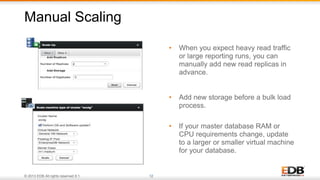
• When you expect heavy read traffic
or large reporting runs, you can
manually add new read replicas in
advance.
• Add new storage before a bulk load
process.
• If your master database RAM or
CPU requirements change, update
to a larger or smaller virtual machine
for your database.
Manual Scaling
© 2013 EDB All rights reserved 8.1. 13
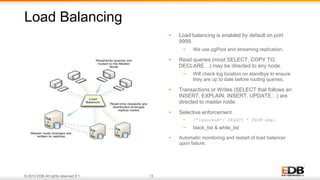
• Load balancing is enabled by default on port
9999.
− We use pgPool and streaming replication.
• Read queries (most SELECT, COPY TO,
DECLARE…) may be directed to any node.
− Will check log location on standbys to ensure
they are up to date before routing queries.
• Transactions or Writes (SELECT that follows an
INSERT, EXPLAIN, INSERT, UPDATE…) are
directed to master node.
• Selective enforcement
− /*IgnoreLB*/ SELECT * FROM emp;
− black_list & white_list
• Automatic monitoring and restart of load balancer
upon failure.
Load Balancing
© 2013 EDB All rights reserved 8.1. 14
Cloud Management RESTful API
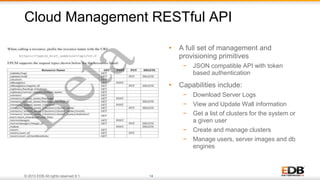
• A full set of management and
provisioning primitives
− JSON compatible API with token
based authentication
• Capabilities include:
− Download Server Logs
− View and Update Wall information
− Get a list of clusters for the system or
a given user
− Create and manage clusters
− Manage users, server images and db
engines
© 2013 EDB All rights reserved 8.1. 15
• Pushbutton provisioning of read scalable database clusters
− Streaming replication between master and replicas
− Connection pooling handle more users over time
− Load-balancing of READS over the whole cluster
− SQL Routing for WRITES to master with white and black listing of SQL
− Start, Connect and code in minutes instead of days or weeks!
• Automatic failover
− Constant health and stats monitoring
− Transaction preferred failover prevents loss of all committed transactions
− Recovery Time preferred failover prioritizes recovery time with possible loss of last committed
transactions
− Cluster configuration fully restored after failover
− Unattended operation - No special DBA or Administrative skills required
Benefits of EDB Postgres Cloud Management
© 2013 EDB All rights reserved 8.1. 16
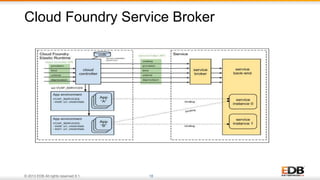
• What allows our integration with EPCM are the RESTful APIs of EPCM
• From the service broker a developer can gain access to Postgres DBs
− provision data bases from within Cloud Foundry using templates set up by the data services
group
− connect to existing databases that were set up by the data services group through EPCM or
were set up by another developer
• Developers and Quality Management engineers can provision populated databases by
restoring a database backup to any instance provided they have rights to access them
• Supports a natural flow – allowing control and visibility for data services and operations
and unimpeded development flow for apps developers
The Integration
© 2013 EDB All rights reserved 8.1. 17
• Shared instance
− Connect to a running Postgres instance and provision a new database within it
− Simple, available now
• In our labs and coming this fall
− Integration with EPCM
− Allows provisioning of a new database instance
− Allows for cloning of database instance, a template with clone of the data.
− Allows for attaching to different data sets for testing by restoring from various
“backups”
− Allows for development on AWS and provisioning in a private cloud
− Or vice versa
The Integration
© 2013 EDB All rights reserved 8.1. 18
Cloud Foundry Service Broker
© 2013 EDB All rights reserved 8.1. 19
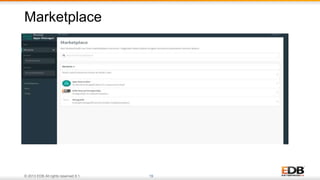
Marketplace
© 2013 EDB All rights reserved 8.1. 20
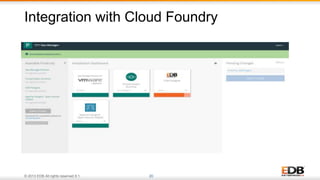
Integration with Cloud Foundry
© 2013 EDB All rights reserved 8.1. 21
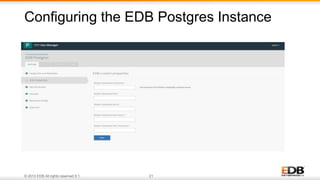
Configuring the EDB Postgres Instance
© 2013 EDB All rights reserved 8.1. 22
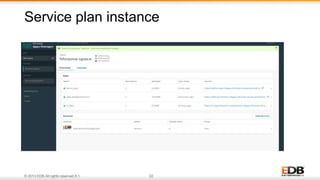
Service plan instance
© 2013 EDB All rights reserved 8.1. 23
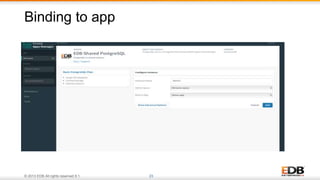
Binding to app
© 2013 EDB All rights reserved 8.1. 24
• Developer and Quality Management Engineers
− Can provision instances of different sizes from within Cloud Foundry
− Can restore a data set to use for testing and/or for initial schema set up
− Can clone instances and the data volumes
• Ops can bind the application to an existing database for production
• EPCM bridges the gap of visibility and control of license instances and
resource utilization for DBAs
• While allowing developers to set up instances and they are needed, all with
a few clicks
• Test can access plans for functional test and for performance and
scalability as required
With the addition of EPCM
© 2013 EDB All rights reserved 8.1. 25
• We are live with our initial shared instance integration on Pivotal Apps
Manager Marketplace right now
• Integration with EPCM is there in our lab and can be demoed – just
contact us for a deeper dive and demo
• We will release the integration to CF based on our EDB Postgres Cloud
Manager this fall
− It will support both OpenStack and AWS
− More targets to come in the first half of 2017
− Azure
− On-prem virtualized environments
− Google Compute Platform
Timeline for EDB / Cloud Foundry integration
© 2013 EDB All rights reserved 8.1. 26
• EPCM 2.0 Technical Overview on YouTube
− https://www.youtube.com/watch?v=-1QiWocUY6U
• You can get to our Tile on Pivotal Marketplace
− https://network.pivotal.io
Resources and additional info

Integrating Hybrid Cloud Database-as-a-Service with Cloud Foundry’s Service​ ​Broker

  • 1.
    © 2013 EDBAll rights reserved 8.1. 1 Integration: EDB Postgres Cloud Management & Pivotal Cloud Foundry Lenley Hensarling SVP Product Management EnterpriseDB
  • 2.
    © 2013 EDBAll rights reserved 8.1. 2 • The “why” and what we are trying to accomplish • EDB Postgres Cloud Management – a DBaaS enablement console • The Integration with Pivotal Cloud Foundry − Shared instance – setup and binding to an existing EDB Postgres DB − Private instance – provisioning of a Postgres cluster from within CF using EDB Postgres Cloud Management What we’ll cover
  • 3.
    © 2013 EDBAll rights reserved 8.1. 3 • For many enterprises there is a tension between IT and new efforts in app development for digital business initiatives − Inventory of licenses − Control of resources versus enablement of agile development − The need for fluid and agile development motions • We want to bridge that divide − Allow the IT side of the house visibility − Give them the ability to set up templates and control access − But not slow things down • We want to give developers, quality engineers, and ops the ability to manage all of this in a hybrid cloud environment without lock-in Why and what we are trying to accomplish
  • 4.
    © 2013 EDBAll rights reserved 8.1. 4 Support for Continuous Delivery in Dev/Ops
  • 5.
    © 2013 EDBAll rights reserved 8.1. 5 Cloud Management Architecture
  • 6.
    © 2013 EDBAll rights reserved 8.1. 6 EDB Cloud Management Architecture - Where we are going PPCD Server Cloud Controller JCloud API Cloud Cluster Manager Configuration Manager AWS Provider OpenStack Provider OpenStack API EC2 API PPCD DB Futures VSphere Provider VSphere API pgPool Master PPAS 9.x Node Manager Replica 1 PPAS 9.x Node Manager Replica n PPAS 9.x Node Manager GCP Provider GCP API Azure Provider Azure API Command Line I/FRESTful API GUI Console
  • 7.
    © 2013 EDBAll rights reserved 8.1. 7 Quality Management Production Developers Test Development Users Operations / DBAs One-click provisioning of database clusters with backup / restore and high availability Define templates on size and capability, manage backups and restores, monitor databases, manage license inventory. Cloud Management – enabling agility for development and deployment of apps while providing visibility and control for operations and DBAs
  • 8.
    © 2013 EDBAll rights reserved 8.1. 8 Console for use by DBAs & Operations 1 2 3 4 7 6 5 8 1 Scale replicas up / down 2 Clone cluster 3 Upgrade Postgres version 4 Scale server class 5 Server DNS / Port & Server statuses 6 Cluster Healing or Failover modes 7 User selectable scaling thresholds 8 DB Monitoring & event log 9 Cluster statuses 9
  • 9.
    © 2013 EDBAll rights reserved 8.1. 9 • Any user with appropriate permissions can create a cluster. • Specify name, type of DB version & server class. • Choose which virtual network and IP pool to use. • Configure number of nodes and storage size / encryption. • Optionally choose to ‘yum update’ server after initial install. • Specify Database username, password and notification info. • Configure backup settings. Self Service Create a New Cluster
  • 10.
    © 2013 EDBAll rights reserved 8.1. 10 • Snapshot based backups with Continuous WAL Archiving for PITR. • View list of backups and their properties. • Choose to restore a backup or remove backups no longer needed. Manage and Use Backups
  • 11.
    © 2013 EDBAll rights reserved 8.1. 11 • View details about storage, connections and CPU load for the cluster − Choose the time range you want to view − Blue line shows utilization, red line shows threshold for adding more capacity • View history of events that have occurred for the logged in user or the chosen cluster Monitor System Usage and Event Log
  • 12.
    © 2013 EDBAll rights reserved 8.1. 12 • When you expect heavy read traffic or large reporting runs, you can manually add new read replicas in advance. • Add new storage before a bulk load process. • If your master database RAM or CPU requirements change, update to a larger or smaller virtual machine for your database. Manual Scaling
  • 13.
    © 2013 EDBAll rights reserved 8.1. 13 • Load balancing is enabled by default on port 9999. − We use pgPool and streaming replication. • Read queries (most SELECT, COPY TO, DECLARE…) may be directed to any node. − Will check log location on standbys to ensure they are up to date before routing queries. • Transactions or Writes (SELECT that follows an INSERT, EXPLAIN, INSERT, UPDATE…) are directed to master node. • Selective enforcement − /*IgnoreLB*/ SELECT * FROM emp; − black_list & white_list • Automatic monitoring and restart of load balancer upon failure. Load Balancing
  • 14.
    © 2013 EDBAll rights reserved 8.1. 14 Cloud Management RESTful API • A full set of management and provisioning primitives − JSON compatible API with token based authentication • Capabilities include: − Download Server Logs − View and Update Wall information − Get a list of clusters for the system or a given user − Create and manage clusters − Manage users, server images and db engines
  • 15.
    © 2013 EDBAll rights reserved 8.1. 15 • Pushbutton provisioning of read scalable database clusters − Streaming replication between master and replicas − Connection pooling handle more users over time − Load-balancing of READS over the whole cluster − SQL Routing for WRITES to master with white and black listing of SQL − Start, Connect and code in minutes instead of days or weeks! • Automatic failover − Constant health and stats monitoring − Transaction preferred failover prevents loss of all committed transactions − Recovery Time preferred failover prioritizes recovery time with possible loss of last committed transactions − Cluster configuration fully restored after failover − Unattended operation - No special DBA or Administrative skills required Benefits of EDB Postgres Cloud Management
  • 16.
    © 2013 EDBAll rights reserved 8.1. 16 • What allows our integration with EPCM are the RESTful APIs of EPCM • From the service broker a developer can gain access to Postgres DBs − provision data bases from within Cloud Foundry using templates set up by the data services group − connect to existing databases that were set up by the data services group through EPCM or were set up by another developer • Developers and Quality Management engineers can provision populated databases by restoring a database backup to any instance provided they have rights to access them • Supports a natural flow – allowing control and visibility for data services and operations and unimpeded development flow for apps developers The Integration
  • 17.
    © 2013 EDBAll rights reserved 8.1. 17 • Shared instance − Connect to a running Postgres instance and provision a new database within it − Simple, available now • In our labs and coming this fall − Integration with EPCM − Allows provisioning of a new database instance − Allows for cloning of database instance, a template with clone of the data. − Allows for attaching to different data sets for testing by restoring from various “backups” − Allows for development on AWS and provisioning in a private cloud − Or vice versa The Integration
  • 18.
    © 2013 EDBAll rights reserved 8.1. 18 Cloud Foundry Service Broker
  • 19.
    © 2013 EDBAll rights reserved 8.1. 19 Marketplace
  • 20.
    © 2013 EDBAll rights reserved 8.1. 20 Integration with Cloud Foundry
  • 21.
    © 2013 EDBAll rights reserved 8.1. 21 Configuring the EDB Postgres Instance
  • 22.
    © 2013 EDBAll rights reserved 8.1. 22 Service plan instance
  • 23.
    © 2013 EDBAll rights reserved 8.1. 23 Binding to app
  • 24.
    © 2013 EDBAll rights reserved 8.1. 24 • Developer and Quality Management Engineers − Can provision instances of different sizes from within Cloud Foundry − Can restore a data set to use for testing and/or for initial schema set up − Can clone instances and the data volumes • Ops can bind the application to an existing database for production • EPCM bridges the gap of visibility and control of license instances and resource utilization for DBAs • While allowing developers to set up instances and they are needed, all with a few clicks • Test can access plans for functional test and for performance and scalability as required With the addition of EPCM
  • 25.
    © 2013 EDBAll rights reserved 8.1. 25 • We are live with our initial shared instance integration on Pivotal Apps Manager Marketplace right now • Integration with EPCM is there in our lab and can be demoed – just contact us for a deeper dive and demo • We will release the integration to CF based on our EDB Postgres Cloud Manager this fall − It will support both OpenStack and AWS − More targets to come in the first half of 2017 − Azure − On-prem virtualized environments − Google Compute Platform Timeline for EDB / Cloud Foundry integration
  • 26.
    © 2013 EDBAll rights reserved 8.1. 26 • EPCM 2.0 Technical Overview on YouTube − https://www.youtube.com/watch?v=-1QiWocUY6U • You can get to our Tile on Pivotal Marketplace − https://network.pivotal.io Resources and additional info