Confirmation of Production Order
In conjunction with EWM, you can use all confirmation transactions at the level of the
order header and the operations. In this example, the production storage location from
which the components were withdrawn is EWM-managed. The storage location in which
the finished materials are to be stored following production is likewise EWM-managed.
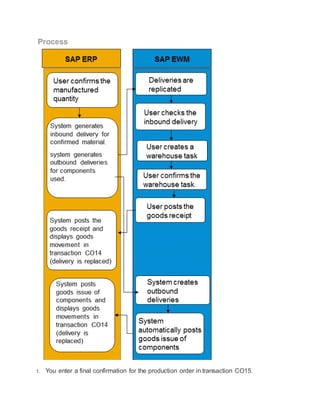
The following process shows the course of events in both systems when you confirm a
production order using transaction CO15.
Prerequisites
 You have made the following settings in the IMG activity Determination of Delivery
Type:
o Process: Goods issue of staged parts
o Delivery Type: DOG
 You have staged the components in an EWM-managed production storage location
and carried out production. See also: Material Staging (with EWM)
Process
1. You enter a final confirmation for the production order in transaction CO15.
2. The ERP system generates the following deliveries for the confirmation:
o The ERP system generates an Inbound Delivery for the confirmed material.
o The ERP system generates an Outbound Delivery for each EWM-managed
component.
You can display the delivery numbers in transaction CO14 in the Overview of Goods
Movements. However, this is possible only as long as the EWM system has not yet
posted any goods movements for these deliveries. If you want to display more
information on the deliveries, use transaction VL06 (Delivery Monitor).
3. The deliveries are replicated in the EWM system.
4. In the EWM system, you use transaction /SCWM/PRDI to check the ERP Document
for the inbound delivery of the confirmed material. (You can adopt the delivery
number of the ERP document from transaction CO14.)
5. In the same transaction, you post the goods receipt of the confirmed material.
6. The EWM system updates the inbound delivery and transfers the goods receipt
posting to the ERP system.
7. As soon as the information on the goods receipt of the confirmed materials arrives in
the ERP system, the ERP system increases the stock of the confirmed material and
generates a material document. This material document replaces the inbound
delivery. You can display the material document in transaction CO14. To display the
material document, starting from the Display Confirmation for Production Order:
Actual Data screen in transaction CO14, choose Goto Administration and then the
Material Documents pushbutton. You can display details pertaining to the material
document in transaction MB51.
8. The EWM system automatically posts the goods issue for the components and
transfers the posting to the ERP system.
9. The ERP system also posts the goods issue and updates the stock of the
components.
In addition, the ERP system generates a material document for each outbound
delivery it created for the components and replaces the outbound deliveries by these
material documents. To gain an overview of all material documents for the production
order, starting from the Display Confirmation for Production Order: Actual Data
screen, choose Goto Administration and then the Material Documents
pushbutton.
In this way, you can control the status of the confirmation on a cross-system basis.
The functions Goods Movements with Errors and Flagged Goods Movements are
also available for the EWM-managed materials.

SAP Prod order confirmation

  • 1.
    Confirmation of ProductionOrder In conjunction with EWM, you can use all confirmation transactions at the level of the order header and the operations. In this example, the production storage location from which the components were withdrawn is EWM-managed. The storage location in which the finished materials are to be stored following production is likewise EWM-managed. The following process shows the course of events in both systems when you confirm a production order using transaction CO15. Prerequisites  You have made the following settings in the IMG activity Determination of Delivery Type: o Process: Goods issue of staged parts o Delivery Type: DOG  You have staged the components in an EWM-managed production storage location and carried out production. See also: Material Staging (with EWM)
  • 2.
    Process 1. You entera final confirmation for the production order in transaction CO15.
  • 3.
    2. The ERPsystem generates the following deliveries for the confirmation: o The ERP system generates an Inbound Delivery for the confirmed material. o The ERP system generates an Outbound Delivery for each EWM-managed component. You can display the delivery numbers in transaction CO14 in the Overview of Goods Movements. However, this is possible only as long as the EWM system has not yet posted any goods movements for these deliveries. If you want to display more information on the deliveries, use transaction VL06 (Delivery Monitor). 3. The deliveries are replicated in the EWM system. 4. In the EWM system, you use transaction /SCWM/PRDI to check the ERP Document for the inbound delivery of the confirmed material. (You can adopt the delivery number of the ERP document from transaction CO14.) 5. In the same transaction, you post the goods receipt of the confirmed material. 6. The EWM system updates the inbound delivery and transfers the goods receipt posting to the ERP system. 7. As soon as the information on the goods receipt of the confirmed materials arrives in the ERP system, the ERP system increases the stock of the confirmed material and generates a material document. This material document replaces the inbound delivery. You can display the material document in transaction CO14. To display the material document, starting from the Display Confirmation for Production Order: Actual Data screen in transaction CO14, choose Goto Administration and then the Material Documents pushbutton. You can display details pertaining to the material document in transaction MB51. 8. The EWM system automatically posts the goods issue for the components and transfers the posting to the ERP system. 9. The ERP system also posts the goods issue and updates the stock of the components. In addition, the ERP system generates a material document for each outbound delivery it created for the components and replaces the outbound deliveries by these material documents. To gain an overview of all material documents for the production order, starting from the Display Confirmation for Production Order: Actual Data
  • 4.
    screen, choose GotoAdministration and then the Material Documents pushbutton. In this way, you can control the status of the confirmation on a cross-system basis. The functions Goods Movements with Errors and Flagged Goods Movements are also available for the EWM-managed materials.