1 
©2014 SAP AG or an SAP affiliate company. All rights reserved. 
SAP HANA SPS 09 - What’s New? SAP HANA Core & SQL 
SAP HANA Product Management November, 2014 
(Delta from SPS 08 to SPS 09)
©2014 SAP SE or an SAP affiliate company. All rights reserved. 
2 
Public 
Disclaimer 
This presentation outlines our general product direction and should not be relied on in making a purchase decision. This presentation is not subject to your license agreement or any other agreement with SAP. 
SAP has no obligation to pursue any course of business outlined in this presentation or to develop or release any functionality mentioned in this presentation. This presentation and SAP’s strategy and possible future developments are subject to change and may be changed by SAP at any time for any reason without notice. 
This document is provided without a warranty of any kind, either express or implied, including but not limited to, the implied warranties of merchantability, fitness for a particular purpose, or non-infringement. SAP assumes no responsibility for errors or omissions in this document, except if such damages were caused by SAP intentionally or grossly negligent.
©2014 SAP SE or an SAP affiliate company. All rights reserved. 
3 
Public 
Agenda 
Extended HANA core features 
Extended HANA SQL syntax
HANA core
©2014 SAP SE or an SAP affiliate company. All rights reserved. 
5 
Public 
Partitioning – What’s New in SPS 09? 
Typical use cases for partitioning 
Load-balancing 
Performance: parallelization, partition pruning, merge 
Overcome 2 billion rows limit 
Types of partitioning 
Single-Level partitioning: hash, range, round-robin 
Multi-Level partitioning: hash-range, hash-round-robin, hash-hash, round-robin-range, range-range (new) 
Added Data-Types for partitioning 
Range partitioning: BIGINT, DECIMAL (new) 
Table re-partitioning 
Python script to improve performance for table re-partitioning (new) 
Script is not available for customers, but shall be used by SAP consultants 
Script is documented and attached to SAP note: #2012533 
Script can be applied to SAP HANA version >= rev69 Patch Level 4
©2014 SAP SE or an SAP affiliate company. All rights reserved. 
6 
Public 
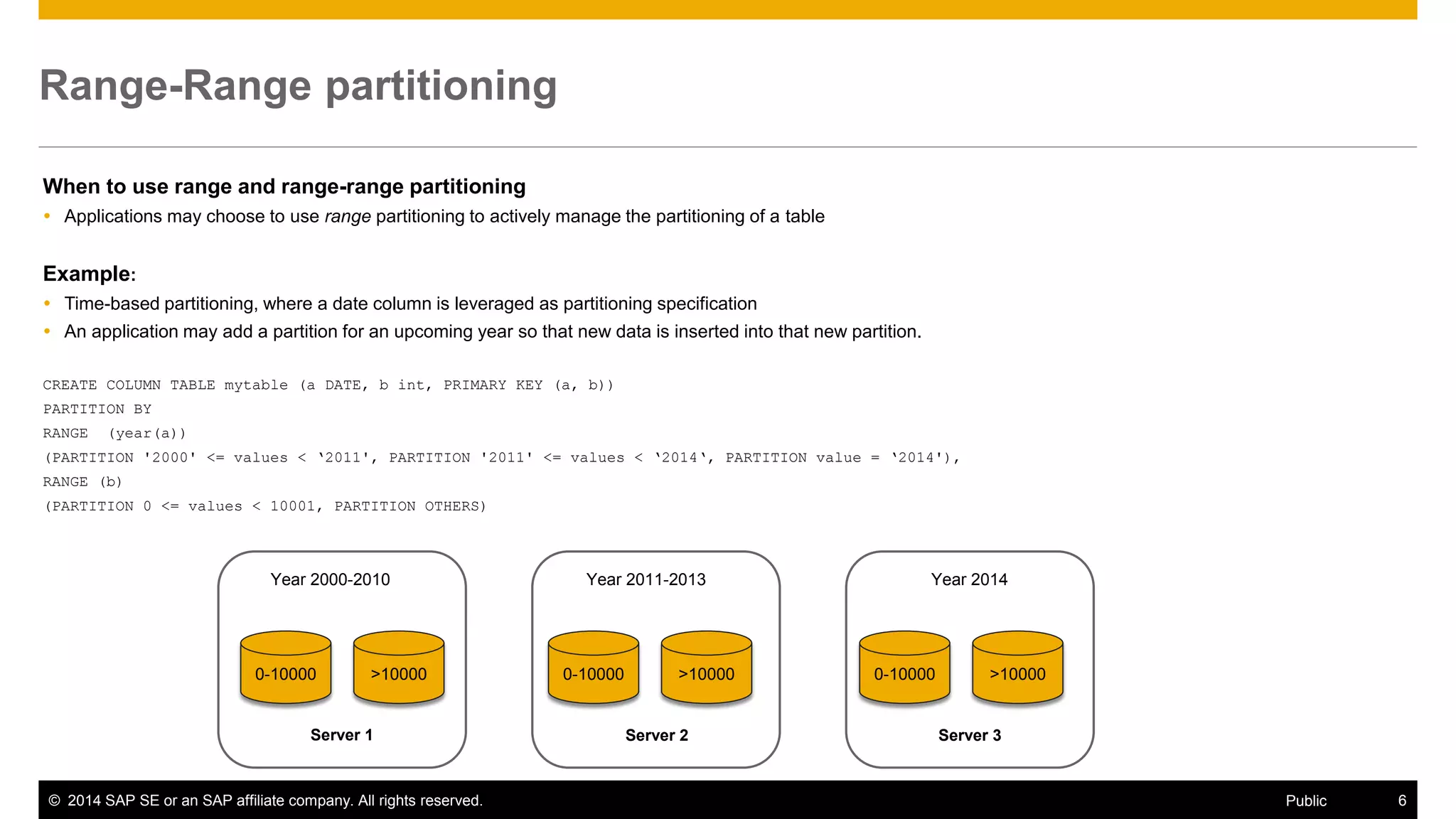
Range-Range partitioning 
When to use range and range-range partitioning 
Applications may choose to use range partitioning to actively manage the partitioning of a table 
Example: 
Time-based partitioning, where a date column is leveraged as partitioning specification 
An application may add a partition for an upcoming year so that new data is inserted into that new partition. 
CREATE COLUMN TABLE mytable (a DATE, b int, PRIMARY KEY (a, b)) 
PARTITION BY 
RANGE (year(a)) 
(PARTITION '2000' <= values < ‘2011', PARTITION '2011' <= values < ‘2014‘, PARTITION value = ‘2014'), 
RANGE (b) 
(PARTITION 0 <= values < 10001, PARTITION OTHERS) 
0-10000 
Server 1 
Server 2 
Server 3 
Year 2000-2010 
Year 2011-2013 
Year 2014 
>10000 
0-10000 
>10000 
0-10000 
>10000
©2014 SAP SE or an SAP affiliate company. All rights reserved. 
7 
Public 
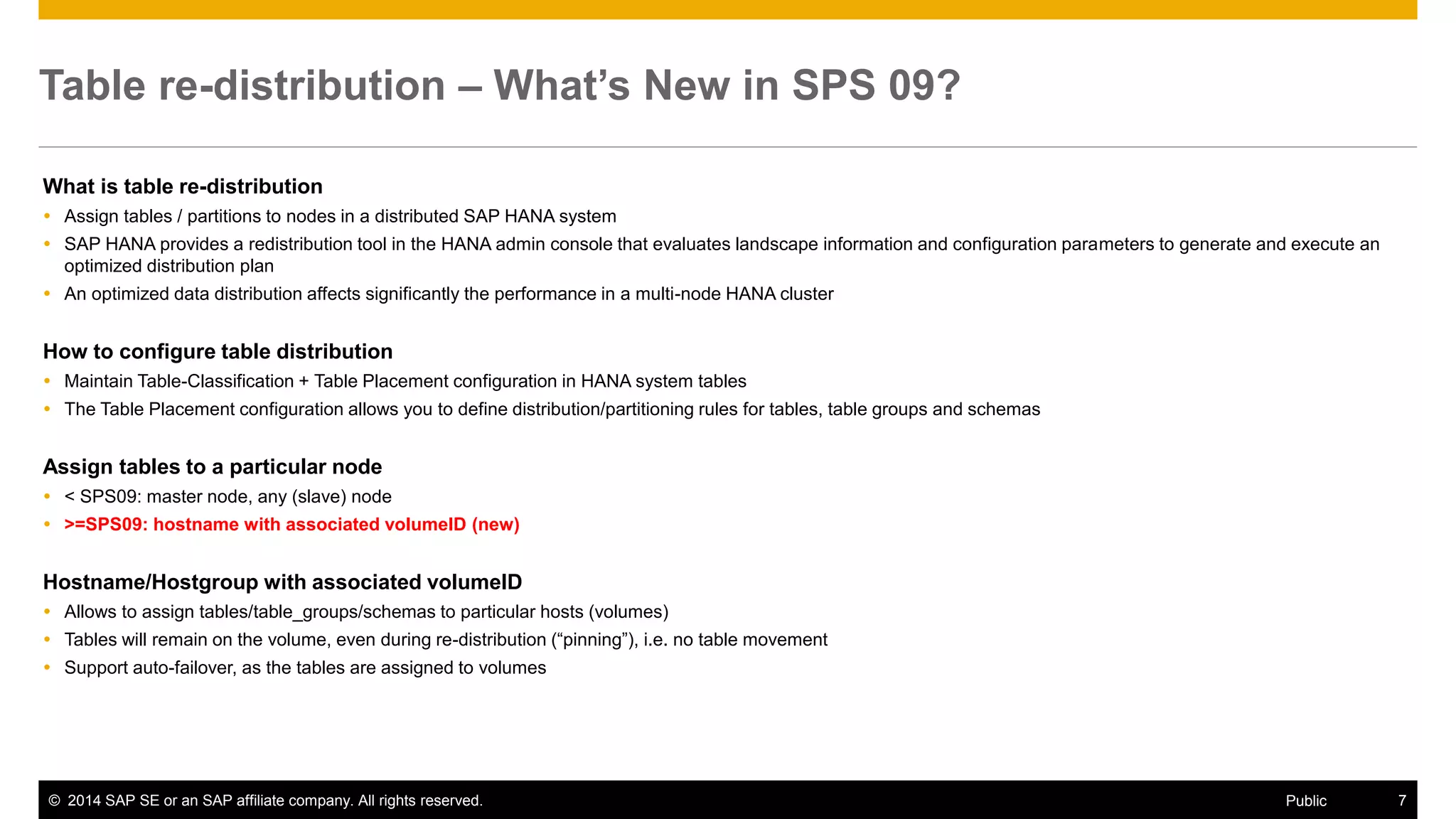
Table re-distribution – What’s New in SPS 09? 
What is table re-distribution 
Assign tables / partitions to nodes in a distributed SAP HANA system 
SAP HANA provides a redistribution tool in the HANA admin console that evaluates landscape information and configuration parameters to generate and execute an optimized distribution plan 
An optimized data distribution affects significantly the performance in a multi-node HANA cluster 
How to configure table distribution 
Maintain Table-Classification + Table Placement configuration in HANA system tables 
The Table Placement configuration allows you to define distribution/partitioning rules for tables, table groups and schemas 
Assign tables to a particular node 
< SPS09: master node, any (slave) node 
>=SPS09: hostname with associated volumeID (new) 
Hostname/Hostgroup with associated volumeID 
Allows to assign tables/table_groups/schemas to particular hosts (volumes) 
Tables will remain on the volume, even during re-distribution (“pinning”), i.e. no table movement 
Support auto-failover, as the tables are assigned to volumes
©2014 SAP SE or an SAP affiliate company. All rights reserved. 
8 
Public 
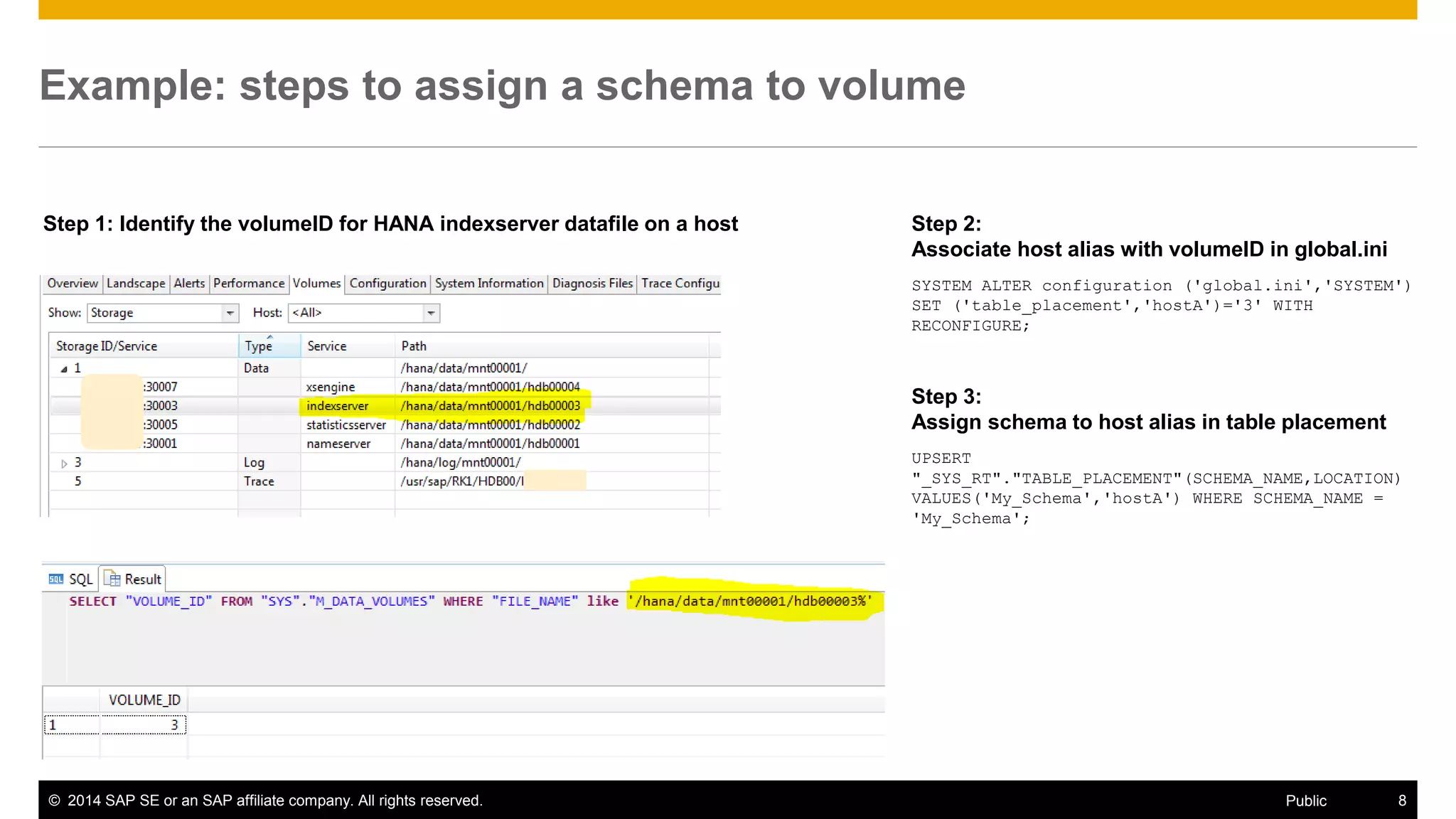
Example: steps to assign a schema to volume 
Step 1: Identify the volumeID for HANA indexserver datafile on a host 
Step 2: Associate host alias with volumeID in global.ini 
SYSTEM ALTER configuration ('global.ini','SYSTEM') SET ('table_placement','hostA')='3' WITH RECONFIGURE; 
Step 3: Assign schema to host alias in table placement 
UPSERT "_SYS_RT"."TABLE_PLACEMENT"(SCHEMA_NAME,LOCATION) VALUES('My_Schema','hostA') WHERE SCHEMA_NAME = 'My_Schema';
©2014 SAP SE or an SAP affiliate company. All rights reserved. 
9 
Public 
Memory efficiency – What’s New in SPS 09? 
Primary Key Inverted Hash 
HANA allows to define a composite primary key for column tables as INVERTED HASH 
Hash keys have reduced main memory requirements HANA, as the composite key is encoded in a condensed manner (hash value) 
Note: 
–The query performance can be affected by using hash keys depending on the statement, such as for between-queries or like-queries on the composite key 
–DML operations on tables with hash keys can still lead to performance penalties (~10%) 
CREATE COLUMN TABLE mytable ("id" NVARCHAR (5), "l_name" NVARCHAR (20), "f_name" NVARCHAR(20), PRIMARY KEY INVERTED HASH("id", "l_name")); 
Auto-Unload of Tables 
Forces the HANA database to unload tables from main memory automatically after a defined unused retention period 
Note: 
–HANA unloads tables based on LRU, whenever the available memory becomes small 
–Additionally, applications can control the loading and unloading of tables explicitly 
With SPS09, the auto-unload function supports the administrator to take off unused tables periodically from main memoy 
Note: 
–The monitoring task of unused tables adds additional workload on the HANA database 
–The SQL syntax will be described with the next HANA DSP revision (Feb 2015) 
CREATE|ALTER TABLE … [UNUSED RETENTION PERIOD <retention_period>] – retention period in <sec>
HANA SQL 
The slides cover new HANA SQL core functions. They will be documented for SPS09 in the customer note #2094186. 
It is planned to update the HANA SQL reference guide in Feb 2015. 
SQL extensions for new HANA options, like dynamic tiering, streaming, data integration and quality, spatial, multi-tenancy, time series are not covered here. Their SQL syntax will be described in dedicated Developer Guides (see customer note #2091815) or in the HANA Admin Guide. 
Important Remarks:
©2014 SAP SE or an SAP affiliate company. All rights reserved. 
11 
Public 
Regular Expressions – What’s New in SPS 09? 
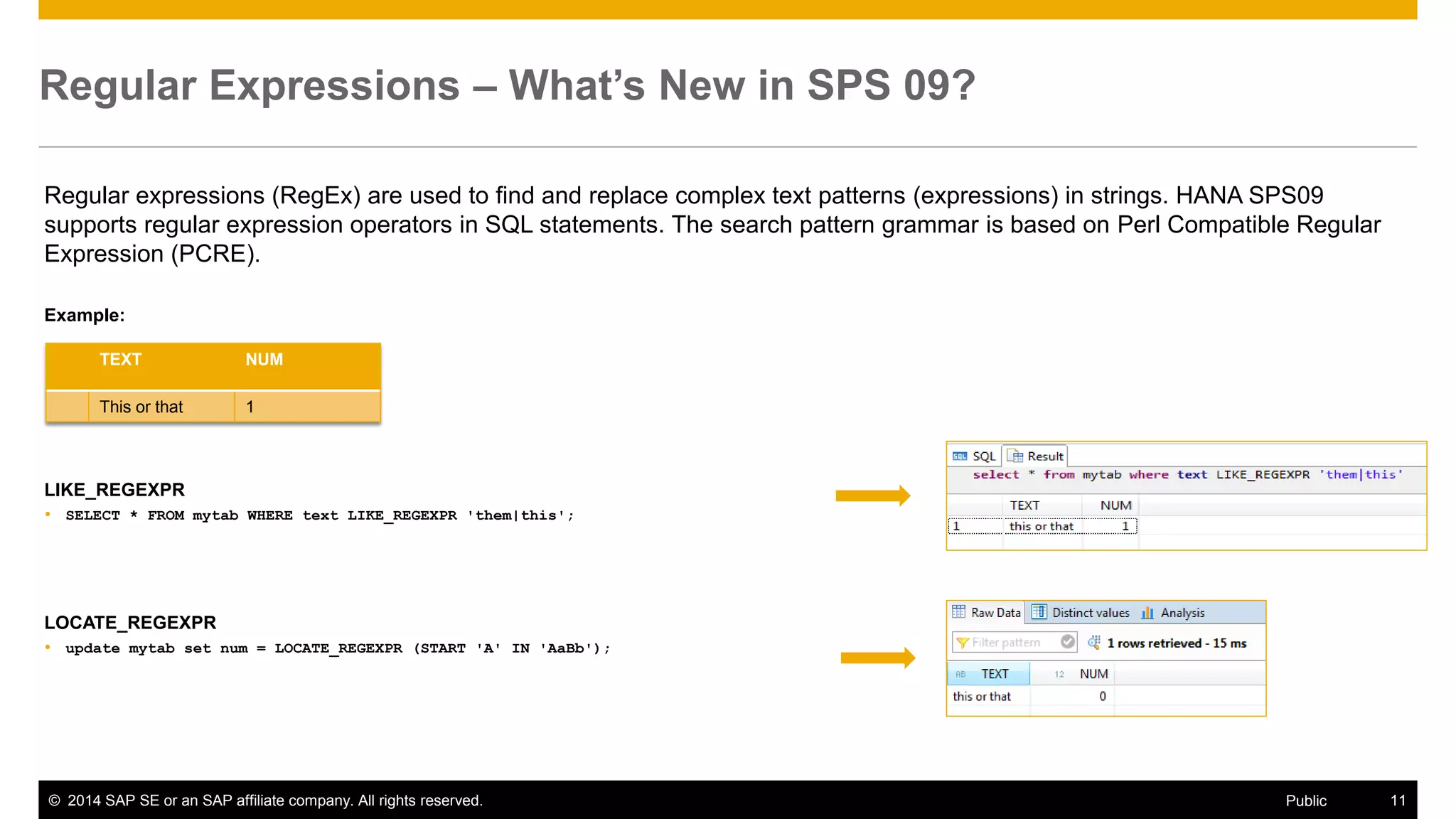
Regular expressions (RegEx) are used to find and replace complex text patterns (expressions) in strings. HANA SPS09 supports regular expression operators in SQL statements. The search pattern grammar is based on Perl Compatible Regular Expression (PCRE). 
Example: 
LIKE_REGEXPR 
SELECT * FROM mytab WHERE text LIKE_REGEXPR 'them|this'; 
LOCATE_REGEXPR 
update mytab set num = LOCATE_REGEXPR (START 'A' IN 'AaBb'); 
TEXT 
NUM 
This or that 
1
©2014 SAP SE or an SAP affiliate company. All rights reserved. 
12 
Public 
Regular Expressions – cont. 
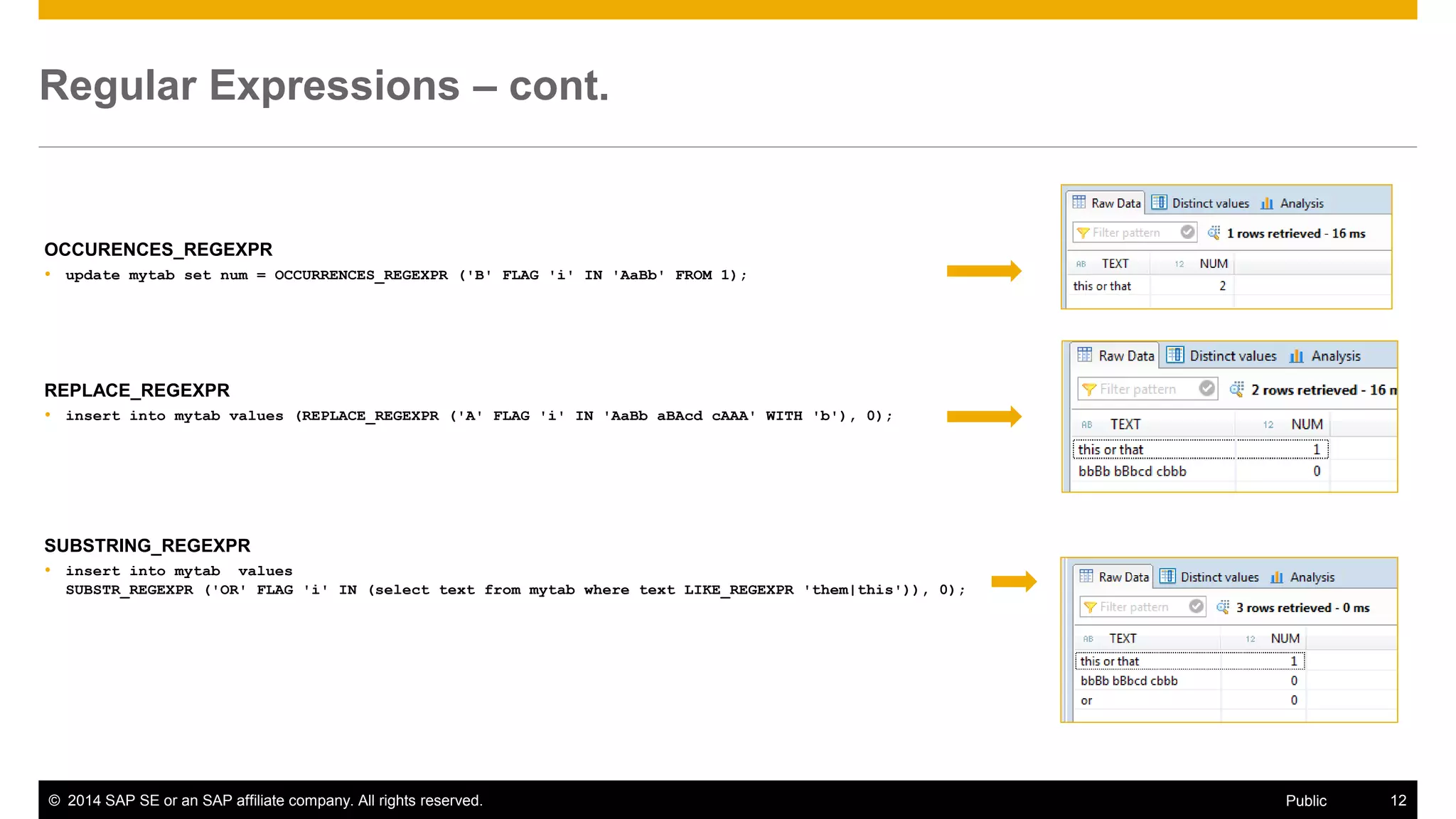
OCCURENCES_REGEXPR 
update mytab set num = OCCURRENCES_REGEXPR ('B' FLAG 'i' IN 'AaBb' FROM 1); 
REPLACE_REGEXPR 
insert into mytab values (REPLACE_REGEXPR ('A' FLAG 'i' IN 'AaBb aBAcd cAAA' WITH 'b'), 0); 
SUBSTRING_REGEXPR 
insert into mytab values SUBSTR_REGEXPR ('OR' FLAG 'i' IN (select text from mytab where text LIKE_REGEXPR 'them|this')), 0);
©2014 SAP SE or an SAP affiliate company. All rights reserved. 
13 
Public 
Window Functions – What’s New in SPS 09? 
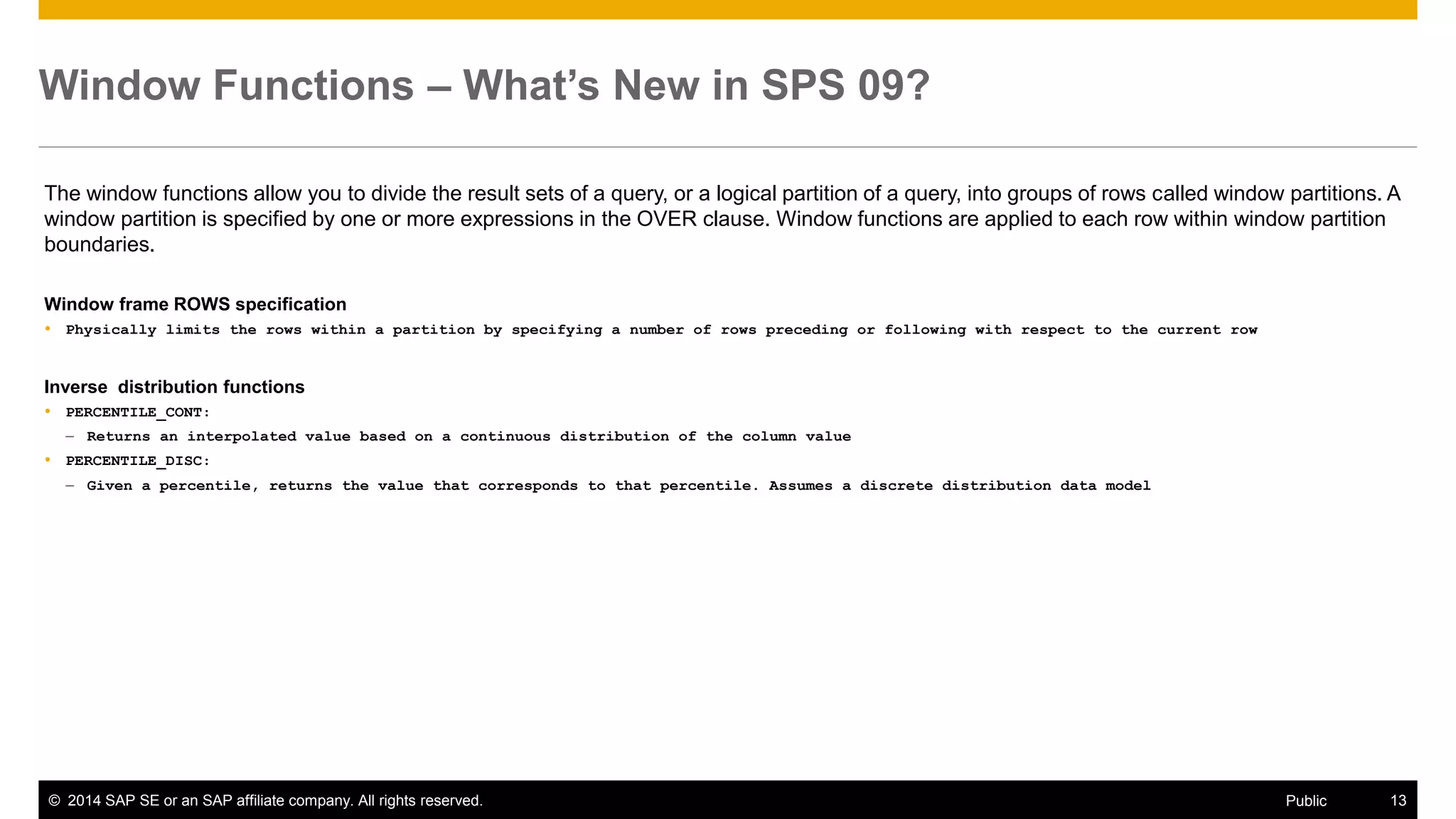
The window functions allow you to divide the result sets of a query, or a logical partition of a query, into groups of rows called window partitions. A window partition is specified by one or more expressions in the OVER clause. Window functions are applied to each row within window partition boundaries. 
Window frame ROWS specification 
Physically limits the rows within a partition by specifying a number of rows preceding or following with respect to the current row 
Inverse distribution functions 
PERCENTILE_CONT: 
–Returns an interpolated value based on a continuous distribution of the column value 
PERCENTILE_DISC: 
–Given a percentile, returns the value that corresponds to that percentile. Assumes a discrete distribution data model
©2014 SAP SE or an SAP affiliate company. All rights reserved. 
14 
Public 
Number Functions – What’s New in SPS 09? 
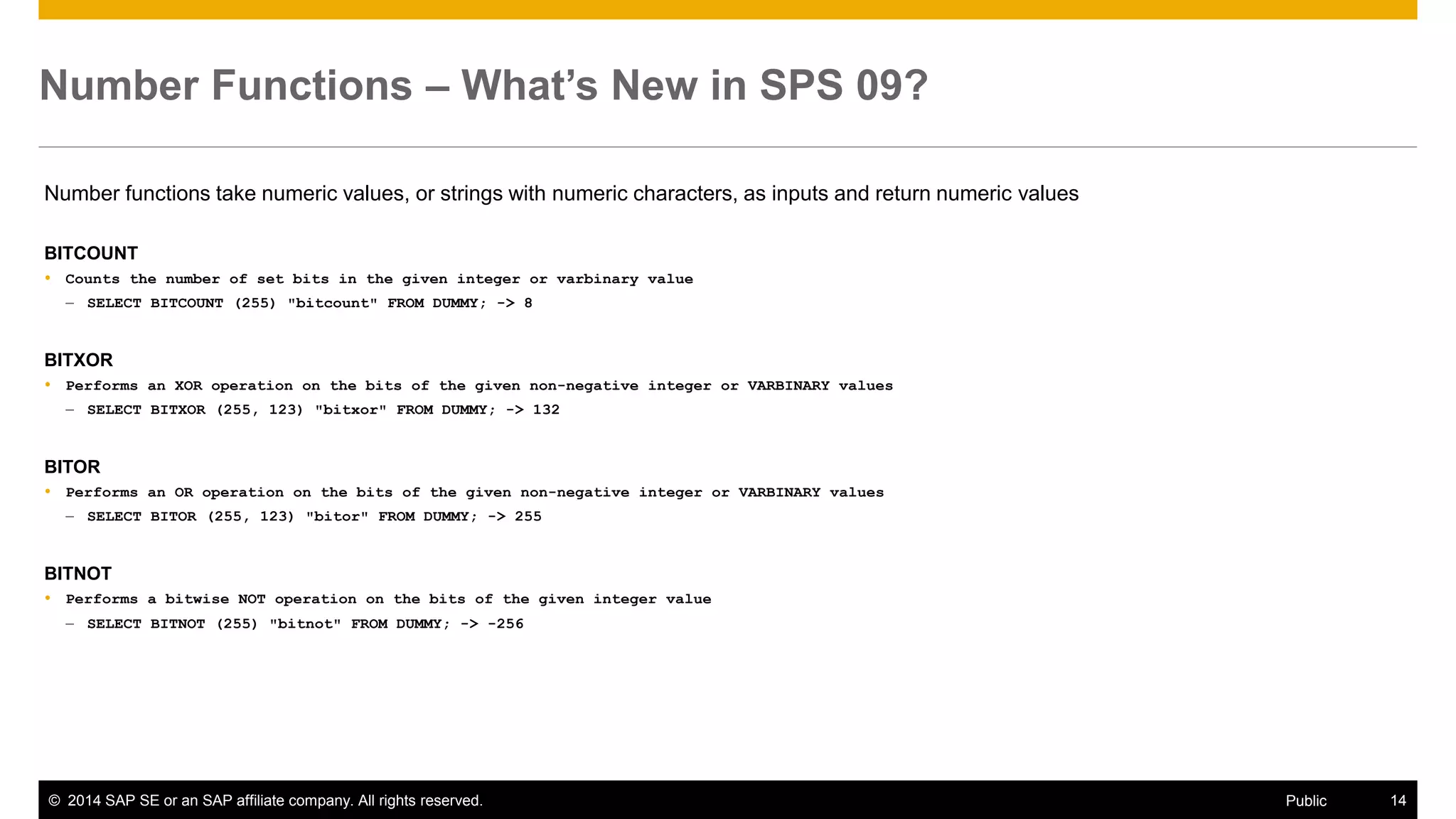
Number functions take numeric values, or strings with numeric characters, as inputs and return numeric values 
BITCOUNT 
Counts the number of set bits in the given integer or varbinary value 
–SELECT BITCOUNT (255) "bitcount" FROM DUMMY; -> 8 
BITXOR 
Performs an XOR operation on the bits of the given non-negative integer or VARBINARY values 
–SELECT BITXOR (255, 123) "bitxor" FROM DUMMY; -> 132 
BITOR 
Performs an OR operation on the bits of the given non-negative integer or VARBINARY values 
–SELECT BITOR (255, 123) "bitor" FROM DUMMY; -> 255 
BITNOT 
Performs a bitwise NOT operation on the bits of the given integer value 
–SELECT BITNOT (255) "bitnot" FROM DUMMY; -> -256
©2014 SAP SE or an SAP affiliate company. All rights reserved. 
15 
Public 
Aggregate function – What’s New in SPS 09? 
Aggregate functions calculate a single value from the values of multiple rows in a column 
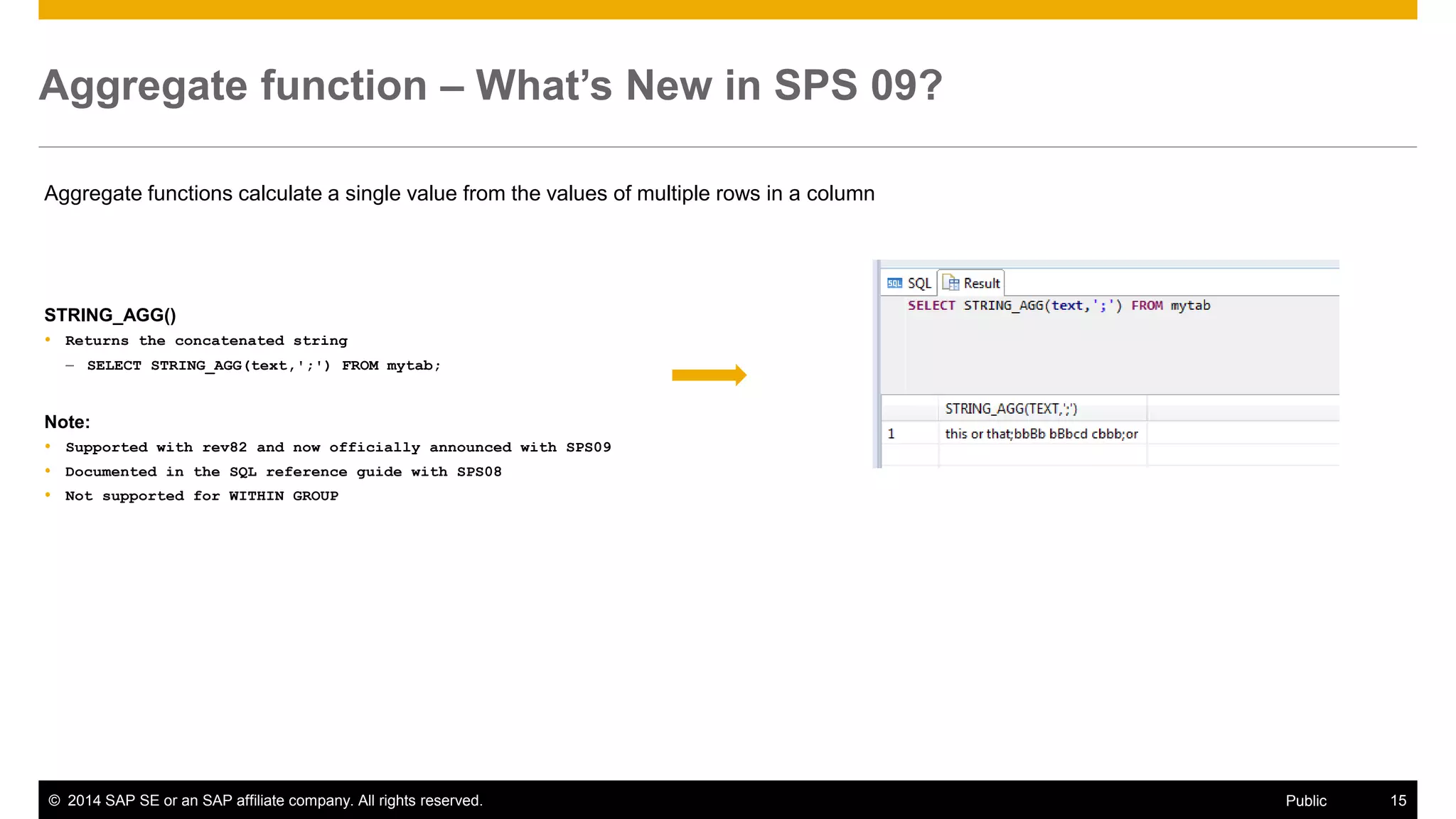
STRING_AGG() 
Returns the concatenated string 
–SELECT STRING_AGG(text,';') FROM mytab; 
Note: 
Supported with rev82 and now officially announced with SPS09 
Documented in the SQL reference guide with SPS08 
Not supported for WITHIN GROUP
©2014 SAP SE or an SAP affiliate company. All rights reserved. 
16 
Public 
Table Sampling – What’s New in SPS 09? 
The goal of the TABLESAMPLE operator is to allow queries to be executed over ad-hoc random samples of tables. Samples are computed uniformly over data items that are qualified by some columnar base table. 
Example 
Compute an approximate average of the salary field for managers over 1% of the emp table 
–SELECT count(*), avg(salary) FROM emp TABLESAMPLE SYSTEM (1) WHERE type = 'manager' 
Note: 
For SPS09, sampling is limited to columnar base tables and repeatability is not supported 
TABLESAMPLE operator will be documented in the updated SQL reference guide Feb 2015
©2014 SAP SE or an SAP affiliate company. All rights reserved. 
17 
Public 
How to find SAP HANA documentation on this topic? 
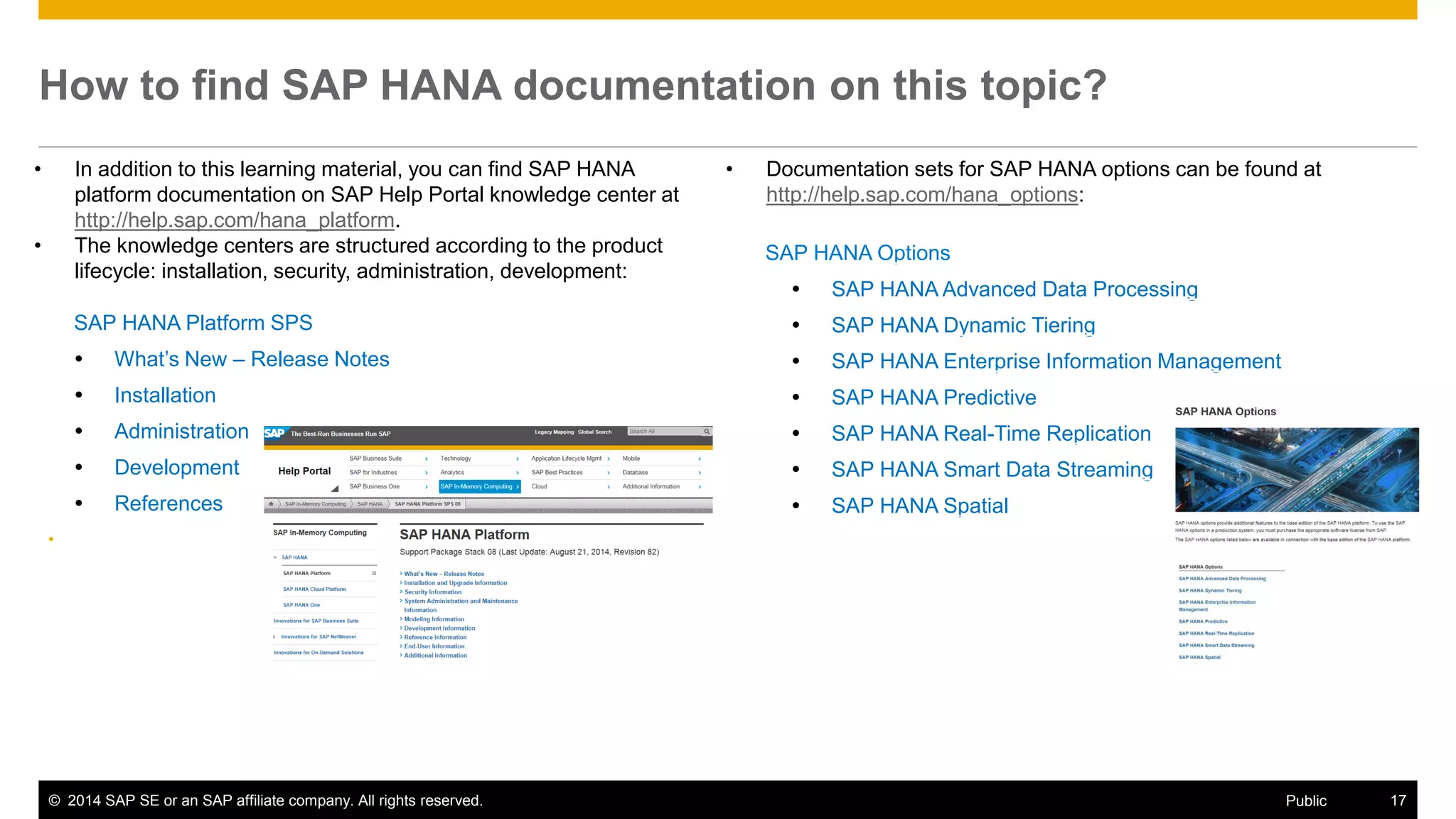
•In addition to this learning material, you can find SAP HANA platform documentation on SAP Help Portal knowledge center at http://help.sap.com/hana_platform. 
•The knowledge centers are structured according to the product lifecycle: installation, security, administration, development: 
SAP HANA Options 
SAP HANA Advanced Data Processing 
SAP HANA Dynamic Tiering 
SAP HANA Enterprise Information Management 
SAP HANA Predictive 
SAP HANA Real-Time Replication 
SAP HANA Smart Data Streaming 
SAP HANA Spatial 
•Documentation sets for SAP HANA options can be found at http://help.sap.com/hana_options: 
SAP HANA Platform SPS 
What’s New – Release Notes 
Installation 
Administration 
Development 
References 
•
©2014 SAP SE or an SAP affiliate company. All rights reserved. 
Thank you 
Contact information 
Ruediger Karl 
SAP HANA Product Management 
AskSAPHANA@sap.com
©2014 SAP SE or an SAP affiliate company. All rights reserved. 
19 
Public 
© 2014 SAP SE or an SAP affiliate company. All rights reserved. 
No part of this publication may be reproduced or transmitted in any form or for any purpose without the express permission of SAP SE or an SAP affiliate company. 
SAP and other SAP products and services mentioned herein as well as their respective logos are trademarks or registered trademarks of SAP SE (or an SAP affiliate company) in Germany and other countries. Please see http://global12.sap.com/corporate-en/legal/copyright/index.epx for additional trademark information and notices. 
Some software products marketed by SAP SE and its distributors contain proprietary software components of other software vendors. 
National product specifications may vary. 
These materials are provided by SAP SE or an SAP affiliate company for informational purposes only, without representation or warranty of any kind, and SAP SE or its affiliated companies shall not be liable for errors or omissions with respect to the materials. The only warranties for SAP SE or SAP affiliate company products and services are those that are set forth in the express warranty statements accompanying such products and services, if any. Nothing herein should be construed as constituting an additional warranty. 
In particular, SAP SE or its affiliated companies have no obligation to pursue any course of business outlined in this document or any related presentation, or to develop or release any functionality mentioned therein. This document, or any related presentation, and SAP SE’s or its affiliated companies’ strategy and possible future developments, products, and/or platform directions and functionality are all subject to change and may be changed by SAP SE or its affiliated companies at any time for any reason without notice. The information in this document is not a commitment, promise, or legal obligation to deliver any material, code, or functionality. All forward- looking statements are subject to various risks and uncertainties that could cause actual results to differ materially from expectations. Readers are cautioned not to place undue reliance on these forward-looking statements, which speak only as of their dates, and they should not be relied upon in making purchasing decisions.

SAP HANA SPS09 - SAP HANA Core & SQL

  • 1.
    1 ©2014 SAPAG or an SAP affiliate company. All rights reserved. SAP HANA SPS 09 - What’s New? SAP HANA Core & SQL SAP HANA Product Management November, 2014 (Delta from SPS 08 to SPS 09)
  • 2.
    ©2014 SAP SEor an SAP affiliate company. All rights reserved. 2 Public Disclaimer This presentation outlines our general product direction and should not be relied on in making a purchase decision. This presentation is not subject to your license agreement or any other agreement with SAP. SAP has no obligation to pursue any course of business outlined in this presentation or to develop or release any functionality mentioned in this presentation. This presentation and SAP’s strategy and possible future developments are subject to change and may be changed by SAP at any time for any reason without notice. This document is provided without a warranty of any kind, either express or implied, including but not limited to, the implied warranties of merchantability, fitness for a particular purpose, or non-infringement. SAP assumes no responsibility for errors or omissions in this document, except if such damages were caused by SAP intentionally or grossly negligent.
  • 3.
    ©2014 SAP SEor an SAP affiliate company. All rights reserved. 3 Public Agenda Extended HANA core features Extended HANA SQL syntax
  • 4.
  • 5.
    ©2014 SAP SEor an SAP affiliate company. All rights reserved. 5 Public Partitioning – What’s New in SPS 09? Typical use cases for partitioning Load-balancing Performance: parallelization, partition pruning, merge Overcome 2 billion rows limit Types of partitioning Single-Level partitioning: hash, range, round-robin Multi-Level partitioning: hash-range, hash-round-robin, hash-hash, round-robin-range, range-range (new) Added Data-Types for partitioning Range partitioning: BIGINT, DECIMAL (new) Table re-partitioning Python script to improve performance for table re-partitioning (new) Script is not available for customers, but shall be used by SAP consultants Script is documented and attached to SAP note: #2012533 Script can be applied to SAP HANA version >= rev69 Patch Level 4
  • 6.
    ©2014 SAP SEor an SAP affiliate company. All rights reserved. 6 Public Range-Range partitioning When to use range and range-range partitioning Applications may choose to use range partitioning to actively manage the partitioning of a table Example: Time-based partitioning, where a date column is leveraged as partitioning specification An application may add a partition for an upcoming year so that new data is inserted into that new partition. CREATE COLUMN TABLE mytable (a DATE, b int, PRIMARY KEY (a, b)) PARTITION BY RANGE (year(a)) (PARTITION '2000' <= values < ‘2011', PARTITION '2011' <= values < ‘2014‘, PARTITION value = ‘2014'), RANGE (b) (PARTITION 0 <= values < 10001, PARTITION OTHERS) 0-10000 Server 1 Server 2 Server 3 Year 2000-2010 Year 2011-2013 Year 2014 >10000 0-10000 >10000 0-10000 >10000
  • 7.
    ©2014 SAP SEor an SAP affiliate company. All rights reserved. 7 Public Table re-distribution – What’s New in SPS 09? What is table re-distribution Assign tables / partitions to nodes in a distributed SAP HANA system SAP HANA provides a redistribution tool in the HANA admin console that evaluates landscape information and configuration parameters to generate and execute an optimized distribution plan An optimized data distribution affects significantly the performance in a multi-node HANA cluster How to configure table distribution Maintain Table-Classification + Table Placement configuration in HANA system tables The Table Placement configuration allows you to define distribution/partitioning rules for tables, table groups and schemas Assign tables to a particular node < SPS09: master node, any (slave) node >=SPS09: hostname with associated volumeID (new) Hostname/Hostgroup with associated volumeID Allows to assign tables/table_groups/schemas to particular hosts (volumes) Tables will remain on the volume, even during re-distribution (“pinning”), i.e. no table movement Support auto-failover, as the tables are assigned to volumes
  • 8.
    ©2014 SAP SEor an SAP affiliate company. All rights reserved. 8 Public Example: steps to assign a schema to volume Step 1: Identify the volumeID for HANA indexserver datafile on a host Step 2: Associate host alias with volumeID in global.ini SYSTEM ALTER configuration ('global.ini','SYSTEM') SET ('table_placement','hostA')='3' WITH RECONFIGURE; Step 3: Assign schema to host alias in table placement UPSERT "_SYS_RT"."TABLE_PLACEMENT"(SCHEMA_NAME,LOCATION) VALUES('My_Schema','hostA') WHERE SCHEMA_NAME = 'My_Schema';
  • 9.
    ©2014 SAP SEor an SAP affiliate company. All rights reserved. 9 Public Memory efficiency – What’s New in SPS 09? Primary Key Inverted Hash HANA allows to define a composite primary key for column tables as INVERTED HASH Hash keys have reduced main memory requirements HANA, as the composite key is encoded in a condensed manner (hash value) Note: –The query performance can be affected by using hash keys depending on the statement, such as for between-queries or like-queries on the composite key –DML operations on tables with hash keys can still lead to performance penalties (~10%) CREATE COLUMN TABLE mytable ("id" NVARCHAR (5), "l_name" NVARCHAR (20), "f_name" NVARCHAR(20), PRIMARY KEY INVERTED HASH("id", "l_name")); Auto-Unload of Tables Forces the HANA database to unload tables from main memory automatically after a defined unused retention period Note: –HANA unloads tables based on LRU, whenever the available memory becomes small –Additionally, applications can control the loading and unloading of tables explicitly With SPS09, the auto-unload function supports the administrator to take off unused tables periodically from main memoy Note: –The monitoring task of unused tables adds additional workload on the HANA database –The SQL syntax will be described with the next HANA DSP revision (Feb 2015) CREATE|ALTER TABLE … [UNUSED RETENTION PERIOD <retention_period>] – retention period in <sec>
  • 10.
    HANA SQL Theslides cover new HANA SQL core functions. They will be documented for SPS09 in the customer note #2094186. It is planned to update the HANA SQL reference guide in Feb 2015. SQL extensions for new HANA options, like dynamic tiering, streaming, data integration and quality, spatial, multi-tenancy, time series are not covered here. Their SQL syntax will be described in dedicated Developer Guides (see customer note #2091815) or in the HANA Admin Guide. Important Remarks:
  • 11.
    ©2014 SAP SEor an SAP affiliate company. All rights reserved. 11 Public Regular Expressions – What’s New in SPS 09? Regular expressions (RegEx) are used to find and replace complex text patterns (expressions) in strings. HANA SPS09 supports regular expression operators in SQL statements. The search pattern grammar is based on Perl Compatible Regular Expression (PCRE). Example: LIKE_REGEXPR SELECT * FROM mytab WHERE text LIKE_REGEXPR 'them|this'; LOCATE_REGEXPR update mytab set num = LOCATE_REGEXPR (START 'A' IN 'AaBb'); TEXT NUM This or that 1
  • 12.
    ©2014 SAP SEor an SAP affiliate company. All rights reserved. 12 Public Regular Expressions – cont. OCCURENCES_REGEXPR update mytab set num = OCCURRENCES_REGEXPR ('B' FLAG 'i' IN 'AaBb' FROM 1); REPLACE_REGEXPR insert into mytab values (REPLACE_REGEXPR ('A' FLAG 'i' IN 'AaBb aBAcd cAAA' WITH 'b'), 0); SUBSTRING_REGEXPR insert into mytab values SUBSTR_REGEXPR ('OR' FLAG 'i' IN (select text from mytab where text LIKE_REGEXPR 'them|this')), 0);
  • 13.
    ©2014 SAP SEor an SAP affiliate company. All rights reserved. 13 Public Window Functions – What’s New in SPS 09? The window functions allow you to divide the result sets of a query, or a logical partition of a query, into groups of rows called window partitions. A window partition is specified by one or more expressions in the OVER clause. Window functions are applied to each row within window partition boundaries. Window frame ROWS specification Physically limits the rows within a partition by specifying a number of rows preceding or following with respect to the current row Inverse distribution functions PERCENTILE_CONT: –Returns an interpolated value based on a continuous distribution of the column value PERCENTILE_DISC: –Given a percentile, returns the value that corresponds to that percentile. Assumes a discrete distribution data model
  • 14.
    ©2014 SAP SEor an SAP affiliate company. All rights reserved. 14 Public Number Functions – What’s New in SPS 09? Number functions take numeric values, or strings with numeric characters, as inputs and return numeric values BITCOUNT Counts the number of set bits in the given integer or varbinary value –SELECT BITCOUNT (255) "bitcount" FROM DUMMY; -> 8 BITXOR Performs an XOR operation on the bits of the given non-negative integer or VARBINARY values –SELECT BITXOR (255, 123) "bitxor" FROM DUMMY; -> 132 BITOR Performs an OR operation on the bits of the given non-negative integer or VARBINARY values –SELECT BITOR (255, 123) "bitor" FROM DUMMY; -> 255 BITNOT Performs a bitwise NOT operation on the bits of the given integer value –SELECT BITNOT (255) "bitnot" FROM DUMMY; -> -256
  • 15.
    ©2014 SAP SEor an SAP affiliate company. All rights reserved. 15 Public Aggregate function – What’s New in SPS 09? Aggregate functions calculate a single value from the values of multiple rows in a column STRING_AGG() Returns the concatenated string –SELECT STRING_AGG(text,';') FROM mytab; Note: Supported with rev82 and now officially announced with SPS09 Documented in the SQL reference guide with SPS08 Not supported for WITHIN GROUP
  • 16.
    ©2014 SAP SEor an SAP affiliate company. All rights reserved. 16 Public Table Sampling – What’s New in SPS 09? The goal of the TABLESAMPLE operator is to allow queries to be executed over ad-hoc random samples of tables. Samples are computed uniformly over data items that are qualified by some columnar base table. Example Compute an approximate average of the salary field for managers over 1% of the emp table –SELECT count(*), avg(salary) FROM emp TABLESAMPLE SYSTEM (1) WHERE type = 'manager' Note: For SPS09, sampling is limited to columnar base tables and repeatability is not supported TABLESAMPLE operator will be documented in the updated SQL reference guide Feb 2015
  • 17.
    ©2014 SAP SEor an SAP affiliate company. All rights reserved. 17 Public How to find SAP HANA documentation on this topic? •In addition to this learning material, you can find SAP HANA platform documentation on SAP Help Portal knowledge center at http://help.sap.com/hana_platform. •The knowledge centers are structured according to the product lifecycle: installation, security, administration, development: SAP HANA Options SAP HANA Advanced Data Processing SAP HANA Dynamic Tiering SAP HANA Enterprise Information Management SAP HANA Predictive SAP HANA Real-Time Replication SAP HANA Smart Data Streaming SAP HANA Spatial •Documentation sets for SAP HANA options can be found at http://help.sap.com/hana_options: SAP HANA Platform SPS What’s New – Release Notes Installation Administration Development References •
  • 18.
    ©2014 SAP SEor an SAP affiliate company. All rights reserved. Thank you Contact information Ruediger Karl SAP HANA Product Management AskSAPHANA@sap.com
  • 19.
    ©2014 SAP SEor an SAP affiliate company. All rights reserved. 19 Public © 2014 SAP SE or an SAP affiliate company. All rights reserved. No part of this publication may be reproduced or transmitted in any form or for any purpose without the express permission of SAP SE or an SAP affiliate company. SAP and other SAP products and services mentioned herein as well as their respective logos are trademarks or registered trademarks of SAP SE (or an SAP affiliate company) in Germany and other countries. Please see http://global12.sap.com/corporate-en/legal/copyright/index.epx for additional trademark information and notices. Some software products marketed by SAP SE and its distributors contain proprietary software components of other software vendors. National product specifications may vary. These materials are provided by SAP SE or an SAP affiliate company for informational purposes only, without representation or warranty of any kind, and SAP SE or its affiliated companies shall not be liable for errors or omissions with respect to the materials. The only warranties for SAP SE or SAP affiliate company products and services are those that are set forth in the express warranty statements accompanying such products and services, if any. Nothing herein should be construed as constituting an additional warranty. In particular, SAP SE or its affiliated companies have no obligation to pursue any course of business outlined in this document or any related presentation, or to develop or release any functionality mentioned therein. This document, or any related presentation, and SAP SE’s or its affiliated companies’ strategy and possible future developments, products, and/or platform directions and functionality are all subject to change and may be changed by SAP SE or its affiliated companies at any time for any reason without notice. The information in this document is not a commitment, promise, or legal obligation to deliver any material, code, or functionality. All forward- looking statements are subject to various risks and uncertainties that could cause actual results to differ materially from expectations. Readers are cautioned not to place undue reliance on these forward-looking statements, which speak only as of their dates, and they should not be relied upon in making purchasing decisions.