SAP  Payroll  Control  Center
Daniel  Richards
©  2015  EPI-­USE  Global  Services.  All  rights  reserved
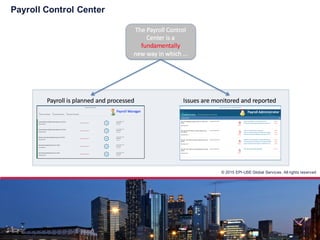
Payroll  Control  Center
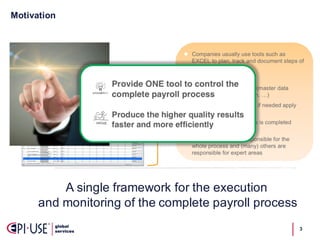
Motivation
3
A  single  framework  for  the  execution  
and  monitoring  of  the  complete  payroll  process
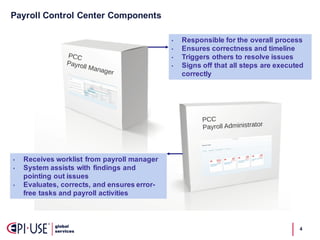
Payroll  Control  Center  Components
4
• Responsible  for  the  overall  process
• Ensures  correctness  and  timeline  
• Triggers  others  to  resolve  issues
• Signs  off  that  all  steps  are  executed  
correctly  
• Receives  worklist  from  payroll  manager  
• System  assists  with  findings  and  
pointing  out  issues  
• Evaluates,  corrects,  and  ensures  error-­
free  tasks  and  payroll  activities  
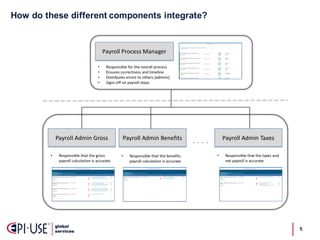
How  do  these  different  components  integrate?
5
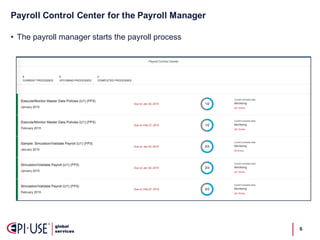
Payroll  Control  Center  for  the  Payroll  Manager
6
• The  payroll  manager  starts  the  payroll  process
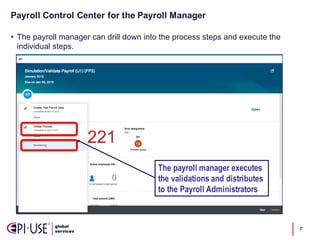
Payroll  Control  Center  for  the  Payroll  Manager
7
• The  payroll  manager  can  drill  down  into  the  process  steps  and  execute  the  
individual  steps.
The payroll manager executes
the validations and distributes
to the Payroll Administrators
Payroll  Control  Center  for  the  Payroll  Manager
8
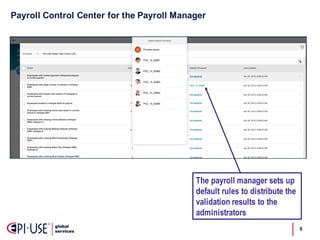
The payroll manager sets up
default rules to distribute the
validation results to the
administrators
Payroll  Control  Center  for  the  Payroll  Manager
9
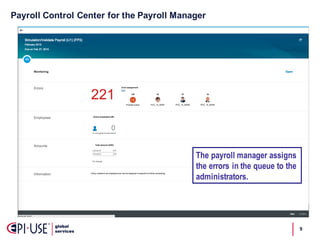
The payroll manager assigns
the errors in the queue to the
administrators.
Payroll  Control  Center  for  the  Payroll  Administrator
10
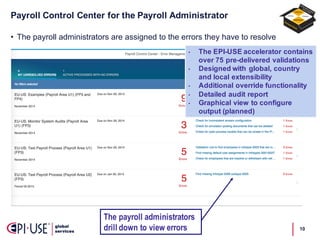
• The  payroll  administrators  are  assigned  to  the  errors  they  have  to  resolve
The payroll administrators
drill down to view errors
• The  EPI-­USE  accelerator  contains  
over  75  pre-­delivered  validations
• Designed  with  global,  country  
and  local  extensibility
• Additional  override  functionality
• Detailed  audit  report
• Graphical  view  to  configure  
output  (planned)
Payroll  Control  Center  for  the  Payroll  Administrator
11
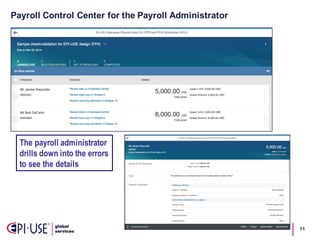
The payroll administrator
drills down into the errors
to see the details
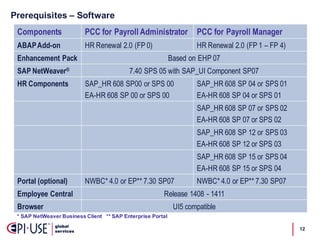
Prerequisites  – Software  
12
Components PCC for Payroll Administrator PCC for Payroll Manager
ABAPAdd-on HR Renewal 2.0 (FP 0) HR Renewal 2.0 (FP 1 – FP 4)
Enhancement Pack Based on EHP 07
SAP NetWeaver® 7.40 SPS 05 with SAP_UI Component SP07
HR Components SAP_HR 608 SP00 or SPS 00
EA-HR 608 SP 00 or SPS 00
SAP_HR 608 SP 04 or SPS 01
EA-HR 608 SP 04 or SPS 01
SAP_HR 608 SP 07 or SPS 02
EA-HR 608 SP 07 or SPS 02
SAP_HR 608 SP 12 or SPS 03
EA-HR 608 SP 12 or SPS 03
SAP_HR 608 SP 15 or SPS 04
EA-HR 608 SP 15 or SPS 04
Portal (optional) NWBC* 4.0 or EP** 7.30 SP07 NWBC* 4.0 or EP** 7.30 SP07
Employee Central Release 1408 - 1411
Browser UI5 compatible
*  SAP  NetWeaver  Business  Client      **  SAP  Enterprise  Portal
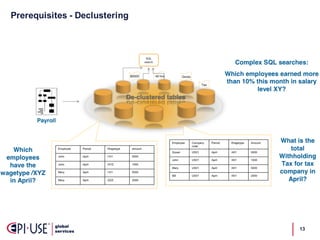
Prerequisites  -­ Declustering
13
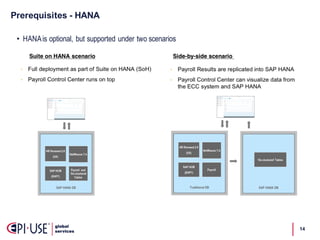
Prerequisites  -­ HANA
14
• HANAis optional, but supported under two scenarios
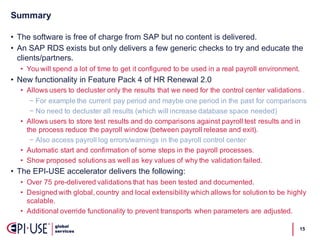
Summary
15
• The  software  is  free  of  charge  from  SAP  but  no  content  is  delivered.
• An  SAP  RDS  exists  but  only  delivers  a  few  generic  checks  to  try  and  educate  the  
clients/partners.  
• You  will  spend  a  lot  of  time  to  get  it  configured  to  be  used  in  a  real  payroll  environment.
• New  functionality  in  Feature  Pack  4  of  HR  Renewal  2.0
• Allows  users  to  decluster  only  the  results  that  we  need  for  the  control  center  validations  .
− For  example  the  current  pay  period  and  maybe  one  period  in  the  past  for  comparisons
− No  need  to  decluster  all  results  (which  will  increase  database  space  needed)
• Allows  users  to  store  test  results  and  do  comparisons  against  payroll  test  results  and  in  
the  process  reduce  the  payroll  window  (between  payroll  release  and  exit).
− Also  access  payroll  log  errors/warnings  in  the  payroll  control  center
• Automatic  start  and  confirmation  of  some  steps  in  the  payroll  processes.
• Show  proposed  solutions  as  well  as  key  values  of  why  the  validation  failed.
• The  EPI-­USE  accelerator  delivers  the  following:
• Over  75  pre-­delivered  validations  that  has  been  tested  and  documented.
• Designed  with  global,  country  and  local  extensibility  which  allows  for  solution  to  be  highly  
scalable.
• Additional  override  functionality  to  prevent  transports  when  parameters  are  adjusted.

About SAP Payroll Control Center by EPI-USE

  • 1.
    SAP  Payroll  Control Center Daniel  Richards
  • 2.
    ©  2015  EPI-­USE Global  Services.  All  rights  reserved Payroll  Control  Center
  • 3.
    Motivation 3 A  single  framework for  the  execution   and  monitoring  of  the  complete  payroll  process
  • 4.
    Payroll  Control  Center Components 4 • Responsible  for  the  overall  process • Ensures  correctness  and  timeline   • Triggers  others  to  resolve  issues • Signs  off  that  all  steps  are  executed   correctly   • Receives  worklist  from  payroll  manager   • System  assists  with  findings  and   pointing  out  issues   • Evaluates,  corrects,  and  ensures  error-­ free  tasks  and  payroll  activities  
  • 5.
    How  do  these different  components  integrate? 5
  • 6.
    Payroll  Control  Center for  the  Payroll  Manager 6 • The  payroll  manager  starts  the  payroll  process
  • 7.
    Payroll  Control  Center for  the  Payroll  Manager 7 • The  payroll  manager  can  drill  down  into  the  process  steps  and  execute  the   individual  steps. The payroll manager executes the validations and distributes to the Payroll Administrators
  • 8.
    Payroll  Control  Center for  the  Payroll  Manager 8 The payroll manager sets up default rules to distribute the validation results to the administrators
  • 9.
    Payroll  Control  Center for  the  Payroll  Manager 9 The payroll manager assigns the errors in the queue to the administrators.
  • 10.
    Payroll  Control  Center for  the  Payroll  Administrator 10 • The  payroll  administrators  are  assigned  to  the  errors  they  have  to  resolve The payroll administrators drill down to view errors • The  EPI-­USE  accelerator  contains   over  75  pre-­delivered  validations • Designed  with  global,  country   and  local  extensibility • Additional  override  functionality • Detailed  audit  report • Graphical  view  to  configure   output  (planned)
  • 11.
    Payroll  Control  Center for  the  Payroll  Administrator 11 The payroll administrator drills down into the errors to see the details
  • 12.
    Prerequisites  – Software  12 Components PCC for Payroll Administrator PCC for Payroll Manager ABAPAdd-on HR Renewal 2.0 (FP 0) HR Renewal 2.0 (FP 1 – FP 4) Enhancement Pack Based on EHP 07 SAP NetWeaver® 7.40 SPS 05 with SAP_UI Component SP07 HR Components SAP_HR 608 SP00 or SPS 00 EA-HR 608 SP 00 or SPS 00 SAP_HR 608 SP 04 or SPS 01 EA-HR 608 SP 04 or SPS 01 SAP_HR 608 SP 07 or SPS 02 EA-HR 608 SP 07 or SPS 02 SAP_HR 608 SP 12 or SPS 03 EA-HR 608 SP 12 or SPS 03 SAP_HR 608 SP 15 or SPS 04 EA-HR 608 SP 15 or SPS 04 Portal (optional) NWBC* 4.0 or EP** 7.30 SP07 NWBC* 4.0 or EP** 7.30 SP07 Employee Central Release 1408 - 1411 Browser UI5 compatible *  SAP  NetWeaver  Business  Client      **  SAP  Enterprise  Portal
  • 13.
  • 14.
    Prerequisites  -­ HANA 14 •HANAis optional, but supported under two scenarios
  • 15.
    Summary 15 • The  software is  free  of  charge  from  SAP  but  no  content  is  delivered. • An  SAP  RDS  exists  but  only  delivers  a  few  generic  checks  to  try  and  educate  the   clients/partners.   • You  will  spend  a  lot  of  time  to  get  it  configured  to  be  used  in  a  real  payroll  environment. • New  functionality  in  Feature  Pack  4  of  HR  Renewal  2.0 • Allows  users  to  decluster  only  the  results  that  we  need  for  the  control  center  validations  . − For  example  the  current  pay  period  and  maybe  one  period  in  the  past  for  comparisons − No  need  to  decluster  all  results  (which  will  increase  database  space  needed) • Allows  users  to  store  test  results  and  do  comparisons  against  payroll  test  results  and  in   the  process  reduce  the  payroll  window  (between  payroll  release  and  exit). − Also  access  payroll  log  errors/warnings  in  the  payroll  control  center • Automatic  start  and  confirmation  of  some  steps  in  the  payroll  processes. • Show  proposed  solutions  as  well  as  key  values  of  why  the  validation  failed. • The  EPI-­USE  accelerator  delivers  the  following: • Over  75  pre-­delivered  validations  that  has  been  tested  and  documented. • Designed  with  global,  country  and  local  extensibility  which  allows  for  solution  to  be  highly   scalable. • Additional  override  functionality  to  prevent  transports  when  parameters  are  adjusted.