1 
©2014 SAP SE or an SAP affiliate company. All rights reserved. 
SAP HANA SPS 09 - What’s New? Development Tools 
SAP HANA Product Management November, 2014 
(Delta from SPS 08 to SPS 09)
©2014 SAP SE or an SAP affiliate company. All rights reserved. 
2 
Public 
Overview – What’s New in SPS 09? 
Primary Focus 
Improve the developer experience 
New/better wizard 
Semantic code completion 
End to end debugging 
Improve interaction between existing tools 
Linking and embedding to Admin and Unit Test tools as well 
Additional focus for the SAP Web-based Development Workbench 
Continue porting tools to the Web-based tooling 
SQLScript Editor 
SQLScript Debugger 
Calculation View
©2014 SAP SE or an SAP affiliate company. All rights reserved. 
3 
Public 
Overview – What’s New in SPS 09? 
Web-based Development Workbench 
Function Flow 
Web Templates and code completion 
Application Preview 
XSOData editor 
Manual test explorer for XSOData artifacts (based on application explorer) 
SQLScript Debugging 
SQLScript Editor 
Performance Measurements in SQL Console 
Form based role editor for hdbrole objects 
Check File Access 
HANA Test Tools integration 
Calculation View editor 
Analytic Privilege editor 
Replication Task Editor 
Smart Data Access integration 
CDS/HDBDD Editor with local semantic code completion 
Studio 
Project set up – artifact generation 
Navigation to XS administration tool 
One click debugging 
XSJS/SQLScript Integrated Debugging 
Direct editing from Repository Browser 
Refactoring services 
Enhanced artifact templates 
Improved Code Completion for SQLScript 
Web Bridge (Run WebIDE editors within the HANA Studio)
SAP HANA Web-based Development Workbench
©2014 SAP SE or an SAP affiliate company. All rights reserved. 
5 
Public 
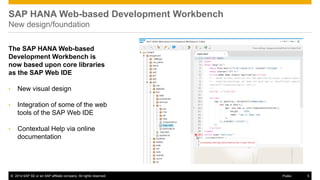
SAP HANA Web-based Development Workbench New design/foundation 
The SAP HANA Web-based Development Workbench is now based upon core libraries as the SAP Web IDE 
•New visual design 
•Integration of some of the web tools of the SAP Web IDE 
•Contextual Help via online documentation
©2014 SAP SE or an SAP affiliate company. All rights reserved. 
6 
Public 
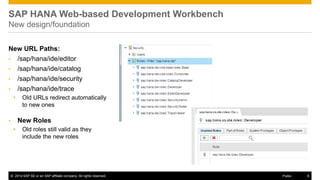
SAP HANA Web-based Development Workbench New design/foundation 
New URL Paths: 
•/sap/hana/ide/editor 
•/sap/hana/ide/catalog 
•/sap/hana/ide/security 
•/sap/hana/ide/trace 
•Old URLs redirect automatically to new ones 
•New Roles 
•Old roles still valid as they include the new roles
©2014 SAP SE or an SAP affiliate company. All rights reserved. 
7 
Public 
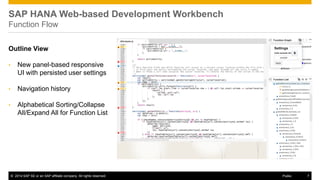
SAP HANA Web-based Development Workbench Function Flow 
Outline View 
•New panel-based responsive UI with persisted user settings 
•Navigation history 
•Alphabetical Sorting/Collapse All/Expand All for Function List
©2014 SAP SE or an SAP affiliate company. All rights reserved. 
8 
Public 
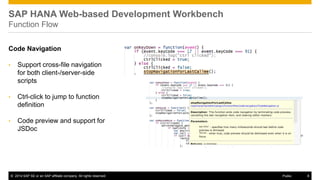
SAP HANA Web-based Development Workbench Function Flow 
Code Navigation 
•Support cross-file navigation for both client-/server-side scripts 
•Ctrl-click to jump to function definition 
•Code preview and support for JSDoc
©2014 SAP SE or an SAP affiliate company. All rights reserved. 
9 
Public 
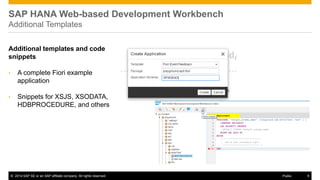
SAP HANA Web-based Development Workbench Additional Templates 
Additional templates and code snippets 
•A complete Fiori example application 
•Snippets for XSJS, XSODATA, HDBPROCEDURE, and others
©2014 SAP SE or an SAP affiliate company. All rights reserved. 
10 
Public 
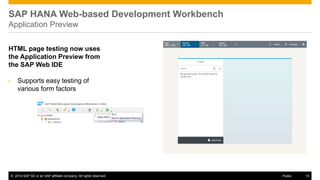
SAP HANA Web-based Development Workbench Application Preview 
HTML page testing now uses the Application Preview from the SAP Web IDE 
•Supports easy testing of various form factors
©2014 SAP SE or an SAP affiliate company. All rights reserved. 
11 
Public 
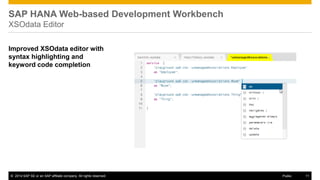
SAP HANA Web-based Development Workbench XSOdata Editor 
Improved XSOdata editor with syntax highlighting and keyword code completion
©2014 SAP SE or an SAP affiliate company. All rights reserved. 
12 
Public 
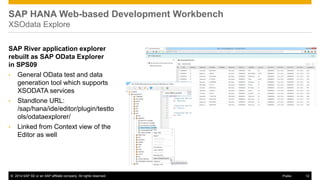
SAP River application explorer rebuilt as SAP OData Explorer in SPS09 
•General OData test and data generation tool which supports XSODATA services 
•Standlone URL: /sap/hana/ide/editor/plugin/testtools/odataexplorer/ 
•Linked from Context view of the Editor as well 
SAP HANA Web-based Development Workbench XSOdata Explore
©2014 SAP SE or an SAP affiliate company. All rights reserved. 
13 
Public 
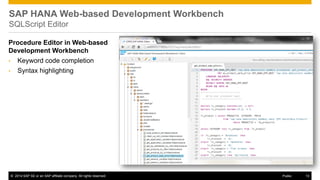
SAP HANA Web-based Development Workbench SQLScript Editor 
Procedure Editor in Web-based Development Workbench 
•Keyword code completion 
•Syntax highlighting
©2014 SAP SE or an SAP affiliate company. All rights reserved. 
14 
Public 
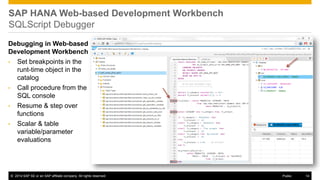
Debugging in Web-based Development Workbench 
•Set breakpoints in the runt-time object in the catalog 
•Call procedure from the SQL console 
•Resume & step over functions 
•Scalar & table variable/parameter evaluations 
SAP HANA Web-based Development Workbench SQLScript Debugger
©2014 SAP SE or an SAP affiliate company. All rights reserved. 
15 
Public 
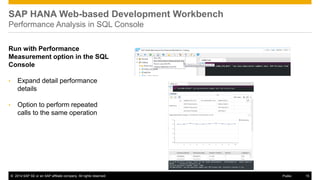
SAP HANA Web-based Development Workbench Performance Analysis in SQL Console 
Run with Performance Measurement option in the SQL Console 
•Expand detail performance details 
•Option to perform repeated calls to the same operation
©2014 SAP SE or an SAP affiliate company. All rights reserved. 
16 
Public 
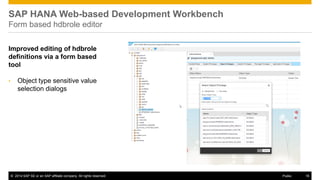
SAP HANA Web-based Development Workbench Form based hdbrole editor 
Improved editing of hdbrole definitions via a form based tool 
•Object type sensitive value selection dialogs
©2014 SAP SE or an SAP affiliate company. All rights reserved. 
17 
Public 
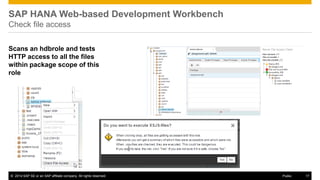
SAP HANA Web-based Development Workbench Check file access 
Scans an hdbrole and tests HTTP access to all the files within package scope of this role
©2014 SAP SE or an SAP affiliate company. All rights reserved. 
18 
Public 
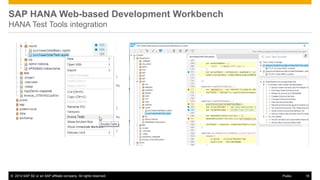
SAP HANA Web-based Development Workbench HANA Test Tools integration
©2014 SAP SE or an SAP affiliate company. All rights reserved. 
19 
Public 
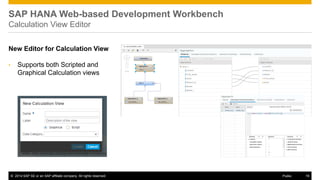
SAP HANA Web-based Development Workbench Calculation View Editor 
New Editor for Calculation View 
•Supports both Scripted and Graphical Calculation views
©2014 SAP SE or an SAP affiliate company. All rights reserved. 
20 
Public 
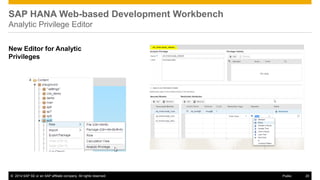
SAP HANA Web-based Development Workbench Analytic Privilege Editor 
New Editor for Analytic Privileges
©2014 SAP SE or an SAP affiliate company. All rights reserved. 
21 
Public 
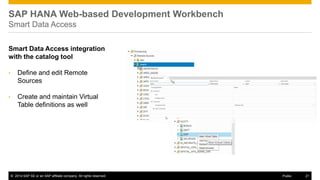
SAP HANA Web-based Development Workbench Smart Data Access 
Smart Data Access integration with the catalog tool 
•Define and edit Remote Sources 
•Create and maintain Virtual Table definitions as well
©2014 SAP SE or an SAP affiliate company. All rights reserved. 
22 
Public 
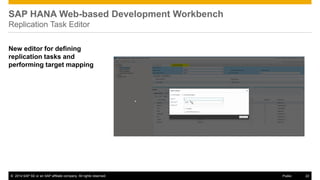
SAP HANA Web-based Development Workbench Replication Task Editor 
New editor for defining replication tasks and performing target mapping
©2014 SAP SE or an SAP affiliate company. All rights reserved. 
23 
Public 
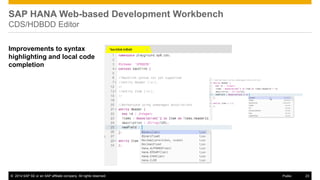
SAP HANA Web-based Development Workbench CDS/HDBDD Editor 
Improvements to syntax highlighting and local code completion
©2014 SAP SE or an SAP affiliate company. All rights reserved. 
24 
Public 
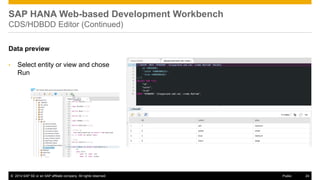
SAP HANA Web-based Development Workbench CDS/HDBDD Editor (Continued) 
Data preview 
•Select entity or view and chose Run
SAP HANA Studio
©2014 SAP SE or an SAP affiliate company. All rights reserved. 
26 
Public 
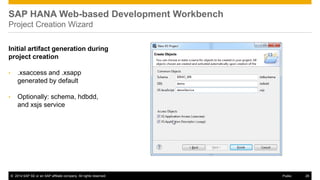
SAP HANA Web-based Development Workbench Project Creation Wizard 
Initial artifact generation during project creation 
•.xsaccess and .xsapp generated by default 
•Optionally: schema, hdbdd, and xsjs service
©2014 SAP SE or an SAP affiliate company. All rights reserved. 
27 
Public 
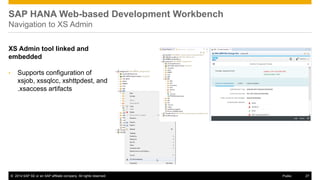
SAP HANA Web-based Development Workbench Navigation to XS Admin 
XS Admin tool linked and embedded 
•Supports configuration of xsjob, xssqlcc, xshttpdest, and .xsaccess artifacts
©2014 SAP SE or an SAP affiliate company. All rights reserved. 
28 
Public 
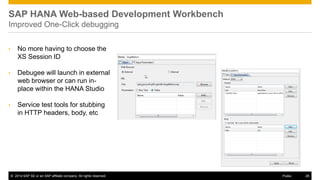
SAP HANA Web-based Development Workbench Improved One-Click debugging 
•No more having to choose the XS Session ID 
•Debugee will launch in external web browser or can run in- place within the HANA Studio 
•Service test tools for stubbing in HTTP headers, body, etc
©2014 SAP SE or an SAP affiliate company. All rights reserved. 
29 
Public 
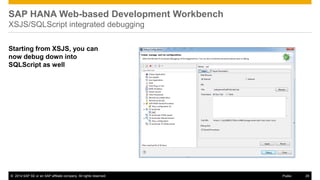
SAP HANA Web-based Development Workbench XSJS/SQLScript integrated debugging 
Starting from XSJS, you can now debug down into SQLScript as well
©2014 SAP SE or an SAP affiliate company. All rights reserved. 
30 
Public 
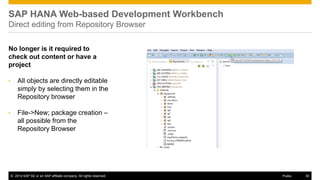
SAP HANA Web-based Development Workbench Direct editing from Repository Browser 
No longer is it required to check out content or have a project 
•All objects are directly editable simply by selecting them in the Repository browser 
•File->New; package creation – all possible from the Repository Browser
©2014 SAP SE or an SAP affiliate company. All rights reserved. 
31 
Public 
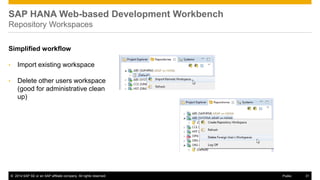
SAP HANA Web-based Development Workbench Repository Workspaces 
Simplified workflow 
•Import existing workspace 
•Delete other users workspace (good for administrative clean up)
©2014 SAP SE or an SAP affiliate company. All rights reserved. 
32 
Public 
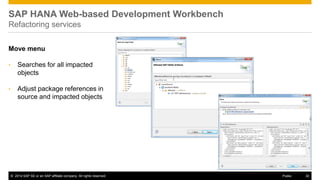
SAP HANA Web-based Development Workbench Refactoring services 
Move menu 
•Searches for all impacted objects 
•Adjust package references in source and impacted objects
©2014 SAP SE or an SAP affiliate company. All rights reserved. 
33 
Public 
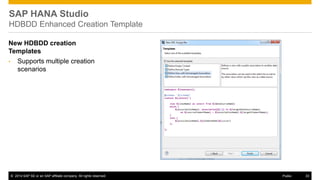
New HDBDD creation Templates 
•Supports multiple creation scenarios 
SAP HANA Studio HDBDD Enhanced Creation Template
©2014 SAP SE or an SAP affiliate company. All rights reserved. 
34 
Public 
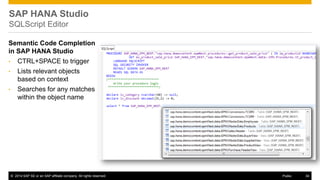
Semantic Code Completion in SAP HANA Studio 
•CTRL+SPACE to trigger 
•Lists relevant objects based on context 
•Searches for any matches within the object name 
SAP HANA Studio SQLScript Editor
©2014 SAP SE or an SAP affiliate company. All rights reserved. 
35 
Public 
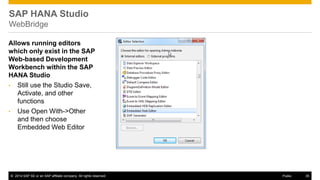
Allows running editors which only exist in the SAP Web-based Development Workbench within the SAP HANA Studio 
•Still use the Studio Save, Activate, and other functions 
•Use Open With->Other and then choose Embedded Web Editor 
SAP HANA Studio WebBridge
©2014 SAP SE or an SAP affiliate company. All rights reserved. 
36 
Public 
Disclaimer 
This presentation outlines our general product direction and should not be relied on in making a purchase decision. This presentation is not subject to your license agreement or any other agreement with SAP. 
SAP has no obligation to pursue any course of business outlined in this presentation or to develop or release any functionality mentioned in this presentation. This presentation and SAP’s strategy and possible future developments are subject to change and may be changed by SAP at any time for any reason without notice. 
This document is provided without a warranty of any kind, either express or implied, including but not limited to, the implied warranties of merchantability, fitness for a particular purpose, or non-infringement. SAP assumes no responsibility for errors or omissions in this document, except if such damages were caused by SAP intentionally or grossly negligent.
©2014 SAP SE or an SAP affiliate company. All rights reserved. 
37 
Public 
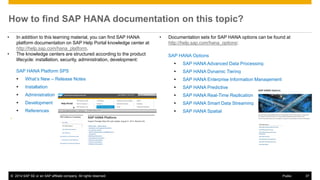
How to find SAP HANA documentation on this topic? 
•In addition to this learning material, you can find SAP HANA platform documentation on SAP Help Portal knowledge center at http://help.sap.com/hana_platform. 
•The knowledge centers are structured according to the product lifecycle: installation, security, administration, development: 
SAP HANA Options 
SAP HANA Advanced Data Processing 
SAP HANA Dynamic Tiering 
SAP HANA Enterprise Information Management 
SAP HANA Predictive 
SAP HANA Real-Time Replication 
SAP HANA Smart Data Streaming 
SAP HANA Spatial 
•Documentation sets for SAP HANA options can be found at http://help.sap.com/hana_options: 
SAP HANA Platform SPS 
What’s New – Release Notes 
Installation 
Administration 
Development 
References 
•
©2014 SAP SE or an SAP affiliate company. All rights reserved. 
Thank you 
Contact information 
Thomas Jung 
SAP HANA Product Management 
AskSAPHANA@sap.com
©2014 SAP SE or an SAP affiliate company. All rights reserved. 
39 
Public 
© 2014 SAP SE or an SAP affiliate company. All rights reserved. 
No part of this publication may be reproduced or transmitted in any form or for any purpose without the express permission of SAP SE or an SAP affiliate company. 
SAP and other SAP products and services mentioned herein as well as their respective logos are trademarks or registered trademarks of SAP SE (or an SAP affiliate company) in Germany and other countries. Please see http://global12.sap.com/corporate-en/legal/copyright/index.epx for additional trademark information and notices. 
Some software products marketed by SAP SE and its distributors contain proprietary software components of other software vendors. 
National product specifications may vary. 
These materials are provided by SAP SE or an SAP affiliate company for informational purposes only, without representation or warranty of any kind, and SAP SE or its affiliated companies shall not be liable for errors or omissions with respect to the materials. The only warranties for SAP SE or SAP affiliate company products and services are those that are set forth in the express warranty statements accompanying such products and services, if any. Nothing herein should be construed as constituting an additional warranty. 
In particular, SAP SE or its affiliated companies have no obligation to pursue any course of business outlined in this document or any related presentation, or to develop or release any functionality mentioned therein. This document, or any related presentation, and SAP SE’s or its affiliated companies’ strategy and possible future developments, products, and/or platform directions and functionality are all subject to change and may be changed by SAP SE or its affiliated companies at any time for any reason without notice. The information in this document is not a commitment, promise, or legal obligation to deliver any material, code, or functionality. All forward- looking statements are subject to various risks and uncertainties that could cause actual results to differ materially from expectations. Readers are cautioned not to place undue reliance on these forward-looking statements, which speak only as of their dates, and they should not be relied upon in making purchasing decisions.

SAP HANA SPS09 - Development Tools

  • 1.
    1 ©2014 SAPSE or an SAP affiliate company. All rights reserved. SAP HANA SPS 09 - What’s New? Development Tools SAP HANA Product Management November, 2014 (Delta from SPS 08 to SPS 09)
  • 2.
    ©2014 SAP SEor an SAP affiliate company. All rights reserved. 2 Public Overview – What’s New in SPS 09? Primary Focus Improve the developer experience New/better wizard Semantic code completion End to end debugging Improve interaction between existing tools Linking and embedding to Admin and Unit Test tools as well Additional focus for the SAP Web-based Development Workbench Continue porting tools to the Web-based tooling SQLScript Editor SQLScript Debugger Calculation View
  • 3.
    ©2014 SAP SEor an SAP affiliate company. All rights reserved. 3 Public Overview – What’s New in SPS 09? Web-based Development Workbench Function Flow Web Templates and code completion Application Preview XSOData editor Manual test explorer for XSOData artifacts (based on application explorer) SQLScript Debugging SQLScript Editor Performance Measurements in SQL Console Form based role editor for hdbrole objects Check File Access HANA Test Tools integration Calculation View editor Analytic Privilege editor Replication Task Editor Smart Data Access integration CDS/HDBDD Editor with local semantic code completion Studio Project set up – artifact generation Navigation to XS administration tool One click debugging XSJS/SQLScript Integrated Debugging Direct editing from Repository Browser Refactoring services Enhanced artifact templates Improved Code Completion for SQLScript Web Bridge (Run WebIDE editors within the HANA Studio)
  • 4.
    SAP HANA Web-basedDevelopment Workbench
  • 5.
    ©2014 SAP SEor an SAP affiliate company. All rights reserved. 5 Public SAP HANA Web-based Development Workbench New design/foundation The SAP HANA Web-based Development Workbench is now based upon core libraries as the SAP Web IDE •New visual design •Integration of some of the web tools of the SAP Web IDE •Contextual Help via online documentation
  • 6.
    ©2014 SAP SEor an SAP affiliate company. All rights reserved. 6 Public SAP HANA Web-based Development Workbench New design/foundation New URL Paths: •/sap/hana/ide/editor •/sap/hana/ide/catalog •/sap/hana/ide/security •/sap/hana/ide/trace •Old URLs redirect automatically to new ones •New Roles •Old roles still valid as they include the new roles
  • 7.
    ©2014 SAP SEor an SAP affiliate company. All rights reserved. 7 Public SAP HANA Web-based Development Workbench Function Flow Outline View •New panel-based responsive UI with persisted user settings •Navigation history •Alphabetical Sorting/Collapse All/Expand All for Function List
  • 8.
    ©2014 SAP SEor an SAP affiliate company. All rights reserved. 8 Public SAP HANA Web-based Development Workbench Function Flow Code Navigation •Support cross-file navigation for both client-/server-side scripts •Ctrl-click to jump to function definition •Code preview and support for JSDoc
  • 9.
    ©2014 SAP SEor an SAP affiliate company. All rights reserved. 9 Public SAP HANA Web-based Development Workbench Additional Templates Additional templates and code snippets •A complete Fiori example application •Snippets for XSJS, XSODATA, HDBPROCEDURE, and others
  • 10.
    ©2014 SAP SEor an SAP affiliate company. All rights reserved. 10 Public SAP HANA Web-based Development Workbench Application Preview HTML page testing now uses the Application Preview from the SAP Web IDE •Supports easy testing of various form factors
  • 11.
    ©2014 SAP SEor an SAP affiliate company. All rights reserved. 11 Public SAP HANA Web-based Development Workbench XSOdata Editor Improved XSOdata editor with syntax highlighting and keyword code completion
  • 12.
    ©2014 SAP SEor an SAP affiliate company. All rights reserved. 12 Public SAP River application explorer rebuilt as SAP OData Explorer in SPS09 •General OData test and data generation tool which supports XSODATA services •Standlone URL: /sap/hana/ide/editor/plugin/testtools/odataexplorer/ •Linked from Context view of the Editor as well SAP HANA Web-based Development Workbench XSOdata Explore
  • 13.
    ©2014 SAP SEor an SAP affiliate company. All rights reserved. 13 Public SAP HANA Web-based Development Workbench SQLScript Editor Procedure Editor in Web-based Development Workbench •Keyword code completion •Syntax highlighting
  • 14.
    ©2014 SAP SEor an SAP affiliate company. All rights reserved. 14 Public Debugging in Web-based Development Workbench •Set breakpoints in the runt-time object in the catalog •Call procedure from the SQL console •Resume & step over functions •Scalar & table variable/parameter evaluations SAP HANA Web-based Development Workbench SQLScript Debugger
  • 15.
    ©2014 SAP SEor an SAP affiliate company. All rights reserved. 15 Public SAP HANA Web-based Development Workbench Performance Analysis in SQL Console Run with Performance Measurement option in the SQL Console •Expand detail performance details •Option to perform repeated calls to the same operation
  • 16.
    ©2014 SAP SEor an SAP affiliate company. All rights reserved. 16 Public SAP HANA Web-based Development Workbench Form based hdbrole editor Improved editing of hdbrole definitions via a form based tool •Object type sensitive value selection dialogs
  • 17.
    ©2014 SAP SEor an SAP affiliate company. All rights reserved. 17 Public SAP HANA Web-based Development Workbench Check file access Scans an hdbrole and tests HTTP access to all the files within package scope of this role
  • 18.
    ©2014 SAP SEor an SAP affiliate company. All rights reserved. 18 Public SAP HANA Web-based Development Workbench HANA Test Tools integration
  • 19.
    ©2014 SAP SEor an SAP affiliate company. All rights reserved. 19 Public SAP HANA Web-based Development Workbench Calculation View Editor New Editor for Calculation View •Supports both Scripted and Graphical Calculation views
  • 20.
    ©2014 SAP SEor an SAP affiliate company. All rights reserved. 20 Public SAP HANA Web-based Development Workbench Analytic Privilege Editor New Editor for Analytic Privileges
  • 21.
    ©2014 SAP SEor an SAP affiliate company. All rights reserved. 21 Public SAP HANA Web-based Development Workbench Smart Data Access Smart Data Access integration with the catalog tool •Define and edit Remote Sources •Create and maintain Virtual Table definitions as well
  • 22.
    ©2014 SAP SEor an SAP affiliate company. All rights reserved. 22 Public SAP HANA Web-based Development Workbench Replication Task Editor New editor for defining replication tasks and performing target mapping
  • 23.
    ©2014 SAP SEor an SAP affiliate company. All rights reserved. 23 Public SAP HANA Web-based Development Workbench CDS/HDBDD Editor Improvements to syntax highlighting and local code completion
  • 24.
    ©2014 SAP SEor an SAP affiliate company. All rights reserved. 24 Public SAP HANA Web-based Development Workbench CDS/HDBDD Editor (Continued) Data preview •Select entity or view and chose Run
  • 25.
  • 26.
    ©2014 SAP SEor an SAP affiliate company. All rights reserved. 26 Public SAP HANA Web-based Development Workbench Project Creation Wizard Initial artifact generation during project creation •.xsaccess and .xsapp generated by default •Optionally: schema, hdbdd, and xsjs service
  • 27.
    ©2014 SAP SEor an SAP affiliate company. All rights reserved. 27 Public SAP HANA Web-based Development Workbench Navigation to XS Admin XS Admin tool linked and embedded •Supports configuration of xsjob, xssqlcc, xshttpdest, and .xsaccess artifacts
  • 28.
    ©2014 SAP SEor an SAP affiliate company. All rights reserved. 28 Public SAP HANA Web-based Development Workbench Improved One-Click debugging •No more having to choose the XS Session ID •Debugee will launch in external web browser or can run in- place within the HANA Studio •Service test tools for stubbing in HTTP headers, body, etc
  • 29.
    ©2014 SAP SEor an SAP affiliate company. All rights reserved. 29 Public SAP HANA Web-based Development Workbench XSJS/SQLScript integrated debugging Starting from XSJS, you can now debug down into SQLScript as well
  • 30.
    ©2014 SAP SEor an SAP affiliate company. All rights reserved. 30 Public SAP HANA Web-based Development Workbench Direct editing from Repository Browser No longer is it required to check out content or have a project •All objects are directly editable simply by selecting them in the Repository browser •File->New; package creation – all possible from the Repository Browser
  • 31.
    ©2014 SAP SEor an SAP affiliate company. All rights reserved. 31 Public SAP HANA Web-based Development Workbench Repository Workspaces Simplified workflow •Import existing workspace •Delete other users workspace (good for administrative clean up)
  • 32.
    ©2014 SAP SEor an SAP affiliate company. All rights reserved. 32 Public SAP HANA Web-based Development Workbench Refactoring services Move menu •Searches for all impacted objects •Adjust package references in source and impacted objects
  • 33.
    ©2014 SAP SEor an SAP affiliate company. All rights reserved. 33 Public New HDBDD creation Templates •Supports multiple creation scenarios SAP HANA Studio HDBDD Enhanced Creation Template
  • 34.
    ©2014 SAP SEor an SAP affiliate company. All rights reserved. 34 Public Semantic Code Completion in SAP HANA Studio •CTRL+SPACE to trigger •Lists relevant objects based on context •Searches for any matches within the object name SAP HANA Studio SQLScript Editor
  • 35.
    ©2014 SAP SEor an SAP affiliate company. All rights reserved. 35 Public Allows running editors which only exist in the SAP Web-based Development Workbench within the SAP HANA Studio •Still use the Studio Save, Activate, and other functions •Use Open With->Other and then choose Embedded Web Editor SAP HANA Studio WebBridge
  • 36.
    ©2014 SAP SEor an SAP affiliate company. All rights reserved. 36 Public Disclaimer This presentation outlines our general product direction and should not be relied on in making a purchase decision. This presentation is not subject to your license agreement or any other agreement with SAP. SAP has no obligation to pursue any course of business outlined in this presentation or to develop or release any functionality mentioned in this presentation. This presentation and SAP’s strategy and possible future developments are subject to change and may be changed by SAP at any time for any reason without notice. This document is provided without a warranty of any kind, either express or implied, including but not limited to, the implied warranties of merchantability, fitness for a particular purpose, or non-infringement. SAP assumes no responsibility for errors or omissions in this document, except if such damages were caused by SAP intentionally or grossly negligent.
  • 37.
    ©2014 SAP SEor an SAP affiliate company. All rights reserved. 37 Public How to find SAP HANA documentation on this topic? •In addition to this learning material, you can find SAP HANA platform documentation on SAP Help Portal knowledge center at http://help.sap.com/hana_platform. •The knowledge centers are structured according to the product lifecycle: installation, security, administration, development: SAP HANA Options SAP HANA Advanced Data Processing SAP HANA Dynamic Tiering SAP HANA Enterprise Information Management SAP HANA Predictive SAP HANA Real-Time Replication SAP HANA Smart Data Streaming SAP HANA Spatial •Documentation sets for SAP HANA options can be found at http://help.sap.com/hana_options: SAP HANA Platform SPS What’s New – Release Notes Installation Administration Development References •
  • 38.
    ©2014 SAP SEor an SAP affiliate company. All rights reserved. Thank you Contact information Thomas Jung SAP HANA Product Management AskSAPHANA@sap.com
  • 39.
    ©2014 SAP SEor an SAP affiliate company. All rights reserved. 39 Public © 2014 SAP SE or an SAP affiliate company. All rights reserved. No part of this publication may be reproduced or transmitted in any form or for any purpose without the express permission of SAP SE or an SAP affiliate company. SAP and other SAP products and services mentioned herein as well as their respective logos are trademarks or registered trademarks of SAP SE (or an SAP affiliate company) in Germany and other countries. Please see http://global12.sap.com/corporate-en/legal/copyright/index.epx for additional trademark information and notices. Some software products marketed by SAP SE and its distributors contain proprietary software components of other software vendors. National product specifications may vary. These materials are provided by SAP SE or an SAP affiliate company for informational purposes only, without representation or warranty of any kind, and SAP SE or its affiliated companies shall not be liable for errors or omissions with respect to the materials. The only warranties for SAP SE or SAP affiliate company products and services are those that are set forth in the express warranty statements accompanying such products and services, if any. Nothing herein should be construed as constituting an additional warranty. In particular, SAP SE or its affiliated companies have no obligation to pursue any course of business outlined in this document or any related presentation, or to develop or release any functionality mentioned therein. This document, or any related presentation, and SAP SE’s or its affiliated companies’ strategy and possible future developments, products, and/or platform directions and functionality are all subject to change and may be changed by SAP SE or its affiliated companies at any time for any reason without notice. The information in this document is not a commitment, promise, or legal obligation to deliver any material, code, or functionality. All forward- looking statements are subject to various risks and uncertainties that could cause actual results to differ materially from expectations. Readers are cautioned not to place undue reliance on these forward-looking statements, which speak only as of their dates, and they should not be relied upon in making purchasing decisions.