Presentation Title Template
The Power of SAP HANA: Integrating Non-SAP data
with Custom SAP HANA Applications
Tim Korba
Wes Feimster
October 16, 2015
Agenda
 Introductions
 Non-SAP Integration with SAP Overview
 SAP Data Services Overview
 SAP Data Services Benefits
 What is SAP HANA?
 SAP HANA Platform Overview
 What are SAP HANA Native Applications?
 SAP HANA UI Overview
 SAP HANA UI Benefits
 Demo
“ It used to be top down. Where companies would go out and conduct a
survey and collect data. Now we are walking around with devices that
log everything we like, picture we take, store we visit. You don’t have
to go out and find data. It is now coming and finding us. “
– Jake Porway – National Geographic
“Consider the decline in the quality and consistency of user interfaces. I
look at the hideous UIs on many commercial applications and it’s
obvious the interface was slapped together just so that the design tool
would crank out the code for handling user events. The code was
finished, but the barely capable UI went out the door with just a little
polish.”
– Tom Yager, “Ahead of the Curve” Columnist
“There is nothing more dangerous than standing still in a world that is
changing.”
– Former French President Jacques Chirac
Non-SAP Integration with SAP Overview
 SAP BW
 Warehouse and Reporting Solution
 Mostly was considered for SAP solutions with integration with
Non-SAP
 BODS, DB Connect, UD Connect, Flat File
 SAP ECC
 Conversion / Interface programs
 SAP HANA
 Focused Non-SAP solutions
 With or without SAP data
 BODS, Smart Data Access, Flat Files, SLT
SAP Data Services Overview
 Unified Data Processing and Integration Platform
 Batch Job and Ad-hoc Processing
 Web-based Central Management Console
 Latest Version: 4.2 Support Pack 5
 Up-to-date information at http://help.sap.com/bods
SAP Data Services Benefits
 Interfaces with wide variety of data sources and targets
out of the box – not just SAP applications
 Databases (DB2, MySQL, Microsoft SQL Server)
 Applications (Oracle, PeopleSoft, JDE)
 Utilizes graphical user interface to design data flows, from
very simple to very complex
 Supports:
 Bi-directional data flows
 Delta processing (e.g., changed data capture)
 Custom scripted functions
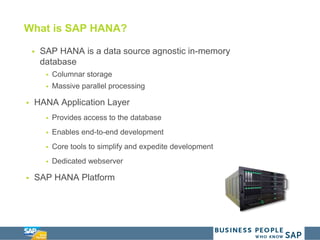
What is SAP HANA?
 SAP HANA is a data source agnostic in-memory
database
 Columnar storage
 Massive parallel processing
 HANA Application Layer
 Provides access to the database
 Enables end-to-end development
 Core tools to simplify and expedite development
 Dedicated webserver
 SAP HANA Platform
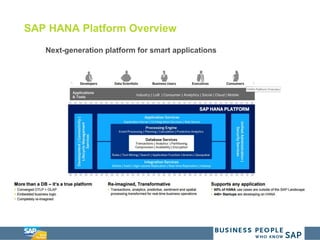
SAP HANA Platform Overview
Next-generation platform for smart applications
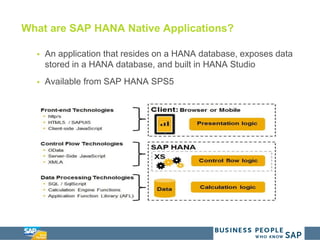
What are SAP HANA Native Applications?
 An application that resides on a HANA database, exposes data
stored in a HANA database, and built in HANA Studio
 Available from SAP HANA SPS5
HANA UI Platform Overview – What is it?
 HANA Extended Services Engine (XS)
 Available from SAP HANA SPS5
 Joint Application / Web Server
 Provides seamless access to HANA Native Applications
 HANA UI Integration Services
 Sites and page building
 State of the art end user experience
 SAP UI5
 Provides capability to develop with standardized services and
consistent UI Patterns
 Support end to end business processes with a harmonized user
experience across applications
SAP HANA Development Benefits
Speed
Hardware Consolidation
Simplified Development
Environment
Effortless Content
Management
 Any Sources
 Any Data
 Device Agnostic
 Reusable
 Branding
Increase IT Output. Reduce IT Costs.
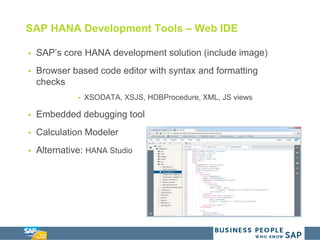
SAP HANA Development Tools – Web IDE
 SAP’s core HANA development solution (include image)
 Browser based code editor with syntax and formatting
checks
 XSODATA, XSJS, HDBProcedure, XML, JS views
 Embedded debugging tool
 Calculation Modeler
 Alternative: HANA Studio
SAP HANA Use Cases
 Extension of existing SAP functionality
 Leverage HANA investment to build a new application
 Simple integration with all data on the HANA server
 New SAP Customers
 Light clean application front-end
 Ability to process massive data sets
HANA UI Deployment Steps
 Design the UX
 Identify the UI Components and Interaction between them
 Current or new applications / components
 Design and develop the components within widgets directly
with HANA Studio
 Including personalization capability
 Design the application site
 Determine the layout of the overall application
 Launch page
Demo Solution Background
 System Overview
 HANA SPS10 (Released July 2015)
 Company Background
 Sporting goods company that specializes in supplying
professional sporting facilities
 The company would like to understand:
 Where are our current shipments and which shipments are
delayed?
 Actionable Results
 Track all in-transit shipments in real time
 Quickly respond to delayed shipments
DEMO
Future Considerations
 IoT – Real-time fleet tracking
 GPS capability on fleet allows for real-time tracking
 Make decisions based on data
 Advanced Notifications
 Alert customers of late shipments before it happens
 Reduce vehicle breakdowns with automated maintenance
alerts
 What potential use cases would you implement?
Appendix
Additional Information
 Dickinson + Associates Web Site
 https://www.dickinson-assoc.com/blog/
 https://www.youtube.com/channel/UCJeOearSqs0AsVkeSzn2
YNg
 Search for Dickinson + Associates Channel
 Code provided for your own application
 Follow us on Twitter and send us a direct message via twitter
 @Dickinson_Assoc
 @tim_korba
 Survey Monkey will be sent out
 Please provide input for future courses
 May be additional follow up Native Application Development
courses
Questions?
Thank You!

Non-SAP Data Integration with SAP HANA_v5.0

  • 1.
    Presentation Title Template ThePower of SAP HANA: Integrating Non-SAP data with Custom SAP HANA Applications Tim Korba Wes Feimster October 16, 2015
  • 2.
    Agenda  Introductions  Non-SAPIntegration with SAP Overview  SAP Data Services Overview  SAP Data Services Benefits  What is SAP HANA?  SAP HANA Platform Overview  What are SAP HANA Native Applications?  SAP HANA UI Overview  SAP HANA UI Benefits  Demo
  • 3.
    “ It usedto be top down. Where companies would go out and conduct a survey and collect data. Now we are walking around with devices that log everything we like, picture we take, store we visit. You don’t have to go out and find data. It is now coming and finding us. “ – Jake Porway – National Geographic “Consider the decline in the quality and consistency of user interfaces. I look at the hideous UIs on many commercial applications and it’s obvious the interface was slapped together just so that the design tool would crank out the code for handling user events. The code was finished, but the barely capable UI went out the door with just a little polish.” – Tom Yager, “Ahead of the Curve” Columnist “There is nothing more dangerous than standing still in a world that is changing.” – Former French President Jacques Chirac
  • 4.
    Non-SAP Integration withSAP Overview  SAP BW  Warehouse and Reporting Solution  Mostly was considered for SAP solutions with integration with Non-SAP  BODS, DB Connect, UD Connect, Flat File  SAP ECC  Conversion / Interface programs  SAP HANA  Focused Non-SAP solutions  With or without SAP data  BODS, Smart Data Access, Flat Files, SLT
  • 5.
    SAP Data ServicesOverview  Unified Data Processing and Integration Platform  Batch Job and Ad-hoc Processing  Web-based Central Management Console  Latest Version: 4.2 Support Pack 5  Up-to-date information at http://help.sap.com/bods
  • 6.
    SAP Data ServicesBenefits  Interfaces with wide variety of data sources and targets out of the box – not just SAP applications  Databases (DB2, MySQL, Microsoft SQL Server)  Applications (Oracle, PeopleSoft, JDE)  Utilizes graphical user interface to design data flows, from very simple to very complex  Supports:  Bi-directional data flows  Delta processing (e.g., changed data capture)  Custom scripted functions
  • 7.
    What is SAPHANA?  SAP HANA is a data source agnostic in-memory database  Columnar storage  Massive parallel processing  HANA Application Layer  Provides access to the database  Enables end-to-end development  Core tools to simplify and expedite development  Dedicated webserver  SAP HANA Platform
  • 8.
    SAP HANA PlatformOverview Next-generation platform for smart applications
  • 9.
    What are SAPHANA Native Applications?  An application that resides on a HANA database, exposes data stored in a HANA database, and built in HANA Studio  Available from SAP HANA SPS5
  • 10.
    HANA UI PlatformOverview – What is it?  HANA Extended Services Engine (XS)  Available from SAP HANA SPS5  Joint Application / Web Server  Provides seamless access to HANA Native Applications  HANA UI Integration Services  Sites and page building  State of the art end user experience  SAP UI5  Provides capability to develop with standardized services and consistent UI Patterns  Support end to end business processes with a harmonized user experience across applications
  • 11.
    SAP HANA DevelopmentBenefits Speed Hardware Consolidation Simplified Development Environment Effortless Content Management  Any Sources  Any Data  Device Agnostic  Reusable  Branding Increase IT Output. Reduce IT Costs.
  • 12.
    SAP HANA DevelopmentTools – Web IDE  SAP’s core HANA development solution (include image)  Browser based code editor with syntax and formatting checks  XSODATA, XSJS, HDBProcedure, XML, JS views  Embedded debugging tool  Calculation Modeler  Alternative: HANA Studio
  • 13.
    SAP HANA UseCases  Extension of existing SAP functionality  Leverage HANA investment to build a new application  Simple integration with all data on the HANA server  New SAP Customers  Light clean application front-end  Ability to process massive data sets
  • 14.
    HANA UI DeploymentSteps  Design the UX  Identify the UI Components and Interaction between them  Current or new applications / components  Design and develop the components within widgets directly with HANA Studio  Including personalization capability  Design the application site  Determine the layout of the overall application  Launch page
  • 15.
    Demo Solution Background System Overview  HANA SPS10 (Released July 2015)  Company Background  Sporting goods company that specializes in supplying professional sporting facilities  The company would like to understand:  Where are our current shipments and which shipments are delayed?  Actionable Results  Track all in-transit shipments in real time  Quickly respond to delayed shipments
  • 16.
  • 17.
    Future Considerations  IoT– Real-time fleet tracking  GPS capability on fleet allows for real-time tracking  Make decisions based on data  Advanced Notifications  Alert customers of late shipments before it happens  Reduce vehicle breakdowns with automated maintenance alerts  What potential use cases would you implement?
  • 18.
  • 19.
    Additional Information  Dickinson+ Associates Web Site  https://www.dickinson-assoc.com/blog/  https://www.youtube.com/channel/UCJeOearSqs0AsVkeSzn2 YNg  Search for Dickinson + Associates Channel  Code provided for your own application  Follow us on Twitter and send us a direct message via twitter  @Dickinson_Assoc  @tim_korba  Survey Monkey will be sent out  Please provide input for future courses  May be additional follow up Native Application Development courses
  • 20.
  • 21.