.consulting .solutions .partnership
SAP Web IDE
IT Conference on SAP Technologies by msg
SAP Web IDE
2© msg | September 2015 | SAP Web IDE - IT Conference on SAP Technologies by msg
SAP Web IDE - A modern web-based IDE for the future1 3
Develop and Deploy applications with SAP Web IDE2 9
SAP Web IDE Hybrid Application Toolkit3 22
Conclusion & Outlook4 31
SAP Web IDE
3© msg | September 2015 | SAP Web IDE - IT Conference on SAP Technologies by msg
SAP Web IDE - A modern web-based IDE for the future1 3
Develop and Deploy applications with SAP Web IDE2 9
SAP Web IDE Hybrid Application Toolkit3 22
Conclusion & Outlook4 31
SAP Web IDE – A modern web-based IDE for the future
What is SAP Web IDE?
© msg | September 2015 | SAP Web IDE - IT Conference on SAP Technologies by msg 4
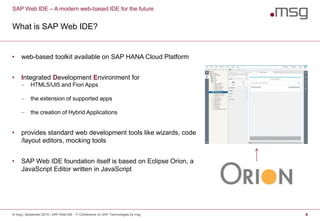
• web-based toolkit available on SAP HANA Cloud Platform
• Integrated Development Environment for
 HTML5/UI5 and Fiori Apps
 the extension of supported apps
 the creation of Hybrid Applications
• provides standard web development tools like wizards, code
/layout editors, mocking tools
• SAP Web IDE foundation itself is based on Eclipse Orion, a
JavaScript Editor written in JavaScript
SAP Web IDE – A modern web-based IDE for the future
Why a web-based IDE?
© msg | September 2015 | SAP Web IDE - IT Conference on SAP Technologies by msg 5
• Several market research companies predict that by 2020 at least 70% of new app development
will take place in the cloud.
• Developer collaboration over cloud-based development infrastructures increases every day.
• Faster and cheaper deliveries.
• Developer is not bound to a specific device. Develop everywhere and everytime.
© msg | September 2015 | SAP Web IDE - IT Conference on SAP Technologies by msg 6
SAP Web IDE – A modern web-based IDE for the future
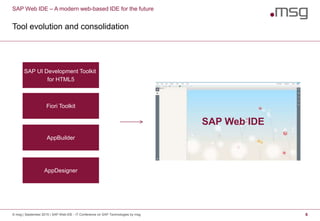
Tool evolution and consolidation
SAP UI Development Toolkit
for HTML5
Fiori Toolkit
AppBuilder
AppDesigner
SAP Web IDE
© msg | September 2015 | SAP Web IDE - IT Conference on SAP Technologies by msg 7
SAP Web IDE – A modern web-based IDE for the future
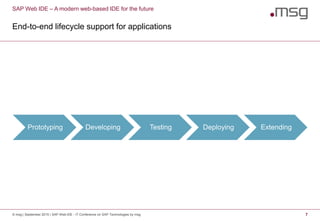
End-to-end lifecycle support for applications
Prototyping Developing Testing Deploying Extending
SAP Web IDE – A modern web-based IDE for the future
SAP Web IDE key features
© msg | September 2015 | SAP Web IDE - IT Conference on SAP Technologies by msg 8
• Development environment
 Source Code editor with SAPUI5 specific code completion
 Layout Editor
 Instant application test
 Mock data support
 OData „Modeller“
 IDE extensions via plugins
• Templates for creating and extending projects
 SAPUI5 Application templates
 SAP Fiori Application templates
 SAP Web IDE Plugin Development templates
 Sample Applications
 Own Templates
• Application extension support (via code and graphical tools)
• Deployment
 to SAP HANA Cloud Platform
 to ABAP UI5 Repository
SAP Web IDE
9© msg | September 2015 | SAP Web IDE - IT Conference on SAP Technologies by msg
SAP Web IDE - A modern web-based IDE for the future1 3
Develop and Deploy applications with SAP Web IDE2 9
SAP Web IDE Hybrid Application Toolkit3 22
Conclusion & Outlook4 31
Develop and Deploy applications with SAP Web IDE
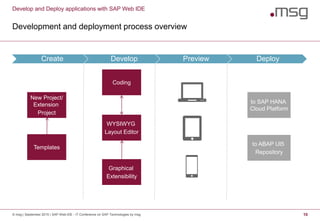
Development and deployment process overview
© msg | September 2015 | SAP Web IDE - IT Conference on SAP Technologies by msg 10
Create Develop Preview Deploy
New Project/
Extension
Project
Coding
WYSIWYG
Layout Editor
to SAP HANA
Cloud Platform
to ABAP UI5
Repository
Templates
Graphical
Extensibility
Develop and Deploy applications with SAP Web IDE
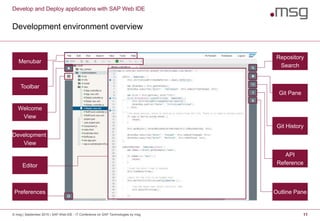
Development environment overview
© msg | September 2015 | SAP Web IDE - IT Conference on SAP Technologies by msg 11
Menubar
Toolbar
Welcome
View
Development
View
Editor
Preferences
Repository
Search
Outline Pane
Git Pane
Git History
API
Reference
Develop and Deploy applications with SAP Web IDE
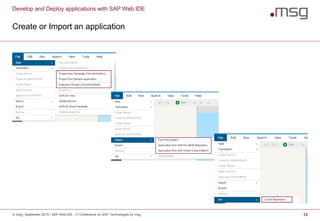
Create or Import an application
© msg | September 2015 | SAP Web IDE - IT Conference on SAP Technologies by msg 12
Develop and Deploy applications with SAP Web IDE
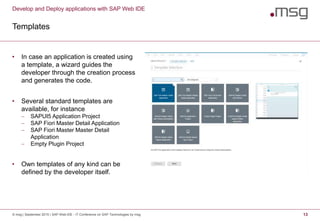
Templates
© msg | September 2015 | SAP Web IDE - IT Conference on SAP Technologies by msg 13
• In case an application is created using
a template, a wizard guides the
developer through the creation process
and generates the code.
• Several standard templates are
available, for instance
 SAPUI5 Application Project
 SAP Fiori Master Detail Application
 SAP Fiori Master Master Detail
Application
 Empty Plugin Project
• Own templates of any kind can be
defined by the developer itself.
Develop and Deploy applications with SAP Web IDE
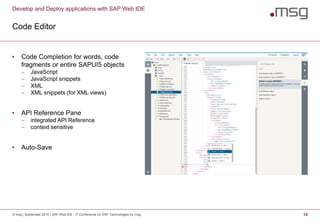
Code Editor
© msg | September 2015 | SAP Web IDE - IT Conference on SAP Technologies by msg 14
• Code Completion for words, code
fragments or entire SAPUI5 objects
 JavaScript
 JavaScript snippets
 XML
 XML snippets (for XML views)
• API Reference Pane
 integrated API Reference
 context sensitive
• Auto-Save
Develop and Deploy applications with SAP Web IDE
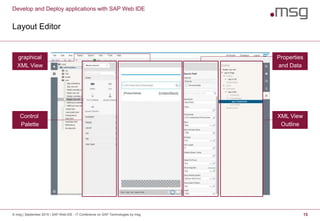
Layout Editor
© msg | September 2015 | SAP Web IDE - IT Conference on SAP Technologies by msg 15
graphical
XML View
Properties
and Data
Control
Palette
XML View
Outline
Develop and Deploy applications with SAP Web IDE
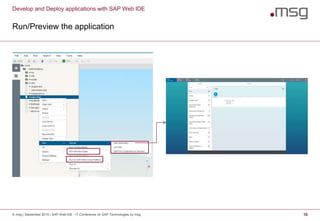
Run/Preview the application
© msg | September 2015 | SAP Web IDE - IT Conference on SAP Technologies by msg 16
Develop and Deploy applications with SAP Web IDE
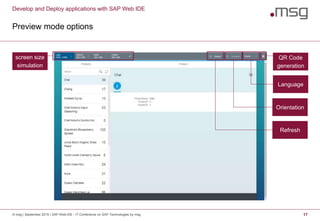
Preview mode options
© msg | September 2015 | SAP Web IDE - IT Conference on SAP Technologies by msg 17
screen size
simulation
QR Code
generation
Language
Orientation
Refresh
Develop and Deploy applications with SAP Web IDE
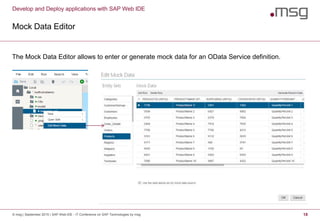
Mock Data Editor
© msg | September 2015 | SAP Web IDE - IT Conference on SAP Technologies by msg 18
The Mock Data Editor allows to enter or generate mock data for an OData Service definition.
Develop and Deploy applications with SAP Web IDE
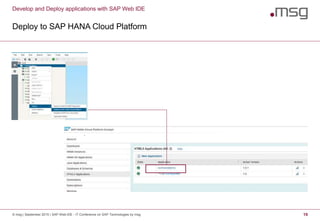
Deploy to SAP HANA Cloud Platform
© msg | September 2015 | SAP Web IDE - IT Conference on SAP Technologies by msg 19
Develop and Deploy applications with SAP Web IDE
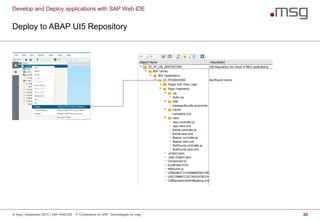
Deploy to ABAP UI5 Repository
© msg | September 2015 | SAP Web IDE - IT Conference on SAP Technologies by msg 20
© msg | September 2015 | SAP Web IDE - IT Conference on SAP Technologies by msg 21
Demo
SAP Web IDE
22© msg | September 2015 | SAP Web IDE - IT Conference on SAP Technologies by msg
SAP Web IDE - A modern web-based IDE for the future1 3
Develop and Deploy applications with SAP Web IDE2 9
SAP Web IDE Hybrid Application Toolkit3 22
Conclusion & Outlook4 31
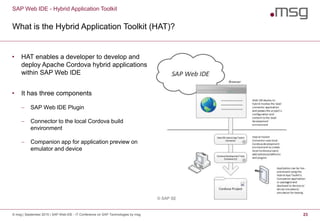
What is the Hybrid Application Toolkit (HAT)?
• HAT enables a developer to develop and
deploy Apache Cordova hybrid applications
within SAP Web IDE
• It has three components
 SAP Web IDE Plugin
 Connector to the local Cordova build
environment
 Companion app for application preview on
emulator and device
SAP Web IDE - Hybrid Application Toolkit
© msg | September 2015 | SAP Web IDE - IT Conference on SAP Technologies by msg 23
© SAP SE
SAP Web IDE Hybrid Application Toolkit
Simple Development and Deployment
© msg | September 2015 | SAP Web IDE - IT Conference on SAP Technologies by msg 24
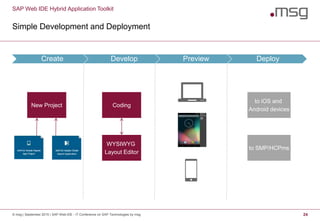
Create Develop Preview Deploy
New Project Coding
WYSIWYG
Layout Editor
to iOS and
Android devices
to SMP/HCPms
SAP Web IDE Hybrid Application Toolkit
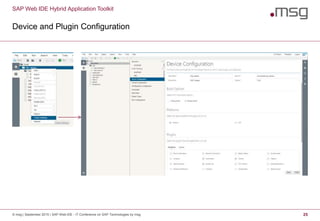
Device and Plugin Configuration
© msg | September 2015 | SAP Web IDE - IT Conference on SAP Technologies by msg 25
SAP Web IDE Hybrid Application Toolkit
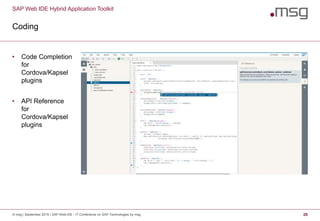
Coding
© msg | September 2015 | SAP Web IDE - IT Conference on SAP Technologies by msg 26
• Code Completion
for
Cordova/Kapsel
plugins
• API Reference
for
Cordova/Kapsel
plugins
SAP Web IDE Hybrid Application Toolkit
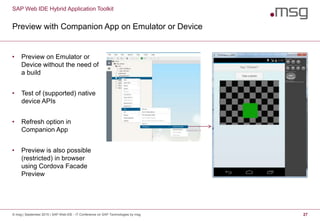
Preview with Companion App on Emulator or Device
© msg | September 2015 | SAP Web IDE - IT Conference on SAP Technologies by msg 27
• Preview on Emulator or
Device without the need of
a build
• Test of (supported) native
device APIs
• Refresh option in
Companion App
• Preview is also possible
(restricted) in browser
using Cordova Facade
Preview
SAP Web IDE Hybrid Application Toolkit
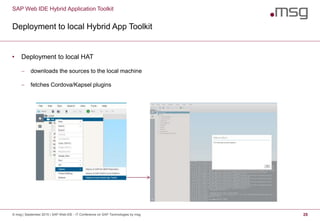
Deployment to local Hybrid App Toolkit
© msg | September 2015 | SAP Web IDE - IT Conference on SAP Technologies by msg 28
• Deployment to local HAT
 downloads the sources to the local machine
 fetches Cordova/Kapsel plugins
SAP Web IDE Hybrid Application Toolkit
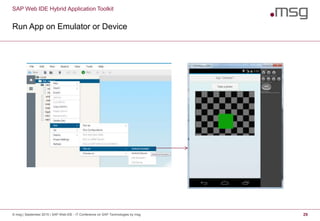
Run App on Emulator or Device
© msg | September 2015 | SAP Web IDE - IT Conference on SAP Technologies by msg 29
© msg | September 2015 | SAP Web IDE - IT Conference on SAP Technologies by msg 30
Demo
SAP Web IDE
31© msg | September 2015 | SAP Web IDE - IT Conference on SAP Technologies by msg
SAP Web IDE - A modern web-based IDE for the future1 3
Develop and Deploy applications with SAP Web IDE2 9
SAP Web IDE Hybrid Application Toolkit3 22
Conclusion & Outlook4 31
Conclusion & Outlook
© msg | September 2015 | SAP Web IDE - IT Conference on SAP Technologies by msg 32
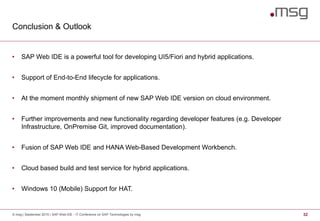
• SAP Web IDE is a powerful tool for developing UI5/Fiori and hybrid applications.
• Support of End-to-End lifecycle for applications.
• At the moment monthly shipment of new SAP Web IDE version on cloud environment.
• Further improvements and new functionality regarding developer features (e.g. Developer
Infrastructure, OnPremise Git, improved documentation).
• Fusion of SAP Web IDE and HANA Web-Based Development Workbench.
• Cloud based build and test service for hybrid applications.
• Windows 10 (Mobile) Support for HAT.
Additional Information
© msg | September 2015 | SAP Web IDE - IT Conference on SAP Technologies by msg 33
• SAP Web IDE
 https://help.hana.ondemand.com/SAP_RDE/frameset.htm
 http://scn.sap.com/docs/DOC-55465
• SAP Web IDE - Hybrid Application Toolkit
 https://help.hana.ondemand.com/webide_hat/frameset.htm
© msg | September 2015 | SAP Web IDE - IT Conference on SAP Technologies by msg 34
Q&A
.consulting .solutions .partnership
Florian Pfeffer
Lead IT Consultant
+49 (0) 851 / 56069 - 4278
florian.pfeffer@msg-systems.com
msg systems ag
Dr.-Hans-Kapfinger-Str. 30, 94032 Passau
Germany
www.msg-systems.com

SAP Web IDE

  • 1.
    .consulting .solutions .partnership SAPWeb IDE IT Conference on SAP Technologies by msg
  • 2.
    SAP Web IDE 2©msg | September 2015 | SAP Web IDE - IT Conference on SAP Technologies by msg SAP Web IDE - A modern web-based IDE for the future1 3 Develop and Deploy applications with SAP Web IDE2 9 SAP Web IDE Hybrid Application Toolkit3 22 Conclusion & Outlook4 31
  • 3.
    SAP Web IDE 3©msg | September 2015 | SAP Web IDE - IT Conference on SAP Technologies by msg SAP Web IDE - A modern web-based IDE for the future1 3 Develop and Deploy applications with SAP Web IDE2 9 SAP Web IDE Hybrid Application Toolkit3 22 Conclusion & Outlook4 31
  • 4.
    SAP Web IDE– A modern web-based IDE for the future What is SAP Web IDE? © msg | September 2015 | SAP Web IDE - IT Conference on SAP Technologies by msg 4 • web-based toolkit available on SAP HANA Cloud Platform • Integrated Development Environment for  HTML5/UI5 and Fiori Apps  the extension of supported apps  the creation of Hybrid Applications • provides standard web development tools like wizards, code /layout editors, mocking tools • SAP Web IDE foundation itself is based on Eclipse Orion, a JavaScript Editor written in JavaScript
  • 5.
    SAP Web IDE– A modern web-based IDE for the future Why a web-based IDE? © msg | September 2015 | SAP Web IDE - IT Conference on SAP Technologies by msg 5 • Several market research companies predict that by 2020 at least 70% of new app development will take place in the cloud. • Developer collaboration over cloud-based development infrastructures increases every day. • Faster and cheaper deliveries. • Developer is not bound to a specific device. Develop everywhere and everytime.
  • 6.
    © msg |September 2015 | SAP Web IDE - IT Conference on SAP Technologies by msg 6 SAP Web IDE – A modern web-based IDE for the future Tool evolution and consolidation SAP UI Development Toolkit for HTML5 Fiori Toolkit AppBuilder AppDesigner SAP Web IDE
  • 7.
    © msg |September 2015 | SAP Web IDE - IT Conference on SAP Technologies by msg 7 SAP Web IDE – A modern web-based IDE for the future End-to-end lifecycle support for applications Prototyping Developing Testing Deploying Extending
  • 8.
    SAP Web IDE– A modern web-based IDE for the future SAP Web IDE key features © msg | September 2015 | SAP Web IDE - IT Conference on SAP Technologies by msg 8 • Development environment  Source Code editor with SAPUI5 specific code completion  Layout Editor  Instant application test  Mock data support  OData „Modeller“  IDE extensions via plugins • Templates for creating and extending projects  SAPUI5 Application templates  SAP Fiori Application templates  SAP Web IDE Plugin Development templates  Sample Applications  Own Templates • Application extension support (via code and graphical tools) • Deployment  to SAP HANA Cloud Platform  to ABAP UI5 Repository
  • 9.
    SAP Web IDE 9©msg | September 2015 | SAP Web IDE - IT Conference on SAP Technologies by msg SAP Web IDE - A modern web-based IDE for the future1 3 Develop and Deploy applications with SAP Web IDE2 9 SAP Web IDE Hybrid Application Toolkit3 22 Conclusion & Outlook4 31
  • 10.
    Develop and Deployapplications with SAP Web IDE Development and deployment process overview © msg | September 2015 | SAP Web IDE - IT Conference on SAP Technologies by msg 10 Create Develop Preview Deploy New Project/ Extension Project Coding WYSIWYG Layout Editor to SAP HANA Cloud Platform to ABAP UI5 Repository Templates Graphical Extensibility
  • 11.
    Develop and Deployapplications with SAP Web IDE Development environment overview © msg | September 2015 | SAP Web IDE - IT Conference on SAP Technologies by msg 11 Menubar Toolbar Welcome View Development View Editor Preferences Repository Search Outline Pane Git Pane Git History API Reference
  • 12.
    Develop and Deployapplications with SAP Web IDE Create or Import an application © msg | September 2015 | SAP Web IDE - IT Conference on SAP Technologies by msg 12
  • 13.
    Develop and Deployapplications with SAP Web IDE Templates © msg | September 2015 | SAP Web IDE - IT Conference on SAP Technologies by msg 13 • In case an application is created using a template, a wizard guides the developer through the creation process and generates the code. • Several standard templates are available, for instance  SAPUI5 Application Project  SAP Fiori Master Detail Application  SAP Fiori Master Master Detail Application  Empty Plugin Project • Own templates of any kind can be defined by the developer itself.
  • 14.
    Develop and Deployapplications with SAP Web IDE Code Editor © msg | September 2015 | SAP Web IDE - IT Conference on SAP Technologies by msg 14 • Code Completion for words, code fragments or entire SAPUI5 objects  JavaScript  JavaScript snippets  XML  XML snippets (for XML views) • API Reference Pane  integrated API Reference  context sensitive • Auto-Save
  • 15.
    Develop and Deployapplications with SAP Web IDE Layout Editor © msg | September 2015 | SAP Web IDE - IT Conference on SAP Technologies by msg 15 graphical XML View Properties and Data Control Palette XML View Outline
  • 16.
    Develop and Deployapplications with SAP Web IDE Run/Preview the application © msg | September 2015 | SAP Web IDE - IT Conference on SAP Technologies by msg 16
  • 17.
    Develop and Deployapplications with SAP Web IDE Preview mode options © msg | September 2015 | SAP Web IDE - IT Conference on SAP Technologies by msg 17 screen size simulation QR Code generation Language Orientation Refresh
  • 18.
    Develop and Deployapplications with SAP Web IDE Mock Data Editor © msg | September 2015 | SAP Web IDE - IT Conference on SAP Technologies by msg 18 The Mock Data Editor allows to enter or generate mock data for an OData Service definition.
  • 19.
    Develop and Deployapplications with SAP Web IDE Deploy to SAP HANA Cloud Platform © msg | September 2015 | SAP Web IDE - IT Conference on SAP Technologies by msg 19
  • 20.
    Develop and Deployapplications with SAP Web IDE Deploy to ABAP UI5 Repository © msg | September 2015 | SAP Web IDE - IT Conference on SAP Technologies by msg 20
  • 21.
    © msg |September 2015 | SAP Web IDE - IT Conference on SAP Technologies by msg 21 Demo
  • 22.
    SAP Web IDE 22©msg | September 2015 | SAP Web IDE - IT Conference on SAP Technologies by msg SAP Web IDE - A modern web-based IDE for the future1 3 Develop and Deploy applications with SAP Web IDE2 9 SAP Web IDE Hybrid Application Toolkit3 22 Conclusion & Outlook4 31
  • 23.
    What is theHybrid Application Toolkit (HAT)? • HAT enables a developer to develop and deploy Apache Cordova hybrid applications within SAP Web IDE • It has three components  SAP Web IDE Plugin  Connector to the local Cordova build environment  Companion app for application preview on emulator and device SAP Web IDE - Hybrid Application Toolkit © msg | September 2015 | SAP Web IDE - IT Conference on SAP Technologies by msg 23 © SAP SE
  • 24.
    SAP Web IDEHybrid Application Toolkit Simple Development and Deployment © msg | September 2015 | SAP Web IDE - IT Conference on SAP Technologies by msg 24 Create Develop Preview Deploy New Project Coding WYSIWYG Layout Editor to iOS and Android devices to SMP/HCPms
  • 25.
    SAP Web IDEHybrid Application Toolkit Device and Plugin Configuration © msg | September 2015 | SAP Web IDE - IT Conference on SAP Technologies by msg 25
  • 26.
    SAP Web IDEHybrid Application Toolkit Coding © msg | September 2015 | SAP Web IDE - IT Conference on SAP Technologies by msg 26 • Code Completion for Cordova/Kapsel plugins • API Reference for Cordova/Kapsel plugins
  • 27.
    SAP Web IDEHybrid Application Toolkit Preview with Companion App on Emulator or Device © msg | September 2015 | SAP Web IDE - IT Conference on SAP Technologies by msg 27 • Preview on Emulator or Device without the need of a build • Test of (supported) native device APIs • Refresh option in Companion App • Preview is also possible (restricted) in browser using Cordova Facade Preview
  • 28.
    SAP Web IDEHybrid Application Toolkit Deployment to local Hybrid App Toolkit © msg | September 2015 | SAP Web IDE - IT Conference on SAP Technologies by msg 28 • Deployment to local HAT  downloads the sources to the local machine  fetches Cordova/Kapsel plugins
  • 29.
    SAP Web IDEHybrid Application Toolkit Run App on Emulator or Device © msg | September 2015 | SAP Web IDE - IT Conference on SAP Technologies by msg 29
  • 30.
    © msg |September 2015 | SAP Web IDE - IT Conference on SAP Technologies by msg 30 Demo
  • 31.
    SAP Web IDE 31©msg | September 2015 | SAP Web IDE - IT Conference on SAP Technologies by msg SAP Web IDE - A modern web-based IDE for the future1 3 Develop and Deploy applications with SAP Web IDE2 9 SAP Web IDE Hybrid Application Toolkit3 22 Conclusion & Outlook4 31
  • 32.
    Conclusion & Outlook ©msg | September 2015 | SAP Web IDE - IT Conference on SAP Technologies by msg 32 • SAP Web IDE is a powerful tool for developing UI5/Fiori and hybrid applications. • Support of End-to-End lifecycle for applications. • At the moment monthly shipment of new SAP Web IDE version on cloud environment. • Further improvements and new functionality regarding developer features (e.g. Developer Infrastructure, OnPremise Git, improved documentation). • Fusion of SAP Web IDE and HANA Web-Based Development Workbench. • Cloud based build and test service for hybrid applications. • Windows 10 (Mobile) Support for HAT.
  • 33.
    Additional Information © msg| September 2015 | SAP Web IDE - IT Conference on SAP Technologies by msg 33 • SAP Web IDE  https://help.hana.ondemand.com/SAP_RDE/frameset.htm  http://scn.sap.com/docs/DOC-55465 • SAP Web IDE - Hybrid Application Toolkit  https://help.hana.ondemand.com/webide_hat/frameset.htm
  • 34.
    © msg |September 2015 | SAP Web IDE - IT Conference on SAP Technologies by msg 34 Q&A
  • 35.
    .consulting .solutions .partnership FlorianPfeffer Lead IT Consultant +49 (0) 851 / 56069 - 4278 florian.pfeffer@msg-systems.com msg systems ag Dr.-Hans-Kapfinger-Str. 30, 94032 Passau Germany www.msg-systems.com

Editor's Notes

  • #5 Monthly shipment of Web IDE releases
  • #6 Monthly shipment of Web IDE releases
  • #7 Existing tools before SAP Web IDE UI Development Toolkit for HTML5 – Eclipse plugin with basic code completion support (still maintained but no new features) Fiori Toolkit – Eclipse plugin on top of UI5 toolkit; first template based approach for Fiori app creation AppBuilder/AppDesigner – web-based tools to implement mobile HTML5 applications SAP Web IDE Consolidated and evolved tool.
  • #11 Create New project or Extension project based on templates Develop Coding: Source Code Editor with Code Completion WYSIWYG Layout Editor: Drag and Drop for Controls Graphical Extensibility Preview PC mode Tablet mode Phone mode Deploy to SAP HANA Cloud Platform to ABAP UI5 repository
  • #12 Menubar Toolbar Save Create File Create Folder Delete Undo Redo Run Back Forward Welcome View What‘s new? Create Applications Import Options Links to documentations Development View Access to Editor and further options Editor Preferences (e.g. editor settings) Repository Search Search for files or content Git Pane Manage objects regarding git (staging, commit, push, …) Git History Do e.g. reverts API Reference Outline View
  • #16 Graphical XML View Control Palette Properties and Data Displays properties and data of selected control Binding of Odata Services XML View Outline Structured outline of controls stacked in XML view
  • #18 Screen Size Simulation Simulate Desktop, Tablet, Smartphone
  • #25 Create New project, based on Kapsel Templates Develop Coding: Source Code Editor with Code Completion, also for Cordova and Kapsel Plugins WYSIWYG Layout Editor: Drag and Drop for Controls Preview (with Companion App) On PC Emulator Device Deploy to iOS and Android devices to SAP Mobile Platform/HANA Cloud Platform mobile services
  • #26 „Project Settings“ menu entry brings up the Device Configuration options App Information Platforms Plugins (Cordova/Kapsel)
  • #29 Deploy to local Hybrid Application Toolkit downloads sources to local machine and fetches Cordova/Kapsel plugins Run App on Emulator or Device starts build of application + installation and execution of app