Presentation Title Template
Timothy Korba
Eric Zenner
HANA Native Application Development
Agenda
 What is SAP HANA?
 The SAP UX Initiative – What is SAP doing?
 What is the HANA Platform UI?
 SAP HANA Application Development Options
 HANA Native Application Development Architecture
 Extended Services (XS) Overview
 Features and Benefits
 UI Deployment Options
 Developer and Designer Views
 DEMO
“ It used to be top down. Where companies would go out and conduct a
survey and collect data. Now we are walking around with devices that
log everything we like, picture we take, store we visit. You don’t have
to go out and find data. It is now coming and finding us. “
– Jake Porway – National Geographic
“Consider the decline in the quality and consistency of user interfaces. I
look at the hideous UIs on many commercial applications and it’s
obvious the interface was slapped together just so that the design tool
would crank out the code for handling user events. The code was
finished, but the barely capable UI went out the door with just a little
polish.”
– Tom Yager, “Ahead of the Curve” Columnist
“There is nothing more dangerous than standing still in a world that is
changing.”
– Former French President Jacques Chirac
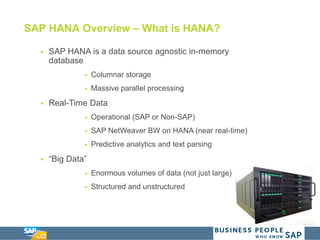
 SAP HANA is a data source agnostic in-memory
database
 Columnar storage
 Massive parallel processing
 Real-Time Data
 Operational (SAP or Non-SAP)
 SAP NetWeaver BW on HANA (near real-time)
 Predictive analytics and text parsing
 “Big Data”
 Enormous volumes of data (not just large)
 Structured and unstructured
SAP HANA Overview – What is HANA?
UX Conversation – What is SAP Doing?
 Overall UX Strategy
 Transformation of the current user experience
 SAP Fiori
 Transform the SAP GUI experience
 Simplification of larger business processes
 Device Independent
 SAP Screen Personas
 Customizing your desktop SAP GUI experience
 SAP HANA UI Platform
 Provides seamless integration of HANA Native
applications
 Centralized development solution
HANA UI Platform Overview – What is it?
 HANA Extended Services Engine (XS)
 Available from SAP HANA SPS5
 Joint Application / Web Server
 Provides seamless access to HANA Native Applications
 HANA UI Integration Services
 Sites and page building
 State of the art end user experience
 SAP UI5
 Provides capability to develop with standardized services
and consistent UI Patterns
 Support end to end business processes with a
harmonized user experience across applications
SAP HANA Application Development Options
 Native SAP HANA Applications
 Leverages XS layer
 OData Services, JavaScript, XMLA, etc…
 Non-Native SAP HANA Applications
 Application developed externally
 Users ABAP, JAVA
 Tomcat Server or another current application server
leveraged
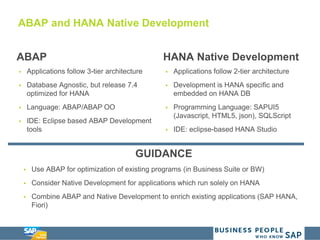
ABAP and HANA Native Development
ABAP
 Applications follow 3-tier architecture
 Database Agnostic, but release 7.4
optimized for HANA
 Language: ABAP/ABAP OO
 IDE: Eclipse based ABAP Development
tools
HANA Native Development
 Applications follow 2-tier architecture
 Development is HANA specific and
embedded on HANA DB
 Programming Language: SAPUI5
(Javascript, HTML5, json), SQLScript
 IDE: eclipse-based HANA Studio
GUIDANCE
 Use ABAP for optimization of existing programs (in Business Suite or BW)
 Consider Native Development for applications which run solely on HANA
 Combine ABAP and Native Development to enrich existing applications (SAP HANA,
Fiori)
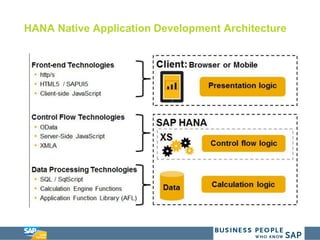
HANA Native Application Development Architecture
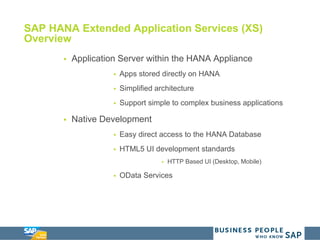
SAP HANA Extended Application Services (XS)
Overview
 Application Server within the HANA Appliance
 Apps stored directly on HANA
 Simplified architecture
 Support simple to complex business applications
 Native Development
 Easy direct access to the HANA Database
 HTML5 UI development standards
 HTTP Based UI (Desktop, Mobile)
 OData Services
SAP HANA UI Features and Benefits
Features
 Page building: State-of-the-art design
environment of the application layout and
content
 Property persistence: Widget can
define properties that are persisted
enabling customization
 Personalization: Persistency of widget
properties on user level
 Publish-Subscribe: Event mechanism
allowing data interchange between
widgets
 Context: Properties can be reflected in
the URL allowing bookmarking and
sharing
Benefits
 Easily build and reuse HTML5 ready
application components with UIS widgets
 Design the application UI with UIS
application site designer
 Create and manage all artifacts directly
from HANA Studio and Repository
 Personalize and customize end-user
preference
 Allow easy customer or partner
application extensibility
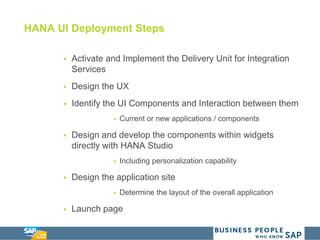
HANA UI Deployment Steps
 Activate and Implement the Delivery Unit for Integration
Services
 Design the UX
 Identify the UI Components and Interaction between them
 Current or new applications / components
 Design and develop the components within widgets
directly with HANA Studio
 Including personalization capability
 Design the application site
 Determine the layout of the overall application
 Launch page
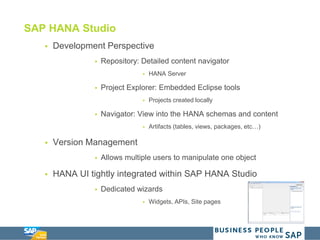
SAP HANA Studio
 Development Perspective
 Repository: Detailed content navigator
 HANA Server
 Project Explorer: Embedded Eclipse tools
 Projects created locally
 Navigator: View into the HANA schemas and content
 Artifacts (tables, views, packages, etc…)
 Version Management
 Allows multiple users to manipulate one object
 HANA UI tightly integrated within SAP HANA Studio
 Dedicated wizards
 Widgets, APIs, Site pages
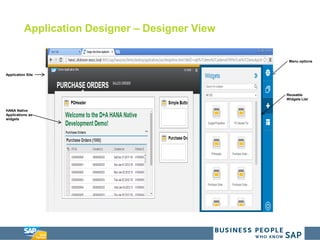
Application Designer – Designer View
Application Site
HANA Native
Applications as
widgets
Reusable
Widgets List
Menu options
DEMO
DEMO
 System Overview
 HANA SPS8, HANA Studio Version: 1.80.3
 Dickinson + Associates would like to understand the following
metric:
 How can we expose live purchase order data to our
internal employees who are not on SAP?
 What are we going to do?
 Quickly deploy basic SAPUI5 Page
 Expose Purchase Order Data via Odata services
 Use an SAPUI5 table element to display the PO Data
 Create a widget to encapsulate the table
 Use Page Builder to compose a website
 Review a detailed HANA application
Appendix
Basic Terminology
 Artifacts
 Eclipse Projects – Local development objects, edited with
the Eclipse developer tool
 XS – Extended Application Services
 UI – User Interface
 OData service – Protocol to provide CRUD (create, read,
update, delete) access
Getting Started
 Download the HANA Developer Edition (30 day free trial)
 Install HANA Studio with SAPUI5 plugins
 Watch the tutorial videos and follow along with the
exercises on HANA Academy
 Learn more with the SHINE Content (SAP HANA
Interactive Education)
 Review the HANA Developer Guide
Other References
 Dickinson + Associates Fiori Offering on HANA
Marketplace:
http://marketplace.saphana.com/Industries/Cross-
Industry/Accelerated-Fiori-Deployment/p/3365
 Dickinson + Associates LinkedIn Page:
https://www.linkedin.com/company/68054?trk=prof-exp-
company-name
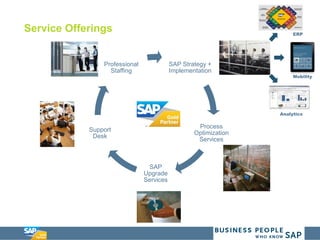
Service Offerings
SAP Strategy +
Implementation
Process
Optimization
Services
SAP
Upgrade
Services
Support
Desk
Professional
Staffing
ERP
Mobility
Analytics
Dickinson + Associates
Tim Korba
Lead Architect, Business Intelligence
tim.k@dickinson-assoc.com
216-577-9676
@tim_korba
LinkedIn - http://www.linkedin.com/in/timkorba/
Eric Zenner
Consultant, Business Intelligence
eric.z@dickinson-assoc.com
224.406.0368
@e_zenner
LinkedIn - http://lnkd.in/dFd7VFh

SAP HANA Native Application Development

  • 1.
    Presentation Title Template TimothyKorba Eric Zenner HANA Native Application Development
  • 2.
    Agenda  What isSAP HANA?  The SAP UX Initiative – What is SAP doing?  What is the HANA Platform UI?  SAP HANA Application Development Options  HANA Native Application Development Architecture  Extended Services (XS) Overview  Features and Benefits  UI Deployment Options  Developer and Designer Views  DEMO
  • 3.
    “ It usedto be top down. Where companies would go out and conduct a survey and collect data. Now we are walking around with devices that log everything we like, picture we take, store we visit. You don’t have to go out and find data. It is now coming and finding us. “ – Jake Porway – National Geographic “Consider the decline in the quality and consistency of user interfaces. I look at the hideous UIs on many commercial applications and it’s obvious the interface was slapped together just so that the design tool would crank out the code for handling user events. The code was finished, but the barely capable UI went out the door with just a little polish.” – Tom Yager, “Ahead of the Curve” Columnist “There is nothing more dangerous than standing still in a world that is changing.” – Former French President Jacques Chirac
  • 4.
     SAP HANAis a data source agnostic in-memory database  Columnar storage  Massive parallel processing  Real-Time Data  Operational (SAP or Non-SAP)  SAP NetWeaver BW on HANA (near real-time)  Predictive analytics and text parsing  “Big Data”  Enormous volumes of data (not just large)  Structured and unstructured SAP HANA Overview – What is HANA?
  • 5.
    UX Conversation –What is SAP Doing?  Overall UX Strategy  Transformation of the current user experience  SAP Fiori  Transform the SAP GUI experience  Simplification of larger business processes  Device Independent  SAP Screen Personas  Customizing your desktop SAP GUI experience  SAP HANA UI Platform  Provides seamless integration of HANA Native applications  Centralized development solution
  • 6.
    HANA UI PlatformOverview – What is it?  HANA Extended Services Engine (XS)  Available from SAP HANA SPS5  Joint Application / Web Server  Provides seamless access to HANA Native Applications  HANA UI Integration Services  Sites and page building  State of the art end user experience  SAP UI5  Provides capability to develop with standardized services and consistent UI Patterns  Support end to end business processes with a harmonized user experience across applications
  • 7.
    SAP HANA ApplicationDevelopment Options  Native SAP HANA Applications  Leverages XS layer  OData Services, JavaScript, XMLA, etc…  Non-Native SAP HANA Applications  Application developed externally  Users ABAP, JAVA  Tomcat Server or another current application server leveraged
  • 8.
    ABAP and HANANative Development ABAP  Applications follow 3-tier architecture  Database Agnostic, but release 7.4 optimized for HANA  Language: ABAP/ABAP OO  IDE: Eclipse based ABAP Development tools HANA Native Development  Applications follow 2-tier architecture  Development is HANA specific and embedded on HANA DB  Programming Language: SAPUI5 (Javascript, HTML5, json), SQLScript  IDE: eclipse-based HANA Studio GUIDANCE  Use ABAP for optimization of existing programs (in Business Suite or BW)  Consider Native Development for applications which run solely on HANA  Combine ABAP and Native Development to enrich existing applications (SAP HANA, Fiori)
  • 9.
    HANA Native ApplicationDevelopment Architecture
  • 10.
    SAP HANA ExtendedApplication Services (XS) Overview  Application Server within the HANA Appliance  Apps stored directly on HANA  Simplified architecture  Support simple to complex business applications  Native Development  Easy direct access to the HANA Database  HTML5 UI development standards  HTTP Based UI (Desktop, Mobile)  OData Services
  • 11.
    SAP HANA UIFeatures and Benefits Features  Page building: State-of-the-art design environment of the application layout and content  Property persistence: Widget can define properties that are persisted enabling customization  Personalization: Persistency of widget properties on user level  Publish-Subscribe: Event mechanism allowing data interchange between widgets  Context: Properties can be reflected in the URL allowing bookmarking and sharing Benefits  Easily build and reuse HTML5 ready application components with UIS widgets  Design the application UI with UIS application site designer  Create and manage all artifacts directly from HANA Studio and Repository  Personalize and customize end-user preference  Allow easy customer or partner application extensibility
  • 12.
    HANA UI DeploymentSteps  Activate and Implement the Delivery Unit for Integration Services  Design the UX  Identify the UI Components and Interaction between them  Current or new applications / components  Design and develop the components within widgets directly with HANA Studio  Including personalization capability  Design the application site  Determine the layout of the overall application  Launch page
  • 13.
    SAP HANA Studio Development Perspective  Repository: Detailed content navigator  HANA Server  Project Explorer: Embedded Eclipse tools  Projects created locally  Navigator: View into the HANA schemas and content  Artifacts (tables, views, packages, etc…)  Version Management  Allows multiple users to manipulate one object  HANA UI tightly integrated within SAP HANA Studio  Dedicated wizards  Widgets, APIs, Site pages
  • 14.
    Application Designer –Designer View Application Site HANA Native Applications as widgets Reusable Widgets List Menu options
  • 15.
  • 16.
    DEMO  System Overview HANA SPS8, HANA Studio Version: 1.80.3  Dickinson + Associates would like to understand the following metric:  How can we expose live purchase order data to our internal employees who are not on SAP?  What are we going to do?  Quickly deploy basic SAPUI5 Page  Expose Purchase Order Data via Odata services  Use an SAPUI5 table element to display the PO Data  Create a widget to encapsulate the table  Use Page Builder to compose a website  Review a detailed HANA application
  • 17.
  • 18.
    Basic Terminology  Artifacts Eclipse Projects – Local development objects, edited with the Eclipse developer tool  XS – Extended Application Services  UI – User Interface  OData service – Protocol to provide CRUD (create, read, update, delete) access
  • 19.
    Getting Started  Downloadthe HANA Developer Edition (30 day free trial)  Install HANA Studio with SAPUI5 plugins  Watch the tutorial videos and follow along with the exercises on HANA Academy  Learn more with the SHINE Content (SAP HANA Interactive Education)  Review the HANA Developer Guide
  • 20.
    Other References  Dickinson+ Associates Fiori Offering on HANA Marketplace: http://marketplace.saphana.com/Industries/Cross- Industry/Accelerated-Fiori-Deployment/p/3365  Dickinson + Associates LinkedIn Page: https://www.linkedin.com/company/68054?trk=prof-exp- company-name
  • 21.
    Service Offerings SAP Strategy+ Implementation Process Optimization Services SAP Upgrade Services Support Desk Professional Staffing ERP Mobility Analytics
  • 22.
    Dickinson + Associates TimKorba Lead Architect, Business Intelligence tim.k@dickinson-assoc.com 216-577-9676 @tim_korba LinkedIn - http://www.linkedin.com/in/timkorba/ Eric Zenner Consultant, Business Intelligence eric.z@dickinson-assoc.com 224.406.0368 @e_zenner LinkedIn - http://lnkd.in/dFd7VFh