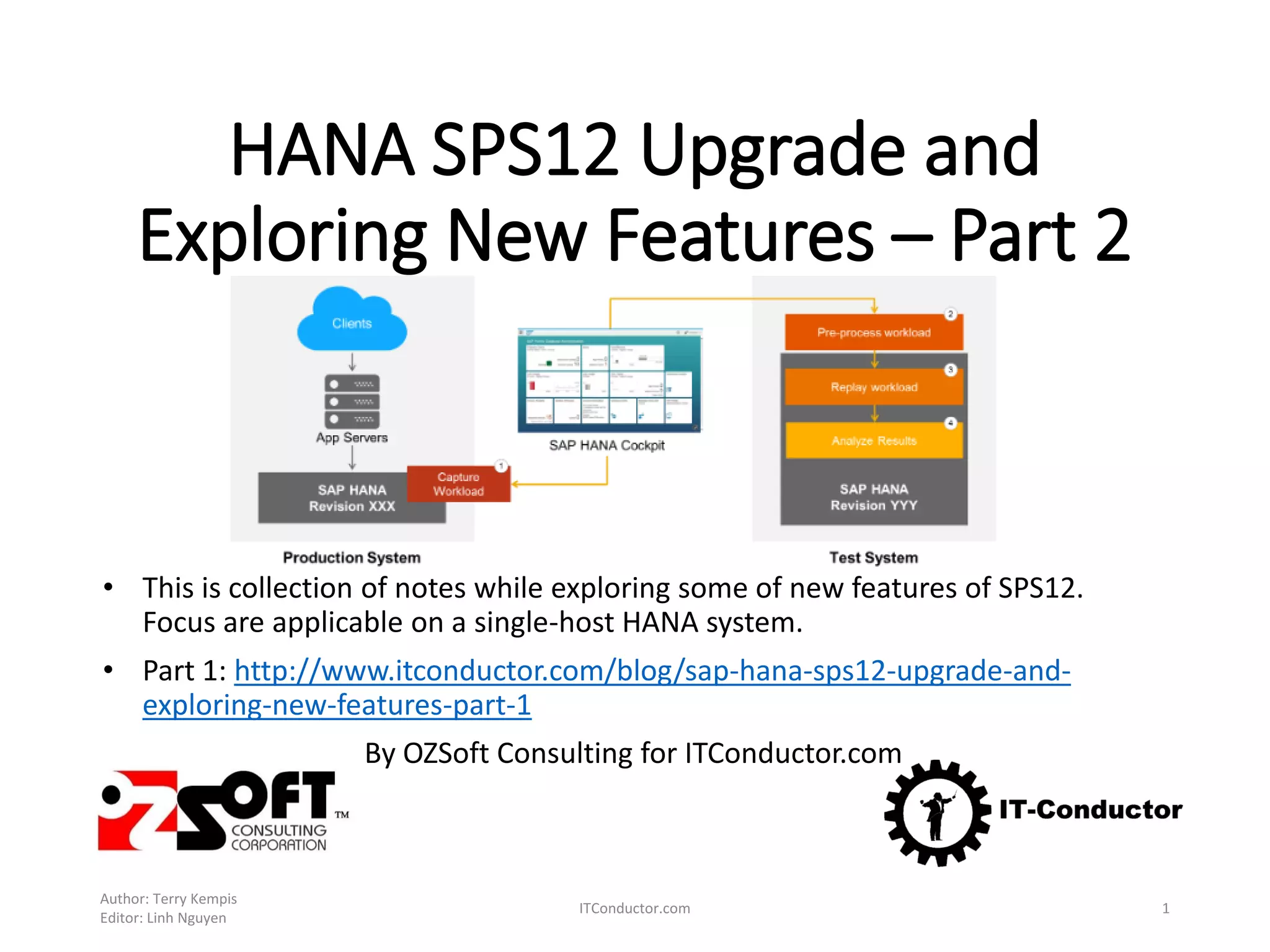
HANA SPS12 Upgrade and
Exploring New Features – Part 2
• This is collection of notes while exploring some of new features of SPS12.
Focus are applicable on a single-host HANA system.
• Part 1: http://www.itconductor.com/blog/sap-hana-sps12-upgrade-and-
exploring-new-features-part-1
By OZSoft Consulting for ITConductor.com
Author: Terry Kempis
Editor: Linh Nguyen
ITConductor.com 1
Part 2 - Exploring What’s new in SPS12
Reference:
What's New in the SAP HANA Platform (Release Notes)
Note that this is not an exhaustive list – only some ’new and
changed’ features were explored!, and more focused on
administration side:
• Security Administration
• System Administration
• Performance Monitoring
• Workload Management
• Capture and Replay
Author: Terry Kempis
Editor: Linh Nguyen
ITConductor.com 2
References: OSS notes and references
1. 1948334 - SAP HANA Database Update Paths for
Maintenance Revisions to ensure the ’from level’ and
intended ‘to level’ does not have any restriction and
things ’general’ things to consider.
2. 2298750 - SAP HANA Platform SPS 12 Release Note
3. SAP HANA SPS 12 Database Maintenance Revision
122.03
4. What's New in the SAP HANA Platform (Release
Notes)
5. SAP HANA Administration Guide - SAP Help Portal
6. SAP HANA Server Installation and Update Guide - SAP
Help Portal
Author: Terry Kempis
Editor: Linh Nguyen
ITConductor.com 3
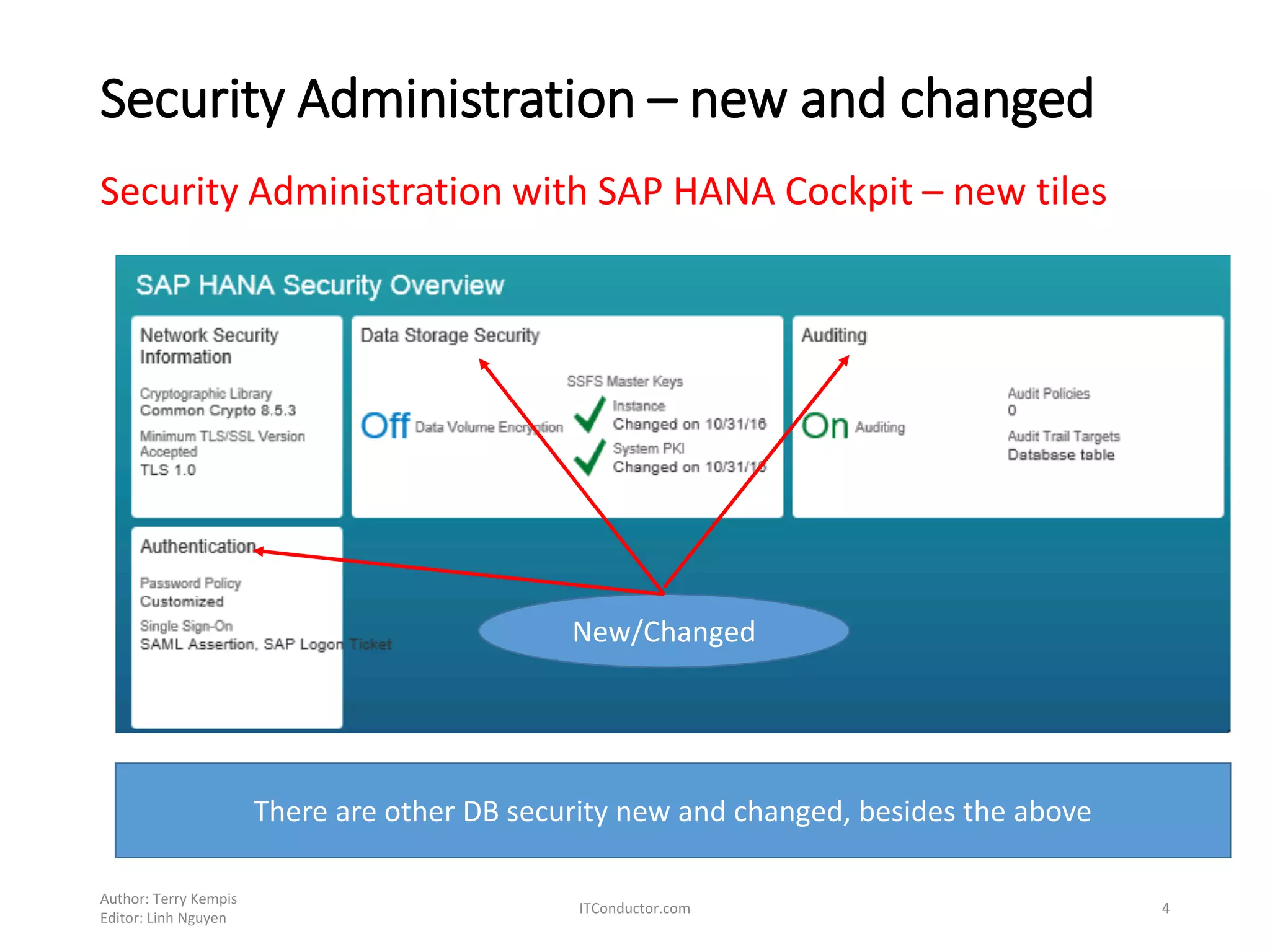
Security Administration – new and changed
Security Administration with SAP HANA Cockpit – new tiles
Author: Terry Kempis
Editor: Linh Nguyen
ITConductor.com 4
New/Changed
There are other DB security new and changed, besides the above
Performance Monitor – Monitor Statements
New HANA Cockpit tile
Author: Terry Kempis
Editor: Linh Nguyen
ITConductor.com 5
List of long-running statements and long-running
blocking situations
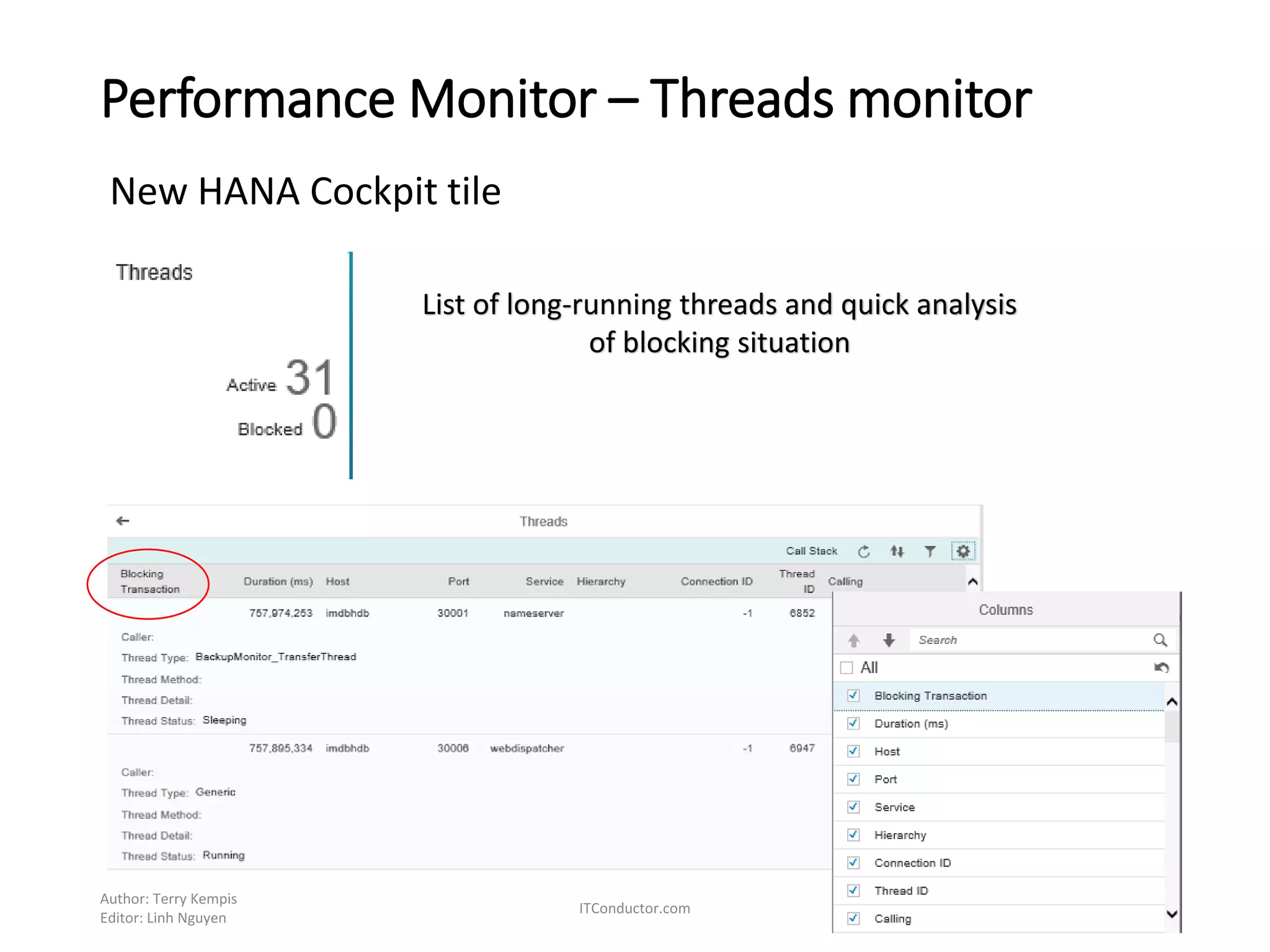
Performance Monitor – Threads monitor
New HANA Cockpit tile
Author: Terry Kempis
Editor: Linh Nguyen
ITConductor.com 6
List of long-running threads and quick analysis
of blocking situation
Performance Monitor – Workload Management
(New)
Author: Terry Kempis
Editor: Linh Nguyen
ITConductor.com 7
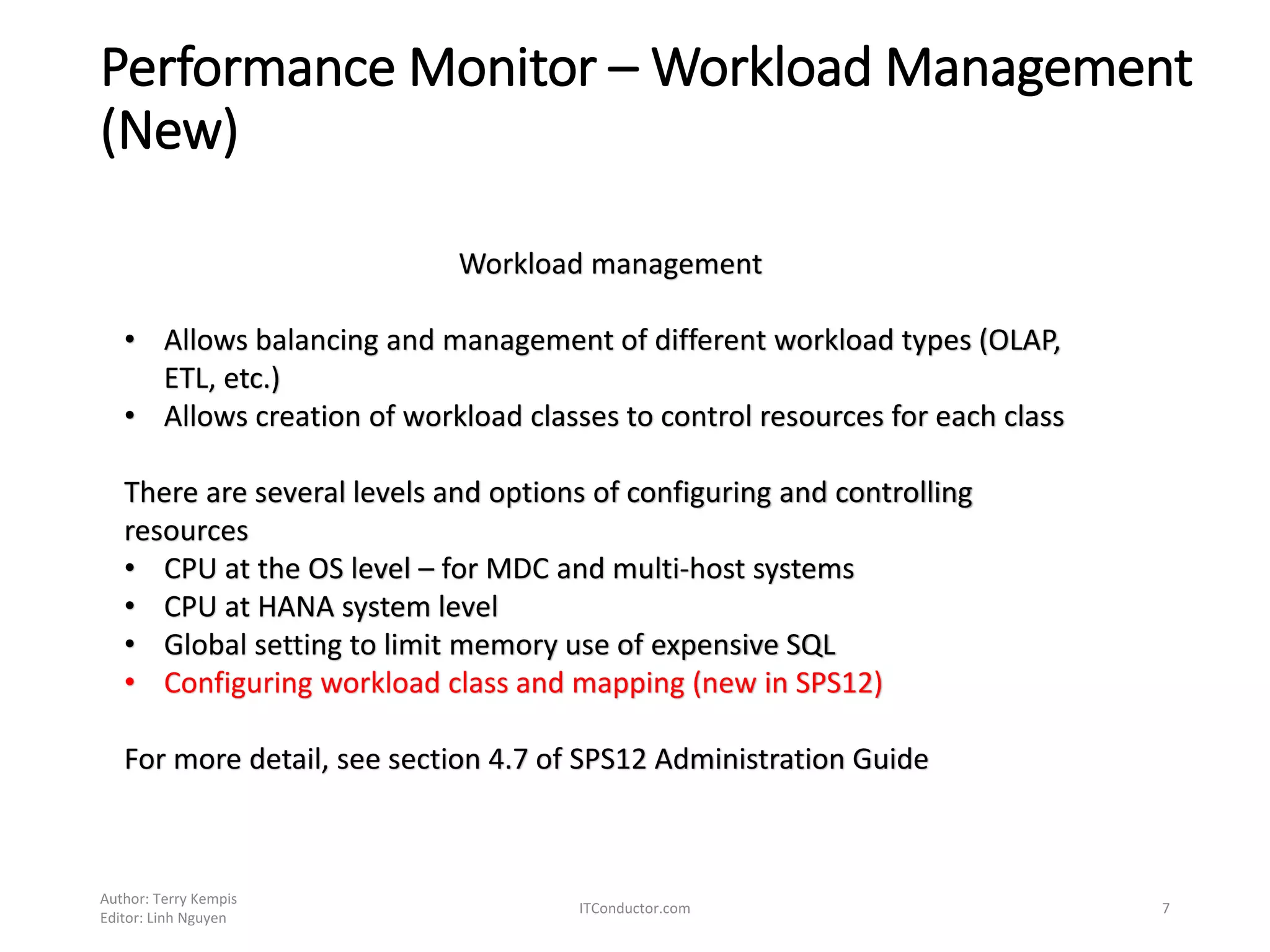
Workload management
• Allows balancing and management of different workload types (OLAP,
ETL, etc.)
• Allows creation of workload classes to control resources for each class
There are several levels and options of configuring and controlling
resources
• CPU at the OS level – for MDC and multi-host systems
• CPU at HANA system level
• Global setting to limit memory use of expensive SQL
• Configuring workload class and mapping (new in SPS12)
For more detail, see section 4.7 of SPS12 Administration Guide
Workload Class and Mapping
Two steps in workload management within HANA, through
SQL or HANA Cockpit
1. Create workload class, with the following attributes
• Priority – allows prioritizing statements, form 0 (lowest) to 9
highest, with default of 5
• Thread limit – number of parallel JobWorker threads per
statement
• Limit memory usage of a SQL statement
2. Map a client (e.g. database user, application name, etc.) to
a workload class
Author: Terry Kempis
Editor: Linh Nguyen
ITConductor.com 8
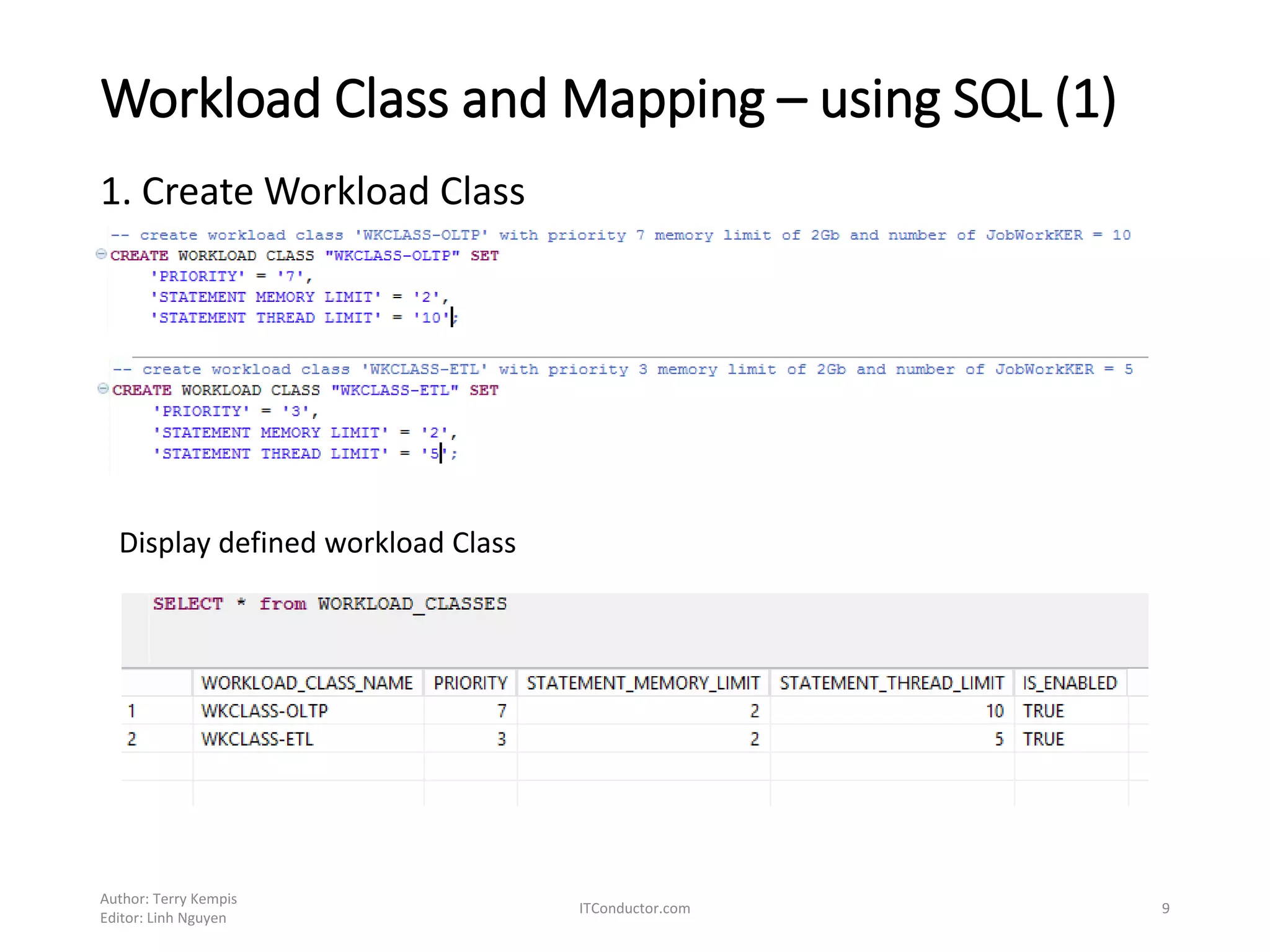
Workload Class and Mapping – using SQL (1)
1. Create Workload Class
Author: Terry Kempis
Editor: Linh Nguyen
ITConductor.com 9
Display defined workload Class
Workload Class and Mapping – using SQL (2)
Author: Terry Kempis
Editor: Linh Nguyen
ITConductor.com 10
Display defined mapping
2. Create workload mapping
Display Class and Mapping relationship
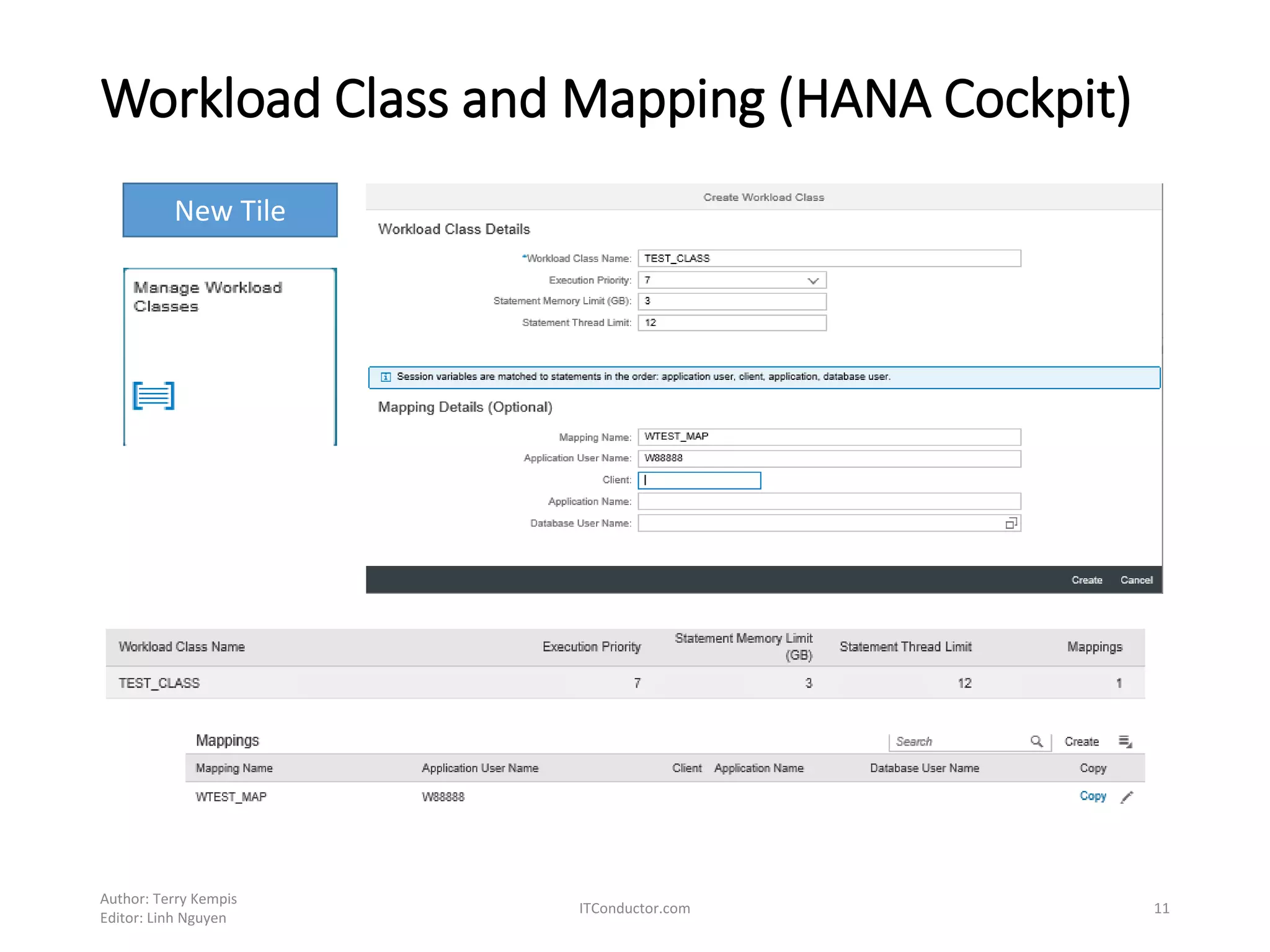
Workload Class and Mapping (HANA Cockpit)
Author: Terry Kempis
Editor: Linh Nguyen
ITConductor.com 11
New Tile
Monitoring Workload
Author: Terry Kempis
Editor: Linh Nguyen
ITConductor.com 12
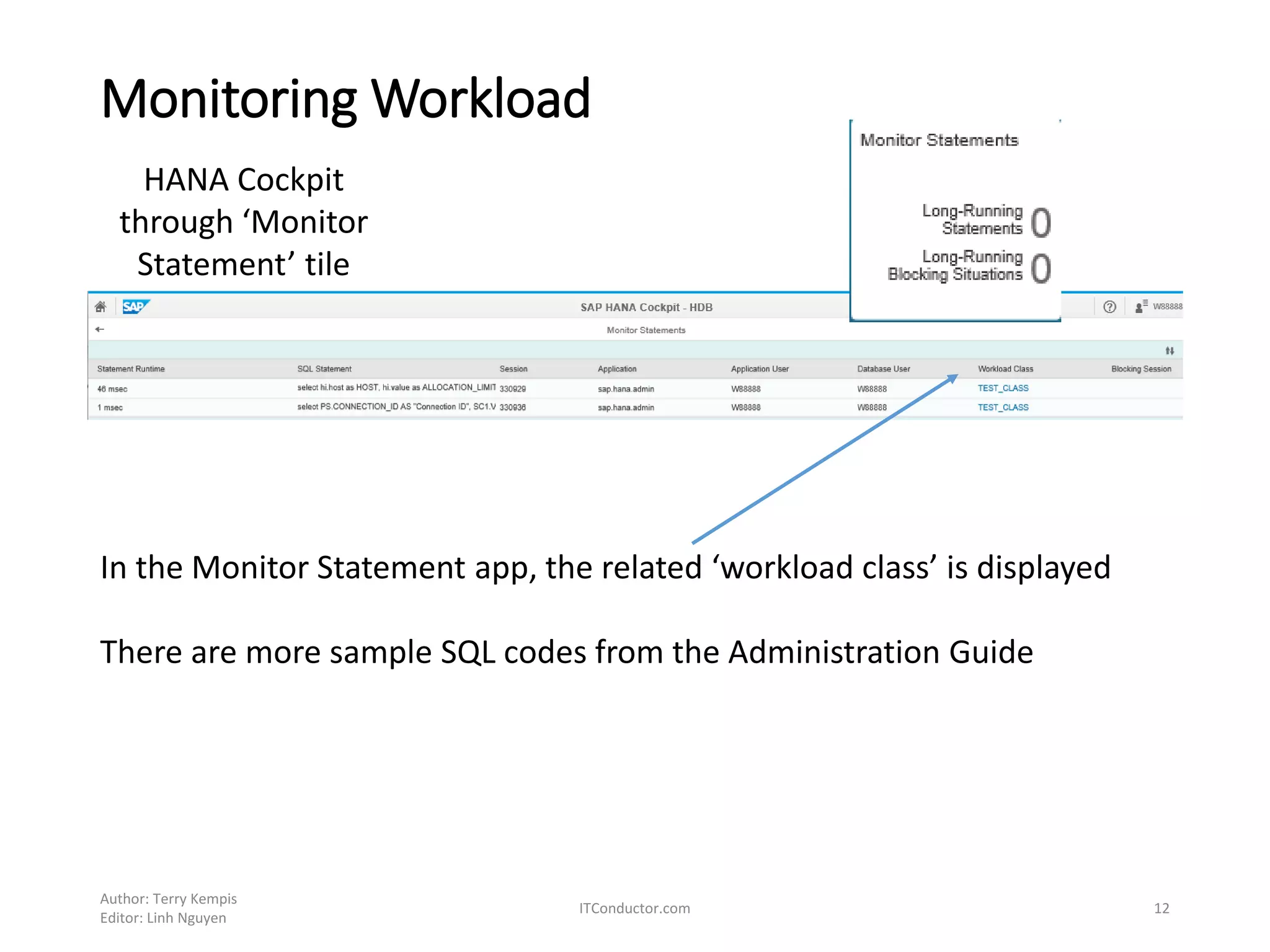
HANA Cockpit
through ‘Monitor
Statement’ tile
In the Monitor Statement app, the related ‘workload class’ is displayed
There are more sample SQL codes from the Administration Guide
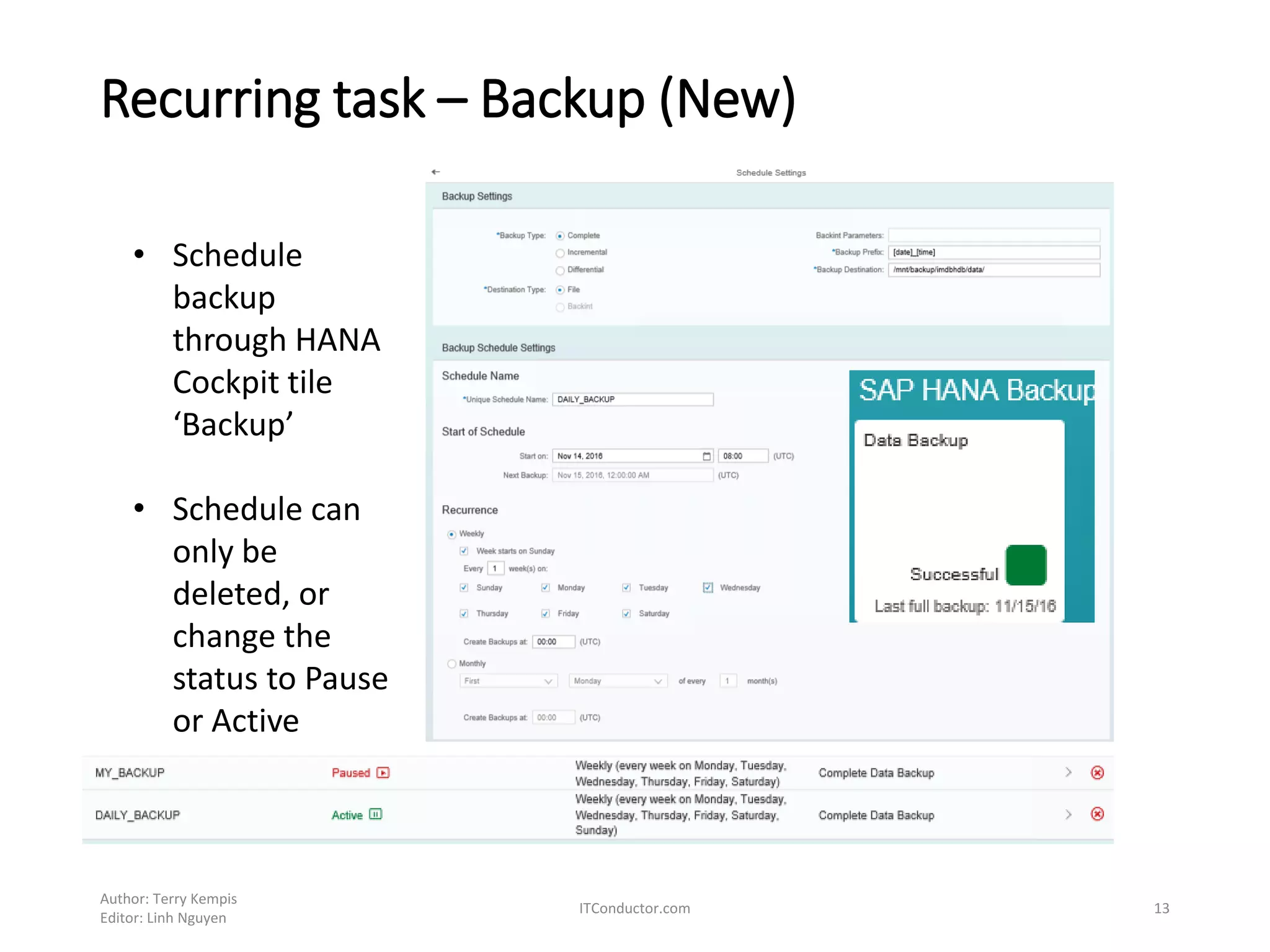
Recurring task – Backup (New)
Author: Terry Kempis
Editor: Linh Nguyen
ITConductor.com 13
• Schedule
backup
through HANA
Cockpit tile
‘Backup’
• Schedule can
only be
deleted, or
change the
status to Pause
or Active
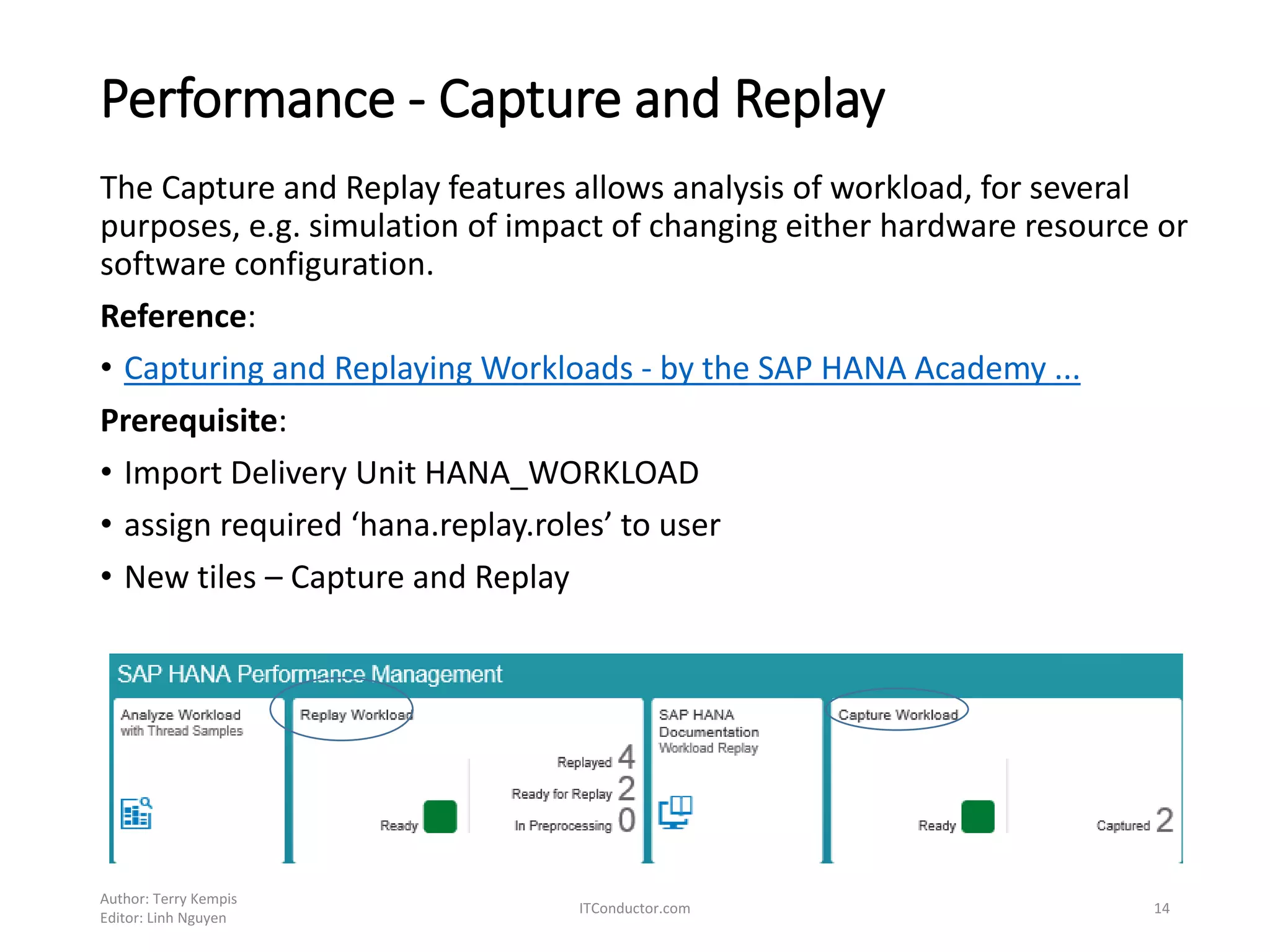
Performance - Capture and Replay
The Capture and Replay features allows analysis of workload, for several
purposes, e.g. simulation of impact of changing either hardware resource or
software configuration.
Reference:
• Capturing and Replaying Workloads - by the SAP HANA Academy ...
Prerequisite:
• Import Delivery Unit HANA_WORKLOAD
• assign required ‘hana.replay.roles’ to user
• New tiles – Capture and Replay
Author: Terry Kempis
Editor: Linh Nguyen
ITConductor.com 14
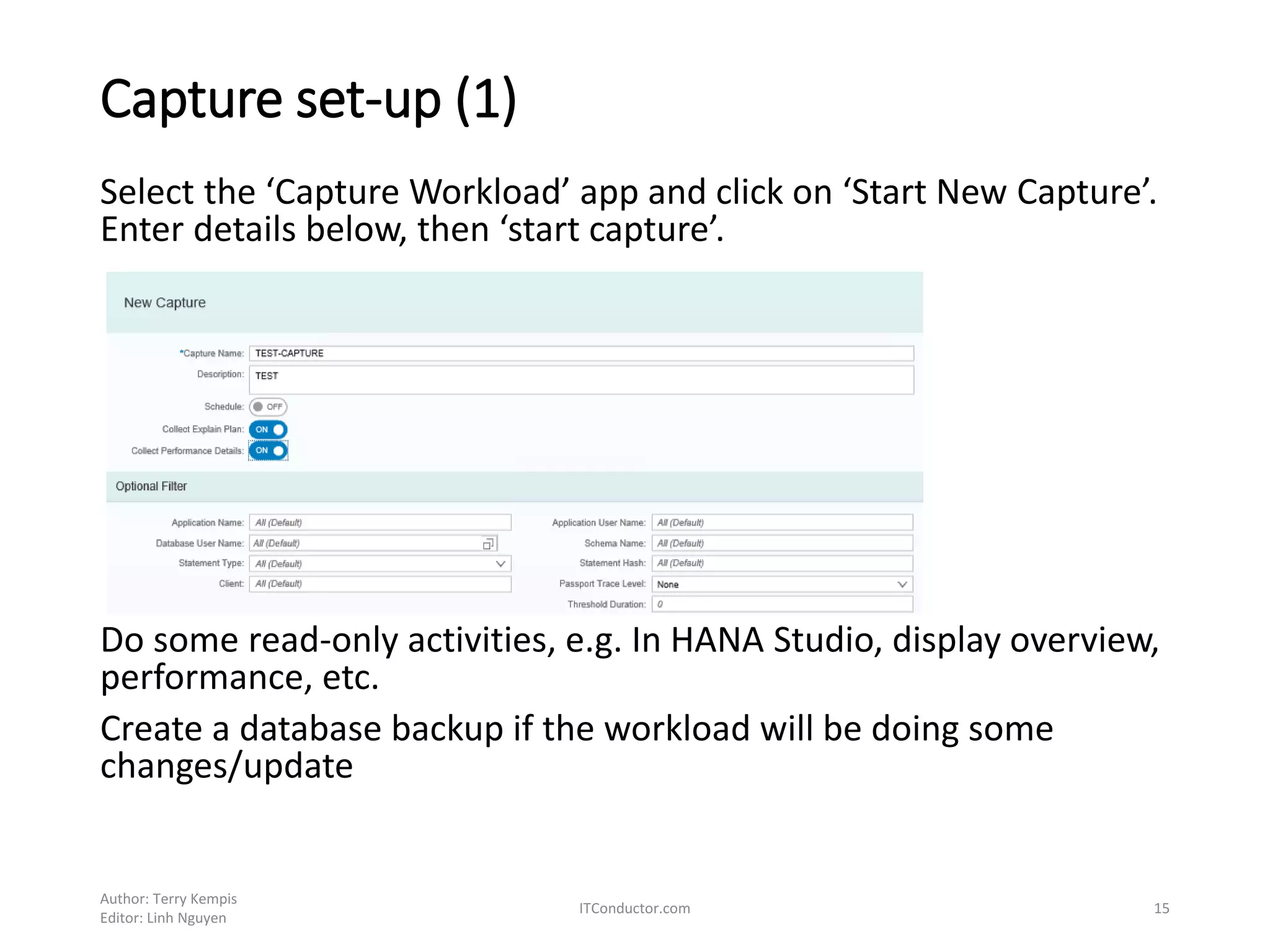
Capture set-up (1)
Select the ‘Capture Workload’ app and click on ‘Start New Capture’.
Enter details below, then ‘start capture’.
Do some read-only activities, e.g. In HANA Studio, display overview,
performance, etc.
Create a database backup if the workload will be doing some
changes/update
Author: Terry Kempis
Editor: Linh Nguyen
ITConductor.com 15
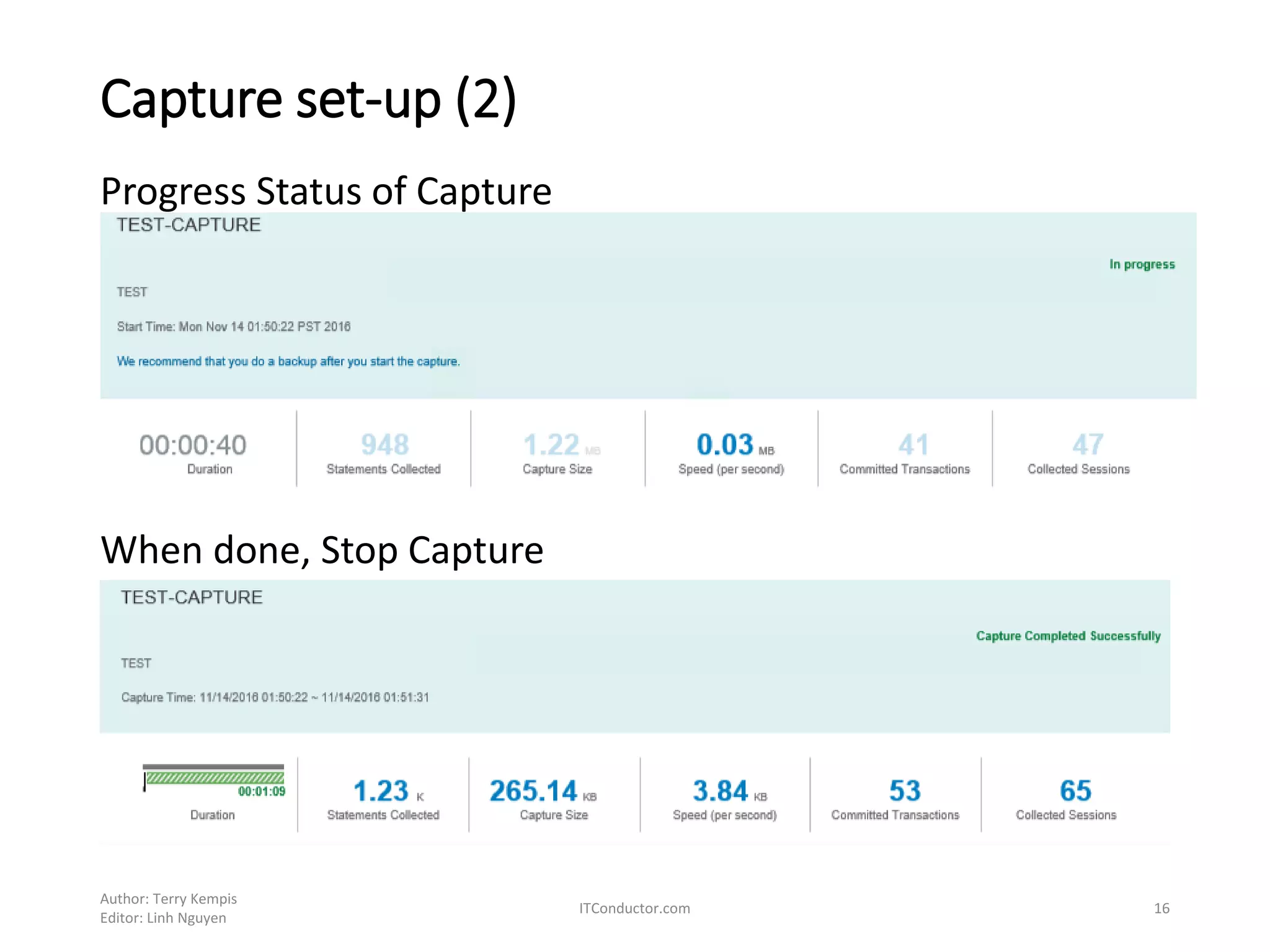
Capture set-up (2)
Progress Status of Capture
When done, Stop Capture
Author: Terry Kempis
Editor: Linh Nguyen
ITConductor.com 16
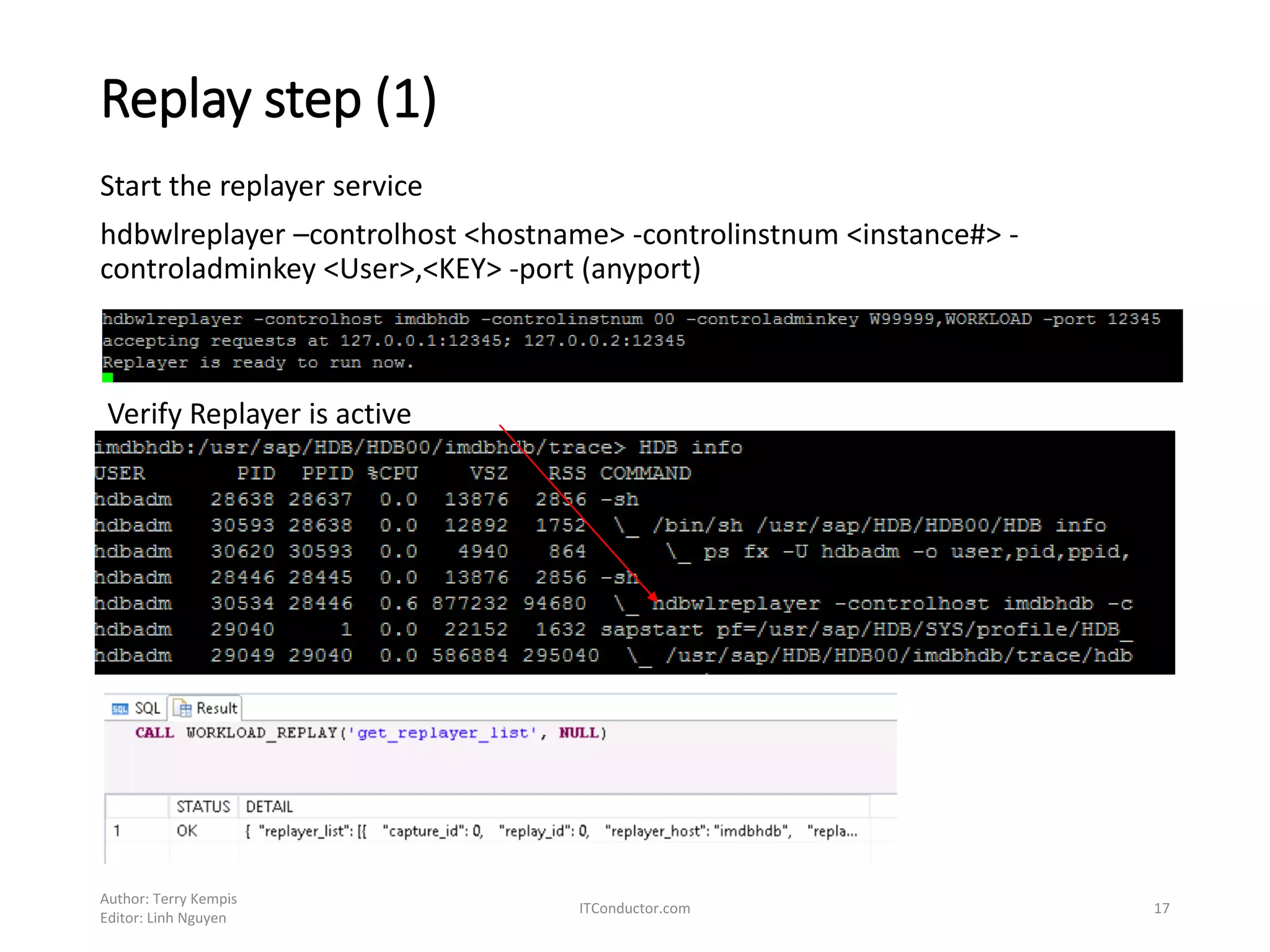
Replay step (1)
Author: Terry Kempis
Editor: Linh Nguyen
ITConductor.com 17
Start the replayer service
hdbwlreplayer –controlhost <hostname> -controlinstnum <instance#> -
controladminkey <User>,<KEY> -port (anyport)
Verify Replayer is active
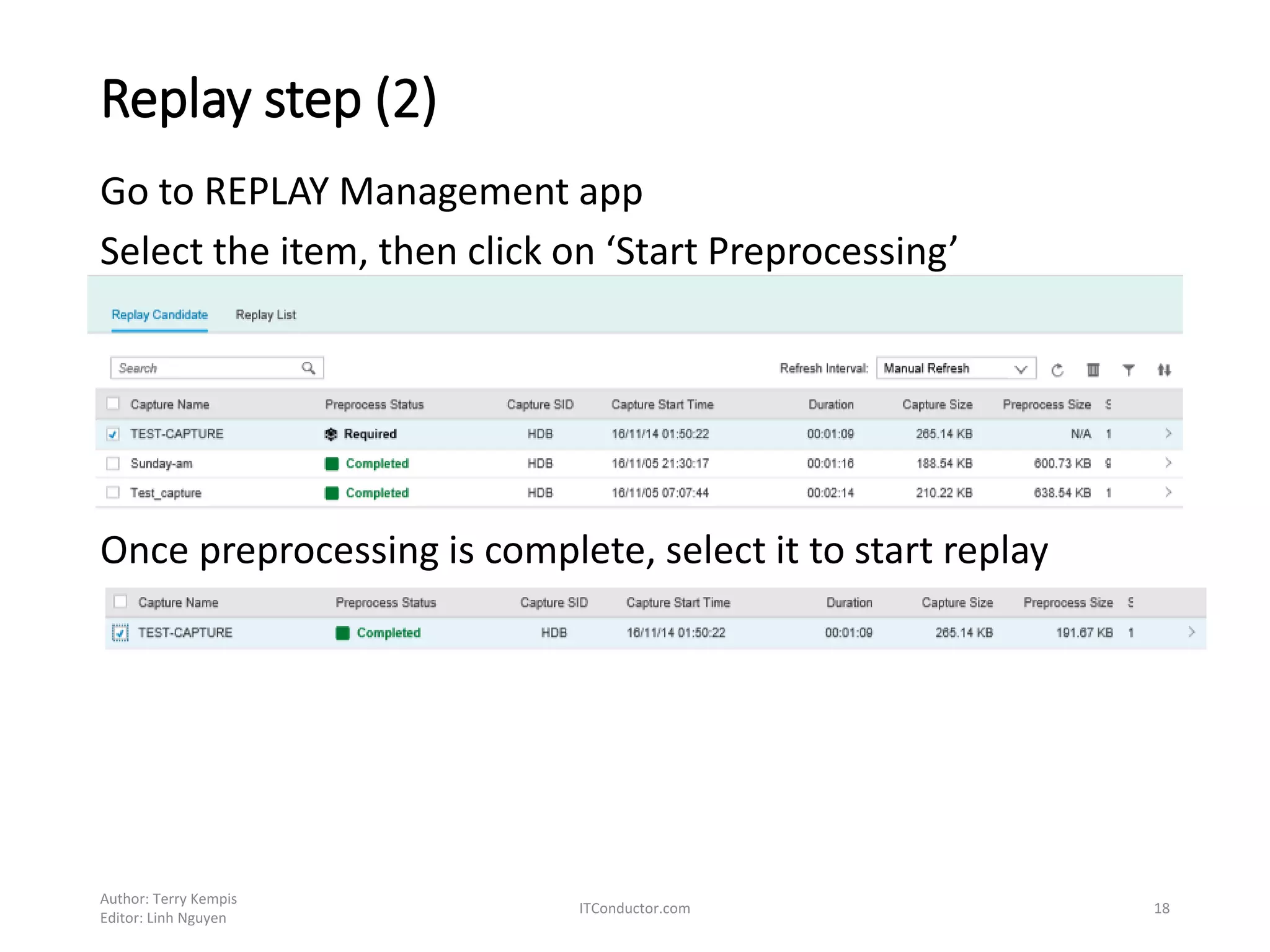
Replay step (2)
Go to REPLAY Management app
Select the item, then click on ‘Start Preprocessing’
Once preprocessing is complete, select it to start replay
Author: Terry Kempis
Editor: Linh Nguyen
ITConductor.com 18
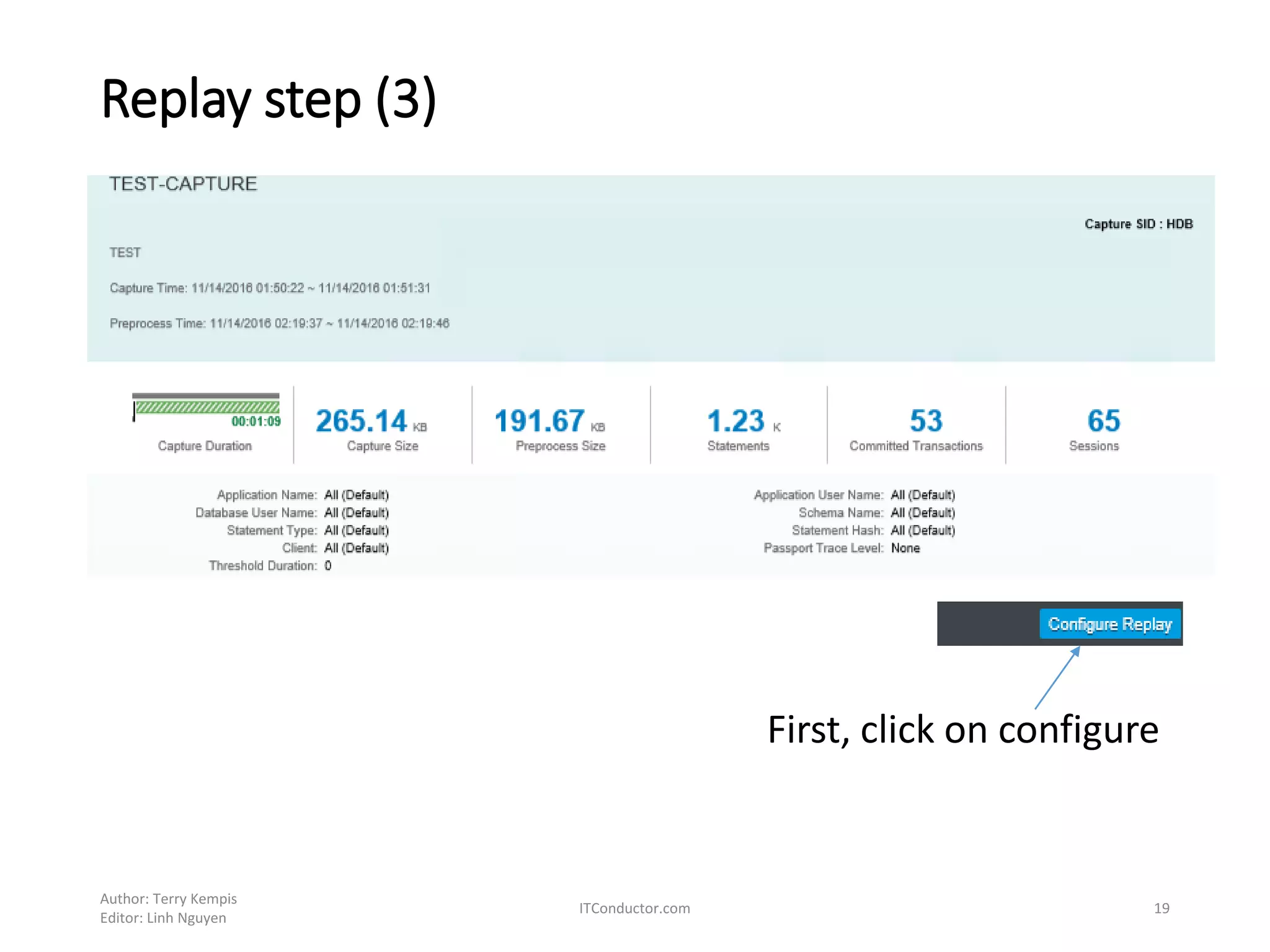
Replay step (3)
First, click on configure
Author: Terry Kempis
Editor: Linh Nguyen
ITConductor.com 19
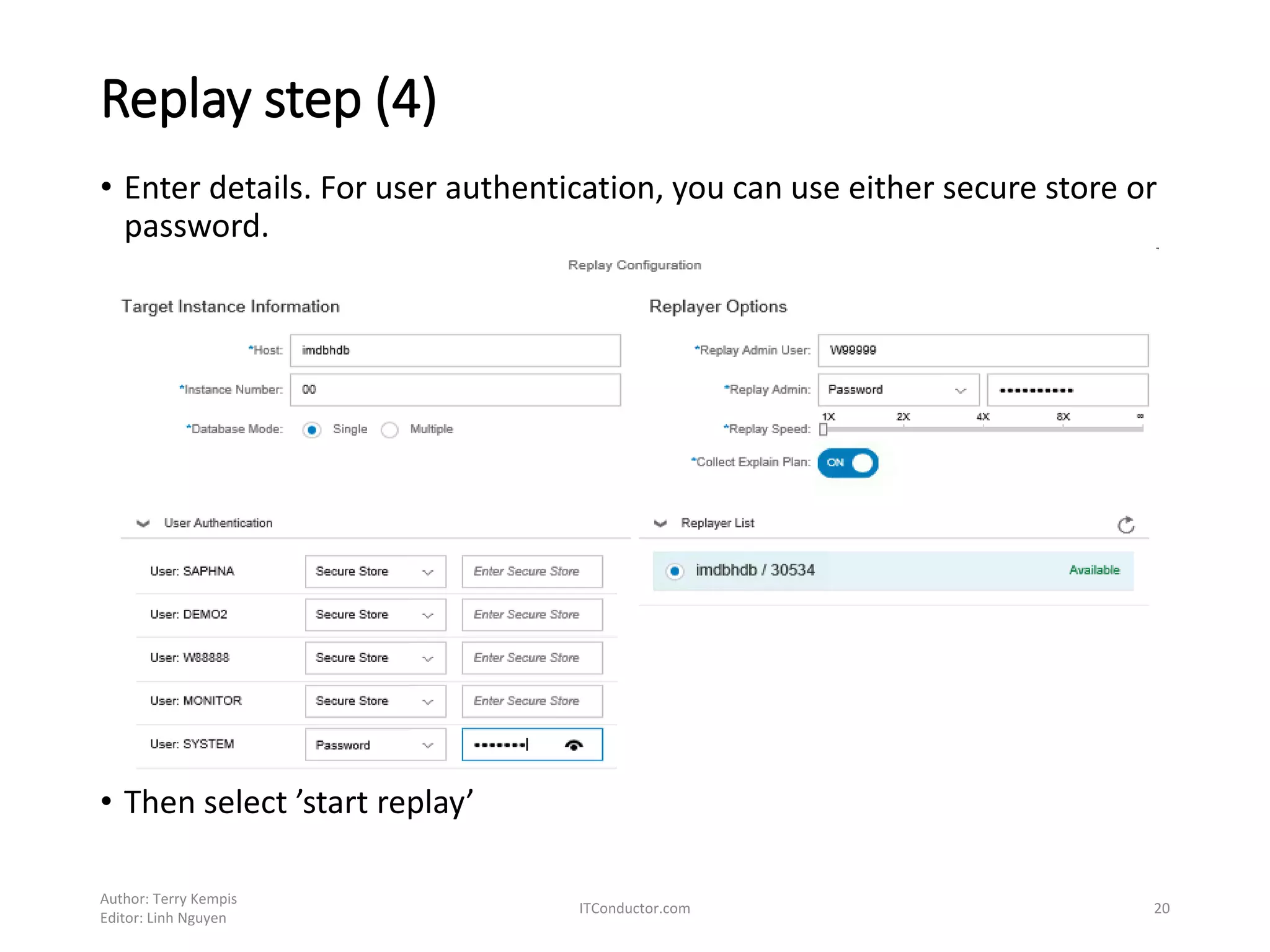
Replay step (4)
• Enter details. For user authentication, you can use either secure store or
password.
• Then select ’start replay’
Author: Terry Kempis
Editor: Linh Nguyen
ITConductor.com 20
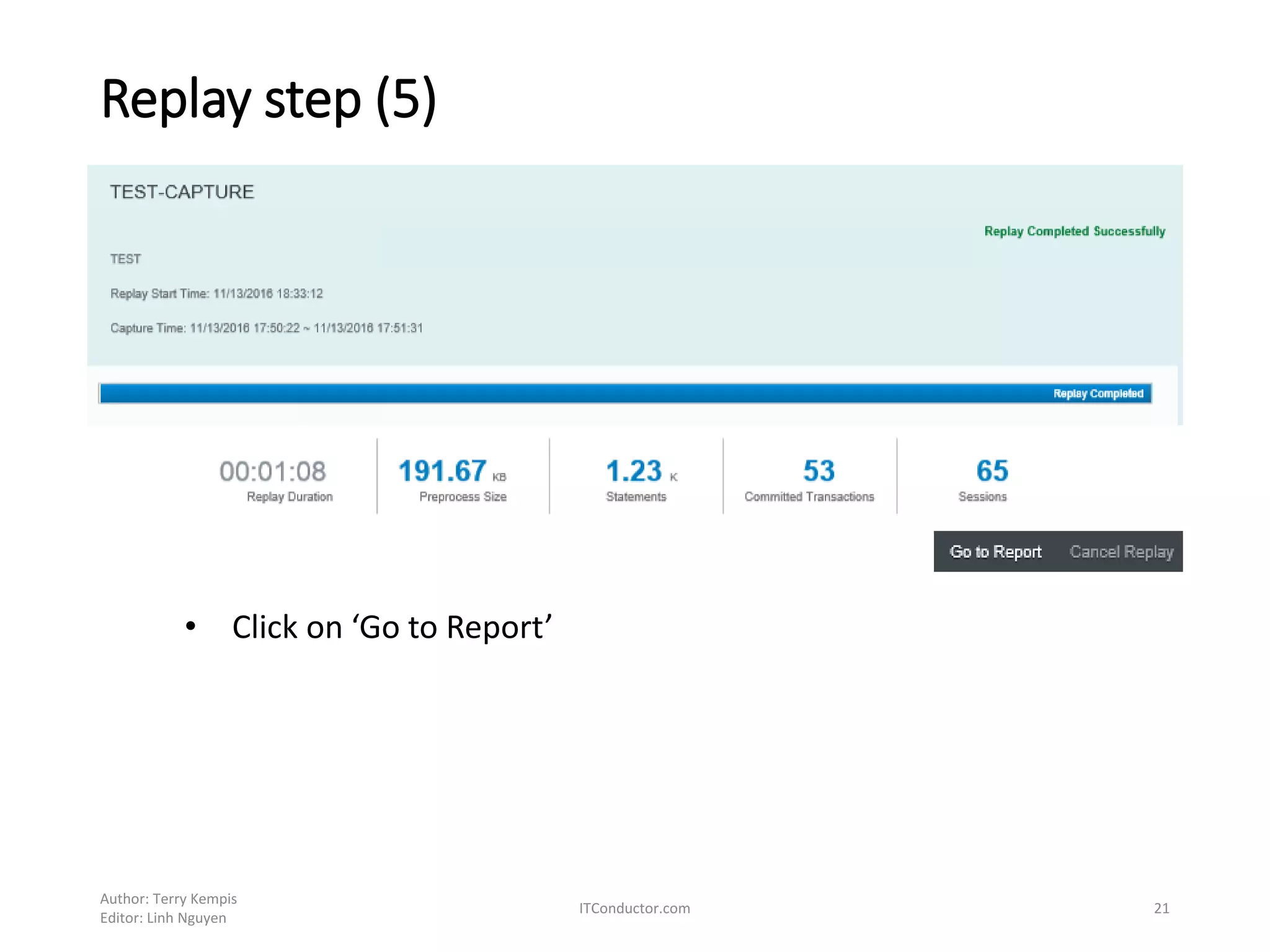
Replay step (5)
Author: Terry Kempis
Editor: Linh Nguyen
ITConductor.com 21
• Click on ‘Go to Report’
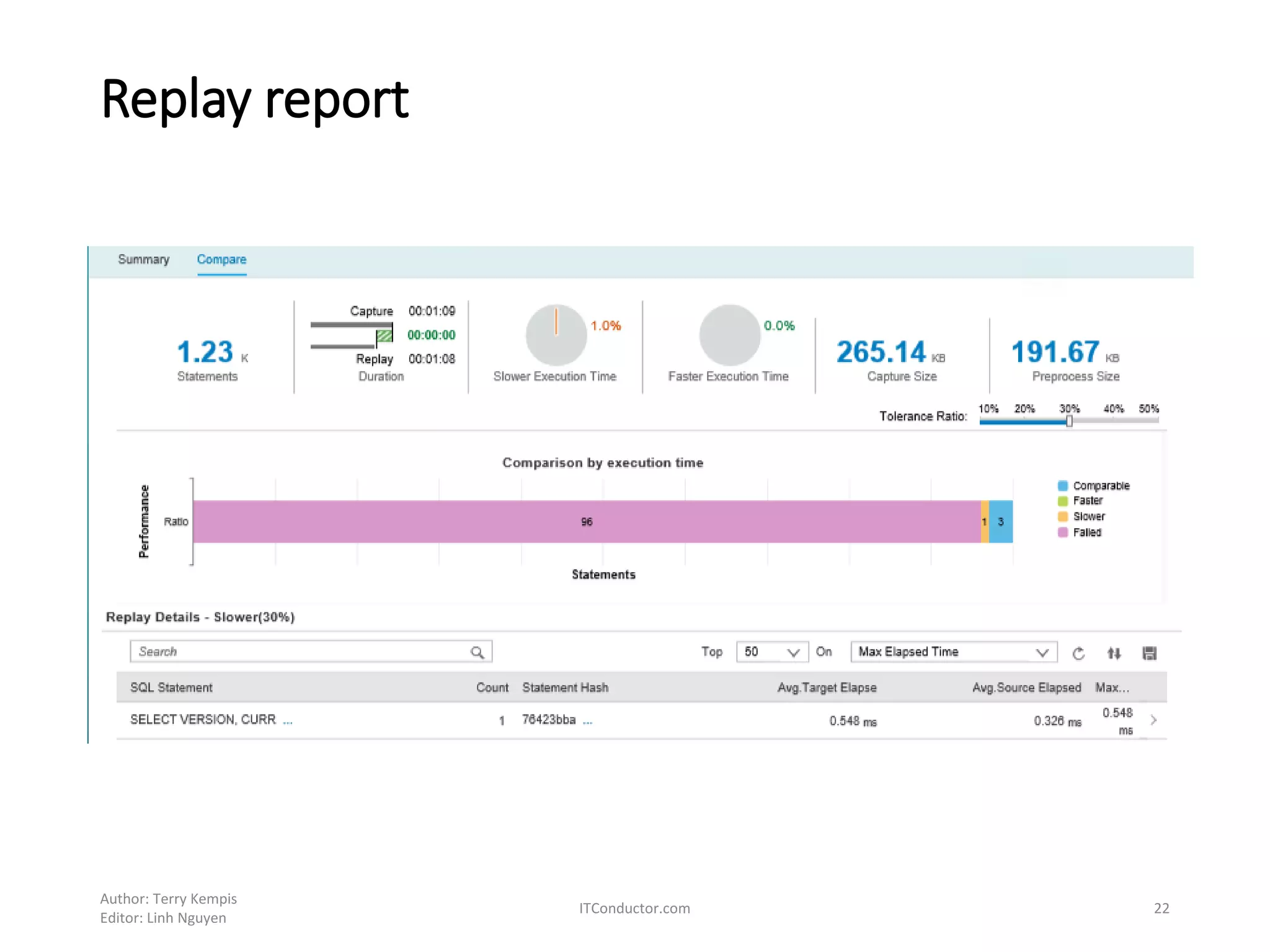
Replay report
• Asdadsf
Author: Terry Kempis
Editor: Linh Nguyen
ITConductor.com 22
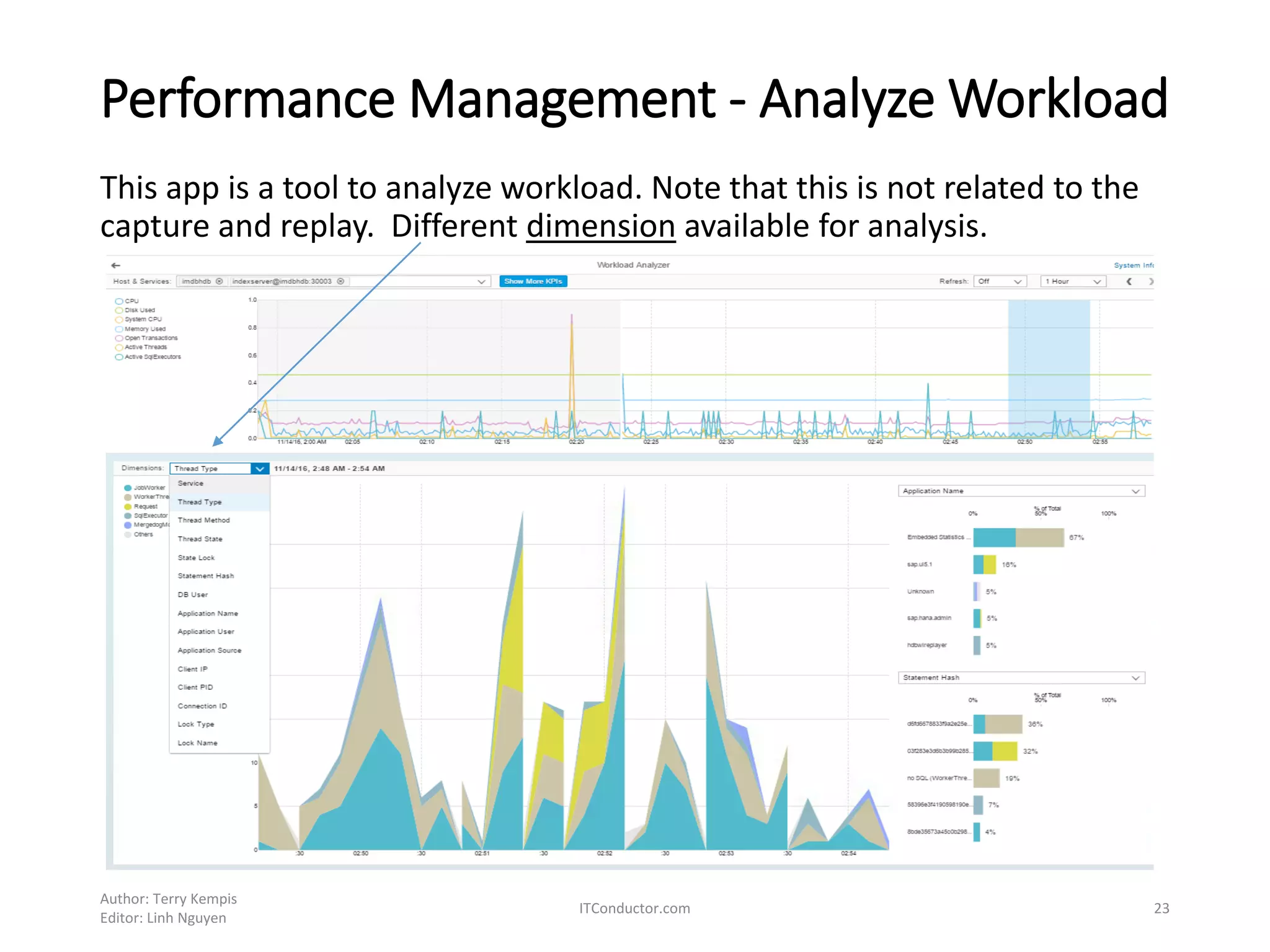
Performance Management - Analyze Workload
This app is a tool to analyze workload. Note that this is not related to the
capture and replay. Different dimension available for analysis.
Author: Terry Kempis
Editor: Linh Nguyen
ITConductor.com 23
• Any Questions?
• Contact Info:
Linh Nguyen linh.nguyen@itconductor.com
Terry Kempis terry.kempis@itconductor.com
Let
itconductor.com
@itconductor

SAP HANA SPS12 Exploring New Features

  • 1.
    HANA SPS12 Upgradeand Exploring New Features – Part 2 • This is collection of notes while exploring some of new features of SPS12. Focus are applicable on a single-host HANA system. • Part 1: http://www.itconductor.com/blog/sap-hana-sps12-upgrade-and- exploring-new-features-part-1 By OZSoft Consulting for ITConductor.com Author: Terry Kempis Editor: Linh Nguyen ITConductor.com 1
  • 2.
    Part 2 -Exploring What’s new in SPS12 Reference: What's New in the SAP HANA Platform (Release Notes) Note that this is not an exhaustive list – only some ’new and changed’ features were explored!, and more focused on administration side: • Security Administration • System Administration • Performance Monitoring • Workload Management • Capture and Replay Author: Terry Kempis Editor: Linh Nguyen ITConductor.com 2
  • 3.
    References: OSS notesand references 1. 1948334 - SAP HANA Database Update Paths for Maintenance Revisions to ensure the ’from level’ and intended ‘to level’ does not have any restriction and things ’general’ things to consider. 2. 2298750 - SAP HANA Platform SPS 12 Release Note 3. SAP HANA SPS 12 Database Maintenance Revision 122.03 4. What's New in the SAP HANA Platform (Release Notes) 5. SAP HANA Administration Guide - SAP Help Portal 6. SAP HANA Server Installation and Update Guide - SAP Help Portal Author: Terry Kempis Editor: Linh Nguyen ITConductor.com 3
  • 4.
    Security Administration –new and changed Security Administration with SAP HANA Cockpit – new tiles Author: Terry Kempis Editor: Linh Nguyen ITConductor.com 4 New/Changed There are other DB security new and changed, besides the above
  • 5.
    Performance Monitor –Monitor Statements New HANA Cockpit tile Author: Terry Kempis Editor: Linh Nguyen ITConductor.com 5 List of long-running statements and long-running blocking situations
  • 6.
    Performance Monitor –Threads monitor New HANA Cockpit tile Author: Terry Kempis Editor: Linh Nguyen ITConductor.com 6 List of long-running threads and quick analysis of blocking situation
  • 7.
    Performance Monitor –Workload Management (New) Author: Terry Kempis Editor: Linh Nguyen ITConductor.com 7 Workload management • Allows balancing and management of different workload types (OLAP, ETL, etc.) • Allows creation of workload classes to control resources for each class There are several levels and options of configuring and controlling resources • CPU at the OS level – for MDC and multi-host systems • CPU at HANA system level • Global setting to limit memory use of expensive SQL • Configuring workload class and mapping (new in SPS12) For more detail, see section 4.7 of SPS12 Administration Guide
  • 8.
    Workload Class andMapping Two steps in workload management within HANA, through SQL or HANA Cockpit 1. Create workload class, with the following attributes • Priority – allows prioritizing statements, form 0 (lowest) to 9 highest, with default of 5 • Thread limit – number of parallel JobWorker threads per statement • Limit memory usage of a SQL statement 2. Map a client (e.g. database user, application name, etc.) to a workload class Author: Terry Kempis Editor: Linh Nguyen ITConductor.com 8
  • 9.
    Workload Class andMapping – using SQL (1) 1. Create Workload Class Author: Terry Kempis Editor: Linh Nguyen ITConductor.com 9 Display defined workload Class
  • 10.
    Workload Class andMapping – using SQL (2) Author: Terry Kempis Editor: Linh Nguyen ITConductor.com 10 Display defined mapping 2. Create workload mapping Display Class and Mapping relationship
  • 11.
    Workload Class andMapping (HANA Cockpit) Author: Terry Kempis Editor: Linh Nguyen ITConductor.com 11 New Tile
  • 12.
    Monitoring Workload Author: TerryKempis Editor: Linh Nguyen ITConductor.com 12 HANA Cockpit through ‘Monitor Statement’ tile In the Monitor Statement app, the related ‘workload class’ is displayed There are more sample SQL codes from the Administration Guide
  • 13.
    Recurring task –Backup (New) Author: Terry Kempis Editor: Linh Nguyen ITConductor.com 13 • Schedule backup through HANA Cockpit tile ‘Backup’ • Schedule can only be deleted, or change the status to Pause or Active
  • 14.
    Performance - Captureand Replay The Capture and Replay features allows analysis of workload, for several purposes, e.g. simulation of impact of changing either hardware resource or software configuration. Reference: • Capturing and Replaying Workloads - by the SAP HANA Academy ... Prerequisite: • Import Delivery Unit HANA_WORKLOAD • assign required ‘hana.replay.roles’ to user • New tiles – Capture and Replay Author: Terry Kempis Editor: Linh Nguyen ITConductor.com 14
  • 15.
    Capture set-up (1) Selectthe ‘Capture Workload’ app and click on ‘Start New Capture’. Enter details below, then ‘start capture’. Do some read-only activities, e.g. In HANA Studio, display overview, performance, etc. Create a database backup if the workload will be doing some changes/update Author: Terry Kempis Editor: Linh Nguyen ITConductor.com 15
  • 16.
    Capture set-up (2) ProgressStatus of Capture When done, Stop Capture Author: Terry Kempis Editor: Linh Nguyen ITConductor.com 16
  • 17.
    Replay step (1) Author:Terry Kempis Editor: Linh Nguyen ITConductor.com 17 Start the replayer service hdbwlreplayer –controlhost <hostname> -controlinstnum <instance#> - controladminkey <User>,<KEY> -port (anyport) Verify Replayer is active
  • 18.
    Replay step (2) Goto REPLAY Management app Select the item, then click on ‘Start Preprocessing’ Once preprocessing is complete, select it to start replay Author: Terry Kempis Editor: Linh Nguyen ITConductor.com 18
  • 19.
    Replay step (3) First,click on configure Author: Terry Kempis Editor: Linh Nguyen ITConductor.com 19
  • 20.
    Replay step (4) •Enter details. For user authentication, you can use either secure store or password. • Then select ’start replay’ Author: Terry Kempis Editor: Linh Nguyen ITConductor.com 20
  • 21.
    Replay step (5) Author:Terry Kempis Editor: Linh Nguyen ITConductor.com 21 • Click on ‘Go to Report’
  • 22.
    Replay report • Asdadsf Author:Terry Kempis Editor: Linh Nguyen ITConductor.com 22
  • 23.
    Performance Management -Analyze Workload This app is a tool to analyze workload. Note that this is not related to the capture and replay. Different dimension available for analysis. Author: Terry Kempis Editor: Linh Nguyen ITConductor.com 23
  • 24.
    • Any Questions? •Contact Info: Linh Nguyen linh.nguyen@itconductor.com Terry Kempis terry.kempis@itconductor.com Let itconductor.com @itconductor