Tips and Tricks for Patching R12
Oracle Applications E-Business Suite


             Ben Prusinski
          ben@ben-oracle.com
About the Speaker

• Ben Prusinski , Oracle ACE and OCP


• More than 13 years experience with Oracle
• Author
Agenda

•   Oracle Release 12 Patching Tips
•   Focus on E-Business Suite Patching
•   New features for Release 12 Patching
•   Will not discuss database patching (opatch)
•   Performance and Availability for patching
New Features Release 12
Oracle Applications E-Business Suite

• Oracle 10gAS replaces previous version for
  application server with three OC4J instances
• New file system changes: INST_TOP
• Oracle 10gR2 database standard for 12.0
• Oracle 11gR1 database standard for 12.1
• New patching features
New Patching features EBS R12

•   Patch Application Assistant (PAA)
•   Allows you to update patch activity
•   Available in GUI or CLI versions
•   Based on perl script called admsi.pl under
    $AD_TOP/bin directory
Patch Application Assistant (PAA)
Oracle Applications Release 12 EBS

• Completed previous failed patching or
  terminated sessions that have not completed.
• Performs automation for patch tasks which
  were a manual process before Release 12
• Available in graphical interface (GUI) and
  command line (CLI) versions.
• Required for some patches per README.txt
  file instructions.
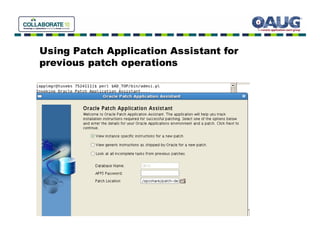
Using Patch Application Assistant for
previous patch operations
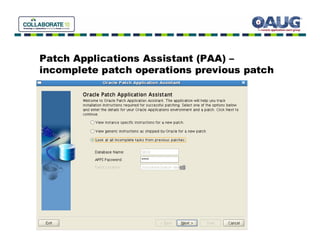
Patch Applications Assistant (PAA) –
incomplete patch operations previous patch
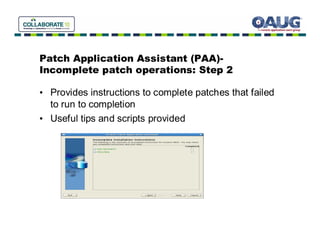
Patch Application Assistant (PAA)-
Incomplete patch operations: Step 2

• Provides instructions to complete patches that failed
  to run to completion
• Useful tips and scripts provided
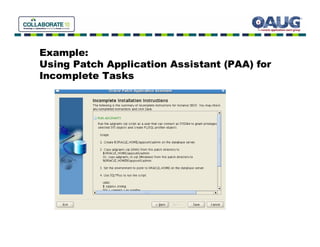
Example:
Using Patch Application Assistant (PAA) for
Incomplete Tasks
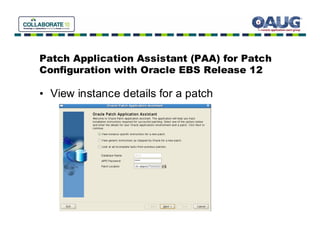
Patch Application Assistant (PAA) for Patch
Configuration with Oracle EBS Release 12

• View instance details for a patch
Patch Application Assistant-
View Instructions for patch
• Useful tool for preparation for major patches such as
  Release Update Packs (RUP) and Maintenance
  Packs (MP) with EBS Release 12
• Simplifies planning for patch strategy
• Eliminates common mistakes for EBS patching
• Self documenting tool
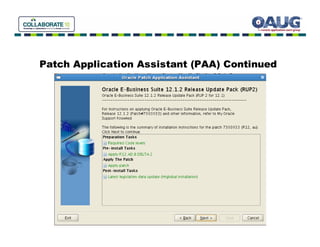
Patch Application Assistant (PAA) Continued
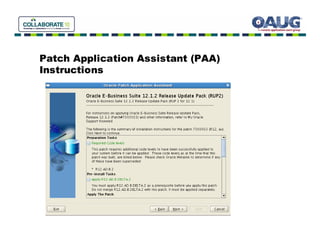
Patch Application Assistant (PAA)
Instructions
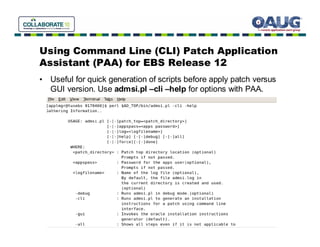
Using Command Line (CLI) Patch Application
Assistant (PAA) for EBS Release 12
• Useful for quick generation of scripts before apply patch versus
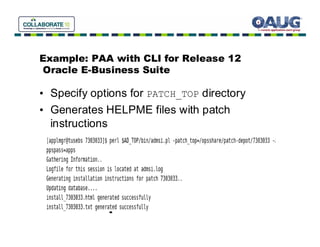
  GUI version. Use admsi.pl –cli –help for options with PAA.
Example: PAA with CLI for Release 12
Oracle E-Business Suite

• Specify options for PATCH_TOP directory
• Generates HELPME files with patch
  instructions
Best Practices Patching Release 12 Oracle
Applications E-Business Suite

•   Availability
•   Performance
•   Minimize Downtime
•   Maintenance and Communication
Best Practices Patching Release 12 Oracle
Applications E-Business Suite- Availability

• Use hotpatch option for Auto Patch to avoid
  downtime
• Syntax: adpatch options=hotpatch
• Be careful with hotpatch for adpatch
• No way to recover if patch fails other than
  restore/recovery
• Do not use for patches that have templates or
  require Auto Config!
Best Practices Patching Release 12 Oracle
Applications E-Business Suite- Availability

• Use staged APPL_TOP

• Use shared APPL_TOP
Best Practices Patching Release 12 Oracle
Applications E-Business Suite- Availability

• Why use shared APPL_TOP?
• Simplifies patch maintenance since you can
  apply patch to one node for a multi-node
  configuration
Best Practices Patching Release 12 Oracle
Applications E-Business Suite- Availability

• Why use Staged APPL_TOP file system?
• Allows you to apply patch without incur
  downtime to applications tier to production
  system.
Best Practices Patching Release 12 Oracle
Applications E-Business Suite- Performance

•   Distributed AD with Auto Patch
•   Merge Patch Utility
•   Multiple Workers for Auto Patch
•   Compile invalid objects before patching
Best Practices Patching Release 12 Oracle
Applications E-Business Suite- Performance
• Distributed AD for Patch Performance
   Uses multiple parallel processing to spread the load of apply the
   patch across multiple nodes for an Oracle Applications
   environment. It is especially useful for multi-node configurations.
   Now let’s explore the method to setup distributed AD.
• Start Auto Patch (adpatch) or AD Controller (adctrl) with the
  distributed option.
  localworkers=<number of workers on node>
    workers=<total number or workers>
 Example:
 AutoPatch session with a total of twelve workers (four workers on
  the local node and eight workers on a remote node):
 $ adpatch workers=12 localworkers=8
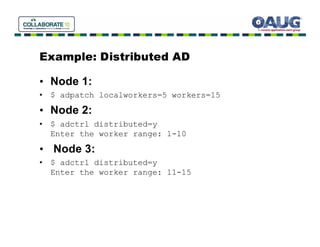
Example: Distributed AD

• Node 1:
• $ adpatch localworkers=5 workers=15
• Node 2:
• $ adctrl distributed=y
  Enter the worker range: 1-10

• Node 3:
• $ adctrl distributed=y
  Enter the worker range: 11-15
Best Practices Patching Release 12 Oracle
Applications E-Business Suite- Performance

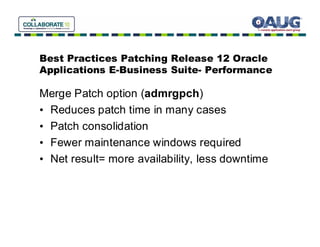
Merge Patch option (admrgpch)
• Reduces patch time in many cases
• Patch consolidation
• Fewer maintenance windows required
• Net result= more availability, less downtime
Best Practices Patching Release 12 Oracle
Applications E-Business Suite- Performance

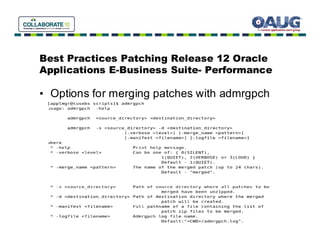
• Options for merging patches with admrgpch
Best Practices Patching Release 12 Oracle
Applications E-Business Suite- Maintenance

•   Maintenance Notification
•   Restricted Mode with Apache
•   Timing Reports for Patch Activity
•   Patch Wizard for Automation of Patch Tasks
Best Practices Patching Release 12 Oracle
Applications E-Business Suite- Maintenance

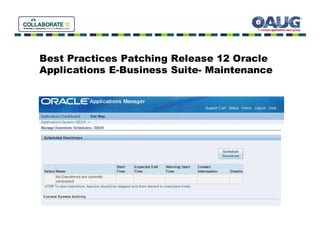
Manage Downtime Schedules Feature
• Useful for scheduling patch activity
• Provides communication to user community
  and management
• Easy to setup and configure
Best Practices Patching Release 12 Oracle
Applications E-Business Suite- Maintenance
Best Practices Patching Release 12 Oracle
Applications E-Business Suite- Maintenance

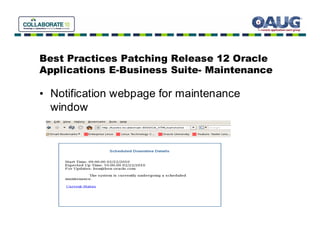
• Notification webpage for maintenance
  window
Best Practices Patching Release 12 Oracle
Applications E-Business Suite- Maintenance

Enable Restricted Mode for Apache
• Useful for the Applications DBA when
  performing maintenance activity and need to
  access Oracle Applications Manager (OAM)
• Allows limited use of OAM interface
• Easy to setup
• Toggle on/Toggle Off as needed
• Uses txkrun script to configure
Best Practices Patching Release 12 Oracle
Applications E-Business Suite- Maintenance
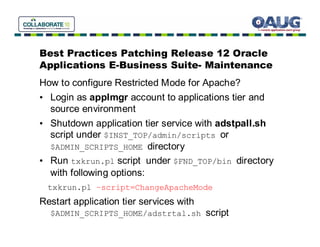
How to configure Restricted Mode for Apache?
• Login as applmgr account to applications tier and
  source environment
• Shutdown application tier service with adstpall.sh
  script under $INST_TOP/admin/scripts or
  $ADMIN_SCRIPTS_HOME directory
• Run txkrun.pl script under $FND_TOP/bin directory
  with following options:
  txkrun.pl –script=ChangeApacheMode
Restart application tier services with
  $ADMIN_SCRIPTS_HOME/adstrtal.sh script
Best Practices Patching Release 12 Oracle
Applications E-Business Suite- Maintenance
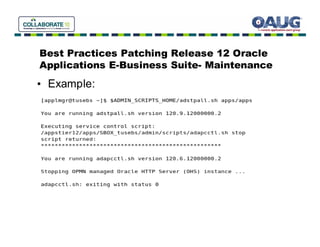
• Example:
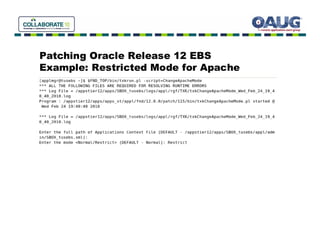
Patching Oracle Release 12 EBS
Example: Restricted Mode for Apache
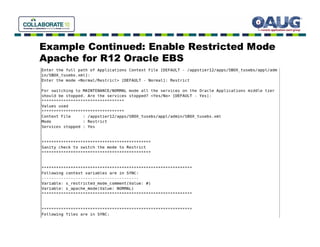
Example Continued: Enable Restricted Mode
Apache for R12 Oracle EBS
Access During Restricted
Apache Mode
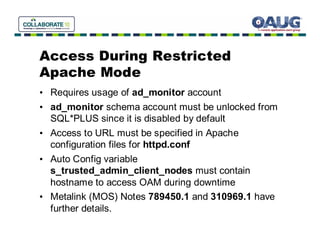
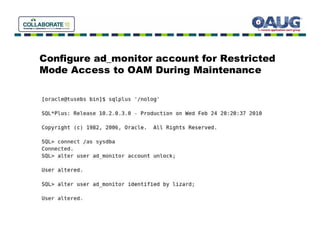
• Requires usage of ad_monitor account
• ad_monitor schema account must be unlocked from
  SQL*PLUS since it is disabled by default
• Access to URL must be specified in Apache
  configuration files for httpd.conf
• Auto Config variable
  s_trusted_admin_client_nodes must contain
  hostname to access OAM during downtime
• Metalink (MOS) Notes 789450.1 and 310969.1 have
  further details.
URL for Restricted Mode Access to OAM For
Release 12

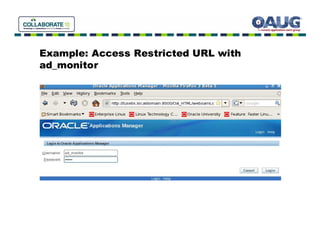
• For Release 12 the default URL for Restricted
  access to OAM with ad_monitor:

http://<host>.<domain>:<port>/OA_HTML/weboamLocal/oamLogin


• Default password for ad_monitor account is lizard
Configure ad_monitor account for Restricted
Mode Access to OAM During Maintenance
Example: Access Restricted URL with
ad_monitor
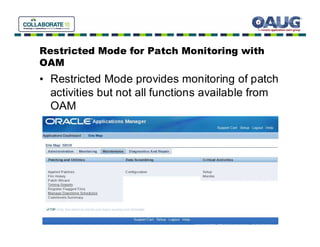
Restricted Mode for Patch Monitoring with
OAM
• Restricted Mode provides monitoring of patch
  activities but not all functions available from
  OAM
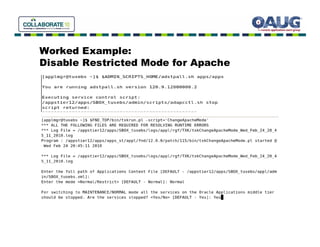
Disable Apache Restricted
Mode
• Shutdown application tier services
  (adstpall.sh)
• Run txkrun.pl script under $FND_TOP/bin
  with following options:
    txkrun.pl –script=ChangeApacheMode

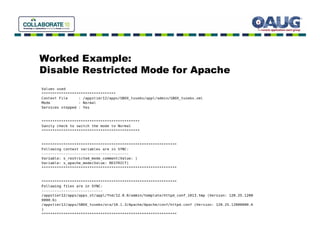
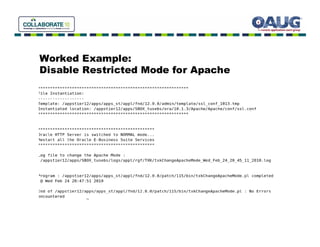
Specify Mode as Normal for Apache
Enter name and location for Context file
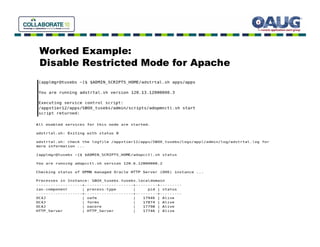
• Restart application tier services (adstrtal.sh)
Worked Example:
Disable Restricted Mode for Apache
Worked Example:
Disable Restricted Mode for Apache
Worked Example:
Disable Restricted Mode for Apache
Worked Example:
Disable Restricted Mode for Apache
Best Practices Patching Release 12 Oracle
Applications E-Business Suite- Maintenance

Timing Reports for Patch Activity
• Provides accurate method to measure
  requirements for maintenance windows
• Useful when apply patches between
  environments to estimate downtime for
  service level agreements (SLAs)
• Excellent way to troubleshoot a patch process
• Should be used as part of DBA patch strategy
Best Practices Patching Release 12 Oracle
Applications E-Business Suite- Maintenance

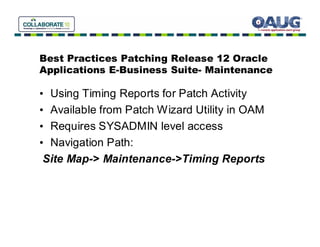
• Using Timing Reports for Patch Activity
• Available from Patch Wizard Utility in OAM
• Requires SYSADMIN level access
• Navigation Path:
 Site Map-> Maintenance->Timing Reports
Best Practices Patching Release 12 EBS
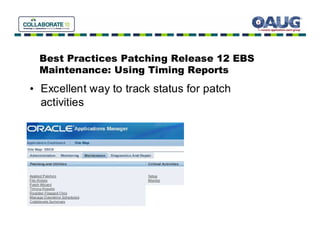
 Maintenance: Using Timing Reports
• Excellent way to track status for patch
  activities
Best Practices Patching Release 12 EBS
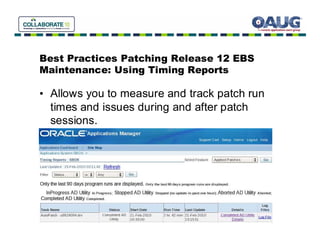
Maintenance: Using Timing Reports

• Allows you to measure and track patch run
  times and issues during and after patch
  sessions.
Best Practices Patching Release 12 EBS
Maintenance: Using Timing Reports
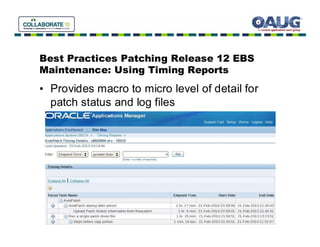
• Provides macro to micro level of detail for
  patch status and log files
Best Practices Patching Release 12 EBS
Maintenance: Inside the Patch Wizard

• Patch Wizard arrived in 11.5.10.2 (11iCU2)
  release for E-Business Suite
• Excellent tool to simplify and automate many
  tedious patch functions:
• Such as download recommended patches
• Also useful for patch impact analysis
• Helpful when you don’t have a test
  environment for patching!
Best Practices Patching Release 12 EBS
Maintenance: Inside the Patch Wizard

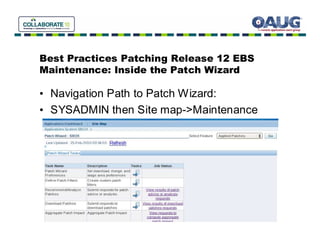
• Navigation Path to Patch Wizard:
• SYSADMIN then Site map->Maintenance
Best Practices Patching Release 12 EBS
Maintenance: Using the Patch Wizard

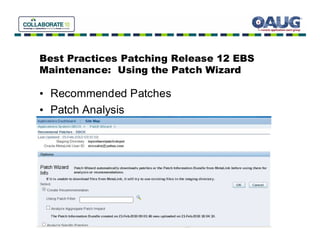
• Recommended Patches
• Patch Analysis
Demonstration
Oracle Applications
Release 12 Patching Tips and Tricks

•   Patch Wizard
•   Patch Application Assistant (PAA)
•   Timing Reports for Patching R12 EBS
•   Schedule Maintenance Window
Q&A Discussion
Thank You!

• Please provide feedback
• Email: ben@ben-oracle.com
• I will be available in the Oracle ACE lounge
• My blog has further tips on Oracle
  technology:
• http://oracle-magician.blogspot.com

Oracle EBS Release 12: Tips for Patching

  • 1.
    Tips and Tricksfor Patching R12 Oracle Applications E-Business Suite Ben Prusinski ben@ben-oracle.com
  • 2.
    About the Speaker •Ben Prusinski , Oracle ACE and OCP • More than 13 years experience with Oracle • Author
  • 3.
    Agenda • Oracle Release 12 Patching Tips • Focus on E-Business Suite Patching • New features for Release 12 Patching • Will not discuss database patching (opatch) • Performance and Availability for patching
  • 4.
    New Features Release12 Oracle Applications E-Business Suite • Oracle 10gAS replaces previous version for application server with three OC4J instances • New file system changes: INST_TOP • Oracle 10gR2 database standard for 12.0 • Oracle 11gR1 database standard for 12.1 • New patching features
  • 5.
    New Patching featuresEBS R12 • Patch Application Assistant (PAA) • Allows you to update patch activity • Available in GUI or CLI versions • Based on perl script called admsi.pl under $AD_TOP/bin directory
  • 6.
    Patch Application Assistant(PAA) Oracle Applications Release 12 EBS • Completed previous failed patching or terminated sessions that have not completed. • Performs automation for patch tasks which were a manual process before Release 12 • Available in graphical interface (GUI) and command line (CLI) versions. • Required for some patches per README.txt file instructions.
  • 7.
    Using Patch ApplicationAssistant for previous patch operations
  • 8.
    Patch Applications Assistant(PAA) – incomplete patch operations previous patch
  • 9.
    Patch Application Assistant(PAA)- Incomplete patch operations: Step 2 • Provides instructions to complete patches that failed to run to completion • Useful tips and scripts provided
  • 10.
    Example: Using Patch ApplicationAssistant (PAA) for Incomplete Tasks
  • 11.
    Patch Application Assistant(PAA) for Patch Configuration with Oracle EBS Release 12 • View instance details for a patch
  • 12.
    Patch Application Assistant- ViewInstructions for patch • Useful tool for preparation for major patches such as Release Update Packs (RUP) and Maintenance Packs (MP) with EBS Release 12 • Simplifies planning for patch strategy • Eliminates common mistakes for EBS patching • Self documenting tool
  • 13.
  • 14.
    Patch Application Assistant(PAA) Instructions
  • 15.
    Using Command Line(CLI) Patch Application Assistant (PAA) for EBS Release 12 • Useful for quick generation of scripts before apply patch versus GUI version. Use admsi.pl –cli –help for options with PAA.
  • 16.
    Example: PAA withCLI for Release 12 Oracle E-Business Suite • Specify options for PATCH_TOP directory • Generates HELPME files with patch instructions
  • 17.
    Best Practices PatchingRelease 12 Oracle Applications E-Business Suite • Availability • Performance • Minimize Downtime • Maintenance and Communication
  • 18.
    Best Practices PatchingRelease 12 Oracle Applications E-Business Suite- Availability • Use hotpatch option for Auto Patch to avoid downtime • Syntax: adpatch options=hotpatch • Be careful with hotpatch for adpatch • No way to recover if patch fails other than restore/recovery • Do not use for patches that have templates or require Auto Config!
  • 19.
    Best Practices PatchingRelease 12 Oracle Applications E-Business Suite- Availability • Use staged APPL_TOP • Use shared APPL_TOP
  • 20.
    Best Practices PatchingRelease 12 Oracle Applications E-Business Suite- Availability • Why use shared APPL_TOP? • Simplifies patch maintenance since you can apply patch to one node for a multi-node configuration
  • 21.
    Best Practices PatchingRelease 12 Oracle Applications E-Business Suite- Availability • Why use Staged APPL_TOP file system? • Allows you to apply patch without incur downtime to applications tier to production system.
  • 22.
    Best Practices PatchingRelease 12 Oracle Applications E-Business Suite- Performance • Distributed AD with Auto Patch • Merge Patch Utility • Multiple Workers for Auto Patch • Compile invalid objects before patching
  • 23.
    Best Practices PatchingRelease 12 Oracle Applications E-Business Suite- Performance • Distributed AD for Patch Performance Uses multiple parallel processing to spread the load of apply the patch across multiple nodes for an Oracle Applications environment. It is especially useful for multi-node configurations. Now let’s explore the method to setup distributed AD. • Start Auto Patch (adpatch) or AD Controller (adctrl) with the distributed option. localworkers=<number of workers on node> workers=<total number or workers> Example: AutoPatch session with a total of twelve workers (four workers on the local node and eight workers on a remote node): $ adpatch workers=12 localworkers=8
  • 24.
    Example: Distributed AD •Node 1: • $ adpatch localworkers=5 workers=15 • Node 2: • $ adctrl distributed=y Enter the worker range: 1-10 • Node 3: • $ adctrl distributed=y Enter the worker range: 11-15
  • 25.
    Best Practices PatchingRelease 12 Oracle Applications E-Business Suite- Performance Merge Patch option (admrgpch) • Reduces patch time in many cases • Patch consolidation • Fewer maintenance windows required • Net result= more availability, less downtime
  • 26.
    Best Practices PatchingRelease 12 Oracle Applications E-Business Suite- Performance • Options for merging patches with admrgpch
  • 27.
    Best Practices PatchingRelease 12 Oracle Applications E-Business Suite- Maintenance • Maintenance Notification • Restricted Mode with Apache • Timing Reports for Patch Activity • Patch Wizard for Automation of Patch Tasks
  • 28.
    Best Practices PatchingRelease 12 Oracle Applications E-Business Suite- Maintenance Manage Downtime Schedules Feature • Useful for scheduling patch activity • Provides communication to user community and management • Easy to setup and configure
  • 29.
    Best Practices PatchingRelease 12 Oracle Applications E-Business Suite- Maintenance
  • 30.
    Best Practices PatchingRelease 12 Oracle Applications E-Business Suite- Maintenance • Notification webpage for maintenance window
  • 31.
    Best Practices PatchingRelease 12 Oracle Applications E-Business Suite- Maintenance Enable Restricted Mode for Apache • Useful for the Applications DBA when performing maintenance activity and need to access Oracle Applications Manager (OAM) • Allows limited use of OAM interface • Easy to setup • Toggle on/Toggle Off as needed • Uses txkrun script to configure
  • 32.
    Best Practices PatchingRelease 12 Oracle Applications E-Business Suite- Maintenance How to configure Restricted Mode for Apache? • Login as applmgr account to applications tier and source environment • Shutdown application tier service with adstpall.sh script under $INST_TOP/admin/scripts or $ADMIN_SCRIPTS_HOME directory • Run txkrun.pl script under $FND_TOP/bin directory with following options: txkrun.pl –script=ChangeApacheMode Restart application tier services with $ADMIN_SCRIPTS_HOME/adstrtal.sh script
  • 33.
    Best Practices PatchingRelease 12 Oracle Applications E-Business Suite- Maintenance • Example:
  • 34.
    Patching Oracle Release12 EBS Example: Restricted Mode for Apache
  • 35.
    Example Continued: EnableRestricted Mode Apache for R12 Oracle EBS
  • 36.
    Access During Restricted ApacheMode • Requires usage of ad_monitor account • ad_monitor schema account must be unlocked from SQL*PLUS since it is disabled by default • Access to URL must be specified in Apache configuration files for httpd.conf • Auto Config variable s_trusted_admin_client_nodes must contain hostname to access OAM during downtime • Metalink (MOS) Notes 789450.1 and 310969.1 have further details.
  • 37.
    URL for RestrictedMode Access to OAM For Release 12 • For Release 12 the default URL for Restricted access to OAM with ad_monitor: http://<host>.<domain>:<port>/OA_HTML/weboamLocal/oamLogin • Default password for ad_monitor account is lizard
  • 38.
    Configure ad_monitor accountfor Restricted Mode Access to OAM During Maintenance
  • 39.
    Example: Access RestrictedURL with ad_monitor
  • 40.
    Restricted Mode forPatch Monitoring with OAM • Restricted Mode provides monitoring of patch activities but not all functions available from OAM
  • 41.
    Disable Apache Restricted Mode •Shutdown application tier services (adstpall.sh) • Run txkrun.pl script under $FND_TOP/bin with following options: txkrun.pl –script=ChangeApacheMode Specify Mode as Normal for Apache Enter name and location for Context file • Restart application tier services (adstrtal.sh)
  • 42.
  • 43.
  • 44.
  • 45.
  • 46.
    Best Practices PatchingRelease 12 Oracle Applications E-Business Suite- Maintenance Timing Reports for Patch Activity • Provides accurate method to measure requirements for maintenance windows • Useful when apply patches between environments to estimate downtime for service level agreements (SLAs) • Excellent way to troubleshoot a patch process • Should be used as part of DBA patch strategy
  • 47.
    Best Practices PatchingRelease 12 Oracle Applications E-Business Suite- Maintenance • Using Timing Reports for Patch Activity • Available from Patch Wizard Utility in OAM • Requires SYSADMIN level access • Navigation Path: Site Map-> Maintenance->Timing Reports
  • 48.
    Best Practices PatchingRelease 12 EBS Maintenance: Using Timing Reports • Excellent way to track status for patch activities
  • 49.
    Best Practices PatchingRelease 12 EBS Maintenance: Using Timing Reports • Allows you to measure and track patch run times and issues during and after patch sessions.
  • 50.
    Best Practices PatchingRelease 12 EBS Maintenance: Using Timing Reports • Provides macro to micro level of detail for patch status and log files
  • 51.
    Best Practices PatchingRelease 12 EBS Maintenance: Inside the Patch Wizard • Patch Wizard arrived in 11.5.10.2 (11iCU2) release for E-Business Suite • Excellent tool to simplify and automate many tedious patch functions: • Such as download recommended patches • Also useful for patch impact analysis • Helpful when you don’t have a test environment for patching!
  • 52.
    Best Practices PatchingRelease 12 EBS Maintenance: Inside the Patch Wizard • Navigation Path to Patch Wizard: • SYSADMIN then Site map->Maintenance
  • 53.
    Best Practices PatchingRelease 12 EBS Maintenance: Using the Patch Wizard • Recommended Patches • Patch Analysis
  • 54.
    Demonstration Oracle Applications Release 12Patching Tips and Tricks • Patch Wizard • Patch Application Assistant (PAA) • Timing Reports for Patching R12 EBS • Schedule Maintenance Window
  • 55.
  • 56.
    Thank You! • Pleaseprovide feedback • Email: ben@ben-oracle.com • I will be available in the Oracle ACE lounge • My blog has further tips on Oracle technology: • http://oracle-magician.blogspot.com