1
ColdFusion MX 7 on Unix and Linux
Steven Erat
Senior ColdFusion Support Engineer
Macromedia
December 21, 2004
2
3
ColdFusion MX 7 on Unix & Linux - Overview
ColdFusion History on Unix & Linux
ColdFusion MX 7 Unix & Linux System Requirements
ColdFusion Version Migration Paths on Unix & Linux
New in ColdFusion MX 7
General ColdFusion Concerns on Unix & Linux
Multiserver Configuration Installation on Linux with Apache – Console
Server Configuration Installation on Linux with Apache – GUI
Settings and Migration Wizard
Server Configuration on Solaris with iPlanet – Console
Thread Dumps
Miscellaneous
ColdFusion IDEs Linux
4
ColdFusion History on Unix & Linux
5
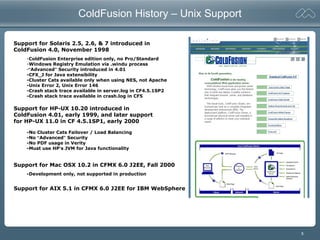
ColdFusion History – Unix Support
Support for Solaris 2.5, 2.6, & 7 introduced in
ColdFusion 4.0, November 1998
Support for HP-UX 10.20 introduced in
ColdFusion 4.01, early 1999, and later support
for HP-UX 11.0 in CF 4.5.1SP1, early 2000
Support for AIX 5.1 in CFMX 6.0 J2EE for IBM WebSphere
Support for Mac OSX 10.2 in CFMX 6.0 J2EE, Fall 2000
-ColdFusion Enterprise edition only, no Pro/Standard
-Windows Registry Emulation via .windu process
-“Advanced” Security introduced in 4.01
-CFX_J for Java extensibility
-Cluster Cats available only when using NES, not Apache
-Unix Error 2, Unix Error 146
-Crash stack trace available in server.log in CF4.5.1SP2
-Crash stack trace available in crash.log in CF5
-No Cluster Cats Failover / Load Balancing
-No “Advanced” Security
-No PDF usage in Verity
-Must use HP’s JVM for Java functionality
-Development only, not supported in production
6
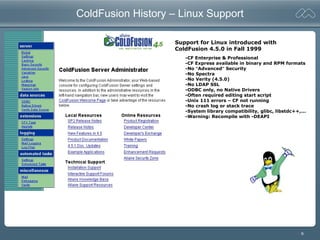
ColdFusion History – Linux Support
Support for Linux introduced with
ColdFusion 4.5.0 in Fall 1999
-CF Enterprise & Professional
-CF Express available in binary and RPM formats
-No “Advanced” Security
-No Spectra
-No Verity (4.5.0)
-No LDAP SSL
-ODBC only, no Native Drivers
-Often required editing start script
-Unix 111 errors – CF not running
-No crash log or stack trace
-System library compatibility, glibc, libstdc++,...
-Warning: Recompile with -DEAPI
7
Low Points in ColdFusion MX
Linux ColdFusion Users Irate With Macromedia
eWeek, December 2002
ColdFusion MX users who are running the rapid server-scripting environment on Unix or Linux
said they feel they've been left out in the cold by developer Macromedia Inc.
Problems with the San Francisco company's software on Linux have prompted hundreds of
user complaints to the Macromedia Web site regarding server crashes and other anomalies.
Macromedia officials blame the problems on incompatible distributions of Linux.
In a statement responding to eWeek, Macromedia said it is "committed to providing
ColdFusion customers with superior performance and stability across all the platforms we
support, including Windows, Linux, Solaris and HP-UX. Since we have not yet been able to
reproduce the reported problems on the certified hardware platform and Linux versions that
we have comprehensively tested, we believe that the anomalies may be due to nonstandard
distributions of Linux. We continue to actively work to identify the problem," officials said.
The company recommends that users follow the systems requirements guidelines published
for ColdFusion MX as closely as possible.
ColdFusion MX support on Linux and Unix with Apache
Macromedia Technote 18340
- Follow System Requirements
- Changes to jrun.xml for mapCheck, thread values
- MaxPermSize jvm arg for out of memory conditions
- EAPI connector fixes numerous httpd CLOSE_WAITs
- Hangs resolved by moving from Apache 1.3x to 2.0.x
- VM Crash when HW/CPU overheated, broken fan
8
ColdFusion MX 7.0 Unix & Linux System Requirements
9
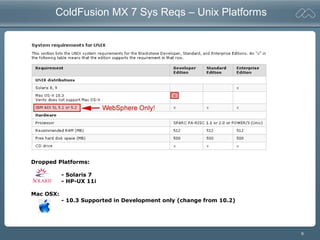
ColdFusion MX 7 Sys Reqs – Unix Platforms
Dropped Platforms:
- Solaris 7
- HP-UX 11i
Mac OSX:
- 10.3 Supported in Development only (change from 10.2)
10
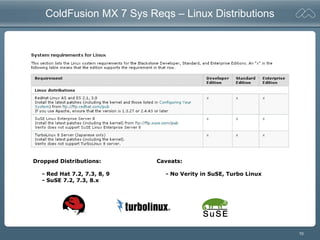
ColdFusion MX 7 Sys Reqs – Linux Distributions
Dropped Distributions:
- Red Hat 7.2, 7.3, 8, 9
- SuSE 7.2, 7.3, 8.x
Caveats:
- No Verity in SuSE, Turbo Linux
11
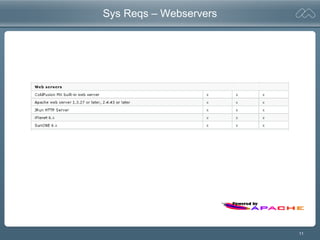
Sys Reqs – Webservers
12
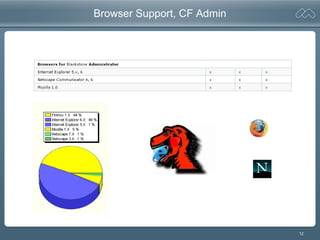
Browser Support, CF Admin
13
ColdFusion Version Migration Paths on Unix & Linux
14
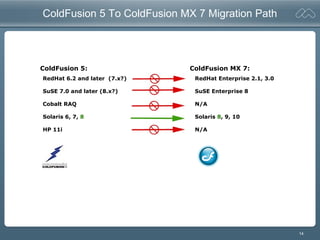
ColdFusion 5 To ColdFusion MX 7 Migration Path
ColdFusion 5: ColdFusion MX 7:
RedHat 6.2 and later (7.x?)
SuSE 7.0 and later (8.x?)
Cobalt RAQ
Solaris 6, 7, 8
HP 11i
RedHat Enterprise 2.1, 3.0
SuSE Enterprise 8
N/A
Solaris 8, 9, 10
N/A
15
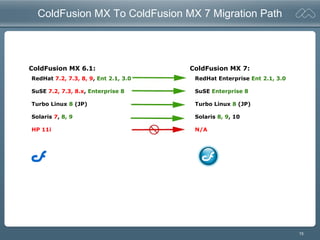
ColdFusion MX To ColdFusion MX 7 Migration Path
ColdFusion MX 6.1: ColdFusion MX 7:
RedHat 7.2, 7.3, 8, 9, Ent 2.1, 3.0
SuSE 7.2, 7.3, 8.x, Enterprise 8
Turbo Linux 8 (JP)
Solaris 7, 8, 9
HP 11i
RedHat Enterprise Ent 2.1, 3.0
SuSE Enterprise 8
Turbo Linux 8 (JP)
Solaris 8, 9, 10
N/A
16
New in ColdFusion MX 7
17
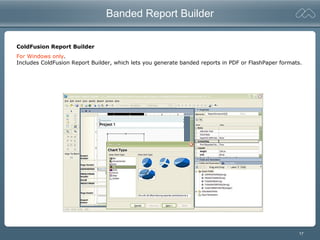
Banded Report Builder
For Windows only.
Includes ColdFusion Report Builder, which lets you generate banded reports in PDF or FlashPaper formats.
ColdFusion Report Builder
18
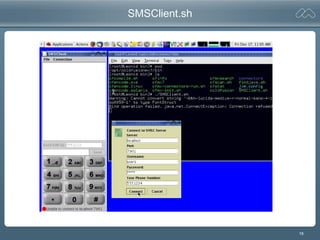
SMSClient.sh
19
Code Considerations
CFFORM – Avoid Browser Issues by Using Flash Format
ColdFusion MX can deliver Forms to the client in Macromedia Flash SWF format. ColdFusion
automatically generates the Flash binary from your CFML code and displays it on the client. Flash forms
are browser-independent. Flash Player works in all commonly used browsers on Windows and Macintosh
systems, and in Netscape and Mozilla on Linux.
cfNTauthenticate – New in ColdFusion MX 7, Windows Only
Use this function to authenticate a user against a Microsoft NT domain and optionally get the user's
groups. This function does not work with the Microsoft Active Directory directory service, and does
nothing on UNIX and Linux systems.
20
Usual Concerns about ColdFusion on Unix & Linux
21
General ColdFusion Considerations for Unix/Linux
Case Sensitivity
Filenames and directories – CFFILE, CFDIRECTORY, fileexists(), etc... (CFFILE mode=“nnn”)
Path delimiter “/” not “”
CF Custom Tag search path, CFModule search path, and CFC search path are all case sensitive
First search is for all lower case match, second search is for exact case match.
How To Change CF Runtime User
• Backup, Uninstall, Reinstall while selecting the different user as the CF runtime user
• Do not just “chown –R {cfuser}” to recursively change ownership on files and directories
Registry
ColdFusion on *nix continues to use a vestigal {CF_HOME}/registry/cf.registry file
to store client variables
22
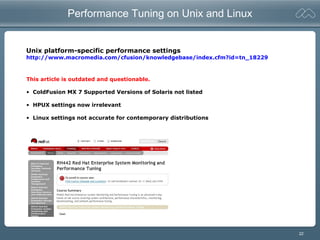
Performance Tuning on Unix and Linux
Unix platform-specific performance settings
http://www.macromedia.com/cfusion/knowledgebase/index.cfm?id=tn_18229
This article is outdated and questionable.
• ColdFusion MX 7 Supported Versions of Solaris not listed
• HPUX settings now irrelevant
• Linux settings not accurate for contemporary distributions
23
Multiserver Configuration Installation on Linux - Console
24
Linux Console Installation – Multiserver (1/13)
[root@Vagrant coldfusionmx7]# chmod +x coldfusion-macr-linux.bin
[root@Vagrant coldfusionmx7]# ./coldfusion-macr-linux.bin
Preparing to install...
Extracting the JRE from the installer archive...
Unpacking the JRE...
Extracting the installation resources from the installer archive...
Configuring the installer for this system's environment...
Launching installer...
Preparing CONSOLE Mode Installation...
===============================================================================
Choose Locale...
----------------
->1- English
CHOOSE LOCALE BY NUMBER: 1
===============================================================================
(created with InstallAnywhere by Zero G)
-------------------------------------------------------------------------------
25
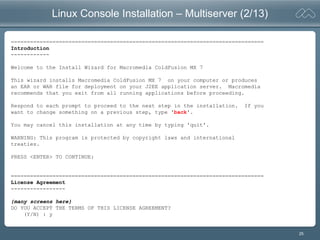
Linux Console Installation – Multiserver (2/13)
===============================================================================
Introduction
------------
Welcome to the Install Wizard for Macromedia ColdFusion MX 7
This wizard installs Macromedia ColdFusion MX 7 on your computer or produces
an EAR or WAR file for deployment on your J2EE application server. Macromedia
recommends that you exit from all running applications before proceeding.
Respond to each prompt to proceed to the next step in the installation. If you
want to change something on a previous step, type 'back'.
You may cancel this installation at any time by typing 'quit'.
WARNING: This program is protected by copyright laws and international
treaties.
PRESS <ENTER> TO CONTINUE:
===============================================================================
License Agreement
-----------------
{many screens here}
DO YOU ACCEPT THE TERMS OF THIS LICENSE AGREEMENT?
(Y/N) : y
26
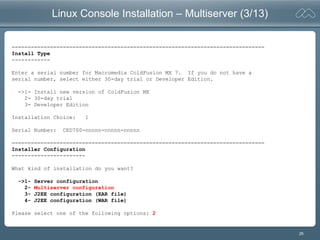
Linux Console Installation – Multiserver (3/13)
===============================================================================
Install Type
------------
Enter a serial number for Macromedia ColdFusion MX 7. If you do not have a
serial number, select either 30-day trial or Developer Edition.
->1- Install new version of ColdFusion MX
2- 30-day trial
3- Developer Edition
Installation Choice: 1
Serial Number: CED700-nnnnn-nnnnn-nnnnn
===============================================================================
Installer Configuration
-----------------------
What kind of installation do you want?
->1- Server configuration
2- Multiserver configuration
3- J2EE configuration (EAR file)
4- J2EE configuration (WAR file)
Please select one of the following options: 2
27
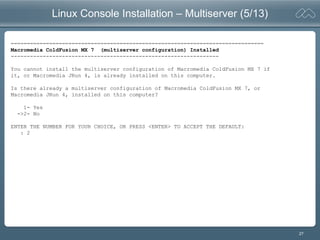
Linux Console Installation – Multiserver (5/13)
===============================================================================
Macromedia ColdFusion MX 7 (multiserver configuration) Installed
-----------------------------------------------------------------
You cannot install the multiserver configuration of Macromedia ColdFusion MX 7 if
it, or Macromedia JRun 4, is already installed on this computer.
Is there already a multiserver configuration of Macromedia ColdFusion MX 7, or
Macromedia JRun 4, installed on this computer?
1- Yes
->2- No
ENTER THE NUMBER FOR YOUR CHOICE, OR PRESS <ENTER> TO ACCEPT THE DEFAULT:
: 2
28
Linux Console Installation – Multiserver (6/13)
===============================================================================
Sub-component installation
--------------------------
The following options are available for installation.
An option with "[X]" in front will be installed and an option with "[ ]" will
not. Choosing an option will toggle it on or off
[X] 1) Getting Started Experience, Tutorials, & Documentation
[X] 2) ColdFusion MX 7 Search Services
3) Continue with installation
Select an option: 1
===============================================================================
Sub-component installation
[ ] 1) Getting Started Experience, Tutorials, & Documentation
[X] 2) ColdFusion MX 7 Search Services
3) Continue with installation
Select an option: 1
===============================================================================
Sub-component installation
[X] 1) Getting Started Experience, Tutorials, & Documentation
[X] 2) ColdFusion MX 7 Search Services
3) Continue with installation
Select an option: 3
29
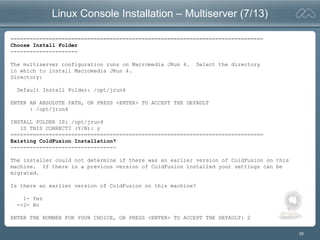
Linux Console Installation – Multiserver (7/13)
===============================================================================
Choose Install Folder
---------------------
The multiserver configuration runs on Macromedia JRun 4. Select the directory
in which to install Macromedia JRun 4.
Directory:
Default Install Folder: /opt/jrun4
ENTER AN ABSOLUTE PATH, OR PRESS <ENTER> TO ACCEPT THE DEFAULT
: /opt/jrun4
INSTALL FOLDER IS: /opt/jrun4
IS THIS CORRECT? (Y/N): y
===============================================================================
Existing ColdFusion Installation?
---------------------------------
The installer could not determine if there was an earlier version of ColdFusion on this
machine. If there is a previous version of ColdFusion installed your settings can be
migrated.
Is there an earlier version of ColdFusion on this machine?
1- Yes
->2- No
ENTER THE NUMBER FOR YOUR CHOICE, OR PRESS <ENTER> TO ACCEPT THE DEFAULT: 2
30
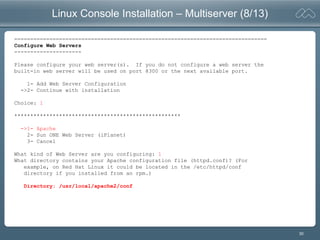
Linux Console Installation – Multiserver (8/13)
===============================================================================
Configure Web Servers
---------------------
Please configure your web server(s). If you do not configure a web server the
built-in web server will be used on port 8300 or the next available port.
1- Add Web Server Configuration
->2- Continue with installation
Choice: 1
****************************************************
->1- Apache
2- Sun ONE Web Server (iPlanet)
3- Cancel
What kind of Web Server are you configuring: 1
What directory contains your Apache configuration file (httpd.conf)? (For
example, on Red Hat Linux it could be located in the /etc/httpd/conf
directory if you installed from an rpm.)
Directory: /usr/local/apache2/conf
31
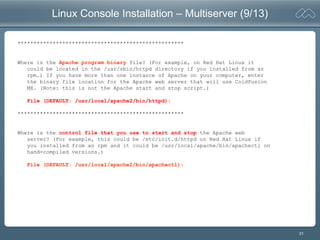
Linux Console Installation – Multiserver (9/13)
****************************************************
Where is the Apache program binary file? (For example, on Red Hat Linux it
could be located in the /usr/sbin/httpd directory if you installed from an
rpm.) If you have more than one instance of Apache on your computer, enter
the binary file location for the Apache web server that will use ColdFusion
MX. (Note: this is not the Apache start and stop script.)
File (DEFAULT: /usr/local/apache2/bin/httpd):
****************************************************
Where is the control file that you use to start and stop the Apache web
server? (For example, this could be /etc/init.d/httpd on Red Hat Linux if
you installed from an rpm and it could be /usr/local/apache/bin/apachectl on
hand-compiled versions.)
File (DEFAULT: /usr/local/apache2/bin/apachectl):
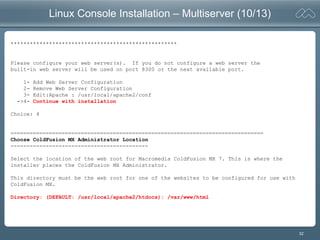
32
Linux Console Installation – Multiserver (10/13)
****************************************************
Please configure your web server(s). If you do not configure a web server the
built-in web server will be used on port 8300 or the next available port.
1- Add Web Server Configuration
2- Remove Web Server Configuration
3- Edit:Apache : /usr/local/apache2/conf
->4- Continue with installation
Choice: 4
===============================================================================
Choose ColdFusion MX Administrator Location
-------------------------------------------
Select the location of the web root for Macromedia ColdFusion MX 7. This is where the
installer places the ColdFusion MX Administrator.
This directory must be the web root for one of the websites to be configured for use with
ColdFusion MX.
Directory: (DEFAULT: /usr/local/apache2/htdocs): /var/www/html
33
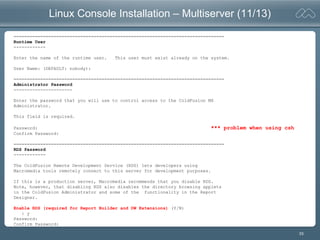
Linux Console Installation – Multiserver (11/13)
===============================================================================
Runtime User
------------
Enter the name of the runtime user. This user must exist already on the system.
User Name: (DEFAULT: nobody):
===============================================================================
Administrator Password
----------------------
Enter the password that you will use to control access to the ColdFusion MX
Administrator.
This field is required.
Password: *** problem when using csh
Confirm Password:
===============================================================================
RDS Password
------------
The ColdFusion Remote Development Service (RDS) lets developers using
Macromedia tools remotely connect to this server for development purposes.
If this is a production server, Macromedia recommends that you disable RDS.
Note, however, that disabling RDS also disables the directory browsing applets
in the ColdFusion Administrator and some of the functionality in the Report
Designer.
Enable RDS (required for Report Builder and DW Extensions) (Y/N)
: y
Password:
Confirm Password:
34
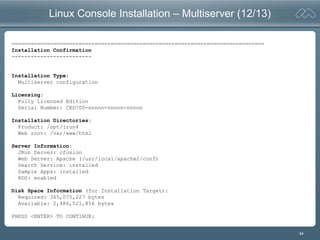
Linux Console Installation – Multiserver (12/13)
===============================================================================
Installation Confirmation
-------------------------
Installation Type:
Multiserver configuration
Licensing:
Fully Licensed Edition
Serial Number: CED700-nnnnn-nnnnn-nnnnn
Installation Directories:
Product: /opt/jrun4
Web root: /var/www/html
Server Information:
JRun Server: cfusion
Web Server: Apache (/usr/local/apache2/conf)
Search Service: installed
Sample Apps: installed
RDS: enabled
Disk Space Information (for Installation Target):
Required: 365,075,227 bytes
Available: 2,486,521,856 bytes
PRESS <ENTER> TO CONTINUE:
35
Linux Console Installation – Multiserver (13/13)
===============================================================================
Installing...
-------------
[==================|==================|==================|==================]
[------------------|------------------|------------------|------------------]
===============================================================================
Installation Complete
---------------------
You have successfully completed the first step in installing Macromedia
ColdFusion MX 7 with JRun 4.
To continue with your installation, go to /opt/jrun4/bin and type the command
“./jrun -start cfusion” to start the CFusion server on JRun. To finish configuring your
web server connectors you will also need to run cfmx_connectors.sh (also in the
/opt/jrun4/bin directory) once the jrun server is up and running.
When the server is started and the connectors are configured log in to the
Configuration Wizard at http://[machinename]/CFIDE/administrator/index.cfm
PRESS <ENTER> TO EXIT THE INSTALLER:
***
36
WARNING: /tmp does not have enough disk space!
[root@Vagrant coldfusionmx7]# ./coldfusion-macr-linux.bin
Preparing to install...
WARNING: /tmp does not have enough disk space!
Attempting to use /root for install base and tmp dir.
WARNING! The amount of /tmp disk space required to perform
this installation is greater than what is available. Please
free up at least 149363 kilobytes in /tmp and attempt this
installation again. You may also set the IATEMPDIR environment
variable to a directory on a disk partition with enough free
disk space. To set the variable enter one of the following
commands at the UNIX command line prompt before running this
installer again:
- for Bourne shell (sh), ksh, bash and zsh:
$ IATEMPDIR=/your/free/space/directory
$ export IATEMPDIR
- for C shell (csh) and tcsh:
$ setenv IATEMPDIR /your/free/space/directory
37
Processes, Directories, Files
Starting ColdFusion
Manual Webserver Configuration
Examining Webserver Configuration
Monitoring Memory
38
JRun Directory Contents – Multiserver Config
[root@Vagrant opt]# cd /opt/jrun4/
[root@Vagrant jrun4]# ls -l
total 72
drwxrwxr-x 2 nobody root 4096 Dec 10 12:52 bin
drwxrwxr-x 7 nobody root 4096 Dec 10 12:52 docs
drwxrwxr-x 8 nobody root 4096 Jul 1 16:30 jre
drwxrwxr-x 3 nobody root 4096 Dec 10 12:52 lib
-rwxrwxrwx 1 nobody root 10523 Apr 7 2004 license.txt
drwxrwxr-x 2 nobody root 4096 Dec 10 12:51 logs
-rw-rw-r-- 1 root root 11081 Dec 10 14:20 Macromedia_ColdFusion_MX_7_InstallLog.log
drwxrwxr-x 7 nobody root 4096 Dec 10 12:52 pointbase
-rwxrwxrwx 1 nobody root 7571 Nov 11 18:51 Readme.htm
-rw-rw-r-- 1 nobody root 1137 Nov 5 11:38 relnotes.htm
drwxrwxr-x 6 nobody root 4096 Dec 10 12:52 servers
drwxrwxr-x 2 nobody root 4096 Dec 10 14:20 uninstall
drwxrwxr-x 7 nobody root 4096 Dec 10 12:50 verity
[root@Vagrant jrun4]# cd bin
[root@Vagrant bin]# ls -l
total 3204
-rwxr-xr-x 1 nobody root 1750 Dec 10 12:52 cfmx-connectors.sh
-rwxrwxr-x 1 nobody root 54723 Dec 8 16:38 java2wsdl
-rwxrwxr-x 1 nobody root 2709768 Dec 8 16:38 jikesw
-rwxrwxr-x 1 nobody root 54723 Dec 8 16:38 jrun
-rwxrwxr-x 1 nobody root 54723 Dec 8 16:38 jrunwizard
-rwxr-xr-x 1 nobody root 54723 Dec 8 16:38 jspc
-rw-rw-r-- 1 nobody root 1279 Dec 10 12:52 jvm.config
-rwxr-xr-x 1 nobody root 54723 Dec 8 16:38 migrate
-rwxrwxr-x 1 nobody root 54723 Dec 8 16:38 sniffer
-rwxr-xr-x 1 nobody root 54723 Dec 8 16:38 wsconfig
-rw-rw-r-- 1 nobody root 976 Dec 10 12:51 wsconfig_jvm.config
-rwxrwxr-x 1 nobody root 54179 Dec 8 16:38 wsdl2java
-rwxr-xr-x 1 nobody root 54723 Dec 8 16:38 xmlscript
39
k2admin service starts immediately
[root@Leonid bin]# ps -ef | grep jrun
cfmx 7657 1 0 19:05 pts/2 /opt/jrun4/verity/k2/_ilnx21/bin/k2admin
cfmx 7774 7778 0 19:06 pts/2 /opt/jrun4/verity/k2/_ilnx21/bin/k2server -ualias ColdFusionK2_server1
cfmx 7777 7778 0 19:06 pts/2 /opt/jrun4/verity/k2/_ilnx21/bin/k2index -ualias ColdFusionK2_indexserver1
root 14453 31191 0 19:13 pts/2 grep jrun
[root@Leonid bin]# ps -ef | grep jrun
cfmx 7657 1 0 19:05 pts/2 /opt/jrun4/verity/k2/_ilnx21/bin/k2admin
cfmx 7774 7778 0 19:06 pts/2 /opt/jrun4/verity/k2/_ilnx21/bin/k2server -ualias ColdFusionK2_server1
cfmx 7777 7778 0 19:06 pts/2 /opt/jrun4/verity/k2/_ilnx21/bin/k2index -ualias ColdFusionK2_indexserver1
root 14455 6821 3 19:14 pts/1 ./jrun -start cfusion
root 14534 31191 0 19:16 pts/2 grep jrun
[root@Leonid bin]#
Before starting ColdFusion server for the first time
After starting ColdFusion
40
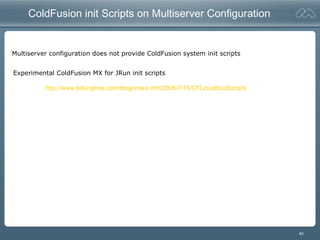
ColdFusion init Scripts on Multiserver Configuration
Multiserver configuration does not provide ColdFusion system init scripts
Experimental ColdFusion MX for JRun init scripts
http://www.talkingtree.com/blog/index.cfm/2005/7/15/CFLinuxBootScripts
41
Verity vspider Utility
Verity vspider utility now available on Linux,making Verity support on Linux finally complete.
[root@Leonid ~]# ls -l `find /opt/coldfusionmx7/ -name vspider`
-rwxrwxr-x 1 cfmx bin 938324 Sep 24 12:26 /opt/coldfusionmx7/verity/k2/_ilnx21/bin/vspider
[root@Leonid ~]#
42
Working with the k2admin Scripts
[root@Leonid jrun4]# pwd
/opt/jrun4
[root@Leonid jrun4]# find . -name k2admin
./verity/k2/_ilnx21/bin/k2admin
[root@Leonid jrun4]# ls -l verity/k2/_ilnx21/bin/ | grep k2
-rwxrwxr-x 1 cfmx root 3778622 Sep 23 15:20 k2admin
-rwxrwxrwx 1 cfmx cfmx 2837 Dec 14 19:05 k2adminstart
-rwxrwxrwx 1 cfmx cfmx 1846 Dec 14 19:05 k2adminstop
-rwxrwxr-x 1 cfmx root 2180802 Sep 24 16:08 k2index
-rwxrwxr-x 1 cfmx root 1199602 May 24 2004 k2lmldap.so
-rwxrwxr-x 1 cfmx root 10338 May 24 2004 k2lmtg.so
-rwxrwxr-x 1 cfmx root 1224318 May 24 2004 k2lmunix.so
-rwxrwxr-x 1 cfmx root 1311719 May 24 2004 k2psldap.so
-rwxrwxr-x 1 cfmx root 1206974 May 24 2004 k2psmdm.so
-rwxrwxr-x 1 cfmx root 4499749 Sep 24 16:03 k2server
-rwxrwxr-x 1 cfmx root 605196 May 24 2004 rck2
[root@Leonid jrun4]#
[root@Leonid jrun4]# ./verity/k2/_ilnx21/bin/k2adminstart
SUCCESS: Created with process ID: 14704
Please use the k2adminstop script to terminate process
[root@Leonid jrun4]#
[root@Leonid jrun4]# ./verity/k2/_ilnx21/bin/k2adminstop
[root@Leonid jrun4]# pwd
43
Starting ColdFusion - Multiserver
[root@Leonid bin]# ./jrun -start cfusion
Starting Macromedia JRun 4 (Build 84683), cfusion server
12/14 19:09:24 warning The Trial License evaluation period will expire in 59 days.
12/14 19:09:27 info JRun Naming Service listening on *:2902
12/14 19:09:28 warning No sessionSecret has been specified in jrun.xml. Installing a self generated
sessionSecret.
12/14 19:09:28 info No JDBC data sources have been configured for this server (see jrun-resources.xml)
12/14 19:09:29 info JRun Web Server listening on *:8300
12/14 19:09:29 info Deploying enterprise application "cfusion-ear" from:
file:/opt/jrun4/servers/cfusion/cfusion-ear/
12/14 19:09:30 info Deploying web application "Macromedia Coldfusion MX" from:
file:/opt/jrun4/servers/cfusion/cfusion-ear/
12/14 19:09:37 INFO License Service: Flex 1.5 CF Edition enabled
12/14 19:09:37 INFO Starting Flex 1.5 CF Edition
12/14 19:09:37 user JSPServlet: init
12/14 19:09:39 user CFMxmlServlet: init
12/14 19:09:39 user CFMxmlServlet: Macromedia Flex Build: 87315.134646
12/14 19:09:39 INFO Macromedia Flex Build: 87315.134646
12/14 19:09:44 user ColdFusionStartUpServlet: init
12/14 19:09:44 user ColdFusionStartUpServlet: ColdFusion MX: Starting application services
12/14 19:09:44 user ColdFusionStartUpServlet: ColdFusion MX: VM version = 1.4.2_05-b04
12/14 19:09:45 Information [scheduler-9] - /opt/jrun4/servers/cfusion/cfusion-ear/cfusion-war/WEB-
INF/cfusion/logs/server.log initialized
12/14 19:09:45 Information [scheduler-9] - Starting logging...
12/14 19:09:45 Information [scheduler-9] - Starting crypto...
12/14 19:09:48 Information [scheduler-9] - Starting license...
12/14 19:09:48 Information [scheduler-9] - Starting License server ...
12/14 19:10:00 Information [scheduler-9] - Starting scheduler...
12/14 19:10:00 Information [scheduler-9] - Starting debugging...
12/14 19:10:01 Information [scheduler-9] - Starting sql...
12/14 19:10:01 Information [scheduler-9] - Starting mail...
12/14 19:10:01 Information [scheduler-9] - CORBA Configuration not enabled
44
Starting ColdFusion – Multiserver (cont’d)
12/14 19:10:01 Information [scheduler-9] - Starting cron...
12/14 19:10:01 Information [scheduler-9] - Starting registry...
12/14 19:10:01 Information [scheduler-9] - Starting client...
12/14 19:10:02 Information [scheduler-9] - The metrics service is disabled for the J2EE edition
12/14 19:10:02 Information [scheduler-9] - Starting xmlrpc...
12/14 19:10:02 Information [scheduler-9] - Starting graphing...
12/14 19:10:03 Information [scheduler-9] - Starting verity...
12/14 19:10:03 Information [scheduler-9] - Starting archive...
12/14 19:10:03 Information [scheduler-9] - Starting document...
12/14 19:10:04 Information [scheduler-9] - Starting eventgateway...
12/14 19:10:05 Information [scheduler-9] - /opt/jrun4/servers/cfusion/cfusion-ear/cfusion-war/WEB-
INF/cfusion/logs/eventgateway.log initialized
12/14 19:10:05 Information [scheduler-9] - Starting Event Backend Handlers
12/14 19:10:05 Information [scheduler-9] - Initialized EventRequestDispatcher with a Thread Pool size of 10
12/14 19:10:05 Information [scheduler-9] - Initializing EventRequestHandler
12/14 19:10:05 Information [scheduler-9] - Starting Event Gateways
12/14 19:10:05 Information [scheduler-9] - ColdFusion started
12/14 19:10:05 user ColdFusionStartUpServlet: ColdFusion MX: application services are now available
12/14 19:10:05 user CFSwfServlet: init
12/14 19:10:05 user CFCServlet: init
12/14 19:10:07 user FlashGateway: init
12/14 19:10:07 user CFFormGateway: init
12/14 19:10:07 user CFInternalServlet: init
12/14 19:10:07 info Deploying enterprise application "JRun 4.0 Internal J2EE Components" from:
file:/opt/jrun4/lib/jrun-comp.ear
12/14 19:10:08 info Deploying EJB "JRunSQLInvoker" from: file:/opt/jrun4/lib/jrun-comp.ear
Server cfusion ready (startup time: 49 seconds)
45
Running cfmx-connectors.sh
[root@Leonid bin]# pwd
/opt/jrun4/bin
[root@Leonid bin]# ls -l
total 3256
-rwxr-xr-x 1 cfmx root 1716 Dec 14 19:07 cfmx-connectors.sh
-rwxrwxr-x 1 cfmx root 54723 Nov 30 21:13 java2wsdl
-rwxrwxr-x 1 cfmx root 2709768 Nov 30 21:13 jikesw
-rwxrwxr-x 1 cfmx root 54723 Nov 30 21:13 jrun
-rwxrwxr-x 1 cfmx root 54723 Nov 30 21:13 jrunwizard
-rwxr-xr-x 1 cfmx root 54723 Nov 30 21:13 jspc
-rw-rw-r-- 1 cfmx root 1279 Dec 14 19:07 jvm.config
-rwxr-xr-x 1 cfmx root 54723 Nov 30 21:13 migrate
-rwxrwxr-x 1 cfmx root 54723 Nov 30 21:13 sniffer
-rwxr-xr-x 1 cfmx root 54723 Nov 30 21:13 wsconfig
-rw-rw-r-- 1 cfmx root 976 Dec 14 19:06 wsconfig_jvm.config
-rwxrwxr-x 1 cfmx root 54179 Nov 30 21:13 wsdl2java
-rwxr-xr-x 1 cfmx root 54723 Nov 30 21:13 xmlscript
[root@Leonid bin]#
[root@Leonid bin]# ./cfmx-connectors.sh
Configuring the web server connector for ColdFusion MX 7 (multiserver)
Running apache connector wizard...
Connector installation succeeded for apache
[root@Leonid bin]#
46
Examining connector installation
[root@Leonid wsconfig]# pwd
/opt/jrun4/lib/wsconfig
[root@Leonid wsconfig]# cat wsconfig.log
# Created by JRun on 12/14 19:26:11
12/14 19:26:11 info Macromedia JRun 4 (Build 84683)
12/14 19:26:12 debug Found JRun server cfusion at 127.0.0.1:2902
12/14 19:26:16 debug Fedora Core release 3 (Heidelberg)
12/14 19:26:16 debug Detected Red Hat Linux release 3
12/14 19:26:16 debug Using Apache binary /usr/sbin/httpd
12/14 19:26:16 info Server version: Apache/2.0.52
12/14 19:26:16 debug Using Apache control script /usr/sbin/apachectl
12/14 19:26:16 debug Parsing Apache configuration file /etc/httpd/conf/httpd.conf
12/14 19:26:16 debug Exec'ing chmod 777 /opt/jrun4/lib/wsconfig/1
12/14 19:26:16 debug Set permission to 777 on /opt/jrun4/lib/wsconfig/1
12/14 19:26:16 debug Exec'ing chmod +x /opt/jrun4/lib/wsconfig/1/mod_jrun20.so
12/14 19:26:16 debug Set permission to execute on /opt/jrun4/lib/wsconfig/1/mod_jrun20.so
12/14 19:26:16 debug Created file /opt/jrun4/lib/wsconfig/1/mod_jrun20.so
12/14 19:26:16 debug Wrote file /etc/httpd/conf/httpd.conf
12/14 19:26:16 debug Added JRun configuration to Apache configuration file /etc/httpd/conf/httpd.conf
12/14 19:26:16 debug Created file /opt/jrun4/lib/wsconfig/1/README.txt
12/14 19:26:16 debug Wrote file /opt/jrun4/lib/wsconfig/wsconfig.properties
12/14 19:26:16 debug Exec'ing /usr/sbin/apachectl restart
12/14 19:26:16 info Restarted Apache server
[root@Leonid wsconfig]# ls -l
total 24
drwxrwxrwx 2 root root 4096 Dec 14 19:26 1
-rw-r--r-- 1 root root 1312 Dec 14 19:26 wsconfig.log
-rw-r--r-- 1 root root 189 Dec 14 19:26 wsconfig.properties
[root@Leonid wsconfig]# ls -l 1/
total 92
-rwxr-xr-x 1 root root 74768 Sep 2 07:14 mod_jrun20.so
-rw-r--r-- 1 root root 272 Dec 14 19:26 README.txt
[root@Leonid wsconfig]#
47
Examining JRun Container in Apache httpd.conf
[root@Leonid bin]# tail -133 /etc/httpd/conf/httpd.conf | head -16
# JRun Settings
LoadModule jrun_module /opt/jrun4/lib/wsconfig/1/mod_jrun20.so
<IfModule mod_jrun20.c>
JRunConfig Verbose false
JRunConfig Apialloc false
JRunConfig Ssl false
JRunConfig Ignoresuffixmap false
JRunConfig Serverstore /opt/jrun4/lib/wsconfig/1/jrunserver.store
JRunConfig Bootstrap 127.0.0.1:51020
#JRunConfig Errorurl <optionally redirect to this URL on errors>
#JRunConfig ProxyRetryInterval <number of seconds to wait before trying to reconnect to unreachable clustered server>
#JRunConfig ConnectTimeout 15
#JRunConfig RecvTimeout 300
#JRunConfig SendTimeout 15
AddHandler jrun-handler .jsp .jws .cfm .cfml .cfc .cfr .cfswf
</IfModule>
[root@Leonid bin]#
** Be aware of the“Pull the plug bug”
48
Monitoring Memory on Linux with top
[root@Leonid bin]# top
Tasks: 102 total, 1 running, 101 sleeping, 0 stopped, 0 zombie
Cpu(s): 2.0% us, 1.0% sy, 0.0% ni, 97.1% id, 0.0% wa, 0.0% hi, 0.0% si
Mem: 775588k total, 574240k used, 201348k free, 47532k buffers
Swap: 1052216k total, 8k used, 1052208k free, 330668k cached
PID USER PR NI VIRT RES SHR S %CPU %MEM TIME+ COMMAND
14455 root 21 0 843m 81m 99m S 0.0 10.8 0:06.30 jrun
3010 root 15 0 80536 24m 61m S 0.0 3.2 13:30.00 X
6794 root 15 0 17828 9.9m 11m S 0.0 1.3 0:01.10 httpd
7774 cfmx 15 0 46840 9.9m 11m S 0.0 1.3 0:00.69 k2server
7657 cfmx 15 0 42236 6532 12m S 0.0 0.8 0:00.10 k2admin
7777 cfmx 15 0 47492 5888 10m S 0.0 0.8 0:00.03 k2index
The difference among VIRT, RES, and SHR in top output
http://gentoo-wiki.com/Linux_Memory_Management
VIRT stands for the virtual size of a process, which is the sum of memory it is actually using, memory it has mapped into
itself (for instance the video card's RAM for the X server), files on disk that have been mapped into it (most notably shared
libraries), and memory shared with other processes. VIRT represents how much memory the program is able to access at
the present moment.
RES stands for the resident size, which is an accurate representation of how much actual physical memory a process is
consuming. (This also corresponds directly to the %MEM column.) This will virtually always be less than the VIRT size, since
most programs depend on the C library.
SHR indicates how much of the VIRT size is actually sharable (memory or libraries). In the case of libraries, it does not
necessarily mean that the entire library is resident. For example, if a program only uses a few functions in a library, the
whole library is mapped and will be counted in VIRT and SHR, but only the parts of the library file containing the functions
being used will actually be loaded in and be counted under RES.
49
Server Configuration Installation on Linux – GUI
50
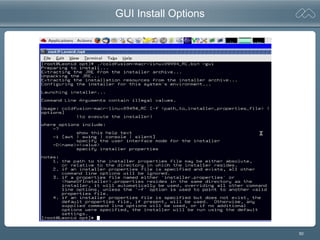
GUI Install Options
51
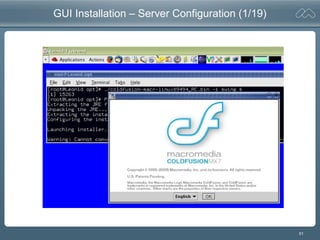
GUI Installation – Server Configuration (1/19)
52
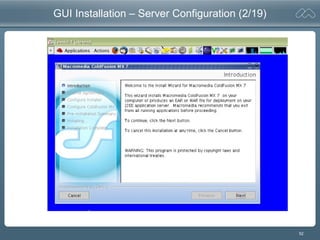
GUI Installation – Server Configuration (2/19)
53
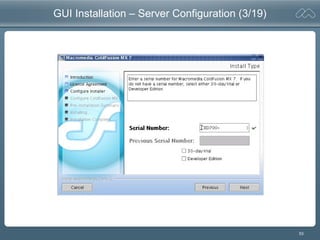
GUI Installation – Server Configuration (3/19)
54
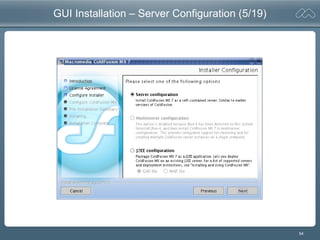
GUI Installation – Server Configuration (5/19)
55
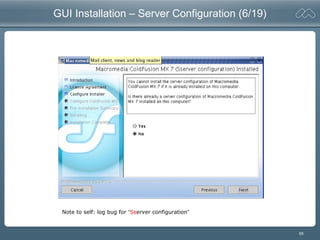
GUI Installation – Server Configuration (6/19)
Note to self: log bug for “Sserver configuration”
56
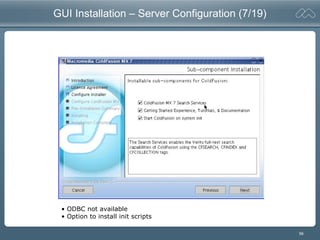
GUI Installation – Server Configuration (7/19)
• ODBC not available
• Option to install init scripts
57
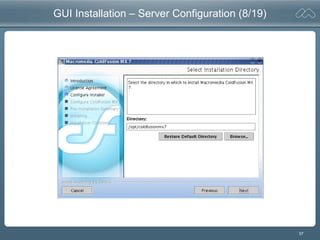
GUI Installation – Server Configuration (8/19)
58
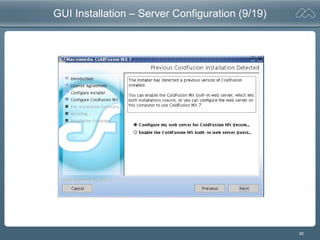
GUI Installation – Server Configuration (9/19)
59
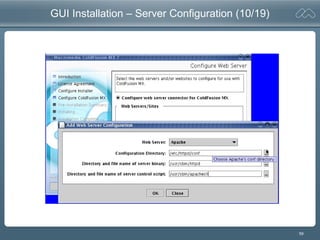
GUI Installation – Server Configuration (10/19)
60
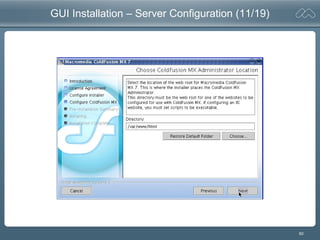
GUI Installation – Server Configuration (11/19)
61
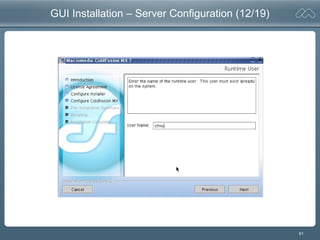
GUI Installation – Server Configuration (12/19)
62
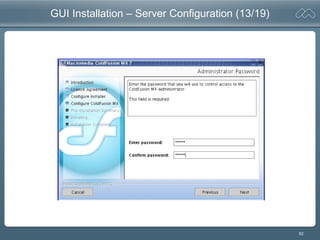
GUI Installation – Server Configuration (13/19)
63
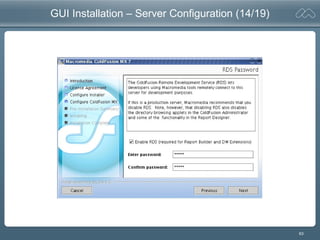
GUI Installation – Server Configuration (14/19)
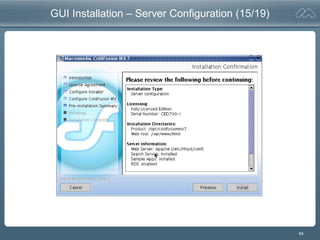
64
GUI Installation – Server Configuration (15/19)
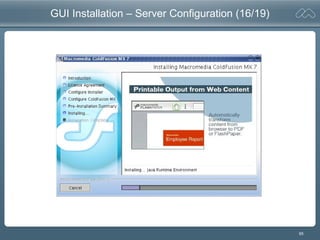
65
GUI Installation – Server Configuration (16/19)
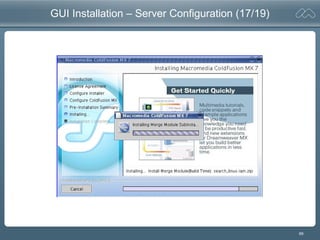
66
GUI Installation – Server Configuration (17/19)
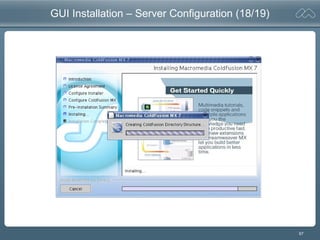
67
GUI Installation – Server Configuration (18/19)
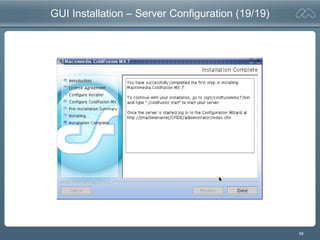
68
GUI Installation – Server Configuration (19/19)
69
Processes, Directories, Files, Init Scripts
Starting ColdFusion
“Auto” Webserver Configuration
70
Server Configuration – Directory Contents
[root@Leonid bin]# pwd
/opt/coldfusionmx7/bin
[root@Leonid bin]# ls -l
total 2280
-rwxr-xr-x 1 cfmx bin 5639 Dec 14 20:50 cfcompile.sh
-rwxr-xr-x 1 cfmx bin 1501420 May 23 2001 cfencode.exe
-rwxr-xr-x 1 cfmx bin 110264 Mar 12 2002 cfencode.linux
-rwxr-xr-x 1 cfmx bin 527624 Mar 12 2002 cfencode.solaris
-rwxr-xr-x 1 cfmx bin 254 Dec 14 20:50 cfinfo
-rwxr-xr-x 1 cfmx bin 54723 Dec 14 20:50 cfmx7
-rwxr-xr-x 1 cfmx bin 1749 Dec 14 20:50 cfmx-connectors.sh
-rwxr-xr-x 1 cfmx bin 4866 Dec 14 20:50 cfmx-init.sh
-rwxr-xr-x 1 cfmx bin 1412 Dec 14 20:50 cfmx7search
-rwxr-xr-x 1 cfmx bin 416 Dec 14 20:50 cfscan.sh
-rwxr-xr-x 1 cfmx bin 431 Dec 14 20:50 cfstat
-rwxr-xr-x 1 cfmx bin 7126 Dec 14 20:50 coldfusion
drwxrwxr-x 2 cfmx bin 4096 Dec 14 20:50 connectors
-rwxr-xr-x 1 cfmx bin 860 Dec 14 20:50 findjava.sh
-rwxr-xr-x 1 cfmx bin 377 Dec 14 20:50 SMSClient.sh
[root@Leonid bin]# ls -l /etc/init.d/ | grep mx
-rwxr-xr-x 1 root root 1412 Dec 14 20:50 cfmx7search
-rwxr-xr-x 1 root root 7126 Dec 14 20:50 coldfusionmx7
71
k2admin Processes Running
[root@Leonid bin]# ps -ef | grep cold
cfmx 16311 1 0 20:49 pts/3 /opt/coldfusionmx7/verity/k2/_ilnx21/bin/k2admin
cfmx 16471 16475 0 20:50 pts/3 /opt/coldfusionmx7/verity/k2/_ilnx21/bin/k2server -ualias ColdFusionK2_server1
cfmx 16474 16475 0 20:50 pts/3 /opt/coldfusionmx7/verity/k2/_ilnx21/bin/k2index –ualias ColdFusionK2_indexserver1
72
Starting k2 on Red Hat Linux
[root@Leonid bin]# ls -l /etc/init.d/ | grep mx
-rwxr-xr-x 1 root root 1412 Dec 14 20:50 cfmx7search
-rwxr-xr-x 1 root root 7126 Dec 14 20:50 coldfusionmx7
[root@Leonid bin]# service cfmx7search stop
[root@Leonid bin]# service cfmx7search start
SUCCESS: Created with process ID: 19307
Please use the k2adminstop script to terminate process
[root@Leonid bin]#
73
Starting the Server Configuration
[root@Leonid bin]# ls -l /etc/init.d/ | grep mx
-rwxr-xr-x 1 root root 1412 Dec 14 20:50 cfmx7search
-rwxr-xr-x 1 root root 7126 Dec 14 20:50 coldfusionmx7
[root@Leonid bin]# pwd
/opt/coldfusionmx7/bin
[root@Leonid bin]# service coldfusionmx7 start
Starting ColdFusion MX 7...
The ColdFusion MX 7 server is starting up and will be available shortly.
======================================================================
Running the ColdFusion MX 7 connector wizard
======================================================================
Configuring the web server connector (Launched on the first run of the ColdFusion MX 7
start script)
Running apache connector wizard...
ColdFusion MX 7 not started, will retry connector 12 more time(s)
Connector installation succeeded for apache
======================================================================
ColdFusion MX 7 has been started.
ColdFusion MX 7 will write logs to /opt/coldfusionmx7/logs/cfserver.log
======================================================================
[root@Leonid bin]#
74
Turning off/on ColdFusion init scripts on Linux
[root@Leonid ~]# cd /etc/init.d/
[root@Leonid init.d]# ls -l | grep mx
-rwxr-xr-x 1 root root 1412 Dec 14 20:50 cfmx7search
-rwxr-xr-x 1 root root 7126 Dec 14 20:50 coldfusionmx7
[root@Leonid init.d]# chkconfig
chkconfig version 1.3.11.1 - Copyright (C) 1997-2000 Red Hat, Inc.
This may be freely redistributed under the terms of the GNU Public License.
usage: chkconfig --list [name]
chkconfig --add <name>
chkconfig --del <name>
chkconfig [--level <levels>] <name> <on|off|reset>
[root@Leonid init.d]# chkconfig cfmx7search off
[root@Leonid init.d]# chkconfig --list cfmx7search
cfmx7search 0:off 1:off 2:off 3:off 4:off 5:off 6:off
[root@Leonid init.d]# chkconfig cfmx7search on
[root@Leonid init.d]# chkconfig --list cfmx7search
cfmx7search 0:off 1:off 2:on 3:on 4:on 5:on 6:off
[root@Leonid init.d]#
75
Server Configuration – $CFHOME/runtime/servers
[root@Leonid ~]# ls -l /opt/coldfusionmx7/runtime/servers/
total 16
drwxrwxr-x 3 cfmx bin 4096 Dec 14 20:50 coldfusion
drwxrwxr-x 2 cfmx bin 4096 Dec 14 20:50 lib
[root@Leonid ~]#
ColdFusion MX 6.x used server named “default”
ColdFusion MX 7 uses server named “coldfusion”
A $cfhome/runtime/servers/lib directory is provided by default
76
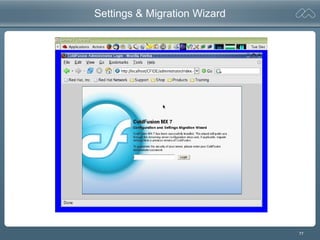
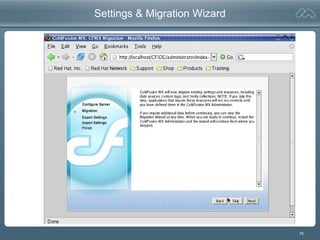
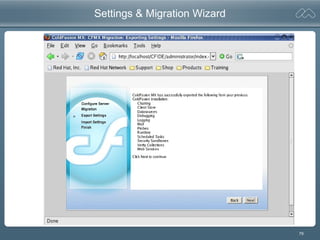
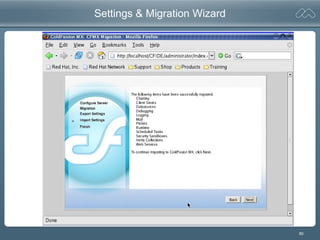
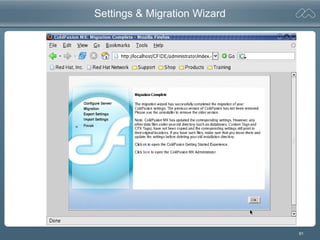
Settings and Migration Wizard
77
Settings & Migration Wizard
78
Settings & Migration Wizard
79
Settings & Migration Wizard
80
Settings & Migration Wizard
81
Settings & Migration Wizard
82
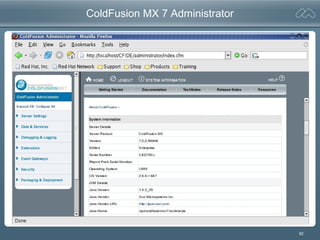
ColdFusion MX 7 Administrator
83
Server Configuration on Solaris with iPlanet
Directories, Files, Startup, Processes
Examining the Webserver Configuration
Uninstalling ColdFusion
84
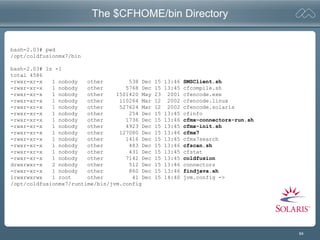
The $CFHOME/bin Directory
bash-2.03# pwd
/opt/coldfusionmx7/bin
bash-2.03# ls -l
total 4586
-rwxr-xr-x 1 nobody other 538 Dec 15 13:46 SMSClient.sh
-rwxr-xr-x 1 nobody other 5768 Dec 15 13:45 cfcompile.sh
-rwxr-xr-x 1 nobody other 1501420 May 23 2001 cfencode.exe
-rwxr-xr-x 1 nobody other 110264 Mar 12 2002 cfencode.linux
-rwxr-xr-x 1 nobody other 527624 Mar 12 2002 cfencode.solaris
-rwxr-xr-x 1 nobody other 254 Dec 15 13:45 cfinfo
-rwxr-xr-x 1 nobody other 1736 Dec 15 13:46 cfmx-connectors-run.sh
-rwxr-xr-x 1 nobody other 4923 Dec 15 13:45 cfmx-init.sh
-rwxr-xr-x 1 nobody other 127080 Dec 15 13:46 cfmx7
-rwxr-xr-x 1 nobody other 1416 Dec 15 13:45 cfmx7search
-rwxr-xr-x 1 nobody other 483 Dec 15 13:46 cfscan.sh
-rwxr-xr-x 1 nobody other 431 Dec 15 13:45 cfstat
-rwxr-xr-x 1 nobody other 7142 Dec 15 13:45 coldfusion
drwxrwxr-x 2 nobody other 512 Dec 15 13:46 connectors
-rwxr-xr-x 1 nobody other 860 Dec 15 13:46 findjava.sh
lrwxrwxrwx 1 root other 41 Dec 15 14:40 jvm.config ->
/opt/coldfusionmx7/runtime/bin/jvm.config
85
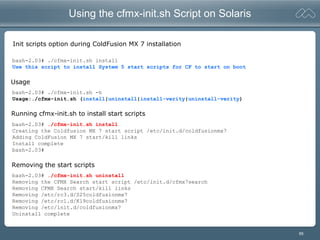
Using the cfmx-init.sh Script on Solaris
Init scripts option during ColdFusion MX 7 installation
bash-2.03# ./cfmx-init.sh install
Use this script to install System 5 start scripts for CF to start on boot
bash-2.03# ./cfmx-init.sh -h
Usage:./cfmx-init.sh (install|uninstall|install-verity|uninstall-verity)
bash-2.03# ./cfmx-init.sh install
Creating the Coldfusion MX 7 start script /etc/init.d/coldfusionmx7
Adding ColdFusion MX 7 start/kill links
Install complete
bash-2.03#
bash-2.03# ./cfmx-init.sh uninstall
Removing the CFMX Search start script /etc/init.d/cfmx7search
Removing CFMX Search start/kill links
Removing /etc/rc3.d/S25coldfusionmx7
Removing /etc/rc1.d/K19coldfusionmx7
Removing /etc/init.d/coldfusionmx7
Uninstall complete
Running cfmx-init.sh to install start scripts
Removing the start scripts
Usage
86
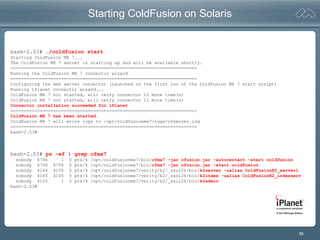
Starting ColdFusion on Solaris
bash-2.03# ./coldfusion start
Starting ColdFusion MX 7...
The ColdFusion MX 7 server is starting up and will be available shortly.
======================================================================
Running the ColdFusion MX 7 connector wizard
======================================================================
Configuring the web server connector (Launched on the first run of the ColdFusion MX 7 start script)
Running iPlanet connector wizard...
ColdFusion MX 7 not started, will retry connector 12 more time(s)
ColdFusion MX 7 not started, will retry connector 11 more time(s)
Connector installation succeeded for iPlanet
======================================================================
ColdFusion MX 7 has been started.
ColdFusion MX 7 will write logs to /opt/coldfusionmx7/logs/cfserver.log
======================================================================
bash-2.03#
bash-2.03# ps -ef | grep cfmx7
nobody 6706 1 0 pts/4 /opt/coldfusionmx7/bin/cfmx7 -jar cfusion.jar -autorestart -start coldfusion
nobody 6708 6706 0 pts/4 /opt/coldfusionmx7/bin/cfmx7 -jar cfusion.jar -start coldfusion
nobody 4164 4105 0 pts/4 /opt/coldfusionmx7/verity/k2/_ssol26/bin/k2server -ualias ColdFusionK2_server1
nobody 4165 4105 0 pts/4 /opt/coldfusionmx7/verity/k2/_ssol26/bin/k2index -ualias ColdFusionK2_indexserv
nobody 4105 1 0 pts/4 /opt/coldfusionmx7/verity/k2/_ssol26/bin/k2admin
bash-2.03#
87
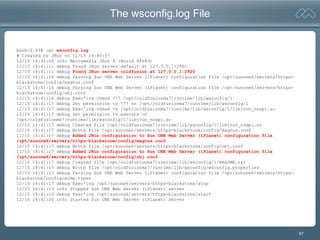
The wsconfig.log File
bash-2.03# cat wsconfig.log
# Created by JRun on 12/15 14:40:37
12/15 14:41:04 info Macromedia JRun 4 (Build 84683)
12/15 14:41:11 debug Found JRun server default at 127.0.0.1:2901
12/15 14:41:11 debug Found JRun server coldfusion at 127.0.0.1:2920
12/15 14:41:16 debug Parsing Sun ONE Web Server (iPlanet) configuration file /opt/sunone6/servers/https-
blackstone/config/magnus.conf
12/15 14:41:16 debug Parsing Sun ONE Web Server (iPlanet) configuration file /opt/sunone6/servers/https-
blackstone/config/obj.conf
12/15 14:41:16 debug Exec'ing chmod 777 /opt/coldfusionmx7/runtime/lib/wsconfig/1
12/15 14:41:17 debug Set permission to 777 on /opt/coldfusionmx7/runtime/lib/wsconfig/1
12/15 14:41:17 debug Exec'ing chmod +x /opt/coldfusionmx7/runtime/lib/wsconfig/1/libjrun_nsapi.so
12/15 14:41:17 debug Set permission to execute on
/opt/coldfusionmx7/runtime/lib/wsconfig/1/libjrun_nsapi.so
12/15 14:41:17 debug Created file /opt/coldfusionmx7/runtime/lib/wsconfig/1/libjrun_nsapi.so
12/15 14:41:17 debug Wrote file /opt/sunone6/servers/https-blackstone/config/magnus.conf
12/15 14:41:17 debug Added JRun configuration to Sun ONE Web Server (iPlanet) configuration file
/opt/sunone6/servers/https-blackstone/config/magnus.conf
12/15 14:41:17 debug Wrote file /opt/sunone6/servers/https-blackstone/config/obj.conf
12/15 14:41:17 debug Added JRun configuration to Sun ONE Web Server (iPlanet) configuration file
/opt/sunone6/servers/https-blackstone/config/obj.conf
12/15 14:41:17 debug Created file /opt/coldfusionmx7/runtime/lib/wsconfig/1/README.txt
12/15 14:41:17 debug Wrote file /opt/coldfusionmx7/runtime/lib/wsconfig/wsconfig.properties
12/15 14:41:17 debug Parsing Sun ONE Web Server (iPlanet) configuration file /opt/sunone6/servers/https-
blackstone/config/mime.types
12/15 14:41:17 debug Exec'ing /opt/sunone6/servers/https-blackstone/stop
12/15 14:41:19 info Stopped Sun ONE Web Server (iPlanet) server
12/15 14:41:19 debug Exec'ing /opt/sunone6/servers/https-blackstone/start
12/15 14:41:26 info Started Sun ONE Web Server (iPlanet) server
88
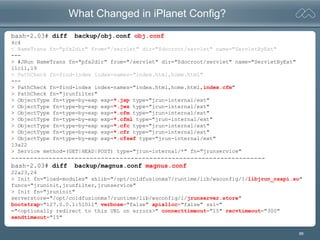
What Changed in iPlanet Config?
bash-2.03# diff backup/obj.conf obj.conf
4c4
< NameTrans fn="pfx2dir" from="/servlet" dir="$docroot/servlet" name="ServletByExt"
---
> #JRun NameTrans fn="pfx2dir" from="/servlet" dir="$docroot/servlet" name="ServletByExt"
11c11,19
< PathCheck fn=find-index index-names="index.html,home.html"
---
> PathCheck fn=find-index index-names="index.html,home.html,index.cfm"
> PathCheck fn="jrunfilter"
> ObjectType fn=type-by-exp exp=*.jsp type="jrun-internal/ext"
> ObjectType fn=type-by-exp exp=*.jws type="jrun-internal/ext"
> ObjectType fn=type-by-exp exp=*.cfm type="jrun-internal/ext"
> ObjectType fn=type-by-exp exp=*.cfml type="jrun-internal/ext"
> ObjectType fn=type-by-exp exp=*.cfc type="jrun-internal/ext"
> ObjectType fn=type-by-exp exp=*.cfr type="jrun-internal/ext"
> ObjectType fn=type-by-exp exp=*.cfswf type="jrun-internal/ext"
13a22
> Service method=(GET|HEAD|POST) type="jrun-internal/*" fn="jrunservice"
--------------------------------------------------------------------
bash-2.03# diff backup/magnus.conf magnus.conf
22a23,24
> Init fn="load-modules" shlib="/opt/coldfusionmx7/runtime/lib/wsconfig/1/libjrun_nsapi.so"
funcs="jruninit,jrunfilter,jrunservice"
> Init fn="jruninit"
serverstore="/opt/coldfusionmx7/runtime/lib/wsconfig/1/jrunserver.store"
bootstrap="127.0.0.1:51011" verbose="false" apialloc="false" ssl="
="<optionally redirect to this URL on errors>" connecttimeout="15" recvtimeout="300"
sendtimeout="15"
89
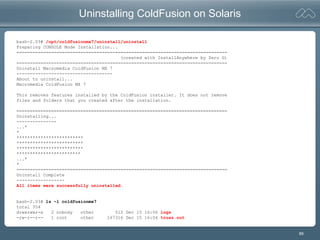
Uninstalling ColdFusion on Solaris
bash-2.03# /opt/coldfusionmx7/uninstall/uninstall
Preparing CONSOLE Mode Installation...
===============================================================================
(created with InstallAnywhere by Zero G)
===============================================================================
Uninstall Macromedia ColdFusion MX 7
------------------------------------
About to uninstall...
Macromedia ColdFusion MX 7
This removes features installed by the ColdFusion installer. It does not remove
files and folders that you created after the installation.
===============================================================================
Uninstalling...
---------------
...*
*
*************************
*************************
*************************
************************
...*
*
===============================================================================
Uninstall Complete
------------------
All items were successfully uninstalled.
bash-2.03# ls -l coldfusionmx7
total 354
drwxrwxr-x 2 nobody other 512 Dec 15 16:06 logs
-rw-r--r-- 1 root other 167316 Dec 15 16:04 truss.out
90
Thread Dumps
91
Generating Thread Dumps on Linux
[root@Leonid init.d]# pstree -p | grep cfmx7
cfmx7(2596)--cfmx7(2598)--cfmx7(2603)---|--cfmx7(2604)
|--cfmx7(2605)
|--cfmx7(2606)
Technote 18339 indicates “pstree –p | grep cfusion” to generate process tree.
This does not work with ColdFusion MX 7. May catch CFMX 6.1 if also running.
Linux: Use “pstree –p | grep cfmx7 | head -3”, identify the second PID from left
[root@Leonid coldfusionmx7]# ls -l logs/cfserver.log
-rw-rw-r-- 1 cfmx bin 8065 Dec 15 11:03 logs/cfserver.log
[root@Leonid coldfusionmx7]# kill -3 2598
[root@Leonid coldfusionmx7]# ls -l logs/cfserver.log
-rw-rw-r-- 1 cfmx bin 27814 Dec 15 11:55 logs/cfserver.log
[root@Leonid coldfusionmx7]#
92
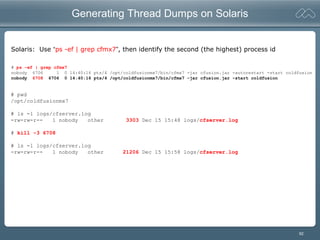
Generating Thread Dumps on Solaris
Solaris: Use “ps -ef | grep cfmx7”, then identify the second (the highest) process id
# ps -ef | grep cfmx7
nobody 6706 1 0 14:40:16 pts/4 /opt/coldfusionmx7/bin/cfmx7 -jar cfusion.jar -autorestart -start coldfusion
nobody 6708 6706 0 14:40:16 pts/4 /opt/coldfusionmx7/bin/cfmx7 -jar cfusion.jar -start coldfusion
# pwd
/opt/coldfusionmx7
# ls -l logs/cfserver.log
-rw-rw-r-- 1 nobody other 3303 Dec 15 15:48 logs/cfserver.log
# kill -3 6708
# ls -l logs/cfserver.log
-rw-rw-r-- 1 nobody other 21206 Dec 15 15:58 logs/cfserver.log
93
Adding Timestamp to Thread Dump
[root@Leonid coldfusionmx7]# date
Wed Dec 15 11:59:07 EST 2004
[root@Leonid coldfusionmx7]# echo "Taking thread dump now: `date`"
Taking thread dump now: Wed Dec 15 11:59:39 EST 2004
[root@Leonid coldfusionmx7]# echo "Taking thread dump now: `date`" >> logs/cfserver.log
[root@Leonid coldfusionmx7]# kill -3 2598
[root@Leonid coldfusionmx7]# echo "Finished thread dump now: `date`" >> logs/cfserver.log
Append date and time stamp to log file as delimters of thread dump
Use “{command} >> {log file}”
Using the “date” command
94
Miscellaneous
95
Installation Debugging Options
LAX_DEBUG=true
Set the debug enviroment variable LAX_DEBUG=true from the active shell before running installer
to output to the console, mixing with the usual install text.
[root@Leonid ~]# export LAX_DEBUG=true
[root@Leonid ~]# ./coldfusionmx-macr-linux.bin
–DSAVE_DEBUG_OUTPUT=true
Start the installer with the argument –DSAVE_DEBUG_OUTPUT=true to output debug info to
{cfroot}/install_debug.txt
[root@Leonid ~]# ./coldfusionmx-macr-linux.bin –DSAVE_DEBUG_OUTPUT=true
Use Both Together
Use both the above together to get debug info at the console and install_debug.txt log file.
96
The wsconfig Utility Fails
Found port 2901 on host localhost
could not connect to port 2901 on host 127.0.0.1
javax.naming.ServiceUnavailableException: The connection to the remote
JNDI server on host 127.0.0.1 at port 2901 has failed (as have all
backup hosts listed, if any) - please verify that the server is running
and the NamingService is available [Root exception is java.net.ConnectException: Connection
refused]
<snip> { java stack trace here } </snip>
Could not connect to any JRun/ColdFusion servers on host localhost.
Possible causes:
o Server not running
-Start Macromedia JRun4 or ColdFusion MX server
o Server running
-JNDI listen port in jndi.properties blocked by TCP/IP filtering or firewall on server
-host restriction in security.properties blocking communication with server
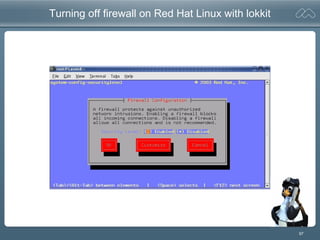
Is there a firewall on local system?
Red Hat: Use lokkit to disable local firewall
Is there a problem with the Network configuration on the system?
Red Hat: check /etc/hosts and /etc/sysconfig/network
SuSE: check /etc/hosts and /etc/HOSTNAME
97
Turning off firewall on Red Hat Linux with lokkit
98
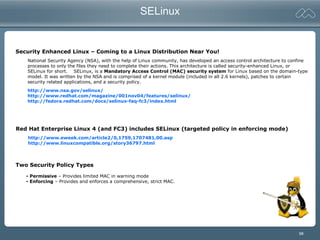
SELinux
Security Enhanced Linux – Coming to a Linux Distribution Near You!
National Security Agency (NSA), with the help of Linux community, has developed an access control architecture to confine
processes to only the files they need to complete their actions. This architecture is called security-enhanced Linux, or
SELinux for short. SELinux, is a Mandatory Access Control (MAC) security system for Linux based on the domain-type
model. It was written by the NSA and is comprised of a kernel module (included in all 2.6 kernels), patches to certain
security related applications, and a security policy.
http://www.nsa.gov/selinux/
http://www.redhat.com/magazine/001nov04/features/selinux/
http://fedora.redhat.com/docs/selinux-faq-fc3/index.html
Red Hat Enterprise Linux 4 (and FC3) includes SELinux (targeted policy in enforcing mode)
http://www.eweek.com/article2/0,1759,1707481,00.asp
http://www.linuxcompatible.org/story36797.html
Two Security Policy Types
- Permissive – Provides limited MAC in warning mode
- Enforcing – Provides and enforces a comprehensive, strict MAC.
99
SELinux
Q: How do I turn enforcing on/off at boot?
A: You can specify the SELinux mode using the configuration file
/etc/sysconfig/selinux
# This file controls the state of SELinux on the system.
# SELINUX= can take one of these three values:
# enforcing - SELinux security policy is enforced.
# permissive - SELinux prints warnings instead of enforcing.
# disabled - No SELinux policy is loaded.
# SELINUX=permissive
SELINUX=enforcing
# SELINUXTYPE= type of policy in use. Possible values are:
# targeted - Only targeted network daemons are protected.
# strict - Full SELinux protection.
SELINUXTYPE=targeted
[root@Aneto wsconfig]# service httpd restart
Stopping httpd: [ OK ]
Starting httpd: Syntax error on line 907 of /etc/httpd/conf/httpd.conf:
Cannot load /opt/coldfusionmx7/runtime/lib/wsconfig/1/mod_jrun20.so into server:
/opt/coldfusionmx7/runtime/lib/wsconfig/1/mod_jrun20.so:
failed to map segment from shared object: Permission denied
[FAILED]
Starting Apache when SELinux in enforcing mode and configured for CFMX
100
Building Connector From Source
[root@Aneto ~]# cd /tmp/
[root@Aneto tmp]# mkdir cfmx7connector; cd cfmx7connector/
[root@Aneto cfmx7connector]# cp /opt/coldfusionmx7/runtime/lib/wsconfig.jar .
[root@Aneto cfmx7connector]# ls
wsconfig.jar
[root@Aneto cfmx7connector]# jar -xf wsconfig.jar
[root@Aneto cfmx7connector]# ls -l
total 2420
drwxr-xr-x 7 root root 4096 Mar 10 11:22 connectors
drwxr-xr-x 3 root root 4096 Mar 10 11:22 javax
drwxr-xr-x 6 root root 4096 Mar 10 11:22 jrun
drwxr-xr-x 12 root root 4096 Mar 10 11:22 jrunx
drwxr-xr-x 2 root root 4096 Mar 10 11:22 META-INF
drwxr-xr-x 3 root root 4096 Mar 10 11:22 org
-rwxr-xr-x 1 root root 2417853 Mar 10 11:21 wsconfig.jar
[root@Aneto cfmx7connector]# find . -name ApacheBuild*.txt
./connectors/src/ApacheBuildInstructions.txt
[root@Aneto cfmx7connector]#
Connector source not extracted in ColdFusion MX 7
101
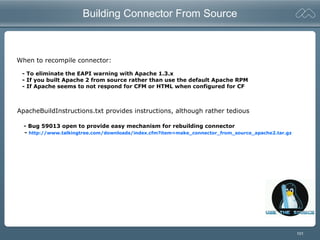
Building Connector From Source
When to recompile connector:
- To eliminate the EAPI warning with Apache 1.3.x
- If you built Apache 2 from source rather than use the default Apache RPM
- If Apache seems to not respond for CFM or HTML when configured for CF
ApacheBuildInstructions.txt provides instructions, although rather tedious
- Bug 59013 open to provide easy mechanism for rebuilding connector
- http://www.talkingtree.com/downloads/index.cfm?item=make_connector_from_source_apache2.tar.gz
102
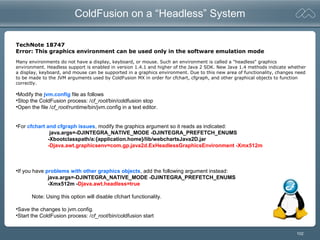
ColdFusion on a “Headless” System
TechNote 18747
Error: This graphics environment can be used only in the software emulation mode
•Modify the jvm.config file as follows
•Stop the ColdFusion process: /cf_root/bin/coldfusion stop
•Open the file /cf_root/runtime/bin/jvm.config in a text editor.
•For cfchart and cfgraph issues, modify the graphics argument so it reads as indicated:
java.args=-DJINTEGRA_NATIVE_MODE -DJINTEGRA_PREFETCH_ENUMS
-Xbootclasspath/a:{application.home}/lib/webchartsJava2D.jar
-Djava.awt.graphicsenv=com.gp.java2d.ExHeadlessGraphicsEnvironment -Xmx512m
•If you have problems with other graphics objects, add the following argument instead:
java.args=-DJINTEGRA_NATIVE_MODE -DJINTEGRA_PREFETCH_ENUMS
-Xmx512m -Djava.awt.headless=true
Note: Using this option will disable cfchart functionality.
•Save the changes to jvm.config.
•Start the ColdFusion process: /cf_root/bin/coldfusion start
Many environments do not have a display, keyboard, or mouse. Such an environment is called a "headless" graphics
environment. Headless support is enabled in version 1.4.1 and higher of the Java 2 SDK. New Java 1.4 methods indicate whether
a display, keyboard, and mouse can be supported in a graphics environment. Due to this new area of functionality, changes need
to be made to the JVM arguments used by ColdFusion MX in order for cfchart, cfgraph, and other graphical objects to function
correctly.
103
Collecting System Information on Linux
[root@Leonid ~]# uname -a
Linux Leonid 2.6.9-1.667 #1 Tue Nov 2 14:41:25 EST 2004 i686 i686 i386 GNU/Linux
[root@Leonid ~]# cat /etc/redhat-release
Fedora Core release 3 (Heidelberg)
ps-shiraz:~ # cat /etc/SuSE-release
SuSE Linux 8.2 (i586)
VERSION = 8.2
[root@Leonid ~]# cat /proc/cpuinfo
processor : 0
vendor_id : GenuineIntel
cpu family : 6
model : 13
model name : Intel(R) Pentium(R) M processor 1.50GHz
cpu MHz : 599.612
...
[root@Leonid ~]# cat /proc/meminfo
MemTotal: 775588 kB
MemFree: 194180 kB
Buffers: 97988 kB
Cached: 189164 kB
SwapCached: 0 kB
Active: 253884 kB
Inactive: 203880 kB
HighTotal: 0 kB
HighFree: 0 kB
...
[root@Leonid opt]#
104
Using The Debugging Tool strace
[root@Leonid bin]# strace ./coldfusion start
execve("./coldfusion", ["./coldfusion", "start"], [/* 19 vars */]) = 0
uname({sys="Linux", node="Leonid", ...}) = 0
brk(0) = 0x9701000
access("/etc/ld.so.preload", R_OK) = -1 ENOENT (No such file or directory)
...
close(3) = 0
open("/proc/meminfo", O_RDONLY) = 3
fstat64(3, {st_mode=S_IFREG|0444, st_size=0, ...}) = 0
mmap2(NULL, 4096, PROT_READ|PROT_WRITE, MAP_PRIVATE|MAP_ANONYMOUS, -1, 0) = 0xf6df1000
read(3, "MemTotal: 775588 kBnMemFre"..., 1024) = 644
close(3)
...
open("/opt/coldfusionmx7/logs/cfserver.log", O_WRONLY|O_APPEND|O_CREAT|O_LARGEFILE, 0666) = 3
fcntl64(1, F_GETFD) = 0
...
dup2(3, 1) = 1
close(3) .....
stat64("/opt/coldfusionmx7/bin/cfmx-connectors.sh", 0xfee44090) = -1 ENOENT
71======================================================================
) = 71
write(1, "ColdFusion MX 7 has been started"..., 34ColdFusion MX 7 has been started.
) = 34
strace
strace is a useful diagnostic, instructional, and debugging tool. System administrators, diagnosticians and trouble-shooters
will find it invaluable for solving problems with programs for which the source is not readily available since they do not need
to be recompiled in order to trace them. Students, hackers and the overly-curious will find that a great deal can be learned
about a system and its system calls by tracing even ordinary programs.
Using strace
105
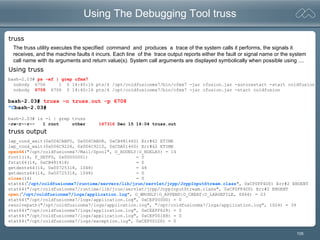
Using The Debugging Tool truss
bash-2.03# ps -ef | grep cfmx7
nobody 6706 1 0 14:40:16 pts/4 /opt/coldfusionmx7/bin/cfmx7 -jar cfusion.jar -autorestart -start coldfusion
nobody 6708 6706 0 14:40:16 pts/4 /opt/coldfusionmx7/bin/cfmx7 -jar cfusion.jar -start coldfusion
bash-2.03# truss -o truss.out -p 6708
^Cbash-2.03#
bash-2.03# ls -l | grep truss
-rw-r--r-- 1 root other 167316 Dec 15 16:04 truss.out
lwp_cond_wait(0x006CABF0, 0x006CABD8, 0xCB481460) Err#62 ETIME
lwp_cond_wait(0x006C9228, 0x006C9210, 0xCDA01460) Err#62 ETIME
open64("/opt/coldfusionmx7/Mail/Spool", O_RDONLY|O_NDELAY) = 14
fcntl(14, F_SETFD, 0x00000001) = 0
fstat64(14, 0xCB481418) = 0
getdents64(14, 0x00725318, 1048) = 48
getdents64(14, 0x00725318, 1048) = 0
close(14) = 0
stat64(“/opt/coldfusionmx7/runtime/servers/lib/jrun/servlet/jrpp/JrppInputStream.class", 0xCF0FF4D0) Err#2 ENOENT
stat64("/opt/coldfusionmx7/runtime/lib/jrun/servlet/jrpp/JrppInputStream.class", 0xCF0FF4D0) Err#2 ENOENT
open(“/opt/coldfusionmx7/logs/application.log", O_WRONLY|O_APPEND|O_CREAT|O_LARGEFILE, 0666) = 23
stat64("/opt/coldfusionmx7/logs/application.log", 0xCEF000D0) = 0
resolvepath("/opt/coldfusionmx7/logs/application.log", "/opt/coldfusionmx7/logs/application.log", 1024) = 39
stat64("/opt/coldfusionmx7/logs/application.log", 0xCEEFF628) = 0
stat64("/opt/coldfusionmx7/logs/application.log", 0xCEF001E8) = 0
stat64("/opt/coldfusionmx7/logs/exception.log", 0xCEF001D0) = 0
truss
Using truss
truss output
The truss utility executes the specified command and produces a trace of the system calls it performs, the signals it
receives, and the machine faults it incurs. Each line of the trace output reports either the fault or signal name or the system
call name with its arguments and return value(s). System call arguments are displayed symbolically when possible using ....
106
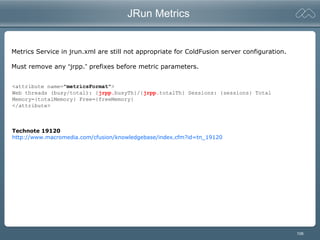
JRun Metrics
<attribute name="metricsFormat">
Web threads (busy/total): {jrpp.busyTh}/{jrpp.totalTh} Sessions: {sessions} Total
Memory={totalMemory} Free={freeMemory}
</attribute>
Technote 19120
http://www.macromedia.com/cfusion/knowledgebase/index.cfm?id=tn_19120
Metrics Service in jrun.xml are still not appropriate for ColdFusion server configuration.
Must remove any “jrpp.” prefixes before metric parameters.
107
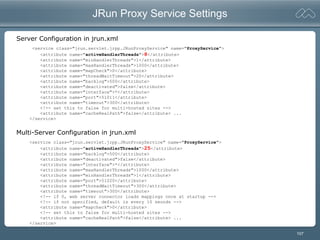
JRun Proxy Service Settings
<service class="jrun.servlet.jrpp.JRunProxyService" name="ProxyService">
<attribute name="activeHandlerThreads">8</attribute>
<attribute name="minHandlerThreads">1</attribute>
<attribute name="maxHandlerThreads">1000</attribute>
<attribute name="mapCheck">0</attribute>
<attribute name="threadWaitTimeout">20</attribute>
<attribute name="backlog">500</attribute>
<attribute name="deactivated">false</attribute>
<attribute name="interface">*</attribute>
<attribute name="port">51011</attribute>
<attribute name="timeout">300</attribute>
<!-- set this to false for multi-hosted sites -->
<attribute name="cacheRealPath">false</attribute> ...
</service>
Server Configuration in jrun.xml
<service class="jrun.servlet.jrpp.JRunProxyService" name="ProxyService">
<attribute name="activeHandlerThreads">25</attribute>
<attribute name="backlog">500</attribute>
<attribute name="deactivated">false</attribute>
<attribute name="interface">*</attribute>
<attribute name="maxHandlerThreads">1000</attribute>
<attribute name="minHandlerThreads">1</attribute>
<attribute name="port">51020</attribute>
<attribute name="threadWaitTimeout">300</attribute>
<attribute name="timeout">300</attribute>
<!-- if 0, web server connector loads mappings once at startup -->
<!-- if not specified, default is every 10 seonds -->
<attribute name="mapcheck">0</attribute>
<!-- set this to false for multi-hosted sites -->
<attribute name="cacheRealPath">false</attribute> ...
</service>
Multi-Server Configuration in jrun.xml
108
Process List
[root@Aneto ~]# ps -ef | grep cfmx7
nobody 5902 1 0 11:00 pts/3 00:00:00 /opt/coldfusionmx7/bin/cfmx7 -jar cfusion.jar -autorestart -start coldfusion
nobody 5904 5902 0 11:00 pts/3 00:00:11 /opt/coldfusionmx7/bin/cfmx7 -jar cfusion.jar -start coldfusion
nobody 5905 5904 0 11:00 pts/3 00:00:00 /opt/coldfusionmx7/bin/cfmx7 -jar cfusion.jar -start coldfusion
nobody 5906 5905 0 11:00 pts/3 00:00:00 /opt/coldfusionmx7/bin/cfmx7 -jar cfusion.jar -start coldfusion
nobody 5907 5905 0 11:00 pts/3 00:01:09 /opt/coldfusionmx7/bin/cfmx7 -jar cfusion.jar -start coldfusion
nobody 5908 5905 0 11:00 pts/3 00:00:00 /opt/coldfusionmx7/bin/cfmx7 -jar cfusion.jar -start coldfusion
nobody 5909 5905 0 11:00 pts/3 00:00:00 /opt/coldfusionmx7/bin/cfmx7 -jar cfusion.jar -start coldfusion
nobody 5910 5905 0 11:00 pts/3 00:00:00 /opt/coldfusionmx7/bin/cfmx7 -jar cfusion.jar -start coldfusion
nobody 5911 5905 0 11:00 pts/3 00:00:00 /opt/coldfusionmx7/bin/cfmx7 -jar cfusion.jar -start coldfusion
nobody 5912 5905 0 11:00 pts/3 00:00:00 /opt/coldfusionmx7/bin/cfmx7 -jar cfusion.jar -start coldfusion
nobody 5913 5905 0 11:00 pts/3 00:00:05 /opt/coldfusionmx7/bin/cfmx7 -jar cfusion.jar -start coldfusion
nobody 5914 5905 0 11:00 pts/3 00:00:03 /opt/coldfusionmx7/bin/cfmx7 -jar cfusion.jar -start coldfusion
nobody 5915 5905 0 11:00 pts/3 00:00:00 /opt/coldfusionmx7/bin/cfmx7 -jar cfusion.jar -start coldfusion
nobody 5916 5905 0 11:00 pts/3 00:00:00 /opt/coldfusionmx7/bin/cfmx7 -jar cfusion.jar -start coldfusion
nobody 5917 5905 0 11:00 pts/3 00:00:00 /opt/coldfusionmx7/bin/cfmx7 -jar cfusion.jar -start coldfusion
(40+ more when server is just idle ...)
Why are there so many ColdFusion processes on Linux?
# ps -ef | grep cfmx7
nobody 6706 1 0 14:40:16 pts/4 /opt/coldfusionmx7/bin/cfmx7 -jar cfusion.jar -autorestart -start coldfusion
nobody 6708 6706 0 14:40:16 pts/4 /opt/coldfusionmx7/bin/cfmx7 -jar cfusion.jar -start coldfusion
Linux
Solaris
Linux - A process listing on Linux will show operating system threads that run inside a process.
Solaris – A process listing shows only processes, not threads. Solaris hides lwps and threads.
109
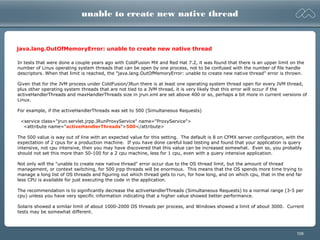
unable to create new native thread
In tests that were done a couple years ago with ColdFusion MX and Red Hat 7.2, it was found that there is an upper limit on the
number of Linux operating system threads that can be open by one process, not to be confused with the number of file handle
descriptors. When that limit is reached, the "java.lang.OutOfMemoryError: unable to create new native thread" error is thrown.
Given that for the JVM process under ColdFusion/JRun there is at least one operating system thread open for every JVM thread,
plus other operating system threads that are not tied to a JVM thread, it is very likely that this error will occur if the
activeHandlerThreads and maxHandlerThreads size in jrun.xml are set above 400 or so, perhaps a bit more in current versions of
Linux.
For example, if the activeHandlerThreads was set to 500 (Simultaneous Requests)
<service class="jrun.servlet.jrpp.JRunProxyService" name="ProxyService">
<attribute name="activeHandlerThreads">500</attribute>
The 500 value is way out of line with an expected value for this setting. The default is 8 on CFMX server configuration, with the
expectation of 2 cpus for a production machine. If you have done careful load testing and found that your application is query
intensive, not cpu intensive, then you may have discovered that this value can be increased somewhat. Even so, you probably
should not set this more than 50-100 for a 2 cpu machine, less for 1 cpu, even with a query intensive application.
Not only will the "unable to create new native thread" error occur due to the OS thread limit, but the amount of thread
management, or context switching, for 500 jrpp threads will be enormous. This means that the OS spends more time trying to
manage a long list of OS threads and figuring out which thread gets to run, for how long, and on which cpu, that in the end far
less CPU is available for just executing the code in the application.
The recommendation is to significantly decrease the activeHandlerThreads (Simultaneous Requests) to a normal range (3-5 per
cpu) unless you have very specific information indicating that a higher value showed better performance.
Solaris showed a similar limit of about 1000-2000 OS threads per process, and Windows showed a limit of about 3000. Current
tests may be somewhat different.
java.lang.OutOfMemoryError: unable to create new native thread
110
Integrated Development Environments
111
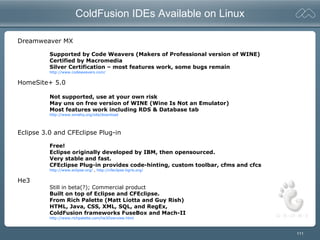
ColdFusion IDEs Available on Linux
Dreamweaver MX
Supported by Code Weavers (Makers of Professional version of WINE)
Certified by Macromedia
Silver Certification – most features work, some bugs remain
http://www.codeweavers.com/
HomeSite+ 5.0
Not supported, use at your own risk
May uns on free version of WINE (Wine Is Not an Emulator)
Most features work including RDS & Database tab
http://www.winehq.org/site/download
Eclipse 3.0 and CFEclipse Plug-in
Free!
Eclipse originally developed by IBM, then opensourced.
Very stable and fast.
CFEclipse Plug-in provides code-hinting, custom toolbar, cfms and cfcs
http://www.eclipse.org/ , http://cfeclipse.tigris.org/
He3
Still in beta(?); Commercial product
Built on top of Eclipse and CFEclipse.
From Rich Palette (Matt Liotta and Guy Rish)
HTML, Java, CSS, XML, SQL, and RegEx,
ColdFusion frameworks FuseBox and Mach-II
http://www.richpalette.com/he3Overview.html
112
Dreamweaver MX
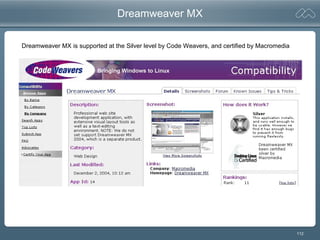
Dreamweaver MX is supported at the Silver level by Code Weavers, and certified by Macromedia
113
Homesite+ 5.5
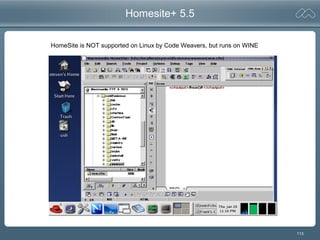
HomeSite is NOT supported on Linux by Code Weavers, but runs on WINE
114
Eclipse with CFEclipse Plug-in
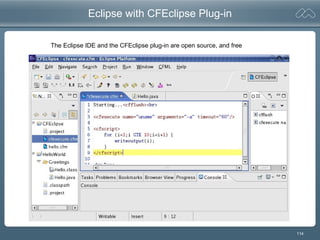
The Eclipse IDE and the CFEclipse plug-in are open source, and free
115
PLATFORM SERVER MARKET SHARE
2004 2008 ∆
Unix 39.6% 31.9% -7.7 %
Windows 32.2% 38.4% +6.2 %
IBM OS/390 10.6% ? (<14.9) - (?)
Linux 8.4% 14.9% +6.5 %
CNET News, December 2004
http://news.com.com/IDC+Linux+server+sales+to+hit+9.1+billion+in+2008/2100-1010_3-5479681.html
• "Sales of servers using Linux will grow faster than the overall market at least through 2008"
• "Revenue from Linux servers is expected to grow annually at 22.8 percent, compared to 3.8
percent for the overall server market"
• "Linux is used on about half of blade servers today, compared to 20 percent of rack-mounted
servers and 11 percent of free-standing servers.“
Server Watch, November 2004
http://www.serverwatch.com/news/article.php/3439721
• "The operating system [Unix] that powers the lion's share of servers is losing ground to
Windows and Linux. Unix is losing so much ground that IT research firm IDC is predicting
Windows will take over as the dominant server operating system by the year 2008."
• "IDC predicts a flat growth rate for Unix servers shipped through 2008."
• “... Unix is going the way of the dinosaur"
• "Linux servers posted their eighth consecutive quarter of double-digit growth..."
"Worldwide Server Customer Revenue, 2004 vs. 2008".
http://www.vergenet.net/~conrad/linux/cartoons/images/roared.jpg
"Worldwide Server Customer Revenue, 2004 vs. 2008, by Operating System“, IDC third-quarter results 11/2004

Running ColdFusion MX 7 on Linux and Unix

  • 1.
    1 ColdFusion MX 7on Unix and Linux Steven Erat Senior ColdFusion Support Engineer Macromedia December 21, 2004
  • 2.
  • 3.
    3 ColdFusion MX 7on Unix & Linux - Overview ColdFusion History on Unix & Linux ColdFusion MX 7 Unix & Linux System Requirements ColdFusion Version Migration Paths on Unix & Linux New in ColdFusion MX 7 General ColdFusion Concerns on Unix & Linux Multiserver Configuration Installation on Linux with Apache – Console Server Configuration Installation on Linux with Apache – GUI Settings and Migration Wizard Server Configuration on Solaris with iPlanet – Console Thread Dumps Miscellaneous ColdFusion IDEs Linux
  • 4.
  • 5.
    5 ColdFusion History –Unix Support Support for Solaris 2.5, 2.6, & 7 introduced in ColdFusion 4.0, November 1998 Support for HP-UX 10.20 introduced in ColdFusion 4.01, early 1999, and later support for HP-UX 11.0 in CF 4.5.1SP1, early 2000 Support for AIX 5.1 in CFMX 6.0 J2EE for IBM WebSphere Support for Mac OSX 10.2 in CFMX 6.0 J2EE, Fall 2000 -ColdFusion Enterprise edition only, no Pro/Standard -Windows Registry Emulation via .windu process -“Advanced” Security introduced in 4.01 -CFX_J for Java extensibility -Cluster Cats available only when using NES, not Apache -Unix Error 2, Unix Error 146 -Crash stack trace available in server.log in CF4.5.1SP2 -Crash stack trace available in crash.log in CF5 -No Cluster Cats Failover / Load Balancing -No “Advanced” Security -No PDF usage in Verity -Must use HP’s JVM for Java functionality -Development only, not supported in production
  • 6.
    6 ColdFusion History –Linux Support Support for Linux introduced with ColdFusion 4.5.0 in Fall 1999 -CF Enterprise & Professional -CF Express available in binary and RPM formats -No “Advanced” Security -No Spectra -No Verity (4.5.0) -No LDAP SSL -ODBC only, no Native Drivers -Often required editing start script -Unix 111 errors – CF not running -No crash log or stack trace -System library compatibility, glibc, libstdc++,... -Warning: Recompile with -DEAPI
  • 7.
    7 Low Points inColdFusion MX Linux ColdFusion Users Irate With Macromedia eWeek, December 2002 ColdFusion MX users who are running the rapid server-scripting environment on Unix or Linux said they feel they've been left out in the cold by developer Macromedia Inc. Problems with the San Francisco company's software on Linux have prompted hundreds of user complaints to the Macromedia Web site regarding server crashes and other anomalies. Macromedia officials blame the problems on incompatible distributions of Linux. In a statement responding to eWeek, Macromedia said it is "committed to providing ColdFusion customers with superior performance and stability across all the platforms we support, including Windows, Linux, Solaris and HP-UX. Since we have not yet been able to reproduce the reported problems on the certified hardware platform and Linux versions that we have comprehensively tested, we believe that the anomalies may be due to nonstandard distributions of Linux. We continue to actively work to identify the problem," officials said. The company recommends that users follow the systems requirements guidelines published for ColdFusion MX as closely as possible. ColdFusion MX support on Linux and Unix with Apache Macromedia Technote 18340 - Follow System Requirements - Changes to jrun.xml for mapCheck, thread values - MaxPermSize jvm arg for out of memory conditions - EAPI connector fixes numerous httpd CLOSE_WAITs - Hangs resolved by moving from Apache 1.3x to 2.0.x - VM Crash when HW/CPU overheated, broken fan
  • 8.
    8 ColdFusion MX 7.0Unix & Linux System Requirements
  • 9.
    9 ColdFusion MX 7Sys Reqs – Unix Platforms Dropped Platforms: - Solaris 7 - HP-UX 11i Mac OSX: - 10.3 Supported in Development only (change from 10.2)
  • 10.
    10 ColdFusion MX 7Sys Reqs – Linux Distributions Dropped Distributions: - Red Hat 7.2, 7.3, 8, 9 - SuSE 7.2, 7.3, 8.x Caveats: - No Verity in SuSE, Turbo Linux
  • 11.
    11 Sys Reqs –Webservers
  • 12.
  • 13.
    13 ColdFusion Version MigrationPaths on Unix & Linux
  • 14.
    14 ColdFusion 5 ToColdFusion MX 7 Migration Path ColdFusion 5: ColdFusion MX 7: RedHat 6.2 and later (7.x?) SuSE 7.0 and later (8.x?) Cobalt RAQ Solaris 6, 7, 8 HP 11i RedHat Enterprise 2.1, 3.0 SuSE Enterprise 8 N/A Solaris 8, 9, 10 N/A
  • 15.
    15 ColdFusion MX ToColdFusion MX 7 Migration Path ColdFusion MX 6.1: ColdFusion MX 7: RedHat 7.2, 7.3, 8, 9, Ent 2.1, 3.0 SuSE 7.2, 7.3, 8.x, Enterprise 8 Turbo Linux 8 (JP) Solaris 7, 8, 9 HP 11i RedHat Enterprise Ent 2.1, 3.0 SuSE Enterprise 8 Turbo Linux 8 (JP) Solaris 8, 9, 10 N/A
  • 16.
  • 17.
    17 Banded Report Builder ForWindows only. Includes ColdFusion Report Builder, which lets you generate banded reports in PDF or FlashPaper formats. ColdFusion Report Builder
  • 18.
  • 19.
    19 Code Considerations CFFORM –Avoid Browser Issues by Using Flash Format ColdFusion MX can deliver Forms to the client in Macromedia Flash SWF format. ColdFusion automatically generates the Flash binary from your CFML code and displays it on the client. Flash forms are browser-independent. Flash Player works in all commonly used browsers on Windows and Macintosh systems, and in Netscape and Mozilla on Linux. cfNTauthenticate – New in ColdFusion MX 7, Windows Only Use this function to authenticate a user against a Microsoft NT domain and optionally get the user's groups. This function does not work with the Microsoft Active Directory directory service, and does nothing on UNIX and Linux systems.
  • 20.
    20 Usual Concerns aboutColdFusion on Unix & Linux
  • 21.
    21 General ColdFusion Considerationsfor Unix/Linux Case Sensitivity Filenames and directories – CFFILE, CFDIRECTORY, fileexists(), etc... (CFFILE mode=“nnn”) Path delimiter “/” not “” CF Custom Tag search path, CFModule search path, and CFC search path are all case sensitive First search is for all lower case match, second search is for exact case match. How To Change CF Runtime User • Backup, Uninstall, Reinstall while selecting the different user as the CF runtime user • Do not just “chown –R {cfuser}” to recursively change ownership on files and directories Registry ColdFusion on *nix continues to use a vestigal {CF_HOME}/registry/cf.registry file to store client variables
  • 22.
    22 Performance Tuning onUnix and Linux Unix platform-specific performance settings http://www.macromedia.com/cfusion/knowledgebase/index.cfm?id=tn_18229 This article is outdated and questionable. • ColdFusion MX 7 Supported Versions of Solaris not listed • HPUX settings now irrelevant • Linux settings not accurate for contemporary distributions
  • 23.
  • 24.
    24 Linux Console Installation– Multiserver (1/13) [root@Vagrant coldfusionmx7]# chmod +x coldfusion-macr-linux.bin [root@Vagrant coldfusionmx7]# ./coldfusion-macr-linux.bin Preparing to install... Extracting the JRE from the installer archive... Unpacking the JRE... Extracting the installation resources from the installer archive... Configuring the installer for this system's environment... Launching installer... Preparing CONSOLE Mode Installation... =============================================================================== Choose Locale... ---------------- ->1- English CHOOSE LOCALE BY NUMBER: 1 =============================================================================== (created with InstallAnywhere by Zero G) -------------------------------------------------------------------------------
  • 25.
    25 Linux Console Installation– Multiserver (2/13) =============================================================================== Introduction ------------ Welcome to the Install Wizard for Macromedia ColdFusion MX 7 This wizard installs Macromedia ColdFusion MX 7 on your computer or produces an EAR or WAR file for deployment on your J2EE application server. Macromedia recommends that you exit from all running applications before proceeding. Respond to each prompt to proceed to the next step in the installation. If you want to change something on a previous step, type 'back'. You may cancel this installation at any time by typing 'quit'. WARNING: This program is protected by copyright laws and international treaties. PRESS <ENTER> TO CONTINUE: =============================================================================== License Agreement ----------------- {many screens here} DO YOU ACCEPT THE TERMS OF THIS LICENSE AGREEMENT? (Y/N) : y
  • 26.
    26 Linux Console Installation– Multiserver (3/13) =============================================================================== Install Type ------------ Enter a serial number for Macromedia ColdFusion MX 7. If you do not have a serial number, select either 30-day trial or Developer Edition. ->1- Install new version of ColdFusion MX 2- 30-day trial 3- Developer Edition Installation Choice: 1 Serial Number: CED700-nnnnn-nnnnn-nnnnn =============================================================================== Installer Configuration ----------------------- What kind of installation do you want? ->1- Server configuration 2- Multiserver configuration 3- J2EE configuration (EAR file) 4- J2EE configuration (WAR file) Please select one of the following options: 2
  • 27.
    27 Linux Console Installation– Multiserver (5/13) =============================================================================== Macromedia ColdFusion MX 7 (multiserver configuration) Installed ----------------------------------------------------------------- You cannot install the multiserver configuration of Macromedia ColdFusion MX 7 if it, or Macromedia JRun 4, is already installed on this computer. Is there already a multiserver configuration of Macromedia ColdFusion MX 7, or Macromedia JRun 4, installed on this computer? 1- Yes ->2- No ENTER THE NUMBER FOR YOUR CHOICE, OR PRESS <ENTER> TO ACCEPT THE DEFAULT: : 2
  • 28.
    28 Linux Console Installation– Multiserver (6/13) =============================================================================== Sub-component installation -------------------------- The following options are available for installation. An option with "[X]" in front will be installed and an option with "[ ]" will not. Choosing an option will toggle it on or off [X] 1) Getting Started Experience, Tutorials, & Documentation [X] 2) ColdFusion MX 7 Search Services 3) Continue with installation Select an option: 1 =============================================================================== Sub-component installation [ ] 1) Getting Started Experience, Tutorials, & Documentation [X] 2) ColdFusion MX 7 Search Services 3) Continue with installation Select an option: 1 =============================================================================== Sub-component installation [X] 1) Getting Started Experience, Tutorials, & Documentation [X] 2) ColdFusion MX 7 Search Services 3) Continue with installation Select an option: 3
  • 29.
    29 Linux Console Installation– Multiserver (7/13) =============================================================================== Choose Install Folder --------------------- The multiserver configuration runs on Macromedia JRun 4. Select the directory in which to install Macromedia JRun 4. Directory: Default Install Folder: /opt/jrun4 ENTER AN ABSOLUTE PATH, OR PRESS <ENTER> TO ACCEPT THE DEFAULT : /opt/jrun4 INSTALL FOLDER IS: /opt/jrun4 IS THIS CORRECT? (Y/N): y =============================================================================== Existing ColdFusion Installation? --------------------------------- The installer could not determine if there was an earlier version of ColdFusion on this machine. If there is a previous version of ColdFusion installed your settings can be migrated. Is there an earlier version of ColdFusion on this machine? 1- Yes ->2- No ENTER THE NUMBER FOR YOUR CHOICE, OR PRESS <ENTER> TO ACCEPT THE DEFAULT: 2
  • 30.
    30 Linux Console Installation– Multiserver (8/13) =============================================================================== Configure Web Servers --------------------- Please configure your web server(s). If you do not configure a web server the built-in web server will be used on port 8300 or the next available port. 1- Add Web Server Configuration ->2- Continue with installation Choice: 1 **************************************************** ->1- Apache 2- Sun ONE Web Server (iPlanet) 3- Cancel What kind of Web Server are you configuring: 1 What directory contains your Apache configuration file (httpd.conf)? (For example, on Red Hat Linux it could be located in the /etc/httpd/conf directory if you installed from an rpm.) Directory: /usr/local/apache2/conf
  • 31.
    31 Linux Console Installation– Multiserver (9/13) **************************************************** Where is the Apache program binary file? (For example, on Red Hat Linux it could be located in the /usr/sbin/httpd directory if you installed from an rpm.) If you have more than one instance of Apache on your computer, enter the binary file location for the Apache web server that will use ColdFusion MX. (Note: this is not the Apache start and stop script.) File (DEFAULT: /usr/local/apache2/bin/httpd): **************************************************** Where is the control file that you use to start and stop the Apache web server? (For example, this could be /etc/init.d/httpd on Red Hat Linux if you installed from an rpm and it could be /usr/local/apache/bin/apachectl on hand-compiled versions.) File (DEFAULT: /usr/local/apache2/bin/apachectl):
  • 32.
    32 Linux Console Installation– Multiserver (10/13) **************************************************** Please configure your web server(s). If you do not configure a web server the built-in web server will be used on port 8300 or the next available port. 1- Add Web Server Configuration 2- Remove Web Server Configuration 3- Edit:Apache : /usr/local/apache2/conf ->4- Continue with installation Choice: 4 =============================================================================== Choose ColdFusion MX Administrator Location ------------------------------------------- Select the location of the web root for Macromedia ColdFusion MX 7. This is where the installer places the ColdFusion MX Administrator. This directory must be the web root for one of the websites to be configured for use with ColdFusion MX. Directory: (DEFAULT: /usr/local/apache2/htdocs): /var/www/html
  • 33.
    33 Linux Console Installation– Multiserver (11/13) =============================================================================== Runtime User ------------ Enter the name of the runtime user. This user must exist already on the system. User Name: (DEFAULT: nobody): =============================================================================== Administrator Password ---------------------- Enter the password that you will use to control access to the ColdFusion MX Administrator. This field is required. Password: *** problem when using csh Confirm Password: =============================================================================== RDS Password ------------ The ColdFusion Remote Development Service (RDS) lets developers using Macromedia tools remotely connect to this server for development purposes. If this is a production server, Macromedia recommends that you disable RDS. Note, however, that disabling RDS also disables the directory browsing applets in the ColdFusion Administrator and some of the functionality in the Report Designer. Enable RDS (required for Report Builder and DW Extensions) (Y/N) : y Password: Confirm Password:
  • 34.
    34 Linux Console Installation– Multiserver (12/13) =============================================================================== Installation Confirmation ------------------------- Installation Type: Multiserver configuration Licensing: Fully Licensed Edition Serial Number: CED700-nnnnn-nnnnn-nnnnn Installation Directories: Product: /opt/jrun4 Web root: /var/www/html Server Information: JRun Server: cfusion Web Server: Apache (/usr/local/apache2/conf) Search Service: installed Sample Apps: installed RDS: enabled Disk Space Information (for Installation Target): Required: 365,075,227 bytes Available: 2,486,521,856 bytes PRESS <ENTER> TO CONTINUE:
  • 35.
    35 Linux Console Installation– Multiserver (13/13) =============================================================================== Installing... ------------- [==================|==================|==================|==================] [------------------|------------------|------------------|------------------] =============================================================================== Installation Complete --------------------- You have successfully completed the first step in installing Macromedia ColdFusion MX 7 with JRun 4. To continue with your installation, go to /opt/jrun4/bin and type the command “./jrun -start cfusion” to start the CFusion server on JRun. To finish configuring your web server connectors you will also need to run cfmx_connectors.sh (also in the /opt/jrun4/bin directory) once the jrun server is up and running. When the server is started and the connectors are configured log in to the Configuration Wizard at http://[machinename]/CFIDE/administrator/index.cfm PRESS <ENTER> TO EXIT THE INSTALLER: ***
  • 36.
    36 WARNING: /tmp doesnot have enough disk space! [root@Vagrant coldfusionmx7]# ./coldfusion-macr-linux.bin Preparing to install... WARNING: /tmp does not have enough disk space! Attempting to use /root for install base and tmp dir. WARNING! The amount of /tmp disk space required to perform this installation is greater than what is available. Please free up at least 149363 kilobytes in /tmp and attempt this installation again. You may also set the IATEMPDIR environment variable to a directory on a disk partition with enough free disk space. To set the variable enter one of the following commands at the UNIX command line prompt before running this installer again: - for Bourne shell (sh), ksh, bash and zsh: $ IATEMPDIR=/your/free/space/directory $ export IATEMPDIR - for C shell (csh) and tcsh: $ setenv IATEMPDIR /your/free/space/directory
  • 37.
    37 Processes, Directories, Files StartingColdFusion Manual Webserver Configuration Examining Webserver Configuration Monitoring Memory
  • 38.
    38 JRun Directory Contents– Multiserver Config [root@Vagrant opt]# cd /opt/jrun4/ [root@Vagrant jrun4]# ls -l total 72 drwxrwxr-x 2 nobody root 4096 Dec 10 12:52 bin drwxrwxr-x 7 nobody root 4096 Dec 10 12:52 docs drwxrwxr-x 8 nobody root 4096 Jul 1 16:30 jre drwxrwxr-x 3 nobody root 4096 Dec 10 12:52 lib -rwxrwxrwx 1 nobody root 10523 Apr 7 2004 license.txt drwxrwxr-x 2 nobody root 4096 Dec 10 12:51 logs -rw-rw-r-- 1 root root 11081 Dec 10 14:20 Macromedia_ColdFusion_MX_7_InstallLog.log drwxrwxr-x 7 nobody root 4096 Dec 10 12:52 pointbase -rwxrwxrwx 1 nobody root 7571 Nov 11 18:51 Readme.htm -rw-rw-r-- 1 nobody root 1137 Nov 5 11:38 relnotes.htm drwxrwxr-x 6 nobody root 4096 Dec 10 12:52 servers drwxrwxr-x 2 nobody root 4096 Dec 10 14:20 uninstall drwxrwxr-x 7 nobody root 4096 Dec 10 12:50 verity [root@Vagrant jrun4]# cd bin [root@Vagrant bin]# ls -l total 3204 -rwxr-xr-x 1 nobody root 1750 Dec 10 12:52 cfmx-connectors.sh -rwxrwxr-x 1 nobody root 54723 Dec 8 16:38 java2wsdl -rwxrwxr-x 1 nobody root 2709768 Dec 8 16:38 jikesw -rwxrwxr-x 1 nobody root 54723 Dec 8 16:38 jrun -rwxrwxr-x 1 nobody root 54723 Dec 8 16:38 jrunwizard -rwxr-xr-x 1 nobody root 54723 Dec 8 16:38 jspc -rw-rw-r-- 1 nobody root 1279 Dec 10 12:52 jvm.config -rwxr-xr-x 1 nobody root 54723 Dec 8 16:38 migrate -rwxrwxr-x 1 nobody root 54723 Dec 8 16:38 sniffer -rwxr-xr-x 1 nobody root 54723 Dec 8 16:38 wsconfig -rw-rw-r-- 1 nobody root 976 Dec 10 12:51 wsconfig_jvm.config -rwxrwxr-x 1 nobody root 54179 Dec 8 16:38 wsdl2java -rwxr-xr-x 1 nobody root 54723 Dec 8 16:38 xmlscript
  • 39.
    39 k2admin service startsimmediately [root@Leonid bin]# ps -ef | grep jrun cfmx 7657 1 0 19:05 pts/2 /opt/jrun4/verity/k2/_ilnx21/bin/k2admin cfmx 7774 7778 0 19:06 pts/2 /opt/jrun4/verity/k2/_ilnx21/bin/k2server -ualias ColdFusionK2_server1 cfmx 7777 7778 0 19:06 pts/2 /opt/jrun4/verity/k2/_ilnx21/bin/k2index -ualias ColdFusionK2_indexserver1 root 14453 31191 0 19:13 pts/2 grep jrun [root@Leonid bin]# ps -ef | grep jrun cfmx 7657 1 0 19:05 pts/2 /opt/jrun4/verity/k2/_ilnx21/bin/k2admin cfmx 7774 7778 0 19:06 pts/2 /opt/jrun4/verity/k2/_ilnx21/bin/k2server -ualias ColdFusionK2_server1 cfmx 7777 7778 0 19:06 pts/2 /opt/jrun4/verity/k2/_ilnx21/bin/k2index -ualias ColdFusionK2_indexserver1 root 14455 6821 3 19:14 pts/1 ./jrun -start cfusion root 14534 31191 0 19:16 pts/2 grep jrun [root@Leonid bin]# Before starting ColdFusion server for the first time After starting ColdFusion
  • 40.
    40 ColdFusion init Scriptson Multiserver Configuration Multiserver configuration does not provide ColdFusion system init scripts Experimental ColdFusion MX for JRun init scripts http://www.talkingtree.com/blog/index.cfm/2005/7/15/CFLinuxBootScripts
  • 41.
    41 Verity vspider Utility Verityvspider utility now available on Linux,making Verity support on Linux finally complete. [root@Leonid ~]# ls -l `find /opt/coldfusionmx7/ -name vspider` -rwxrwxr-x 1 cfmx bin 938324 Sep 24 12:26 /opt/coldfusionmx7/verity/k2/_ilnx21/bin/vspider [root@Leonid ~]#
  • 42.
    42 Working with thek2admin Scripts [root@Leonid jrun4]# pwd /opt/jrun4 [root@Leonid jrun4]# find . -name k2admin ./verity/k2/_ilnx21/bin/k2admin [root@Leonid jrun4]# ls -l verity/k2/_ilnx21/bin/ | grep k2 -rwxrwxr-x 1 cfmx root 3778622 Sep 23 15:20 k2admin -rwxrwxrwx 1 cfmx cfmx 2837 Dec 14 19:05 k2adminstart -rwxrwxrwx 1 cfmx cfmx 1846 Dec 14 19:05 k2adminstop -rwxrwxr-x 1 cfmx root 2180802 Sep 24 16:08 k2index -rwxrwxr-x 1 cfmx root 1199602 May 24 2004 k2lmldap.so -rwxrwxr-x 1 cfmx root 10338 May 24 2004 k2lmtg.so -rwxrwxr-x 1 cfmx root 1224318 May 24 2004 k2lmunix.so -rwxrwxr-x 1 cfmx root 1311719 May 24 2004 k2psldap.so -rwxrwxr-x 1 cfmx root 1206974 May 24 2004 k2psmdm.so -rwxrwxr-x 1 cfmx root 4499749 Sep 24 16:03 k2server -rwxrwxr-x 1 cfmx root 605196 May 24 2004 rck2 [root@Leonid jrun4]# [root@Leonid jrun4]# ./verity/k2/_ilnx21/bin/k2adminstart SUCCESS: Created with process ID: 14704 Please use the k2adminstop script to terminate process [root@Leonid jrun4]# [root@Leonid jrun4]# ./verity/k2/_ilnx21/bin/k2adminstop [root@Leonid jrun4]# pwd
  • 43.
    43 Starting ColdFusion -Multiserver [root@Leonid bin]# ./jrun -start cfusion Starting Macromedia JRun 4 (Build 84683), cfusion server 12/14 19:09:24 warning The Trial License evaluation period will expire in 59 days. 12/14 19:09:27 info JRun Naming Service listening on *:2902 12/14 19:09:28 warning No sessionSecret has been specified in jrun.xml. Installing a self generated sessionSecret. 12/14 19:09:28 info No JDBC data sources have been configured for this server (see jrun-resources.xml) 12/14 19:09:29 info JRun Web Server listening on *:8300 12/14 19:09:29 info Deploying enterprise application "cfusion-ear" from: file:/opt/jrun4/servers/cfusion/cfusion-ear/ 12/14 19:09:30 info Deploying web application "Macromedia Coldfusion MX" from: file:/opt/jrun4/servers/cfusion/cfusion-ear/ 12/14 19:09:37 INFO License Service: Flex 1.5 CF Edition enabled 12/14 19:09:37 INFO Starting Flex 1.5 CF Edition 12/14 19:09:37 user JSPServlet: init 12/14 19:09:39 user CFMxmlServlet: init 12/14 19:09:39 user CFMxmlServlet: Macromedia Flex Build: 87315.134646 12/14 19:09:39 INFO Macromedia Flex Build: 87315.134646 12/14 19:09:44 user ColdFusionStartUpServlet: init 12/14 19:09:44 user ColdFusionStartUpServlet: ColdFusion MX: Starting application services 12/14 19:09:44 user ColdFusionStartUpServlet: ColdFusion MX: VM version = 1.4.2_05-b04 12/14 19:09:45 Information [scheduler-9] - /opt/jrun4/servers/cfusion/cfusion-ear/cfusion-war/WEB- INF/cfusion/logs/server.log initialized 12/14 19:09:45 Information [scheduler-9] - Starting logging... 12/14 19:09:45 Information [scheduler-9] - Starting crypto... 12/14 19:09:48 Information [scheduler-9] - Starting license... 12/14 19:09:48 Information [scheduler-9] - Starting License server ... 12/14 19:10:00 Information [scheduler-9] - Starting scheduler... 12/14 19:10:00 Information [scheduler-9] - Starting debugging... 12/14 19:10:01 Information [scheduler-9] - Starting sql... 12/14 19:10:01 Information [scheduler-9] - Starting mail... 12/14 19:10:01 Information [scheduler-9] - CORBA Configuration not enabled
  • 44.
    44 Starting ColdFusion –Multiserver (cont’d) 12/14 19:10:01 Information [scheduler-9] - Starting cron... 12/14 19:10:01 Information [scheduler-9] - Starting registry... 12/14 19:10:01 Information [scheduler-9] - Starting client... 12/14 19:10:02 Information [scheduler-9] - The metrics service is disabled for the J2EE edition 12/14 19:10:02 Information [scheduler-9] - Starting xmlrpc... 12/14 19:10:02 Information [scheduler-9] - Starting graphing... 12/14 19:10:03 Information [scheduler-9] - Starting verity... 12/14 19:10:03 Information [scheduler-9] - Starting archive... 12/14 19:10:03 Information [scheduler-9] - Starting document... 12/14 19:10:04 Information [scheduler-9] - Starting eventgateway... 12/14 19:10:05 Information [scheduler-9] - /opt/jrun4/servers/cfusion/cfusion-ear/cfusion-war/WEB- INF/cfusion/logs/eventgateway.log initialized 12/14 19:10:05 Information [scheduler-9] - Starting Event Backend Handlers 12/14 19:10:05 Information [scheduler-9] - Initialized EventRequestDispatcher with a Thread Pool size of 10 12/14 19:10:05 Information [scheduler-9] - Initializing EventRequestHandler 12/14 19:10:05 Information [scheduler-9] - Starting Event Gateways 12/14 19:10:05 Information [scheduler-9] - ColdFusion started 12/14 19:10:05 user ColdFusionStartUpServlet: ColdFusion MX: application services are now available 12/14 19:10:05 user CFSwfServlet: init 12/14 19:10:05 user CFCServlet: init 12/14 19:10:07 user FlashGateway: init 12/14 19:10:07 user CFFormGateway: init 12/14 19:10:07 user CFInternalServlet: init 12/14 19:10:07 info Deploying enterprise application "JRun 4.0 Internal J2EE Components" from: file:/opt/jrun4/lib/jrun-comp.ear 12/14 19:10:08 info Deploying EJB "JRunSQLInvoker" from: file:/opt/jrun4/lib/jrun-comp.ear Server cfusion ready (startup time: 49 seconds)
  • 45.
    45 Running cfmx-connectors.sh [root@Leonid bin]#pwd /opt/jrun4/bin [root@Leonid bin]# ls -l total 3256 -rwxr-xr-x 1 cfmx root 1716 Dec 14 19:07 cfmx-connectors.sh -rwxrwxr-x 1 cfmx root 54723 Nov 30 21:13 java2wsdl -rwxrwxr-x 1 cfmx root 2709768 Nov 30 21:13 jikesw -rwxrwxr-x 1 cfmx root 54723 Nov 30 21:13 jrun -rwxrwxr-x 1 cfmx root 54723 Nov 30 21:13 jrunwizard -rwxr-xr-x 1 cfmx root 54723 Nov 30 21:13 jspc -rw-rw-r-- 1 cfmx root 1279 Dec 14 19:07 jvm.config -rwxr-xr-x 1 cfmx root 54723 Nov 30 21:13 migrate -rwxrwxr-x 1 cfmx root 54723 Nov 30 21:13 sniffer -rwxr-xr-x 1 cfmx root 54723 Nov 30 21:13 wsconfig -rw-rw-r-- 1 cfmx root 976 Dec 14 19:06 wsconfig_jvm.config -rwxrwxr-x 1 cfmx root 54179 Nov 30 21:13 wsdl2java -rwxr-xr-x 1 cfmx root 54723 Nov 30 21:13 xmlscript [root@Leonid bin]# [root@Leonid bin]# ./cfmx-connectors.sh Configuring the web server connector for ColdFusion MX 7 (multiserver) Running apache connector wizard... Connector installation succeeded for apache [root@Leonid bin]#
  • 46.
    46 Examining connector installation [root@Leonidwsconfig]# pwd /opt/jrun4/lib/wsconfig [root@Leonid wsconfig]# cat wsconfig.log # Created by JRun on 12/14 19:26:11 12/14 19:26:11 info Macromedia JRun 4 (Build 84683) 12/14 19:26:12 debug Found JRun server cfusion at 127.0.0.1:2902 12/14 19:26:16 debug Fedora Core release 3 (Heidelberg) 12/14 19:26:16 debug Detected Red Hat Linux release 3 12/14 19:26:16 debug Using Apache binary /usr/sbin/httpd 12/14 19:26:16 info Server version: Apache/2.0.52 12/14 19:26:16 debug Using Apache control script /usr/sbin/apachectl 12/14 19:26:16 debug Parsing Apache configuration file /etc/httpd/conf/httpd.conf 12/14 19:26:16 debug Exec'ing chmod 777 /opt/jrun4/lib/wsconfig/1 12/14 19:26:16 debug Set permission to 777 on /opt/jrun4/lib/wsconfig/1 12/14 19:26:16 debug Exec'ing chmod +x /opt/jrun4/lib/wsconfig/1/mod_jrun20.so 12/14 19:26:16 debug Set permission to execute on /opt/jrun4/lib/wsconfig/1/mod_jrun20.so 12/14 19:26:16 debug Created file /opt/jrun4/lib/wsconfig/1/mod_jrun20.so 12/14 19:26:16 debug Wrote file /etc/httpd/conf/httpd.conf 12/14 19:26:16 debug Added JRun configuration to Apache configuration file /etc/httpd/conf/httpd.conf 12/14 19:26:16 debug Created file /opt/jrun4/lib/wsconfig/1/README.txt 12/14 19:26:16 debug Wrote file /opt/jrun4/lib/wsconfig/wsconfig.properties 12/14 19:26:16 debug Exec'ing /usr/sbin/apachectl restart 12/14 19:26:16 info Restarted Apache server [root@Leonid wsconfig]# ls -l total 24 drwxrwxrwx 2 root root 4096 Dec 14 19:26 1 -rw-r--r-- 1 root root 1312 Dec 14 19:26 wsconfig.log -rw-r--r-- 1 root root 189 Dec 14 19:26 wsconfig.properties [root@Leonid wsconfig]# ls -l 1/ total 92 -rwxr-xr-x 1 root root 74768 Sep 2 07:14 mod_jrun20.so -rw-r--r-- 1 root root 272 Dec 14 19:26 README.txt [root@Leonid wsconfig]#
  • 47.
    47 Examining JRun Containerin Apache httpd.conf [root@Leonid bin]# tail -133 /etc/httpd/conf/httpd.conf | head -16 # JRun Settings LoadModule jrun_module /opt/jrun4/lib/wsconfig/1/mod_jrun20.so <IfModule mod_jrun20.c> JRunConfig Verbose false JRunConfig Apialloc false JRunConfig Ssl false JRunConfig Ignoresuffixmap false JRunConfig Serverstore /opt/jrun4/lib/wsconfig/1/jrunserver.store JRunConfig Bootstrap 127.0.0.1:51020 #JRunConfig Errorurl <optionally redirect to this URL on errors> #JRunConfig ProxyRetryInterval <number of seconds to wait before trying to reconnect to unreachable clustered server> #JRunConfig ConnectTimeout 15 #JRunConfig RecvTimeout 300 #JRunConfig SendTimeout 15 AddHandler jrun-handler .jsp .jws .cfm .cfml .cfc .cfr .cfswf </IfModule> [root@Leonid bin]# ** Be aware of the“Pull the plug bug”
  • 48.
    48 Monitoring Memory onLinux with top [root@Leonid bin]# top Tasks: 102 total, 1 running, 101 sleeping, 0 stopped, 0 zombie Cpu(s): 2.0% us, 1.0% sy, 0.0% ni, 97.1% id, 0.0% wa, 0.0% hi, 0.0% si Mem: 775588k total, 574240k used, 201348k free, 47532k buffers Swap: 1052216k total, 8k used, 1052208k free, 330668k cached PID USER PR NI VIRT RES SHR S %CPU %MEM TIME+ COMMAND 14455 root 21 0 843m 81m 99m S 0.0 10.8 0:06.30 jrun 3010 root 15 0 80536 24m 61m S 0.0 3.2 13:30.00 X 6794 root 15 0 17828 9.9m 11m S 0.0 1.3 0:01.10 httpd 7774 cfmx 15 0 46840 9.9m 11m S 0.0 1.3 0:00.69 k2server 7657 cfmx 15 0 42236 6532 12m S 0.0 0.8 0:00.10 k2admin 7777 cfmx 15 0 47492 5888 10m S 0.0 0.8 0:00.03 k2index The difference among VIRT, RES, and SHR in top output http://gentoo-wiki.com/Linux_Memory_Management VIRT stands for the virtual size of a process, which is the sum of memory it is actually using, memory it has mapped into itself (for instance the video card's RAM for the X server), files on disk that have been mapped into it (most notably shared libraries), and memory shared with other processes. VIRT represents how much memory the program is able to access at the present moment. RES stands for the resident size, which is an accurate representation of how much actual physical memory a process is consuming. (This also corresponds directly to the %MEM column.) This will virtually always be less than the VIRT size, since most programs depend on the C library. SHR indicates how much of the VIRT size is actually sharable (memory or libraries). In the case of libraries, it does not necessarily mean that the entire library is resident. For example, if a program only uses a few functions in a library, the whole library is mapped and will be counted in VIRT and SHR, but only the parts of the library file containing the functions being used will actually be loaded in and be counted under RES.
  • 49.
  • 50.
  • 51.
    51 GUI Installation –Server Configuration (1/19)
  • 52.
    52 GUI Installation –Server Configuration (2/19)
  • 53.
    53 GUI Installation –Server Configuration (3/19)
  • 54.
    54 GUI Installation –Server Configuration (5/19)
  • 55.
    55 GUI Installation –Server Configuration (6/19) Note to self: log bug for “Sserver configuration”
  • 56.
    56 GUI Installation –Server Configuration (7/19) • ODBC not available • Option to install init scripts
  • 57.
    57 GUI Installation –Server Configuration (8/19)
  • 58.
    58 GUI Installation –Server Configuration (9/19)
  • 59.
    59 GUI Installation –Server Configuration (10/19)
  • 60.
    60 GUI Installation –Server Configuration (11/19)
  • 61.
    61 GUI Installation –Server Configuration (12/19)
  • 62.
    62 GUI Installation –Server Configuration (13/19)
  • 63.
    63 GUI Installation –Server Configuration (14/19)
  • 64.
    64 GUI Installation –Server Configuration (15/19)
  • 65.
    65 GUI Installation –Server Configuration (16/19)
  • 66.
    66 GUI Installation –Server Configuration (17/19)
  • 67.
    67 GUI Installation –Server Configuration (18/19)
  • 68.
    68 GUI Installation –Server Configuration (19/19)
  • 69.
    69 Processes, Directories, Files,Init Scripts Starting ColdFusion “Auto” Webserver Configuration
  • 70.
    70 Server Configuration –Directory Contents [root@Leonid bin]# pwd /opt/coldfusionmx7/bin [root@Leonid bin]# ls -l total 2280 -rwxr-xr-x 1 cfmx bin 5639 Dec 14 20:50 cfcompile.sh -rwxr-xr-x 1 cfmx bin 1501420 May 23 2001 cfencode.exe -rwxr-xr-x 1 cfmx bin 110264 Mar 12 2002 cfencode.linux -rwxr-xr-x 1 cfmx bin 527624 Mar 12 2002 cfencode.solaris -rwxr-xr-x 1 cfmx bin 254 Dec 14 20:50 cfinfo -rwxr-xr-x 1 cfmx bin 54723 Dec 14 20:50 cfmx7 -rwxr-xr-x 1 cfmx bin 1749 Dec 14 20:50 cfmx-connectors.sh -rwxr-xr-x 1 cfmx bin 4866 Dec 14 20:50 cfmx-init.sh -rwxr-xr-x 1 cfmx bin 1412 Dec 14 20:50 cfmx7search -rwxr-xr-x 1 cfmx bin 416 Dec 14 20:50 cfscan.sh -rwxr-xr-x 1 cfmx bin 431 Dec 14 20:50 cfstat -rwxr-xr-x 1 cfmx bin 7126 Dec 14 20:50 coldfusion drwxrwxr-x 2 cfmx bin 4096 Dec 14 20:50 connectors -rwxr-xr-x 1 cfmx bin 860 Dec 14 20:50 findjava.sh -rwxr-xr-x 1 cfmx bin 377 Dec 14 20:50 SMSClient.sh [root@Leonid bin]# ls -l /etc/init.d/ | grep mx -rwxr-xr-x 1 root root 1412 Dec 14 20:50 cfmx7search -rwxr-xr-x 1 root root 7126 Dec 14 20:50 coldfusionmx7
  • 71.
    71 k2admin Processes Running [root@Leonidbin]# ps -ef | grep cold cfmx 16311 1 0 20:49 pts/3 /opt/coldfusionmx7/verity/k2/_ilnx21/bin/k2admin cfmx 16471 16475 0 20:50 pts/3 /opt/coldfusionmx7/verity/k2/_ilnx21/bin/k2server -ualias ColdFusionK2_server1 cfmx 16474 16475 0 20:50 pts/3 /opt/coldfusionmx7/verity/k2/_ilnx21/bin/k2index –ualias ColdFusionK2_indexserver1
  • 72.
    72 Starting k2 onRed Hat Linux [root@Leonid bin]# ls -l /etc/init.d/ | grep mx -rwxr-xr-x 1 root root 1412 Dec 14 20:50 cfmx7search -rwxr-xr-x 1 root root 7126 Dec 14 20:50 coldfusionmx7 [root@Leonid bin]# service cfmx7search stop [root@Leonid bin]# service cfmx7search start SUCCESS: Created with process ID: 19307 Please use the k2adminstop script to terminate process [root@Leonid bin]#
  • 73.
    73 Starting the ServerConfiguration [root@Leonid bin]# ls -l /etc/init.d/ | grep mx -rwxr-xr-x 1 root root 1412 Dec 14 20:50 cfmx7search -rwxr-xr-x 1 root root 7126 Dec 14 20:50 coldfusionmx7 [root@Leonid bin]# pwd /opt/coldfusionmx7/bin [root@Leonid bin]# service coldfusionmx7 start Starting ColdFusion MX 7... The ColdFusion MX 7 server is starting up and will be available shortly. ====================================================================== Running the ColdFusion MX 7 connector wizard ====================================================================== Configuring the web server connector (Launched on the first run of the ColdFusion MX 7 start script) Running apache connector wizard... ColdFusion MX 7 not started, will retry connector 12 more time(s) Connector installation succeeded for apache ====================================================================== ColdFusion MX 7 has been started. ColdFusion MX 7 will write logs to /opt/coldfusionmx7/logs/cfserver.log ====================================================================== [root@Leonid bin]#
  • 74.
    74 Turning off/on ColdFusioninit scripts on Linux [root@Leonid ~]# cd /etc/init.d/ [root@Leonid init.d]# ls -l | grep mx -rwxr-xr-x 1 root root 1412 Dec 14 20:50 cfmx7search -rwxr-xr-x 1 root root 7126 Dec 14 20:50 coldfusionmx7 [root@Leonid init.d]# chkconfig chkconfig version 1.3.11.1 - Copyright (C) 1997-2000 Red Hat, Inc. This may be freely redistributed under the terms of the GNU Public License. usage: chkconfig --list [name] chkconfig --add <name> chkconfig --del <name> chkconfig [--level <levels>] <name> <on|off|reset> [root@Leonid init.d]# chkconfig cfmx7search off [root@Leonid init.d]# chkconfig --list cfmx7search cfmx7search 0:off 1:off 2:off 3:off 4:off 5:off 6:off [root@Leonid init.d]# chkconfig cfmx7search on [root@Leonid init.d]# chkconfig --list cfmx7search cfmx7search 0:off 1:off 2:on 3:on 4:on 5:on 6:off [root@Leonid init.d]#
  • 75.
    75 Server Configuration –$CFHOME/runtime/servers [root@Leonid ~]# ls -l /opt/coldfusionmx7/runtime/servers/ total 16 drwxrwxr-x 3 cfmx bin 4096 Dec 14 20:50 coldfusion drwxrwxr-x 2 cfmx bin 4096 Dec 14 20:50 lib [root@Leonid ~]# ColdFusion MX 6.x used server named “default” ColdFusion MX 7 uses server named “coldfusion” A $cfhome/runtime/servers/lib directory is provided by default
  • 76.
  • 77.
  • 78.
  • 79.
  • 80.
  • 81.
  • 82.
    82 ColdFusion MX 7Administrator
  • 83.
    83 Server Configuration onSolaris with iPlanet Directories, Files, Startup, Processes Examining the Webserver Configuration Uninstalling ColdFusion
  • 84.
    84 The $CFHOME/bin Directory bash-2.03#pwd /opt/coldfusionmx7/bin bash-2.03# ls -l total 4586 -rwxr-xr-x 1 nobody other 538 Dec 15 13:46 SMSClient.sh -rwxr-xr-x 1 nobody other 5768 Dec 15 13:45 cfcompile.sh -rwxr-xr-x 1 nobody other 1501420 May 23 2001 cfencode.exe -rwxr-xr-x 1 nobody other 110264 Mar 12 2002 cfencode.linux -rwxr-xr-x 1 nobody other 527624 Mar 12 2002 cfencode.solaris -rwxr-xr-x 1 nobody other 254 Dec 15 13:45 cfinfo -rwxr-xr-x 1 nobody other 1736 Dec 15 13:46 cfmx-connectors-run.sh -rwxr-xr-x 1 nobody other 4923 Dec 15 13:45 cfmx-init.sh -rwxr-xr-x 1 nobody other 127080 Dec 15 13:46 cfmx7 -rwxr-xr-x 1 nobody other 1416 Dec 15 13:45 cfmx7search -rwxr-xr-x 1 nobody other 483 Dec 15 13:46 cfscan.sh -rwxr-xr-x 1 nobody other 431 Dec 15 13:45 cfstat -rwxr-xr-x 1 nobody other 7142 Dec 15 13:45 coldfusion drwxrwxr-x 2 nobody other 512 Dec 15 13:46 connectors -rwxr-xr-x 1 nobody other 860 Dec 15 13:46 findjava.sh lrwxrwxrwx 1 root other 41 Dec 15 14:40 jvm.config -> /opt/coldfusionmx7/runtime/bin/jvm.config
  • 85.
    85 Using the cfmx-init.shScript on Solaris Init scripts option during ColdFusion MX 7 installation bash-2.03# ./cfmx-init.sh install Use this script to install System 5 start scripts for CF to start on boot bash-2.03# ./cfmx-init.sh -h Usage:./cfmx-init.sh (install|uninstall|install-verity|uninstall-verity) bash-2.03# ./cfmx-init.sh install Creating the Coldfusion MX 7 start script /etc/init.d/coldfusionmx7 Adding ColdFusion MX 7 start/kill links Install complete bash-2.03# bash-2.03# ./cfmx-init.sh uninstall Removing the CFMX Search start script /etc/init.d/cfmx7search Removing CFMX Search start/kill links Removing /etc/rc3.d/S25coldfusionmx7 Removing /etc/rc1.d/K19coldfusionmx7 Removing /etc/init.d/coldfusionmx7 Uninstall complete Running cfmx-init.sh to install start scripts Removing the start scripts Usage
  • 86.
    86 Starting ColdFusion onSolaris bash-2.03# ./coldfusion start Starting ColdFusion MX 7... The ColdFusion MX 7 server is starting up and will be available shortly. ====================================================================== Running the ColdFusion MX 7 connector wizard ====================================================================== Configuring the web server connector (Launched on the first run of the ColdFusion MX 7 start script) Running iPlanet connector wizard... ColdFusion MX 7 not started, will retry connector 12 more time(s) ColdFusion MX 7 not started, will retry connector 11 more time(s) Connector installation succeeded for iPlanet ====================================================================== ColdFusion MX 7 has been started. ColdFusion MX 7 will write logs to /opt/coldfusionmx7/logs/cfserver.log ====================================================================== bash-2.03# bash-2.03# ps -ef | grep cfmx7 nobody 6706 1 0 pts/4 /opt/coldfusionmx7/bin/cfmx7 -jar cfusion.jar -autorestart -start coldfusion nobody 6708 6706 0 pts/4 /opt/coldfusionmx7/bin/cfmx7 -jar cfusion.jar -start coldfusion nobody 4164 4105 0 pts/4 /opt/coldfusionmx7/verity/k2/_ssol26/bin/k2server -ualias ColdFusionK2_server1 nobody 4165 4105 0 pts/4 /opt/coldfusionmx7/verity/k2/_ssol26/bin/k2index -ualias ColdFusionK2_indexserv nobody 4105 1 0 pts/4 /opt/coldfusionmx7/verity/k2/_ssol26/bin/k2admin bash-2.03#
  • 87.
    87 The wsconfig.log File bash-2.03#cat wsconfig.log # Created by JRun on 12/15 14:40:37 12/15 14:41:04 info Macromedia JRun 4 (Build 84683) 12/15 14:41:11 debug Found JRun server default at 127.0.0.1:2901 12/15 14:41:11 debug Found JRun server coldfusion at 127.0.0.1:2920 12/15 14:41:16 debug Parsing Sun ONE Web Server (iPlanet) configuration file /opt/sunone6/servers/https- blackstone/config/magnus.conf 12/15 14:41:16 debug Parsing Sun ONE Web Server (iPlanet) configuration file /opt/sunone6/servers/https- blackstone/config/obj.conf 12/15 14:41:16 debug Exec'ing chmod 777 /opt/coldfusionmx7/runtime/lib/wsconfig/1 12/15 14:41:17 debug Set permission to 777 on /opt/coldfusionmx7/runtime/lib/wsconfig/1 12/15 14:41:17 debug Exec'ing chmod +x /opt/coldfusionmx7/runtime/lib/wsconfig/1/libjrun_nsapi.so 12/15 14:41:17 debug Set permission to execute on /opt/coldfusionmx7/runtime/lib/wsconfig/1/libjrun_nsapi.so 12/15 14:41:17 debug Created file /opt/coldfusionmx7/runtime/lib/wsconfig/1/libjrun_nsapi.so 12/15 14:41:17 debug Wrote file /opt/sunone6/servers/https-blackstone/config/magnus.conf 12/15 14:41:17 debug Added JRun configuration to Sun ONE Web Server (iPlanet) configuration file /opt/sunone6/servers/https-blackstone/config/magnus.conf 12/15 14:41:17 debug Wrote file /opt/sunone6/servers/https-blackstone/config/obj.conf 12/15 14:41:17 debug Added JRun configuration to Sun ONE Web Server (iPlanet) configuration file /opt/sunone6/servers/https-blackstone/config/obj.conf 12/15 14:41:17 debug Created file /opt/coldfusionmx7/runtime/lib/wsconfig/1/README.txt 12/15 14:41:17 debug Wrote file /opt/coldfusionmx7/runtime/lib/wsconfig/wsconfig.properties 12/15 14:41:17 debug Parsing Sun ONE Web Server (iPlanet) configuration file /opt/sunone6/servers/https- blackstone/config/mime.types 12/15 14:41:17 debug Exec'ing /opt/sunone6/servers/https-blackstone/stop 12/15 14:41:19 info Stopped Sun ONE Web Server (iPlanet) server 12/15 14:41:19 debug Exec'ing /opt/sunone6/servers/https-blackstone/start 12/15 14:41:26 info Started Sun ONE Web Server (iPlanet) server
  • 88.
    88 What Changed iniPlanet Config? bash-2.03# diff backup/obj.conf obj.conf 4c4 < NameTrans fn="pfx2dir" from="/servlet" dir="$docroot/servlet" name="ServletByExt" --- > #JRun NameTrans fn="pfx2dir" from="/servlet" dir="$docroot/servlet" name="ServletByExt" 11c11,19 < PathCheck fn=find-index index-names="index.html,home.html" --- > PathCheck fn=find-index index-names="index.html,home.html,index.cfm" > PathCheck fn="jrunfilter" > ObjectType fn=type-by-exp exp=*.jsp type="jrun-internal/ext" > ObjectType fn=type-by-exp exp=*.jws type="jrun-internal/ext" > ObjectType fn=type-by-exp exp=*.cfm type="jrun-internal/ext" > ObjectType fn=type-by-exp exp=*.cfml type="jrun-internal/ext" > ObjectType fn=type-by-exp exp=*.cfc type="jrun-internal/ext" > ObjectType fn=type-by-exp exp=*.cfr type="jrun-internal/ext" > ObjectType fn=type-by-exp exp=*.cfswf type="jrun-internal/ext" 13a22 > Service method=(GET|HEAD|POST) type="jrun-internal/*" fn="jrunservice" -------------------------------------------------------------------- bash-2.03# diff backup/magnus.conf magnus.conf 22a23,24 > Init fn="load-modules" shlib="/opt/coldfusionmx7/runtime/lib/wsconfig/1/libjrun_nsapi.so" funcs="jruninit,jrunfilter,jrunservice" > Init fn="jruninit" serverstore="/opt/coldfusionmx7/runtime/lib/wsconfig/1/jrunserver.store" bootstrap="127.0.0.1:51011" verbose="false" apialloc="false" ssl=" ="<optionally redirect to this URL on errors>" connecttimeout="15" recvtimeout="300" sendtimeout="15"
  • 89.
    89 Uninstalling ColdFusion onSolaris bash-2.03# /opt/coldfusionmx7/uninstall/uninstall Preparing CONSOLE Mode Installation... =============================================================================== (created with InstallAnywhere by Zero G) =============================================================================== Uninstall Macromedia ColdFusion MX 7 ------------------------------------ About to uninstall... Macromedia ColdFusion MX 7 This removes features installed by the ColdFusion installer. It does not remove files and folders that you created after the installation. =============================================================================== Uninstalling... --------------- ...* * ************************* ************************* ************************* ************************ ...* * =============================================================================== Uninstall Complete ------------------ All items were successfully uninstalled. bash-2.03# ls -l coldfusionmx7 total 354 drwxrwxr-x 2 nobody other 512 Dec 15 16:06 logs -rw-r--r-- 1 root other 167316 Dec 15 16:04 truss.out
  • 90.
  • 91.
    91 Generating Thread Dumpson Linux [root@Leonid init.d]# pstree -p | grep cfmx7 cfmx7(2596)--cfmx7(2598)--cfmx7(2603)---|--cfmx7(2604) |--cfmx7(2605) |--cfmx7(2606) Technote 18339 indicates “pstree –p | grep cfusion” to generate process tree. This does not work with ColdFusion MX 7. May catch CFMX 6.1 if also running. Linux: Use “pstree –p | grep cfmx7 | head -3”, identify the second PID from left [root@Leonid coldfusionmx7]# ls -l logs/cfserver.log -rw-rw-r-- 1 cfmx bin 8065 Dec 15 11:03 logs/cfserver.log [root@Leonid coldfusionmx7]# kill -3 2598 [root@Leonid coldfusionmx7]# ls -l logs/cfserver.log -rw-rw-r-- 1 cfmx bin 27814 Dec 15 11:55 logs/cfserver.log [root@Leonid coldfusionmx7]#
  • 92.
    92 Generating Thread Dumpson Solaris Solaris: Use “ps -ef | grep cfmx7”, then identify the second (the highest) process id # ps -ef | grep cfmx7 nobody 6706 1 0 14:40:16 pts/4 /opt/coldfusionmx7/bin/cfmx7 -jar cfusion.jar -autorestart -start coldfusion nobody 6708 6706 0 14:40:16 pts/4 /opt/coldfusionmx7/bin/cfmx7 -jar cfusion.jar -start coldfusion # pwd /opt/coldfusionmx7 # ls -l logs/cfserver.log -rw-rw-r-- 1 nobody other 3303 Dec 15 15:48 logs/cfserver.log # kill -3 6708 # ls -l logs/cfserver.log -rw-rw-r-- 1 nobody other 21206 Dec 15 15:58 logs/cfserver.log
  • 93.
    93 Adding Timestamp toThread Dump [root@Leonid coldfusionmx7]# date Wed Dec 15 11:59:07 EST 2004 [root@Leonid coldfusionmx7]# echo "Taking thread dump now: `date`" Taking thread dump now: Wed Dec 15 11:59:39 EST 2004 [root@Leonid coldfusionmx7]# echo "Taking thread dump now: `date`" >> logs/cfserver.log [root@Leonid coldfusionmx7]# kill -3 2598 [root@Leonid coldfusionmx7]# echo "Finished thread dump now: `date`" >> logs/cfserver.log Append date and time stamp to log file as delimters of thread dump Use “{command} >> {log file}” Using the “date” command
  • 94.
  • 95.
    95 Installation Debugging Options LAX_DEBUG=true Setthe debug enviroment variable LAX_DEBUG=true from the active shell before running installer to output to the console, mixing with the usual install text. [root@Leonid ~]# export LAX_DEBUG=true [root@Leonid ~]# ./coldfusionmx-macr-linux.bin –DSAVE_DEBUG_OUTPUT=true Start the installer with the argument –DSAVE_DEBUG_OUTPUT=true to output debug info to {cfroot}/install_debug.txt [root@Leonid ~]# ./coldfusionmx-macr-linux.bin –DSAVE_DEBUG_OUTPUT=true Use Both Together Use both the above together to get debug info at the console and install_debug.txt log file.
  • 96.
    96 The wsconfig UtilityFails Found port 2901 on host localhost could not connect to port 2901 on host 127.0.0.1 javax.naming.ServiceUnavailableException: The connection to the remote JNDI server on host 127.0.0.1 at port 2901 has failed (as have all backup hosts listed, if any) - please verify that the server is running and the NamingService is available [Root exception is java.net.ConnectException: Connection refused] <snip> { java stack trace here } </snip> Could not connect to any JRun/ColdFusion servers on host localhost. Possible causes: o Server not running -Start Macromedia JRun4 or ColdFusion MX server o Server running -JNDI listen port in jndi.properties blocked by TCP/IP filtering or firewall on server -host restriction in security.properties blocking communication with server Is there a firewall on local system? Red Hat: Use lokkit to disable local firewall Is there a problem with the Network configuration on the system? Red Hat: check /etc/hosts and /etc/sysconfig/network SuSE: check /etc/hosts and /etc/HOSTNAME
  • 97.
    97 Turning off firewallon Red Hat Linux with lokkit
  • 98.
    98 SELinux Security Enhanced Linux– Coming to a Linux Distribution Near You! National Security Agency (NSA), with the help of Linux community, has developed an access control architecture to confine processes to only the files they need to complete their actions. This architecture is called security-enhanced Linux, or SELinux for short. SELinux, is a Mandatory Access Control (MAC) security system for Linux based on the domain-type model. It was written by the NSA and is comprised of a kernel module (included in all 2.6 kernels), patches to certain security related applications, and a security policy. http://www.nsa.gov/selinux/ http://www.redhat.com/magazine/001nov04/features/selinux/ http://fedora.redhat.com/docs/selinux-faq-fc3/index.html Red Hat Enterprise Linux 4 (and FC3) includes SELinux (targeted policy in enforcing mode) http://www.eweek.com/article2/0,1759,1707481,00.asp http://www.linuxcompatible.org/story36797.html Two Security Policy Types - Permissive – Provides limited MAC in warning mode - Enforcing – Provides and enforces a comprehensive, strict MAC.
  • 99.
    99 SELinux Q: How doI turn enforcing on/off at boot? A: You can specify the SELinux mode using the configuration file /etc/sysconfig/selinux # This file controls the state of SELinux on the system. # SELINUX= can take one of these three values: # enforcing - SELinux security policy is enforced. # permissive - SELinux prints warnings instead of enforcing. # disabled - No SELinux policy is loaded. # SELINUX=permissive SELINUX=enforcing # SELINUXTYPE= type of policy in use. Possible values are: # targeted - Only targeted network daemons are protected. # strict - Full SELinux protection. SELINUXTYPE=targeted [root@Aneto wsconfig]# service httpd restart Stopping httpd: [ OK ] Starting httpd: Syntax error on line 907 of /etc/httpd/conf/httpd.conf: Cannot load /opt/coldfusionmx7/runtime/lib/wsconfig/1/mod_jrun20.so into server: /opt/coldfusionmx7/runtime/lib/wsconfig/1/mod_jrun20.so: failed to map segment from shared object: Permission denied [FAILED] Starting Apache when SELinux in enforcing mode and configured for CFMX
  • 100.
    100 Building Connector FromSource [root@Aneto ~]# cd /tmp/ [root@Aneto tmp]# mkdir cfmx7connector; cd cfmx7connector/ [root@Aneto cfmx7connector]# cp /opt/coldfusionmx7/runtime/lib/wsconfig.jar . [root@Aneto cfmx7connector]# ls wsconfig.jar [root@Aneto cfmx7connector]# jar -xf wsconfig.jar [root@Aneto cfmx7connector]# ls -l total 2420 drwxr-xr-x 7 root root 4096 Mar 10 11:22 connectors drwxr-xr-x 3 root root 4096 Mar 10 11:22 javax drwxr-xr-x 6 root root 4096 Mar 10 11:22 jrun drwxr-xr-x 12 root root 4096 Mar 10 11:22 jrunx drwxr-xr-x 2 root root 4096 Mar 10 11:22 META-INF drwxr-xr-x 3 root root 4096 Mar 10 11:22 org -rwxr-xr-x 1 root root 2417853 Mar 10 11:21 wsconfig.jar [root@Aneto cfmx7connector]# find . -name ApacheBuild*.txt ./connectors/src/ApacheBuildInstructions.txt [root@Aneto cfmx7connector]# Connector source not extracted in ColdFusion MX 7
  • 101.
    101 Building Connector FromSource When to recompile connector: - To eliminate the EAPI warning with Apache 1.3.x - If you built Apache 2 from source rather than use the default Apache RPM - If Apache seems to not respond for CFM or HTML when configured for CF ApacheBuildInstructions.txt provides instructions, although rather tedious - Bug 59013 open to provide easy mechanism for rebuilding connector - http://www.talkingtree.com/downloads/index.cfm?item=make_connector_from_source_apache2.tar.gz
  • 102.
    102 ColdFusion on a“Headless” System TechNote 18747 Error: This graphics environment can be used only in the software emulation mode •Modify the jvm.config file as follows •Stop the ColdFusion process: /cf_root/bin/coldfusion stop •Open the file /cf_root/runtime/bin/jvm.config in a text editor. •For cfchart and cfgraph issues, modify the graphics argument so it reads as indicated: java.args=-DJINTEGRA_NATIVE_MODE -DJINTEGRA_PREFETCH_ENUMS -Xbootclasspath/a:{application.home}/lib/webchartsJava2D.jar -Djava.awt.graphicsenv=com.gp.java2d.ExHeadlessGraphicsEnvironment -Xmx512m •If you have problems with other graphics objects, add the following argument instead: java.args=-DJINTEGRA_NATIVE_MODE -DJINTEGRA_PREFETCH_ENUMS -Xmx512m -Djava.awt.headless=true Note: Using this option will disable cfchart functionality. •Save the changes to jvm.config. •Start the ColdFusion process: /cf_root/bin/coldfusion start Many environments do not have a display, keyboard, or mouse. Such an environment is called a "headless" graphics environment. Headless support is enabled in version 1.4.1 and higher of the Java 2 SDK. New Java 1.4 methods indicate whether a display, keyboard, and mouse can be supported in a graphics environment. Due to this new area of functionality, changes need to be made to the JVM arguments used by ColdFusion MX in order for cfchart, cfgraph, and other graphical objects to function correctly.
  • 103.
    103 Collecting System Informationon Linux [root@Leonid ~]# uname -a Linux Leonid 2.6.9-1.667 #1 Tue Nov 2 14:41:25 EST 2004 i686 i686 i386 GNU/Linux [root@Leonid ~]# cat /etc/redhat-release Fedora Core release 3 (Heidelberg) ps-shiraz:~ # cat /etc/SuSE-release SuSE Linux 8.2 (i586) VERSION = 8.2 [root@Leonid ~]# cat /proc/cpuinfo processor : 0 vendor_id : GenuineIntel cpu family : 6 model : 13 model name : Intel(R) Pentium(R) M processor 1.50GHz cpu MHz : 599.612 ... [root@Leonid ~]# cat /proc/meminfo MemTotal: 775588 kB MemFree: 194180 kB Buffers: 97988 kB Cached: 189164 kB SwapCached: 0 kB Active: 253884 kB Inactive: 203880 kB HighTotal: 0 kB HighFree: 0 kB ... [root@Leonid opt]#
  • 104.
    104 Using The DebuggingTool strace [root@Leonid bin]# strace ./coldfusion start execve("./coldfusion", ["./coldfusion", "start"], [/* 19 vars */]) = 0 uname({sys="Linux", node="Leonid", ...}) = 0 brk(0) = 0x9701000 access("/etc/ld.so.preload", R_OK) = -1 ENOENT (No such file or directory) ... close(3) = 0 open("/proc/meminfo", O_RDONLY) = 3 fstat64(3, {st_mode=S_IFREG|0444, st_size=0, ...}) = 0 mmap2(NULL, 4096, PROT_READ|PROT_WRITE, MAP_PRIVATE|MAP_ANONYMOUS, -1, 0) = 0xf6df1000 read(3, "MemTotal: 775588 kBnMemFre"..., 1024) = 644 close(3) ... open("/opt/coldfusionmx7/logs/cfserver.log", O_WRONLY|O_APPEND|O_CREAT|O_LARGEFILE, 0666) = 3 fcntl64(1, F_GETFD) = 0 ... dup2(3, 1) = 1 close(3) ..... stat64("/opt/coldfusionmx7/bin/cfmx-connectors.sh", 0xfee44090) = -1 ENOENT 71====================================================================== ) = 71 write(1, "ColdFusion MX 7 has been started"..., 34ColdFusion MX 7 has been started. ) = 34 strace strace is a useful diagnostic, instructional, and debugging tool. System administrators, diagnosticians and trouble-shooters will find it invaluable for solving problems with programs for which the source is not readily available since they do not need to be recompiled in order to trace them. Students, hackers and the overly-curious will find that a great deal can be learned about a system and its system calls by tracing even ordinary programs. Using strace
  • 105.
    105 Using The DebuggingTool truss bash-2.03# ps -ef | grep cfmx7 nobody 6706 1 0 14:40:16 pts/4 /opt/coldfusionmx7/bin/cfmx7 -jar cfusion.jar -autorestart -start coldfusion nobody 6708 6706 0 14:40:16 pts/4 /opt/coldfusionmx7/bin/cfmx7 -jar cfusion.jar -start coldfusion bash-2.03# truss -o truss.out -p 6708 ^Cbash-2.03# bash-2.03# ls -l | grep truss -rw-r--r-- 1 root other 167316 Dec 15 16:04 truss.out lwp_cond_wait(0x006CABF0, 0x006CABD8, 0xCB481460) Err#62 ETIME lwp_cond_wait(0x006C9228, 0x006C9210, 0xCDA01460) Err#62 ETIME open64("/opt/coldfusionmx7/Mail/Spool", O_RDONLY|O_NDELAY) = 14 fcntl(14, F_SETFD, 0x00000001) = 0 fstat64(14, 0xCB481418) = 0 getdents64(14, 0x00725318, 1048) = 48 getdents64(14, 0x00725318, 1048) = 0 close(14) = 0 stat64(“/opt/coldfusionmx7/runtime/servers/lib/jrun/servlet/jrpp/JrppInputStream.class", 0xCF0FF4D0) Err#2 ENOENT stat64("/opt/coldfusionmx7/runtime/lib/jrun/servlet/jrpp/JrppInputStream.class", 0xCF0FF4D0) Err#2 ENOENT open(“/opt/coldfusionmx7/logs/application.log", O_WRONLY|O_APPEND|O_CREAT|O_LARGEFILE, 0666) = 23 stat64("/opt/coldfusionmx7/logs/application.log", 0xCEF000D0) = 0 resolvepath("/opt/coldfusionmx7/logs/application.log", "/opt/coldfusionmx7/logs/application.log", 1024) = 39 stat64("/opt/coldfusionmx7/logs/application.log", 0xCEEFF628) = 0 stat64("/opt/coldfusionmx7/logs/application.log", 0xCEF001E8) = 0 stat64("/opt/coldfusionmx7/logs/exception.log", 0xCEF001D0) = 0 truss Using truss truss output The truss utility executes the specified command and produces a trace of the system calls it performs, the signals it receives, and the machine faults it incurs. Each line of the trace output reports either the fault or signal name or the system call name with its arguments and return value(s). System call arguments are displayed symbolically when possible using ....
  • 106.
    106 JRun Metrics <attribute name="metricsFormat"> Webthreads (busy/total): {jrpp.busyTh}/{jrpp.totalTh} Sessions: {sessions} Total Memory={totalMemory} Free={freeMemory} </attribute> Technote 19120 http://www.macromedia.com/cfusion/knowledgebase/index.cfm?id=tn_19120 Metrics Service in jrun.xml are still not appropriate for ColdFusion server configuration. Must remove any “jrpp.” prefixes before metric parameters.
  • 107.
    107 JRun Proxy ServiceSettings <service class="jrun.servlet.jrpp.JRunProxyService" name="ProxyService"> <attribute name="activeHandlerThreads">8</attribute> <attribute name="minHandlerThreads">1</attribute> <attribute name="maxHandlerThreads">1000</attribute> <attribute name="mapCheck">0</attribute> <attribute name="threadWaitTimeout">20</attribute> <attribute name="backlog">500</attribute> <attribute name="deactivated">false</attribute> <attribute name="interface">*</attribute> <attribute name="port">51011</attribute> <attribute name="timeout">300</attribute> <!-- set this to false for multi-hosted sites --> <attribute name="cacheRealPath">false</attribute> ... </service> Server Configuration in jrun.xml <service class="jrun.servlet.jrpp.JRunProxyService" name="ProxyService"> <attribute name="activeHandlerThreads">25</attribute> <attribute name="backlog">500</attribute> <attribute name="deactivated">false</attribute> <attribute name="interface">*</attribute> <attribute name="maxHandlerThreads">1000</attribute> <attribute name="minHandlerThreads">1</attribute> <attribute name="port">51020</attribute> <attribute name="threadWaitTimeout">300</attribute> <attribute name="timeout">300</attribute> <!-- if 0, web server connector loads mappings once at startup --> <!-- if not specified, default is every 10 seonds --> <attribute name="mapcheck">0</attribute> <!-- set this to false for multi-hosted sites --> <attribute name="cacheRealPath">false</attribute> ... </service> Multi-Server Configuration in jrun.xml
  • 108.
    108 Process List [root@Aneto ~]#ps -ef | grep cfmx7 nobody 5902 1 0 11:00 pts/3 00:00:00 /opt/coldfusionmx7/bin/cfmx7 -jar cfusion.jar -autorestart -start coldfusion nobody 5904 5902 0 11:00 pts/3 00:00:11 /opt/coldfusionmx7/bin/cfmx7 -jar cfusion.jar -start coldfusion nobody 5905 5904 0 11:00 pts/3 00:00:00 /opt/coldfusionmx7/bin/cfmx7 -jar cfusion.jar -start coldfusion nobody 5906 5905 0 11:00 pts/3 00:00:00 /opt/coldfusionmx7/bin/cfmx7 -jar cfusion.jar -start coldfusion nobody 5907 5905 0 11:00 pts/3 00:01:09 /opt/coldfusionmx7/bin/cfmx7 -jar cfusion.jar -start coldfusion nobody 5908 5905 0 11:00 pts/3 00:00:00 /opt/coldfusionmx7/bin/cfmx7 -jar cfusion.jar -start coldfusion nobody 5909 5905 0 11:00 pts/3 00:00:00 /opt/coldfusionmx7/bin/cfmx7 -jar cfusion.jar -start coldfusion nobody 5910 5905 0 11:00 pts/3 00:00:00 /opt/coldfusionmx7/bin/cfmx7 -jar cfusion.jar -start coldfusion nobody 5911 5905 0 11:00 pts/3 00:00:00 /opt/coldfusionmx7/bin/cfmx7 -jar cfusion.jar -start coldfusion nobody 5912 5905 0 11:00 pts/3 00:00:00 /opt/coldfusionmx7/bin/cfmx7 -jar cfusion.jar -start coldfusion nobody 5913 5905 0 11:00 pts/3 00:00:05 /opt/coldfusionmx7/bin/cfmx7 -jar cfusion.jar -start coldfusion nobody 5914 5905 0 11:00 pts/3 00:00:03 /opt/coldfusionmx7/bin/cfmx7 -jar cfusion.jar -start coldfusion nobody 5915 5905 0 11:00 pts/3 00:00:00 /opt/coldfusionmx7/bin/cfmx7 -jar cfusion.jar -start coldfusion nobody 5916 5905 0 11:00 pts/3 00:00:00 /opt/coldfusionmx7/bin/cfmx7 -jar cfusion.jar -start coldfusion nobody 5917 5905 0 11:00 pts/3 00:00:00 /opt/coldfusionmx7/bin/cfmx7 -jar cfusion.jar -start coldfusion (40+ more when server is just idle ...) Why are there so many ColdFusion processes on Linux? # ps -ef | grep cfmx7 nobody 6706 1 0 14:40:16 pts/4 /opt/coldfusionmx7/bin/cfmx7 -jar cfusion.jar -autorestart -start coldfusion nobody 6708 6706 0 14:40:16 pts/4 /opt/coldfusionmx7/bin/cfmx7 -jar cfusion.jar -start coldfusion Linux Solaris Linux - A process listing on Linux will show operating system threads that run inside a process. Solaris – A process listing shows only processes, not threads. Solaris hides lwps and threads.
  • 109.
    109 unable to createnew native thread In tests that were done a couple years ago with ColdFusion MX and Red Hat 7.2, it was found that there is an upper limit on the number of Linux operating system threads that can be open by one process, not to be confused with the number of file handle descriptors. When that limit is reached, the "java.lang.OutOfMemoryError: unable to create new native thread" error is thrown. Given that for the JVM process under ColdFusion/JRun there is at least one operating system thread open for every JVM thread, plus other operating system threads that are not tied to a JVM thread, it is very likely that this error will occur if the activeHandlerThreads and maxHandlerThreads size in jrun.xml are set above 400 or so, perhaps a bit more in current versions of Linux. For example, if the activeHandlerThreads was set to 500 (Simultaneous Requests) <service class="jrun.servlet.jrpp.JRunProxyService" name="ProxyService"> <attribute name="activeHandlerThreads">500</attribute> The 500 value is way out of line with an expected value for this setting. The default is 8 on CFMX server configuration, with the expectation of 2 cpus for a production machine. If you have done careful load testing and found that your application is query intensive, not cpu intensive, then you may have discovered that this value can be increased somewhat. Even so, you probably should not set this more than 50-100 for a 2 cpu machine, less for 1 cpu, even with a query intensive application. Not only will the "unable to create new native thread" error occur due to the OS thread limit, but the amount of thread management, or context switching, for 500 jrpp threads will be enormous. This means that the OS spends more time trying to manage a long list of OS threads and figuring out which thread gets to run, for how long, and on which cpu, that in the end far less CPU is available for just executing the code in the application. The recommendation is to significantly decrease the activeHandlerThreads (Simultaneous Requests) to a normal range (3-5 per cpu) unless you have very specific information indicating that a higher value showed better performance. Solaris showed a similar limit of about 1000-2000 OS threads per process, and Windows showed a limit of about 3000. Current tests may be somewhat different. java.lang.OutOfMemoryError: unable to create new native thread
  • 110.
  • 111.
    111 ColdFusion IDEs Availableon Linux Dreamweaver MX Supported by Code Weavers (Makers of Professional version of WINE) Certified by Macromedia Silver Certification – most features work, some bugs remain http://www.codeweavers.com/ HomeSite+ 5.0 Not supported, use at your own risk May uns on free version of WINE (Wine Is Not an Emulator) Most features work including RDS & Database tab http://www.winehq.org/site/download Eclipse 3.0 and CFEclipse Plug-in Free! Eclipse originally developed by IBM, then opensourced. Very stable and fast. CFEclipse Plug-in provides code-hinting, custom toolbar, cfms and cfcs http://www.eclipse.org/ , http://cfeclipse.tigris.org/ He3 Still in beta(?); Commercial product Built on top of Eclipse and CFEclipse. From Rich Palette (Matt Liotta and Guy Rish) HTML, Java, CSS, XML, SQL, and RegEx, ColdFusion frameworks FuseBox and Mach-II http://www.richpalette.com/he3Overview.html
  • 112.
    112 Dreamweaver MX Dreamweaver MXis supported at the Silver level by Code Weavers, and certified by Macromedia
  • 113.
    113 Homesite+ 5.5 HomeSite isNOT supported on Linux by Code Weavers, but runs on WINE
  • 114.
    114 Eclipse with CFEclipsePlug-in The Eclipse IDE and the CFEclipse plug-in are open source, and free
  • 115.
    115 PLATFORM SERVER MARKETSHARE 2004 2008 ∆ Unix 39.6% 31.9% -7.7 % Windows 32.2% 38.4% +6.2 % IBM OS/390 10.6% ? (<14.9) - (?) Linux 8.4% 14.9% +6.5 % CNET News, December 2004 http://news.com.com/IDC+Linux+server+sales+to+hit+9.1+billion+in+2008/2100-1010_3-5479681.html • "Sales of servers using Linux will grow faster than the overall market at least through 2008" • "Revenue from Linux servers is expected to grow annually at 22.8 percent, compared to 3.8 percent for the overall server market" • "Linux is used on about half of blade servers today, compared to 20 percent of rack-mounted servers and 11 percent of free-standing servers.“ Server Watch, November 2004 http://www.serverwatch.com/news/article.php/3439721 • "The operating system [Unix] that powers the lion's share of servers is losing ground to Windows and Linux. Unix is losing so much ground that IT research firm IDC is predicting Windows will take over as the dominant server operating system by the year 2008." • "IDC predicts a flat growth rate for Unix servers shipped through 2008." • “... Unix is going the way of the dinosaur" • "Linux servers posted their eighth consecutive quarter of double-digit growth..." "Worldwide Server Customer Revenue, 2004 vs. 2008". http://www.vergenet.net/~conrad/linux/cartoons/images/roared.jpg "Worldwide Server Customer Revenue, 2004 vs. 2008, by Operating System“, IDC third-quarter results 11/2004