FUJITSU Server PRIMEQUEST 2000 Series
Linux Design Guide
-Red Hat Enterprise Linux-
CA92344-0509-03
Copyright 2014 FUJITSU LIMITED
PRIMEQUEST 2000 Series Linux Design Guide
Table of Contents
Preface P.4
 1. Linux Overview
1.1 Available Distribution P.8
1.2 RHEL6 Features and New Functions P.9
1.3 RHEL7 Features and New Functions P.10
1.4 Supported Software P.11
1.5 Software Bundled With Hardware P.12
 2. Linux System Design
2.1 Linux System Design Workflow P.14
2.2 Installation Design With SVIM P.15
2.3 Security Design P.17
2.4 Hard Disk Operation Design P.18
2.5 Network Operation Design P.20
2.6 Device Name Conflict Prevention Design P.21
2.7 Log File Operation Design P.22
2.8 Dump Environment Design P.24
Copyright 2014 FUJITSU LIMITED1
PRIMEQUEST 2000 Series Linux Design Guide
Table of Contents (Cont'd)
 3. High Availability Design
3.1 Key Points for Hard Disk Redundancy P.26
3.2 Software RAID Types and Features P.28
3.3 Software RAID Comparison P.29
3.4 Key Points for Network Redundancy P.30
3.5 Key Points for System Redundancy (Cluster) P.32
Copyright 2014 FUJITSU LIMITED2
PRIMEQUEST 2000 Series Linux Design Guide
Table of Contents (Cont'd)
 4. OS Operation Management Design
4.1 Overview of Applying Modifications P.36
4.2 Overview of Backup and Restoration Design P.38
4.3 Backup and Restoration P.40
4.4 Key Points for Time Correction P.48
Copyright 2014 FUJITSU LIMITED3
PRIMEQUEST 2000 Series Linux Design Guide
Preface
 About This Manual
 Contents of This Manual
This manual describes an outline for OS design and notes for those who want to
install and use Red Hat Enterprise Linux on the PRIMEQUEST 2000 series.
•For details on the operation method, refer to the manuals for the PRIMEQUEST
2000 series main unit and Linux.
•For details on the operating environment of the software, refer to the website of
each software.
 Organization of Manuals
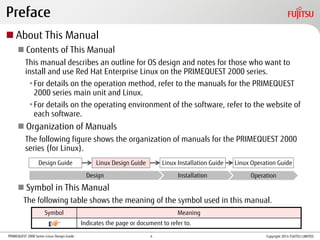
The following figure shows the organization of manuals for the PRIMEQUEST 2000
series (for Linux).
 Symbol in This Manual
The following table shows the meaning of the symbol used in this manual.
Symbol Meaning
Indicates the page or document to refer to.
Design Guide Linux Design Guide Linux Installation Guide Linux Operation Guide
OperationInstallationDesign
Copyright 2014 FUJITSU LIMITED4
PRIMEQUEST 2000 Series Linux Design Guide
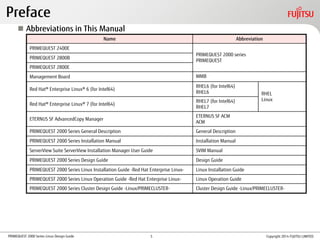
 Abbreviations in This Manual
Preface
Name Abbreviation
PRIMEQUEST 2400E
PRIMEQUEST 2000 series
PRIMEQUEST
PRIMEQUEST 2800B
PRIMEQUEST 2800E
Management Board MMB
Red Hat® Enterprise Linux® 6 (for Intel64)
RHEL6 (for Intel64)
RHEL6 RHEL
Linux
Red Hat® Enterprise Linux® 7 (for Intel64)
RHEL7 (for Intel64)
RHEL7
ETERNUS SF AdvancedCopy Manager
ETERNUS SF ACM
ACM
PRIMEQUEST 2000 Series General Description General Description
PRIMEQUEST 2000 Series Installation Manual Installation Manual
ServerView Suite ServerView Installation Manager User Guide SVIM Manual
PRIMEQUEST 2000 Series Design Guide Design Guide
PRIMEQUEST 2000 Series Linux Installation Guide -Red Hat Enterprise Linux- Linux Installation Guide
PRIMEQUEST 2000 Series Linux Operation Guide -Red Hat Enterprise Linux- Linux Operation Guide
PRIMEQUEST 2000 Series Cluster Design Guide -Linux/PRIMECLUSTER- Cluster Design Guide -Linux/PRIMECLUSTER-
Copyright 2014 FUJITSU LIMITED5
PRIMEQUEST 2000 Series Linux Design Guide
• Linux is a registered trademark of Linus Torvalds.
• Red Hat is a registered trademark of Red Hat, Inc. in the United States and other countries.
• Intel is a trademark of Intel Corporation in the United States and/or other countries.
• Microsoft, Windows, and Windows Server are the registered trademarks or trademarks of Microsoft Corporation in the United States and/or other
countries.
• Oracle and Java are the registered trademarks of Oracle Corporation and its subsidiaries/related companies in the United States and other countries.
• NetVault is a trademark or registered trademark of Dell, Inc. in the United States and/or other countries.
• PRIMECLUSTER is a registered trademark of Fujitsu Limited.
• Other company names and product names are the trademarks or registered trademarks of their respective owners.
Preface
Copyright 2014 FUJITSU LIMITED6
PRIMEQUEST 2000 Series Linux Design Guide Copyright 2014 FUJITSU LIMITED
1. Linux Overview
This chapter provides an overview of Linux.
7
PRIMEQUEST 2000 Series Linux Design Guide
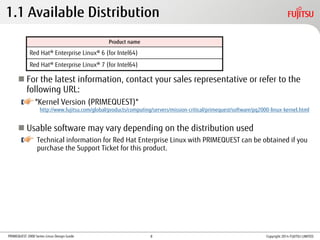
 For the latest information, contact your sales representative or refer to the
following URL:
"Kernel Version (PRIMEQUEST)"
 Usable software may vary depending on the distribution used
Technical information for Red Hat Enterprise Linux with PRIMEQUEST can be obtained if you
purchase the Support Ticket for this product.
Product name
Red Hat® Enterprise Linux® 6 (for Intel64)
Red Hat® Enterprise Linux® 7 (for Intel64)
1.1 Available Distribution
Copyright 2014 FUJITSU LIMITED
http://www.fujitsu.com/global/products/computing/servers/mission-critical/primequest/software/pq2000-linux-kernel.html
8
PRIMEQUEST 2000 Series Linux Design Guide
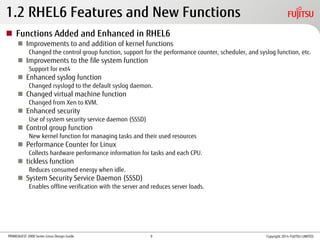
1.2 RHEL6 Features and New Functions
 Functions Added and Enhanced in RHEL6
 Improvements to and addition of kernel functions
Changed the control group function, support for the performance counter, scheduler, and syslog function, etc.
 Improvements to the file system function
Support for ext4
 Enhanced syslog function
Changed rsyslogd to the default syslog daemon.
 Changed virtual machine function
Changed from Xen to KVM.
 Enhanced security
Use of system security service daemon (SSSD)
 Control group function
New kernel function for managing tasks and their used resources
 Performance Counter for Linux
Collects hardware performance information for tasks and each CPU.
 tickless function
Reduces consumed energy when idle.
 System Security Service Daemon (SSSD)
Enables offline verification with the server and reduces server loads.
Copyright 2014 FUJITSU LIMITED9
PRIMEQUEST 2000 Series Linux Design Guide
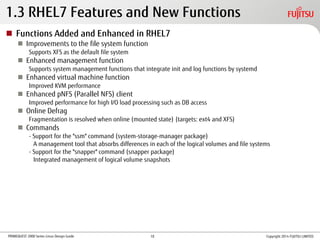
1.3 RHEL7 Features and New Functions
 Functions Added and Enhanced in RHEL7
 Improvements to the file system function
Supports XFS as the default file system
 Enhanced management function
Supports system management functions that integrate init and log functions by systemd
 Enhanced virtual machine function
Improved KVM performance
 Enhanced pNFS (Parallel NFS) client
Improved performance for high I/O load processing such as DB access
 Online Defrag
Fragmentation is resolved when online (mounted state) (targets: ext4 and XFS)
 Commands
- Support for the "ssm" command (system-storage-manager package)
A management tool that absorbs differences in each of the logical volumes and file systems
- Support for the "snapper" command (snapper package)
Integrated management of logical volume snapshots
Copyright 2014 FUJITSU LIMITED10
PRIMEQUEST 2000 Series Linux Design Guide
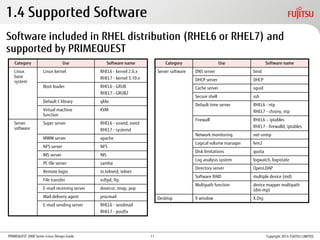
Software included in RHEL distribution (RHEL6 or RHEL7) and
supported by PRIMEQUEST
1.4 Supported Software
Category Use Software name
Linux
base
system
Linux kernel RHEL6 - kernel 2.6.x
RHEL7 - kernel 3.10.x
Boot loader RHEL6 - GRUB
RHEL7 - GRUB2
Default C library glibc
Virtual machine
function
KVM
Server
software
Super server RHEL6 - xinetd, inetd
RHEL7 - systemd
WWW server apache
NFS server NFS
NIS server NIS
PC file server samba
Remote login in.telnetd, telnet
File transfer vsftpd, ftp
E-mail receiving server dovecot, imap, pop
Mail delivery agent procmail
E-mail sending server RHEL6 - sendmail
RHEL7 - postfix
Category Use Software name
Server software DNS server bind
DHCP server DHCP
Cache server squid
Secure shell ssh
Default time server RHEL6 - ntp
RHEL7 - chrony, ntp
Firewall RHEL6 – iptables
RHEL7 - firewalld, iptables
Network monitoring net-snmp
Logical volume manager lvm2
Disk limitations quota
Log analysis system logwatch, logrotate
Directory server OpenLDAP
Software RAID multiple device (md)
Multipath function device mapper multipath
(dm-mp)
Desktop X window X.Org
Copyright 2014 FUJITSU LIMITED11
PRIMEQUEST 2000 Series Linux Design Guide
1.5 Software Bundled With Hardware
Make sure to install the software bundled with hardware.
* If you are using ServerView Installation Manager (SVIM), the software bundled
with hardware is installed automatically.
For details, refer to "3.3 Bundled software" in "General Description".
Copyright 2014 FUJITSU LIMITED12
PRIMEQUEST 2000 Series Linux Design Guide Copyright 2014 FUJITSU LIMITED
2. Linux System Design
This chapter describes preliminary designs for each Linux
setting.
For details, refer to the product manuals that are provided by
Red Hat.
13
PRIMEQUEST 2000 Series Linux Design Guide
2.1 Linux System Design Workflow
 Installation Design With SVIM
Refer to "2.2 Installation Design With SVIM".
 Package selection design
 Verification design
 Security Design
Refer to "2.3 Security Design".
 Hard Disk Operation Design
Refer to "2.4 Hard Disk Operation Design".
 Disk partition design
 Estimated space for each partition
 Network Operation Design
Refer to "2.5 Network Operation Design".
 Device Name Conflict Prevention Design
Refer to "2.6 Device Name Conflict Prevention Design".
Reasons for and measures against device name conflicts
 Log File Operation Design
Refer to "2.7 Log File Operation Design".
Necessity of log rotation
 Dump Environment Design
Refer to "2.8 Dump Environment Design".
Memory dump function
Copyright 2014 FUJITSU LIMITED14
PRIMEQUEST 2000 Series Linux Design Guide
2.2 Installation Design With SVIM (1/2)
 Key Points of Design
 Estimate the swap area, dump device, and dump saving area based on the
memory capacity
Select Customized to configure the options.
 Make sure to set a root password
 Make sure to set a boot loader password
If you used SVIM to install the OS by selecting Typical, the password is not set. By
selecting Customized, the password can be set during installation. To ensure security,
renew the password after installation is complete.
 Set the DNS server as necessary
 Tools that can be installed with SVIM
ServerView Suite (monitoring software) and other tools
For details, refer to "SVIM Manual".
Copyright 2014 FUJITSU LIMITED15
PRIMEQUEST 2000 Series Linux Design Guide
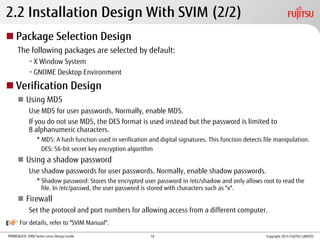
2.2 Installation Design With SVIM (2/2)
 Package Selection Design
The following packages are selected by default:
•X Window System
•GNOME Desktop Environment
 Verification Design
 Using MD5
Use MD5 for user passwords. Normally, enable MD5.
If you do not use MD5, the DES format is used instead but the password is limited to
8 alphanumeric characters.
* MD5: A hash function used in verification and digital signatures. This function detects file manipulation.
DES: 56-bit secret key encryption algorithm
 Using a shadow password
Use shadow passwords for user passwords. Normally, enable shadow passwords.
* Shadow password: Stores the encrypted user password in /etc/shadow and only allows root to read the
file. In /etc/passwd, the user password is stored with characters such as "x".
 Firewall
Set the protocol and port numbers for allowing access from a different computer.
For details, refer to "SVIM Manual".
Copyright 2014 FUJITSU LIMITED16
PRIMEQUEST 2000 Series Linux Design Guide
Take the following measures.
 OS Security Measures
For details, refer to the guide that is shown below. To access this guide, go to the
Red Hat Customer Portal (https://access.redhat.com/home), and then click
[Support]. Under [Product Documentation], click on [Red Hat Enterprise Linux].
• "Security Guide" for Red Hat Enterprise Linux 6
• "Security Guide" for Red Hat Enterprise Linux 7
 Applying Modifications
For details, refer to "4.1 Overview of Applying Modifications".
* For information about the security software (ISV product), contact your sales
representative.
2.3 Security Design
Copyright 2014 FUJITSU LIMITED17
PRIMEQUEST 2000 Series Linux Design Guide
2.4 Hard Disk Operation Design (1/2)
 Disk Partition Design
Design item Description
Mounting point Set the path for each disk partition.
/ : root directory
/boot : Area for files used in the bootstrap process and the OS kernel
swap : Area used as a virtual memory area when the system memory is insufficient
File system type Set the file system type. The main file systems are shown below.
[Available file systems for RHEL6]
ext2: This file system was used by many distributors as the default file system until ext3 was released.
ext3: This file system adds a journaling function to ext2
The maximum file system size is 16TB and the maximum file size is 2TB.
ext4: This file system has the same journaling function as ext3
The maximum file system size is 16TB and the maximum file size is 16TB.
[Available file systems for RHEL7]
XFS: The file system that became the default type from RHEL7.
Supports large file systems; the maximum file system size is 500TB.
ext4: The maximum file system size is 50TB and the maximum file size is 16TB.
ext2, ext3: These file systems can also be used for RHEL7.
Drive Set the drive to create disk partitions.
E.g., sda: First internal hard disk drive
sdb: Second internal hard disk drive
For details, refer to Red Hat "Storage Administration Guide".
Copyright 2014 FUJITSU LIMITED18
PRIMEQUEST 2000 Series Linux Design Guide
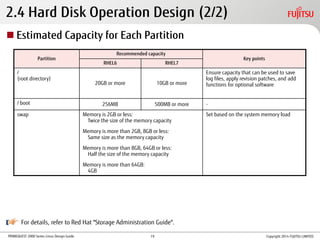
2.4 Hard Disk Operation Design (2/2)
Partition
Recommended capacity
Key points
RHEL6 RHEL7
/
(root directory)
20GB or more 10GB or more
Ensure capacity that can be used to save
log files, apply revision patches, and add
functions for optional software
/ boot 256MB 500MB or more -
swap Memory is 2GB or less:
Twice the size of the memory capacity
Memory is more than 2GB, 8GB or less:
Same size as the memory capacity
Memory is more than 8GB, 64GB or less:
Half the size of the memory capacity
Memory is more than 64GB:
4GB
Set based on the system memory load
 Estimated Capacity for Each Partition
For details, refer to Red Hat "Storage Administration Guide".
Copyright 2014 FUJITSU LIMITED19
PRIMEQUEST 2000 Series Linux Design Guide
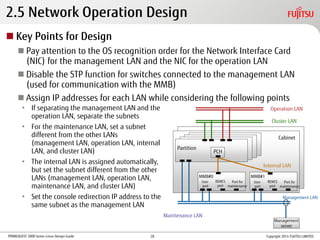
2.5 Network Operation Design
 Key Points for Design
 Pay attention to the OS recognition order for the Network Interface Card
(NIC) for the management LAN and the NIC for the operation LAN
 Disable the STP function for switches connected to the management LAN
(used for communication with the MMB)
 Assign IP addresses for each LAN while considering the following points
• If separating the management LAN and the
operation LAN, separate the subnets
• For the maintenance LAN, set a subnet
different from the other LANs
(management LAN, operation LAN, internal
LAN, and cluster LAN)
• The internal LAN is assigned automatically,
but set the subnet different from the other
LANs (management LAN, operation LAN,
maintenance LAN, and cluster LAN)
• Set the console redirection IP address to the
same subnet as the management LAN
Management
server
MMB#0
User
port
REMCS
port
Port for
maintenance
Partition
PCH
MMB#1
Cabinet
Maintenance LAN
Operation LAN
Cluster LAN
Internal LAN
Management LAN
Copyright 2014 FUJITSU LIMITED
User
port
REMCS
port
Port for
maintenance
20
PRIMEQUEST 2000 Series Linux Design Guide
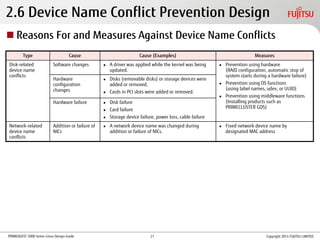
2.6 Device Name Conflict Prevention Design
Type Cause Cause (Examples) Measures
Disk-related
device name
conflicts
Software changes  A driver was applied while the kernel was being
updated.
 Prevention using hardware
(RAID configuration, automatic stop of
system starts during a hardware failure)
 Prevention using OS functions
(using label names, udev, or UUID)
 Prevention using middleware functions
(Installing products such as
PRIMECLUSTER GDS)
Hardware
configuration
changes
 Disks (removable disks) or storage devices were
added or removed.
 Cards in PCI slots were added or removed.
Hardware failure  Disk failure
 Card failure
 Storage device failure, power loss, cable failure
Network-related
device name
conflicts
Addition or failure of
NICs
 A network device name was changed during
addition or failure of NICs.
 Fixed network device name by
designated MAC address
 Reasons For and Measures Against Device Name Conflicts
Copyright 2014 FUJITSU LIMITED21
PRIMEQUEST 2000 Series Linux Design Guide
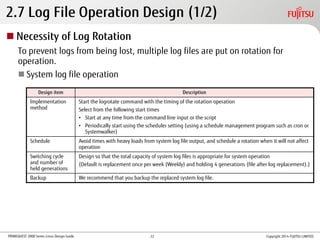
2.7 Log File Operation Design (1/2)
Design item Description
Implementation
method
Start the logrotate command with the timing of the rotation operation
Select from the following start times
• Start at any time from the command line input or the script
• Periodically start using the scheduler setting (using a schedule management program such as cron or
Systemwalker)
Schedule Avoid times with heavy loads from system log file output, and schedule a rotation when it will not affect
operation
Switching cycle
and number of
held generations
Design so that the total capacity of system log files is appropriate for system operation
(Default is replacement once per week (Weekly) and holding 4 generations (file after log replacement).)
Backup We recommend that you backup the replaced system log file.
 Necessity of Log Rotation
To prevent logs from being lost, multiple log files are put on rotation for
operation.
 System log file operation
Copyright 2014 FUJITSU LIMITED22
PRIMEQUEST 2000 Series Linux Design Guide
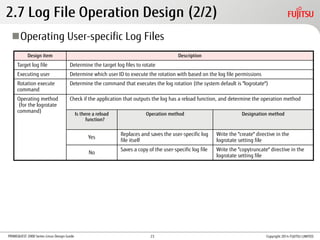
2.7 Log File Operation Design (2/2)
Design item Description
Target log file Determine the target log files to rotate
Executing user Determine which user ID to execute the rotation with based on the log file permissions
Rotation execute
command
Determine the command that executes the log rotation (the system default is "logrotate")
Operating method
(for the logrotate
command)
Check if the application that outputs the log has a reload function, and determine the operation method
Is there a reload
function?
Operation method Designation method
Yes
Replaces and saves the user-specific log
file itself
Write the "create" directive in the
logrotate setting file
No
Saves a copy of the user-specific log file Write the "copytruncate" directive in the
logrotate setting file
Operating User-specific Log Files
Copyright 2014 FUJITSU LIMITED23
PRIMEQUEST 2000 Series Linux Design Guide
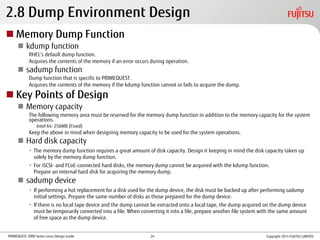
2.8 Dump Environment Design
 Memory Dump Function
 kdump function
RHEL’s default dump function.
Acquires the contents of the memory if an error occurs during operation.
 sadump function
Dump function that is specific to PRIMEQUEST.
Acquires the contents of the memory if the kdump function cannot or fails to acquire the dump.
 Key Points of Design
 Memory capacity
The following memory area must be reserved for the memory dump function in addition to the memory capacity for the system
operations.
Intel 64: 256MB (Fixed)
Keep the above in mind when designing memory capacity to be used for the system operations.
 Hard disk capacity
• The memory dump function requires a great amount of disk capacity. Design it keeping in mind the disk capacity taken up
solely by the memory dump function.
• For iSCSI- and FCoE-connected hard disks, the memory dump cannot be acquired with the kdump function.
Prepare an internal hard disk for acquiring the memory dump.
 sadump device
• If performing a hot replacement for a disk used for the dump device, the disk must be backed up after performing sadump
initial settings. Prepare the same number of disks as those prepared for the dump device.
• If there is no local tape device and the dump cannot be extracted onto a local tape, the dump acquired on the dump device
must be temporarily converted into a file. When converting it into a file, prepare another file system with the same amount
of free space as the dump device.
Copyright 2014 FUJITSU LIMITED24
PRIMEQUEST 2000 Series Linux Design Guide Copyright 2014 FUJITSU LIMITED
3. High Availability Design
This chapter describes the key points for system redundancy.
For details, refer to "Design Guide".
25
PRIMEQUEST 2000 Series Linux Design Guide
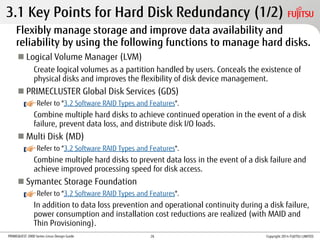
3.1 Key Points for Hard Disk Redundancy (1/2)
Flexibly manage storage and improve data availability and
reliability by using the following functions to manage hard disks.
 Logical Volume Manager (LVM)
Create logical volumes as a partition handled by users. Conceals the existence of
physical disks and improves the flexibility of disk device management.
 PRIMECLUSTER Global Disk Services (GDS)
Refer to "3.2 Software RAID Types and Features".
Combine multiple hard disks to achieve continued operation in the event of a disk
failure, prevent data loss, and distribute disk I/O loads.
 Multi Disk (MD)
Refer to "3.2 Software RAID Types and Features".
Combine multiple hard disks to prevent data loss in the event of a disk failure and
achieve improved processing speed for disk access.
 Symantec Storage Foundation
Refer to "3.2 Software RAID Types and Features".
In addition to data loss prevention and operational continuity during a disk failure,
power consumption and installation cost reductions are realized (with MAID and
Thin Provisioning).
Copyright 2014 FUJITSU LIMITED26
PRIMEQUEST 2000 Series Linux Design Guide
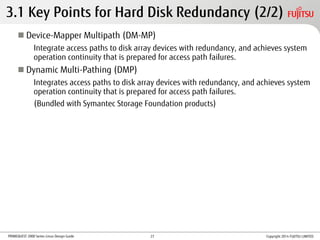
3.1 Key Points for Hard Disk Redundancy (2/2)
 Device-Mapper Multipath (DM-MP)
Integrate access paths to disk array devices with redundancy, and achieves system
operation continuity that is prepared for access path failures.
 Dynamic Multi-Pathing (DMP)
Integrates access paths to disk array devices with redundancy, and achieves system
operation continuity that is prepared for access path failures.
(Bundled with Symantec Storage Foundation products)
Copyright 2014 FUJITSU LIMITED27
PRIMEQUEST 2000 Series Linux Design Guide
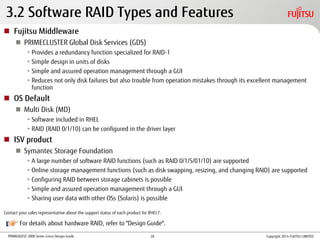
3.2 Software RAID Types and Features
 Fujitsu Middleware
 PRIMECLUSTER Global Disk Services (GDS)
• Provides a redundancy function specialized for RAID-1
• Simple design in units of disks
• Simple and assured operation management through a GUI
• Reduces not only disk failures but also trouble from operation mistakes through its excellent management
function
 OS Default
 Multi Disk (MD)
• Software included in RHEL
• RAID (RAID 0/1/10) can be configured in the driver layer
 ISV product
 Symantec Storage Foundation
• A large number of software RAID functions (such as RAID 0/1/5/01/10) are supported
• Online storage management functions (such as disk swapping, resizing, and changing RAID) are supported
• Configuring RAID between storage cabinets is possible
• Simple and assured operation management through a GUI
• Sharing user data with other OSs (Solaris) is possible
Contact your sales representative about the support status of each product for RHEL7.
For details about hardware RAID, refer to "Design Guide".
Copyright 2014 FUJITSU LIMITED28
PRIMEQUEST 2000 Series Linux Design Guide
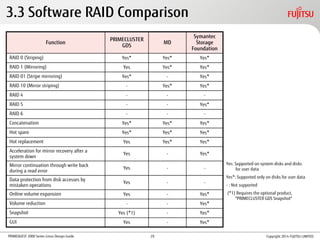
3.3 Software RAID Comparison
Function
PRIMECLUSTER
GDS
MD
Symantec
Storage
Foundation
RAID 0 (Striping) Yes* Yes* Yes*
RAID 1 (Mirroring) Yes Yes* Yes*
RAID 01 (Stripe mirroring) Yes* - Yes*
RAID 10 (Mirror striping) - Yes* Yes*
RAID 4 - - -
RAID 5 - - Yes*
RAID 6 - - -
Concatenation Yes* Yes* Yes*
Hot spare Yes* Yes* Yes*
Hot replacement Yes Yes* Yes*
Acceleration for mirror recovery after a
system down
Yes - Yes*
Mirror continuation through write back
during a read error
Yes - -
Data protection from disk accesses by
mistaken operations
Yes - -
Online volume expansion Yes - Yes*
Volume reduction - - Yes*
Snapshot Yes (*1) - Yes*
GUI Yes - Yes*
Yes: Supported on system disks and disks
for user data
Yes*: Supported only on disks for user data
- : Not supported
(*1) Requires the optional product,
"PRIMECLUSTER GDS Snapshot"
Copyright 2014 FUJITSU LIMITED29
PRIMEQUEST 2000 Series Linux Design Guide
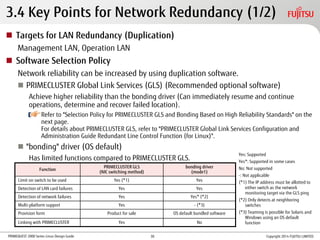
3.4 Key Points for Network Redundancy (1/2)
 Targets for LAN Redundancy (Duplication)
Management LAN, Operation LAN
 Software Selection Policy
Network reliability can be increased by using duplication software.
 PRIMECLUSTER Global Link Services (GLS) (Recommended optional software)
Achieve higher reliability than the bonding driver (Can immediately resume and continue
operations, determine and recover failed location).
Refer to "Selection Policy for PRIMECLUSTER GLS and Bonding Based on High Reliability Standards" on the
next page.
For details about PRIMECLUSTER GLS, refer to "PRIMECLUSTER Global Link Services Configuration and
Administration Guide Redundant Line Control Function (for Linux)".
 "bonding" driver (OS default)
Has limited functions compared to PRIMECLUSTER GLS.
Function
PRIMECLUSTER GLS
(NIC switching method)
bonding driver
(mode1)
Limit on switch to be used Yes (*1) Yes
Detection of LAN card failures Yes Yes
Detection of network failures Yes Yes* (*2)
Multi-platform support Yes - (*3)
Provision form Product for sale OS default bundled software
Linking with PRIMECLUSTER Yes No
Yes: Supported
Yes*: Supported in some cases
No: Not supported
-: Not applicable
(*1) The IP address must be allotted to
either switch as the network
monitoring target via the GLS ping
(*2) Only detects at neighboring
switches
(*3) Teaming is possible for Solaris and
Windows using an OS default
function
Copyright 2014 FUJITSU LIMITED30
PRIMEQUEST 2000 Series Linux Design Guide
3.4 Key Points for Network Redundancy (2/2)
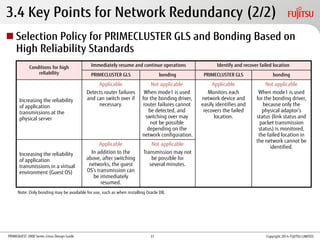
 Selection Policy for PRIMECLUSTER GLS and Bonding Based on
High Reliability Standards
Conditions for high
reliability
Immediately resume and continue operations Identify and recover failed location
PRIMECLUSTER GLS bonding PRIMECLUSTER GLS bonding
Increasing the reliability
of application
transmissions at the
physical server
Applicable
Detects router failures
and can switch over if
necessary.
Not applicable
When mode1 is used
for the bonding driver,
router failures cannot
be detected, and
switching over may
not be possible
depending on the
network configuration.
Applicable
Monitors each
network device and
easily identifies and
recovers the failed
location.
Not applicable
When mode1 is used
for the bonding driver,
because only the
physical adaptor’s
status (link status and
packet transmission
status) is monitored,
the failed location in
the network cannot be
identified.
Increasing the reliability
of application
transmissions in a virtual
environment (Guest OS)
Applicable
In addition to the
above, after switching
networks, the guest
OS’s transmission can
be immediately
resumed.
Not applicable
Transmission may not
be possible for
several minutes.
Note: Only bonding may be available for use, such as when installing Oracle DB.
Copyright 2014 FUJITSU LIMITED31
PRIMEQUEST 2000 Series Linux Design Guide
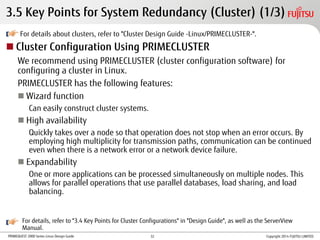
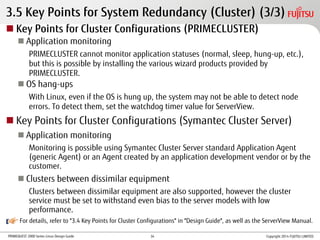
3.5 Key Points for System Redundancy (Cluster) (1/3)
For details about clusters, refer to "Cluster Design Guide -Linux/PRIMECLUSTER-".
 Cluster Configuration Using PRIMECLUSTER
We recommend using PRIMECLUSTER (cluster configuration software) for
configuring a cluster in Linux.
PRIMECLUSTER has the following features:
 Wizard function
Can easily construct cluster systems.
 High availability
Quickly takes over a node so that operation does not stop when an error occurs. By
employing high multiplicity for transmission paths, communication can be continued
even when there is a network error or a network device failure.
 Expandability
One or more applications can be processed simultaneously on multiple nodes. This
allows for parallel operations that use parallel databases, load sharing, and load
balancing.
For details, refer to "3.4 Key Points for Cluster Configurations" in "Design Guide", as well as the ServerView
Manual.
Copyright 2014 FUJITSU LIMITED32
PRIMEQUEST 2000 Series Linux Design Guide
For details, refer to "3.4 Key Points for Cluster Configurations" in "Design Guide", as well as the ServerView Manual.
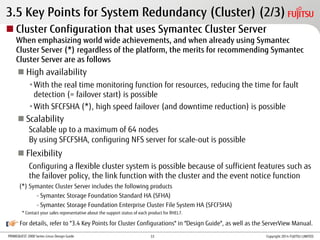
3.5 Key Points for System Redundancy (Cluster) (2/3)
 Cluster Configuration that uses Symantec Cluster Server
When emphasizing world wide achievements, and when already using Symantec
Cluster Server (*) regardless of the platform, the merits for recommending Symantec
Cluster Server are as follows
 High availability
•With the real time monitoring function for resources, reducing the time for fault
detection (= failover start) is possible
•With SFCFSHA (*), high speed failover (and downtime reduction) is possible
 Scalability
Scalable up to a maximum of 64 nodes
By using SFCFSHA, configuring NFS server for scale-out is possible
 Flexibility
Configuring a flexible cluster system is possible because of sufficient features such as
the failover policy, the link function with the cluster and the event notice function
(*) Symantec Cluster Server includes the following products
- Symantec Storage Foundation Standard HA (SFHA)
- Symantec Storage Foundation Enterprise Cluster File System HA (SFCFSHA)
* Contact your sales representative about the support status of each product for RHEL7.
Copyright 2014 FUJITSU LIMITED33
PRIMEQUEST 2000 Series Linux Design Guide
For details, refer to "3.4 Key Points for Cluster Configurations" in "Design Guide", as well as the ServerView Manual.
3.5 Key Points for System Redundancy (Cluster) (3/3)
 Key Points for Cluster Configurations (PRIMECLUSTER)
 Application monitoring
PRIMECLUSTER cannot monitor application statuses (normal, sleep, hung-up, etc.),
but this is possible by installing the various wizard products provided by
PRIMECLUSTER.
 OS hang-ups
With Linux, even if the OS is hung up, the system may not be able to detect node
errors. To detect them, set the watchdog timer value for ServerView.
 Key Points for Cluster Configurations (Symantec Cluster Server)
 Application monitoring
Monitoring is possible using Symantec Cluster Server standard Application Agent
(generic Agent) or an Agent created by an application development vendor or by the
customer.
 Clusters between dissimilar equipment
Clusters between dissimilar equipment are also supported, however the cluster
service must be set to withstand even bias to the server models with low
performance.
Copyright 2014 FUJITSU LIMITED34
PRIMEQUEST 2000 Series Linux Design Guide Copyright 2014 FUJITSU LIMITED
4. OS Operation Management Design
This chapter provides an overview of Linux operation
management design.
35
PRIMEQUEST 2000 Series Linux Design Guide
x.3x.2
4.1 Overview of Applying Modifications (1/2)
Type of modification Description Acquire from:
errata Major error modifications for OS (including security patches) Red Hat‘s Red Hat Customer Portal
(https://access.redhat.com/home)
Minor releases Releases provided periodically that include support for new
hardware, additional functions, and error patches
 Type of Modification
 Application Method for Modifications
 Standard application method [For the latest operation]
Errata is provided only with the latest minor release.
Customer
7 months
errataMinor release
x.1
errata application
RHEL
x.1
7 months
errataMinor release
errata application
RHEL
x.2
7 months
errataMinor release
errata application
RHEL
x.3
Copyright 2014 FUJITSU LIMITED
For details, refer to "Red Hat Enterprise Linux Life Cycle" (the following URL):
https://access.redhat.com/support/policy/updates/errata
36
PRIMEQUEST 2000 Series Linux Design Guide
 Application method for Extended Update Support (EUS) [For planned
maintenance]
•Provides errata for particular minor releases continually over a longer period of time
than the standard application method
•Particular minor releases: For RHEL6, all minor releases
For RHEL7 (7.1 or later), all minor releases
•Provision period for errata: 24 months after the release of the said minor release
•Allows for a reasonable maintenance plan for ensuring a sufficient amount of
preparation time for periodic maintenance
4.1 Overview of Applying Modifications (2/2)
7 months
errataMinor release
RHEL
x.1
7 months
errataMinor release
RHEL
x.2
7 months
errataMinor release
x.1
EUS
x.3
EUS
RHEL
x.3
Patch for major errors Provision period for errata (24 months)
(*1) Backport:
Porting the error patch equipped in the latest minor release
to a previous minor release
x.2
EUS
Backport from the latest minor release (*1)
Copyright 2014 FUJITSU LIMITED
For details, refer to
"Red Hat Enterprise Linux Life Cycle" (the following URL):
https://access.redhat.com/support/policy/updates/errata
37
PRIMEQUEST 2000 Series Linux Design Guide
To protect your resources and data from risks such as natural disasters,
periodically perform backups so that you can restore the data in the event of an
emergency.
 Backup Including System Volume
 Online backup
Requires confirmation in advance that the product supports online backups and that there will be no effect
on operation.
 Offline backup
• Requires a stop in operations (The time for stopping operations is proportional to the backup capacity)
• Simpler to perform than the online backup
• 3 different methods: Full backup, differential backup, and incremental backup
4.2 Overview of Backup and Restoration Design (1/2)
For details, refer to the manuals for each tool.
Method, software Type Online Offline
dump/restore command OS default utility Not supported Supported
SystemcastWizard Professional Image backup software developed by Fujitsu Not supported Supported
PRIMECLUSTER GDS Snapshot PRIMECLUSTER GDS optional software Supported Supported
ETERNUS SF AdvancedCopy Manager Fujitsu software that supports the SAN boot Not supported Supported
NetVault Backup 9 Dell Software Supported Supported
* The software support information is as of September 2014.
For the latest software information, contact your sales representative.
Copyright 2014 FUJITSU LIMITED38
PRIMEQUEST 2000 Series Linux Design Guide
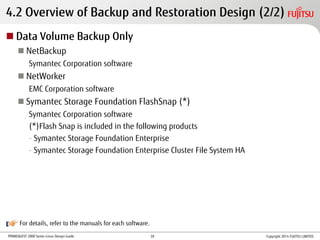
4.2 Overview of Backup and Restoration Design (2/2)
 Data Volume Backup Only
 NetBackup
Symantec Corporation software
 NetWorker
EMC Corporation software
 Symantec Storage Foundation FlashSnap (*)
Symantec Corporation software
(*)Flash Snap is included in the following products
- Symantec Storage Foundation Enterprise
- Symantec Storage Foundation Enterprise Cluster File System HA
For details, refer to the manuals for each software.
Copyright 2014 FUJITSU LIMITED39
PRIMEQUEST 2000 Series Linux Design Guide
PRIMEQUEST
4.3 Backup and Restoration - dump/restore Command
Merits Demerits
• Is an OS default utility, and does not require the purchase of
special software
• Does not require a backup server
• Can backup and restore the system volume
(* Use of rescue mode)
• Requires separate operation for each partition
• Only supports the single unit as a save area
• Cannot perform a DB online backup
Execute the dump/restore command from the OS console of the
system partition you want to perform the backup or restore for.
[Local backup using the default utility]
KVM: Keyboard, Video, Mouse
Tape device
Backup
Restore
KVM Partition#0
Partition#1
Partition#n
Input command
on a KVM console
Copyright 2014 FUJITSU LIMITED40
PRIMEQUEST 2000 Series Linux Design Guide
PRIMEQUEST
4.3 Backup and Restoration - SystemcastWizard Professional
Merits Demerits
• Can automatically perform backups or restorations for multiple
partitions
• Can be done using remote operation
• Can be executed by GUI operation
• Requires a separate deployment server
• Cannot perform differential or incremental backups
• Does not have an automatic generation management function for
backup data
• Partition must be stopped before the backup
• Basically backs data up on a hard disk. To back up to a secondary
memory device, separate backup software that operates on Windows
is necessary
Saves the hard disk image of the system to be backed up on the deployment
server via the network, and recovers and deploys the target system.
[Configuration of backup using SystemcastWizard Professional]
• Connect the deployment server to the management LAN
in the same segment as PRIMEQUEST
• The deployment server must have the capacity and
reliability necessary to back up the system volume
Partition#0
Internal
disk
Partition#n
MMB
External disk
Restore
Restore
Deployment server
MMB console terminal
SystemcastWizard
Professional equipped
Backup
Management LAN
Copyright 2014 FUJITSU LIMITED41
PRIMEQUEST 2000 Series Linux Design Guide
4.3 Backup and Restoration - PRIMECLUSTER GDS Snapshot
Merits Demerits
• Can create snapshots in units of disks and in units of volumes managed by
PRIMECLUSTER GDS
• Can use the system disk snapshot function to perform system backups and
apply patches in advance during operation
• Automatically selects the optimal snapshot method based on the volume
configuration and functions the storage device has
• If restoring the snapshot data created with the high-speed copy function, for
configurations that cannot use the high-speed copy function, the system
automatically switches the copy method to the software copy function and
performs the high-speed restore
• PRIMECLUSTER GDS is necessary to use PRIMECLUSTER
GDS Snapshot
• PRIMECLUSTER GDS Snapshot is necessary for all servers
that share the common disk device
High-speed Backups and Restorations
• The backup disk must be the same size or larger than the disk being backed up
PRIMEQUEST
…
Partition#0 Partition#n
PRIMECLUSTER GDS Snapshot
PRIMECLUSTER GDS
Backup
Disk
Backup Restore
GDS mirror
[Example backup configuration using an internal disk] [Example backup configuration using ETERNUS]
PRIMEQUEST
…
Partition#0 Partition#n
PRIMECLUSTER GDS Snapshot
PRIMECLUSTER GDS
ETERNUS#0 ETERNUS#1
GDS mirror
Backup
Disk
Backup Restore (1)
EC/OPC (Advanced Copy function)
FC-SAN
Restore (2) (Mirror recovery)
Copyright 2014 FUJITSU LIMITED42
PRIMEQUEST 2000 Series Linux Design Guide
4.3 Backup and Restoration - ETERNUS SF ACM
Merits Demerits
• Can perform backups or restorations without putting a load on the operation server or LAN
• Can perform high-speed backups or restorations with little operation stoppage time
(* Using the ETERNUS Advanced Copy function)
• Can perform remote, high-speed replication
(* Using the ETERNUS Remote Advanced Copy function)
• Can perform a low-energy backup that reduces the power consumed by ETERNUS
• Can do an online backup for DB (Oracle, Symfoware)
• Can perform system volume backups or restorations during the SAN boot
• Does not support backups for the internal disk
 Use in combination with a disk array device (ETERNUS)
 Can back up and restore the disk array data without going through an
operation server or LAN
[Configuration of the data backup on ETERNUS using ACM]
•ACM agent
Controls the ETERNUS Advanced Copy function.
Install on the operation server to be backed up or restored.
•ACM manager
Centrally manages device information and policies for all ACM agents.
PRIMEQUEST
Partition#0(*2)
Partition#1(*2)
Partition#n(*1)
LT seriesETERNUS
(*1) ACM manager equipped
(*2) ACM agent equipped
(*3) ACM tape server equipped
Using the
Advanced Copy
function
PRIMEPOWER/
SPARC Enterprise
[Solaris Server] (*3)FC-SAN
Copyright 2014 FUJITSU LIMITED
For supported OSs of the ETERNUS SF ACM, refer to "Environments" on the following URL:
https://www.fujitsu.com/global/products/computing/storage/software/eternus-sf/advancedcopy-manager/index.html
43
PRIMEQUEST 2000 Series Linux Design Guide
4.3 Backup and Restoration - NetVault Backup
Merits Demerits
• Can define schedules for backups, making processing automatic
• Can perform synthetic backups for differential data (*)
• Can be controlled by a common GUI, even on different OSs
• Highly compatible with PRIMECLUSTER
• Can do an online backup for DB (Oracle) (Requires optional product)
• Can do backups and restore the system volume (Requires optional product)
• Can do backups with a mix of different OSs (Linux and Windows)
• Optional products are required to perform
system backups of the operation server
Software with the No.1 share of the Linux server backup market in Japan
(*) Integrates a differential backup with the full backup, creating a backup equivalent to the latest full backup
Mechanism for system volume backup using NetVault Backup
• When starting up the server from a VaultOS CD, connect the
KVM console to the system partition you want to restore
• Control with a remote console via MMB
[Example configuration connected to a KVM console]
PRIMEQUEST
Partition#n
Partition#0
KVM
NetVault Server
VaultDR
LTOBackup
Restore
KVM console
LAN for backup
Start up
VaultOS CD for the boot
Copyright 2014 FUJITSU LIMITED
* Support for RHEL7 is to be determined.
44
PRIMEQUEST 2000 Series Linux Design Guide Copyright 2014 FUJITSU LIMITED
Merits Demerits
• With deduplication backups, the storage usage is reduced
(Requires optional product)
• Speed up full backups with an accelerator (Requires optional product)
• Online backups by automatically detecting instances of Oracle DB
(Requires optional product)
• Replication to remote locations with Auto Image Replication(AIR)
(Requires optional product)
• Manage an environment with a mix of different platforms using a single server
• Automatic processing by defining schedules for backups
• Synthetic backups for differential data (*)
• Does not support the Japanese language
(Linux version only)
• Cannot back up and restore the system
volume
RHEL’s range of support in NetBackup 7.6
• Backup server *1
RHEL6 (for Intel64)
• Backup client (backup is being performed)
RHEL7 (for Intel64) *2
RHEL6 (for Intel64)
*1: The backup server's support period for RHEL7 is to be determined
(For the latest support status, contact your sales representative.)
*2: Please apply the patch (7.6.0.3 or later) after the scheduled release on
September 2014 or later
Software with proven results for backups in large-scale systems
PRIMEQUEST
…
(*) Integrates a differential backup with the full backup, creating a backup equivalent to the latest full backup
[Data backup using NetBackup]
PRIMEQUEST
…Partition#0 Partition#n Partition#0 Partition#n
LTO LTOETERNUS
NetBackup
Server
NetBackup
Server
NetBackup
Client
LAN for backup
(2) Copy
(1)
OPC
directive
FC-SAN
(3) Backup
Via SANVia LAN
4.3 Backup and Restoration - NetBackup
45
PRIMEQUEST 2000 Series Linux Design Guide Copyright 2014 FUJITSU LIMITED
Merits Demerits
• Affinity with PRIMECLUSTER is high (the results are abundant with UNIX Solaris, and optimal when
migrating from Solaris)
• Support for multiple tenants (independent backup operations in each tenant is possible)
• Online backups (VADP) of Linux guest OSs in VMware are possible
(Requires optional product)
• Backups of mixed OSs (Linux, Windows, Solaris) are possible (including raw devices)
• Even with different OSs, operations are possible with the unified GUI
• Since backup schedule definitions are possible, the process can be performed automatically
• Online backups of DB (Oracle) is possible (Requires optional product)
• Synthetic backup of differential data is possible (*)
• Cannot back up and restore the
system volume
(Using the OS's standard backup
utility is recommended)
(*) Integrates a differential backup with the full backup, creating a backup equivalent to the latest full backup
[Example configuration that incorporates the backup server in PRIMECLUSTER]
RHEL’s range of support in NetWorker 8.1
• Backup server
RHEL6 (for Intel64)
• Backup client (backup is being performed)
RHEL6 (for Intel64)
* RHEL7 is scheduled for support with the next scheduled release
version (NetWorker 8.2) in the 4th quarter of 2014.
Partition#0 Partition#0
NetWorker
Server
NetWorker
Server
Operational
system
PRIMEQUEST PRIMEQUEST
DISK
FC-SAN
Management from a browser (Java) is possible.
Independent backup operations in each tenant is possible
Support for the backup of the file systems and RAW devices
on each platform
Standby
system
Backup flow during normal operations
Backup flow during operational system failure
PRIMECLUSTER
Tenant 1 Tenant 3
Failure
Failover
Tenant 2
Linux Windows Solaris
Backup software that is No. 1 for affinity with PRIMECLUSTER
4.3 Backup and Restoration - NetWorker
46
PRIMEQUEST 2000 Series Linux Design Guide Copyright 2014 FUJITSU LIMITED
High speed backups with flexibility
Merits Demerits
• The synchronization process is omitted for unused areas when snapshots are created with
volume units but not for disk units.
• Including the backup source volume, a maximum of up to 32 generations can be managed
• With high speed resynchronization and the Split/Join function for the disk group, off-host
processes such as off-host backups are possible
• Mirror disconnect method (equivalent to EC for ETERNUS) and instant snapshot method
(equivalent to OPC for ETERNUS) can be selected
• If the storage is within the range of the supported storage, the storage combination for the
backup source and backup destination is unrestricted
• Local snapshots, such as with file and directory units are possible but not volume units
• When compared with the storage
side copy function, load is applied to
the operation server and I/O path
during disconnection and
reconnection
• Does not support internal disks
PRIMEQUEST
…
[Data backups with FlashSnap]
Partition#0 Partition#n
LTO
NBU Server
FC-SAN
PRIMEQUEST
Partition#0
[Off-host backups with FlashSnap and NetBackup]
FlashSnap
FC-SAN
SETERNUS
1st
generation
Backup Restore
Mirror
Backup volume
2nd
generation nth
generation…
SETERNUS
1) Backup 4) restore
Mirror
Backup volume
…
FlashSnap FlashSnap
Split
• Backup volumes can even be in
different storage cabinets
• Support for RHEL7 is to be determined
For the latest support status, contact
your sales representative
represents a disk group
2) Backup
to tape
3) Restore
from tape
1st
generation 2nd
generation nth
generation
4.3 Backup and Restoration – Symantec Storage Foundation FlashSnap
47
PRIMEQUEST 2000 Series Linux Design Guide
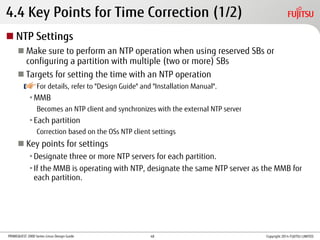
4.4 Key Points for Time Correction (1/2)
 NTP Settings
 Make sure to perform an NTP operation when using reserved SBs or
configuring a partition with multiple (two or more) SBs
 Targets for setting the time with an NTP operation
For details, refer to "Design Guide" and "Installation Manual".
•MMB
Becomes an NTP client and synchronizes with the external NTP server
•Each partition
Correction based on the OSs NTP client settings
 Key points for settings
•Designate three or more NTP servers for each partition.
•If the MMB is operating with NTP, designate the same NTP server as the MMB for
each partition.
Copyright 2014 FUJITSU LIMITED48
PRIMEQUEST 2000 Series Linux Design Guide
4.4 Key Points for Time Correction (2/2)
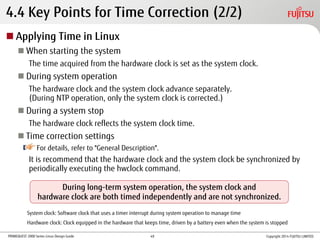
 Applying Time in Linux
 When starting the system
The time acquired from the hardware clock is set as the system clock.
 During system operation
The hardware clock and the system clock advance separately.
(During NTP operation, only the system clock is corrected.)
 During a system stop
The hardware clock reflects the system clock time.
 Time correction settings
For details, refer to "General Description".
It is recommend that the hardware clock and the system clock be synchronized by
periodically executing the hwclock command.
During long-term system operation, the system clock and
hardware clock are both timed independently and are not synchronized.
System clock: Software clock that uses a timer interrupt during system operation to manage time
Hardware clock: Clock equipped in the hardware that keeps time, driven by a battery even when the system is stopped
Copyright 2014 FUJITSU LIMITED49
PRIMEQUEST 2000 Series Linux Design Guide
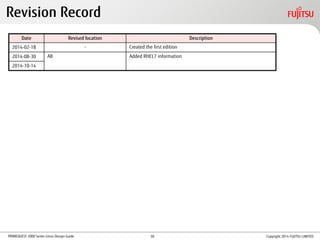
Revision Record
Date Revised location Description
2014-02-18 - Created the first edition
2014-08-30 All Added RHEL7 information
2014-10-14
Copyright 2014 FUJITSU LIMITED50
PRIMEQUEST 2000 Series Linux Design Guide
Conditions of Use
 Copyright, Trademark Rights, and Other Intellectual Property Rights
The contents (text, images, audio, etc.) in this manual are protected by copyright,
trademark rights, and other intellectual property rights. These contents may be printed
and downloaded for personal use only. However, permission from Fujitsu Limited or the
relevant right holder is required for any other use, such as reuse on your own website or
uploading to another server.
 Warranty Restrictions
Fujitsu Limited does not guarantee the accuracy, merchantability, or applicability to your
purpose of these contents, and shall bear no liability for any damages that are incurred as
a result of the use of these contents. These contents are subject to change or removal
without notice.
For more information on this product or to contact us, refer to the following URL:
http://www.fujitsu.com/global/about/resources/contact/computing/server/mission-critical/index.html
CA92344-0509-03
All rights reserved.
2014.10
Copyright 2014 FUJITSU LIMITED51
C122 a015-en

C122 a015-en

  • 1.
    FUJITSU Server PRIMEQUEST2000 Series Linux Design Guide -Red Hat Enterprise Linux- CA92344-0509-03 Copyright 2014 FUJITSU LIMITED
  • 2.
    PRIMEQUEST 2000 SeriesLinux Design Guide Table of Contents Preface P.4  1. Linux Overview 1.1 Available Distribution P.8 1.2 RHEL6 Features and New Functions P.9 1.3 RHEL7 Features and New Functions P.10 1.4 Supported Software P.11 1.5 Software Bundled With Hardware P.12  2. Linux System Design 2.1 Linux System Design Workflow P.14 2.2 Installation Design With SVIM P.15 2.3 Security Design P.17 2.4 Hard Disk Operation Design P.18 2.5 Network Operation Design P.20 2.6 Device Name Conflict Prevention Design P.21 2.7 Log File Operation Design P.22 2.8 Dump Environment Design P.24 Copyright 2014 FUJITSU LIMITED1
  • 3.
    PRIMEQUEST 2000 SeriesLinux Design Guide Table of Contents (Cont'd)  3. High Availability Design 3.1 Key Points for Hard Disk Redundancy P.26 3.2 Software RAID Types and Features P.28 3.3 Software RAID Comparison P.29 3.4 Key Points for Network Redundancy P.30 3.5 Key Points for System Redundancy (Cluster) P.32 Copyright 2014 FUJITSU LIMITED2
  • 4.
    PRIMEQUEST 2000 SeriesLinux Design Guide Table of Contents (Cont'd)  4. OS Operation Management Design 4.1 Overview of Applying Modifications P.36 4.2 Overview of Backup and Restoration Design P.38 4.3 Backup and Restoration P.40 4.4 Key Points for Time Correction P.48 Copyright 2014 FUJITSU LIMITED3
  • 5.
    PRIMEQUEST 2000 SeriesLinux Design Guide Preface  About This Manual  Contents of This Manual This manual describes an outline for OS design and notes for those who want to install and use Red Hat Enterprise Linux on the PRIMEQUEST 2000 series. •For details on the operation method, refer to the manuals for the PRIMEQUEST 2000 series main unit and Linux. •For details on the operating environment of the software, refer to the website of each software.  Organization of Manuals The following figure shows the organization of manuals for the PRIMEQUEST 2000 series (for Linux).  Symbol in This Manual The following table shows the meaning of the symbol used in this manual. Symbol Meaning Indicates the page or document to refer to. Design Guide Linux Design Guide Linux Installation Guide Linux Operation Guide OperationInstallationDesign Copyright 2014 FUJITSU LIMITED4
  • 6.
    PRIMEQUEST 2000 SeriesLinux Design Guide  Abbreviations in This Manual Preface Name Abbreviation PRIMEQUEST 2400E PRIMEQUEST 2000 series PRIMEQUEST PRIMEQUEST 2800B PRIMEQUEST 2800E Management Board MMB Red Hat® Enterprise Linux® 6 (for Intel64) RHEL6 (for Intel64) RHEL6 RHEL Linux Red Hat® Enterprise Linux® 7 (for Intel64) RHEL7 (for Intel64) RHEL7 ETERNUS SF AdvancedCopy Manager ETERNUS SF ACM ACM PRIMEQUEST 2000 Series General Description General Description PRIMEQUEST 2000 Series Installation Manual Installation Manual ServerView Suite ServerView Installation Manager User Guide SVIM Manual PRIMEQUEST 2000 Series Design Guide Design Guide PRIMEQUEST 2000 Series Linux Installation Guide -Red Hat Enterprise Linux- Linux Installation Guide PRIMEQUEST 2000 Series Linux Operation Guide -Red Hat Enterprise Linux- Linux Operation Guide PRIMEQUEST 2000 Series Cluster Design Guide -Linux/PRIMECLUSTER- Cluster Design Guide -Linux/PRIMECLUSTER- Copyright 2014 FUJITSU LIMITED5
  • 7.
    PRIMEQUEST 2000 SeriesLinux Design Guide • Linux is a registered trademark of Linus Torvalds. • Red Hat is a registered trademark of Red Hat, Inc. in the United States and other countries. • Intel is a trademark of Intel Corporation in the United States and/or other countries. • Microsoft, Windows, and Windows Server are the registered trademarks or trademarks of Microsoft Corporation in the United States and/or other countries. • Oracle and Java are the registered trademarks of Oracle Corporation and its subsidiaries/related companies in the United States and other countries. • NetVault is a trademark or registered trademark of Dell, Inc. in the United States and/or other countries. • PRIMECLUSTER is a registered trademark of Fujitsu Limited. • Other company names and product names are the trademarks or registered trademarks of their respective owners. Preface Copyright 2014 FUJITSU LIMITED6
  • 8.
    PRIMEQUEST 2000 SeriesLinux Design Guide Copyright 2014 FUJITSU LIMITED 1. Linux Overview This chapter provides an overview of Linux. 7
  • 9.
    PRIMEQUEST 2000 SeriesLinux Design Guide  For the latest information, contact your sales representative or refer to the following URL: "Kernel Version (PRIMEQUEST)"  Usable software may vary depending on the distribution used Technical information for Red Hat Enterprise Linux with PRIMEQUEST can be obtained if you purchase the Support Ticket for this product. Product name Red Hat® Enterprise Linux® 6 (for Intel64) Red Hat® Enterprise Linux® 7 (for Intel64) 1.1 Available Distribution Copyright 2014 FUJITSU LIMITED http://www.fujitsu.com/global/products/computing/servers/mission-critical/primequest/software/pq2000-linux-kernel.html 8
  • 10.
    PRIMEQUEST 2000 SeriesLinux Design Guide 1.2 RHEL6 Features and New Functions  Functions Added and Enhanced in RHEL6  Improvements to and addition of kernel functions Changed the control group function, support for the performance counter, scheduler, and syslog function, etc.  Improvements to the file system function Support for ext4  Enhanced syslog function Changed rsyslogd to the default syslog daemon.  Changed virtual machine function Changed from Xen to KVM.  Enhanced security Use of system security service daemon (SSSD)  Control group function New kernel function for managing tasks and their used resources  Performance Counter for Linux Collects hardware performance information for tasks and each CPU.  tickless function Reduces consumed energy when idle.  System Security Service Daemon (SSSD) Enables offline verification with the server and reduces server loads. Copyright 2014 FUJITSU LIMITED9
  • 11.
    PRIMEQUEST 2000 SeriesLinux Design Guide 1.3 RHEL7 Features and New Functions  Functions Added and Enhanced in RHEL7  Improvements to the file system function Supports XFS as the default file system  Enhanced management function Supports system management functions that integrate init and log functions by systemd  Enhanced virtual machine function Improved KVM performance  Enhanced pNFS (Parallel NFS) client Improved performance for high I/O load processing such as DB access  Online Defrag Fragmentation is resolved when online (mounted state) (targets: ext4 and XFS)  Commands - Support for the "ssm" command (system-storage-manager package) A management tool that absorbs differences in each of the logical volumes and file systems - Support for the "snapper" command (snapper package) Integrated management of logical volume snapshots Copyright 2014 FUJITSU LIMITED10
  • 12.
    PRIMEQUEST 2000 SeriesLinux Design Guide Software included in RHEL distribution (RHEL6 or RHEL7) and supported by PRIMEQUEST 1.4 Supported Software Category Use Software name Linux base system Linux kernel RHEL6 - kernel 2.6.x RHEL7 - kernel 3.10.x Boot loader RHEL6 - GRUB RHEL7 - GRUB2 Default C library glibc Virtual machine function KVM Server software Super server RHEL6 - xinetd, inetd RHEL7 - systemd WWW server apache NFS server NFS NIS server NIS PC file server samba Remote login in.telnetd, telnet File transfer vsftpd, ftp E-mail receiving server dovecot, imap, pop Mail delivery agent procmail E-mail sending server RHEL6 - sendmail RHEL7 - postfix Category Use Software name Server software DNS server bind DHCP server DHCP Cache server squid Secure shell ssh Default time server RHEL6 - ntp RHEL7 - chrony, ntp Firewall RHEL6 – iptables RHEL7 - firewalld, iptables Network monitoring net-snmp Logical volume manager lvm2 Disk limitations quota Log analysis system logwatch, logrotate Directory server OpenLDAP Software RAID multiple device (md) Multipath function device mapper multipath (dm-mp) Desktop X window X.Org Copyright 2014 FUJITSU LIMITED11
  • 13.
    PRIMEQUEST 2000 SeriesLinux Design Guide 1.5 Software Bundled With Hardware Make sure to install the software bundled with hardware. * If you are using ServerView Installation Manager (SVIM), the software bundled with hardware is installed automatically. For details, refer to "3.3 Bundled software" in "General Description". Copyright 2014 FUJITSU LIMITED12
  • 14.
    PRIMEQUEST 2000 SeriesLinux Design Guide Copyright 2014 FUJITSU LIMITED 2. Linux System Design This chapter describes preliminary designs for each Linux setting. For details, refer to the product manuals that are provided by Red Hat. 13
  • 15.
    PRIMEQUEST 2000 SeriesLinux Design Guide 2.1 Linux System Design Workflow  Installation Design With SVIM Refer to "2.2 Installation Design With SVIM".  Package selection design  Verification design  Security Design Refer to "2.3 Security Design".  Hard Disk Operation Design Refer to "2.4 Hard Disk Operation Design".  Disk partition design  Estimated space for each partition  Network Operation Design Refer to "2.5 Network Operation Design".  Device Name Conflict Prevention Design Refer to "2.6 Device Name Conflict Prevention Design". Reasons for and measures against device name conflicts  Log File Operation Design Refer to "2.7 Log File Operation Design". Necessity of log rotation  Dump Environment Design Refer to "2.8 Dump Environment Design". Memory dump function Copyright 2014 FUJITSU LIMITED14
  • 16.
    PRIMEQUEST 2000 SeriesLinux Design Guide 2.2 Installation Design With SVIM (1/2)  Key Points of Design  Estimate the swap area, dump device, and dump saving area based on the memory capacity Select Customized to configure the options.  Make sure to set a root password  Make sure to set a boot loader password If you used SVIM to install the OS by selecting Typical, the password is not set. By selecting Customized, the password can be set during installation. To ensure security, renew the password after installation is complete.  Set the DNS server as necessary  Tools that can be installed with SVIM ServerView Suite (monitoring software) and other tools For details, refer to "SVIM Manual". Copyright 2014 FUJITSU LIMITED15
  • 17.
    PRIMEQUEST 2000 SeriesLinux Design Guide 2.2 Installation Design With SVIM (2/2)  Package Selection Design The following packages are selected by default: •X Window System •GNOME Desktop Environment  Verification Design  Using MD5 Use MD5 for user passwords. Normally, enable MD5. If you do not use MD5, the DES format is used instead but the password is limited to 8 alphanumeric characters. * MD5: A hash function used in verification and digital signatures. This function detects file manipulation. DES: 56-bit secret key encryption algorithm  Using a shadow password Use shadow passwords for user passwords. Normally, enable shadow passwords. * Shadow password: Stores the encrypted user password in /etc/shadow and only allows root to read the file. In /etc/passwd, the user password is stored with characters such as "x".  Firewall Set the protocol and port numbers for allowing access from a different computer. For details, refer to "SVIM Manual". Copyright 2014 FUJITSU LIMITED16
  • 18.
    PRIMEQUEST 2000 SeriesLinux Design Guide Take the following measures.  OS Security Measures For details, refer to the guide that is shown below. To access this guide, go to the Red Hat Customer Portal (https://access.redhat.com/home), and then click [Support]. Under [Product Documentation], click on [Red Hat Enterprise Linux]. • "Security Guide" for Red Hat Enterprise Linux 6 • "Security Guide" for Red Hat Enterprise Linux 7  Applying Modifications For details, refer to "4.1 Overview of Applying Modifications". * For information about the security software (ISV product), contact your sales representative. 2.3 Security Design Copyright 2014 FUJITSU LIMITED17
  • 19.
    PRIMEQUEST 2000 SeriesLinux Design Guide 2.4 Hard Disk Operation Design (1/2)  Disk Partition Design Design item Description Mounting point Set the path for each disk partition. / : root directory /boot : Area for files used in the bootstrap process and the OS kernel swap : Area used as a virtual memory area when the system memory is insufficient File system type Set the file system type. The main file systems are shown below. [Available file systems for RHEL6] ext2: This file system was used by many distributors as the default file system until ext3 was released. ext3: This file system adds a journaling function to ext2 The maximum file system size is 16TB and the maximum file size is 2TB. ext4: This file system has the same journaling function as ext3 The maximum file system size is 16TB and the maximum file size is 16TB. [Available file systems for RHEL7] XFS: The file system that became the default type from RHEL7. Supports large file systems; the maximum file system size is 500TB. ext4: The maximum file system size is 50TB and the maximum file size is 16TB. ext2, ext3: These file systems can also be used for RHEL7. Drive Set the drive to create disk partitions. E.g., sda: First internal hard disk drive sdb: Second internal hard disk drive For details, refer to Red Hat "Storage Administration Guide". Copyright 2014 FUJITSU LIMITED18
  • 20.
    PRIMEQUEST 2000 SeriesLinux Design Guide 2.4 Hard Disk Operation Design (2/2) Partition Recommended capacity Key points RHEL6 RHEL7 / (root directory) 20GB or more 10GB or more Ensure capacity that can be used to save log files, apply revision patches, and add functions for optional software / boot 256MB 500MB or more - swap Memory is 2GB or less: Twice the size of the memory capacity Memory is more than 2GB, 8GB or less: Same size as the memory capacity Memory is more than 8GB, 64GB or less: Half the size of the memory capacity Memory is more than 64GB: 4GB Set based on the system memory load  Estimated Capacity for Each Partition For details, refer to Red Hat "Storage Administration Guide". Copyright 2014 FUJITSU LIMITED19
  • 21.
    PRIMEQUEST 2000 SeriesLinux Design Guide 2.5 Network Operation Design  Key Points for Design  Pay attention to the OS recognition order for the Network Interface Card (NIC) for the management LAN and the NIC for the operation LAN  Disable the STP function for switches connected to the management LAN (used for communication with the MMB)  Assign IP addresses for each LAN while considering the following points • If separating the management LAN and the operation LAN, separate the subnets • For the maintenance LAN, set a subnet different from the other LANs (management LAN, operation LAN, internal LAN, and cluster LAN) • The internal LAN is assigned automatically, but set the subnet different from the other LANs (management LAN, operation LAN, maintenance LAN, and cluster LAN) • Set the console redirection IP address to the same subnet as the management LAN Management server MMB#0 User port REMCS port Port for maintenance Partition PCH MMB#1 Cabinet Maintenance LAN Operation LAN Cluster LAN Internal LAN Management LAN Copyright 2014 FUJITSU LIMITED User port REMCS port Port for maintenance 20
  • 22.
    PRIMEQUEST 2000 SeriesLinux Design Guide 2.6 Device Name Conflict Prevention Design Type Cause Cause (Examples) Measures Disk-related device name conflicts Software changes  A driver was applied while the kernel was being updated.  Prevention using hardware (RAID configuration, automatic stop of system starts during a hardware failure)  Prevention using OS functions (using label names, udev, or UUID)  Prevention using middleware functions (Installing products such as PRIMECLUSTER GDS) Hardware configuration changes  Disks (removable disks) or storage devices were added or removed.  Cards in PCI slots were added or removed. Hardware failure  Disk failure  Card failure  Storage device failure, power loss, cable failure Network-related device name conflicts Addition or failure of NICs  A network device name was changed during addition or failure of NICs.  Fixed network device name by designated MAC address  Reasons For and Measures Against Device Name Conflicts Copyright 2014 FUJITSU LIMITED21
  • 23.
    PRIMEQUEST 2000 SeriesLinux Design Guide 2.7 Log File Operation Design (1/2) Design item Description Implementation method Start the logrotate command with the timing of the rotation operation Select from the following start times • Start at any time from the command line input or the script • Periodically start using the scheduler setting (using a schedule management program such as cron or Systemwalker) Schedule Avoid times with heavy loads from system log file output, and schedule a rotation when it will not affect operation Switching cycle and number of held generations Design so that the total capacity of system log files is appropriate for system operation (Default is replacement once per week (Weekly) and holding 4 generations (file after log replacement).) Backup We recommend that you backup the replaced system log file.  Necessity of Log Rotation To prevent logs from being lost, multiple log files are put on rotation for operation.  System log file operation Copyright 2014 FUJITSU LIMITED22
  • 24.
    PRIMEQUEST 2000 SeriesLinux Design Guide 2.7 Log File Operation Design (2/2) Design item Description Target log file Determine the target log files to rotate Executing user Determine which user ID to execute the rotation with based on the log file permissions Rotation execute command Determine the command that executes the log rotation (the system default is "logrotate") Operating method (for the logrotate command) Check if the application that outputs the log has a reload function, and determine the operation method Is there a reload function? Operation method Designation method Yes Replaces and saves the user-specific log file itself Write the "create" directive in the logrotate setting file No Saves a copy of the user-specific log file Write the "copytruncate" directive in the logrotate setting file Operating User-specific Log Files Copyright 2014 FUJITSU LIMITED23
  • 25.
    PRIMEQUEST 2000 SeriesLinux Design Guide 2.8 Dump Environment Design  Memory Dump Function  kdump function RHEL’s default dump function. Acquires the contents of the memory if an error occurs during operation.  sadump function Dump function that is specific to PRIMEQUEST. Acquires the contents of the memory if the kdump function cannot or fails to acquire the dump.  Key Points of Design  Memory capacity The following memory area must be reserved for the memory dump function in addition to the memory capacity for the system operations. Intel 64: 256MB (Fixed) Keep the above in mind when designing memory capacity to be used for the system operations.  Hard disk capacity • The memory dump function requires a great amount of disk capacity. Design it keeping in mind the disk capacity taken up solely by the memory dump function. • For iSCSI- and FCoE-connected hard disks, the memory dump cannot be acquired with the kdump function. Prepare an internal hard disk for acquiring the memory dump.  sadump device • If performing a hot replacement for a disk used for the dump device, the disk must be backed up after performing sadump initial settings. Prepare the same number of disks as those prepared for the dump device. • If there is no local tape device and the dump cannot be extracted onto a local tape, the dump acquired on the dump device must be temporarily converted into a file. When converting it into a file, prepare another file system with the same amount of free space as the dump device. Copyright 2014 FUJITSU LIMITED24
  • 26.
    PRIMEQUEST 2000 SeriesLinux Design Guide Copyright 2014 FUJITSU LIMITED 3. High Availability Design This chapter describes the key points for system redundancy. For details, refer to "Design Guide". 25
  • 27.
    PRIMEQUEST 2000 SeriesLinux Design Guide 3.1 Key Points for Hard Disk Redundancy (1/2) Flexibly manage storage and improve data availability and reliability by using the following functions to manage hard disks.  Logical Volume Manager (LVM) Create logical volumes as a partition handled by users. Conceals the existence of physical disks and improves the flexibility of disk device management.  PRIMECLUSTER Global Disk Services (GDS) Refer to "3.2 Software RAID Types and Features". Combine multiple hard disks to achieve continued operation in the event of a disk failure, prevent data loss, and distribute disk I/O loads.  Multi Disk (MD) Refer to "3.2 Software RAID Types and Features". Combine multiple hard disks to prevent data loss in the event of a disk failure and achieve improved processing speed for disk access.  Symantec Storage Foundation Refer to "3.2 Software RAID Types and Features". In addition to data loss prevention and operational continuity during a disk failure, power consumption and installation cost reductions are realized (with MAID and Thin Provisioning). Copyright 2014 FUJITSU LIMITED26
  • 28.
    PRIMEQUEST 2000 SeriesLinux Design Guide 3.1 Key Points for Hard Disk Redundancy (2/2)  Device-Mapper Multipath (DM-MP) Integrate access paths to disk array devices with redundancy, and achieves system operation continuity that is prepared for access path failures.  Dynamic Multi-Pathing (DMP) Integrates access paths to disk array devices with redundancy, and achieves system operation continuity that is prepared for access path failures. (Bundled with Symantec Storage Foundation products) Copyright 2014 FUJITSU LIMITED27
  • 29.
    PRIMEQUEST 2000 SeriesLinux Design Guide 3.2 Software RAID Types and Features  Fujitsu Middleware  PRIMECLUSTER Global Disk Services (GDS) • Provides a redundancy function specialized for RAID-1 • Simple design in units of disks • Simple and assured operation management through a GUI • Reduces not only disk failures but also trouble from operation mistakes through its excellent management function  OS Default  Multi Disk (MD) • Software included in RHEL • RAID (RAID 0/1/10) can be configured in the driver layer  ISV product  Symantec Storage Foundation • A large number of software RAID functions (such as RAID 0/1/5/01/10) are supported • Online storage management functions (such as disk swapping, resizing, and changing RAID) are supported • Configuring RAID between storage cabinets is possible • Simple and assured operation management through a GUI • Sharing user data with other OSs (Solaris) is possible Contact your sales representative about the support status of each product for RHEL7. For details about hardware RAID, refer to "Design Guide". Copyright 2014 FUJITSU LIMITED28
  • 30.
    PRIMEQUEST 2000 SeriesLinux Design Guide 3.3 Software RAID Comparison Function PRIMECLUSTER GDS MD Symantec Storage Foundation RAID 0 (Striping) Yes* Yes* Yes* RAID 1 (Mirroring) Yes Yes* Yes* RAID 01 (Stripe mirroring) Yes* - Yes* RAID 10 (Mirror striping) - Yes* Yes* RAID 4 - - - RAID 5 - - Yes* RAID 6 - - - Concatenation Yes* Yes* Yes* Hot spare Yes* Yes* Yes* Hot replacement Yes Yes* Yes* Acceleration for mirror recovery after a system down Yes - Yes* Mirror continuation through write back during a read error Yes - - Data protection from disk accesses by mistaken operations Yes - - Online volume expansion Yes - Yes* Volume reduction - - Yes* Snapshot Yes (*1) - Yes* GUI Yes - Yes* Yes: Supported on system disks and disks for user data Yes*: Supported only on disks for user data - : Not supported (*1) Requires the optional product, "PRIMECLUSTER GDS Snapshot" Copyright 2014 FUJITSU LIMITED29
  • 31.
    PRIMEQUEST 2000 SeriesLinux Design Guide 3.4 Key Points for Network Redundancy (1/2)  Targets for LAN Redundancy (Duplication) Management LAN, Operation LAN  Software Selection Policy Network reliability can be increased by using duplication software.  PRIMECLUSTER Global Link Services (GLS) (Recommended optional software) Achieve higher reliability than the bonding driver (Can immediately resume and continue operations, determine and recover failed location). Refer to "Selection Policy for PRIMECLUSTER GLS and Bonding Based on High Reliability Standards" on the next page. For details about PRIMECLUSTER GLS, refer to "PRIMECLUSTER Global Link Services Configuration and Administration Guide Redundant Line Control Function (for Linux)".  "bonding" driver (OS default) Has limited functions compared to PRIMECLUSTER GLS. Function PRIMECLUSTER GLS (NIC switching method) bonding driver (mode1) Limit on switch to be used Yes (*1) Yes Detection of LAN card failures Yes Yes Detection of network failures Yes Yes* (*2) Multi-platform support Yes - (*3) Provision form Product for sale OS default bundled software Linking with PRIMECLUSTER Yes No Yes: Supported Yes*: Supported in some cases No: Not supported -: Not applicable (*1) The IP address must be allotted to either switch as the network monitoring target via the GLS ping (*2) Only detects at neighboring switches (*3) Teaming is possible for Solaris and Windows using an OS default function Copyright 2014 FUJITSU LIMITED30
  • 32.
    PRIMEQUEST 2000 SeriesLinux Design Guide 3.4 Key Points for Network Redundancy (2/2)  Selection Policy for PRIMECLUSTER GLS and Bonding Based on High Reliability Standards Conditions for high reliability Immediately resume and continue operations Identify and recover failed location PRIMECLUSTER GLS bonding PRIMECLUSTER GLS bonding Increasing the reliability of application transmissions at the physical server Applicable Detects router failures and can switch over if necessary. Not applicable When mode1 is used for the bonding driver, router failures cannot be detected, and switching over may not be possible depending on the network configuration. Applicable Monitors each network device and easily identifies and recovers the failed location. Not applicable When mode1 is used for the bonding driver, because only the physical adaptor’s status (link status and packet transmission status) is monitored, the failed location in the network cannot be identified. Increasing the reliability of application transmissions in a virtual environment (Guest OS) Applicable In addition to the above, after switching networks, the guest OS’s transmission can be immediately resumed. Not applicable Transmission may not be possible for several minutes. Note: Only bonding may be available for use, such as when installing Oracle DB. Copyright 2014 FUJITSU LIMITED31
  • 33.
    PRIMEQUEST 2000 SeriesLinux Design Guide 3.5 Key Points for System Redundancy (Cluster) (1/3) For details about clusters, refer to "Cluster Design Guide -Linux/PRIMECLUSTER-".  Cluster Configuration Using PRIMECLUSTER We recommend using PRIMECLUSTER (cluster configuration software) for configuring a cluster in Linux. PRIMECLUSTER has the following features:  Wizard function Can easily construct cluster systems.  High availability Quickly takes over a node so that operation does not stop when an error occurs. By employing high multiplicity for transmission paths, communication can be continued even when there is a network error or a network device failure.  Expandability One or more applications can be processed simultaneously on multiple nodes. This allows for parallel operations that use parallel databases, load sharing, and load balancing. For details, refer to "3.4 Key Points for Cluster Configurations" in "Design Guide", as well as the ServerView Manual. Copyright 2014 FUJITSU LIMITED32
  • 34.
    PRIMEQUEST 2000 SeriesLinux Design Guide For details, refer to "3.4 Key Points for Cluster Configurations" in "Design Guide", as well as the ServerView Manual. 3.5 Key Points for System Redundancy (Cluster) (2/3)  Cluster Configuration that uses Symantec Cluster Server When emphasizing world wide achievements, and when already using Symantec Cluster Server (*) regardless of the platform, the merits for recommending Symantec Cluster Server are as follows  High availability •With the real time monitoring function for resources, reducing the time for fault detection (= failover start) is possible •With SFCFSHA (*), high speed failover (and downtime reduction) is possible  Scalability Scalable up to a maximum of 64 nodes By using SFCFSHA, configuring NFS server for scale-out is possible  Flexibility Configuring a flexible cluster system is possible because of sufficient features such as the failover policy, the link function with the cluster and the event notice function (*) Symantec Cluster Server includes the following products - Symantec Storage Foundation Standard HA (SFHA) - Symantec Storage Foundation Enterprise Cluster File System HA (SFCFSHA) * Contact your sales representative about the support status of each product for RHEL7. Copyright 2014 FUJITSU LIMITED33
  • 35.
    PRIMEQUEST 2000 SeriesLinux Design Guide For details, refer to "3.4 Key Points for Cluster Configurations" in "Design Guide", as well as the ServerView Manual. 3.5 Key Points for System Redundancy (Cluster) (3/3)  Key Points for Cluster Configurations (PRIMECLUSTER)  Application monitoring PRIMECLUSTER cannot monitor application statuses (normal, sleep, hung-up, etc.), but this is possible by installing the various wizard products provided by PRIMECLUSTER.  OS hang-ups With Linux, even if the OS is hung up, the system may not be able to detect node errors. To detect them, set the watchdog timer value for ServerView.  Key Points for Cluster Configurations (Symantec Cluster Server)  Application monitoring Monitoring is possible using Symantec Cluster Server standard Application Agent (generic Agent) or an Agent created by an application development vendor or by the customer.  Clusters between dissimilar equipment Clusters between dissimilar equipment are also supported, however the cluster service must be set to withstand even bias to the server models with low performance. Copyright 2014 FUJITSU LIMITED34
  • 36.
    PRIMEQUEST 2000 SeriesLinux Design Guide Copyright 2014 FUJITSU LIMITED 4. OS Operation Management Design This chapter provides an overview of Linux operation management design. 35
  • 37.
    PRIMEQUEST 2000 SeriesLinux Design Guide x.3x.2 4.1 Overview of Applying Modifications (1/2) Type of modification Description Acquire from: errata Major error modifications for OS (including security patches) Red Hat‘s Red Hat Customer Portal (https://access.redhat.com/home) Minor releases Releases provided periodically that include support for new hardware, additional functions, and error patches  Type of Modification  Application Method for Modifications  Standard application method [For the latest operation] Errata is provided only with the latest minor release. Customer 7 months errataMinor release x.1 errata application RHEL x.1 7 months errataMinor release errata application RHEL x.2 7 months errataMinor release errata application RHEL x.3 Copyright 2014 FUJITSU LIMITED For details, refer to "Red Hat Enterprise Linux Life Cycle" (the following URL): https://access.redhat.com/support/policy/updates/errata 36
  • 38.
    PRIMEQUEST 2000 SeriesLinux Design Guide  Application method for Extended Update Support (EUS) [For planned maintenance] •Provides errata for particular minor releases continually over a longer period of time than the standard application method •Particular minor releases: For RHEL6, all minor releases For RHEL7 (7.1 or later), all minor releases •Provision period for errata: 24 months after the release of the said minor release •Allows for a reasonable maintenance plan for ensuring a sufficient amount of preparation time for periodic maintenance 4.1 Overview of Applying Modifications (2/2) 7 months errataMinor release RHEL x.1 7 months errataMinor release RHEL x.2 7 months errataMinor release x.1 EUS x.3 EUS RHEL x.3 Patch for major errors Provision period for errata (24 months) (*1) Backport: Porting the error patch equipped in the latest minor release to a previous minor release x.2 EUS Backport from the latest minor release (*1) Copyright 2014 FUJITSU LIMITED For details, refer to "Red Hat Enterprise Linux Life Cycle" (the following URL): https://access.redhat.com/support/policy/updates/errata 37
  • 39.
    PRIMEQUEST 2000 SeriesLinux Design Guide To protect your resources and data from risks such as natural disasters, periodically perform backups so that you can restore the data in the event of an emergency.  Backup Including System Volume  Online backup Requires confirmation in advance that the product supports online backups and that there will be no effect on operation.  Offline backup • Requires a stop in operations (The time for stopping operations is proportional to the backup capacity) • Simpler to perform than the online backup • 3 different methods: Full backup, differential backup, and incremental backup 4.2 Overview of Backup and Restoration Design (1/2) For details, refer to the manuals for each tool. Method, software Type Online Offline dump/restore command OS default utility Not supported Supported SystemcastWizard Professional Image backup software developed by Fujitsu Not supported Supported PRIMECLUSTER GDS Snapshot PRIMECLUSTER GDS optional software Supported Supported ETERNUS SF AdvancedCopy Manager Fujitsu software that supports the SAN boot Not supported Supported NetVault Backup 9 Dell Software Supported Supported * The software support information is as of September 2014. For the latest software information, contact your sales representative. Copyright 2014 FUJITSU LIMITED38
  • 40.
    PRIMEQUEST 2000 SeriesLinux Design Guide 4.2 Overview of Backup and Restoration Design (2/2)  Data Volume Backup Only  NetBackup Symantec Corporation software  NetWorker EMC Corporation software  Symantec Storage Foundation FlashSnap (*) Symantec Corporation software (*)Flash Snap is included in the following products - Symantec Storage Foundation Enterprise - Symantec Storage Foundation Enterprise Cluster File System HA For details, refer to the manuals for each software. Copyright 2014 FUJITSU LIMITED39
  • 41.
    PRIMEQUEST 2000 SeriesLinux Design Guide PRIMEQUEST 4.3 Backup and Restoration - dump/restore Command Merits Demerits • Is an OS default utility, and does not require the purchase of special software • Does not require a backup server • Can backup and restore the system volume (* Use of rescue mode) • Requires separate operation for each partition • Only supports the single unit as a save area • Cannot perform a DB online backup Execute the dump/restore command from the OS console of the system partition you want to perform the backup or restore for. [Local backup using the default utility] KVM: Keyboard, Video, Mouse Tape device Backup Restore KVM Partition#0 Partition#1 Partition#n Input command on a KVM console Copyright 2014 FUJITSU LIMITED40
  • 42.
    PRIMEQUEST 2000 SeriesLinux Design Guide PRIMEQUEST 4.3 Backup and Restoration - SystemcastWizard Professional Merits Demerits • Can automatically perform backups or restorations for multiple partitions • Can be done using remote operation • Can be executed by GUI operation • Requires a separate deployment server • Cannot perform differential or incremental backups • Does not have an automatic generation management function for backup data • Partition must be stopped before the backup • Basically backs data up on a hard disk. To back up to a secondary memory device, separate backup software that operates on Windows is necessary Saves the hard disk image of the system to be backed up on the deployment server via the network, and recovers and deploys the target system. [Configuration of backup using SystemcastWizard Professional] • Connect the deployment server to the management LAN in the same segment as PRIMEQUEST • The deployment server must have the capacity and reliability necessary to back up the system volume Partition#0 Internal disk Partition#n MMB External disk Restore Restore Deployment server MMB console terminal SystemcastWizard Professional equipped Backup Management LAN Copyright 2014 FUJITSU LIMITED41
  • 43.
    PRIMEQUEST 2000 SeriesLinux Design Guide 4.3 Backup and Restoration - PRIMECLUSTER GDS Snapshot Merits Demerits • Can create snapshots in units of disks and in units of volumes managed by PRIMECLUSTER GDS • Can use the system disk snapshot function to perform system backups and apply patches in advance during operation • Automatically selects the optimal snapshot method based on the volume configuration and functions the storage device has • If restoring the snapshot data created with the high-speed copy function, for configurations that cannot use the high-speed copy function, the system automatically switches the copy method to the software copy function and performs the high-speed restore • PRIMECLUSTER GDS is necessary to use PRIMECLUSTER GDS Snapshot • PRIMECLUSTER GDS Snapshot is necessary for all servers that share the common disk device High-speed Backups and Restorations • The backup disk must be the same size or larger than the disk being backed up PRIMEQUEST … Partition#0 Partition#n PRIMECLUSTER GDS Snapshot PRIMECLUSTER GDS Backup Disk Backup Restore GDS mirror [Example backup configuration using an internal disk] [Example backup configuration using ETERNUS] PRIMEQUEST … Partition#0 Partition#n PRIMECLUSTER GDS Snapshot PRIMECLUSTER GDS ETERNUS#0 ETERNUS#1 GDS mirror Backup Disk Backup Restore (1) EC/OPC (Advanced Copy function) FC-SAN Restore (2) (Mirror recovery) Copyright 2014 FUJITSU LIMITED42
  • 44.
    PRIMEQUEST 2000 SeriesLinux Design Guide 4.3 Backup and Restoration - ETERNUS SF ACM Merits Demerits • Can perform backups or restorations without putting a load on the operation server or LAN • Can perform high-speed backups or restorations with little operation stoppage time (* Using the ETERNUS Advanced Copy function) • Can perform remote, high-speed replication (* Using the ETERNUS Remote Advanced Copy function) • Can perform a low-energy backup that reduces the power consumed by ETERNUS • Can do an online backup for DB (Oracle, Symfoware) • Can perform system volume backups or restorations during the SAN boot • Does not support backups for the internal disk  Use in combination with a disk array device (ETERNUS)  Can back up and restore the disk array data without going through an operation server or LAN [Configuration of the data backup on ETERNUS using ACM] •ACM agent Controls the ETERNUS Advanced Copy function. Install on the operation server to be backed up or restored. •ACM manager Centrally manages device information and policies for all ACM agents. PRIMEQUEST Partition#0(*2) Partition#1(*2) Partition#n(*1) LT seriesETERNUS (*1) ACM manager equipped (*2) ACM agent equipped (*3) ACM tape server equipped Using the Advanced Copy function PRIMEPOWER/ SPARC Enterprise [Solaris Server] (*3)FC-SAN Copyright 2014 FUJITSU LIMITED For supported OSs of the ETERNUS SF ACM, refer to "Environments" on the following URL: https://www.fujitsu.com/global/products/computing/storage/software/eternus-sf/advancedcopy-manager/index.html 43
  • 45.
    PRIMEQUEST 2000 SeriesLinux Design Guide 4.3 Backup and Restoration - NetVault Backup Merits Demerits • Can define schedules for backups, making processing automatic • Can perform synthetic backups for differential data (*) • Can be controlled by a common GUI, even on different OSs • Highly compatible with PRIMECLUSTER • Can do an online backup for DB (Oracle) (Requires optional product) • Can do backups and restore the system volume (Requires optional product) • Can do backups with a mix of different OSs (Linux and Windows) • Optional products are required to perform system backups of the operation server Software with the No.1 share of the Linux server backup market in Japan (*) Integrates a differential backup with the full backup, creating a backup equivalent to the latest full backup Mechanism for system volume backup using NetVault Backup • When starting up the server from a VaultOS CD, connect the KVM console to the system partition you want to restore • Control with a remote console via MMB [Example configuration connected to a KVM console] PRIMEQUEST Partition#n Partition#0 KVM NetVault Server VaultDR LTOBackup Restore KVM console LAN for backup Start up VaultOS CD for the boot Copyright 2014 FUJITSU LIMITED * Support for RHEL7 is to be determined. 44
  • 46.
    PRIMEQUEST 2000 SeriesLinux Design Guide Copyright 2014 FUJITSU LIMITED Merits Demerits • With deduplication backups, the storage usage is reduced (Requires optional product) • Speed up full backups with an accelerator (Requires optional product) • Online backups by automatically detecting instances of Oracle DB (Requires optional product) • Replication to remote locations with Auto Image Replication(AIR) (Requires optional product) • Manage an environment with a mix of different platforms using a single server • Automatic processing by defining schedules for backups • Synthetic backups for differential data (*) • Does not support the Japanese language (Linux version only) • Cannot back up and restore the system volume RHEL’s range of support in NetBackup 7.6 • Backup server *1 RHEL6 (for Intel64) • Backup client (backup is being performed) RHEL7 (for Intel64) *2 RHEL6 (for Intel64) *1: The backup server's support period for RHEL7 is to be determined (For the latest support status, contact your sales representative.) *2: Please apply the patch (7.6.0.3 or later) after the scheduled release on September 2014 or later Software with proven results for backups in large-scale systems PRIMEQUEST … (*) Integrates a differential backup with the full backup, creating a backup equivalent to the latest full backup [Data backup using NetBackup] PRIMEQUEST …Partition#0 Partition#n Partition#0 Partition#n LTO LTOETERNUS NetBackup Server NetBackup Server NetBackup Client LAN for backup (2) Copy (1) OPC directive FC-SAN (3) Backup Via SANVia LAN 4.3 Backup and Restoration - NetBackup 45
  • 47.
    PRIMEQUEST 2000 SeriesLinux Design Guide Copyright 2014 FUJITSU LIMITED Merits Demerits • Affinity with PRIMECLUSTER is high (the results are abundant with UNIX Solaris, and optimal when migrating from Solaris) • Support for multiple tenants (independent backup operations in each tenant is possible) • Online backups (VADP) of Linux guest OSs in VMware are possible (Requires optional product) • Backups of mixed OSs (Linux, Windows, Solaris) are possible (including raw devices) • Even with different OSs, operations are possible with the unified GUI • Since backup schedule definitions are possible, the process can be performed automatically • Online backups of DB (Oracle) is possible (Requires optional product) • Synthetic backup of differential data is possible (*) • Cannot back up and restore the system volume (Using the OS's standard backup utility is recommended) (*) Integrates a differential backup with the full backup, creating a backup equivalent to the latest full backup [Example configuration that incorporates the backup server in PRIMECLUSTER] RHEL’s range of support in NetWorker 8.1 • Backup server RHEL6 (for Intel64) • Backup client (backup is being performed) RHEL6 (for Intel64) * RHEL7 is scheduled for support with the next scheduled release version (NetWorker 8.2) in the 4th quarter of 2014. Partition#0 Partition#0 NetWorker Server NetWorker Server Operational system PRIMEQUEST PRIMEQUEST DISK FC-SAN Management from a browser (Java) is possible. Independent backup operations in each tenant is possible Support for the backup of the file systems and RAW devices on each platform Standby system Backup flow during normal operations Backup flow during operational system failure PRIMECLUSTER Tenant 1 Tenant 3 Failure Failover Tenant 2 Linux Windows Solaris Backup software that is No. 1 for affinity with PRIMECLUSTER 4.3 Backup and Restoration - NetWorker 46
  • 48.
    PRIMEQUEST 2000 SeriesLinux Design Guide Copyright 2014 FUJITSU LIMITED High speed backups with flexibility Merits Demerits • The synchronization process is omitted for unused areas when snapshots are created with volume units but not for disk units. • Including the backup source volume, a maximum of up to 32 generations can be managed • With high speed resynchronization and the Split/Join function for the disk group, off-host processes such as off-host backups are possible • Mirror disconnect method (equivalent to EC for ETERNUS) and instant snapshot method (equivalent to OPC for ETERNUS) can be selected • If the storage is within the range of the supported storage, the storage combination for the backup source and backup destination is unrestricted • Local snapshots, such as with file and directory units are possible but not volume units • When compared with the storage side copy function, load is applied to the operation server and I/O path during disconnection and reconnection • Does not support internal disks PRIMEQUEST … [Data backups with FlashSnap] Partition#0 Partition#n LTO NBU Server FC-SAN PRIMEQUEST Partition#0 [Off-host backups with FlashSnap and NetBackup] FlashSnap FC-SAN SETERNUS 1st generation Backup Restore Mirror Backup volume 2nd generation nth generation… SETERNUS 1) Backup 4) restore Mirror Backup volume … FlashSnap FlashSnap Split • Backup volumes can even be in different storage cabinets • Support for RHEL7 is to be determined For the latest support status, contact your sales representative represents a disk group 2) Backup to tape 3) Restore from tape 1st generation 2nd generation nth generation 4.3 Backup and Restoration – Symantec Storage Foundation FlashSnap 47
  • 49.
    PRIMEQUEST 2000 SeriesLinux Design Guide 4.4 Key Points for Time Correction (1/2)  NTP Settings  Make sure to perform an NTP operation when using reserved SBs or configuring a partition with multiple (two or more) SBs  Targets for setting the time with an NTP operation For details, refer to "Design Guide" and "Installation Manual". •MMB Becomes an NTP client and synchronizes with the external NTP server •Each partition Correction based on the OSs NTP client settings  Key points for settings •Designate three or more NTP servers for each partition. •If the MMB is operating with NTP, designate the same NTP server as the MMB for each partition. Copyright 2014 FUJITSU LIMITED48
  • 50.
    PRIMEQUEST 2000 SeriesLinux Design Guide 4.4 Key Points for Time Correction (2/2)  Applying Time in Linux  When starting the system The time acquired from the hardware clock is set as the system clock.  During system operation The hardware clock and the system clock advance separately. (During NTP operation, only the system clock is corrected.)  During a system stop The hardware clock reflects the system clock time.  Time correction settings For details, refer to "General Description". It is recommend that the hardware clock and the system clock be synchronized by periodically executing the hwclock command. During long-term system operation, the system clock and hardware clock are both timed independently and are not synchronized. System clock: Software clock that uses a timer interrupt during system operation to manage time Hardware clock: Clock equipped in the hardware that keeps time, driven by a battery even when the system is stopped Copyright 2014 FUJITSU LIMITED49
  • 51.
    PRIMEQUEST 2000 SeriesLinux Design Guide Revision Record Date Revised location Description 2014-02-18 - Created the first edition 2014-08-30 All Added RHEL7 information 2014-10-14 Copyright 2014 FUJITSU LIMITED50
  • 52.
    PRIMEQUEST 2000 SeriesLinux Design Guide Conditions of Use  Copyright, Trademark Rights, and Other Intellectual Property Rights The contents (text, images, audio, etc.) in this manual are protected by copyright, trademark rights, and other intellectual property rights. These contents may be printed and downloaded for personal use only. However, permission from Fujitsu Limited or the relevant right holder is required for any other use, such as reuse on your own website or uploading to another server.  Warranty Restrictions Fujitsu Limited does not guarantee the accuracy, merchantability, or applicability to your purpose of these contents, and shall bear no liability for any damages that are incurred as a result of the use of these contents. These contents are subject to change or removal without notice. For more information on this product or to contact us, refer to the following URL: http://www.fujitsu.com/global/about/resources/contact/computing/server/mission-critical/index.html CA92344-0509-03 All rights reserved. 2014.10 Copyright 2014 FUJITSU LIMITED51