Social Media 101
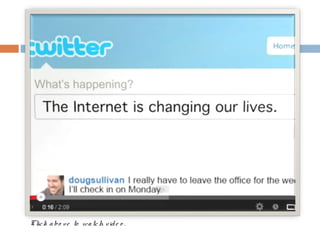
What is all the hype about?
Clic k a bo ve to wa tc h vid e o .
What are the key sites?
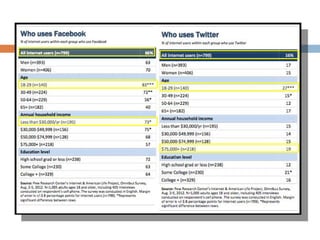
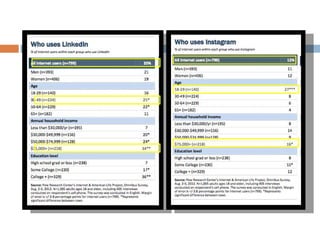
Who uses social media?
LEARN THE TECHNIQUES.
FACEBOOK
DO YOU THINK IN FRIEND GROUPS?
Pros & Cons
•   Pros
    • Wide [International] Reach
    • Built-in Fan, Group and Event Pages
    • “Foundation” Platform


•    Cons
    • Younger [majority] Demographic
    • Tougher platform to navigate initially
What you can do:
•   Pros
    • Share & Comment Quickly
    • Create a Fan Page
    • Create Events
    • Create a Group
    • Judge success with built-in metrics
Tips, Tricks and Techniques
    ENGAGE – Don’t push!
      Focus   on developing relationships.

    Be consistent & timely.
      Using   Facebook (and all Social Media) takes time!
    Ask questions to e ng a g e your audience.
    Create a group to communicate with existing
     members.
    Create a Fan Page to pull in new members.
    Create Events to publicize actual events.
TWITTER
DO YOU THINK IN 140-CHARACTERS?
Pros & Cons
•   Pros
    • Amazing way to ‘crowd-source’ information
    • Quick, to-the-point updates
    • Interface with other platforms
    • Add followers in geographic area
    • Younger [majority] Demographic with higher levels
      of education, on average

•    Cons
    • Tougher platform to navigate initially
    • Not as effective for a consistent link for details
What you can do:
 HashTag to crowd source information
 Short 140 character posts

 @ Tag other users and re-tweet

  posts
 Follow other users to quickly gain

  information
 Search map of nearby users to add

  people in geographic vicinity
Tips, Tricks and Techniques
    Search using #s to quickly get up to date on a
     topic.
    Connect with Facebook to reduce overhead
     admin time from managing both platforms.
    Don’t be ‘fake.’
      Startconversations and follow others with
      interesting and engaging content.
    Follow members close by your geographic area.
    Follow existing organizations (like Rotary
     International) to learn about upcoming events
     and programs.
LINKEDIN
DO YOU THINK IN RESUMES?
LinkedIn: The Professional Social
Network
•   Designed for “professional”
    connectivity
•   Your Profile is in a Resume/CV
    format
      • This can be augmented with
         “apps” that allow you to post
         professional portfolios,
         slideshows, and other
         multimedia formats
•   Instead of “Friends”, you build
    “Connections”
•   You build Connections through
    direct invitations and “Groups”,
    which allow you to connect with
    fellow Group members
•   Your connections can endorse
    “Skills” that you self select via key
    words, these are tracked in your
    profile
LinkedIn Groups: The Gateway to the
Network
•   Groups are the heart and soul of LinkedIn

•   There are thousands of “Groups” which revolve around a specific topic, institution, or
    industry
      • Example: The Official Rotary International group has 45,000+ members
      • The Project Manager Network has 405,000+ members

•   These groups allow members to post jobs, discussion topics, use a members directory
    to connect directly with members, take polls, and track updates
      •  Discussion topics can be “Liked” so that the most popular topics stay at the top of
         the Group page
      •  The current top Discussion in the Official Rotary Group is: “Is it time to revist our
         New Member sign up criteria? W have had to start declining membership to our
                                          e
         club, have you?

•   Groups are often used by recruiters, job seekers, investors, and prospective
    entrepreneurs who are seeking opportunities
LinkedIn: Pros and Cons
•   Pros
     •   You can view “People who Viewed my Profile”, and link to their profile
     •   Due to the nature of LinkedIn, people are ready to “talk business” and are
         typically more open to first time introductions to new Connections
     •   Groups allow for Discussions/topics to reach a targeted audience
     •   Events can be shared with a large number of people, even if they are not
         direct connections; via Groups
     •   Job postings are readily available (in both Groups and in a stand alone
         section) with strong search tools to filter by key words, categories, or
         seniority
     •   The network is free to join and also offers more advanced features to paid
         members

•   Cons
     •   LinkedIn is a “freemium” service
           •   This membership is typically utilized by sales and marketing professionals to
               reach their targets
     •   Many Groups end up have dozens of discussions where the original
         poster gives a link to an “interesting” article, this can be useful but
         becomes repetitive
LinkedIn: Using within Rotary
                •   Make your Club digitally visible
                      •  Many people use key words to
                         search for local or topical Groups to
                         join, having your own group may
                         draw in prospects, especially if it is
                         an active and robust Group
                •   Rotary already has a strong presence on
                    LinkedIn
                      •  The Official Rotary International
                         group has 45,000+ members
                      •  This and other Rotary Groups can
                         be used to partner with new clubs
                         and send out marketing material for
                         upcoming initiatives
                •   Increase the value of Rotary
                    membership
                      •  Allows a forum for posting job and
                         partnership opportunities
                      •  Enables members to connect on
                         areas of shared interest and
                         passions
INSTAGRAM
DO YOU THINK IN IMAGES?
Pros & Cons
•   Pros
    • ‘Instantly’ upload images to web via
      SmartPhone
    • Sync with existing platforms [Facebook,
      Twitter, etc.]
    • Use #s to crowd-source visual information
    • Large younger, more affluent demographic


•    Cons
    • Younger Demographic
    • Lack of information share benefit [generate
      Buzz vs. teach or engage audience]
What you can do:
 Take quick photos from your mobile
  device.
 Apply neat effects to photos!

 Upload immediately and share out with

  other platforms.
 Add #s to crowd-source details.

 Follow other Instagram Users to keep up

  to date on events and happenings of
  community.
Tips, Tricks and Techniques
    Take photos of outings to quickly update
     members and guests.
    Tell a story with photos.
DEVELOP A STRATEGY.
Tips to Consider.
   Start Small.
   Do what makes sense for y o ur club.
   You have the skills as a networker. Only the
    medium is changing.
   Realize successful social media takes time
    to do right.
   Be intentional with your approach.
Steps to develop your game
plan.
   Assess your Goals.
       Who do you want to reach?
       What message(s) do you want to send?
       What do you want to result from your approach?
   Assess your available resources and time.
       How much time can you invest per week?
   Assess the available tools.
       Which platform makes the most sense for your
        goals and time?
Steps to develop your game
plan.
   Give a member the opportunity to manage.
       Agree to your platforms.
       Agree to your messaging.
       Agree to your schedule for posting.
   Develop check-in points with the board.
       Based on your goals, are your efforts working?
       Why or why not?
Questions?
Facebook.com/  rotaractl
        b
        www.rotaractlb.org


KATIE GASTON
Katie.rose.gaston@gmail.co
m
916-743-4255


MICHAEL ANDERSON
manders623@gmail.com
310-804-6563

Rotary Assembly: Social Media 101

  • 1.
  • 2.
    What is allthe hype about?
  • 3.
    Clic k abo ve to wa tc h vid e o .
  • 4.
    What are thekey sites?
  • 6.
  • 9.
  • 10.
    FACEBOOK DO YOU THINKIN FRIEND GROUPS?
  • 11.
    Pros & Cons • Pros • Wide [International] Reach • Built-in Fan, Group and Event Pages • “Foundation” Platform • Cons • Younger [majority] Demographic • Tougher platform to navigate initially
  • 12.
    What you cando: • Pros • Share & Comment Quickly • Create a Fan Page • Create Events • Create a Group • Judge success with built-in metrics
  • 13.
    Tips, Tricks andTechniques  ENGAGE – Don’t push!  Focus on developing relationships.  Be consistent & timely.  Using Facebook (and all Social Media) takes time!  Ask questions to e ng a g e your audience.  Create a group to communicate with existing members.  Create a Fan Page to pull in new members.  Create Events to publicize actual events.
  • 14.
    TWITTER DO YOU THINKIN 140-CHARACTERS?
  • 15.
    Pros & Cons • Pros • Amazing way to ‘crowd-source’ information • Quick, to-the-point updates • Interface with other platforms • Add followers in geographic area • Younger [majority] Demographic with higher levels of education, on average • Cons • Tougher platform to navigate initially • Not as effective for a consistent link for details
  • 16.
    What you cando:  HashTag to crowd source information  Short 140 character posts  @ Tag other users and re-tweet posts  Follow other users to quickly gain information  Search map of nearby users to add people in geographic vicinity
  • 17.
    Tips, Tricks andTechniques  Search using #s to quickly get up to date on a topic.  Connect with Facebook to reduce overhead admin time from managing both platforms.  Don’t be ‘fake.’  Startconversations and follow others with interesting and engaging content.  Follow members close by your geographic area.  Follow existing organizations (like Rotary International) to learn about upcoming events and programs.
  • 18.
  • 19.
    LinkedIn: The ProfessionalSocial Network • Designed for “professional” connectivity • Your Profile is in a Resume/CV format • This can be augmented with “apps” that allow you to post professional portfolios, slideshows, and other multimedia formats • Instead of “Friends”, you build “Connections” • You build Connections through direct invitations and “Groups”, which allow you to connect with fellow Group members • Your connections can endorse “Skills” that you self select via key words, these are tracked in your profile
  • 20.
    LinkedIn Groups: TheGateway to the Network • Groups are the heart and soul of LinkedIn • There are thousands of “Groups” which revolve around a specific topic, institution, or industry • Example: The Official Rotary International group has 45,000+ members • The Project Manager Network has 405,000+ members • These groups allow members to post jobs, discussion topics, use a members directory to connect directly with members, take polls, and track updates • Discussion topics can be “Liked” so that the most popular topics stay at the top of the Group page • The current top Discussion in the Official Rotary Group is: “Is it time to revist our New Member sign up criteria? W have had to start declining membership to our e club, have you? • Groups are often used by recruiters, job seekers, investors, and prospective entrepreneurs who are seeking opportunities
  • 21.
    LinkedIn: Pros andCons • Pros • You can view “People who Viewed my Profile”, and link to their profile • Due to the nature of LinkedIn, people are ready to “talk business” and are typically more open to first time introductions to new Connections • Groups allow for Discussions/topics to reach a targeted audience • Events can be shared with a large number of people, even if they are not direct connections; via Groups • Job postings are readily available (in both Groups and in a stand alone section) with strong search tools to filter by key words, categories, or seniority • The network is free to join and also offers more advanced features to paid members • Cons • LinkedIn is a “freemium” service • This membership is typically utilized by sales and marketing professionals to reach their targets • Many Groups end up have dozens of discussions where the original poster gives a link to an “interesting” article, this can be useful but becomes repetitive
  • 22.
    LinkedIn: Using withinRotary • Make your Club digitally visible • Many people use key words to search for local or topical Groups to join, having your own group may draw in prospects, especially if it is an active and robust Group • Rotary already has a strong presence on LinkedIn • The Official Rotary International group has 45,000+ members • This and other Rotary Groups can be used to partner with new clubs and send out marketing material for upcoming initiatives • Increase the value of Rotary membership • Allows a forum for posting job and partnership opportunities • Enables members to connect on areas of shared interest and passions
  • 23.
  • 24.
    Pros & Cons • Pros • ‘Instantly’ upload images to web via SmartPhone • Sync with existing platforms [Facebook, Twitter, etc.] • Use #s to crowd-source visual information • Large younger, more affluent demographic • Cons • Younger Demographic • Lack of information share benefit [generate Buzz vs. teach or engage audience]
  • 25.
    What you cando:  Take quick photos from your mobile device.  Apply neat effects to photos!  Upload immediately and share out with other platforms.  Add #s to crowd-source details.  Follow other Instagram Users to keep up to date on events and happenings of community.
  • 26.
    Tips, Tricks andTechniques  Take photos of outings to quickly update members and guests.  Tell a story with photos.
  • 27.
  • 28.
    Tips to Consider.  Start Small.  Do what makes sense for y o ur club.  You have the skills as a networker. Only the medium is changing.  Realize successful social media takes time to do right.  Be intentional with your approach.
  • 29.
    Steps to developyour game plan.  Assess your Goals.  Who do you want to reach?  What message(s) do you want to send?  What do you want to result from your approach?  Assess your available resources and time.  How much time can you invest per week?  Assess the available tools.  Which platform makes the most sense for your goals and time?
  • 30.
    Steps to developyour game plan.  Give a member the opportunity to manage.  Agree to your platforms.  Agree to your messaging.  Agree to your schedule for posting.  Develop check-in points with the board.  Based on your goals, are your efforts working?  Why or why not?
  • 31.
  • 32.
    Facebook.com/ rotaractl b www.rotaractlb.org KATIE GASTON Katie.rose.gaston@gmail.co m 916-743-4255 MICHAEL ANDERSON manders623@gmail.com 310-804-6563

Editor's Notes

  • #2 This template can be used as a starter file for a photo album.