© SB InstitutE
A Roadmap for PROJECT
(A Project Guide for Computer Science and IT)
C.V. Suresh Babu
© SB InstitutE
Introduction
• A Project generally involves a software
implementation.
• The aim of the project is to highlight the abilities
of algorithmic formulation, modular
programming, optimized code preparation,
systematic documentation and other associated
aspects of Software Development.
• The design and implementation of the software
are expected to conform to current software
engineering principles and practices.
• The written report should concentrate on the
various design and implementation issues.
© SB InstitutE
Project Proposal
• It is a written presentation of an intended project
specifying the problem, purpose, scope,
methodology, and references.
• It should be have 15 – 20 pages.
• The content should be as brief as is sufficient
enough to explain the objective and
implementation of the project that the candidate
is going to take up.
• The write up must adhere to the guidelines and
should include the following.
© SB InstitutE
Proposal Format
• 1. Introduction
• 1.1 Background to the Study
– Statement of the Problem
– Objectives
• General Objective
• Specific Objective
– Scope
– Significance of the Study / Justification
• 2. Organisation Profile
• 3. Project Category
» Process Description or Methodology
» Conclusion
• References
• Bibliography
• Appendices
© SB InstitutE
Why Proposals are rejected
• Problem not identified or is of insufficient importance
• Purpose or demonstrated need is vague
• Problem more complex than proposer realises
• Problem is too small for a project
• Project is already done.
• Proposal is not explicit enough, lacks detail, or is too vague or
general
• Need is poorly presented; logical process not followed
• The design is too ambitious or otherwise inappropriate
• Methods or procedures unsuited to stated objective
• Approach is poorly thought out; methods poorly demonstrated
• Proposal falls short of the standard of the expected award
© SB InstitutE
Examples of bad titles are:
• Payroll Management System
• Library Management System
• Inventory Management System
• Student Mark Processing/Student or
School Managing Systems
• Online Shopping
© SB InstitutE
Table of Content Format
• Cover page,
• Original copy of the approved Proposal and Synopsis
• Declaration
• Bonafide Certificate
• Certificate of attendance given by Organisations
• Acknowledgement
• Abstract
• List of Contents
• List of Tables
• List of Figures
• Body of the Project work
• Bibliography
• Appendices, if any
© SB InstitutE
TOC cont..
• Chapter I Introduction
– Organization Profile
– System Overview
– Objectives
– Environment Specification
• H/W (Specification & Requirement)
• S/W (Specification & Requirement)
– Software Engineering Paradigms Used
– System Planning
• Pert/CPM/Gantt chart
• Chapter II System Analysis
• 2.1. Analysis of the situation
• 2.2. Existing System
• 2.3. Need for the change in System
• 2.4. Proposed System
© SB InstitutE
TOC cont..
• Chapter III System Design
• 3.1. Input Output Design
• 3.2. Data Base Design
• 3.2.1. Requirement Analysis
• 3.2.1.1. ER Diagram
• 3.2.1.2. Table Relationship
• 3.2.1.3. Class Diagram
• 3.2.1.4. Use Case Diagrams
• 3.2.2 Logical Design
• 3.2.2.1. Context Analysis Diagram
• 3.2.2.2. Data Flow Diagrams
• 3.2.2.3. Data Dictionaries
• 3.2.2.4. Normalization
• 3.2.2.5. Activity Diagram
• 3.2.3. Physical Design
• 3.2.3.1. System Flow chart
• 3.2.3.2. Structure Chart
• 3.2.3.3. Table Structure
• 3.2.3.4. Process Logic
© SB InstitutE
TOC cont..
• Chapter IV System Development
• 4.1. System Architecture
• 4.1. Program Specification
• Chapter V System Testing and Implementation
• 5.1. Validation and System Testing
• 5.2. System Implementation
• Chapter VI Conclusion
• 6.1. Scope of the system
• 6.2. Future Application of the Project
© SB InstitutE
Software Engineering Paradigm
• The computer science discipline
concerned with developing large
applications. Software engineering covers
not only the technical aspects of building
software systems, but also management
issues, such as directing programming
teams, scheduling, and budgeting.
© SB InstitutE
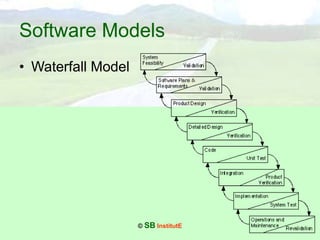
Software Models
• Waterfall Model
© SB InstitutE
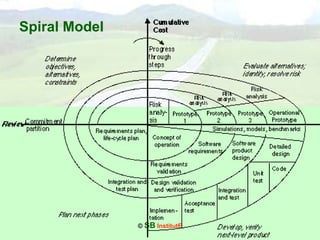
Spiral Model
© SB InstitutE
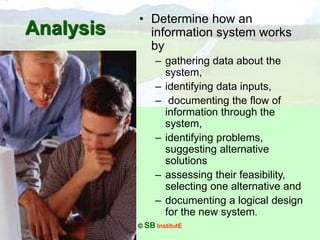
Analysis
• Determine how an
information system works
by
– gathering data about the
system,
– identifying data inputs,
– documenting the flow of
information through the
system,
– identifying problems,
suggesting alternative
solutions
– assessing their feasibility,
selecting one alternative and
– documenting a logical design
for the new system.
© SB InstitutE
System Design
• Design of the information
processing system
covering the activities of
– determining detailed
requirements,
– design of data/information
flow,
– design of database,
– design of user interface,
physical design, and
– design of
hardware/software
configuration
© SB InstitutE
Database Design
• Database design is the
process of producing a
detailed data model of a
database.
• This model contains all the
needed logical and physical
design choices and physical
storage parameters needed
to generate a design in a
Data Definition Language,
which can then be used to
create a database.
© SB InstitutE
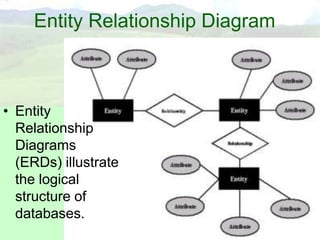
Entity Relationship Diagram
• Entity
Relationship
Diagrams
(ERDs) illustrate
the logical
structure of
databases.
© SB InstitutE
Logical Design
• Describes the functions required of a system,
that is, .
– what is to be done,
– not how it will be done.
• Logical design is not concerned with hardware
and software requirements but rather with the
processes to be performed.
– Context diagrams,
– data flow diagrams and
– data dictionaries
are useful tools in representing the logical design
of a system.
© SB InstitutE
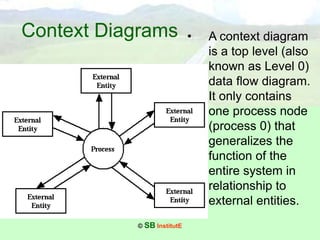
Context Diagrams • A context diagram
is a top level (also
known as Level 0)
data flow diagram.
It only contains
one process node
(process 0) that
generalizes the
function of the
entire system in
relationship to
external entities.
© SB InstitutE
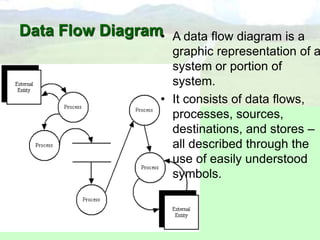
Data Flow Diagram• A data flow diagram is a
graphic representation of a
system or portion of
system.
• It consists of data flows,
processes, sources,
destinations, and stores –
all described through the
use of easily understood
symbols.
© SB InstitutE
Data Dictionary
• A data dictionary is a set of metadata that
contains definitions and representations of data
elements.
• a data dictionary holds the following information:
– Precise definition of data elements Usernames, roles
and privileges
– Schema objects
– Integrity constraints
– Stored procedures and triggers
– General database structure
– Audit information
– Space allocations
© SB InstitutE
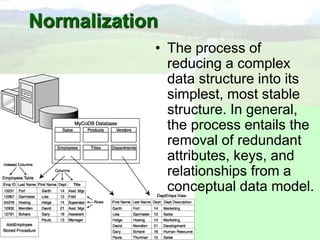
Normalization
• The process of
reducing a complex
data structure into its
simplest, most stable
structure. In general,
the process entails the
removal of redundant
attributes, keys, and
relationships from a
conceptual data model.
© SB InstitutE
Physical Design
• Describes how the processing will be
performed; for example, whether data is
input by a person or read by a bar code
reader, whether a file is electronic or print.
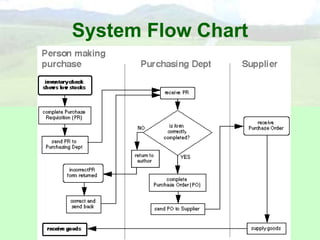
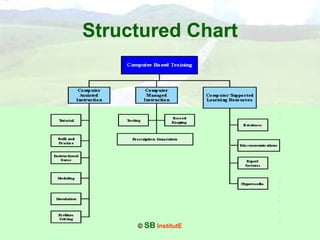
Tools to represent the physical design
include a system flow charts and structure
charts.
© SB InstitutE
System Flow Chart
© SB InstitutE
Structured Chart
© SB InstitutE
System Testing
• Testing is critical for newly
developed systems.
• Packaged systems, which
are already running on
numerous sites, still
require testing to ensure
they are properly installed
and to ensure system
parameters are properly
established.
© SB InstitutE
Conclusion
• In the conclusion you draw together all the
points made earlier, both looking back to the
objectives set at the outset and what has
actually been achieved as well as looking to the
future by specifying the work that could be done
next.
• Explain how well your objectives have been
achieved, what you would now do differently,
where things worked well and where they did
not, what you have learned on the way.
© SB InstitutE
Bibliography
• The bibliography follows the main
body of the thesis. It should
begin on a new page.
In the format of a bibliography, the surname of the
author precedes the initials of first names.
For Example
Suresh Babu C.V. (2005), A Roadmap for
PROJECT, Anniyappa Publications, Chennai.
Welldone Project
Management Consultants
©
SB InstitutE
welldone_project@yahoo.com

Road map for project

  • 1.
    © SB InstitutE ARoadmap for PROJECT (A Project Guide for Computer Science and IT) C.V. Suresh Babu
  • 2.
    © SB InstitutE Introduction •A Project generally involves a software implementation. • The aim of the project is to highlight the abilities of algorithmic formulation, modular programming, optimized code preparation, systematic documentation and other associated aspects of Software Development. • The design and implementation of the software are expected to conform to current software engineering principles and practices. • The written report should concentrate on the various design and implementation issues.
  • 3.
    © SB InstitutE ProjectProposal • It is a written presentation of an intended project specifying the problem, purpose, scope, methodology, and references. • It should be have 15 – 20 pages. • The content should be as brief as is sufficient enough to explain the objective and implementation of the project that the candidate is going to take up. • The write up must adhere to the guidelines and should include the following.
  • 4.
    © SB InstitutE ProposalFormat • 1. Introduction • 1.1 Background to the Study – Statement of the Problem – Objectives • General Objective • Specific Objective – Scope – Significance of the Study / Justification • 2. Organisation Profile • 3. Project Category » Process Description or Methodology » Conclusion • References • Bibliography • Appendices
  • 5.
    © SB InstitutE WhyProposals are rejected • Problem not identified or is of insufficient importance • Purpose or demonstrated need is vague • Problem more complex than proposer realises • Problem is too small for a project • Project is already done. • Proposal is not explicit enough, lacks detail, or is too vague or general • Need is poorly presented; logical process not followed • The design is too ambitious or otherwise inappropriate • Methods or procedures unsuited to stated objective • Approach is poorly thought out; methods poorly demonstrated • Proposal falls short of the standard of the expected award
  • 6.
    © SB InstitutE Examplesof bad titles are: • Payroll Management System • Library Management System • Inventory Management System • Student Mark Processing/Student or School Managing Systems • Online Shopping
  • 7.
    © SB InstitutE Tableof Content Format • Cover page, • Original copy of the approved Proposal and Synopsis • Declaration • Bonafide Certificate • Certificate of attendance given by Organisations • Acknowledgement • Abstract • List of Contents • List of Tables • List of Figures • Body of the Project work • Bibliography • Appendices, if any
  • 8.
    © SB InstitutE TOCcont.. • Chapter I Introduction – Organization Profile – System Overview – Objectives – Environment Specification • H/W (Specification & Requirement) • S/W (Specification & Requirement) – Software Engineering Paradigms Used – System Planning • Pert/CPM/Gantt chart • Chapter II System Analysis • 2.1. Analysis of the situation • 2.2. Existing System • 2.3. Need for the change in System • 2.4. Proposed System
  • 9.
    © SB InstitutE TOCcont.. • Chapter III System Design • 3.1. Input Output Design • 3.2. Data Base Design • 3.2.1. Requirement Analysis • 3.2.1.1. ER Diagram • 3.2.1.2. Table Relationship • 3.2.1.3. Class Diagram • 3.2.1.4. Use Case Diagrams • 3.2.2 Logical Design • 3.2.2.1. Context Analysis Diagram • 3.2.2.2. Data Flow Diagrams • 3.2.2.3. Data Dictionaries • 3.2.2.4. Normalization • 3.2.2.5. Activity Diagram • 3.2.3. Physical Design • 3.2.3.1. System Flow chart • 3.2.3.2. Structure Chart • 3.2.3.3. Table Structure • 3.2.3.4. Process Logic
  • 10.
    © SB InstitutE TOCcont.. • Chapter IV System Development • 4.1. System Architecture • 4.1. Program Specification • Chapter V System Testing and Implementation • 5.1. Validation and System Testing • 5.2. System Implementation • Chapter VI Conclusion • 6.1. Scope of the system • 6.2. Future Application of the Project
  • 11.
    © SB InstitutE SoftwareEngineering Paradigm • The computer science discipline concerned with developing large applications. Software engineering covers not only the technical aspects of building software systems, but also management issues, such as directing programming teams, scheduling, and budgeting.
  • 12.
    © SB InstitutE SoftwareModels • Waterfall Model
  • 13.
  • 14.
    © SB InstitutE Analysis •Determine how an information system works by – gathering data about the system, – identifying data inputs, – documenting the flow of information through the system, – identifying problems, suggesting alternative solutions – assessing their feasibility, selecting one alternative and – documenting a logical design for the new system.
  • 15.
    © SB InstitutE SystemDesign • Design of the information processing system covering the activities of – determining detailed requirements, – design of data/information flow, – design of database, – design of user interface, physical design, and – design of hardware/software configuration
  • 16.
    © SB InstitutE DatabaseDesign • Database design is the process of producing a detailed data model of a database. • This model contains all the needed logical and physical design choices and physical storage parameters needed to generate a design in a Data Definition Language, which can then be used to create a database.
  • 17.
    © SB InstitutE EntityRelationship Diagram • Entity Relationship Diagrams (ERDs) illustrate the logical structure of databases.
  • 18.
    © SB InstitutE LogicalDesign • Describes the functions required of a system, that is, . – what is to be done, – not how it will be done. • Logical design is not concerned with hardware and software requirements but rather with the processes to be performed. – Context diagrams, – data flow diagrams and – data dictionaries are useful tools in representing the logical design of a system.
  • 19.
    © SB InstitutE ContextDiagrams • A context diagram is a top level (also known as Level 0) data flow diagram. It only contains one process node (process 0) that generalizes the function of the entire system in relationship to external entities.
  • 20.
    © SB InstitutE DataFlow Diagram• A data flow diagram is a graphic representation of a system or portion of system. • It consists of data flows, processes, sources, destinations, and stores – all described through the use of easily understood symbols.
  • 21.
    © SB InstitutE DataDictionary • A data dictionary is a set of metadata that contains definitions and representations of data elements. • a data dictionary holds the following information: – Precise definition of data elements Usernames, roles and privileges – Schema objects – Integrity constraints – Stored procedures and triggers – General database structure – Audit information – Space allocations
  • 22.
    © SB InstitutE Normalization •The process of reducing a complex data structure into its simplest, most stable structure. In general, the process entails the removal of redundant attributes, keys, and relationships from a conceptual data model.
  • 23.
    © SB InstitutE PhysicalDesign • Describes how the processing will be performed; for example, whether data is input by a person or read by a bar code reader, whether a file is electronic or print. Tools to represent the physical design include a system flow charts and structure charts.
  • 24.
  • 25.
  • 26.
    © SB InstitutE SystemTesting • Testing is critical for newly developed systems. • Packaged systems, which are already running on numerous sites, still require testing to ensure they are properly installed and to ensure system parameters are properly established.
  • 27.
    © SB InstitutE Conclusion •In the conclusion you draw together all the points made earlier, both looking back to the objectives set at the outset and what has actually been achieved as well as looking to the future by specifying the work that could be done next. • Explain how well your objectives have been achieved, what you would now do differently, where things worked well and where they did not, what you have learned on the way.
  • 28.
    © SB InstitutE Bibliography •The bibliography follows the main body of the thesis. It should begin on a new page. In the format of a bibliography, the surname of the author precedes the initials of first names. For Example Suresh Babu C.V. (2005), A Roadmap for PROJECT, Anniyappa Publications, Chennai.
  • 29.
    Welldone Project Management Consultants © SBInstitutE welldone_project@yahoo.com