www.aja.com


                                              RH10UC
                                         SD to HD Upconverter
                                          R-series Card Module


                                                     Published: 7/13/10


                               Installation and Operation
                                                   Guide


B e c a u s e   i t   m a t t e r s .
2


Trademarks
                   AJA®, KONA®, Ki Pro®, and XENA® are registered trademarks of AJA Video, Inc. FiDO™, Io HD™ and Io™ are
                   trademarks of AJA Video, Inc. HDMI, the HDMI logo and High-Definition Multimedia Interface are trademarks
                   or registered trademarks of HDMI Licensing LLC. DVI is a registered trademark of DDWG. All other trademarks
                   are the property of their respective holders.

Notice
                   Copyright © 2010 AJA Video, Inc. All rights reserved. All information in this manual is subject to change
                   without notice. No part of the document may be reproduced or transmitted in any form, or by any means,
                   electronic or mechanical, including photocopying or recording, without the express written permission of
                   AJA Inc.

Contacting Support
                   To contact AJA Video for sales or support, use any of the following methods:
                   180 Litton Drive, Grass Valley, CA. 95945 USA
                   Telephone: 800.251.4224 or 530.274.2048
                   Fax: 530.274.9442
                   Web: http://www.aja.com
                   Support Email: support@aja.com
                   Sales Email: sales@aja.com
                   When calling for support, have all information at hand prior to calling.

Limited Warranty
                   AJA Video warrants that this product will be free from defects in materials and workmanship for a period of
                   five years from the date of purchase. If a product proves to be defective during this warranty period, AJA
                   Video, at its option, will either repair the defective product without charge for parts and labor, or will provide
                   a replacement in exchange for the defective product.
                   In order to obtain service under this warranty, you the Customer, must notify AJA Video of the defect before
                   the expiration of the warranty period and make suitable arrangements for the performance of service. The
                   Customer shall be responsible for packaging and shipping the defective product to a designated service
                   center nominated by AJA Video, with shipping charges prepaid. AJA Video shall pay for the return of the
                   product to the Customer if the shipment is to a location within the country in which the AJA Video service
                   center is located. Customer shall be responsible for paying all shipping charges, insurance, duties, taxes, and
                   any other charges for products returned to any other locations.
                   This warranty shall not apply to any defect, failure or damage caused by improper use or improper or
                   inadequate maintenance and care. AJA Video shall not be obligated to furnish service under this warranty a)
                   to repair damage resulting from attempts by personnel other than AJA Video representatives to install, repair
                   or service the product, b) to repair damage resulting from improper use or connection to incompatible
                   equipment, c) to repair any damage or malfunction caused by the use of non-AJA Video parts or supplies, or
                   d) to service a product that has been modified or integrated with other products when the effect of such a
                   modification or integration increases the time or difficulty of servicing the product.
                   THIS WARRANTY IS GIVEN BY AJA VIDEO IN LIEU OF ANY OTHER WARRANTIES, EXPRESS OR IMPLIED. AJA
                   VIDEO AND ITS VENDORS DISCLAIM ANY IMPLIED WARRANTIES OF MERCHANTABILITY OR FITNESS FOR A
                   PARTICULAR PURPOSE. AJA VIDEO’S RESPONSIBILITY TO REPAIR OR REPLACE DEFECTIVE PRODUCTS IS THE
                   WHOLE AND EXCLUSIVE REMEDY PROVIDED TO THE CUSTOMER FOR ANY INDIRECT, SPECIAL, INCIDENTAL OR
                   CONSEQUENTIAL DAMAGES IRRESPECTIVE OF WHETHER AJA VIDEO OR THE VENDOR HAS ADVANCE NOTICE
                   OF THE POSSIBILITY OF SUCH DAMAGES.
AJA RH10UC SD to HD Upconverter User Manual            3

Features

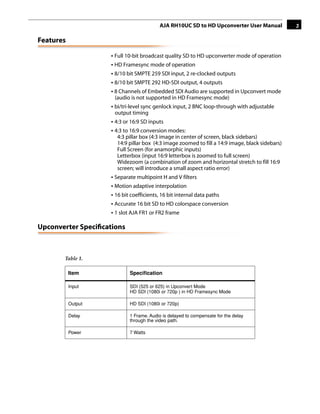
                    • Full 10-bit broadcast quality SD to HD upconverter mode of operation
                    • HD Framesync mode of operation
                    • 8/10 bit SMPTE 259 SDI input, 2 re-clocked outputs
                    • 8/10 bit SMPTE 292 HD-SDI output, 4 outputs
                    • 8 Channels of Embedded SDI Audio are supported in Upconvert mode
                      (audio is not supported in HD Framesync mode)
                    • bi/tri-level sync genlock input, 2 BNC loop-through with adjustable
                      output timing
                                                                                    1
                    • 4:3 or 16:9 SD inputs
                    • 4:3 to 16:9 conversion modes:
                       4:3 pillar box (4:3 image in center of screen, black sidebars)
                       14:9 pillar box (4:3 image zoomed to fill a 14:9 image, black sidebars)
                       Full Screen (for anamorphic inputs)
                       Letterbox (input 16:9 letterbox is zoomed to full screen)
                       Widezoom (a combination of zoom and horizontal stretch to fill 16:9
                       screen; will introduce a small aspect ratio error)
                    • Separate multipoint H and V filters
                    • Motion adaptive interpolation
                    • 16 bit coefficients, 16 bit internal data paths
                    • Accurate 16 bit SD to HD colorspace conversion
                    • 1 slot AJA FR1 or FR2 frame

Upconverter Specifications


       Table 1.

           Item             Specification

           Input            SDI (525 or 625) in Upconvert Mode
                            HD SDI (1080i or 720p ) in HD Framesync Mode

           Output           HD SDI (1080i or 720p)

           Delay            1 Frame. Audio is delayed to compensate for the delay
                            through the video path.

           Power            7 Watts
4


I/O Connections


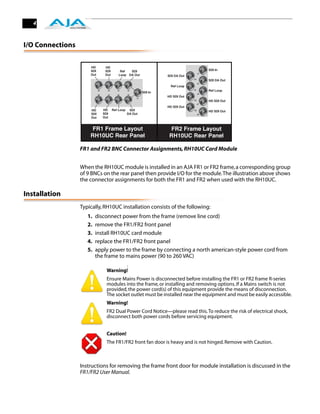
                  FR1 and FR2 BNC Connector Assignments, RH10UC Card Module


                  When the RH10UC module is installed in an AJA FR1 or FR2 frame, a corresponding group
                  of 9 BNCs on the rear panel then provide I/O for the module. The illustration above shows
                  the connector assignments for both the FR1 and FR2 when used with the RH10UC.

Installation
                  Typically, RH10UC installation consists of the following:
                     1.   disconnect power from the frame (remove line cord)
                     2.   remove the FR1/FR2 front panel
                     3.   install RH10UC card module
                     4.   replace the FR1/FR2 front panel
                     5.   apply power to the frame by connecting a north american-style power cord from
                          the frame to mains power (90 to 260 VAC)
                                         !
                              Warning!
                              Ensure Mains Power is disconnected before installing the FR1 or FR2 frame R-series
                              modules into the frame, or installing and removing options. If a Mains switch is not
                              provided, the power cord(s) of this equipment provide the means of disconnection.
                              The socket outlet must be installed near the equipment and must be easily accessible.
                              Warning!
                              FR2 Dual Power Cord Notice—please read this. To reduce the risk of electrical shock,
                              disconnect both power cords before servicing equipment.


                              Caution!
                              The FR1/FR2 front fan door is heavy and is not hinged. Remove with Caution.


                  Instructions for removing the frame front door for module installation is discussed in the
                  FR1/FR2 User Manual.
AJA RH10UC SD to HD Upconverter User Manual     5

User Controls
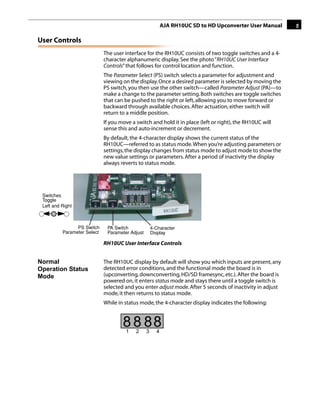
                             The user interface for the RH10UC consists of two toggle switches and a 4-
                             character alphanumeric display. See the photo “RH10UC User Interface
                             Controls” that follows for control location and function.
                             The Parameter Select (PS) switch selects a parameter for adjustment and
                             viewing on the display. Once a desired parameter is selected by moving the
                             PS switch, you then use the other switch—called Parameter Adjust (PA)—to
                             make a change to the parameter setting. Both switches are toggle switches
                             that can be pushed to the right or left, allowing you to move forward or
                             backward through available choices. After actuation, either switch will
                             return to a middle position.
                                                                                             1
                             If you move a switch and hold it in place (left or right), the RH10UC will
                             sense this and auto-increment or decrement.
                             By default, the 4-character display shows the current status of the
                             RH10UC—referred to as status mode. When you’re adjusting parameters or
                             settings, the display changes from status mode to adjust mode to show the
                             new value settings or parameters. After a period of inactivity the display
                             always reverts to status mode.


 Switches
 Toggle
 Left and Right


                PS Switch     PA Switch              4-Character
          Parameter Select    Parameter Adjust       Display

                             RH10UC User Interface Controls


Normal                       The RH10UC display by default will show you which inputs are present, any
Operation Status             detected error conditions, and the functional mode the board is in
Mode                         (upconverting, downconverting, HD/SD framesync, etc.). After the board is
                             powered on, it enters status mode and stays there until a toggle switch is
                             selected and you enter adjust mode. After 5 seconds of inactivity in adjust
                             mode, it then returns to status mode.
                             While in status mode, the 4-character display indicates the following:


                                     8 8 88
                                      1    2     3     4
6


                      Table 2.

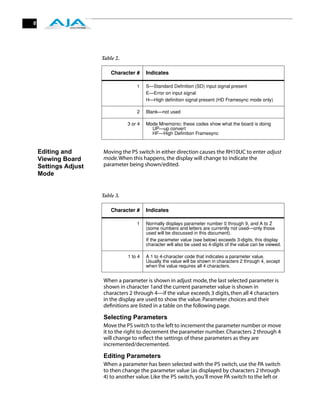
                          Character #     Indicates

                                     1    S—Standard Definition (SD) input signal present
                                          E—Error on input signal
                                          H—High definition signal present (HD Framesync mode only)

                                     2    Blank—not used

                                 3 or 4   Mode Mnemonic: these codes show what the board is doing
                                            UP—up convert
                                            HF—High Definition Framesync


    Editing and       Moving the PS switch in either direction causes the RH10UC to enter adjust
    Viewing Board     mode. When this happens, the display will change to indicate the
    Settings Adjust   parameter being shown/edited.
    Mode


                      Table 3.

                          Character #     Indicates

                                     1    Normally displays parameter number 0 through 9, and A to Z
                                          (some numbers and letters are currently not used—only those
                                          used will be discussed in this document).
                                          If the parameter value (see below) exceeds 3-digits, this display
                                          character will also be used so 4-digits of the value can be viewed.

                                 1 to 4   A 1 to 4-character code that indicates a parameter value.
                                          Usually the value will be shown in characters 2 through 4, except
                                          when the value requires all 4 characters.


                      When a parameter is shown in adjust mode, the last selected parameter is
                      shown in character 1and the current parameter value is shown in
                      characters 2 through 4—if the value exceeds 3 digits, then all 4 characters
                      in the display are used to show the value. Parameter choices and their
                      definitions are listed in a table on the following page.

                      Selecting Parameters
                      Move the PS switch to the left to increment the parameter number or move
                      it to the right to decrement the parameter number. Characters 2 through 4
                      will change to reflect the settings of these parameters as they are
                      incremented/decremented.

                      Editing Parameters
                      When a parameter has been selected with the PS switch, use the PA switch
                      to then change the parameter value (as displayed by characters 2 through
                      4) to another value. Like the PS switch, you’ll move PA switch to the left or
AJA RH10UC SD to HD Upconverter User Manual      7

right to scroll through the setting choices. When a desired choice is found,
simply leave it at that choice to select it.

Changing Operating Modes
Changing the selection in Param 0 from “UP” to “HF” selects the operating
mode of the board and results in alternate sets of parameters and
definitions. The two tables that follow show the parameter choices and
definitions available when the board is in Upconvert or HD Framesync
mode. Making a change in Param 0 results in an alternate bitfile to be
loaded and the HD Framesync H and V output timing params to be loaded
into the registers. During the bitfile loading process you may notice a short
delay when the switches are not responsive. After the process completes,
the unit will return to the status display.                         1
In the Status display, which is active when the unit's switches have not
been toggled for 5 seconds or more, an “H” will appear in the character 1
position if the unit is in HD Framesync mode—and there is a valid HD signal
present on both the video input and the genlock input (the two must
match).

Parameter Choices and Definitions When in Upconvert
Mode


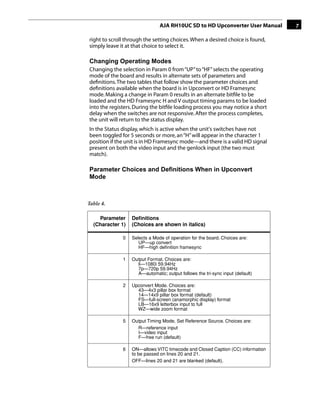
Table 4.

    Parameter     Definitions
  (Character 1)   (Choices are shown in italics)

              0   Selects a Mode of operation for the board. Choices are:
                     UP—up convert
                     HF—high definition framesync

              1   Output Format. Choices are:
                    li—1080i 59.94Hz
                    7p—720p 59.94Hz
                    A—automatic; output follows the tri-sync input (default)

              2   Upconvert Mode. Choices are:
                    43—4x3 pillar box format
                    14—14x9 pillar box format (default)
                    FS—full-screen (anamorphic display) format
                    LB—16x9 letterbox input to full
                    WZ—wide zoom format

              5   Output Timing Mode, Set Reference Source. Choices are:
                    R—reference input
                    I—video input
                    F—free run (default)

              6   ON—allows VITC timecode and Closed Caption (CC) information
                  to be passed on lines 20 and 21.
                  OFF—lines 20 and 21 are blanked (default).
8


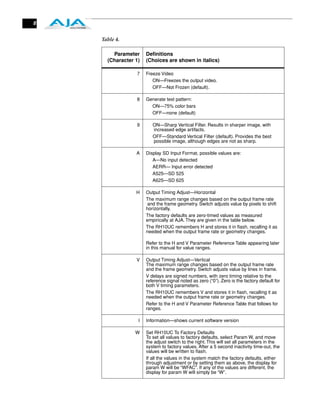
    Table 4.

        Parameter     Definitions
      (Character 1)   (Choices are shown in italics)

                 7    Freeze Video
                         ON—Freezes the output video.
                         OFF—Not Frozen (default).

                 8    Generate test pattern:
                        ON—75% color bars
                        OFF—none (default)

                 9       ON—Sharp Vertical Filter. Results in sharper image, with
                         increased edge artifacts.
                         OFF—Standard Vertical Filter (default). Provides the best
                         possible image, although edges are not as sharp.

                 A    Display SD Input Format, possible values are:
                         A—No input detected
                         AERR— Input error detected
                         A525—SD 525
                         A625—SD 625

                 H    Output Timing Adjust—Horizontal
                      The maximum range changes based on the output frame rate
                       and the frame geometry. Switch adjusts value by pixels to shift
                      horizontally.
                      The factory defaults are zero-timed values as measured
                      empirically at AJA. They are given in the table below.
                      The RH10UC remembers H and stores it in flash, recalling it as
                      needed when the output frame rate or geometry changes.

                      Refer to the H and V Parameter Reference Table appearing later
                      in this manual for value ranges.

                 V    Output Timing Adjust—Vertical
                      The maximum range changes based on the output frame rate
                      and the frame geometry. Switch adjusts value by lines in frame.
                      V delays are signed numbers, with zero timing relative to the
                      reference signal noted as zero (“0”). Zero is the factory default for
                      both V timing parameters.
                      The RH10UC remembers V and stores it in flash, recalling it as
                      needed when the output frame rate or geometry changes.
                      Refer to the H and V Parameter Reference Table that follows for
                      ranges.

                  I   Information—shows current software version

                 W    Set RH10UC To Factory Defaults
                      To set all values to factory defaults, select Param W, and move
                      the adjust switch to the right. This will set all parameters in the
                      system to factory values. After a 5 second inactivity time-out, the
                      values will be written to flash.
                      If all the values in the system match the factory defaults, either
                      through adjustment or by setting them as above, the display for
                      param W will be “WFAC”. If any of the values are different, the
                      display for param W will simply be “W”.
AJA RH10UC SD to HD Upconverter User Manual                  9

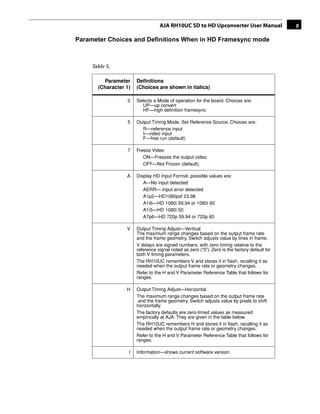
Parameter Choices and Definitions When in HD Framesync mode


     Table 5.

         Parameter     Definitions
       (Character 1)   (Choices are shown in italics)

                  0    Selects a Mode of operation for the board. Choices are:
                          UP—up convert
                          HF—high definition framesync
                                                                                1
                  5    Output Timing Mode, Set Reference Source. Choices are:
                         R—reference input
                         I—video input
                         F—free run (default)

                  7    Freeze Video
                          ON—Freezes the output video.
                          OFF—Not Frozen (default).

                  A    Display HD Input Format, possible values are:
                          A—No input detected
                          AERR— Input error detected
                          A1p2—HD1080psf 23.98
                          A1i6—HD 1080i 59.94 or 1080i 60
                          A1i5—HD 1080i 50
                          A7p6—HD 720p 59.94 or 720p 60

                  V    Output Timing Adjust—Vertical
                       The maximum range changes based on the output frame rate
                       and the frame geometry. Switch adjusts value by lines in frame.
                       V delays are signed numbers, with zero timing relative to the
                       reference signal noted as zero (“0”). Zero is the factory default for
                       both V timing parameters.
                       The RH10UC remembers V and stores it in flash, recalling it as
                       needed when the output frame rate or geometry changes.
                       Refer to the H and V Parameter Reference Table that follows for
                       ranges.

                  H    Output Timing Adjust—Horizontal
                       The maximum range changes based on the output frame rate
                        and the frame geometry. Switch adjusts value by pixels to shift
                       horizontally.
                       The factory defaults are zero-timed values as measured
                       empirically at AJA. They are given in the table below.
                       The RH10UC remembers H and stores it in flash, recalling it as
                       needed when the output frame rate or geometry changes.
                       Refer to the H and V Parameter Reference Table that follows for
                       ranges.

                   I   Information—shows current software version
10


                        Table 5.

                            Parameter         Definitions
                          (Character 1)       (Choices are shown in italics)

                                      W       Set RH10UC To Factory Defaults
                                              To set all values to factory defaults, select Param W, and move
                                              the adjust switch to the right. This will set all parameters in the
                                              system to factory values. After a 5 second inactivity time-out, the
                                              values will be written to flash.
                                              If all the values in the system match the factory defaults, either
                                              through adjustment or by setting them as above, the display for
                                              param W will be “WFAC”. If any of the values are different, the
                                              display for param W will simply be “W”.


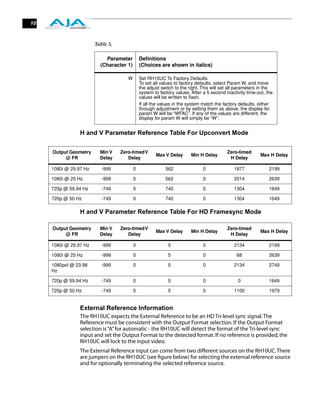
                 H and V Parameter Reference Table For Upconvert Mode

     Output Geometry      Min V    Zero-timed V                                           Zero-timed
                                                      Max V Delay       Min H Delay                       Max H Delay
          @ FR            Delay       Delay                                                H Delay

     1080i @ 29.97 Hz      -999           0                562                0              1877              2199

     1080i @ 25 Hz         -999           0                562                0              2014              2639

     720p @ 59.94 Hz       -749           0                740                0              1304              1649

     720p @ 50 Hz          -749           0                740                0              1304              1649

                 H and V Parameter Reference Table For HD Framesync Mode

     Output Geometry      Min V    Zero-timed V                                           Zero-timed
                                                      Max V Delay       Min H Delay                       Max H Delay
          @ FR            Delay       Delay                                                H Delay

     1080i @ 29.97 Hz      -999           0                 5                 0              2134              2199

     1080i @ 25 Hz         -999           0                 5                 0                68              2639

     1080psf @ 23.98       -999           0                 5                 0              2134              2749
     Hz

     720p @ 59.94 Hz       -749           0                 5                 0                0               1649

     720p @ 50 Hz          -749           0                 5                 0              1100              1979


                 External Reference Information
                 The RH10UC expects the External Reference to be an HD Tri-level sync signal. The
                 Reference must be consistent with the Output Format selection. If the Output Format
                 selection is “A” for automatic - the RH10UC will detect the format of the Tri-level sync
                 input and set the Output Format to the detected format. If no reference is provided, the
                 RH10UC will lock to the input video.
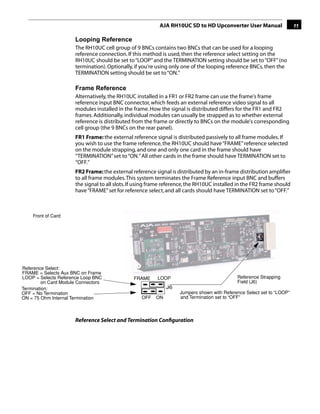
                 The External Reference input can come from two different sources on the RH10UC. There
                 are jumpers on the RH10UC (see figure below) for selecting the external reference source
                 and for optionally terminating the selected reference source.
AJA RH10UC SD to HD Upconverter User Manual                  11

                      Looping Reference
                      The RH10UC cell group of 9 BNCs contains two BNCs that can be used for a looping
                      reference connection. If this method is used, then the reference select setting on the
                      RH10UC should be set to “LOOP” and the TERMINATION setting should be set to “OFF” (no
                      termination). Optionally, if you're using only one of the looping reference BNCs, then the
                      TERMINATION setting should be set to “ON.”

                      Frame Reference
                      Alternatively, the RH10UC installed in a FR1 or FR2 frame can use the frame's frame
                      reference input BNC connector, which feeds an external reference video signal to all
                      modules installed in the frame. How the signal is distributed differs for the FR1 and FR2
                      frames. Additionally, individual modules can usually be strapped as to whether external
                                                                                                  1
                      reference is distributed from the frame or directly to BNCs on the module's corresponding
                      cell group (the 9 BNCs on the rear panel).
                      FR1 Frame: the external reference signal is distributed passively to all frame modules. If
                      you wish to use the frame reference, the RH10UC should have “FRAME” reference selected
                      on the module strapping, and one and only one card in the frame should have
                      “TERMINATION” set to “ON.” All other cards in the frame should have TERMINATION set to
                      “OFF.”
                      FR2 Frame: the external reference signal is distributed by an in-frame distribution amplifier
                      to all frame modules. This system terminates the Frame Reference input BNC and buffers
                      the signal to all slots. If using frame reference, the RH10UC installed in the FR2 frame should
                      have “FRAME” set for reference select, and all cards should have TERMINATION set to “OFF.”


    Front of Card


Reference Select:
FRAME = Selects Aux BNC on Frame
LOOP = Selects Reference Loop BNC              FRAME      LOOP                               Reference Strapping
         on Card Module Connectors                                                           Field (J6)
Termination:                                                  J6
OFF = No Termination                                                Jumpers shown with Reference Select set to “LOOP”
ON = 75 Ohm Internal Termination                   OFF   ON         and Termination set to “OFF”


                      Reference Select and Termination Configuration
12


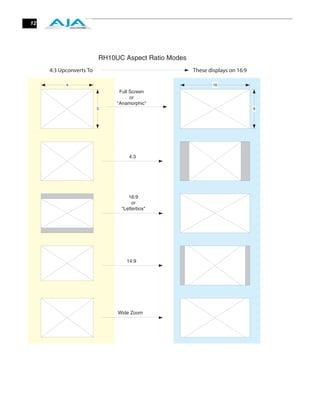
                         RH10UC Aspect Ratio Modes
     4:3 Upconverts To                               These displays on 16:9

           4                                                 16
                               Full Screen
                                    or
                              "Anamorphic"
                         3                                                    9


                                  4:3


                                  16:9
                                    or
                               "Letterbox"


                                  14:9


                              Wide Zoom
AJA RH10UC SD to HD Upconverter User Manual                    13


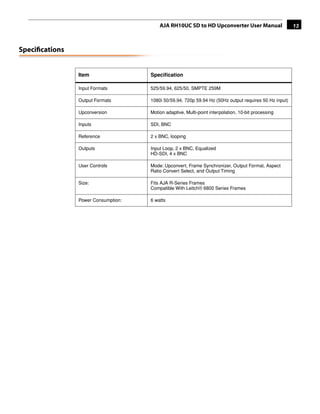
Specifications


                Item                 Specification

                Input Formats        525/59.94, 625/50, SMPTE 259M

                Output Formats       1080i 50/59.94, 720p 59.94 Hz (50Hz output requires 50 Hz input)

                Upconversion         Motion adaptive, Multi-point interpolation, 10-bit processing
                                                                                     1
                Inputs               SDI, BNC

                Reference            2 x BNC, looping

                Outputs              Input Loop, 2 x BNC, Equalized
                                     HD-SDI, 4 x BNC

                User Controls        Mode: Upconvert, Frame Synchronizer, Output Format, Aspect
                                     Ratio Convert Select, and Output Timing

                Size:                Fits AJA R-Series Frames
                                     Compatible With Leitch® 6800 Series Frames

                Power Consumption:   6 watts
14


                              Appendix A: Safety & Compliance
Federal Communications Commission (FCC) Compliance Notices

Class A        This equipment has been tested and found to comply with the limits for a Class A digital device,
Interference   pursuant to Part 15, Subpart B of the FCC Rules. These limits are designed to provide reasonable
               protection against harmful interference in a commercial installation. This equipment generates,
Statement      uses, and can radiate radio frequency energy and, if not installed and used in accordance with the
               instructions, may cause harmful interference to radio communications. However, there is no
               guarantee that interference will not occur in a particular installation. Operation of this equipment
               in a residential area is likely to cause harmful interference in which case the user will be required to
               correct the interference at his own expense. If this equipment does cause harmful interference to
               radio or television reception, which can be determined by turning the equipment off and on, the
               user is encouraged to try to correct the interference by one or more of the following measures:
                  • Reorient or relocate the receiving antenna.
                  • Increase the separation between the equipment and receiver.
                  • Connect the equipment into an outlet on a circuit different from that to which the receiver is
                    connected.
                  • Consult the dealer or an experienced radio/TV technician for help.

FCC Caution    This device complies with Part 15 of the FCC Rules. Operation is subject to the following two
               conditions: (1) This device may not cause harmful interference, and (2) this device must accept any
               interference received, including interference that may cause undesired operation.

Canadian ICES Statement
               Canadian Department of Communications Radio Interference Regulations
               This digital apparatus does not exceed the Class A limits for radio-noise emissions from a digital
               apparatus as set out in the Radio Interference Regulations of the Canadian Department of
               Communications. This Class A digital apparatus complies with Canadian ICES-003.
               Règlement sur le brouillage radioélectrique du ministère des Communications
               Cet appareil numérique respecte les limites de bruits radioélectriques visant les appareils
               numériques de classe A prescrites dans le Règlement sur le brouillage radioélectrique du
               ministère des Communications du Canada. Cet appareil numérique de la Classe A est conforme à
               la norme NMB-003 du Canada.

European Union and European Free Trade Association (EFTA)
Regulatory Compliance
               This equipment may be operated in the countries that comprise the member countries of the
               European Union and the European Free Trade Association. These countries, listed in the following
               paragraph, are referred to as The European Community throughout this document:
               AUSTRIA, BELGIUM, BULGARIA, CYPRUS, CZECH REPUBLIC, DENMARK, ESTONIA, FINLAND,
               FRANCE, GERMANY, GREECE, HUNGARY, IRELAND, ITALY, LATVIA, LITHUANIA, LUXEMBOURG,
               MALTA, NETHERLANDS, POLAND, PORTUGAL, ROMANIA, SLOVAKIA, SLOVENIA, SPAIN, SWEDEN,
               UNITED KINGDOM, ICELAND, LICHTENSTEIN, NORWAY, SWITZERLAND
AJA RH10UC SD to HD Upconverter User Manual                        15

Declaration of   Marking by this symbol indicates compliance with the Essential Requirements of the EMC Directive
Conformity       of the European Union 2004/108/EC.


                 This equipment meets the following conformance standards:
                     Safety:
                        CB- IEC 60065:2001 + A1:2005
                        NRTL - UL 60065:2003 R11.06, CSA C22.2 NO. 60065:2003 + A1:06
                        GS - EN 60065:2002 + A1                                                     1
                        Additional licenses issued for specific countries available on request.
                     Emissions:
                        EN 55103-1: 1996
                        EN61000-3-2:2006, EN61000-3-3:1995 +A1:2001 +A2:2005
                     Immunity:
                        EN 55103-2: 1996
                        EN61000-4-2:1995 + A1:1999 + A2:2001, EN61000-4-3:2006, EN61000-4-4:2004,
                        EN 61000-4-5: 2005, EN 610004-6:2007, EN61000-4-11:2004


                         The product is also licensed for additional country specific standards as required for
                        the International Marketplace.
                                  Warning!

                                  This is a Class A product. In a domestic environment, this product may cause radio
                                  interference, in which case, the user may be required to take appropriate measures.
                                 Achtung! Dieses ist ein Gerät der Funkstörgrenzwertklasse A. In Wohnbereichen
                     können bei Betrieb dieses Gerätes Rundfunkstörungen auftreten, in welchen Fällen der
                     Benutzer für entsprechende Gegenmaßnahmen verantwortlich ist.
                     Attention! Ceci est un produit de Classe A. Dans un environnement domestique, ce produit
                     risque de créer des interférences radioélectriques, il appartiendra alors à l’utilisateur de prendre
                     les mesures spécifiques appropriées.

Korea KCC Compliance Statement
16


Taiwan Compliance Statement


                 This is a Class A product based on the standard of the Bureau of Standards, Metrology and
                 Inspection (BSMI) CNS 13438, Class A.

Japanese Compliance Statement

                    1. Class A ITE

                                        A


                                                 −


                 This is a Class A product based on the standard of the VCCI Council (VCCI V-3/2008.04). If this
                 equipment is used in a domestic environment, radio interference may occur, in which case, the
                 user may be required to take corrective actions.

Translated caution statements, warning conventions and warning messages
                 The following caution statements, warning conventions, and warning messages apply to this
                 product and manual.


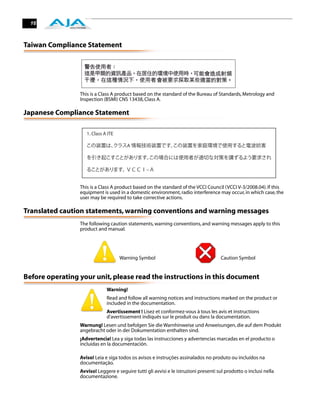
                                     Warning Symbol                                   Caution Symbol


Before operating your unit, please read the instructions in this document
                              Warning!
                              Read and follow all warning notices and instructions marked on the product or
                              included in the documentation.
                              Avertissement ! Lisez et conformez-vous à tous les avis et instructions
                              d'avertissement indiqués sur le produit ou dans la documentation.
                 Warnung! Lesen und befolgen Sie die Warnhinweise und Anweisungen, die auf dem Produkt
                 angebracht oder in der Dokumentation enthalten sind.
                 ¡Advertencia! Lea y siga todas las instrucciones y advertencias marcadas en el producto o
                 incluidas en la documentación.

                 Aviso! Leia e siga todos os avisos e instruções assinalados no produto ou incluídos na
                 documentação.
                 Avviso! Leggere e seguire tutti gli avvisi e le istruzioni presenti sul prodotto o inclusi nella
                 documentazione.
AJA RH10UC SD to HD Upconverter User Manual                       17

             Warning!
             Do not use this device near water and clean only with a dry cloth.
             Avertissement! N'utilisez pas cet appareil près de l'eau et nettoyez-le seulement avec
             un tissu sec..
Warnung! Das Gerät nicht in der Nähe von Wasser verwenden und nur mit einem trockenen Tuch
säubern.
¡Advertencia! No utilice este dispositivo cerca del agua y límpielo solamente con un paño seco.
Aviso! Não utilize este dispositivo perto da água e limpe-o somente com um pano seco.
Avviso! Non utilizzare questo dispositivo vicino all'acqua e pulirlo soltanto con un panno asciutto.

             Warning!
                                                                                      1
             Do not block any ventilation openings. Install in accordance with the manufacturer's
             instructions.


Avertissement ! Ne bloquez aucune ouverture de ventilation. Suivez les instructions du fabricant
lors de l'installation.
Warnung! Die Lüftungsöffnungen dürfen nicht blockiert werden. Nur gemäß den Anweisungen des
Herstellers installieren.
¡Advertencia! No bloquee ninguna de las aberturas de la ventilación. Instale de acuerdo con las
instrucciones del fabricante.
Aviso! Não obstrua nenhuma das aberturas de ventilação. Instale de acordo com as instruções do
fabricante.
Avviso! Non ostruire le aperture di ventilazione. Installare in conformità con le istruzioni del
fornitore.

             Warning!
             Do not install near any heat sources such as radiators, heat registers, stoves, or other
             apparatus (including amplifiers) that produce heat.


Avertissement ! N'installez pas l'appareil près d'une source de chaleur telle que des radiateurs, des
bouches d'air de chauffage, des fourneaux ou d'autres appareils (amplificateurs compris) qui
produisent de la chaleur.
Warnung! Nicht in der Nähe von Wärmequellen wie Heizkörpern, Heizregistern, Öfen oder anderen
Wärme erzeugenden Geräten (einschließlich Verstärkern) aufstellen.
¡Advertencia! No instale cerca de fuentes de calor tales como radiadores, registros de calor, estufas
u otros aparatos (incluidos amplificadores) que generan calor.
Aviso! Não instale perto de nenhuma fonte de calor tal como radiadores, saídas de calor, fogões ou
outros aparelhos (incluindo amplificadores) que produzam calor.
Avviso! Non installare vicino a fonti di calore come termosifoni, diffusori di aria calda, stufe o altri
apparecchi (amplificatori compresi) che emettono calore.

             Warning!
             Refer all servicing to qualified service personnel. Servicing is required when the device
             has been damaged in any wav, such as power-supply cord or plug is damaged, liquid
             has been spilled or objects have fallen into the device, the device has been exposed to
             rain or moisture, does not operate normally, or has been dropped.
Avertissement ! Référez-vous au personnel de service qualifié pour tout entretien. L'entretien est
exigé quand l'appareil a été endommagé de quelque manière que ce soit, par exemple lorsque le
cordon d'alimentation ou la prise sont endommagés, que du liquide a été versé ou des objets sont
tombés dans l'appareil, que l'appareil a été exposé à la pluie ou à l'humidité, ne fonctionne pas
normalement ou est tombé.
18


     Warnung! Das Gerät sollte nur von qualifizierten Fachkräften gewartet werden. Eine Wartung ist
     fällig, wenn das Gerät in irgendeiner Weise beschädigt wurde, wie bei beschädigtem Netzkabel
     oder Netzstecker, falls Flüssigkeiten oder Objekte in das Gerät gelangen, das Gerät Regen oder
     Feuchtigkeit ausgesetzt wurde, nicht ordnungsgemäß funktioniert oder fallen gelassen wurde.
     ¡Advertencia! Consulte al personal calificado por cuestiones de reparación. El servicio de
     reparación se requiere cuando el dispositivo ha recibido cualquier tipo de daño, por ejemplo cable
     o espigas dañadas, se ha derramado líquido o se han caído objetos dentro del dispositivo, el
     dispositivo ha sido expuesto a la lluvia o humedad, o no funciona de modo normal, o se ha caído.
     Aviso! Remeta todos os serviços de manutenção para o pessoal de assistência qualificado. A
     prestação de serviços de manutenção é exigida quando o dispositivo foi danificado mediante
     qualquer forma, como um cabo de alimentação ou ficha que se encontra danificado/a, quando foi
     derramado líquido ou caíram objectos sobre o dispositivo, quando o dispositivo foi exposto à
     chuva ou à humidade, quando não funciona normalmente ou quando foi deixado cair.
     Avviso! Fare riferimento al personale qualificato per tutti gli interventi di assistenza. L'assistenza è
     necessaria quando il dispositivo è stato danneggiato in qualche modo, ad esempio se il cavo di
     alimentazione o la spina sono danneggiati, è stato rovesciato del liquido è stato rovesciato o
     qualche oggetto è caduto nel dispositivo, il dispositivo è stato esposto a pioggia o umidità, non
     funziona correttamente o è caduto.

                  Caution!
                  This device is a Class A product. Operation of this equipment in a residential area is
                  likely to cause harmful interference, in which case users will be required to take
                  whatever measures may be necessary to correct the interference at their own
                  expense.
     Attention! Le périphérique est un produit de Classe A. Le fonctionnement de cet équipement
     dans une zone résidentielle risque de causer des interférences nuisibles, auquel cas l'utilisateur
     devra y remédier à ses propres frais.
     Achtung! Dies ist ein Gerät der Klasse A. Bei Einsatz des Geräts in Wohngebieten kann es
     Störungen des Radio- und Fernsehempfangs verursachen. In diesem Fall muss der Benutzer alle
     notwendigen Maßnahmen ergreifen, die möglicherweise nötig sind, um die Störungen auf eigene
     Rechnung zu beheben.
     ¡Precaución! Este es un producto clase A. El uso de este equipo en áreas residenciales puede
     causar interferencias nocivas, en cuyo caso, se requerirá que los usuarios tomen cualquier medida
     necesaria para corregir la interferencia por cuenta propia.
     Cuidado! Este dispositivo é um produto Classe A. Operar este equipamento em uma área
     residencial provavelmente causará interferência prejudicial; neste caso, espera-se que os usuários
     tomem as medidas necessárias para corrigir a interferência por sua própria conta.
     Attenzione! Questo dispositivo è un prodotto di Classe A. Il funzionamento di questo apparecchio
     in aree residenziali potrebbe causare interferenze dannose, nel cui caso agli utenti verrà richiesto
     di adottare tutte le misure necessarie per porre rimedio alle interferenze a proprie spese.


                  Warning!
                  Disconnect the external AC power supply line cord(s) from the mains power before
                  moving the unit.
                  Avertissement ! Retirez le ou les cordons d’alimentation en CA de la source
                  d’alimentation principale lorsque vous déplacez l’appareil.

     Warnung! Trennen Sie die Wechselstrom-Versorgungskabel vom Netzstrom, bevor Sie das Gerät
     verschieben.
     ¡Advertencia! Cuando mueva la unidad desenchufe de la red eléctrica el/los cable(s) de la fuente
     de alimentación CA tipo brick.
     Advertência! Remova os cabos CA de alimentação brick da rede elétrica ao mover a unidade.
     Avvertenza! Scollegare il cavo dell’alimentatore quando si sposta l’unità.
AJA RH10UC SD to HD Upconverter User Manual                       19

            Warning!
            Ensure Mains Power is disconnected before installing the FR1 or FR2 frame R-series
            modules into the frame, or installing and removing options. If a Mains switch is not
            provided, the power cord(s) of this equipment provide the means of disconnection. The
            socket outlet must be installed near the equipment and must be easily accessible.
Avertissement ! S’assurer que la source principale d’alimentation est débranchée avant d’installer
les modules des cartes série R de boîtier FR1 ou FR2 sur l’appareil, ou avant d’installer ou de
supprimer des options. Si aucun commutateur principal n’est fourni, le ou les cordons
d’alimentation de cet équipement fournissent le moyen nécessaire pour le débranchement. La prise
doit être installée près de l’équipement et doit être facilement accessible.
Warnung! Vor der Installation der FR1 oder FR2 Steckkartenmodule der R-Serie in den Rahmen bzw.
vor der Installation oder dem Entfernen von Optionen muss sichergestellt werden, dass der
Netzstrom ausgeschaltet bzw. abgetrennt ist. Wenn kein Netzschalter verfügbar ist, kann der
Netzstrom mithilfe des/der Netzkabel(s) am Gerät getrennt werden. Die Steckdose muss in der Nähe
                                                                                     1
des Geräts installiert und leicht zugänglich sein.
¡Advertencia! Asegúrese de que la energía de la red de electricidad esté desconectada antes de
instalar el módulo de tarjeta de cuadro FR1 o FR2 serie R dentro del cuadro, o antes de instalar o
desinstalar opciones. Si el interruptor de la red eléctrica no se encuentra disponible, desconecte el/
los cable(s) eléctrico(s) del equipo. La toma de corriente debe ser instalada cerca del equipo y debe
estar fácilmente accesible.
Advertência! Certifique-se de que a alimentação principal esteja desconectada antes de instalar os
cartões R-series FR1 ou FR2 no quadro ou ao instalar e desinstalar opcionais. Se não houver um
interruptor de alimentação principal, o próprio cabo de alimentação do equipamento é o meio de
desconexão. A tomada de alimentação deve ser instalada próxima ao equipamento e seu acesso
deve ser fácil.
Avvertenza! Verificare che la rete di alimentazione sia scollegata prima di installare i moduli FR1 o
FR2 serie R nel telaio, o installare o rimuovere le opzioni. Se non è disponibile un interruttore di
alimentazione, il/i cavo/i di alimentazione di questa apparecchiatura forniscono i mezzi di
sconnessione. La presa deve essere installata vicino all'apparecchio e deve essere facilmente
accessibile.
              Warning!
              FR2 Dual Power Cord Notice—please read this. To reduce the risk of electrical shock,
              disconnect both power cords before servicing equipment.
              Avertissement ! Notice relative aux doubles cordons d’alimentation de FR2—veuillez
              lire. Pour réduire le risque de choc électrique, débranchez les deux cordons
d’alimentation avec d’effectuer tout entretien de l’équipement.
Warnung! Hinweis zum FR2 mit doppeltem Netzkabel – bitte beachten. Um das Risiko eines
Elektroschocks zu verringern, sind beide Netzkabel vor der Wartung des Geräts abzutrennen.
¡Advertencia! Aviso: Cable eléctrico FR2 dual — Por favor leer. Para reducir el riesgo de
electrocución, desconecte ambos cables eléctricos antes de reparar el equipo.
Advertência! Aviso do cabo duplo de alimentação FR2 — leia isto. Para reduzir o risco de choque
elétrico, desconecte ambos os cabos de alimentação antes de qualquer manutenção no
equipamento.
Avvertenza! Avviso cavo a doppia potenza FR2. Per ridurre il rischio di scosse elettriche, scollegare
entrambi i cavi di alimentazione prima di effettuare qualsiasi operazione di manutenzione.
              Caution!
            The FR1/FR2 front fan door is heavy and is not hinged. Remove with Caution.
             Attention ! La porte frontale du ventilateur de FR1/FR2 est lourde et ne repose pas sur
             des charnières. Retirer avec précaution.
Achtung! Die vordere Gebläsetür des FR1/FR2 ist schwer und lässt sich nicht klappen. Bitte
vorsichtig entfernen.
¡Precaución! La puerta del ventilador delantero del FR1/FR2 es pesada y no posee bisagras. Extraer
con precaución.
Atenção! A porta frontal de acesso aos ventiladores do FR1/FR2 é pesada e não possui dobradiças.
Remova com cuidado.
Attenzione! La porta anteriore della ventola FR1/FR2 è pesante e non è a cerniera. Rimuovere con
cautela.
20

AJA RH-10UC

  • 1.
    www.aja.com RH10UC SD to HD Upconverter R-series Card Module Published: 7/13/10 Installation and Operation Guide B e c a u s e i t m a t t e r s .
  • 2.
    2 Trademarks AJA®, KONA®, Ki Pro®, and XENA® are registered trademarks of AJA Video, Inc. FiDO™, Io HD™ and Io™ are trademarks of AJA Video, Inc. HDMI, the HDMI logo and High-Definition Multimedia Interface are trademarks or registered trademarks of HDMI Licensing LLC. DVI is a registered trademark of DDWG. All other trademarks are the property of their respective holders. Notice Copyright © 2010 AJA Video, Inc. All rights reserved. All information in this manual is subject to change without notice. No part of the document may be reproduced or transmitted in any form, or by any means, electronic or mechanical, including photocopying or recording, without the express written permission of AJA Inc. Contacting Support To contact AJA Video for sales or support, use any of the following methods: 180 Litton Drive, Grass Valley, CA. 95945 USA Telephone: 800.251.4224 or 530.274.2048 Fax: 530.274.9442 Web: http://www.aja.com Support Email: support@aja.com Sales Email: sales@aja.com When calling for support, have all information at hand prior to calling. Limited Warranty AJA Video warrants that this product will be free from defects in materials and workmanship for a period of five years from the date of purchase. If a product proves to be defective during this warranty period, AJA Video, at its option, will either repair the defective product without charge for parts and labor, or will provide a replacement in exchange for the defective product. In order to obtain service under this warranty, you the Customer, must notify AJA Video of the defect before the expiration of the warranty period and make suitable arrangements for the performance of service. The Customer shall be responsible for packaging and shipping the defective product to a designated service center nominated by AJA Video, with shipping charges prepaid. AJA Video shall pay for the return of the product to the Customer if the shipment is to a location within the country in which the AJA Video service center is located. Customer shall be responsible for paying all shipping charges, insurance, duties, taxes, and any other charges for products returned to any other locations. This warranty shall not apply to any defect, failure or damage caused by improper use or improper or inadequate maintenance and care. AJA Video shall not be obligated to furnish service under this warranty a) to repair damage resulting from attempts by personnel other than AJA Video representatives to install, repair or service the product, b) to repair damage resulting from improper use or connection to incompatible equipment, c) to repair any damage or malfunction caused by the use of non-AJA Video parts or supplies, or d) to service a product that has been modified or integrated with other products when the effect of such a modification or integration increases the time or difficulty of servicing the product. THIS WARRANTY IS GIVEN BY AJA VIDEO IN LIEU OF ANY OTHER WARRANTIES, EXPRESS OR IMPLIED. AJA VIDEO AND ITS VENDORS DISCLAIM ANY IMPLIED WARRANTIES OF MERCHANTABILITY OR FITNESS FOR A PARTICULAR PURPOSE. AJA VIDEO’S RESPONSIBILITY TO REPAIR OR REPLACE DEFECTIVE PRODUCTS IS THE WHOLE AND EXCLUSIVE REMEDY PROVIDED TO THE CUSTOMER FOR ANY INDIRECT, SPECIAL, INCIDENTAL OR CONSEQUENTIAL DAMAGES IRRESPECTIVE OF WHETHER AJA VIDEO OR THE VENDOR HAS ADVANCE NOTICE OF THE POSSIBILITY OF SUCH DAMAGES.
  • 3.
    AJA RH10UC SDto HD Upconverter User Manual 3 Features • Full 10-bit broadcast quality SD to HD upconverter mode of operation • HD Framesync mode of operation • 8/10 bit SMPTE 259 SDI input, 2 re-clocked outputs • 8/10 bit SMPTE 292 HD-SDI output, 4 outputs • 8 Channels of Embedded SDI Audio are supported in Upconvert mode (audio is not supported in HD Framesync mode) • bi/tri-level sync genlock input, 2 BNC loop-through with adjustable output timing 1 • 4:3 or 16:9 SD inputs • 4:3 to 16:9 conversion modes: 4:3 pillar box (4:3 image in center of screen, black sidebars) 14:9 pillar box (4:3 image zoomed to fill a 14:9 image, black sidebars) Full Screen (for anamorphic inputs) Letterbox (input 16:9 letterbox is zoomed to full screen) Widezoom (a combination of zoom and horizontal stretch to fill 16:9 screen; will introduce a small aspect ratio error) • Separate multipoint H and V filters • Motion adaptive interpolation • 16 bit coefficients, 16 bit internal data paths • Accurate 16 bit SD to HD colorspace conversion • 1 slot AJA FR1 or FR2 frame Upconverter Specifications Table 1. Item Specification Input SDI (525 or 625) in Upconvert Mode HD SDI (1080i or 720p ) in HD Framesync Mode Output HD SDI (1080i or 720p) Delay 1 Frame. Audio is delayed to compensate for the delay through the video path. Power 7 Watts
  • 4.
    4 I/O Connections FR1 and FR2 BNC Connector Assignments, RH10UC Card Module When the RH10UC module is installed in an AJA FR1 or FR2 frame, a corresponding group of 9 BNCs on the rear panel then provide I/O for the module. The illustration above shows the connector assignments for both the FR1 and FR2 when used with the RH10UC. Installation Typically, RH10UC installation consists of the following: 1. disconnect power from the frame (remove line cord) 2. remove the FR1/FR2 front panel 3. install RH10UC card module 4. replace the FR1/FR2 front panel 5. apply power to the frame by connecting a north american-style power cord from the frame to mains power (90 to 260 VAC) ! Warning! Ensure Mains Power is disconnected before installing the FR1 or FR2 frame R-series modules into the frame, or installing and removing options. If a Mains switch is not provided, the power cord(s) of this equipment provide the means of disconnection. The socket outlet must be installed near the equipment and must be easily accessible. Warning! FR2 Dual Power Cord Notice—please read this. To reduce the risk of electrical shock, disconnect both power cords before servicing equipment. Caution! The FR1/FR2 front fan door is heavy and is not hinged. Remove with Caution. Instructions for removing the frame front door for module installation is discussed in the FR1/FR2 User Manual.
  • 5.
    AJA RH10UC SDto HD Upconverter User Manual 5 User Controls The user interface for the RH10UC consists of two toggle switches and a 4- character alphanumeric display. See the photo “RH10UC User Interface Controls” that follows for control location and function. The Parameter Select (PS) switch selects a parameter for adjustment and viewing on the display. Once a desired parameter is selected by moving the PS switch, you then use the other switch—called Parameter Adjust (PA)—to make a change to the parameter setting. Both switches are toggle switches that can be pushed to the right or left, allowing you to move forward or backward through available choices. After actuation, either switch will return to a middle position. 1 If you move a switch and hold it in place (left or right), the RH10UC will sense this and auto-increment or decrement. By default, the 4-character display shows the current status of the RH10UC—referred to as status mode. When you’re adjusting parameters or settings, the display changes from status mode to adjust mode to show the new value settings or parameters. After a period of inactivity the display always reverts to status mode. Switches Toggle Left and Right PS Switch PA Switch 4-Character Parameter Select Parameter Adjust Display RH10UC User Interface Controls Normal The RH10UC display by default will show you which inputs are present, any Operation Status detected error conditions, and the functional mode the board is in Mode (upconverting, downconverting, HD/SD framesync, etc.). After the board is powered on, it enters status mode and stays there until a toggle switch is selected and you enter adjust mode. After 5 seconds of inactivity in adjust mode, it then returns to status mode. While in status mode, the 4-character display indicates the following: 8 8 88 1 2 3 4
  • 6.
    6 Table 2. Character # Indicates 1 S—Standard Definition (SD) input signal present E—Error on input signal H—High definition signal present (HD Framesync mode only) 2 Blank—not used 3 or 4 Mode Mnemonic: these codes show what the board is doing UP—up convert HF—High Definition Framesync Editing and Moving the PS switch in either direction causes the RH10UC to enter adjust Viewing Board mode. When this happens, the display will change to indicate the Settings Adjust parameter being shown/edited. Mode Table 3. Character # Indicates 1 Normally displays parameter number 0 through 9, and A to Z (some numbers and letters are currently not used—only those used will be discussed in this document). If the parameter value (see below) exceeds 3-digits, this display character will also be used so 4-digits of the value can be viewed. 1 to 4 A 1 to 4-character code that indicates a parameter value. Usually the value will be shown in characters 2 through 4, except when the value requires all 4 characters. When a parameter is shown in adjust mode, the last selected parameter is shown in character 1and the current parameter value is shown in characters 2 through 4—if the value exceeds 3 digits, then all 4 characters in the display are used to show the value. Parameter choices and their definitions are listed in a table on the following page. Selecting Parameters Move the PS switch to the left to increment the parameter number or move it to the right to decrement the parameter number. Characters 2 through 4 will change to reflect the settings of these parameters as they are incremented/decremented. Editing Parameters When a parameter has been selected with the PS switch, use the PA switch to then change the parameter value (as displayed by characters 2 through 4) to another value. Like the PS switch, you’ll move PA switch to the left or
  • 7.
    AJA RH10UC SDto HD Upconverter User Manual 7 right to scroll through the setting choices. When a desired choice is found, simply leave it at that choice to select it. Changing Operating Modes Changing the selection in Param 0 from “UP” to “HF” selects the operating mode of the board and results in alternate sets of parameters and definitions. The two tables that follow show the parameter choices and definitions available when the board is in Upconvert or HD Framesync mode. Making a change in Param 0 results in an alternate bitfile to be loaded and the HD Framesync H and V output timing params to be loaded into the registers. During the bitfile loading process you may notice a short delay when the switches are not responsive. After the process completes, the unit will return to the status display. 1 In the Status display, which is active when the unit's switches have not been toggled for 5 seconds or more, an “H” will appear in the character 1 position if the unit is in HD Framesync mode—and there is a valid HD signal present on both the video input and the genlock input (the two must match). Parameter Choices and Definitions When in Upconvert Mode Table 4. Parameter Definitions (Character 1) (Choices are shown in italics) 0 Selects a Mode of operation for the board. Choices are: UP—up convert HF—high definition framesync 1 Output Format. Choices are: li—1080i 59.94Hz 7p—720p 59.94Hz A—automatic; output follows the tri-sync input (default) 2 Upconvert Mode. Choices are: 43—4x3 pillar box format 14—14x9 pillar box format (default) FS—full-screen (anamorphic display) format LB—16x9 letterbox input to full WZ—wide zoom format 5 Output Timing Mode, Set Reference Source. Choices are: R—reference input I—video input F—free run (default) 6 ON—allows VITC timecode and Closed Caption (CC) information to be passed on lines 20 and 21. OFF—lines 20 and 21 are blanked (default).
  • 8.
    8 Table 4. Parameter Definitions (Character 1) (Choices are shown in italics) 7 Freeze Video ON—Freezes the output video. OFF—Not Frozen (default). 8 Generate test pattern: ON—75% color bars OFF—none (default) 9 ON—Sharp Vertical Filter. Results in sharper image, with increased edge artifacts. OFF—Standard Vertical Filter (default). Provides the best possible image, although edges are not as sharp. A Display SD Input Format, possible values are: A—No input detected AERR— Input error detected A525—SD 525 A625—SD 625 H Output Timing Adjust—Horizontal The maximum range changes based on the output frame rate and the frame geometry. Switch adjusts value by pixels to shift horizontally. The factory defaults are zero-timed values as measured empirically at AJA. They are given in the table below. The RH10UC remembers H and stores it in flash, recalling it as needed when the output frame rate or geometry changes. Refer to the H and V Parameter Reference Table appearing later in this manual for value ranges. V Output Timing Adjust—Vertical The maximum range changes based on the output frame rate and the frame geometry. Switch adjusts value by lines in frame. V delays are signed numbers, with zero timing relative to the reference signal noted as zero (“0”). Zero is the factory default for both V timing parameters. The RH10UC remembers V and stores it in flash, recalling it as needed when the output frame rate or geometry changes. Refer to the H and V Parameter Reference Table that follows for ranges. I Information—shows current software version W Set RH10UC To Factory Defaults To set all values to factory defaults, select Param W, and move the adjust switch to the right. This will set all parameters in the system to factory values. After a 5 second inactivity time-out, the values will be written to flash. If all the values in the system match the factory defaults, either through adjustment or by setting them as above, the display for param W will be “WFAC”. If any of the values are different, the display for param W will simply be “W”.
  • 9.
    AJA RH10UC SDto HD Upconverter User Manual 9 Parameter Choices and Definitions When in HD Framesync mode Table 5. Parameter Definitions (Character 1) (Choices are shown in italics) 0 Selects a Mode of operation for the board. Choices are: UP—up convert HF—high definition framesync 1 5 Output Timing Mode, Set Reference Source. Choices are: R—reference input I—video input F—free run (default) 7 Freeze Video ON—Freezes the output video. OFF—Not Frozen (default). A Display HD Input Format, possible values are: A—No input detected AERR— Input error detected A1p2—HD1080psf 23.98 A1i6—HD 1080i 59.94 or 1080i 60 A1i5—HD 1080i 50 A7p6—HD 720p 59.94 or 720p 60 V Output Timing Adjust—Vertical The maximum range changes based on the output frame rate and the frame geometry. Switch adjusts value by lines in frame. V delays are signed numbers, with zero timing relative to the reference signal noted as zero (“0”). Zero is the factory default for both V timing parameters. The RH10UC remembers V and stores it in flash, recalling it as needed when the output frame rate or geometry changes. Refer to the H and V Parameter Reference Table that follows for ranges. H Output Timing Adjust—Horizontal The maximum range changes based on the output frame rate and the frame geometry. Switch adjusts value by pixels to shift horizontally. The factory defaults are zero-timed values as measured empirically at AJA. They are given in the table below. The RH10UC remembers H and stores it in flash, recalling it as needed when the output frame rate or geometry changes. Refer to the H and V Parameter Reference Table that follows for ranges. I Information—shows current software version
  • 10.
    10 Table 5. Parameter Definitions (Character 1) (Choices are shown in italics) W Set RH10UC To Factory Defaults To set all values to factory defaults, select Param W, and move the adjust switch to the right. This will set all parameters in the system to factory values. After a 5 second inactivity time-out, the values will be written to flash. If all the values in the system match the factory defaults, either through adjustment or by setting them as above, the display for param W will be “WFAC”. If any of the values are different, the display for param W will simply be “W”. H and V Parameter Reference Table For Upconvert Mode Output Geometry Min V Zero-timed V Zero-timed Max V Delay Min H Delay Max H Delay @ FR Delay Delay H Delay 1080i @ 29.97 Hz -999 0 562 0 1877 2199 1080i @ 25 Hz -999 0 562 0 2014 2639 720p @ 59.94 Hz -749 0 740 0 1304 1649 720p @ 50 Hz -749 0 740 0 1304 1649 H and V Parameter Reference Table For HD Framesync Mode Output Geometry Min V Zero-timed V Zero-timed Max V Delay Min H Delay Max H Delay @ FR Delay Delay H Delay 1080i @ 29.97 Hz -999 0 5 0 2134 2199 1080i @ 25 Hz -999 0 5 0 68 2639 1080psf @ 23.98 -999 0 5 0 2134 2749 Hz 720p @ 59.94 Hz -749 0 5 0 0 1649 720p @ 50 Hz -749 0 5 0 1100 1979 External Reference Information The RH10UC expects the External Reference to be an HD Tri-level sync signal. The Reference must be consistent with the Output Format selection. If the Output Format selection is “A” for automatic - the RH10UC will detect the format of the Tri-level sync input and set the Output Format to the detected format. If no reference is provided, the RH10UC will lock to the input video. The External Reference input can come from two different sources on the RH10UC. There are jumpers on the RH10UC (see figure below) for selecting the external reference source and for optionally terminating the selected reference source.
  • 11.
    AJA RH10UC SDto HD Upconverter User Manual 11 Looping Reference The RH10UC cell group of 9 BNCs contains two BNCs that can be used for a looping reference connection. If this method is used, then the reference select setting on the RH10UC should be set to “LOOP” and the TERMINATION setting should be set to “OFF” (no termination). Optionally, if you're using only one of the looping reference BNCs, then the TERMINATION setting should be set to “ON.” Frame Reference Alternatively, the RH10UC installed in a FR1 or FR2 frame can use the frame's frame reference input BNC connector, which feeds an external reference video signal to all modules installed in the frame. How the signal is distributed differs for the FR1 and FR2 frames. Additionally, individual modules can usually be strapped as to whether external 1 reference is distributed from the frame or directly to BNCs on the module's corresponding cell group (the 9 BNCs on the rear panel). FR1 Frame: the external reference signal is distributed passively to all frame modules. If you wish to use the frame reference, the RH10UC should have “FRAME” reference selected on the module strapping, and one and only one card in the frame should have “TERMINATION” set to “ON.” All other cards in the frame should have TERMINATION set to “OFF.” FR2 Frame: the external reference signal is distributed by an in-frame distribution amplifier to all frame modules. This system terminates the Frame Reference input BNC and buffers the signal to all slots. If using frame reference, the RH10UC installed in the FR2 frame should have “FRAME” set for reference select, and all cards should have TERMINATION set to “OFF.” Front of Card Reference Select: FRAME = Selects Aux BNC on Frame LOOP = Selects Reference Loop BNC FRAME LOOP Reference Strapping on Card Module Connectors Field (J6) Termination: J6 OFF = No Termination Jumpers shown with Reference Select set to “LOOP” ON = 75 Ohm Internal Termination OFF ON and Termination set to “OFF” Reference Select and Termination Configuration
  • 12.
    12 RH10UC Aspect Ratio Modes 4:3 Upconverts To These displays on 16:9 4 16 Full Screen or "Anamorphic" 3 9 4:3 16:9 or "Letterbox" 14:9 Wide Zoom
  • 13.
    AJA RH10UC SDto HD Upconverter User Manual 13 Specifications Item Specification Input Formats 525/59.94, 625/50, SMPTE 259M Output Formats 1080i 50/59.94, 720p 59.94 Hz (50Hz output requires 50 Hz input) Upconversion Motion adaptive, Multi-point interpolation, 10-bit processing 1 Inputs SDI, BNC Reference 2 x BNC, looping Outputs Input Loop, 2 x BNC, Equalized HD-SDI, 4 x BNC User Controls Mode: Upconvert, Frame Synchronizer, Output Format, Aspect Ratio Convert Select, and Output Timing Size: Fits AJA R-Series Frames Compatible With Leitch® 6800 Series Frames Power Consumption: 6 watts
  • 14.
    14 Appendix A: Safety & Compliance Federal Communications Commission (FCC) Compliance Notices Class A This equipment has been tested and found to comply with the limits for a Class A digital device, Interference pursuant to Part 15, Subpart B of the FCC Rules. These limits are designed to provide reasonable protection against harmful interference in a commercial installation. This equipment generates, Statement uses, and can radiate radio frequency energy and, if not installed and used in accordance with the instructions, may cause harmful interference to radio communications. However, there is no guarantee that interference will not occur in a particular installation. Operation of this equipment in a residential area is likely to cause harmful interference in which case the user will be required to correct the interference at his own expense. If this equipment does cause harmful interference to radio or television reception, which can be determined by turning the equipment off and on, the user is encouraged to try to correct the interference by one or more of the following measures: • Reorient or relocate the receiving antenna. • Increase the separation between the equipment and receiver. • Connect the equipment into an outlet on a circuit different from that to which the receiver is connected. • Consult the dealer or an experienced radio/TV technician for help. FCC Caution This device complies with Part 15 of the FCC Rules. Operation is subject to the following two conditions: (1) This device may not cause harmful interference, and (2) this device must accept any interference received, including interference that may cause undesired operation. Canadian ICES Statement Canadian Department of Communications Radio Interference Regulations This digital apparatus does not exceed the Class A limits for radio-noise emissions from a digital apparatus as set out in the Radio Interference Regulations of the Canadian Department of Communications. This Class A digital apparatus complies with Canadian ICES-003. Règlement sur le brouillage radioélectrique du ministère des Communications Cet appareil numérique respecte les limites de bruits radioélectriques visant les appareils numériques de classe A prescrites dans le Règlement sur le brouillage radioélectrique du ministère des Communications du Canada. Cet appareil numérique de la Classe A est conforme à la norme NMB-003 du Canada. European Union and European Free Trade Association (EFTA) Regulatory Compliance This equipment may be operated in the countries that comprise the member countries of the European Union and the European Free Trade Association. These countries, listed in the following paragraph, are referred to as The European Community throughout this document: AUSTRIA, BELGIUM, BULGARIA, CYPRUS, CZECH REPUBLIC, DENMARK, ESTONIA, FINLAND, FRANCE, GERMANY, GREECE, HUNGARY, IRELAND, ITALY, LATVIA, LITHUANIA, LUXEMBOURG, MALTA, NETHERLANDS, POLAND, PORTUGAL, ROMANIA, SLOVAKIA, SLOVENIA, SPAIN, SWEDEN, UNITED KINGDOM, ICELAND, LICHTENSTEIN, NORWAY, SWITZERLAND
  • 15.
    AJA RH10UC SDto HD Upconverter User Manual 15 Declaration of Marking by this symbol indicates compliance with the Essential Requirements of the EMC Directive Conformity of the European Union 2004/108/EC. This equipment meets the following conformance standards: Safety: CB- IEC 60065:2001 + A1:2005 NRTL - UL 60065:2003 R11.06, CSA C22.2 NO. 60065:2003 + A1:06 GS - EN 60065:2002 + A1 1 Additional licenses issued for specific countries available on request. Emissions: EN 55103-1: 1996 EN61000-3-2:2006, EN61000-3-3:1995 +A1:2001 +A2:2005 Immunity: EN 55103-2: 1996 EN61000-4-2:1995 + A1:1999 + A2:2001, EN61000-4-3:2006, EN61000-4-4:2004, EN 61000-4-5: 2005, EN 610004-6:2007, EN61000-4-11:2004 The product is also licensed for additional country specific standards as required for the International Marketplace. Warning! This is a Class A product. In a domestic environment, this product may cause radio interference, in which case, the user may be required to take appropriate measures. Achtung! Dieses ist ein Gerät der Funkstörgrenzwertklasse A. In Wohnbereichen können bei Betrieb dieses Gerätes Rundfunkstörungen auftreten, in welchen Fällen der Benutzer für entsprechende Gegenmaßnahmen verantwortlich ist. Attention! Ceci est un produit de Classe A. Dans un environnement domestique, ce produit risque de créer des interférences radioélectriques, il appartiendra alors à l’utilisateur de prendre les mesures spécifiques appropriées. Korea KCC Compliance Statement
  • 16.
    16 Taiwan Compliance Statement This is a Class A product based on the standard of the Bureau of Standards, Metrology and Inspection (BSMI) CNS 13438, Class A. Japanese Compliance Statement 1. Class A ITE A − This is a Class A product based on the standard of the VCCI Council (VCCI V-3/2008.04). If this equipment is used in a domestic environment, radio interference may occur, in which case, the user may be required to take corrective actions. Translated caution statements, warning conventions and warning messages The following caution statements, warning conventions, and warning messages apply to this product and manual. Warning Symbol Caution Symbol Before operating your unit, please read the instructions in this document Warning! Read and follow all warning notices and instructions marked on the product or included in the documentation. Avertissement ! Lisez et conformez-vous à tous les avis et instructions d'avertissement indiqués sur le produit ou dans la documentation. Warnung! Lesen und befolgen Sie die Warnhinweise und Anweisungen, die auf dem Produkt angebracht oder in der Dokumentation enthalten sind. ¡Advertencia! Lea y siga todas las instrucciones y advertencias marcadas en el producto o incluidas en la documentación. Aviso! Leia e siga todos os avisos e instruções assinalados no produto ou incluídos na documentação. Avviso! Leggere e seguire tutti gli avvisi e le istruzioni presenti sul prodotto o inclusi nella documentazione.
  • 17.
    AJA RH10UC SDto HD Upconverter User Manual 17 Warning! Do not use this device near water and clean only with a dry cloth. Avertissement! N'utilisez pas cet appareil près de l'eau et nettoyez-le seulement avec un tissu sec.. Warnung! Das Gerät nicht in der Nähe von Wasser verwenden und nur mit einem trockenen Tuch säubern. ¡Advertencia! No utilice este dispositivo cerca del agua y límpielo solamente con un paño seco. Aviso! Não utilize este dispositivo perto da água e limpe-o somente com um pano seco. Avviso! Non utilizzare questo dispositivo vicino all'acqua e pulirlo soltanto con un panno asciutto. Warning! 1 Do not block any ventilation openings. Install in accordance with the manufacturer's instructions. Avertissement ! Ne bloquez aucune ouverture de ventilation. Suivez les instructions du fabricant lors de l'installation. Warnung! Die Lüftungsöffnungen dürfen nicht blockiert werden. Nur gemäß den Anweisungen des Herstellers installieren. ¡Advertencia! No bloquee ninguna de las aberturas de la ventilación. Instale de acuerdo con las instrucciones del fabricante. Aviso! Não obstrua nenhuma das aberturas de ventilação. Instale de acordo com as instruções do fabricante. Avviso! Non ostruire le aperture di ventilazione. Installare in conformità con le istruzioni del fornitore. Warning! Do not install near any heat sources such as radiators, heat registers, stoves, or other apparatus (including amplifiers) that produce heat. Avertissement ! N'installez pas l'appareil près d'une source de chaleur telle que des radiateurs, des bouches d'air de chauffage, des fourneaux ou d'autres appareils (amplificateurs compris) qui produisent de la chaleur. Warnung! Nicht in der Nähe von Wärmequellen wie Heizkörpern, Heizregistern, Öfen oder anderen Wärme erzeugenden Geräten (einschließlich Verstärkern) aufstellen. ¡Advertencia! No instale cerca de fuentes de calor tales como radiadores, registros de calor, estufas u otros aparatos (incluidos amplificadores) que generan calor. Aviso! Não instale perto de nenhuma fonte de calor tal como radiadores, saídas de calor, fogões ou outros aparelhos (incluindo amplificadores) que produzam calor. Avviso! Non installare vicino a fonti di calore come termosifoni, diffusori di aria calda, stufe o altri apparecchi (amplificatori compresi) che emettono calore. Warning! Refer all servicing to qualified service personnel. Servicing is required when the device has been damaged in any wav, such as power-supply cord or plug is damaged, liquid has been spilled or objects have fallen into the device, the device has been exposed to rain or moisture, does not operate normally, or has been dropped. Avertissement ! Référez-vous au personnel de service qualifié pour tout entretien. L'entretien est exigé quand l'appareil a été endommagé de quelque manière que ce soit, par exemple lorsque le cordon d'alimentation ou la prise sont endommagés, que du liquide a été versé ou des objets sont tombés dans l'appareil, que l'appareil a été exposé à la pluie ou à l'humidité, ne fonctionne pas normalement ou est tombé.
  • 18.
    18 Warnung! Das Gerät sollte nur von qualifizierten Fachkräften gewartet werden. Eine Wartung ist fällig, wenn das Gerät in irgendeiner Weise beschädigt wurde, wie bei beschädigtem Netzkabel oder Netzstecker, falls Flüssigkeiten oder Objekte in das Gerät gelangen, das Gerät Regen oder Feuchtigkeit ausgesetzt wurde, nicht ordnungsgemäß funktioniert oder fallen gelassen wurde. ¡Advertencia! Consulte al personal calificado por cuestiones de reparación. El servicio de reparación se requiere cuando el dispositivo ha recibido cualquier tipo de daño, por ejemplo cable o espigas dañadas, se ha derramado líquido o se han caído objetos dentro del dispositivo, el dispositivo ha sido expuesto a la lluvia o humedad, o no funciona de modo normal, o se ha caído. Aviso! Remeta todos os serviços de manutenção para o pessoal de assistência qualificado. A prestação de serviços de manutenção é exigida quando o dispositivo foi danificado mediante qualquer forma, como um cabo de alimentação ou ficha que se encontra danificado/a, quando foi derramado líquido ou caíram objectos sobre o dispositivo, quando o dispositivo foi exposto à chuva ou à humidade, quando não funciona normalmente ou quando foi deixado cair. Avviso! Fare riferimento al personale qualificato per tutti gli interventi di assistenza. L'assistenza è necessaria quando il dispositivo è stato danneggiato in qualche modo, ad esempio se il cavo di alimentazione o la spina sono danneggiati, è stato rovesciato del liquido è stato rovesciato o qualche oggetto è caduto nel dispositivo, il dispositivo è stato esposto a pioggia o umidità, non funziona correttamente o è caduto. Caution! This device is a Class A product. Operation of this equipment in a residential area is likely to cause harmful interference, in which case users will be required to take whatever measures may be necessary to correct the interference at their own expense. Attention! Le périphérique est un produit de Classe A. Le fonctionnement de cet équipement dans une zone résidentielle risque de causer des interférences nuisibles, auquel cas l'utilisateur devra y remédier à ses propres frais. Achtung! Dies ist ein Gerät der Klasse A. Bei Einsatz des Geräts in Wohngebieten kann es Störungen des Radio- und Fernsehempfangs verursachen. In diesem Fall muss der Benutzer alle notwendigen Maßnahmen ergreifen, die möglicherweise nötig sind, um die Störungen auf eigene Rechnung zu beheben. ¡Precaución! Este es un producto clase A. El uso de este equipo en áreas residenciales puede causar interferencias nocivas, en cuyo caso, se requerirá que los usuarios tomen cualquier medida necesaria para corregir la interferencia por cuenta propia. Cuidado! Este dispositivo é um produto Classe A. Operar este equipamento em uma área residencial provavelmente causará interferência prejudicial; neste caso, espera-se que os usuários tomem as medidas necessárias para corrigir a interferência por sua própria conta. Attenzione! Questo dispositivo è un prodotto di Classe A. Il funzionamento di questo apparecchio in aree residenziali potrebbe causare interferenze dannose, nel cui caso agli utenti verrà richiesto di adottare tutte le misure necessarie per porre rimedio alle interferenze a proprie spese. Warning! Disconnect the external AC power supply line cord(s) from the mains power before moving the unit. Avertissement ! Retirez le ou les cordons d’alimentation en CA de la source d’alimentation principale lorsque vous déplacez l’appareil. Warnung! Trennen Sie die Wechselstrom-Versorgungskabel vom Netzstrom, bevor Sie das Gerät verschieben. ¡Advertencia! Cuando mueva la unidad desenchufe de la red eléctrica el/los cable(s) de la fuente de alimentación CA tipo brick. Advertência! Remova os cabos CA de alimentação brick da rede elétrica ao mover a unidade. Avvertenza! Scollegare il cavo dell’alimentatore quando si sposta l’unità.
  • 19.
    AJA RH10UC SDto HD Upconverter User Manual 19 Warning! Ensure Mains Power is disconnected before installing the FR1 or FR2 frame R-series modules into the frame, or installing and removing options. If a Mains switch is not provided, the power cord(s) of this equipment provide the means of disconnection. The socket outlet must be installed near the equipment and must be easily accessible. Avertissement ! S’assurer que la source principale d’alimentation est débranchée avant d’installer les modules des cartes série R de boîtier FR1 ou FR2 sur l’appareil, ou avant d’installer ou de supprimer des options. Si aucun commutateur principal n’est fourni, le ou les cordons d’alimentation de cet équipement fournissent le moyen nécessaire pour le débranchement. La prise doit être installée près de l’équipement et doit être facilement accessible. Warnung! Vor der Installation der FR1 oder FR2 Steckkartenmodule der R-Serie in den Rahmen bzw. vor der Installation oder dem Entfernen von Optionen muss sichergestellt werden, dass der Netzstrom ausgeschaltet bzw. abgetrennt ist. Wenn kein Netzschalter verfügbar ist, kann der Netzstrom mithilfe des/der Netzkabel(s) am Gerät getrennt werden. Die Steckdose muss in der Nähe 1 des Geräts installiert und leicht zugänglich sein. ¡Advertencia! Asegúrese de que la energía de la red de electricidad esté desconectada antes de instalar el módulo de tarjeta de cuadro FR1 o FR2 serie R dentro del cuadro, o antes de instalar o desinstalar opciones. Si el interruptor de la red eléctrica no se encuentra disponible, desconecte el/ los cable(s) eléctrico(s) del equipo. La toma de corriente debe ser instalada cerca del equipo y debe estar fácilmente accesible. Advertência! Certifique-se de que a alimentação principal esteja desconectada antes de instalar os cartões R-series FR1 ou FR2 no quadro ou ao instalar e desinstalar opcionais. Se não houver um interruptor de alimentação principal, o próprio cabo de alimentação do equipamento é o meio de desconexão. A tomada de alimentação deve ser instalada próxima ao equipamento e seu acesso deve ser fácil. Avvertenza! Verificare che la rete di alimentazione sia scollegata prima di installare i moduli FR1 o FR2 serie R nel telaio, o installare o rimuovere le opzioni. Se non è disponibile un interruttore di alimentazione, il/i cavo/i di alimentazione di questa apparecchiatura forniscono i mezzi di sconnessione. La presa deve essere installata vicino all'apparecchio e deve essere facilmente accessibile. Warning! FR2 Dual Power Cord Notice—please read this. To reduce the risk of electrical shock, disconnect both power cords before servicing equipment. Avertissement ! Notice relative aux doubles cordons d’alimentation de FR2—veuillez lire. Pour réduire le risque de choc électrique, débranchez les deux cordons d’alimentation avec d’effectuer tout entretien de l’équipement. Warnung! Hinweis zum FR2 mit doppeltem Netzkabel – bitte beachten. Um das Risiko eines Elektroschocks zu verringern, sind beide Netzkabel vor der Wartung des Geräts abzutrennen. ¡Advertencia! Aviso: Cable eléctrico FR2 dual — Por favor leer. Para reducir el riesgo de electrocución, desconecte ambos cables eléctricos antes de reparar el equipo. Advertência! Aviso do cabo duplo de alimentação FR2 — leia isto. Para reduzir o risco de choque elétrico, desconecte ambos os cabos de alimentação antes de qualquer manutenção no equipamento. Avvertenza! Avviso cavo a doppia potenza FR2. Per ridurre il rischio di scosse elettriche, scollegare entrambi i cavi di alimentazione prima di effettuare qualsiasi operazione di manutenzione. Caution! The FR1/FR2 front fan door is heavy and is not hinged. Remove with Caution. Attention ! La porte frontale du ventilateur de FR1/FR2 est lourde et ne repose pas sur des charnières. Retirer avec précaution. Achtung! Die vordere Gebläsetür des FR1/FR2 ist schwer und lässt sich nicht klappen. Bitte vorsichtig entfernen. ¡Precaución! La puerta del ventilador delantero del FR1/FR2 es pesada y no posee bisagras. Extraer con precaución. Atenção! A porta frontal de acesso aos ventiladores do FR1/FR2 é pesada e não possui dobradiças. Remova com cuidado. Attenzione! La porta anteriore della ventola FR1/FR2 è pesante e non è a cerniera. Rimuovere con cautela.
  • 20.