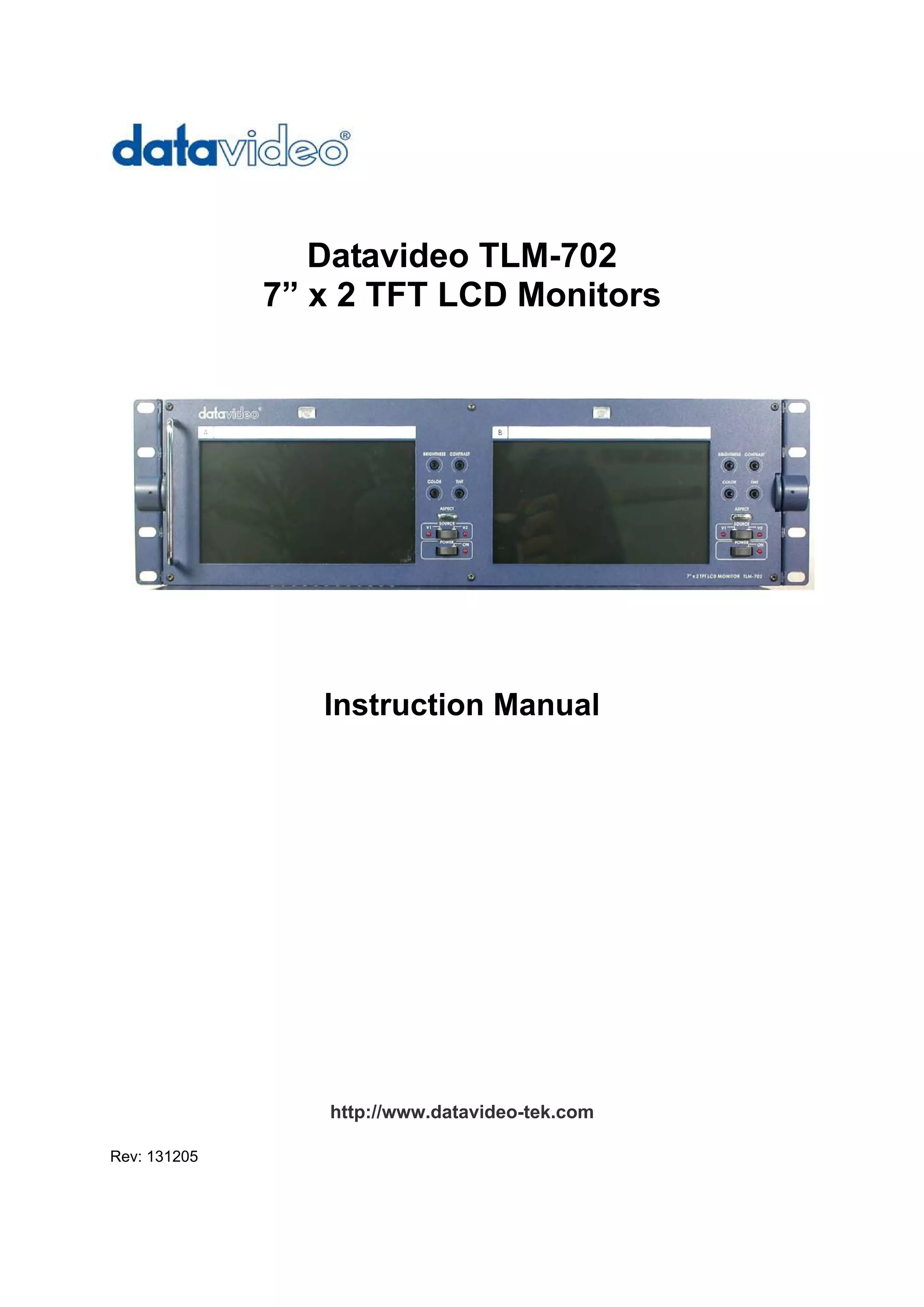
Datavideo TLM-702
              7” x 2 TFT LCD Monitors


                 Instruction Manual


                 http://www.datavideo-tek.com

Rev: 131205
Table of contents


Warnings and Precautions ----------------------------------------------------------------------------------- 2

Warranty ---------------------------------------------------------------------------------------------------------- 3

Disposal------------------------------------------------------------------------------------------------------------ 3

What is in the package ---------------------------------------------------------------------------------------- 5

Introduction ------------------------------------------------------------------------------------------------------- 5

Features ----------------------------------------------------------------------------------------------------------- 5

Functions --------------------------------------------------------------------------------------------------------- 6

      Front Panel ------------------------------------------------------------------------------------------------ 6

      Rear Panel ------------------------------------------------------------------------------------------------- 7

Specification ------------------------------------------------------------------------------------------------------ 8

Service and Support -------------------------------------------------------------------------------------------- 9


                                                            2
Warnings and Precautions

1. Read all of these warnings and save them for later reference.
2. Follow all warnings and instructions marked on this unit.
3. Unplug this unit from the wall outlet before cleaning. Do not use liquid or aerosol cleaners.
    Use a damp cloth for cleaning.
4. Do not use this unit in or near water.
5. Do not place this unit on an unstable cart, stand, or table. The unit may fall, causing serious
    damage.
6. Slots and openings on the cabinet top, back, and bottom are provided for ventilation. To
    ensure safe and reliable operation of this unit, and to protect it from overheating, do not block
    or cover these openings. Do not place this unit on a bed, sofa, rug, or similar surface, as the
    ventilation openings on the bottom of the cabinet will be blocked. This unit should never be
    placed near or over a heat register or radiator. This unit should not be placed in a built-in
    installation unless proper ventilation is provided.
7. This product should only be operated from the type of power source indicated on the marking
    label of the AC adapter. If you are not sure of the type of power available, consult your
    Datavideo dealer or your local power company.
8. Do not allow anything to rest on the power cord. Do not locate this unit where the power cord
    will be walked on, rolled over, or otherwise stressed.
9. If an extension cord must be used with this unit, make sure that the total of the ampere ratings
    on the products plugged into the extension cord do not exceed the extension cord’s rating.
10. Make sure that the total amperes of all the units that are plugged into a single wall outlet do
    not exceed 15 amperes.
11. Never push objects of any kind into this unit through the cabinet ventilation slots, as they may
    touch dangerous voltage points or short out parts that could result in risk of fire or electric
    shock. Never spill liquid of any kind onto or into this unit.
12. Except as specifically explained elsewhere in this manual, do not attempt to service this
    product yourself. Opening or removing covers that are marked “Do Not Remove” may expose
    you to dangerous voltage points or other risks, and will void your warranty. Refer all service
    issues to qualified service personnel.
13. Unplug this product from the wall outlet and refer to qualified service personnel under the
    following conditions:
         a. When the power cord is damaged or frayed;
         b. When liquid has spilled into the unit;
         c. When the product has been exposed to rain or water;
         d. When the product does not operate normally under normal operating conditions.
              Adjust only those controls that are covered by the operating instructions in this
              manual; improper adjustment of other controls may result in damage to the unit and
              may often require extensive work by a qualified technician to restore the unit to normal
              operation;
         e. When the product has been dropped or the cabinet has been damaged;
         f. When the product exhibits a distinct change in performance, indicating a need for
              service.


                                                3
Warranty
Datavideo warrants that the equipment it manufactures shall be free from defects in material and
workmanship for a period of 12 months from the date of product purchased. If equipment fails due to
such defects, Datavideo will, at its option, repair or provide a replacement for the defective part or
product.
Equipment that fails after the warranty period, has been operated or installed in a manner other than
that specified by Datavideo, or has been subjected to abuse or modification, will be repaired for time
and material charges at the Buyer’s expense.
This warranty does not affect your statutory rights within the Country of purchase.


Disposal
For EU Customers only - WEEE Marking.


This symbol on the product indicates that it will not be treated as household waste. It must be handed
over to the applicable take-back scheme for the recycling of electrical and electronic equipment. For
more detailed information about the recycling of this product, please contact your local Datavideo
office.


                                                   4
What’s in the Package
The following is a packing list, if any items are missing from your box please contact your dealer
immediately.

Item    Description                                                                              Q’ty
  1     TLM-702 (2 x 7” TFT Monitor)                                                              1
  2     BNC to BNC 1.2m                                                                           2
  3     Tally cable (Stereo 3.5mm mini jack) 1.2m                                                 2
  4     1.5 ψHex Wrench                                                                           1
  5     2.5 ψHex Wrench                                                                           1
  6     AC Power Cord                                                                             1
  7     AC/DC Switching Adaptor 12V / 2.5A                                                        1
  8     Instruction Manual                                                                        1


Introduction
The Datavideo TLM-702 is a 19” rack mountable dual 7” TFT Monitor. It is an ideal accessory for the
Datavideo SE 500 & SE 800 (with RMC-140 or RMC-90) Vision Mixers, or many other 19” rack mount
applications.
The all-metal construction makes the TLM-702 robust and durable, and the 12V power requirements
make it easy to power in the field.
The high resolution TFT screens have a wide viewing angle and feature NTSC / PAL auto detection.


Features
    Each monitor has two composite video inputs with bypass outputs
    High resolution TFT Screens - 1440 x 234 dots
    Individual adjustments of Brightness, Contrast, Color and Tint (Tint NTSC only) for each monitor
    Pivoting mount to enable the screens to be angled up or down
    Wide viewing angle - (Vertical) +40/-60 degree, (Horizontal) +60/-60 degree
    Switchable Aspect Ratio - 16:9 / 4:3 selectable
    2 Color Tally Light (Red and Amber)
    NTSC/PAL compatible (Automatic switching)


                                                    5
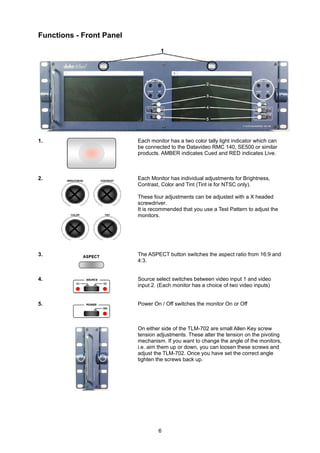
Functions - Front Panel


1.                        Each monitor has a two color tally light indicator which can
                          be connected to the Datavideo RMC 140, SE500 or similar
                          products. AMBER indicates Cued and RED indicates Live.


2.                        Each Monitor has individual adjustments for Brightness,
                          Contrast, Color and Tint (Tint is for NTSC only).

                          These four adjustments can be adjusted with a X headed
                          screwdriver.
                          It is recommended that you use a Test Pattern to adjust the
                          monitors.


3.                        The ASPECT button switches the aspect ratio from 16:9 and
                          4:3.


4.                        Source select switches between video input 1 and video
                          input 2. (Each monitor has a choice of two video inputs)


5.                        Power On / Off switches the monitor On or Off


                          On either side of the TLM-702 are small Allen Key screw
                          tension adjustments. These alter the tension on the pivoting
                          mechanism. If you want to change the angle of the monitors,
                          i.e. aim them up or down, you can loosen these screws and
                          adjust the TLM-702. Once you have set the correct angle
                          tighten the screws back up.


                                  6
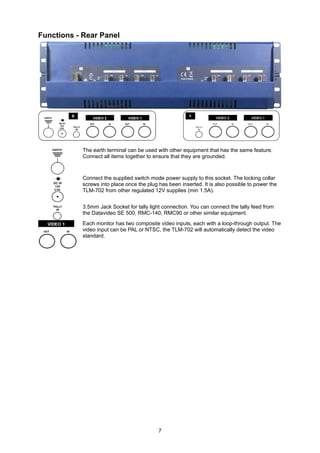
Functions - Rear Panel


            The earth terminal can be used with other equipment that has the same feature.
            Connect all items together to ensure that they are grounded.


            Connect the supplied switch mode power supply to this socket. The locking collar
            screws into place once the plug has been inserted. It is also possible to power the
            TLM-702 from other regulated 12V supplies (min 1.5A).


            3.5mm Jack Socket for tally light connection. You can connect the tally feed from
            the Datavideo SE 500, RMC-140, RMC90 or other similar equipment.
            Each monitor has two composite video inputs, each with a loop-through output. The
            video input can be PAL or NTSC, the TLM-702 will automatically detect the video
            standard.


                                            7
Specifications
   LCD Display              7" x 2 TFT LCD active matrix, resolution 1440 x 234 dots

   Aspect Ratio             4:3 and 16:9 selectable

   Brightness (Luminance)   500 cd/m²

   Contrast Ratio           300

   View Angle               Top:            40 deg

                            Bottom:         60 deg

                            Left:           60 deg

                            Right:          60 deg

   Video Input              CV input 1.0Vp-p, with self Loop-Through output

                            (75 Ohm-terminated)

   Video System             NTSC/PAL auto recognition

   Color Adjustment         Brightness, Contrast, Color, Tint (Tint is NTSC only)

   Tally Indication         Two Color Tally LED indicators

   Operation condition      Operation temperature from 0℃ to 50℃, RH less than 90%

   Power Consumption        DC12Volt, 2.0Amp

   Dimension of LCD Panel   484mm x 133mm x 50mm (W x H x D)


                                      8
Service and Support
      It is our goal to make your products ownership a satisfying experience. Our support team is available
      to assist you in setting up and operating your system. Please refer to our web site www.datavideo-
      tek.com for answers to common questions, support requests or contact your local office below.

      Datavideo Corporation (USA)
      12300-U East Washington Blvd., Whittier, CA 90606 USA
      Tel: +1 562 696 2324          contactus@datavideo.us             www.datavideo.us

      Datavideo Technologies Europe BV
      Californiedreef 263565 BL Utrecht, The Netherlands
      Tel: +31 30 261 9656           info@datavideo.nl                 www.datavideo.info

      Datavideo UK Limited
      Unit 2 Waterside Business Park, Hadfield, Glossop, Derbyshire SK13 1BE UK
      Tel: +44 1457 851000           sales@datavideo.co.uk           www.datavideo.info

      Datavideo Technologies Co., Ltd.
      10F, 176 Jian-Yi Rd, Chung Ho City, Taipei Hsien, Taiwan 235
      Tel: +886 2 8227 2888          info@datavideo.com.tw             www.datavideo.com.tw

      Datavideo Technologies China Co.
      2F-D, 2 Lane 777, West Guangzhong Rd, Zhabei District, Shanghai, China
      Tel: +86 21 5603 6599        service@datavideo.cn           www.datavideo.cn

      Datavideo Technologies (S) PTE Ltd.
      No. 100, Lorong 23 Geylong, #01-03 D’Centennial Bldg, Singapore 388398
      Tel: +65 6749 6866            info@datavideo.sg              www.datavideo.info

      Datavideo Hong Kong Ltd.
      G/F., 26 CROSS LANE, WANCHAI, HK
      Tel: +9485 3222           leon@datavideohk.com                   www.datavideohk.com


All the trademarks are the properties of their respective owners.                         P/N: 082060389E1
Datavideo Technologies Co., Ltd. All rights reserved 2005.

                                                          9

Datavideo TLM-702

  • 1.
    Datavideo TLM-702 7” x 2 TFT LCD Monitors Instruction Manual http://www.datavideo-tek.com Rev: 131205
  • 2.
    Table of contents Warningsand Precautions ----------------------------------------------------------------------------------- 2 Warranty ---------------------------------------------------------------------------------------------------------- 3 Disposal------------------------------------------------------------------------------------------------------------ 3 What is in the package ---------------------------------------------------------------------------------------- 5 Introduction ------------------------------------------------------------------------------------------------------- 5 Features ----------------------------------------------------------------------------------------------------------- 5 Functions --------------------------------------------------------------------------------------------------------- 6 Front Panel ------------------------------------------------------------------------------------------------ 6 Rear Panel ------------------------------------------------------------------------------------------------- 7 Specification ------------------------------------------------------------------------------------------------------ 8 Service and Support -------------------------------------------------------------------------------------------- 9 2
  • 3.
    Warnings and Precautions 1.Read all of these warnings and save them for later reference. 2. Follow all warnings and instructions marked on this unit. 3. Unplug this unit from the wall outlet before cleaning. Do not use liquid or aerosol cleaners. Use a damp cloth for cleaning. 4. Do not use this unit in or near water. 5. Do not place this unit on an unstable cart, stand, or table. The unit may fall, causing serious damage. 6. Slots and openings on the cabinet top, back, and bottom are provided for ventilation. To ensure safe and reliable operation of this unit, and to protect it from overheating, do not block or cover these openings. Do not place this unit on a bed, sofa, rug, or similar surface, as the ventilation openings on the bottom of the cabinet will be blocked. This unit should never be placed near or over a heat register or radiator. This unit should not be placed in a built-in installation unless proper ventilation is provided. 7. This product should only be operated from the type of power source indicated on the marking label of the AC adapter. If you are not sure of the type of power available, consult your Datavideo dealer or your local power company. 8. Do not allow anything to rest on the power cord. Do not locate this unit where the power cord will be walked on, rolled over, or otherwise stressed. 9. If an extension cord must be used with this unit, make sure that the total of the ampere ratings on the products plugged into the extension cord do not exceed the extension cord’s rating. 10. Make sure that the total amperes of all the units that are plugged into a single wall outlet do not exceed 15 amperes. 11. Never push objects of any kind into this unit through the cabinet ventilation slots, as they may touch dangerous voltage points or short out parts that could result in risk of fire or electric shock. Never spill liquid of any kind onto or into this unit. 12. Except as specifically explained elsewhere in this manual, do not attempt to service this product yourself. Opening or removing covers that are marked “Do Not Remove” may expose you to dangerous voltage points or other risks, and will void your warranty. Refer all service issues to qualified service personnel. 13. Unplug this product from the wall outlet and refer to qualified service personnel under the following conditions: a. When the power cord is damaged or frayed; b. When liquid has spilled into the unit; c. When the product has been exposed to rain or water; d. When the product does not operate normally under normal operating conditions. Adjust only those controls that are covered by the operating instructions in this manual; improper adjustment of other controls may result in damage to the unit and may often require extensive work by a qualified technician to restore the unit to normal operation; e. When the product has been dropped or the cabinet has been damaged; f. When the product exhibits a distinct change in performance, indicating a need for service. 3
  • 4.
    Warranty Datavideo warrants thatthe equipment it manufactures shall be free from defects in material and workmanship for a period of 12 months from the date of product purchased. If equipment fails due to such defects, Datavideo will, at its option, repair or provide a replacement for the defective part or product. Equipment that fails after the warranty period, has been operated or installed in a manner other than that specified by Datavideo, or has been subjected to abuse or modification, will be repaired for time and material charges at the Buyer’s expense. This warranty does not affect your statutory rights within the Country of purchase. Disposal For EU Customers only - WEEE Marking. This symbol on the product indicates that it will not be treated as household waste. It must be handed over to the applicable take-back scheme for the recycling of electrical and electronic equipment. For more detailed information about the recycling of this product, please contact your local Datavideo office. 4
  • 5.
    What’s in thePackage The following is a packing list, if any items are missing from your box please contact your dealer immediately. Item Description Q’ty 1 TLM-702 (2 x 7” TFT Monitor) 1 2 BNC to BNC 1.2m 2 3 Tally cable (Stereo 3.5mm mini jack) 1.2m 2 4 1.5 ψHex Wrench 1 5 2.5 ψHex Wrench 1 6 AC Power Cord 1 7 AC/DC Switching Adaptor 12V / 2.5A 1 8 Instruction Manual 1 Introduction The Datavideo TLM-702 is a 19” rack mountable dual 7” TFT Monitor. It is an ideal accessory for the Datavideo SE 500 & SE 800 (with RMC-140 or RMC-90) Vision Mixers, or many other 19” rack mount applications. The all-metal construction makes the TLM-702 robust and durable, and the 12V power requirements make it easy to power in the field. The high resolution TFT screens have a wide viewing angle and feature NTSC / PAL auto detection. Features Each monitor has two composite video inputs with bypass outputs High resolution TFT Screens - 1440 x 234 dots Individual adjustments of Brightness, Contrast, Color and Tint (Tint NTSC only) for each monitor Pivoting mount to enable the screens to be angled up or down Wide viewing angle - (Vertical) +40/-60 degree, (Horizontal) +60/-60 degree Switchable Aspect Ratio - 16:9 / 4:3 selectable 2 Color Tally Light (Red and Amber) NTSC/PAL compatible (Automatic switching) 5
  • 6.
    Functions - FrontPanel 1. Each monitor has a two color tally light indicator which can be connected to the Datavideo RMC 140, SE500 or similar products. AMBER indicates Cued and RED indicates Live. 2. Each Monitor has individual adjustments for Brightness, Contrast, Color and Tint (Tint is for NTSC only). These four adjustments can be adjusted with a X headed screwdriver. It is recommended that you use a Test Pattern to adjust the monitors. 3. The ASPECT button switches the aspect ratio from 16:9 and 4:3. 4. Source select switches between video input 1 and video input 2. (Each monitor has a choice of two video inputs) 5. Power On / Off switches the monitor On or Off On either side of the TLM-702 are small Allen Key screw tension adjustments. These alter the tension on the pivoting mechanism. If you want to change the angle of the monitors, i.e. aim them up or down, you can loosen these screws and adjust the TLM-702. Once you have set the correct angle tighten the screws back up. 6
  • 7.
    Functions - RearPanel The earth terminal can be used with other equipment that has the same feature. Connect all items together to ensure that they are grounded. Connect the supplied switch mode power supply to this socket. The locking collar screws into place once the plug has been inserted. It is also possible to power the TLM-702 from other regulated 12V supplies (min 1.5A). 3.5mm Jack Socket for tally light connection. You can connect the tally feed from the Datavideo SE 500, RMC-140, RMC90 or other similar equipment. Each monitor has two composite video inputs, each with a loop-through output. The video input can be PAL or NTSC, the TLM-702 will automatically detect the video standard. 7
  • 8.
    Specifications LCD Display 7" x 2 TFT LCD active matrix, resolution 1440 x 234 dots Aspect Ratio 4:3 and 16:9 selectable Brightness (Luminance) 500 cd/m² Contrast Ratio 300 View Angle Top: 40 deg Bottom: 60 deg Left: 60 deg Right: 60 deg Video Input CV input 1.0Vp-p, with self Loop-Through output (75 Ohm-terminated) Video System NTSC/PAL auto recognition Color Adjustment Brightness, Contrast, Color, Tint (Tint is NTSC only) Tally Indication Two Color Tally LED indicators Operation condition Operation temperature from 0℃ to 50℃, RH less than 90% Power Consumption DC12Volt, 2.0Amp Dimension of LCD Panel 484mm x 133mm x 50mm (W x H x D) 8
  • 9.
    Service and Support It is our goal to make your products ownership a satisfying experience. Our support team is available to assist you in setting up and operating your system. Please refer to our web site www.datavideo- tek.com for answers to common questions, support requests or contact your local office below. Datavideo Corporation (USA) 12300-U East Washington Blvd., Whittier, CA 90606 USA Tel: +1 562 696 2324 contactus@datavideo.us www.datavideo.us Datavideo Technologies Europe BV Californiedreef 263565 BL Utrecht, The Netherlands Tel: +31 30 261 9656 info@datavideo.nl www.datavideo.info Datavideo UK Limited Unit 2 Waterside Business Park, Hadfield, Glossop, Derbyshire SK13 1BE UK Tel: +44 1457 851000 sales@datavideo.co.uk www.datavideo.info Datavideo Technologies Co., Ltd. 10F, 176 Jian-Yi Rd, Chung Ho City, Taipei Hsien, Taiwan 235 Tel: +886 2 8227 2888 info@datavideo.com.tw www.datavideo.com.tw Datavideo Technologies China Co. 2F-D, 2 Lane 777, West Guangzhong Rd, Zhabei District, Shanghai, China Tel: +86 21 5603 6599 service@datavideo.cn www.datavideo.cn Datavideo Technologies (S) PTE Ltd. No. 100, Lorong 23 Geylong, #01-03 D’Centennial Bldg, Singapore 388398 Tel: +65 6749 6866 info@datavideo.sg www.datavideo.info Datavideo Hong Kong Ltd. G/F., 26 CROSS LANE, WANCHAI, HK Tel: +9485 3222 leon@datavideohk.com www.datavideohk.com All the trademarks are the properties of their respective owners. P/N: 082060389E1 Datavideo Technologies Co., Ltd. All rights reserved 2005. 9