Understanding Reference
Planes and Reference
lines in Revit
Agenda
• About Reference Planes (RP)
• Understanding Reference
Planes
• Type of Reference Planes in
Revit
• Setting up a plane in Revit
• Reference Planes or
Reference lines
A PRESENTATION BY NARASIMHAMURTHY K C
About Reference planes
(RP).
• Reference planes in Revit are essential for constraining and
hosting the geometry.
• They play a crucial role in positioning 3D solids accurately
within the Revit environment.
• Understanding reference planes is vital for Revit users to
fully leverage the software's capabilities in creating 3D
models and families.
• Reference planes are datum elements in Revit and serve as
the primary foundation for creating 3D forms.
Understanding Reference
Planes
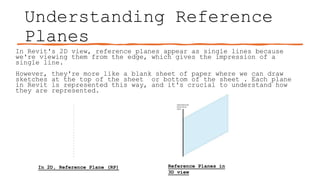
In 2D, Reference Plane (RP) Reference Planes in
3D view
In Revit's 2D view, reference planes appear as single lines because
we're viewing them from the edge, which gives the impression of a
single line.
However, they're more like a blank sheet of paper where we can draw
sketches at the top of the sheet or bottom of the sheet . Each plane
in Revit is represented this way, and it's crucial to understand how
they are represented.
Understanding Reference
Planes
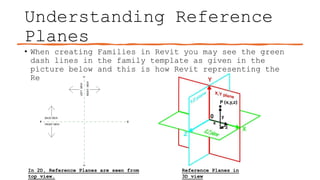
• When creating Families in Revit you may see the green
dash lines in the family template as given in the
picture below and this is how Revit representing the
Reference planes.
In 2D, Reference Planes are seen from
top view.
Reference Planes in
3D view
Type of Reference Planes
in Revit
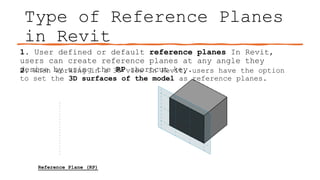
1. User defined or default reference planes In Revit,
users can create reference planes at any angle they
desire by using the RP shortcut key.
Reference Plane (RP)
2. When working in a 3D view in Revit, users have the option
to set the 3D surfaces of the model as reference planes.
Setting up a plane in
Revit
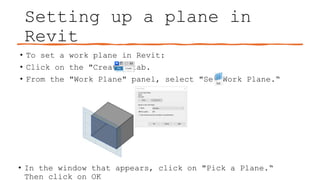
• To set a work plane in Revit:
• Click on the "Create" tab.
• From the "Work Plane" panel, select "Set Work Plane.“
• In the window that appears, click on "Pick a Plane.“
Then click on OK
Setting up a plane in
Revit
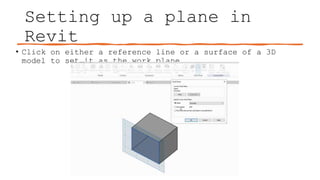
• Click on either a reference line or a surface of a 3D
model to set it as the work plane.
Reference Planes or
Reference lines
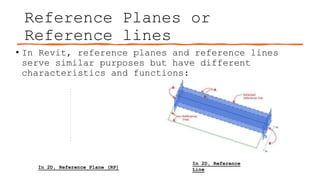
In 2D, Reference Plane (RP)
In 2D, Reference
Line
• In Revit, reference planes and reference lines
serve similar purposes but have different
characteristics and functions:
Reference Planes or
Reference lines
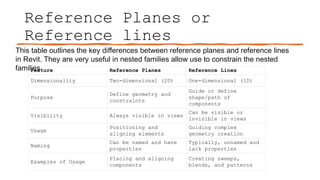
Feature Reference Planes Reference Lines
Dimensionality Two-dimensional (2D) One-dimensional (1D)
Purpose
Define geometry and
constraints
Guide or define
shape/path of
components
Visibility Always visible in views
Can be visible or
invisible in views
Usage
Positioning and
aligning elements
Guiding complex
geometry creation
Naming
Can be named and have
properties
Typically, unnamed and
lack properties
Examples of Usage
Placing and aligning
components
Creating sweeps,
blends, and patterns
This table outlines the key differences between reference planes and reference lines
in Revit. They are very useful in nested families allow use to constrain the nested
families.
Q&A

Revit Understanding Reference Planes and Reference lines in Revit for Family Creation.

  • 1.
    Understanding Reference Planes andReference lines in Revit
  • 2.
    Agenda • About ReferencePlanes (RP) • Understanding Reference Planes • Type of Reference Planes in Revit • Setting up a plane in Revit • Reference Planes or Reference lines A PRESENTATION BY NARASIMHAMURTHY K C
  • 3.
    About Reference planes (RP). •Reference planes in Revit are essential for constraining and hosting the geometry. • They play a crucial role in positioning 3D solids accurately within the Revit environment. • Understanding reference planes is vital for Revit users to fully leverage the software's capabilities in creating 3D models and families. • Reference planes are datum elements in Revit and serve as the primary foundation for creating 3D forms.
  • 4.
    Understanding Reference Planes In 2D,Reference Plane (RP) Reference Planes in 3D view In Revit's 2D view, reference planes appear as single lines because we're viewing them from the edge, which gives the impression of a single line. However, they're more like a blank sheet of paper where we can draw sketches at the top of the sheet or bottom of the sheet . Each plane in Revit is represented this way, and it's crucial to understand how they are represented.
  • 5.
    Understanding Reference Planes • Whencreating Families in Revit you may see the green dash lines in the family template as given in the picture below and this is how Revit representing the Reference planes. In 2D, Reference Planes are seen from top view. Reference Planes in 3D view
  • 6.
    Type of ReferencePlanes in Revit 1. User defined or default reference planes In Revit, users can create reference planes at any angle they desire by using the RP shortcut key. Reference Plane (RP) 2. When working in a 3D view in Revit, users have the option to set the 3D surfaces of the model as reference planes.
  • 7.
    Setting up aplane in Revit • To set a work plane in Revit: • Click on the "Create" tab. • From the "Work Plane" panel, select "Set Work Plane.“ • In the window that appears, click on "Pick a Plane.“ Then click on OK
  • 8.
    Setting up aplane in Revit • Click on either a reference line or a surface of a 3D model to set it as the work plane.
  • 9.
    Reference Planes or Referencelines In 2D, Reference Plane (RP) In 2D, Reference Line • In Revit, reference planes and reference lines serve similar purposes but have different characteristics and functions:
  • 10.
    Reference Planes or Referencelines Feature Reference Planes Reference Lines Dimensionality Two-dimensional (2D) One-dimensional (1D) Purpose Define geometry and constraints Guide or define shape/path of components Visibility Always visible in views Can be visible or invisible in views Usage Positioning and aligning elements Guiding complex geometry creation Naming Can be named and have properties Typically, unnamed and lack properties Examples of Usage Placing and aligning components Creating sweeps, blends, and patterns This table outlines the key differences between reference planes and reference lines in Revit. They are very useful in nested families allow use to constrain the nested families.
  • 11.