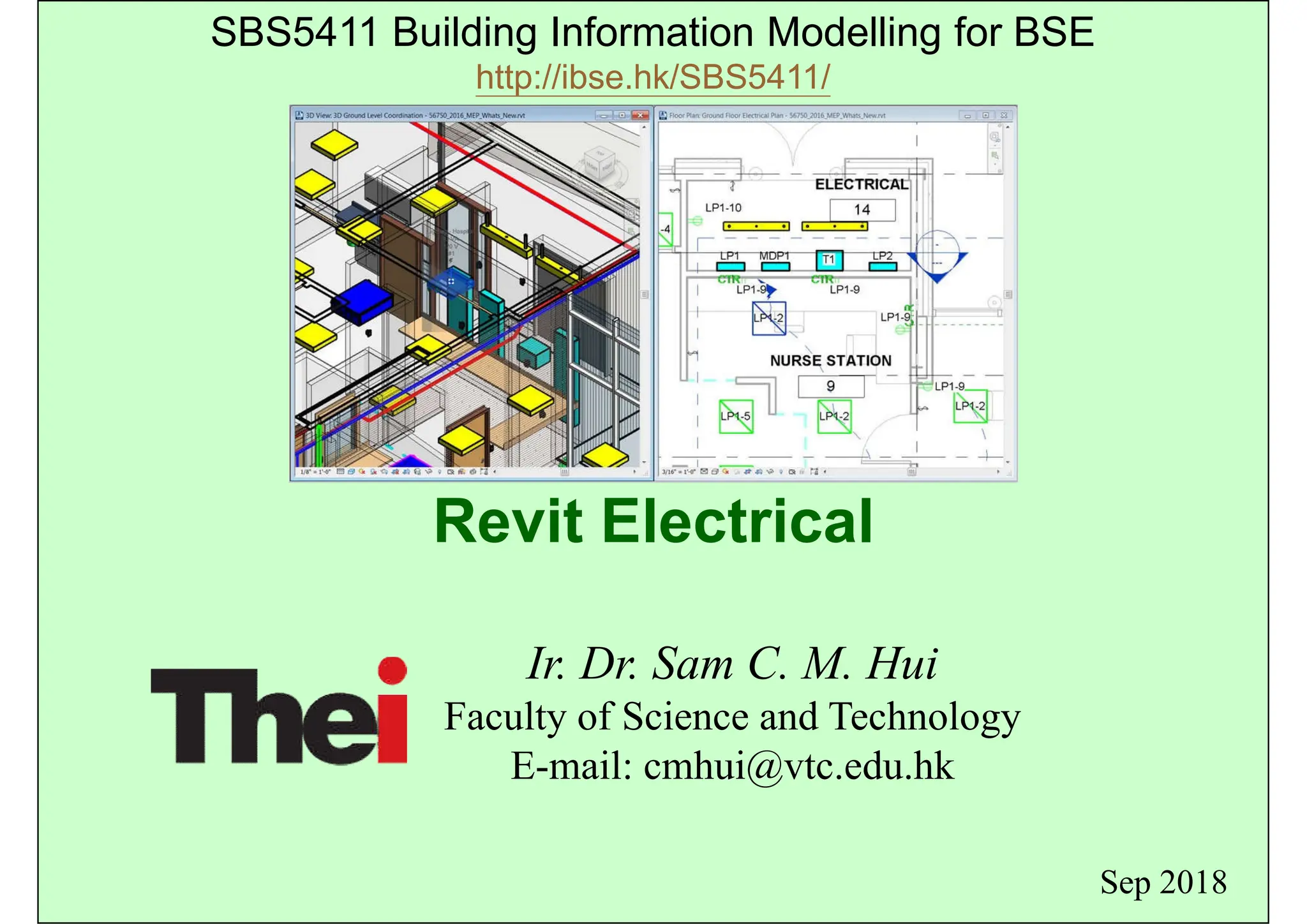
Revit Electrical
Ir. Dr. Sam C. M. Hui
Faculty of Science and Technology
E-mail: cmhui@vtc.edu.hk
Sep 2018
SBS5411 Building Information Modelling for BSE
http://ibse.hk/SBS5411/
Contents
• Electrical systems
• Lighting systems
• Power and communications
• Circuiting and panels
Electrical systems
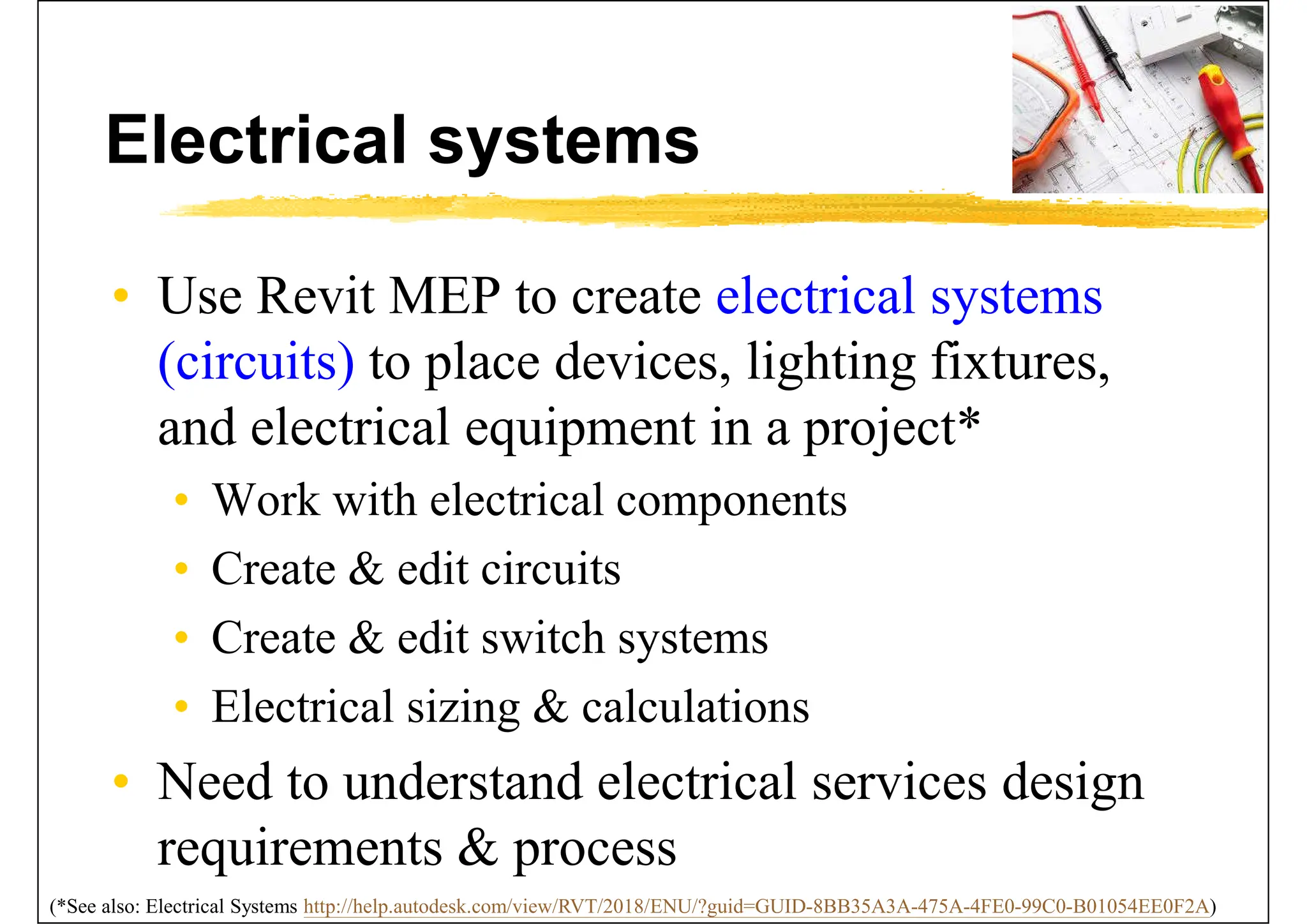
• Use Revit MEP to create electrical systems
(circuits) to place devices, lighting fixtures,
and electrical equipment in a project*
• Work with electrical components
• Create & edit circuits
• Create & edit switch systems
• Electrical sizing & calculations
• Need to understand electrical services design
requirements & process
(*See also: Electrical Systems http://help.autodesk.com/view/RVT/2018/ENU/?guid=GUID-8BB35A3A-475A-4FE0-99C0-B01054EE0F2A)
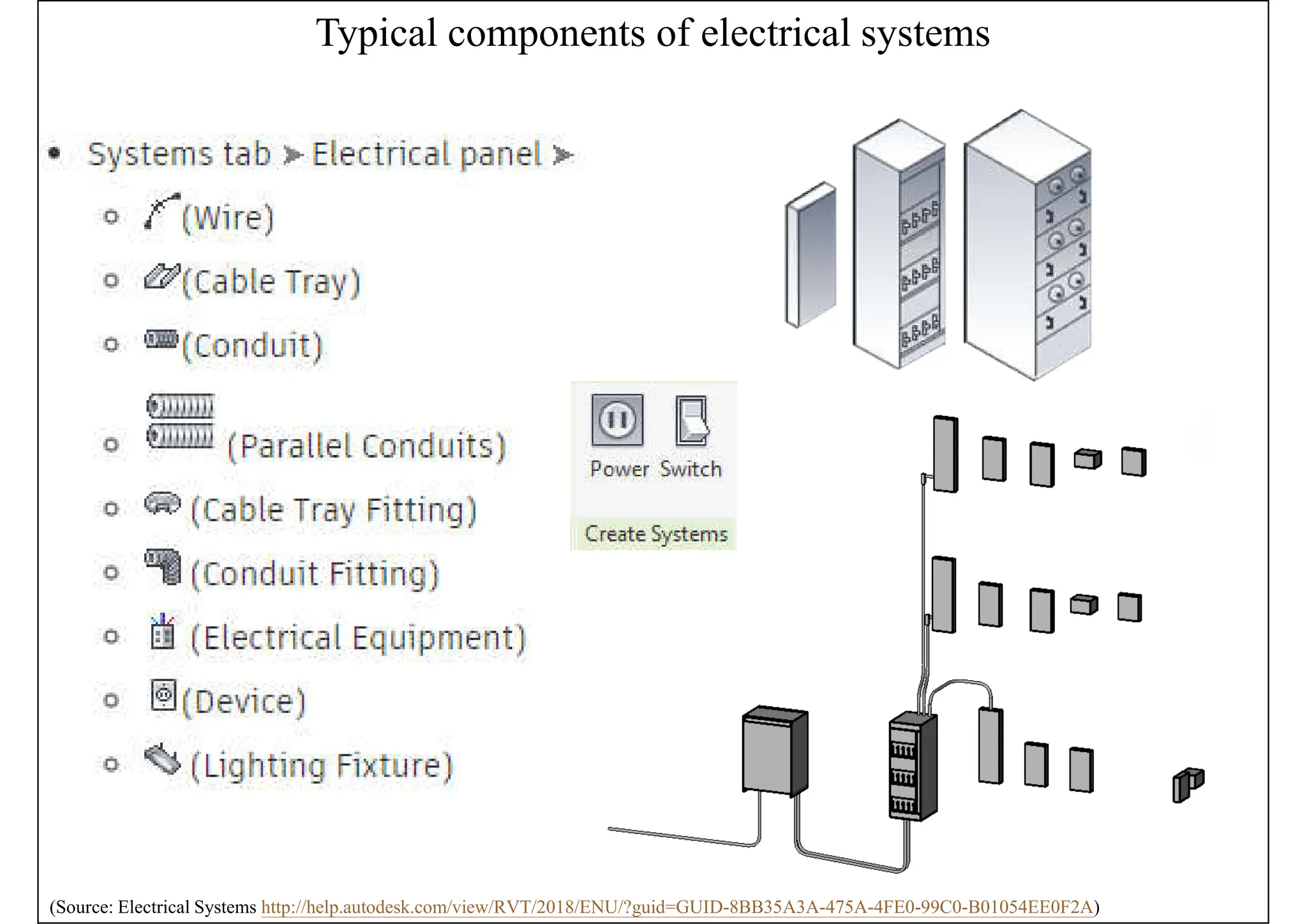
Typical components of electrical systems
(Source: Electrical Systems http://help.autodesk.com/view/RVT/2018/ENU/?guid=GUID-8BB35A3A-475A-4FE0-99C0-B01054EE0F2A)
Electrical systems
• Electrical loads
• Lighting and power for a space
• These loads affect the cooling & heating loads
analysis according to the lighting & power
schedules
• Electrical family parameters*
• Specify the parameter type & properties
• Customize electrical families
• Facilitate productivity & improve accuracy
(*See also: Electrical Family Parameters http://help.autodesk.com/view/RVT/2018/ENU/?guid=GUID-4E5DD909-DD4C-41B9-83DB-
37E9F7CA9639)
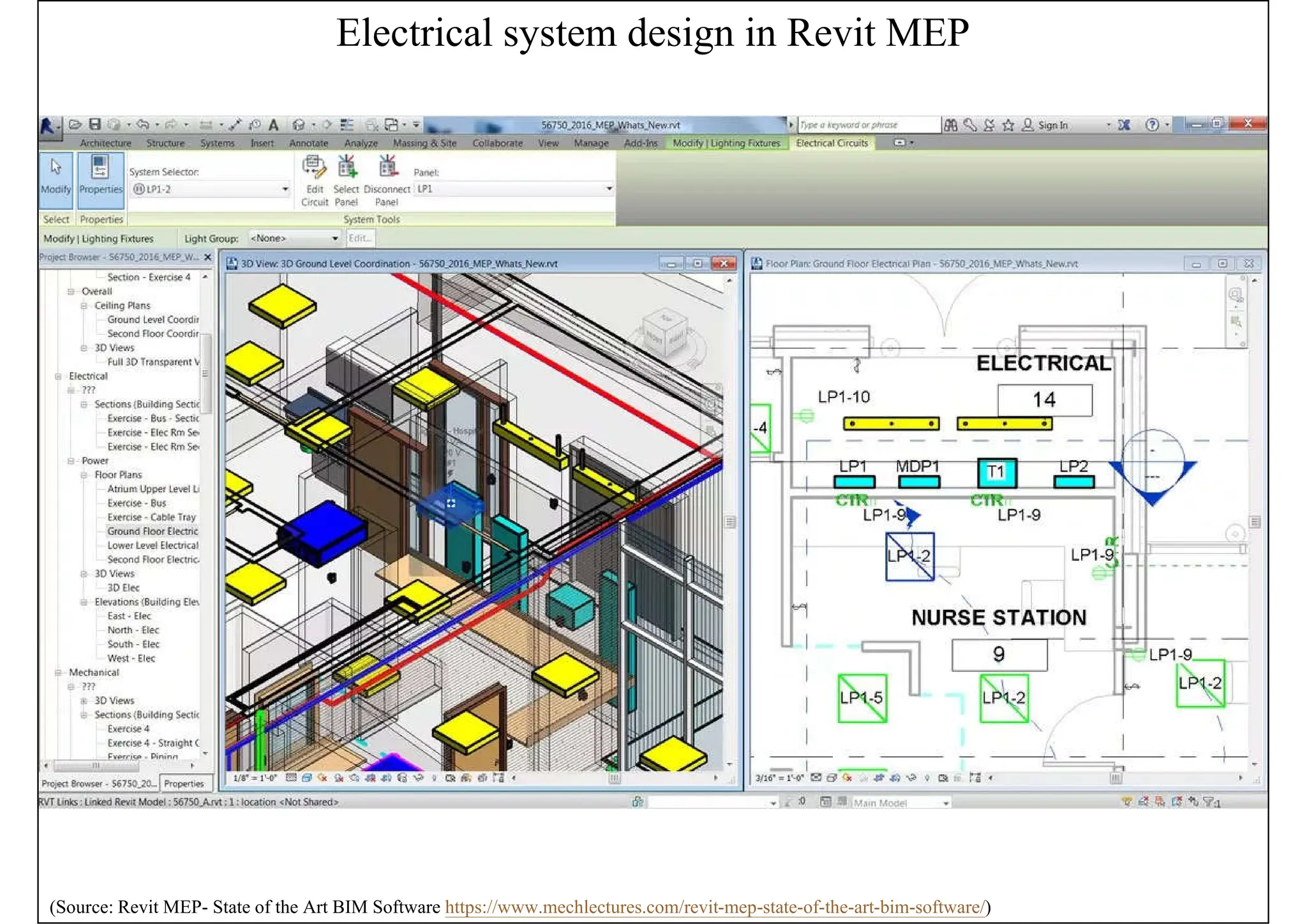
Electrical system design in Revit MEP
(Source: Revit MEP- State of the Art BIM Software https://www.mechlectures.com/revit-mep-state-of-the-art-bim-software/)
Lighting systems
• Design tasks for lighting systems
• Select light fixtures & their associated devices
• Coordinate with electrical design by providing
electrical load information
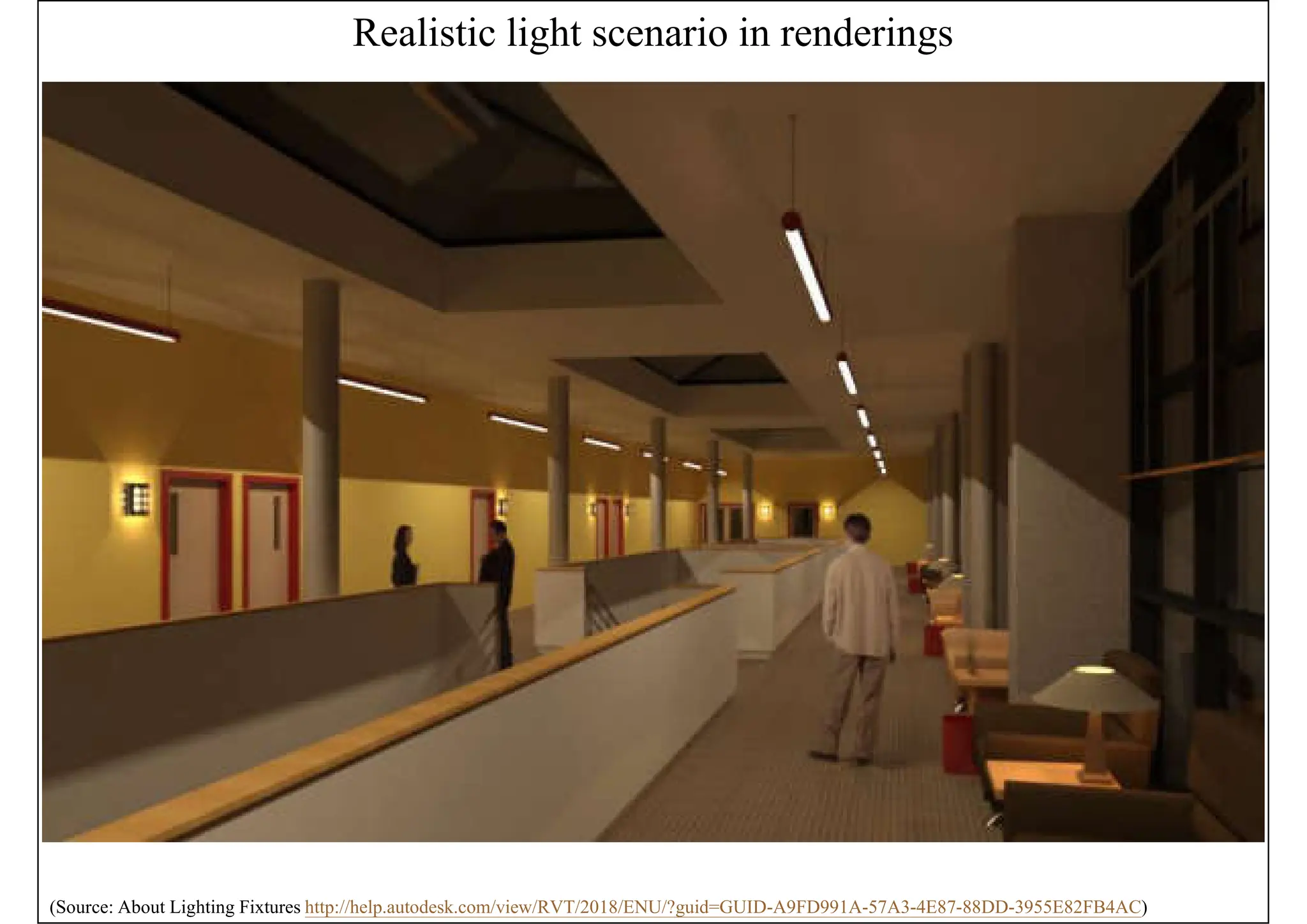
• Develop presentation imagery by generating
realistic light in renderings
• Coordination on the reflected ceiling plan
• Check on the correct lighting level & quality
(See also: Lights http://help.autodesk.com/view/RVT/2018/ENU/?guid=GUID-97C00105-902A-4C66-B3DF-8BAB48C01493)
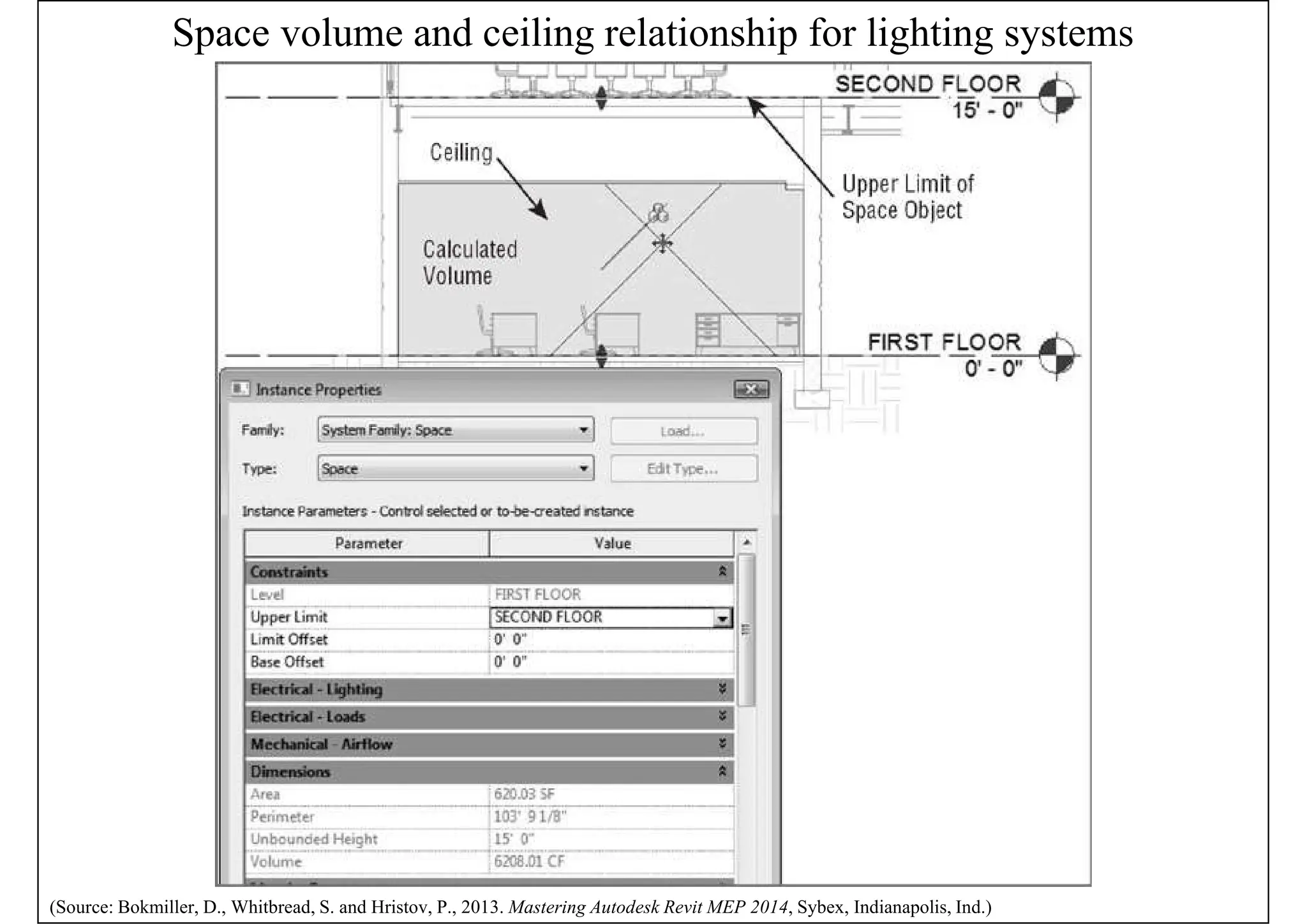
Space volume and ceiling relationship for lighting systems
(Source: Bokmiller, D., Whitbread, S. and Hristov, P., 2013. Mastering Autodesk Revit MEP 2014, Sybex, Indianapolis, Ind.)
Realistic light scenario in renderings
(Source: About Lighting Fixtures http://help.autodesk.com/view/RVT/2018/ENU/?guid=GUID-A9FD991A-57A3-4E87-88DD-3955E82FB4AC)
Lighting systems
• Lighting analysis
• Space lighting schedule (e.g. shows required &
actual lighting levels, lighting electrical loads)
• Assign target lighting levels to spaces easily
• Revit MEP uses basic lighting calculation methods
to provide an average estimated illumination*
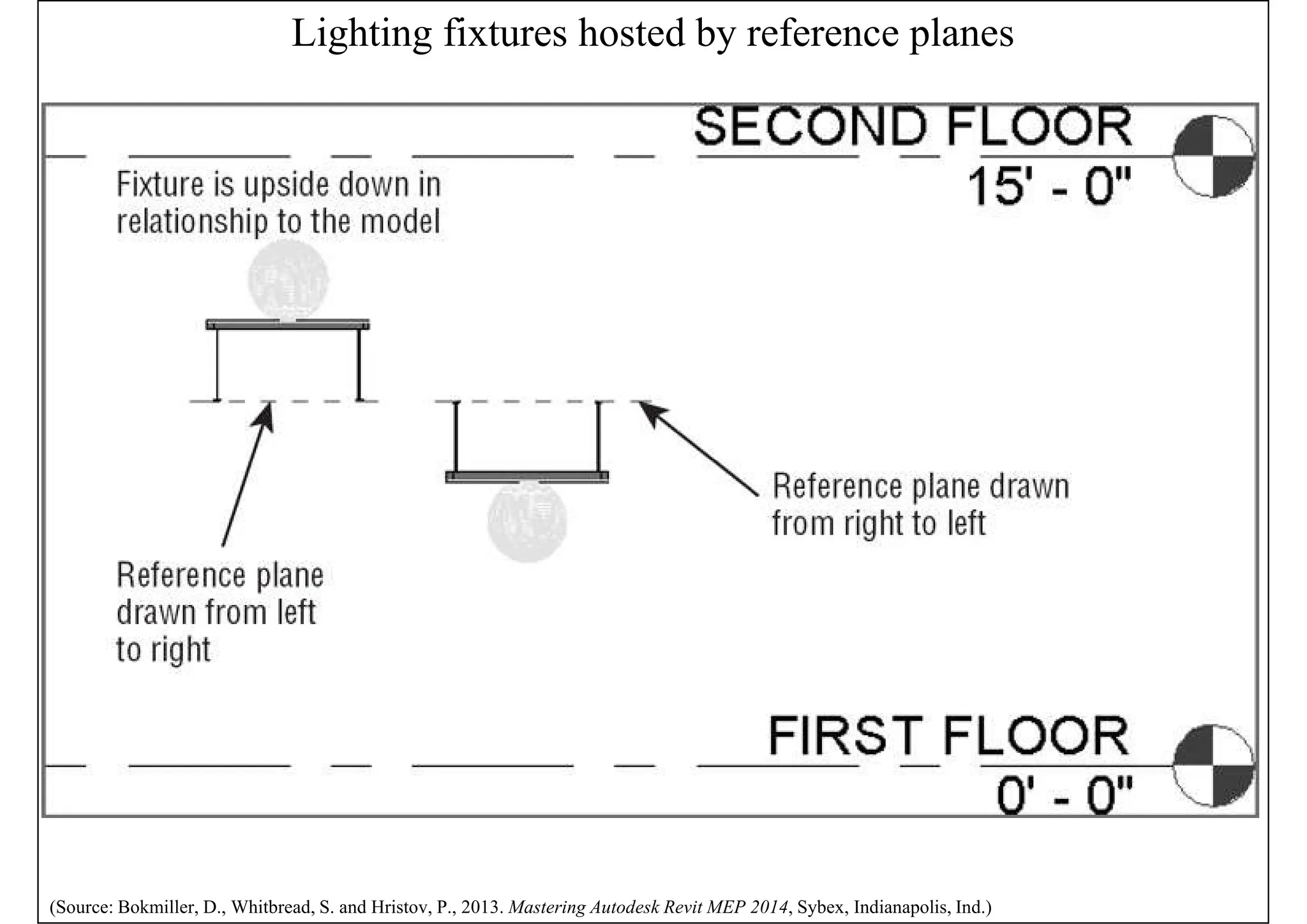
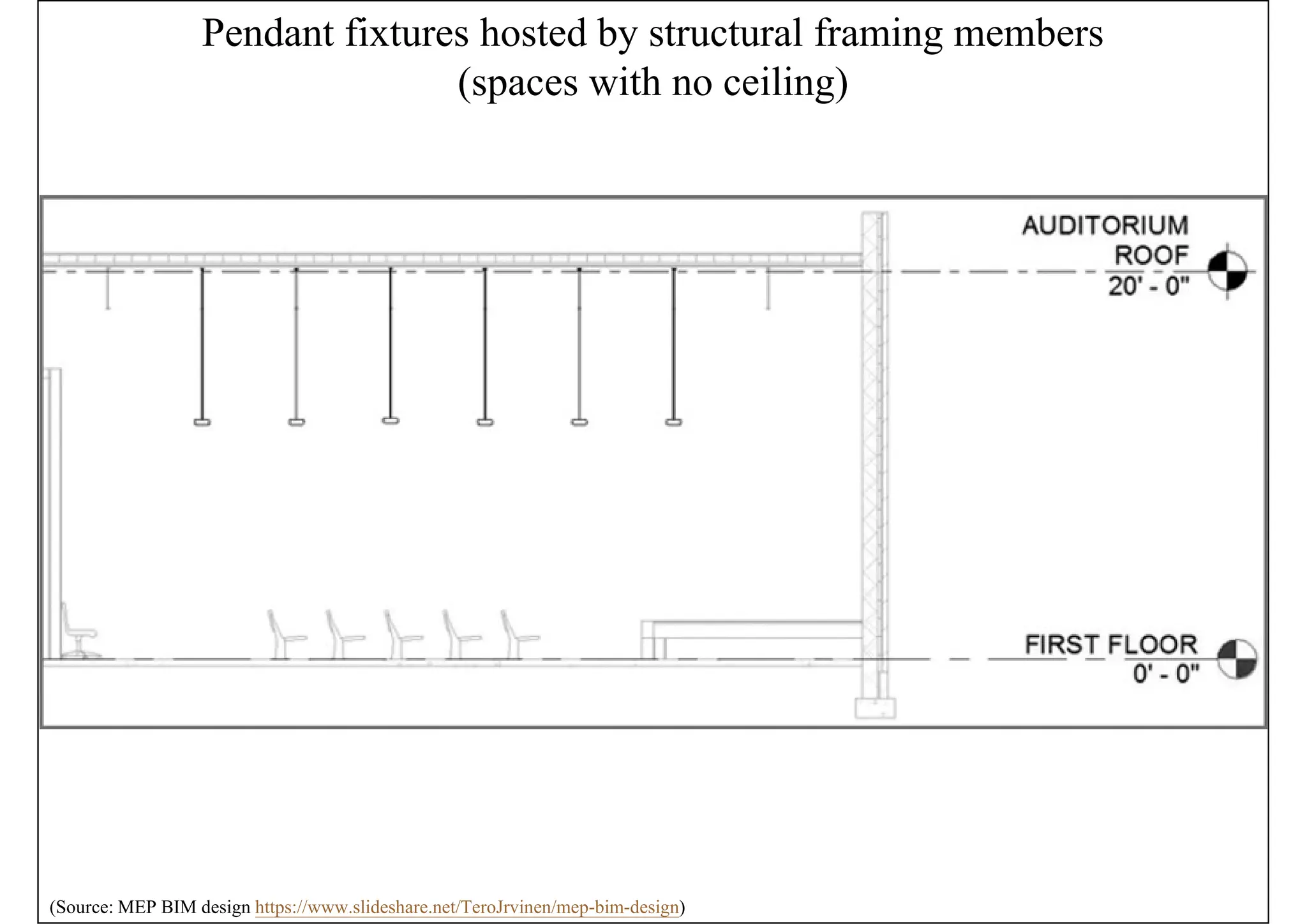
• Hosting lighting fixtures & devices
• Important for coordination with other model
elements (e.g. ceiling- or wall-counted)
(*See also: About Lighting Calculations http://help.autodesk.com/view/RVT/2018/ENU/?guid=GUID-60EC93DB-5194-4334-9D61-
B17850CE3BC1)
Lighting fixtures hosted by reference planes
(Source: Bokmiller, D., Whitbread, S. and Hristov, P., 2013. Mastering Autodesk Revit MEP 2014, Sybex, Indianapolis, Ind.)
Pendant fixtures hosted by structural framing members
(spaces with no ceiling)
(Source: MEP BIM design https://www.slideshare.net/TeroJrvinen/mep-bim-design)
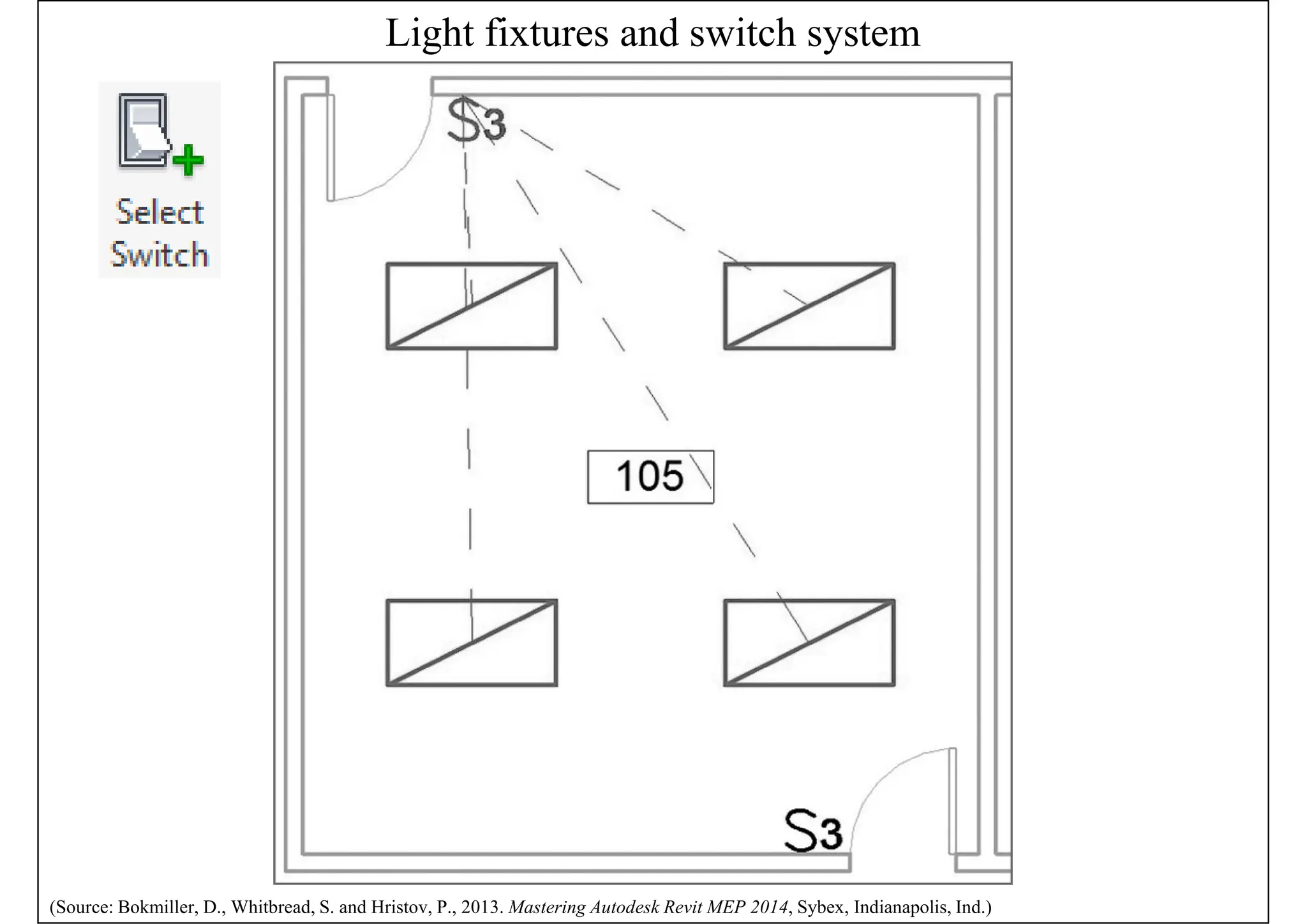
Light fixtures and switch system
(Source: Bokmiller, D., Whitbread, S. and Hristov, P., 2013. Mastering Autodesk Revit MEP 2014, Sybex, Indianapolis, Ind.)
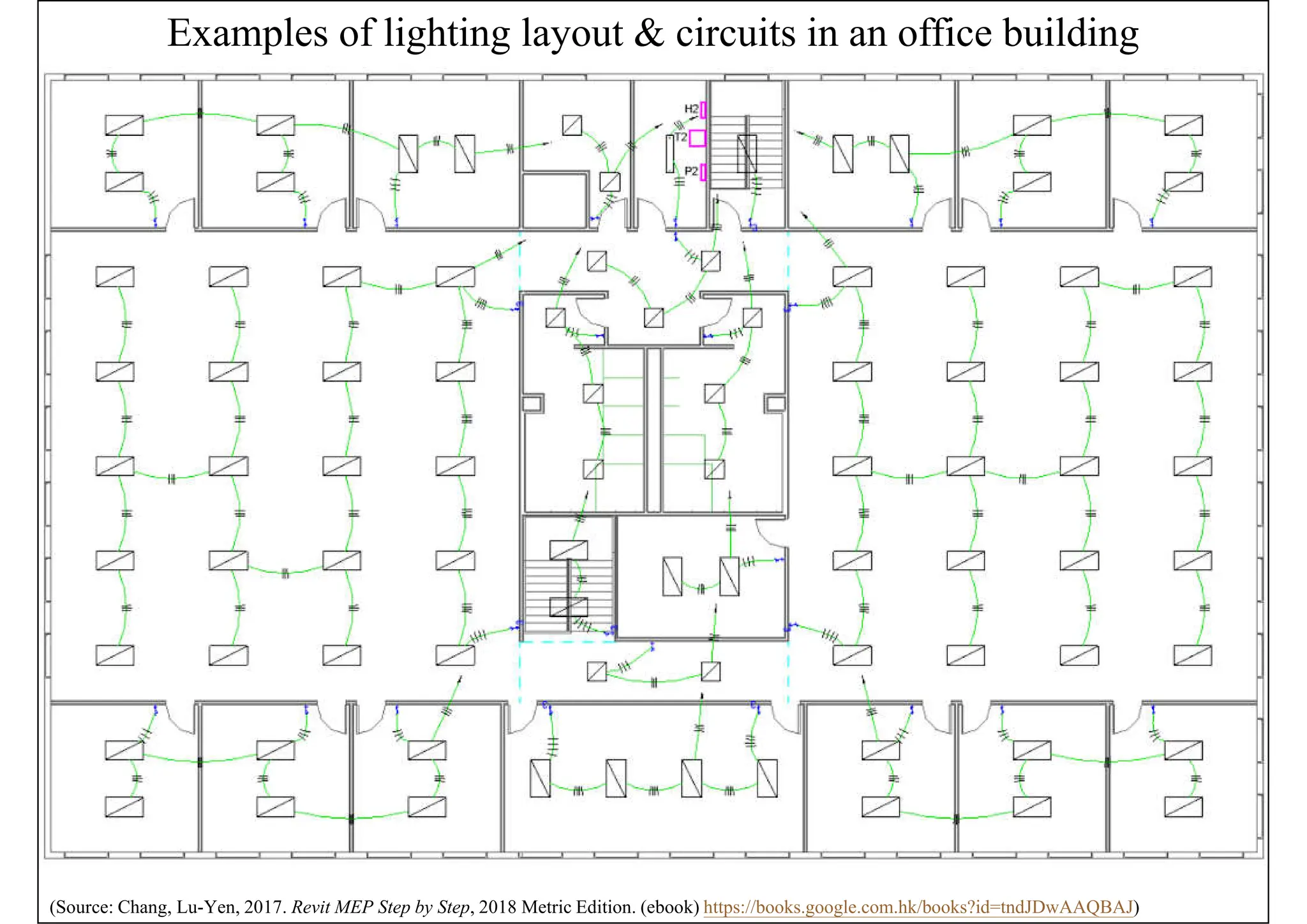
Examples of lighting layout & circuits in an office building
(Source: Chang, Lu-Yen, 2017. Revit MEP Step by Step, 2018 Metric Edition. (ebook) https://books.google.com.hk/books?id=tndJDwAAQBAJ)
Lighting systems
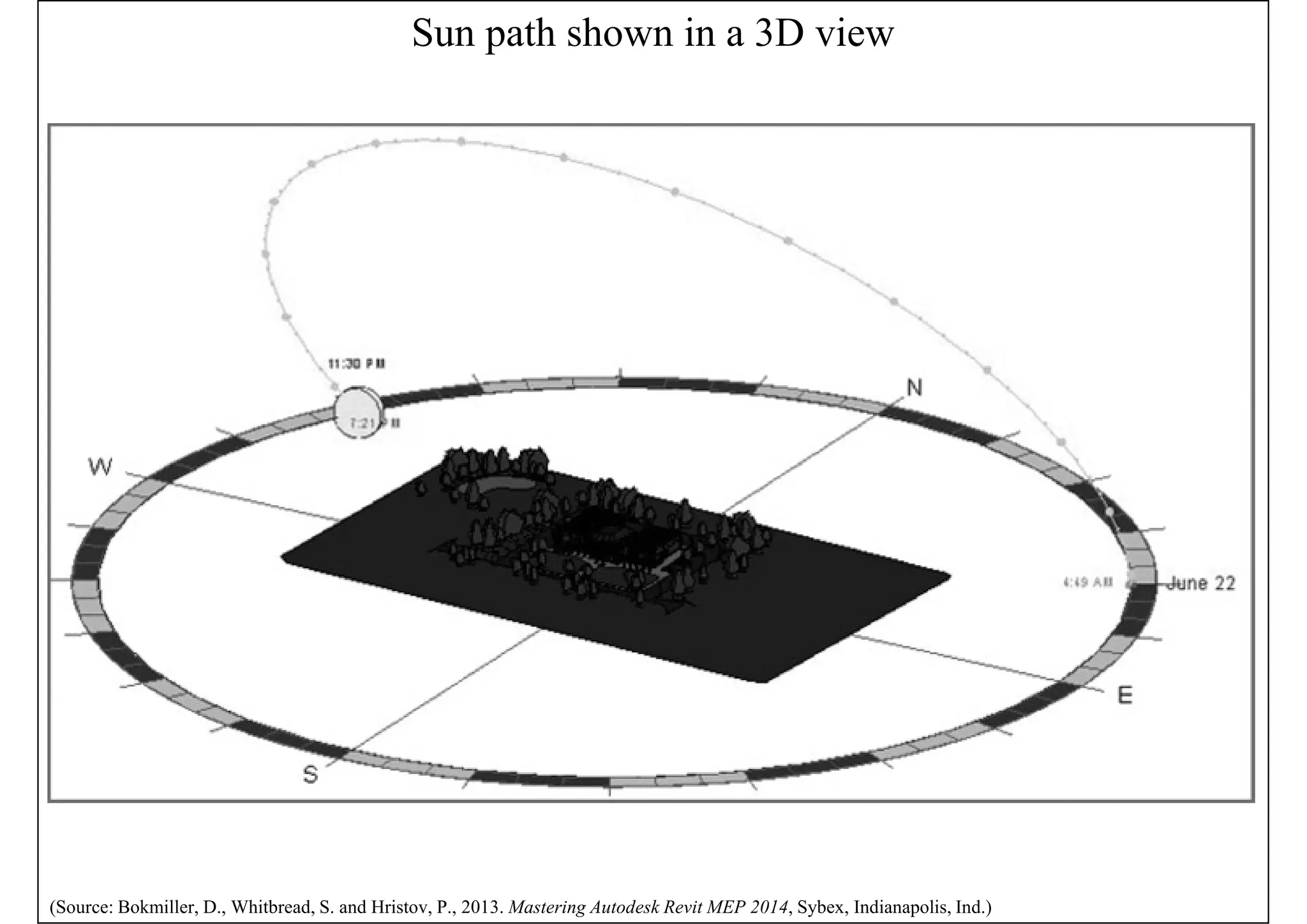
• Exterior site lighting
• Revit MEP cannot do analysis on exterior lights
• Locations of poles, bollards, and other site lighting
fixtures can be coordinated with other utilities
within the project site
• Create renderings to get an idea of the coverage of
the lighting fixtures on the site
• Can use the site plan or topography information
from other consultants (Architect & Civil Engr.)
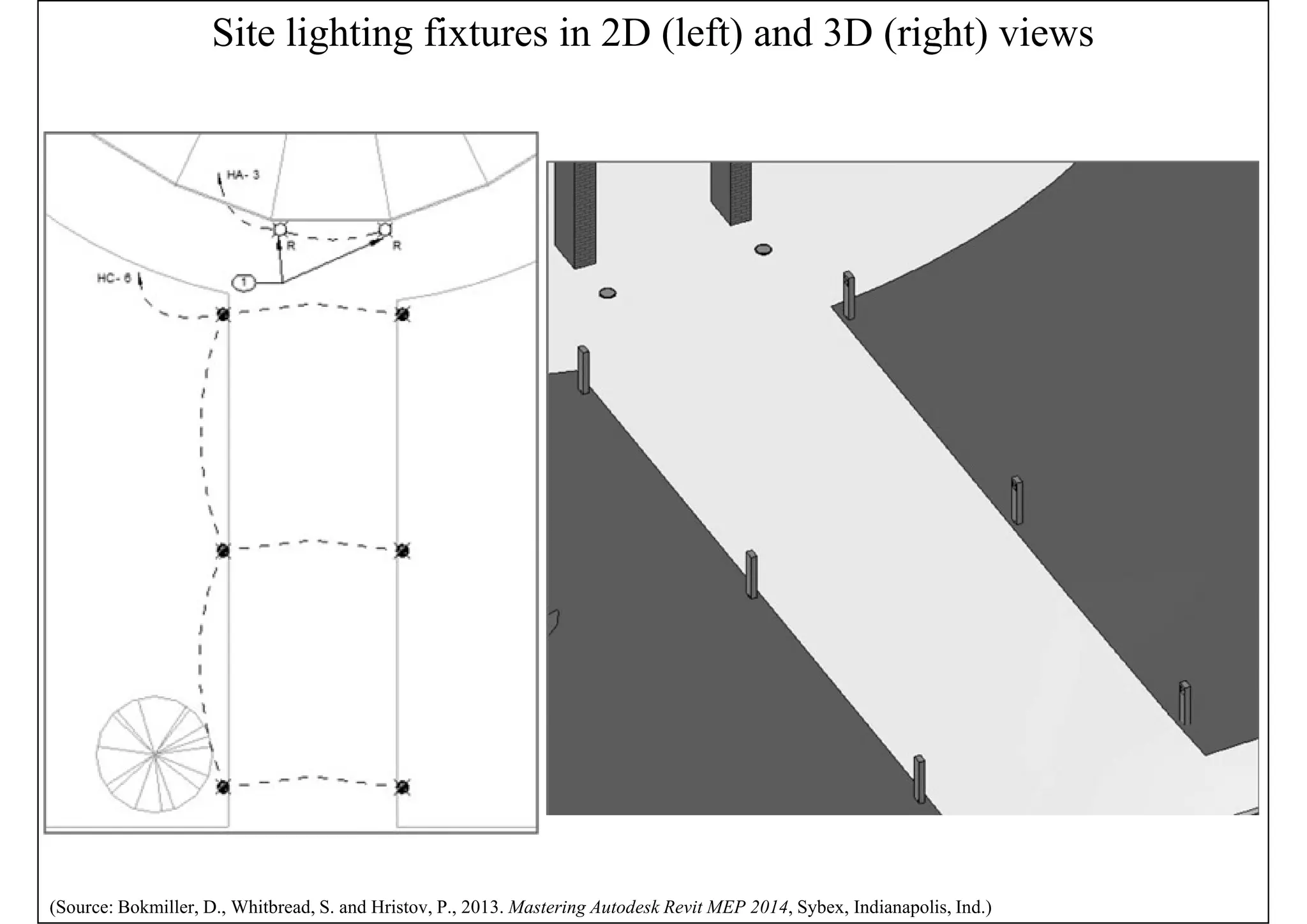
Site lighting fixtures in 2D (left) and 3D (right) views
(Source: Bokmiller, D., Whitbread, S. and Hristov, P., 2013. Mastering Autodesk Revit MEP 2014, Sybex, Indianapolis, Ind.)
Sun path shown in a 3D view
(Source: Bokmiller, D., Whitbread, S. and Hristov, P., 2013. Mastering Autodesk Revit MEP 2014, Sybex, Indianapolis, Ind.)
Power and communications
• Electrical systems & devices
• Electrical equipment, conduit runs & cable trays,
receptacles and junction boxes
• Building communication systems
• Security & fire alarm systems
• Modelling methods
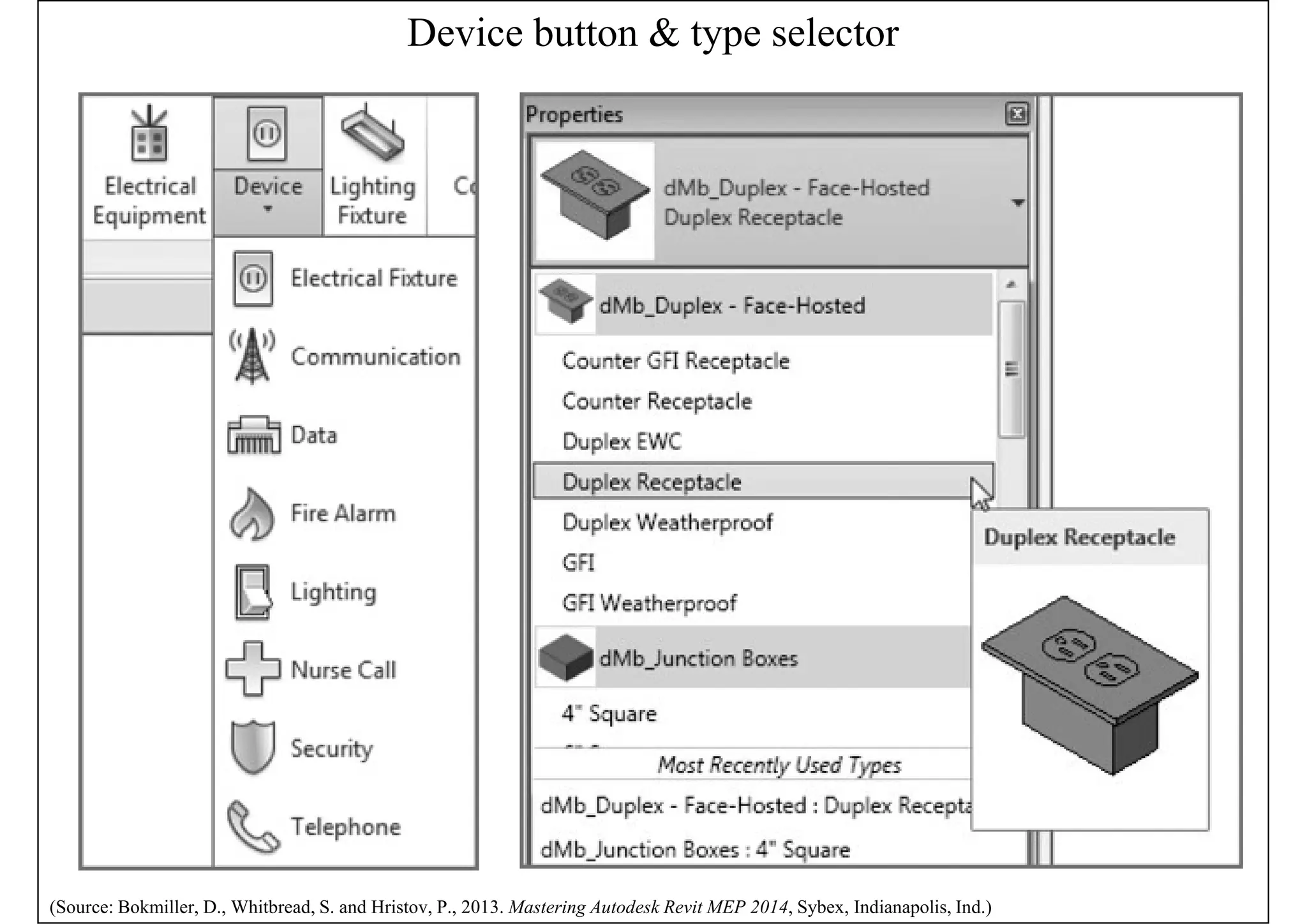
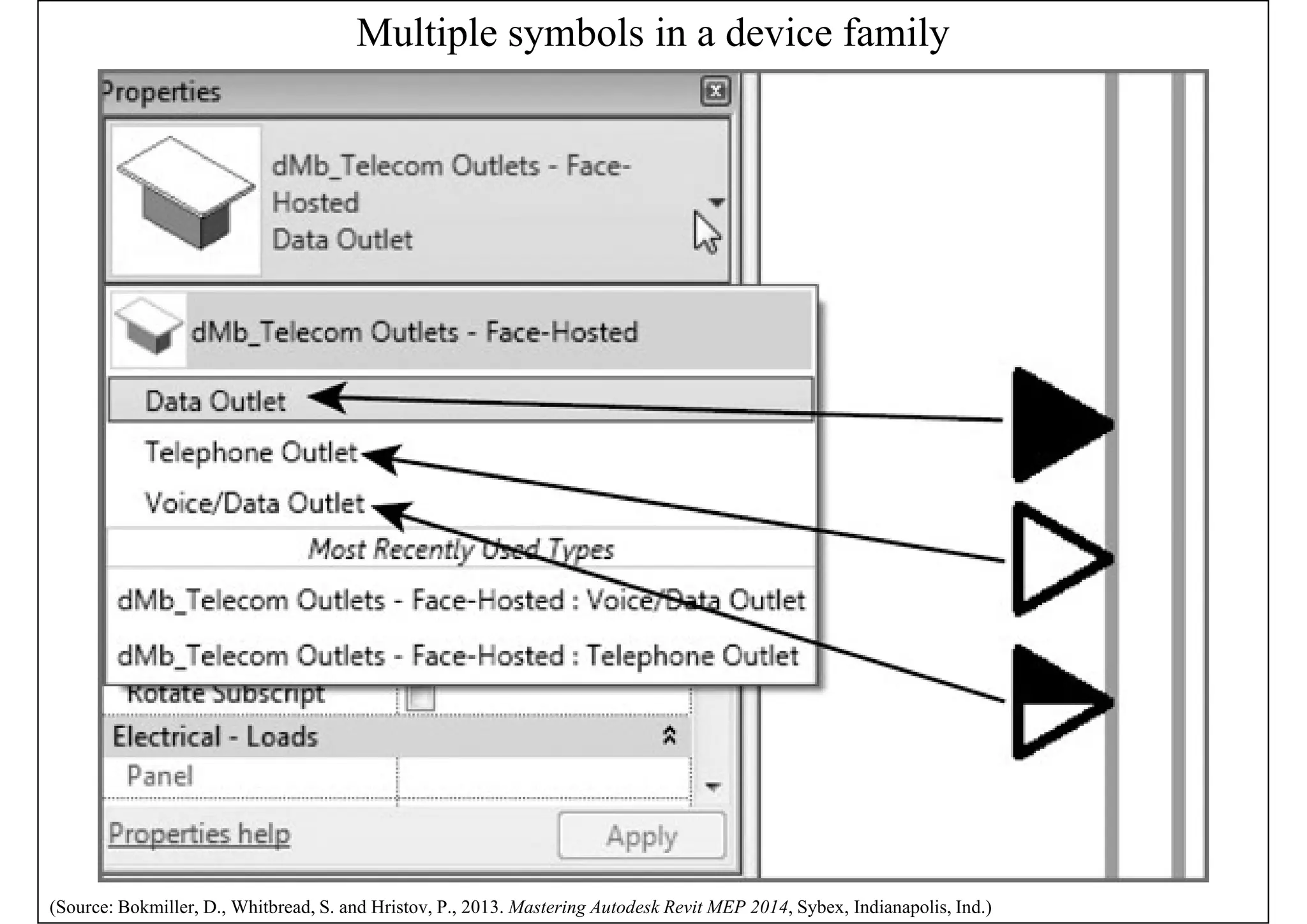
• Can use symbols, model elements, or a
combination of the two to represent the design
electrical layout; then create a circuit for them
(See also: Prepare the Electrical Design http://help.autodesk.com/view/RVT/2018/ENU/?guid=GUID-C1639372-F179-42C4-980A-762D142DFAD6)
Device button & type selector
(Source: Bokmiller, D., Whitbread, S. and Hristov, P., 2013. Mastering Autodesk Revit MEP 2014, Sybex, Indianapolis, Ind.)
Multiple symbols in a device family
(Source: Bokmiller, D., Whitbread, S. and Hristov, P., 2013. Mastering Autodesk Revit MEP 2014, Sybex, Indianapolis, Ind.)
Power and communications
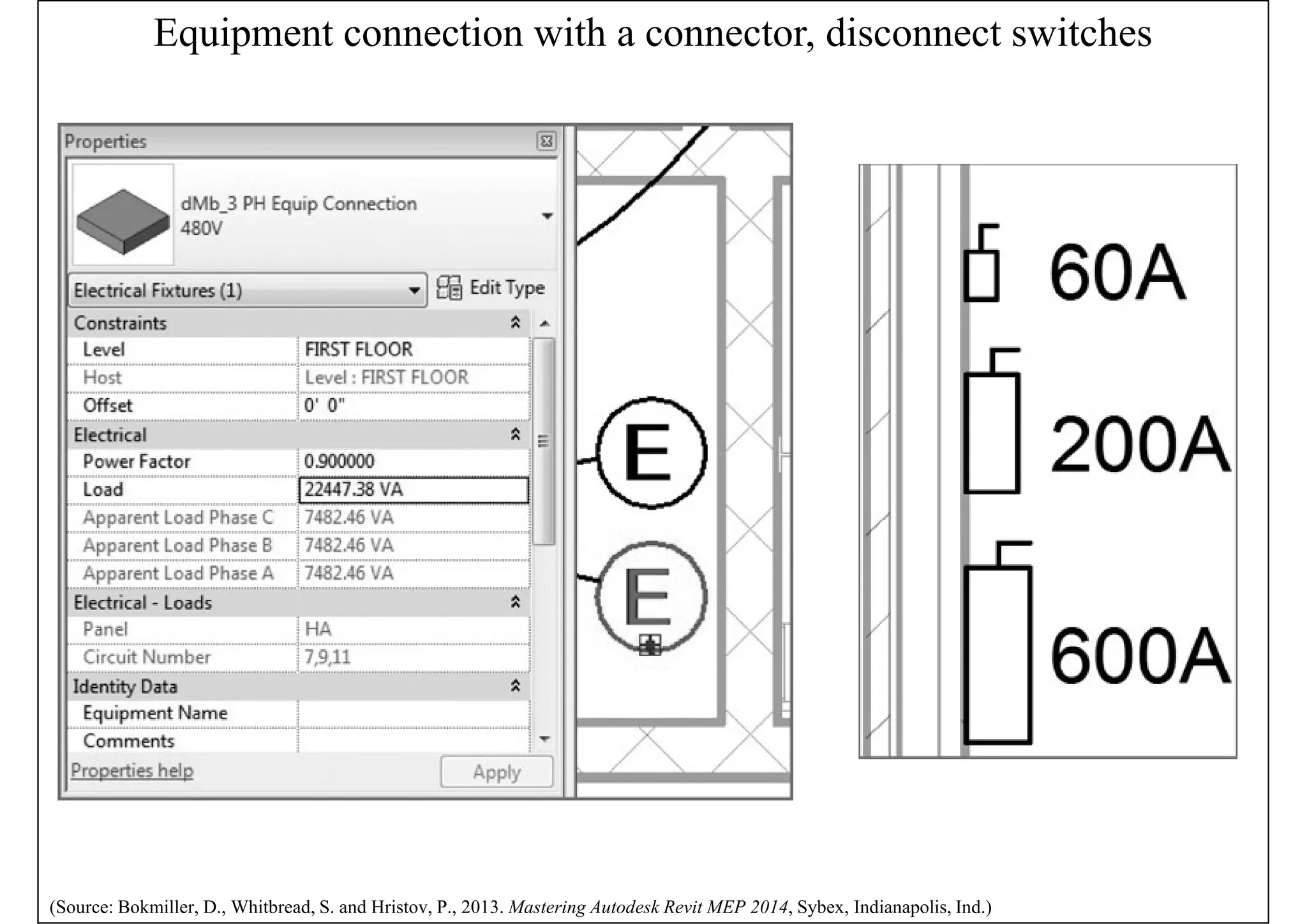
• Placing devices & equipment connections
• Use symbols that contain connectors to account
for the connections in the electrical model
• Such as linking an HVAC equipment with
electrical specifications to an electrical supply
• Disconnect or isolation switches
• A point of disconnection is required
• To coordinate location and space requirements
• Attach wiring or drawn from the symbol
(See also: Design the Electrical Systems http://help.autodesk.com/view/RVT/2018/ENU/?guid=GUID-C1F0D828-6C41-45DF-A03E-C5B6DC64FA40)
Equipment connection with a connector, disconnect switches
(Source: Bokmiller, D., Whitbread, S. and Hristov, P., 2013. Mastering Autodesk Revit MEP 2014, Sybex, Indianapolis, Ind.)
Power and communications
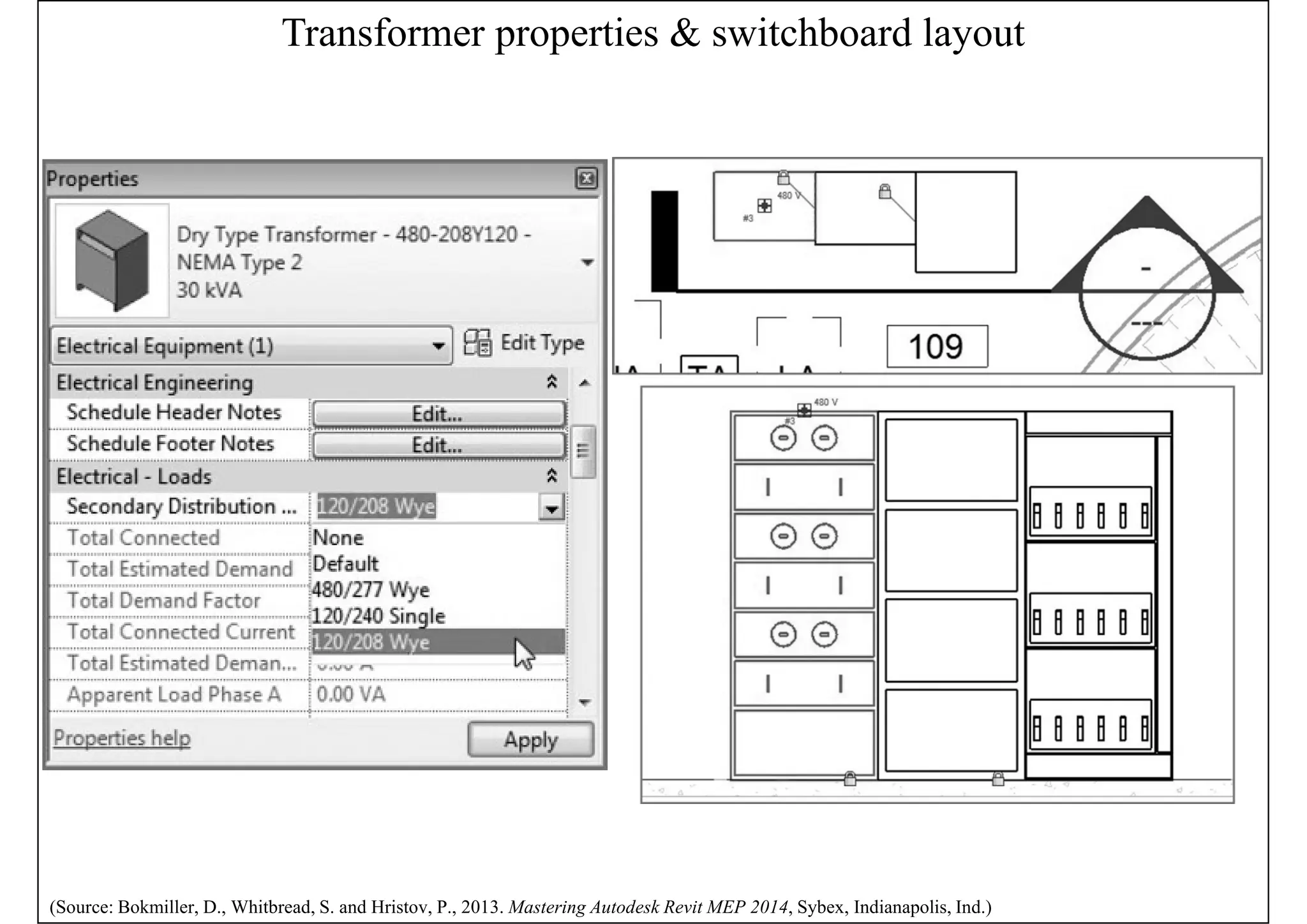
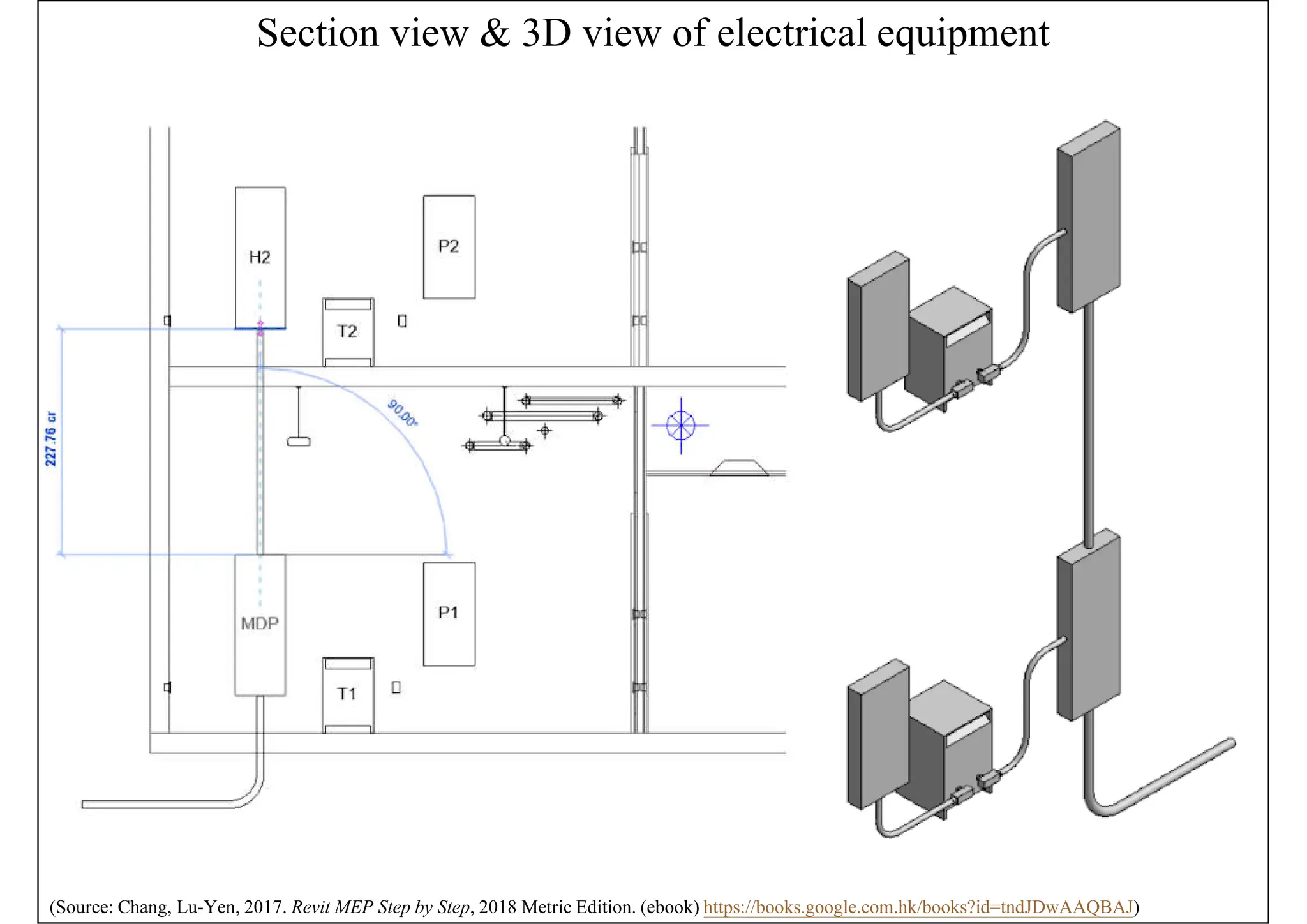
• Distribution equipment & transformers
• They require space for accessibility
• Using accurately sized model components for
them allows you to coordinate early on with the
architectural model for space requirements
• Switchboards
• Various components e.g. metering, transformer,
and circuit breaker sections
• Define distribution system & switchboard layout
Transformer properties & switchboard layout
(Source: Bokmiller, D., Whitbread, S. and Hristov, P., 2013. Mastering Autodesk Revit MEP 2014, Sybex, Indianapolis, Ind.)
Section view & 3D view of electrical equipment
(Source: Chang, Lu-Yen, 2017. Revit MEP Step by Step, 2018 Metric Edition. (ebook) https://books.google.com.hk/books?id=tndJDwAAQBAJ)
Power and communications
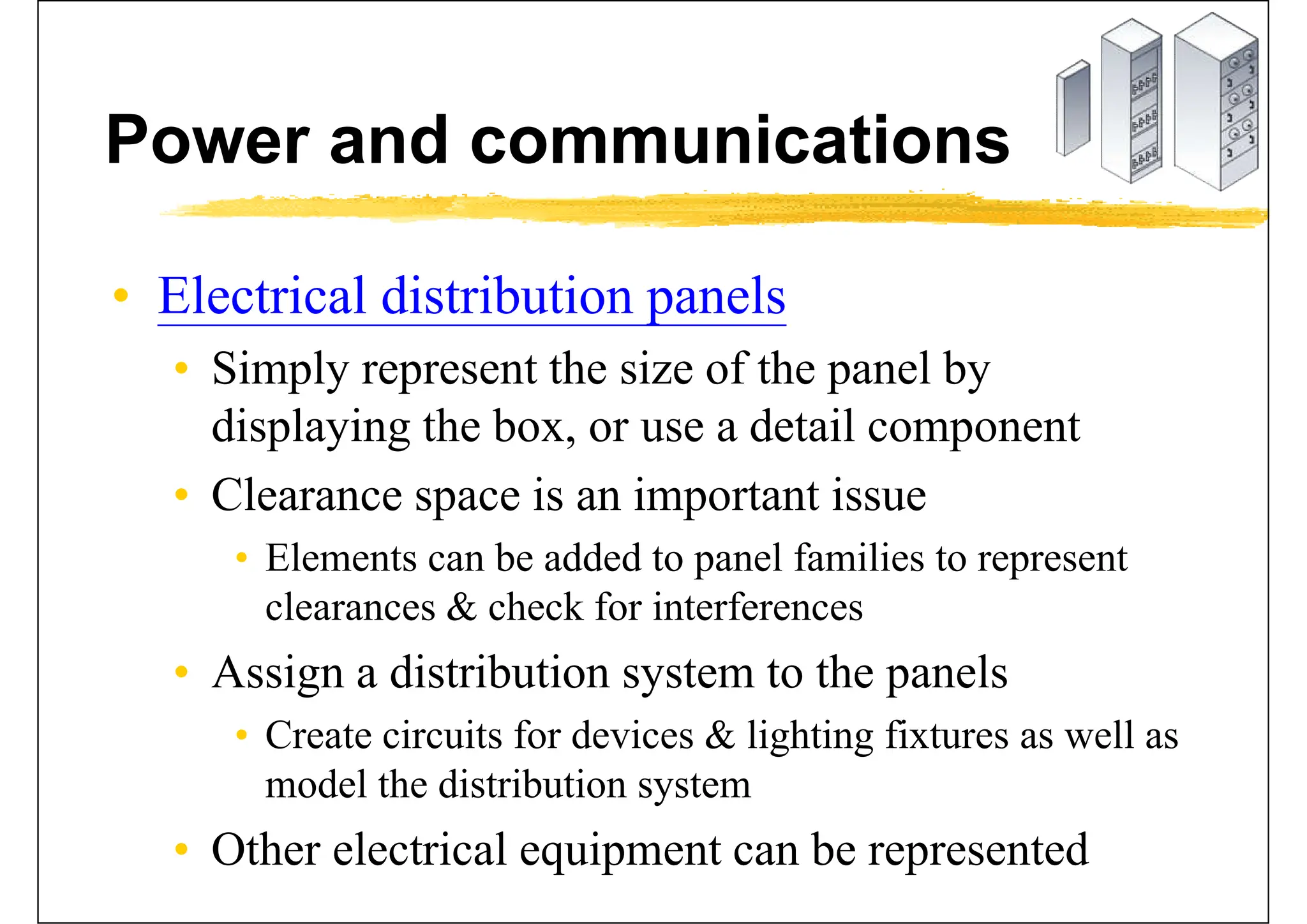
• Electrical distribution panels
• Simply represent the size of the panel by
displaying the box, or use a detail component
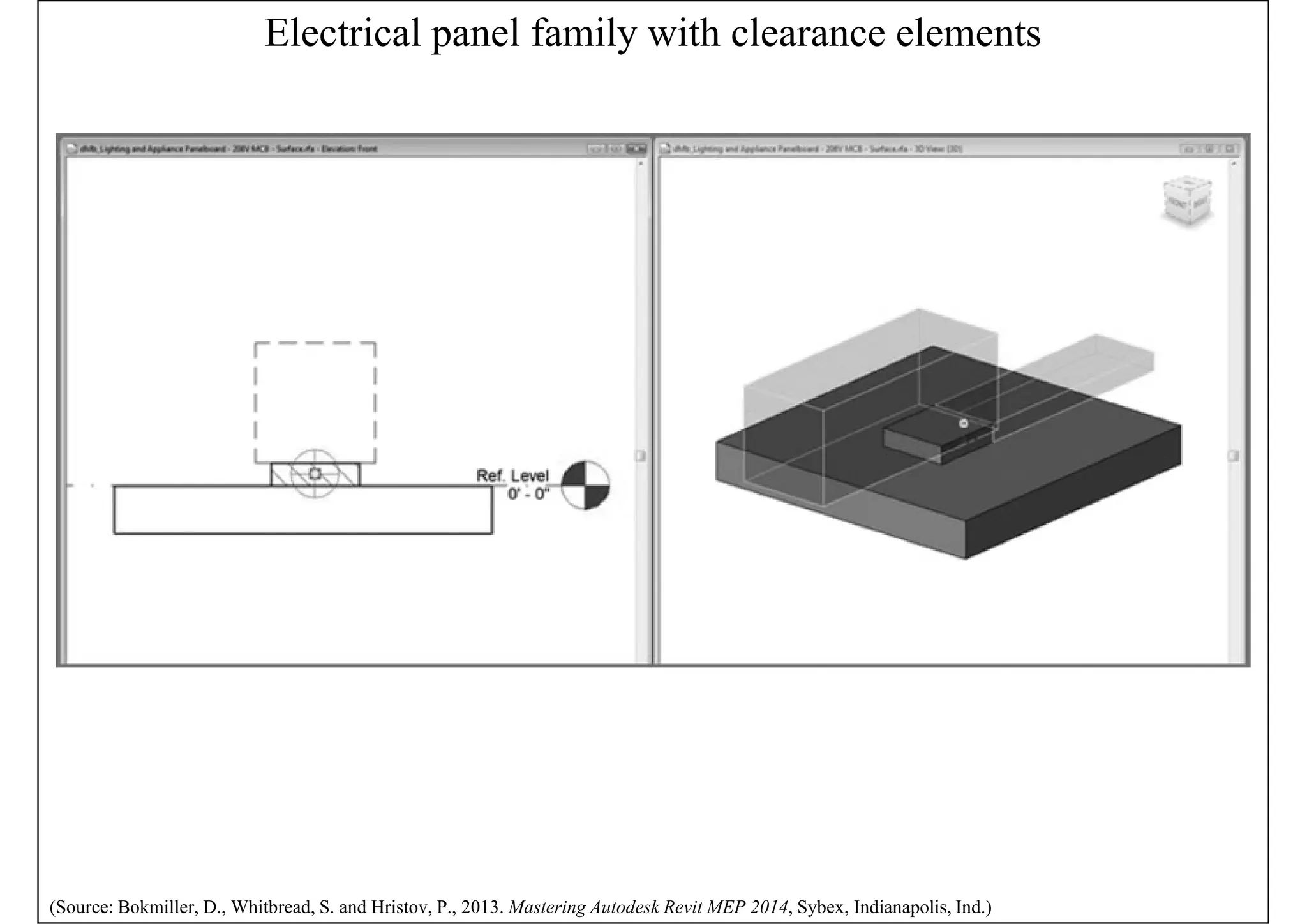
• Clearance space is an important issue
• Elements can be added to panel families to represent
clearances & check for interferences
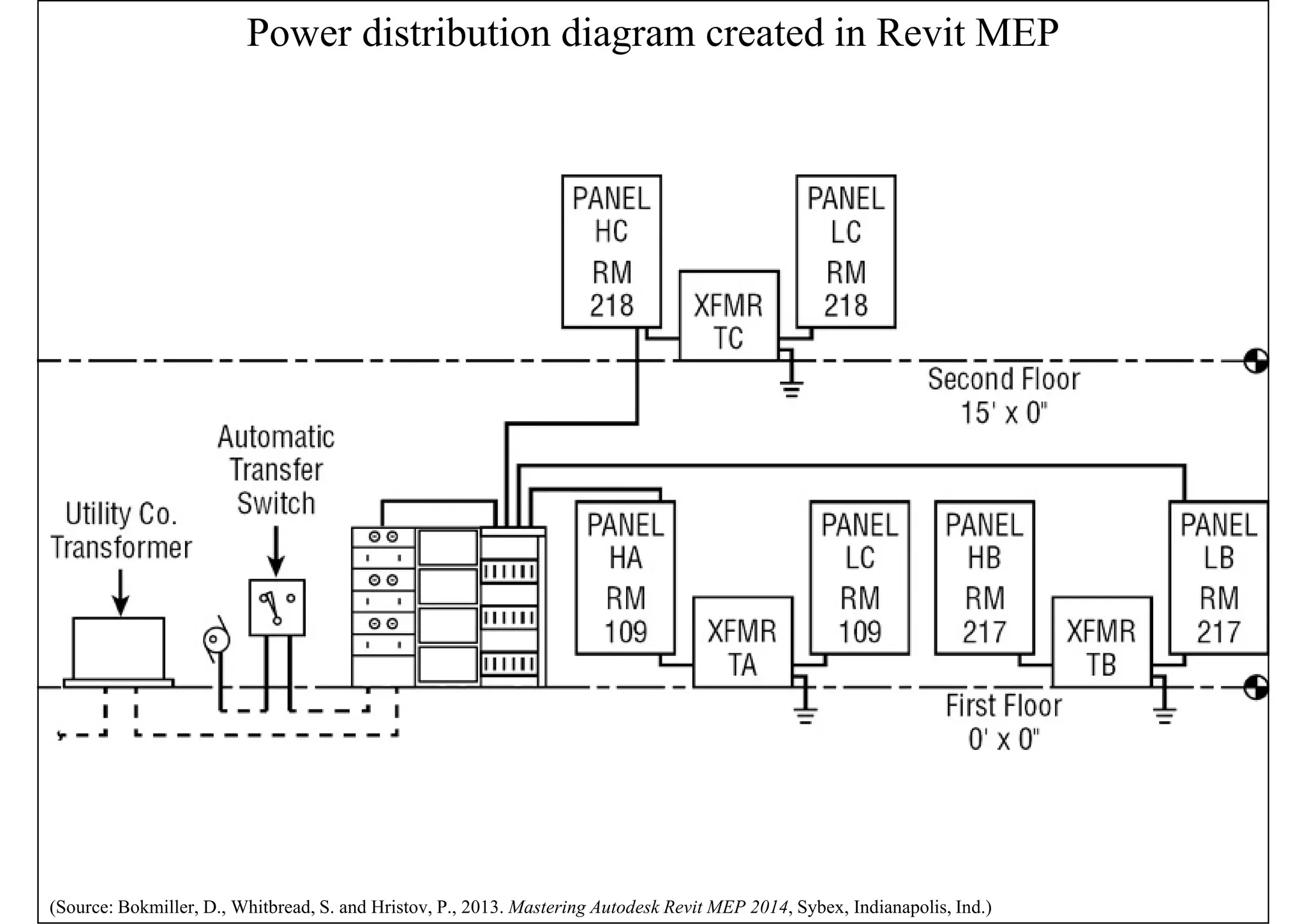
• Assign a distribution system to the panels
• Create circuits for devices & lighting fixtures as well as
model the distribution system
• Other electrical equipment can be represented
Electrical panel family with clearance elements
(Source: Bokmiller, D., Whitbread, S. and Hristov, P., 2013. Mastering Autodesk Revit MEP 2014, Sybex, Indianapolis, Ind.)
Power distribution diagram created in Revit MEP
(Source: Bokmiller, D., Whitbread, S. and Hristov, P., 2013. Mastering Autodesk Revit MEP 2014, Sybex, Indianapolis, Ind.)
Power and communications
• Fire alarm system
• Create a work-set for it to allow for multiple user
access to the model
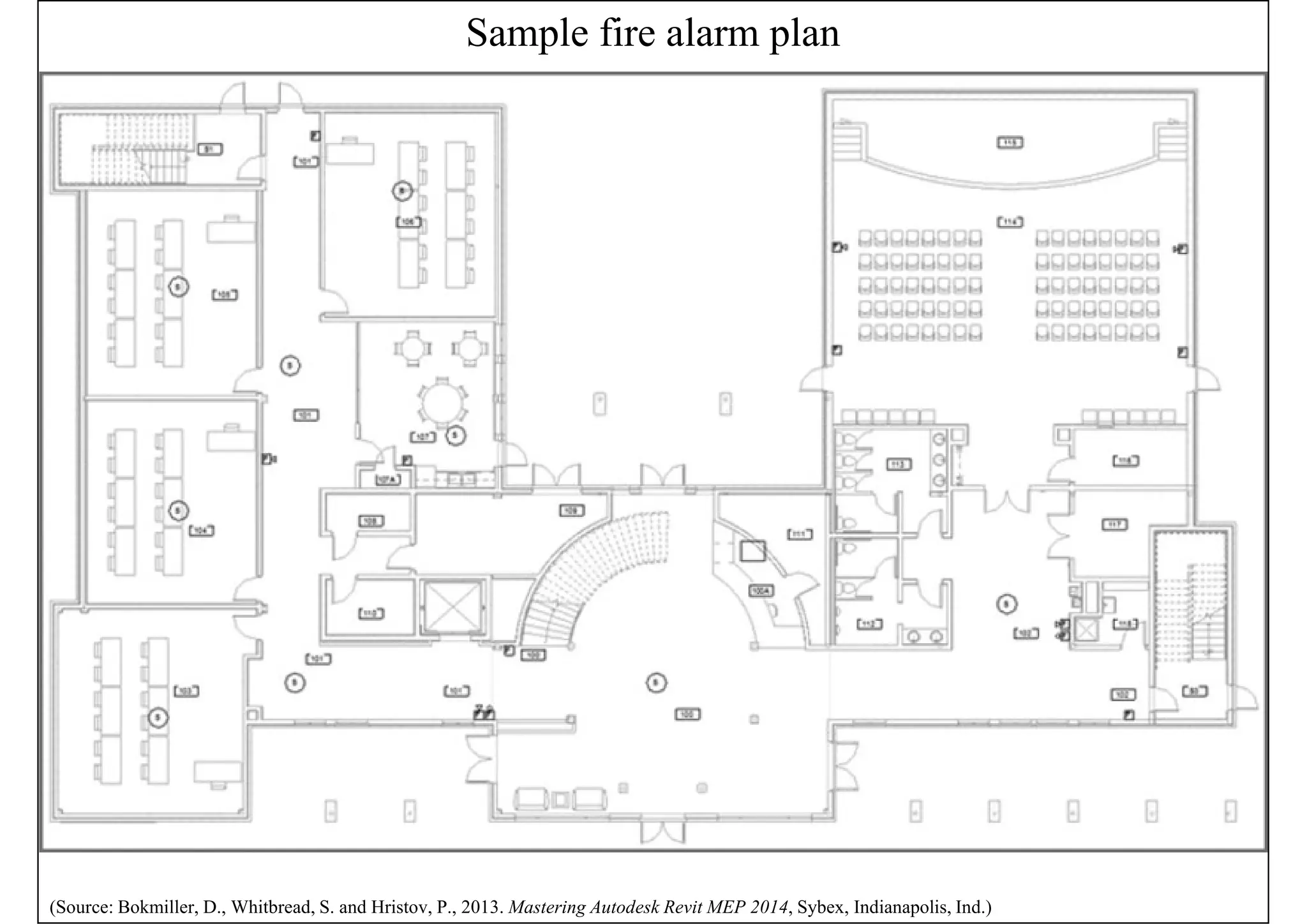
• Fire alarm construction documents are usually
schematic in nature
• Wiring is typically not shown on fire alarm layout
plan drawings for the connectivity of the system
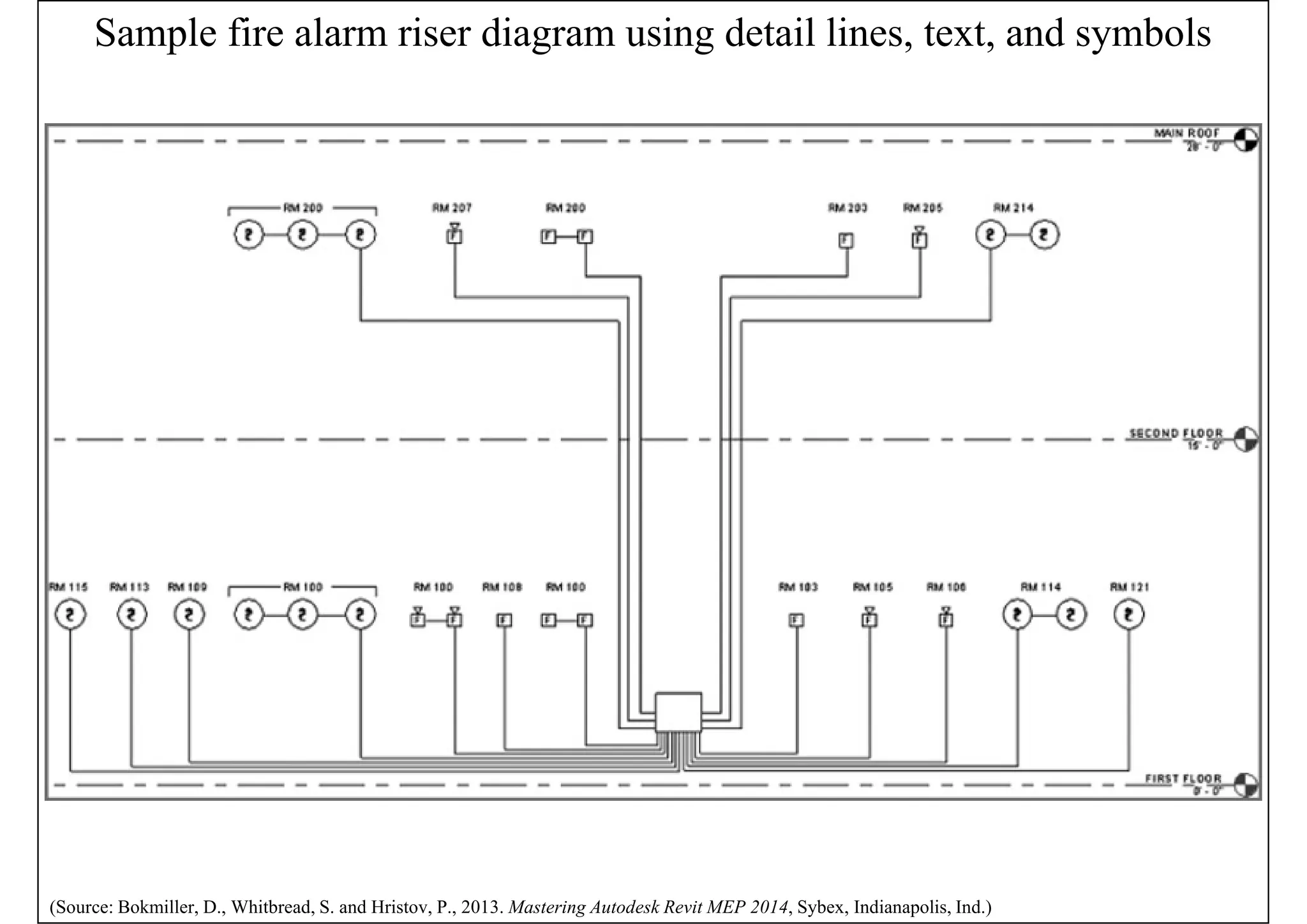
• Fire alarm riser diagram is an important
information of the project
Sample fire alarm plan
(Source: Bokmiller, D., Whitbread, S. and Hristov, P., 2013. Mastering Autodesk Revit MEP 2014, Sybex, Indianapolis, Ind.)
Sample fire alarm riser diagram using detail lines, text, and symbols
(Source: Bokmiller, D., Whitbread, S. and Hristov, P., 2013. Mastering Autodesk Revit MEP 2014, Sybex, Indianapolis, Ind.)
Power and communications
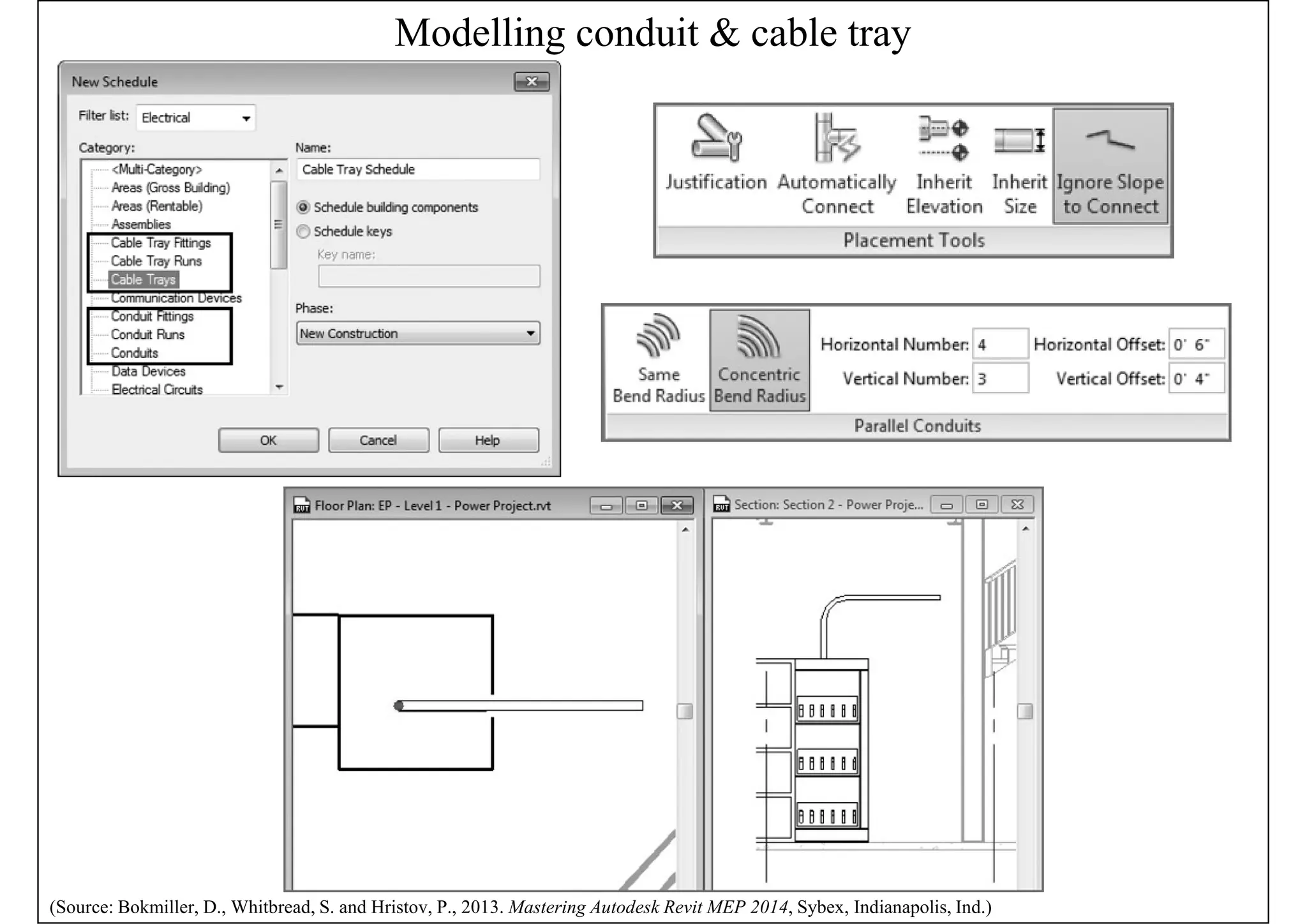
• Modelling conduit & cable tray
• Model conduit only when it may present a
coordination issue with other building components
• Can create conduit or cable tray runs that utilize
fittings or runs that do not
• Conduit displays as a single line or showing
fittings with bend radius for conduit elbows
• Conduit and cable tray settings and sizes
• Placing conduit or cable tray in a model
Modelling conduit & cable tray
(Source: Bokmiller, D., Whitbread, S. and Hristov, P., 2013. Mastering Autodesk Revit MEP 2014, Sybex, Indianapolis, Ind.)
Circuiting and panels
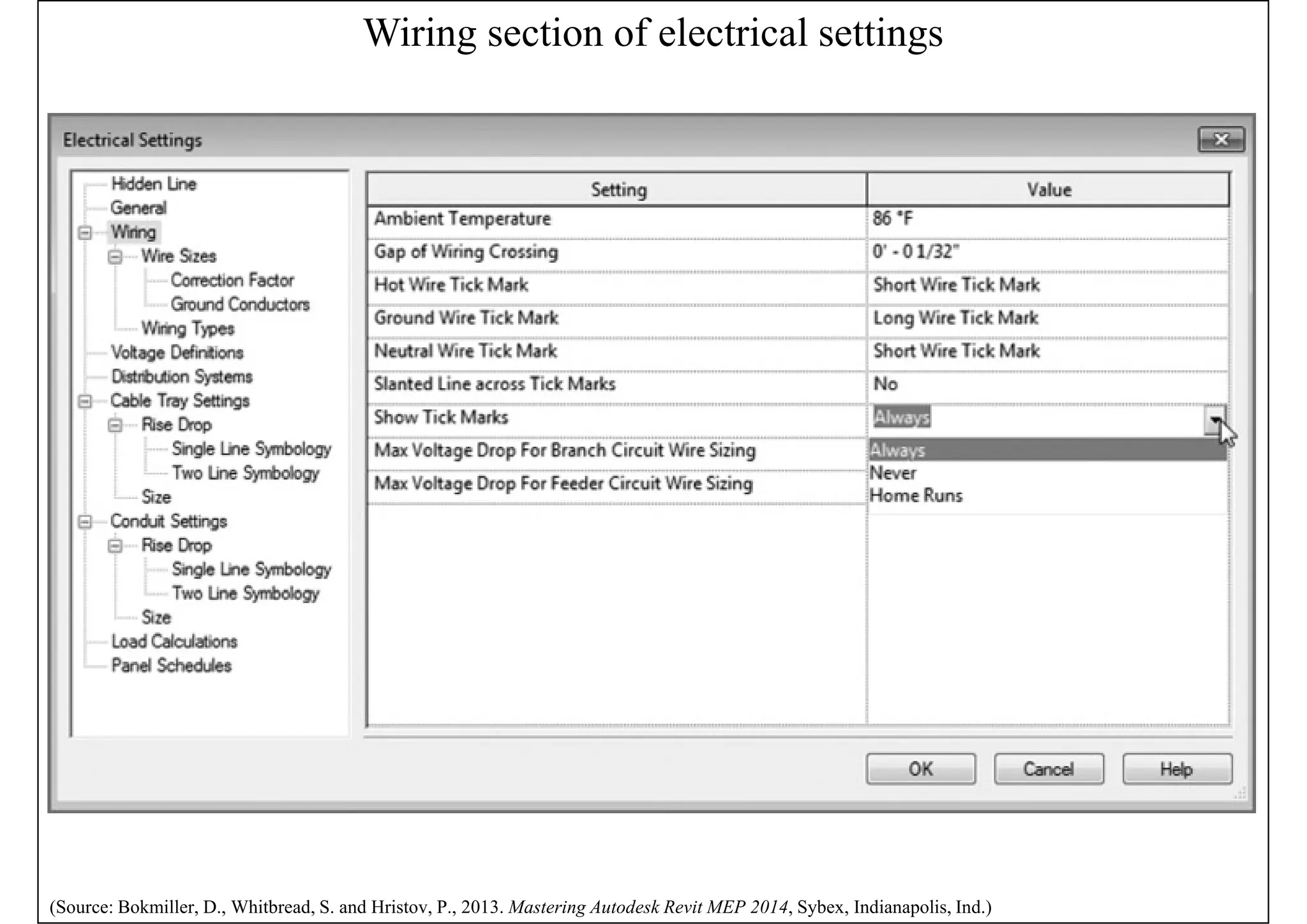
• Electrical settings
• Circuit types: power, data, communications,
security, and others
• Relationship between model elements & the
schematic wiring
• Determine the ability to connect devices &
equipment, and also define how wiring &
electrical information is displayed
• Wiring settings, voltage definitions, distribution
systems, load calculations
Wiring section of electrical settings
(Source: Bokmiller, D., Whitbread, S. and Hristov, P., 2013. Mastering Autodesk Revit MEP 2014, Sybex, Indianapolis, Ind.)
Circuiting and panels
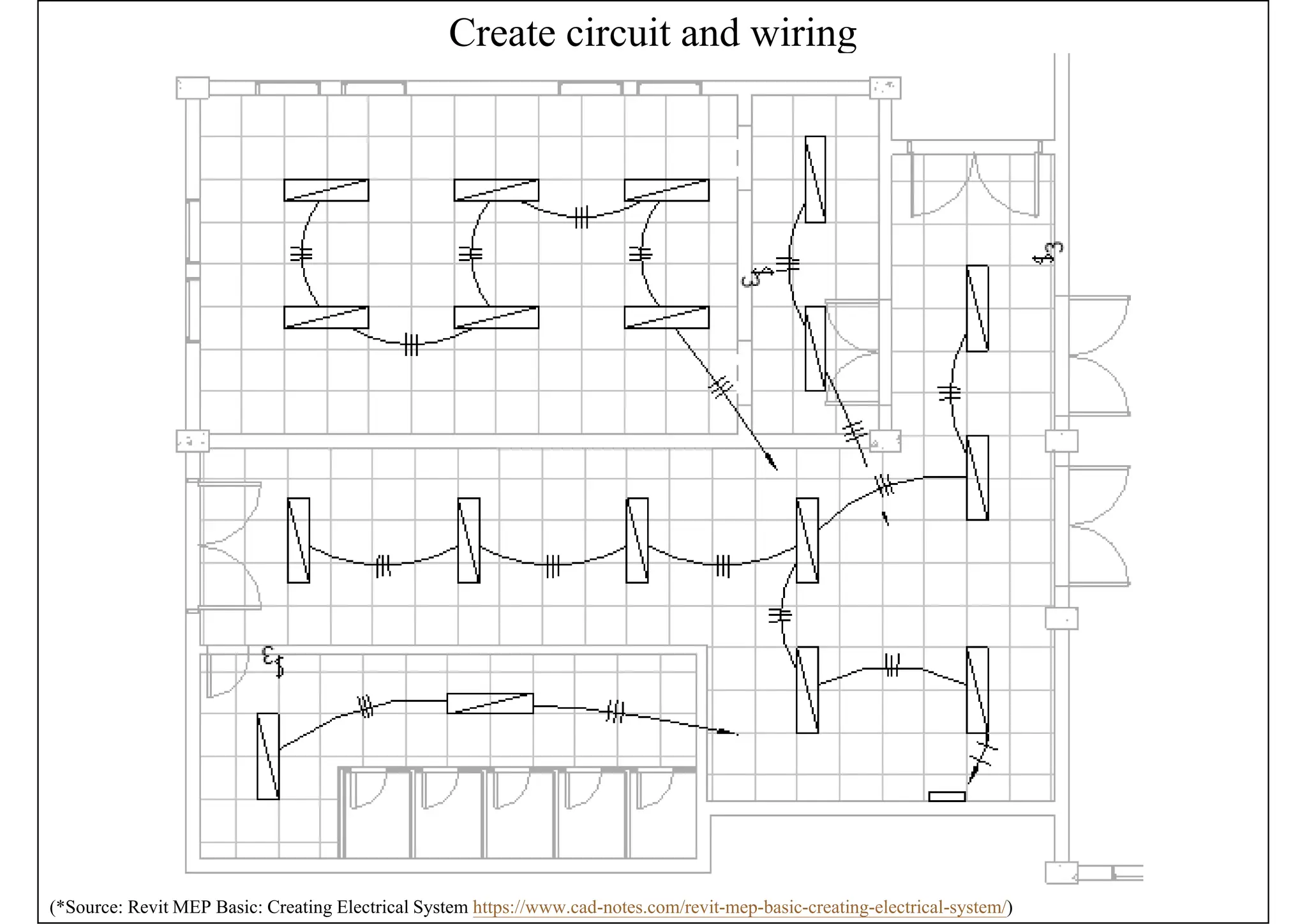
• Create circuits & wiring for devices & fixtures
• To keep track of the loads within the panels*
• Circuits are logical connection between elements
• But they do not require physical connections as the
other disciplines do
• Wires are a schematic, annotative representation
of the means to make the connection only
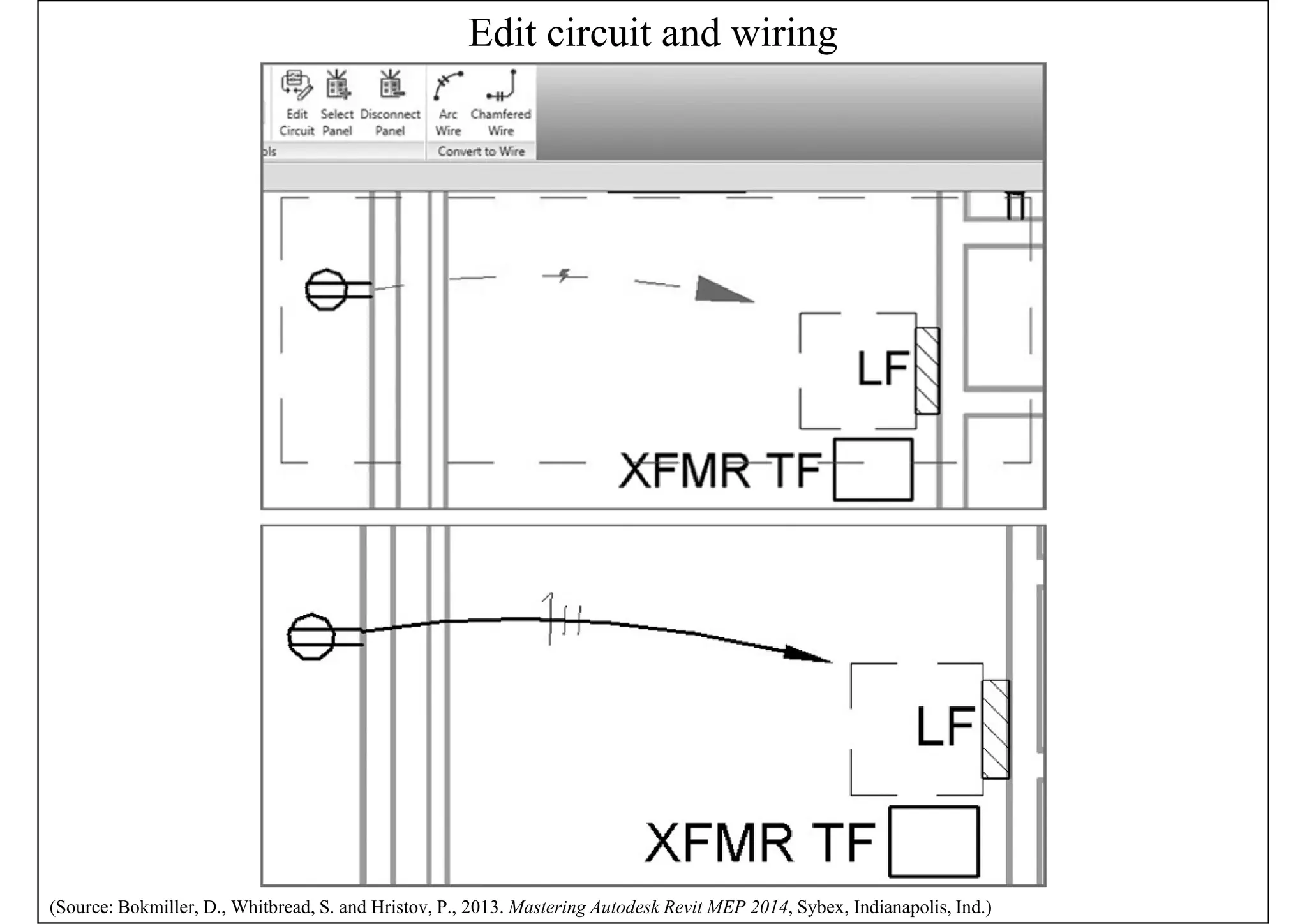
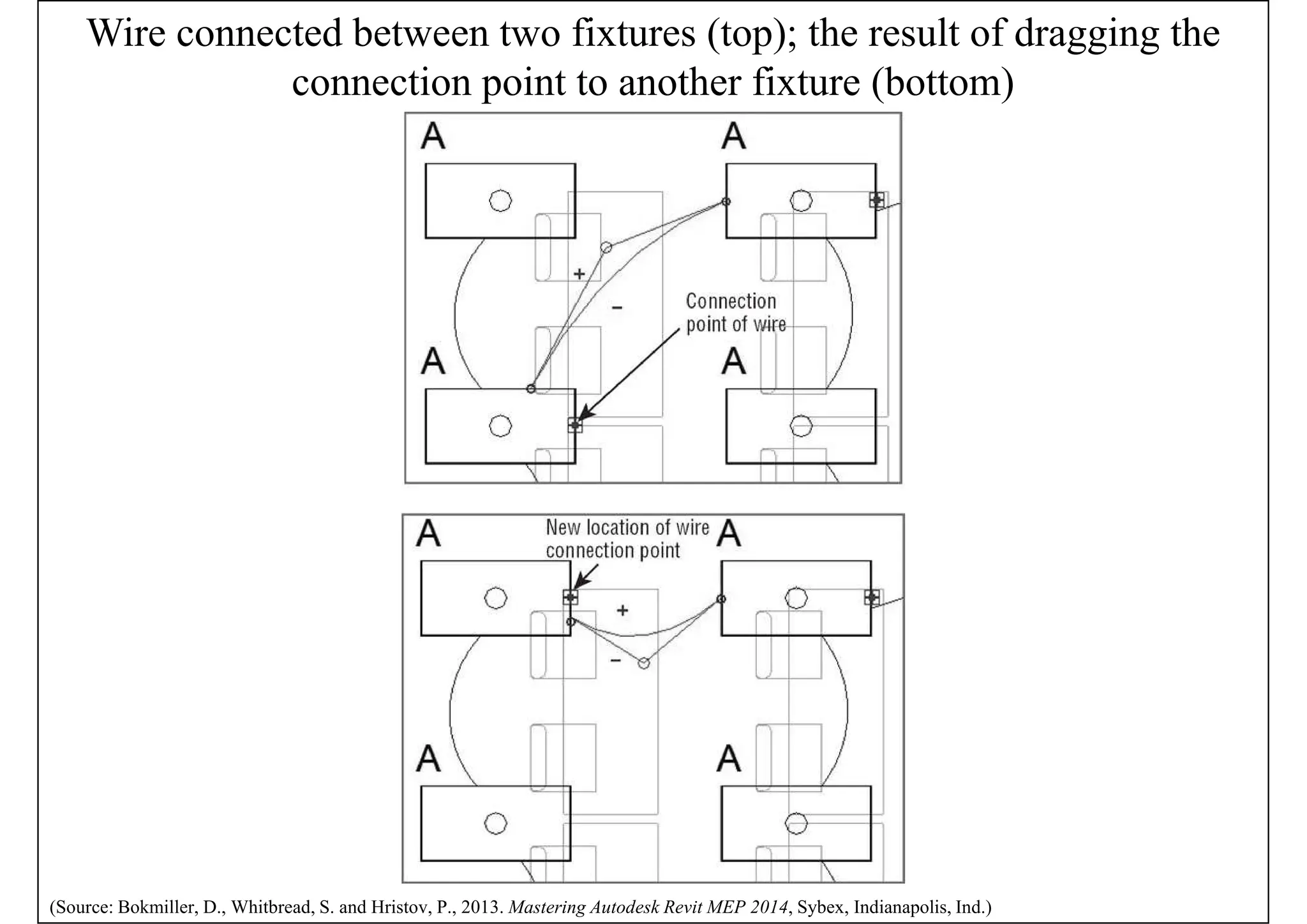
• Editing wiring (e.g. change the arc & location)
• Editing circuits (e.g. add or remove elements)
(*See also: Revit MEP Basic: Creating Electrical System https://www.cad-notes.com/revit-mep-basic-creating-electrical-system/)
Create circuit and wiring
(*Source: Revit MEP Basic: Creating Electrical System https://www.cad-notes.com/revit-mep-basic-creating-electrical-system/)
Edit circuit and wiring
(Source: Bokmiller, D., Whitbread, S. and Hristov, P., 2013. Mastering Autodesk Revit MEP 2014, Sybex, Indianapolis, Ind.)
Wire connected between two fixtures (top); the result of dragging the
connection point to another fixture (bottom)
(Source: Bokmiller, D., Whitbread, S. and Hristov, P., 2013. Mastering Autodesk Revit MEP 2014, Sybex, Indianapolis, Ind.)
Circuiting and panels
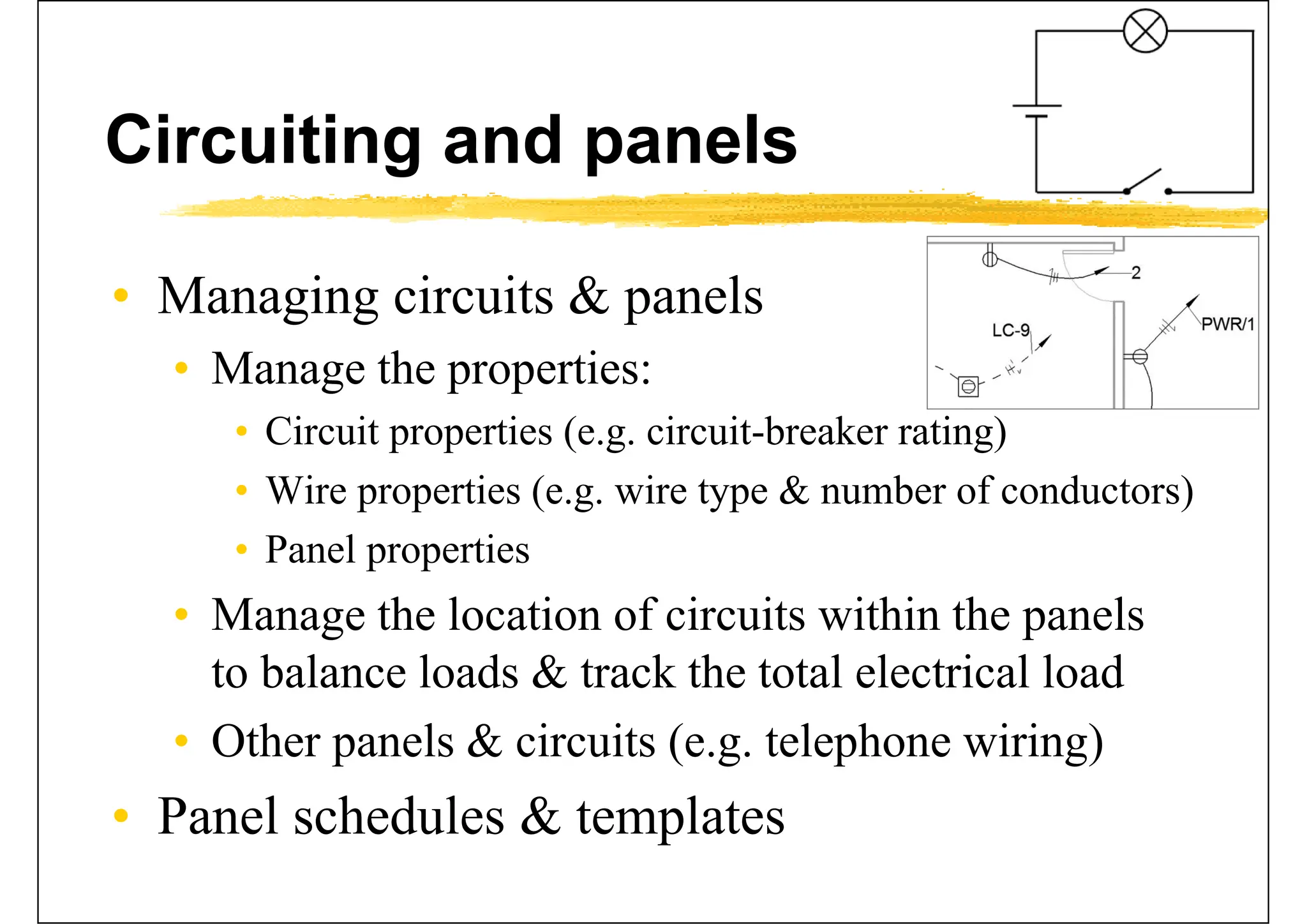
• Managing circuits & panels
• Manage the properties:
• Circuit properties (e.g. circuit-breaker rating)
• Wire properties (e.g. wire type & number of conductors)
• Panel properties
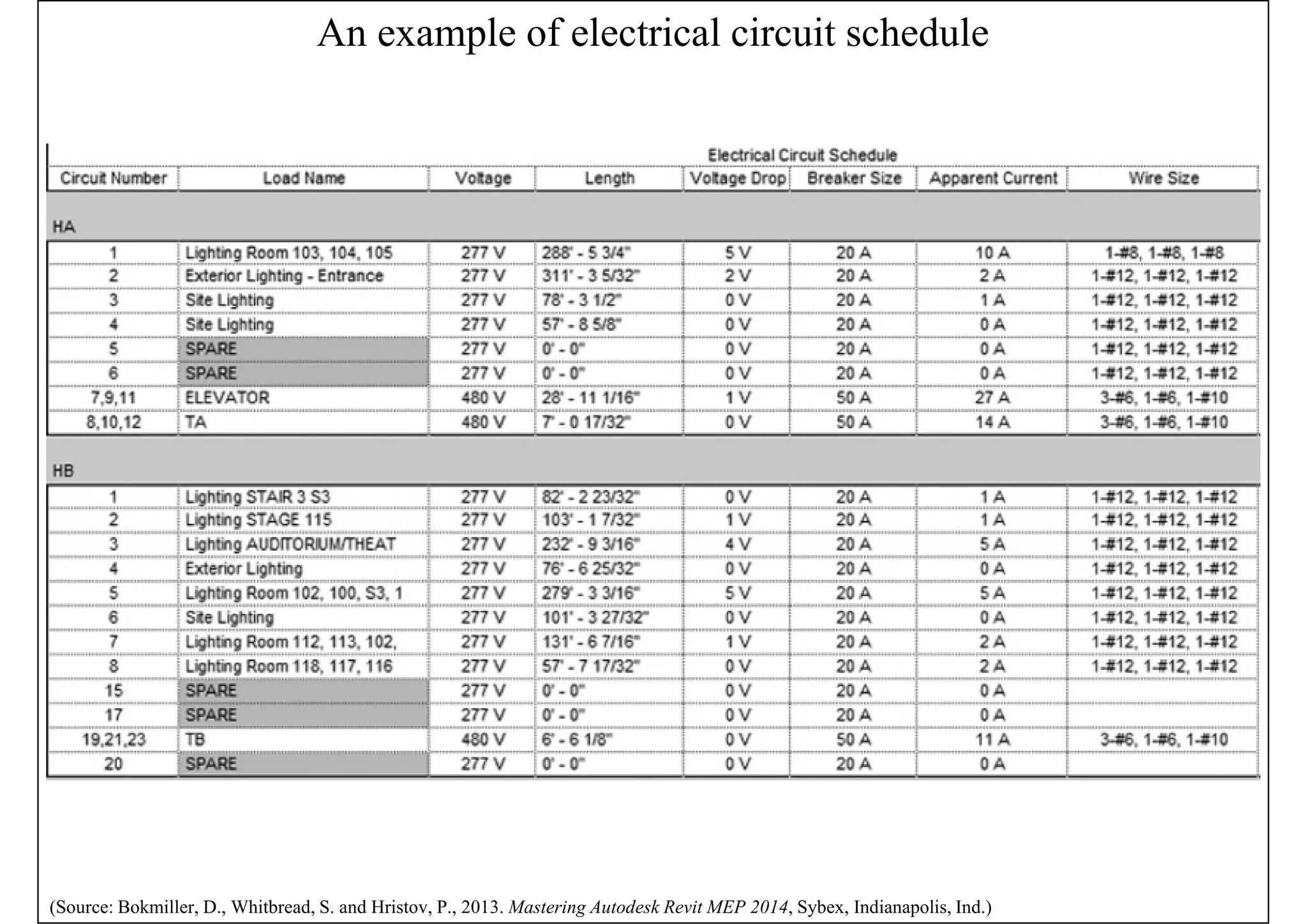
• Manage the location of circuits within the panels
to balance loads & track the total electrical load
• Other panels & circuits (e.g. telephone wiring)
• Panel schedules & templates
An example of electrical circuit schedule
(Source: Bokmiller, D., Whitbread, S. and Hristov, P., 2013. Mastering Autodesk Revit MEP 2014, Sybex, Indianapolis, Ind.)
Further reading
• Bokmiller, D., Whitbread, S. and Hristov, P., 2013. Mastering
Autodesk Revit MEP 2014, Sybex, Indianapolis, Ind. [TH 6010
.B65 2013 (ebook)]
• Chapter 12 - Lighting
• Chapter 13 - Power and Communications
• Chapter 14 - Circuiting and Panels
• Chang, Lu-Yen, 2017. Revit MEP Step by Step, 2018 Metric
Edition. (ebook) https://books.google.com.hk/books?id=tndJDwAAQBAJ
• Chapter 4 Electrical Systems
• Videos: Electrical Engineering
• http://help.autodesk.com/view/RVT/2018/ENU/?guid=GUID-
3C209C9A-51FA-4F9A-8445-D493134DD444
• Watch these videos to learn how to work with electrical engineering tools to build systems.

Revit MEP Electrical Material for beginners

  • 1.
    Revit Electrical Ir. Dr.Sam C. M. Hui Faculty of Science and Technology E-mail: cmhui@vtc.edu.hk Sep 2018 SBS5411 Building Information Modelling for BSE http://ibse.hk/SBS5411/
  • 2.
    Contents • Electrical systems •Lighting systems • Power and communications • Circuiting and panels
  • 3.
    Electrical systems • UseRevit MEP to create electrical systems (circuits) to place devices, lighting fixtures, and electrical equipment in a project* • Work with electrical components • Create & edit circuits • Create & edit switch systems • Electrical sizing & calculations • Need to understand electrical services design requirements & process (*See also: Electrical Systems http://help.autodesk.com/view/RVT/2018/ENU/?guid=GUID-8BB35A3A-475A-4FE0-99C0-B01054EE0F2A)
  • 4.
    Typical components ofelectrical systems (Source: Electrical Systems http://help.autodesk.com/view/RVT/2018/ENU/?guid=GUID-8BB35A3A-475A-4FE0-99C0-B01054EE0F2A)
  • 5.
    Electrical systems • Electricalloads • Lighting and power for a space • These loads affect the cooling & heating loads analysis according to the lighting & power schedules • Electrical family parameters* • Specify the parameter type & properties • Customize electrical families • Facilitate productivity & improve accuracy (*See also: Electrical Family Parameters http://help.autodesk.com/view/RVT/2018/ENU/?guid=GUID-4E5DD909-DD4C-41B9-83DB- 37E9F7CA9639)
  • 6.
    Electrical system designin Revit MEP (Source: Revit MEP- State of the Art BIM Software https://www.mechlectures.com/revit-mep-state-of-the-art-bim-software/)
  • 7.
    Lighting systems • Designtasks for lighting systems • Select light fixtures & their associated devices • Coordinate with electrical design by providing electrical load information • Develop presentation imagery by generating realistic light in renderings • Coordination on the reflected ceiling plan • Check on the correct lighting level & quality (See also: Lights http://help.autodesk.com/view/RVT/2018/ENU/?guid=GUID-97C00105-902A-4C66-B3DF-8BAB48C01493)
  • 8.
    Space volume andceiling relationship for lighting systems (Source: Bokmiller, D., Whitbread, S. and Hristov, P., 2013. Mastering Autodesk Revit MEP 2014, Sybex, Indianapolis, Ind.)
  • 9.
    Realistic light scenarioin renderings (Source: About Lighting Fixtures http://help.autodesk.com/view/RVT/2018/ENU/?guid=GUID-A9FD991A-57A3-4E87-88DD-3955E82FB4AC)
  • 10.
    Lighting systems • Lightinganalysis • Space lighting schedule (e.g. shows required & actual lighting levels, lighting electrical loads) • Assign target lighting levels to spaces easily • Revit MEP uses basic lighting calculation methods to provide an average estimated illumination* • Hosting lighting fixtures & devices • Important for coordination with other model elements (e.g. ceiling- or wall-counted) (*See also: About Lighting Calculations http://help.autodesk.com/view/RVT/2018/ENU/?guid=GUID-60EC93DB-5194-4334-9D61- B17850CE3BC1)
  • 11.
    Lighting fixtures hostedby reference planes (Source: Bokmiller, D., Whitbread, S. and Hristov, P., 2013. Mastering Autodesk Revit MEP 2014, Sybex, Indianapolis, Ind.)
  • 12.
    Pendant fixtures hostedby structural framing members (spaces with no ceiling) (Source: MEP BIM design https://www.slideshare.net/TeroJrvinen/mep-bim-design)
  • 13.
    Light fixtures andswitch system (Source: Bokmiller, D., Whitbread, S. and Hristov, P., 2013. Mastering Autodesk Revit MEP 2014, Sybex, Indianapolis, Ind.)
  • 14.
    Examples of lightinglayout & circuits in an office building (Source: Chang, Lu-Yen, 2017. Revit MEP Step by Step, 2018 Metric Edition. (ebook) https://books.google.com.hk/books?id=tndJDwAAQBAJ)
  • 15.
    Lighting systems • Exteriorsite lighting • Revit MEP cannot do analysis on exterior lights • Locations of poles, bollards, and other site lighting fixtures can be coordinated with other utilities within the project site • Create renderings to get an idea of the coverage of the lighting fixtures on the site • Can use the site plan or topography information from other consultants (Architect & Civil Engr.)
  • 16.
    Site lighting fixturesin 2D (left) and 3D (right) views (Source: Bokmiller, D., Whitbread, S. and Hristov, P., 2013. Mastering Autodesk Revit MEP 2014, Sybex, Indianapolis, Ind.)
  • 17.
    Sun path shownin a 3D view (Source: Bokmiller, D., Whitbread, S. and Hristov, P., 2013. Mastering Autodesk Revit MEP 2014, Sybex, Indianapolis, Ind.)
  • 18.
    Power and communications •Electrical systems & devices • Electrical equipment, conduit runs & cable trays, receptacles and junction boxes • Building communication systems • Security & fire alarm systems • Modelling methods • Can use symbols, model elements, or a combination of the two to represent the design electrical layout; then create a circuit for them (See also: Prepare the Electrical Design http://help.autodesk.com/view/RVT/2018/ENU/?guid=GUID-C1639372-F179-42C4-980A-762D142DFAD6)
  • 19.
    Device button &type selector (Source: Bokmiller, D., Whitbread, S. and Hristov, P., 2013. Mastering Autodesk Revit MEP 2014, Sybex, Indianapolis, Ind.)
  • 20.
    Multiple symbols ina device family (Source: Bokmiller, D., Whitbread, S. and Hristov, P., 2013. Mastering Autodesk Revit MEP 2014, Sybex, Indianapolis, Ind.)
  • 21.
    Power and communications •Placing devices & equipment connections • Use symbols that contain connectors to account for the connections in the electrical model • Such as linking an HVAC equipment with electrical specifications to an electrical supply • Disconnect or isolation switches • A point of disconnection is required • To coordinate location and space requirements • Attach wiring or drawn from the symbol (See also: Design the Electrical Systems http://help.autodesk.com/view/RVT/2018/ENU/?guid=GUID-C1F0D828-6C41-45DF-A03E-C5B6DC64FA40)
  • 22.
    Equipment connection witha connector, disconnect switches (Source: Bokmiller, D., Whitbread, S. and Hristov, P., 2013. Mastering Autodesk Revit MEP 2014, Sybex, Indianapolis, Ind.)
  • 23.
    Power and communications •Distribution equipment & transformers • They require space for accessibility • Using accurately sized model components for them allows you to coordinate early on with the architectural model for space requirements • Switchboards • Various components e.g. metering, transformer, and circuit breaker sections • Define distribution system & switchboard layout
  • 24.
    Transformer properties &switchboard layout (Source: Bokmiller, D., Whitbread, S. and Hristov, P., 2013. Mastering Autodesk Revit MEP 2014, Sybex, Indianapolis, Ind.)
  • 25.
    Section view &3D view of electrical equipment (Source: Chang, Lu-Yen, 2017. Revit MEP Step by Step, 2018 Metric Edition. (ebook) https://books.google.com.hk/books?id=tndJDwAAQBAJ)
  • 26.
    Power and communications •Electrical distribution panels • Simply represent the size of the panel by displaying the box, or use a detail component • Clearance space is an important issue • Elements can be added to panel families to represent clearances & check for interferences • Assign a distribution system to the panels • Create circuits for devices & lighting fixtures as well as model the distribution system • Other electrical equipment can be represented
  • 27.
    Electrical panel familywith clearance elements (Source: Bokmiller, D., Whitbread, S. and Hristov, P., 2013. Mastering Autodesk Revit MEP 2014, Sybex, Indianapolis, Ind.)
  • 28.
    Power distribution diagramcreated in Revit MEP (Source: Bokmiller, D., Whitbread, S. and Hristov, P., 2013. Mastering Autodesk Revit MEP 2014, Sybex, Indianapolis, Ind.)
  • 29.
    Power and communications •Fire alarm system • Create a work-set for it to allow for multiple user access to the model • Fire alarm construction documents are usually schematic in nature • Wiring is typically not shown on fire alarm layout plan drawings for the connectivity of the system • Fire alarm riser diagram is an important information of the project
  • 30.
    Sample fire alarmplan (Source: Bokmiller, D., Whitbread, S. and Hristov, P., 2013. Mastering Autodesk Revit MEP 2014, Sybex, Indianapolis, Ind.)
  • 31.
    Sample fire alarmriser diagram using detail lines, text, and symbols (Source: Bokmiller, D., Whitbread, S. and Hristov, P., 2013. Mastering Autodesk Revit MEP 2014, Sybex, Indianapolis, Ind.)
  • 32.
    Power and communications •Modelling conduit & cable tray • Model conduit only when it may present a coordination issue with other building components • Can create conduit or cable tray runs that utilize fittings or runs that do not • Conduit displays as a single line or showing fittings with bend radius for conduit elbows • Conduit and cable tray settings and sizes • Placing conduit or cable tray in a model
  • 33.
    Modelling conduit &cable tray (Source: Bokmiller, D., Whitbread, S. and Hristov, P., 2013. Mastering Autodesk Revit MEP 2014, Sybex, Indianapolis, Ind.)
  • 34.
    Circuiting and panels •Electrical settings • Circuit types: power, data, communications, security, and others • Relationship between model elements & the schematic wiring • Determine the ability to connect devices & equipment, and also define how wiring & electrical information is displayed • Wiring settings, voltage definitions, distribution systems, load calculations
  • 35.
    Wiring section ofelectrical settings (Source: Bokmiller, D., Whitbread, S. and Hristov, P., 2013. Mastering Autodesk Revit MEP 2014, Sybex, Indianapolis, Ind.)
  • 36.
    Circuiting and panels •Create circuits & wiring for devices & fixtures • To keep track of the loads within the panels* • Circuits are logical connection between elements • But they do not require physical connections as the other disciplines do • Wires are a schematic, annotative representation of the means to make the connection only • Editing wiring (e.g. change the arc & location) • Editing circuits (e.g. add or remove elements) (*See also: Revit MEP Basic: Creating Electrical System https://www.cad-notes.com/revit-mep-basic-creating-electrical-system/)
  • 37.
    Create circuit andwiring (*Source: Revit MEP Basic: Creating Electrical System https://www.cad-notes.com/revit-mep-basic-creating-electrical-system/)
  • 38.
    Edit circuit andwiring (Source: Bokmiller, D., Whitbread, S. and Hristov, P., 2013. Mastering Autodesk Revit MEP 2014, Sybex, Indianapolis, Ind.)
  • 39.
    Wire connected betweentwo fixtures (top); the result of dragging the connection point to another fixture (bottom) (Source: Bokmiller, D., Whitbread, S. and Hristov, P., 2013. Mastering Autodesk Revit MEP 2014, Sybex, Indianapolis, Ind.)
  • 40.
    Circuiting and panels •Managing circuits & panels • Manage the properties: • Circuit properties (e.g. circuit-breaker rating) • Wire properties (e.g. wire type & number of conductors) • Panel properties • Manage the location of circuits within the panels to balance loads & track the total electrical load • Other panels & circuits (e.g. telephone wiring) • Panel schedules & templates
  • 41.
    An example ofelectrical circuit schedule (Source: Bokmiller, D., Whitbread, S. and Hristov, P., 2013. Mastering Autodesk Revit MEP 2014, Sybex, Indianapolis, Ind.)
  • 42.
    Further reading • Bokmiller,D., Whitbread, S. and Hristov, P., 2013. Mastering Autodesk Revit MEP 2014, Sybex, Indianapolis, Ind. [TH 6010 .B65 2013 (ebook)] • Chapter 12 - Lighting • Chapter 13 - Power and Communications • Chapter 14 - Circuiting and Panels • Chang, Lu-Yen, 2017. Revit MEP Step by Step, 2018 Metric Edition. (ebook) https://books.google.com.hk/books?id=tndJDwAAQBAJ • Chapter 4 Electrical Systems • Videos: Electrical Engineering • http://help.autodesk.com/view/RVT/2018/ENU/?guid=GUID- 3C209C9A-51FA-4F9A-8445-D493134DD444 • Watch these videos to learn how to work with electrical engineering tools to build systems.