InformationLiteracy
http://www.library.qmul.ac.uk/
• When you are new to literature searching
it’s easy to generate large numbers of
irrelevant search results, or to experience
finding any relevant results.
• Here’s a few simple techniques to use when
searching databases that should help you
to focus your searching on the most
relevant references you need.
InformationLiteracy
http://www.library.qmul.ac.uk/
 Refine (narrow) your results by:
 searching within results
 limiting to subject areas
 limiting by publication date
 limiting by document format
 Sort your results by:
 relevance
 times cited
 publication date
InformationLiteracy
http://www.library.qmul.ac.uk/
Use these to reduce scope of search, and
therefore number of references, e.g.:
 Publication type (e.g. journals)
 Publication date (e.g. 2005-)
 Language (e.g. English)
InformationLiteracy
http://www.library.qmul.ac.uk/
• In several databases (e.g. Web of Science)
search filters and limiters appear as options
displayed on the search results screen.
• These include the option to narrow your
search by document type, date range, subject,
author, year of publication and many more.
InformationLiteracy
http://www.library.qmul.ac.uk/
Refine Results
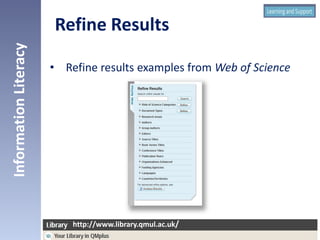
• Refine results examples from Web of Science
InformationLiteracy
http://www.library.qmul.ac.uk/
Refine Results
 Snowballing - If you find one relevant
reference you can use it to help you find
others.
 Check the references and bibliography at
the end of the article for related works.
 Many database provide direct links to
related articles displayed in these fields.
InformationLiteracy
http://www.library.qmul.ac.uk/
What to do if you only get
a few results?
• Use more search terms linked with AND between
each term
e.g. If you need to find references about microbiology
especially concerned with tissue samples, type
microbiology AND tissue AND samples
• Exclude irrelevant subjects by typing NOT before
the term you wish to exclude.
e.g. If you need to find references about microbiology, but
not those about plants, type microbiology NOT plants
InformationLiteracy
http://www.library.qmul.ac.uk/
What to do if you get
too many results?
• Limit your results by date range.
e.g. if you were looking for the very latest research on
a particular subject you could type 2012-2013 in the
date field of the database search screen.
• Limit your search to particular fields
e.g. enter your search terms in the title field of the
database search screen to increase the relevance of
your results.
InformationLiteracy
http://www.library.qmul.ac.uk/
What to do if you get
too many results?
Using limiters and filters to make your search
more specific and focussed is a great method to
help you:
• Maximise the relevance of your search results
• Ensure you are able to easily manage and
evaluate the number of hits in your search
results
InformationLiteracy
http://www.library.qmul.ac.uk/
Conclusion
But:
• Think carefully about how you plan to apply
search filters and limiters
• If you apply too many search filters and
limiters you can exclude potentially useful
references or retrieve no results at all
InformationLiteracy
http://www.library.qmul.ac.uk/
Conclusion

Review and refine your search (TLS)

  • 1.
  • 2.
    • When youare new to literature searching it’s easy to generate large numbers of irrelevant search results, or to experience finding any relevant results. • Here’s a few simple techniques to use when searching databases that should help you to focus your searching on the most relevant references you need. InformationLiteracy http://www.library.qmul.ac.uk/ http://www.library.qmul.ac.uk/
  • 3.
     Refine (narrow)your results by:  searching within results  limiting to subject areas  limiting by publication date  limiting by document format  Sort your results by:  relevance  times cited  publication date InformationLiteracy http://www.library.qmul.ac.uk/ http://www.library.qmul.ac.uk/
  • 4.
    Use these toreduce scope of search, and therefore number of references, e.g.:  Publication type (e.g. journals)  Publication date (e.g. 2005-)  Language (e.g. English) InformationLiteracy http://www.library.qmul.ac.uk/ http://www.library.qmul.ac.uk/
  • 5.
    • In severaldatabases (e.g. Web of Science) search filters and limiters appear as options displayed on the search results screen. • These include the option to narrow your search by document type, date range, subject, author, year of publication and many more. InformationLiteracy http://www.library.qmul.ac.uk/ http://www.library.qmul.ac.uk/ Refine Results
  • 6.
    • Refine resultsexamples from Web of Science InformationLiteracy http://www.library.qmul.ac.uk/ http://www.library.qmul.ac.uk/ Refine Results
  • 7.
     Snowballing -If you find one relevant reference you can use it to help you find others.  Check the references and bibliography at the end of the article for related works.  Many database provide direct links to related articles displayed in these fields. InformationLiteracy http://www.library.qmul.ac.uk/ http://www.library.qmul.ac.uk/ What to do if you only get a few results?
  • 8.
    • Use moresearch terms linked with AND between each term e.g. If you need to find references about microbiology especially concerned with tissue samples, type microbiology AND tissue AND samples • Exclude irrelevant subjects by typing NOT before the term you wish to exclude. e.g. If you need to find references about microbiology, but not those about plants, type microbiology NOT plants InformationLiteracy http://www.library.qmul.ac.uk/ http://www.library.qmul.ac.uk/ What to do if you get too many results?
  • 9.
    • Limit yourresults by date range. e.g. if you were looking for the very latest research on a particular subject you could type 2012-2013 in the date field of the database search screen. • Limit your search to particular fields e.g. enter your search terms in the title field of the database search screen to increase the relevance of your results. InformationLiteracy http://www.library.qmul.ac.uk/ http://www.library.qmul.ac.uk/ What to do if you get too many results?
  • 10.
    Using limiters andfilters to make your search more specific and focussed is a great method to help you: • Maximise the relevance of your search results • Ensure you are able to easily manage and evaluate the number of hits in your search results InformationLiteracy http://www.library.qmul.ac.uk/ http://www.library.qmul.ac.uk/ Conclusion
  • 11.
    But: • Think carefullyabout how you plan to apply search filters and limiters • If you apply too many search filters and limiters you can exclude potentially useful references or retrieve no results at all InformationLiteracy http://www.library.qmul.ac.uk/ http://www.library.qmul.ac.uk/ Conclusion