Using UT Library
Databases
“Academic Search Complete”
Two good
reasons to
use Academic
Search
Complete
Magazine and journal articles often go into
depth and cite research studies. It’s worth
exploring how they can help “verify” the
information on your Infographic.
You will demonstrate that you can and did
use this database as a student in
Composition I.
To get started, go to LibGuides on
our course menu. Click on the link.
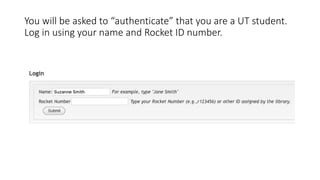
You will be asked to “authenticate” that you are a UT student.
Log in using your name and Rocket ID number.
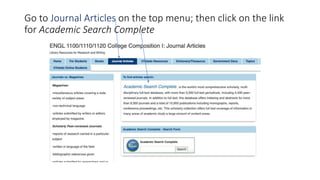
Go to Journal Articles on the top menu; then click on the link
for Academic Search Complete
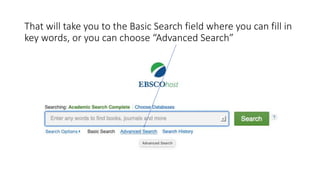
That will take you to the Basic Search field where you can fill in
key words, or you can choose “Advanced Search”
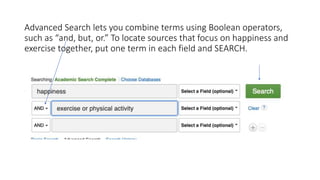
Advanced Search lets you combine terms using Boolean operators,
such as “and, but, or.” To locate sources that focus on happiness and
exercise together, put one term in each field and SEARCH.
Using “key words”
Half the battle in finding good sources is using good key words. Review “Searching for
Sources” in the RESEARCH links for a reminder about key words and Boolean operators.
Be brief and specific in your choice of search terms (key words)
Avoid using long phrases or complete sentences. The database will attempt to match each
word (and you may get no results)
Let the database help you “speak” to it using words and terms it recognizes (see next
screen):
Using key words
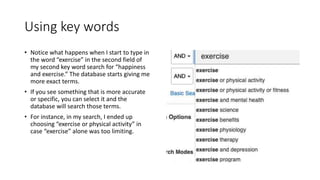
• Notice what happens when I start to type in
the word “exercise” in the second field of
my second key word search for “happiness
and exercise.” The database starts giving me
more exact terms.
• If you see something that is more accurate
or specific, you can select it and the
database will search those terms.
• For instance, in my search, I ended up
choosing “exercise or physical activity” in
case “exercise” alone was too limiting.
RESULTS List
My search lead to a RESULTS LIST of 618 items! I
will want to “filter” that list using a couple of
options. Let’s start with source type:
• Journals
• Magazines
Two types of
sources:
Journals and
Magazines
Academic journals are research-
based and peer reviewed. Thus,
they are very reliable and often
useful sources.
Magazines will be shorter and more
readable but may not include
research. Choose titles that reflect a
focus or expertise in your topic.
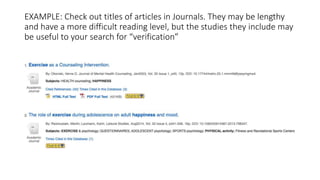
EXAMPLE: Check out titles of articles in Journals. They may be lengthy
and have a more difficult reading level, but the studies they include may
be useful to your search for “verification”
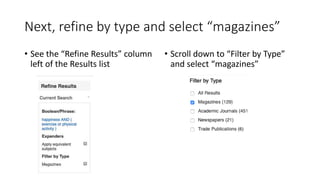
Next, refine by type and select “magazines”
• See the “Refine Results” column
left of the Results list
• Scroll down to “Filter by Type”
and select “magazines”
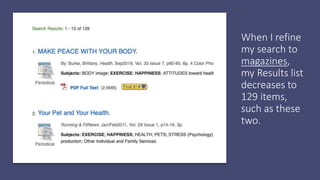
When I refine
my search to
magazines,
my Results list
decreases to
129 items,
such as these
two.
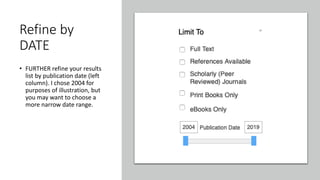
Refine by
DATE
• FURTHER refine your results
list by publication date (left
column). I chose 2004 for
purposes of illustration, but
you may want to choose a
more narrow date range.
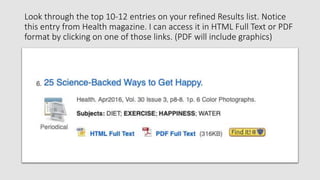
Look through the top 10-12 entries on your refined Results list. Notice
this entry from Health magazine. I can access it in HTML Full Text or PDF
format by clicking on one of those links. (PDF will include graphics)
Preview the contents of the
article
• Click on the title of the article to see an abstract
of the content (or sometimes it simply leads to
the full article).
• You can also preview the contents by clicking on
the “spyglass” icon to the far right of each title:
Once you find a source you want. . . .
You have several options for saving,
printing, or emailing it to yourself.
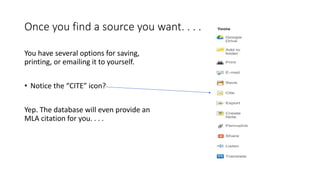
• Notice the “CITE” icon?
Yep. The database will even provide an
MLA citation for you. . . .
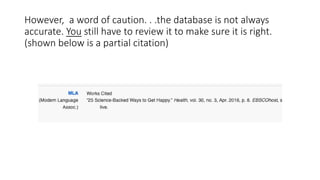
However, a word of caution. . .the database is not always
accurate. You still have to review it to make sure it is right.
(shown below is a partial citation)
Using a library database strengthens
your ethos as a college-level writer.
Include a search of journals and
magazines among sources for your
“fact-check."

Using UToledo Library Databases

  • 1.
  • 2.
    Two good reasons to useAcademic Search Complete Magazine and journal articles often go into depth and cite research studies. It’s worth exploring how they can help “verify” the information on your Infographic. You will demonstrate that you can and did use this database as a student in Composition I.
  • 3.
    To get started,go to LibGuides on our course menu. Click on the link.
  • 4.
    You will beasked to “authenticate” that you are a UT student. Log in using your name and Rocket ID number.
  • 5.
    Go to JournalArticles on the top menu; then click on the link for Academic Search Complete
  • 6.
    That will takeyou to the Basic Search field where you can fill in key words, or you can choose “Advanced Search”
  • 7.
    Advanced Search letsyou combine terms using Boolean operators, such as “and, but, or.” To locate sources that focus on happiness and exercise together, put one term in each field and SEARCH.
  • 8.
    Using “key words” Halfthe battle in finding good sources is using good key words. Review “Searching for Sources” in the RESEARCH links for a reminder about key words and Boolean operators. Be brief and specific in your choice of search terms (key words) Avoid using long phrases or complete sentences. The database will attempt to match each word (and you may get no results) Let the database help you “speak” to it using words and terms it recognizes (see next screen):
  • 9.
    Using key words •Notice what happens when I start to type in the word “exercise” in the second field of my second key word search for “happiness and exercise.” The database starts giving me more exact terms. • If you see something that is more accurate or specific, you can select it and the database will search those terms. • For instance, in my search, I ended up choosing “exercise or physical activity” in case “exercise” alone was too limiting.
  • 10.
    RESULTS List My searchlead to a RESULTS LIST of 618 items! I will want to “filter” that list using a couple of options. Let’s start with source type: • Journals • Magazines
  • 11.
    Two types of sources: Journalsand Magazines Academic journals are research- based and peer reviewed. Thus, they are very reliable and often useful sources. Magazines will be shorter and more readable but may not include research. Choose titles that reflect a focus or expertise in your topic.
  • 12.
    EXAMPLE: Check outtitles of articles in Journals. They may be lengthy and have a more difficult reading level, but the studies they include may be useful to your search for “verification”
  • 13.
    Next, refine bytype and select “magazines” • See the “Refine Results” column left of the Results list • Scroll down to “Filter by Type” and select “magazines”
  • 14.
    When I refine mysearch to magazines, my Results list decreases to 129 items, such as these two.
  • 15.
    Refine by DATE • FURTHERrefine your results list by publication date (left column). I chose 2004 for purposes of illustration, but you may want to choose a more narrow date range.
  • 16.
    Look through thetop 10-12 entries on your refined Results list. Notice this entry from Health magazine. I can access it in HTML Full Text or PDF format by clicking on one of those links. (PDF will include graphics)
  • 17.
    Preview the contentsof the article • Click on the title of the article to see an abstract of the content (or sometimes it simply leads to the full article). • You can also preview the contents by clicking on the “spyglass” icon to the far right of each title:
  • 18.
    Once you finda source you want. . . . You have several options for saving, printing, or emailing it to yourself. • Notice the “CITE” icon? Yep. The database will even provide an MLA citation for you. . . .
  • 19.
    However, a wordof caution. . .the database is not always accurate. You still have to review it to make sure it is right. (shown below is a partial citation)
  • 20.
    Using a librarydatabase strengthens your ethos as a college-level writer. Include a search of journals and magazines among sources for your “fact-check."