Finding electronic
  journal articles
  John Hynes– MBS Library Service
          Tel: 0161 275 6501
Email: john.hynes@manchester.ac.uk


         http://www.mbs.ac.uk/library
Introduction
Introduction to journals – JRUL journals

Download of a specific journal article

Introduction to literature searching (4 stages)

Bibliographic databases – Which should I use?

Bibliographic databases – How to search
                 http://www.mbs.ac.uk/library
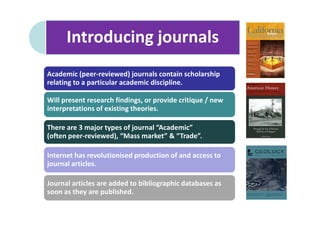
Introducing journals
Academic (peer-reviewed) journals contain scholarship
relating to a particular academic discipline.

Will present research findings, or provide critique / new
interpretations of existing theories.

There are 3 major types of journal “Academic”
(often peer-reviewed), “Mass market” & “Trade”.

Internet has revolutionised production of and access to
journal articles.

Journal articles are added to bibliographic databases as
soon as they are published.
Article search

•   We subscribe to over 41,000
    individual journal titles

•   Pay close attention to citation detail
    before accessing: All elements are
    important, but the JOURNAL TITLE is
    key to locating an individual article:
    Cuenda, Ana and Angel R. Nebreda.
    2009. "p38[delta] and PKD1: Kinase
    Switches for Insulin Secretion." Cell
    136(2):209-210.

•   Use the A-Z listing of e-journal titles
    to locate the article: Follow the links
    from www.mbs.ac.uk/library

                                http://www.mbs.ac.uk/library
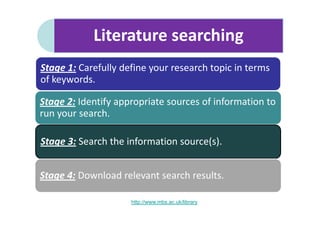
Literature searching
Stage 1: Carefully define your research topic in terms
of keywords.

Stage 2: Identify appropriate sources of information to
run your search.

Stage 3: Search the information source(s).


Stage 4: Download relevant search results.

                     http://www.mbs.ac.uk/library
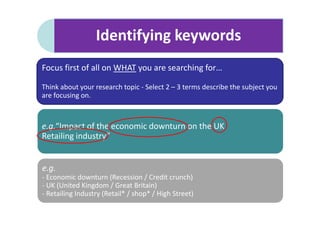
Identifying keywords
Focus first of all on WHAT you are searching for…

Think about your research topic - Select 2 – 3 terms describe the subject you
are focusing on.


e.g.“Impact of the economic downturn on the UK
Retailing industry”


e.g.
- Economic downturn (Recession / Credit crunch)
- UK (United Kingdom / Great Britain)
- Retailing Industry (Retail* / shop* / High Street)
Choosing an information source

•   Subject specialist databases
•   JSTOR
•   Library Search


•   Our bibliographic databases provide access to high quality (peer-review) articles from
    leading business & management periodicals.
•   They also provide you with advanced searching facilities which help you to retrieve more
    relevant articles.
•   Search engines such as Google Scholar will also return articles that we do not have access
    to and /or direct you to wrong login point when off-campus.


                                  http://www.mbs.ac.uk/library
Search techniques
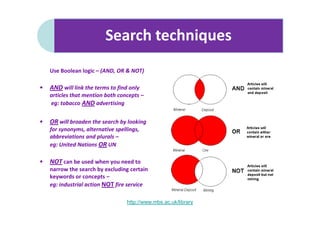
    Use Boolean logic – (AND, OR & NOT)

•   AND will link the terms to find only
    articles that mention both concepts –
    eg: tobacco AND advertising


•   OR will broaden the search by looking
    for synonyms, alternative spellings,
    abbreviations and plurals –
    eg: United Nations OR UN

•   NOT can be used when you need to
    narrow the search by excluding certain
    keywords or concepts –
    eg: industrial action NOT fire service

                                   http://www.mbs.ac.uk/library
Search techniques
Adding limiters to the search will reduce the number of results
received, and also improve the relevance of those returned.
Restrict your text search to scan journal abstracts rather than
full text.

Set date parameters for search e.g. 1/1/2007 – 31/10/2008.

Restrict search to certain publication types (e.g. academic
journals) or to specific titles.
Use subject specific limiters such as the “company” field in
B&M databases.
                       http://www.mbs.ac.uk/library

E journals march 2011 john rylandsx

  • 1.
    Finding electronic journal articles John Hynes– MBS Library Service Tel: 0161 275 6501 Email: john.hynes@manchester.ac.uk http://www.mbs.ac.uk/library
  • 2.
    Introduction Introduction to journals– JRUL journals Download of a specific journal article Introduction to literature searching (4 stages) Bibliographic databases – Which should I use? Bibliographic databases – How to search http://www.mbs.ac.uk/library
  • 3.
    Introducing journals Academic (peer-reviewed)journals contain scholarship relating to a particular academic discipline. Will present research findings, or provide critique / new interpretations of existing theories. There are 3 major types of journal “Academic” (often peer-reviewed), “Mass market” & “Trade”. Internet has revolutionised production of and access to journal articles. Journal articles are added to bibliographic databases as soon as they are published.
  • 4.
    Article search • We subscribe to over 41,000 individual journal titles • Pay close attention to citation detail before accessing: All elements are important, but the JOURNAL TITLE is key to locating an individual article: Cuenda, Ana and Angel R. Nebreda. 2009. "p38[delta] and PKD1: Kinase Switches for Insulin Secretion." Cell 136(2):209-210. • Use the A-Z listing of e-journal titles to locate the article: Follow the links from www.mbs.ac.uk/library http://www.mbs.ac.uk/library
  • 5.
    Literature searching Stage 1:Carefully define your research topic in terms of keywords. Stage 2: Identify appropriate sources of information to run your search. Stage 3: Search the information source(s). Stage 4: Download relevant search results. http://www.mbs.ac.uk/library
  • 6.
    Identifying keywords Focus firstof all on WHAT you are searching for… Think about your research topic - Select 2 – 3 terms describe the subject you are focusing on. e.g.“Impact of the economic downturn on the UK Retailing industry” e.g. - Economic downturn (Recession / Credit crunch) - UK (United Kingdom / Great Britain) - Retailing Industry (Retail* / shop* / High Street)
  • 7.
    Choosing an informationsource • Subject specialist databases • JSTOR • Library Search • Our bibliographic databases provide access to high quality (peer-review) articles from leading business & management periodicals. • They also provide you with advanced searching facilities which help you to retrieve more relevant articles. • Search engines such as Google Scholar will also return articles that we do not have access to and /or direct you to wrong login point when off-campus. http://www.mbs.ac.uk/library
  • 8.
    Search techniques Use Boolean logic – (AND, OR & NOT) • AND will link the terms to find only articles that mention both concepts – eg: tobacco AND advertising • OR will broaden the search by looking for synonyms, alternative spellings, abbreviations and plurals – eg: United Nations OR UN • NOT can be used when you need to narrow the search by excluding certain keywords or concepts – eg: industrial action NOT fire service http://www.mbs.ac.uk/library
  • 9.
    Search techniques Adding limitersto the search will reduce the number of results received, and also improve the relevance of those returned. Restrict your text search to scan journal abstracts rather than full text. Set date parameters for search e.g. 1/1/2007 – 31/10/2008. Restrict search to certain publication types (e.g. academic journals) or to specific titles. Use subject specific limiters such as the “company” field in B&M databases. http://www.mbs.ac.uk/library