ProQuest
Database
Overview
ProQuest is a research database covering social
issues, business, health, science, economics,
current events and more.
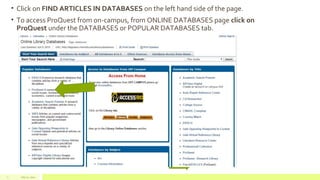
• Click on FIND ARTICLES IN DATABASES on the left hand side of the page.
• To access ProQuest from on-campus, from ONLINE DATABASES page click on
ProQuest under the DATABASES or POPULAR DATABASES tab.
July 22, 20122
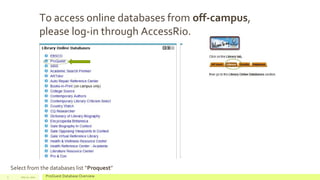
To access online databases from off-campus,
please log-in through AccessRio.
July 22, 2012 ProQuest Database Overview3
Select from the databases list “Proquest”
Use AND, OR, NOT
Use AND to narrow down a topic. Use OR to broaden a topic. Use NOT to eliminate a information not wanted.
To search for a phrase use quotation marks (""). Example “ The Great Depression”
Use the * character instead of spelling the entire word. Example farm* = farm, farming, farms, farmed
etc.
More search tips
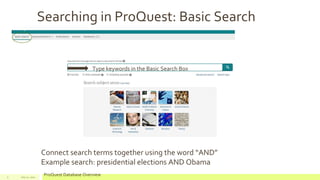
Searching in ProQuest: Basic Search
July 22, 2012
ProQuest Database Overview5
Type keywords in the Basic Search Box
Connect search terms together using the word “AND”
Example search: presidential elections AND Obama
July 22, 2012 ProQuest Database Overview6
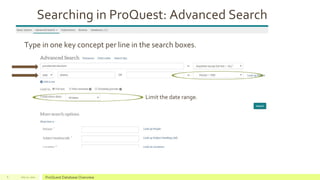
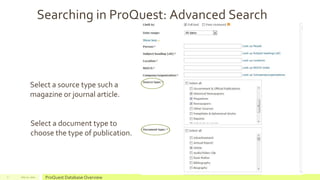
Searching in ProQuest: Advanced Search
Type in one key concept per line in the search boxes.
Limit the date range.
July 22, 2012 ProQuest Database Overview7
Searching in ProQuest: Advanced Search
Select a source type such a
magazine or journal article.
Select a document type to
choose the type of publication.
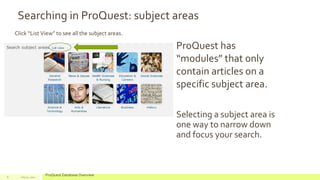
ProQuest has
“modules” that only
contain articles on a
specific subject area.
Selecting a subject area is
one way to narrow down
and focus your search.
July 22, 2012
ProQuest Database Overview8
Searching in ProQuest: subject areas
Click “List View” to see all the subject areas.
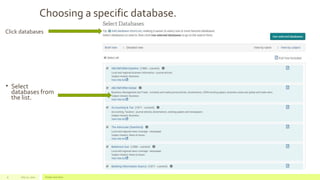
Choosing a specific database.
• Select
databases from
the list.
July 22, 2012 Footer text here9
Click databases
Looking for a specific publication, such as The NY Times.
• Select
“publications” at the
top of the screen.
• Type in “New York
Times”
• Select “New York
Times” from the list.
July 22, 2012 ProQuest Database Overview10
Searching by Author's Name
July 22, 2012 Footer text here11
Author’s Name
AUTHOR or AU can also be used
Finding Scholarly Journal Articles
• Scholarly Journals have
in-depth articles written
on a specific subject and
usually contain research.
• Click the “Peer reviewed”
box to find only scholarly
journals.
July 22, 2012
ProQuest Database Overview12
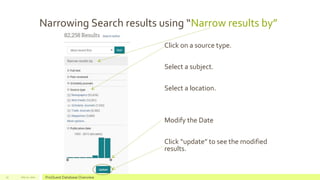
Narrowing Search results using “Narrow results by”
July 22, 2012 ProQuest Database Overview13
Click on a source type.
Select a subject.
Select a location.
Modify the Date
Click “update” to see the modified
results.
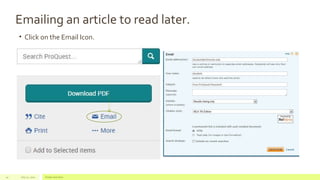
Emailing an article to read later.
• Click on the Email Icon.
July 22, 2012 Footer text here14
Click on “Cite” to generate a citation.
July 22, 2012 Footer text here15

2015 pro quest’s new database platform

  • 1.
    ProQuest Database Overview ProQuest is aresearch database covering social issues, business, health, science, economics, current events and more.
  • 2.
    • Click onFIND ARTICLES IN DATABASES on the left hand side of the page. • To access ProQuest from on-campus, from ONLINE DATABASES page click on ProQuest under the DATABASES or POPULAR DATABASES tab. July 22, 20122
  • 3.
    To access onlinedatabases from off-campus, please log-in through AccessRio. July 22, 2012 ProQuest Database Overview3 Select from the databases list “Proquest”
  • 4.
    Use AND, OR,NOT Use AND to narrow down a topic. Use OR to broaden a topic. Use NOT to eliminate a information not wanted. To search for a phrase use quotation marks (""). Example “ The Great Depression” Use the * character instead of spelling the entire word. Example farm* = farm, farming, farms, farmed etc. More search tips
  • 5.
    Searching in ProQuest:Basic Search July 22, 2012 ProQuest Database Overview5 Type keywords in the Basic Search Box Connect search terms together using the word “AND” Example search: presidential elections AND Obama
  • 6.
    July 22, 2012ProQuest Database Overview6 Searching in ProQuest: Advanced Search Type in one key concept per line in the search boxes. Limit the date range.
  • 7.
    July 22, 2012ProQuest Database Overview7 Searching in ProQuest: Advanced Search Select a source type such a magazine or journal article. Select a document type to choose the type of publication.
  • 8.
    ProQuest has “modules” thatonly contain articles on a specific subject area. Selecting a subject area is one way to narrow down and focus your search. July 22, 2012 ProQuest Database Overview8 Searching in ProQuest: subject areas Click “List View” to see all the subject areas.
  • 9.
    Choosing a specificdatabase. • Select databases from the list. July 22, 2012 Footer text here9 Click databases
  • 10.
    Looking for aspecific publication, such as The NY Times. • Select “publications” at the top of the screen. • Type in “New York Times” • Select “New York Times” from the list. July 22, 2012 ProQuest Database Overview10
  • 11.
    Searching by Author'sName July 22, 2012 Footer text here11 Author’s Name AUTHOR or AU can also be used
  • 12.
    Finding Scholarly JournalArticles • Scholarly Journals have in-depth articles written on a specific subject and usually contain research. • Click the “Peer reviewed” box to find only scholarly journals. July 22, 2012 ProQuest Database Overview12
  • 13.
    Narrowing Search resultsusing “Narrow results by” July 22, 2012 ProQuest Database Overview13 Click on a source type. Select a subject. Select a location. Modify the Date Click “update” to see the modified results.
  • 14.
    Emailing an articleto read later. • Click on the Email Icon. July 22, 2012 Footer text here14
  • 15.
    Click on “Cite”to generate a citation. July 22, 2012 Footer text here15