REST SECURITY IN MULE
We often required to secure our web services specially those are accessed by the
external world.
What about securing a RESTful web services ???
We can easily secure our REST service using OAUTH 2.0
For implementing OAUTH 2.0 in our REST web service we require 3 steps
:-
• Authorisation to obtain a secret code
• Use that secret code to obtain an access_token
• Use the access_token to validate and access the web service
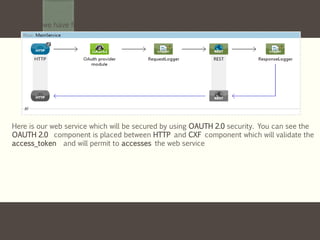
Let us we have following Mule flow:-
Here is our web service which will be secured by using OAUTH 2.0 security. You can see the
OAUTH 2.0 component is placed between HTTP and CXF component which will validate the
access_token and will permit to accesses the web service
The corresponding Mule flow will be as follows:-
Here is you can see OAUTH 2.0 is validating the access_token coming from HTTP
Here you can see we have configured the Spring security with username and password
to obtain a secret code. Also in oauth2 provider config we configured client id and
client secret
Authorization to obtain a secret code
Now we will go with first step :
Step 1 :- Authorisation to obtain a secret code
We will put the following url in browser :-
http://localhost:8084/tweetbook/api/authorize?response_type=code&client_id=e7aaf348-f08a-11e1-9237-
96c6dd6a022f&scope=READ_BOOKSHELF&redirect_uri=http://localhost:8082/getData/insert
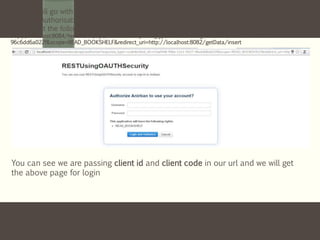
You can see we are passing client id and client code in our url and we will get
the above page for login
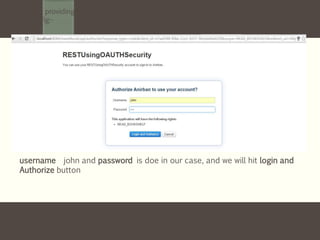
We will be providing the username and password configure in our Spring security in
Mule Config:-
username john and password is doe in our case, and we will hit login and
Authorize button
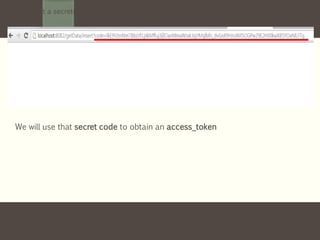
We will get a secrete code in browser url as following :-
We will use that secret code to obtain an access_token
Use that secret code to obtain an access_token
Now we will go with second step :
Step 2 :- Use that secret code to obtain an access_token
We need to include the secret code in our url as follows :-
http://localhost:8084/tweetbook/api/token?grant_type=AUTHORIZATION_CODE&client_id=e7aaf348-f08a-11e1-9237-
96c6dd6a022f&client_secret=ee9acaa2-f08a-11e1-bc20-
96c6dd6a022f&code=lkE9VJmNmTBbzVl1plkMffuj3jlIOavtWeaWsxk3gVMglbfo_dvGnX9HJoXMSOGPw29E2H00kwX85YOxNl
LFTg&redirect_uri=http://localhost:8082/getData/insert
We will use that secret code to obtain an access_token.
And now you can see we got the access_token in the browser.
And this access_token will be using to access our web service
Use the access_token to validate and access the web service
Now we will go with third step :
Step 3 :- Use the access_token to validate and access the web service
We need the access_token to be pass as a header when accessing web service as follows
You can see we are using REST Client for testing our web service and
passing the access_token in the header
Now, you can see that if we hit the web service in the REST Client with the an access_token
in the header, the secured service is providing the response
In my next slide I will bring some other techniques in Mule implementation .
Hope you have enjoyed this simpler version.
Keep sharing your knowledge and let our Mule community grow 

Rest security in mule

  • 1.
  • 2.
    We often requiredto secure our web services specially those are accessed by the external world. What about securing a RESTful web services ???
  • 3.
    We can easilysecure our REST service using OAUTH 2.0
  • 4.
    For implementing OAUTH2.0 in our REST web service we require 3 steps :- • Authorisation to obtain a secret code • Use that secret code to obtain an access_token • Use the access_token to validate and access the web service
  • 5.
    Let us wehave following Mule flow:- Here is our web service which will be secured by using OAUTH 2.0 security. You can see the OAUTH 2.0 component is placed between HTTP and CXF component which will validate the access_token and will permit to accesses the web service
  • 6.
    The corresponding Muleflow will be as follows:- Here is you can see OAUTH 2.0 is validating the access_token coming from HTTP
  • 7.
    Here you cansee we have configured the Spring security with username and password to obtain a secret code. Also in oauth2 provider config we configured client id and client secret
  • 8.
  • 9.
    Now we willgo with first step : Step 1 :- Authorisation to obtain a secret code We will put the following url in browser :- http://localhost:8084/tweetbook/api/authorize?response_type=code&client_id=e7aaf348-f08a-11e1-9237- 96c6dd6a022f&scope=READ_BOOKSHELF&redirect_uri=http://localhost:8082/getData/insert You can see we are passing client id and client code in our url and we will get the above page for login
  • 10.
    We will beproviding the username and password configure in our Spring security in Mule Config:- username john and password is doe in our case, and we will hit login and Authorize button
  • 11.
    We will geta secrete code in browser url as following :- We will use that secret code to obtain an access_token
  • 12.
    Use that secretcode to obtain an access_token
  • 13.
    Now we willgo with second step : Step 2 :- Use that secret code to obtain an access_token We need to include the secret code in our url as follows :- http://localhost:8084/tweetbook/api/token?grant_type=AUTHORIZATION_CODE&client_id=e7aaf348-f08a-11e1-9237- 96c6dd6a022f&client_secret=ee9acaa2-f08a-11e1-bc20- 96c6dd6a022f&code=lkE9VJmNmTBbzVl1plkMffuj3jlIOavtWeaWsxk3gVMglbfo_dvGnX9HJoXMSOGPw29E2H00kwX85YOxNl LFTg&redirect_uri=http://localhost:8082/getData/insert We will use that secret code to obtain an access_token. And now you can see we got the access_token in the browser. And this access_token will be using to access our web service
  • 14.
    Use the access_tokento validate and access the web service
  • 15.
    Now we willgo with third step : Step 3 :- Use the access_token to validate and access the web service We need the access_token to be pass as a header when accessing web service as follows You can see we are using REST Client for testing our web service and passing the access_token in the header
  • 16.
    Now, you cansee that if we hit the web service in the REST Client with the an access_token in the header, the secured service is providing the response
  • 17.
    In my nextslide I will bring some other techniques in Mule implementation . Hope you have enjoyed this simpler version. Keep sharing your knowledge and let our Mule community grow 