Responsive Design
Is it for you?
Chris Clemente
Template Designer
Kevin Allen
Template Designer
Nabeel John
Template Designer
Today's Topics
• What is Responsive Design?
• What can and can’t Responsive Design do?
• Responsive vs. Mobile Friendly Design
What is Responsive Design?
The approach that suggests that design and
development should react to the user’s
behavior and environment based on screen
size, platform and orientation.
- Smashing Magazine
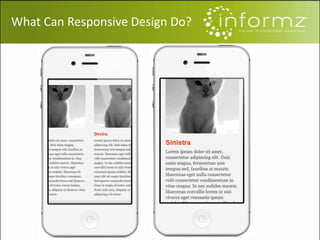
What Can Responsive Design Do?
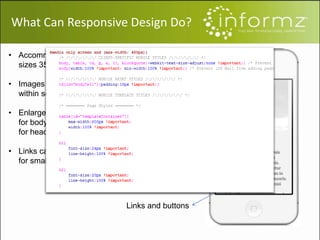
Screen size
Image resize
Headline and text
Links and buttons
• Accommodates for screen
sizes 350-400px wide
• Images are be scaled to fit
within screen
• Enlarge fonts to 12pt-14pt
for body content and 16pt
for headlines
• Links can turn into buttons
for smaller screens
What Can Responsive Design Do?
Limitations of Responsive Design
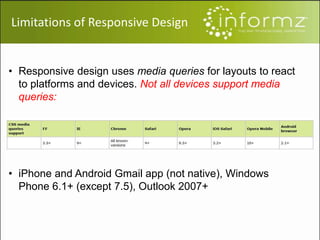
• Responsive design uses media queries for layouts to react
to platforms and devices. Not all devices support media
queries:
• iPhone and Android Gmail app (not native), Windows
Phone 6.1+ (except 7.5), Outlook 2007+
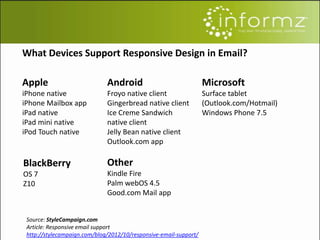
What Devices Support Responsive Design in Email?
Apple
iPhone native
iPhone Mailbox app
iPad native
iPad mini native
iPod Touch native
Android
Froyo native client
Gingerbread native client
Ice Creme Sandwich
native client
Jelly Bean native client
Outlook.com app
Microsoft
Surface tablet
(Outlook.com/Hotmail)
Windows Phone 7.5
BlackBerry
OS 7
Z10
Other
Kindle Fire
Palm webOS 4.5
Good.com Mail app
Source: StyleCampaign.com
Article: Responsive email support
http://stylecampaign.com/blog/2012/10/responsive-email-support/
Is Responsive Design the
Solution for You?
The answer is in your audience!
Decide for yourself by answering 3
questions:
1. What devices and browsers support responsive
design?
2. What is your audience reading their email with?
3. Test your audience to see if open rates and click
through rates are higher with responsive design
templates.
Responsive design will:
• Ensure mobile rendering will be legible
• Will enlarge the buttons in your email to a
manageable size
• Will display content one item at a time – crucial for
the small screen.
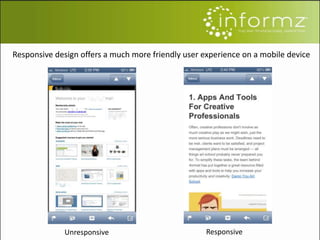
Unresponsive Responsive
Responsive design offers a much more friendly user experience on a mobile device
Know how your audience
reads their email! Take the time to
analyze your email metrics.
Informz collects this information for you
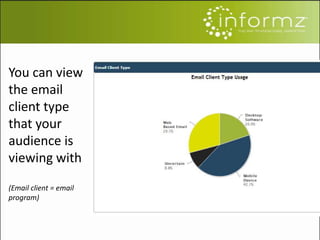
You can view
the email
client type
that your
audience is
viewing with
(Email client = email
program)
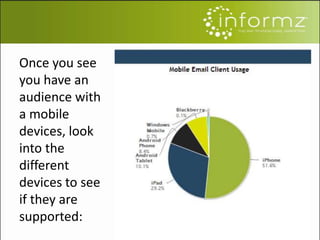
Once you see
you have an
audience with
a mobile
devices, look
into the
different
devices to see
if they are
supported:
Learn more about your audience…
• Conduct a test: send out two emails and compare
the results
• You should be able to discern whether a responsive
template works better than a non-responsive
template.
• Ultimately, trends are showing that more and more
people are reading their email on a mobile device. If
now is not the time for you to go responsive, the
near future most likely will be.
Mobile Usage… our own Report!
Each year, Informz analyzes our client’s email metrics to
set benchmarks and help associations see how their
email marketing programs compare to their peers.
In the most recent report, which is being released
tomorrow, we’ve found that mobile usage continues to
surpass desktop usage. 43% of our client’s members
are reading their emails on mobile devices as compared
to 37% reading on a desktop.
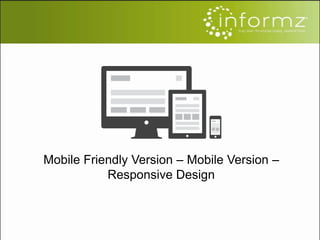
Mobile Friendly Version – Mobile Version –
Responsive Design
Mobile Friendly Version – Mobile Version –
Responsive Design
• Mobile Friendly Version
– Approach that accurately displays content on
multiple devices:
• Eg. Desktop & Mobile Devices
– Content appears smaller on phones and/or
mobile devices
– May not work perfectly on touchscreen
devices
• Text becomes too small to read
• Hard to click links
Mobile Friendly Version – Mobile Version –
Responsive Design
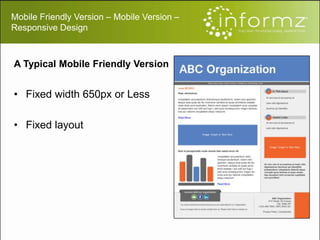
A Typical Mobile Friendly Version
• Fixed width 650px or Less
• Fixed layout
Mobile Friendly Version – Mobile Version –
Responsive Design
• Mobile Version
– Designed exclusively for mobile devices
– Displays content correctly on mobile devices
only
– Usually one column layout
– Would require a separate version for desktop
email clients
– Could require higher maintenance and
expense
Mobile Friendly Version – Mobile Version –
Responsive Design
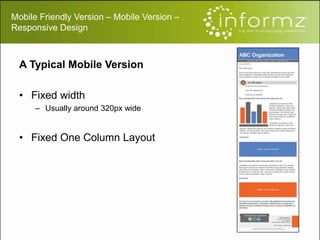
A Typical Mobile Version
• Fixed width
– Usually around 320px wide
• Fixed One Column Layout
Mobile Friendly Version – Mobile Version –
Responsive Design
• Responsive Design
– Also called multi screen design
– Responds to media screens
• Changes Layout based on screen resolution
– Designing for breakpoints
– Single template that works everywhere
• Offers significant savings over creating multiple
native templates
– HTML and CSS can be repurposed instead of having to
be rewritten, which saves considerable design time
Mobile Friendly Version – Mobile Version –
Responsive Design
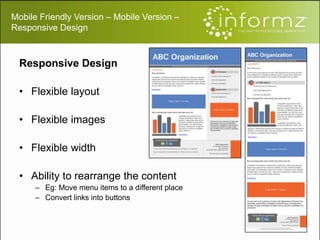
Responsive Design
• Flexible layout
• Flexible images
• Flexible width
• Ability to rearrange the content
– Eg: Move menu items to a different place
– Convert links into buttons
Questions?

Responsive Design Webinar

  • 1.
    Responsive Design Is itfor you? Chris Clemente Template Designer Kevin Allen Template Designer Nabeel John Template Designer
  • 2.
    Today's Topics • Whatis Responsive Design? • What can and can’t Responsive Design do? • Responsive vs. Mobile Friendly Design
  • 3.
    What is ResponsiveDesign? The approach that suggests that design and development should react to the user’s behavior and environment based on screen size, platform and orientation. - Smashing Magazine
  • 4.
  • 5.
    Screen size Image resize Headlineand text Links and buttons • Accommodates for screen sizes 350-400px wide • Images are be scaled to fit within screen • Enlarge fonts to 12pt-14pt for body content and 16pt for headlines • Links can turn into buttons for smaller screens What Can Responsive Design Do?
  • 6.
    Limitations of ResponsiveDesign • Responsive design uses media queries for layouts to react to platforms and devices. Not all devices support media queries: • iPhone and Android Gmail app (not native), Windows Phone 6.1+ (except 7.5), Outlook 2007+
  • 7.
    What Devices SupportResponsive Design in Email? Apple iPhone native iPhone Mailbox app iPad native iPad mini native iPod Touch native Android Froyo native client Gingerbread native client Ice Creme Sandwich native client Jelly Bean native client Outlook.com app Microsoft Surface tablet (Outlook.com/Hotmail) Windows Phone 7.5 BlackBerry OS 7 Z10 Other Kindle Fire Palm webOS 4.5 Good.com Mail app Source: StyleCampaign.com Article: Responsive email support http://stylecampaign.com/blog/2012/10/responsive-email-support/
  • 8.
    Is Responsive Designthe Solution for You? The answer is in your audience!
  • 9.
    Decide for yourselfby answering 3 questions: 1. What devices and browsers support responsive design? 2. What is your audience reading their email with? 3. Test your audience to see if open rates and click through rates are higher with responsive design templates.
  • 10.
    Responsive design will: •Ensure mobile rendering will be legible • Will enlarge the buttons in your email to a manageable size • Will display content one item at a time – crucial for the small screen.
  • 11.
    Unresponsive Responsive Responsive designoffers a much more friendly user experience on a mobile device
  • 12.
    Know how youraudience reads their email! Take the time to analyze your email metrics. Informz collects this information for you
  • 13.
    You can view theemail client type that your audience is viewing with (Email client = email program)
  • 14.
    Once you see youhave an audience with a mobile devices, look into the different devices to see if they are supported:
  • 15.
    Learn more aboutyour audience… • Conduct a test: send out two emails and compare the results • You should be able to discern whether a responsive template works better than a non-responsive template. • Ultimately, trends are showing that more and more people are reading their email on a mobile device. If now is not the time for you to go responsive, the near future most likely will be.
  • 16.
    Mobile Usage… ourown Report! Each year, Informz analyzes our client’s email metrics to set benchmarks and help associations see how their email marketing programs compare to their peers. In the most recent report, which is being released tomorrow, we’ve found that mobile usage continues to surpass desktop usage. 43% of our client’s members are reading their emails on mobile devices as compared to 37% reading on a desktop.
  • 17.
    Mobile Friendly Version– Mobile Version – Responsive Design
  • 18.
    Mobile Friendly Version– Mobile Version – Responsive Design • Mobile Friendly Version – Approach that accurately displays content on multiple devices: • Eg. Desktop & Mobile Devices – Content appears smaller on phones and/or mobile devices – May not work perfectly on touchscreen devices • Text becomes too small to read • Hard to click links
  • 19.
    Mobile Friendly Version– Mobile Version – Responsive Design A Typical Mobile Friendly Version • Fixed width 650px or Less • Fixed layout
  • 20.
    Mobile Friendly Version– Mobile Version – Responsive Design • Mobile Version – Designed exclusively for mobile devices – Displays content correctly on mobile devices only – Usually one column layout – Would require a separate version for desktop email clients – Could require higher maintenance and expense
  • 21.
    Mobile Friendly Version– Mobile Version – Responsive Design A Typical Mobile Version • Fixed width – Usually around 320px wide • Fixed One Column Layout
  • 22.
    Mobile Friendly Version– Mobile Version – Responsive Design • Responsive Design – Also called multi screen design – Responds to media screens • Changes Layout based on screen resolution – Designing for breakpoints – Single template that works everywhere • Offers significant savings over creating multiple native templates – HTML and CSS can be repurposed instead of having to be rewritten, which saves considerable design time
  • 23.
    Mobile Friendly Version– Mobile Version – Responsive Design Responsive Design • Flexible layout • Flexible images • Flexible width • Ability to rearrange the content – Eg: Move menu items to a different place – Convert links into buttons
  • 24.