Why Replication Is Not Enough 
to Keep Your Business Running
While you may be 
familiar with multiple 
replication products 
and vendors, don’t 
confuse the 
technology of data or 
server replication with 
Disaster Recovery.
Replication is not a disaster 
recovery solution nor does it 
provide business continuity. So 
what exactly is replication?
Replication is the process of 
copying data from one location 
to another over a SAN, LAN, 
or local WAN. 
Source: TechTarget
This provides you with multiple 
up-to-date copies of your data.
Look at replication as 
an aspect of disaster 
recovery and 
business continuity.
Although it is a key technology 
in order to implement a 
complete DR/BC plan, it needs 
to be combined with data 
deduplication, virtual servers, 
or even the cloud.
But let’s take a step back to really 
understand business continuity.
According to ESG Sr. 
Analyst Jason 
Buffington, “business 
continuity is ensuring 
that your IT and 
business processes 
continue, involving 
availability technologies 
as well as mitigation 
methods, etc.”
Ultimately, your entire IT 
infrastructure needs to be up 
and running in order to assure 
that your employees can 
continue working during any 
disaster or IT outage.
While you need to 
protect your data, 
just as importantly, 
you need to protect 
and keep your 
applications up.
Having survivable data does not 
equate to disaster recovery.
“Business continuity and 
disaster recovery is 
more about people and 
processes than it is 
about the data,” 
according to Buffington.
By combining appropriate 
planning, IT orchestration and 
instrumentation with a surviving 
copy of your data, you then 
have a real BC/DR plan.
For example: it’s typical for a 
vendor to be able to backup 
and replicate his or her virtual 
machines to another data 
center.
Many of these vendors are even 
willing to turn the servers back 
on in case something goes 
wrong.
However, unless all of the 
servers are all powered 
back up and in an exact 
order… 
Photo by Tim Cummins
It is still considered downtime. 
Photo by Jenn Vargas
Not only does the 
order in which 
servers are spun up 
important… 
Photo by GYLo
But making sure all 
the interconnected 
elements of your 
network (e.g. Active 
Directories, etc.) are 
also up and working 
is vital. 
Photo 
by 
CJ 
Isherwood
What you need to look for is not 
just the ability to bring up 
individual or multiple servers, but 
rather be able to virtualize your 
entire LAN.
The other aspect that is 
important to consider 
that may be forgotten 
around certain 
technology is that a 
proper Business 
Continuity program 
requires people and 
processes as well.
All these elements combined will 
form the basis for your company 
resiliency plan. 
Photo by Lauren Manning
So ask yourself, how 
resilient is your 
company? Do you 
have the right 
technology, the proper 
documentation, and 
executive 
sponsorship?
Watch the ESG video on hybrid 
cloud for data protection to learn 
more.
Find what your company’s resiliency 
score is with our 
“Disaster Recovery Maturity Framework” 
whitepaper.
The Axcient Solution 
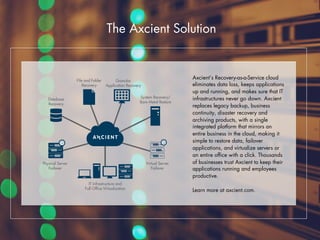
Axcient’s Recovery-as-a-Service cloud 
eliminates data loss, keeps applications 
up and running, and makes sure that IT 
infrastructures never go down. Axcient 
replaces legacy backup, business 
continuity, disaster recovery and 
archiving products, with a single 
integrated platform that mirrors an 
entire business in the cloud, making it 
simple to restore data, failover 
applications, and virtualize servers or 
an entire office with a click. Thousands 
of businesses trust Axcient to keep their 
applications running and employees 
productive. 
Learn more at axcient.com. 
r

Why Replication is Not Enough to Keep Your Business Running

  • 1.
    Why Replication IsNot Enough to Keep Your Business Running
  • 2.
    While you maybe familiar with multiple replication products and vendors, don’t confuse the technology of data or server replication with Disaster Recovery.
  • 3.
    Replication is nota disaster recovery solution nor does it provide business continuity. So what exactly is replication?
  • 4.
    Replication is theprocess of copying data from one location to another over a SAN, LAN, or local WAN. Source: TechTarget
  • 5.
    This provides youwith multiple up-to-date copies of your data.
  • 6.
    Look at replicationas an aspect of disaster recovery and business continuity.
  • 7.
    Although it isa key technology in order to implement a complete DR/BC plan, it needs to be combined with data deduplication, virtual servers, or even the cloud.
  • 8.
    But let’s takea step back to really understand business continuity.
  • 9.
    According to ESGSr. Analyst Jason Buffington, “business continuity is ensuring that your IT and business processes continue, involving availability technologies as well as mitigation methods, etc.”
  • 10.
    Ultimately, your entireIT infrastructure needs to be up and running in order to assure that your employees can continue working during any disaster or IT outage.
  • 11.
    While you needto protect your data, just as importantly, you need to protect and keep your applications up.
  • 12.
    Having survivable datadoes not equate to disaster recovery.
  • 13.
    “Business continuity and disaster recovery is more about people and processes than it is about the data,” according to Buffington.
  • 14.
    By combining appropriate planning, IT orchestration and instrumentation with a surviving copy of your data, you then have a real BC/DR plan.
  • 15.
    For example: it’stypical for a vendor to be able to backup and replicate his or her virtual machines to another data center.
  • 16.
    Many of thesevendors are even willing to turn the servers back on in case something goes wrong.
  • 17.
    However, unless allof the servers are all powered back up and in an exact order… Photo by Tim Cummins
  • 18.
    It is stillconsidered downtime. Photo by Jenn Vargas
  • 19.
    Not only doesthe order in which servers are spun up important… Photo by GYLo
  • 20.
    But making sureall the interconnected elements of your network (e.g. Active Directories, etc.) are also up and working is vital. Photo by CJ Isherwood
  • 21.
    What you needto look for is not just the ability to bring up individual or multiple servers, but rather be able to virtualize your entire LAN.
  • 22.
    The other aspectthat is important to consider that may be forgotten around certain technology is that a proper Business Continuity program requires people and processes as well.
  • 23.
    All these elementscombined will form the basis for your company resiliency plan. Photo by Lauren Manning
  • 24.
    So ask yourself,how resilient is your company? Do you have the right technology, the proper documentation, and executive sponsorship?
  • 25.
    Watch the ESGvideo on hybrid cloud for data protection to learn more.
  • 26.
    Find what yourcompany’s resiliency score is with our “Disaster Recovery Maturity Framework” whitepaper.
  • 27.
    The Axcient Solution Axcient’s Recovery-as-a-Service cloud eliminates data loss, keeps applications up and running, and makes sure that IT infrastructures never go down. Axcient replaces legacy backup, business continuity, disaster recovery and archiving products, with a single integrated platform that mirrors an entire business in the cloud, making it simple to restore data, failover applications, and virtualize servers or an entire office with a click. Thousands of businesses trust Axcient to keep their applications running and employees productive. Learn more at axcient.com. r