Replacements
In this module, we will discuss:-
1. What are Replacements?
2. What are the reasons for replacements?
3. How does replacement work?
4. How do you get the benefits from replacements ?
5. How can you check a replacement order on the seller panel?
6. How can you process a replacement order on the seller panel?
7. When will you get the payout of your replaced order?
8. How to raise a query for replacements?
What are Replacements?
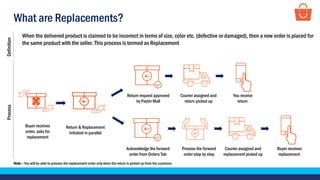
When the delivered product is claimed to be incorrect in terms of size, color etc. (defective or damaged), then a new order is placed for
the same product with the seller. This process is termed as Replacement
Buyer receives
order, asks for
replacement
Return request approved
by Paytm Mall
You receive
return
Courier assigned and
return picked up
Return & Replacement
initiated in parallel
Acknowledge the forward
order from Orders Tab
Process the forward
order step by step
Courier assigned and
replacement picked up
Buyer receives
replacement
ProcessDefinition
Note – You will be able to process the replacement order only when the return is picked up from the customer.
What are the reasons for returns?
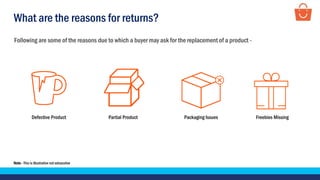
Following are some of the reasons due to which a buyer may ask for the replacement of a product -
Defective Product Partial Product Packaging Issues Freebies Missing
Note - This is illustrative not exhaustive
How does replacement work?
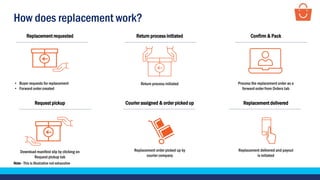
• Buyer requests for replacement
• Forward order created
Replacement requested
Return process initiated
Return process initiated Confirm & Pack
Process the replacement order as a
forward order from Orders tab
Courier assigned & order picked up
Replacement order picked up by
courier company
Replacement delivered
Replacement delivered and payout
is initiated
Request pickup
Download manifest slip by clicking on
Request pickup tab
Note - This is illustrative not exhaustive
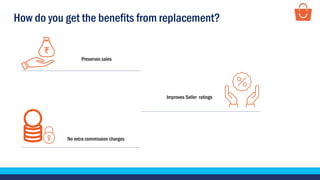
How do you get the benefits from replacement?
Improves Seller ratings
No extra commission charges
Preserves sales
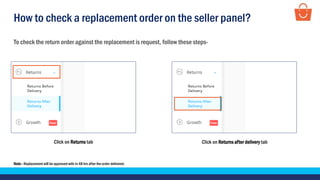
How to check a replacement order on the seller panel?
To check the return order against the replacement is request, follow these steps-
Note– Replacement will be approved with in 48 hrs after the order delivered.
Click on Returns tab Click on Returns after delivery tab
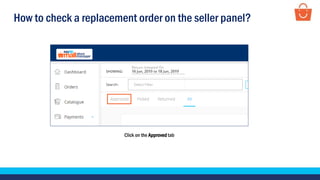
How to check a replacement order on the seller panel?
Click on the Approved tab
How to check a replacement order on the seller panel?
Here you can check your return orders against the replacement is requested
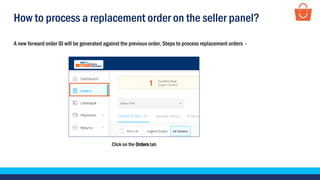
How to process a replacement order on the seller panel?
Click on the Orders tab
A new forward order ID will be generated against the previous order. Steps to process replacement orders -
How to process a replacement order on the seller panel?
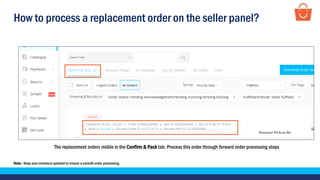
The replacement orders visible in the Confirm & Pack tab. Process this order through forward order processing steps
Note– Keep your inventory updated to ensure a smooth order processing.
How to process a replacement order on the seller panel?
Click on the Pack tab Click on the confirm button
How to process a replacement order on the seller panel?
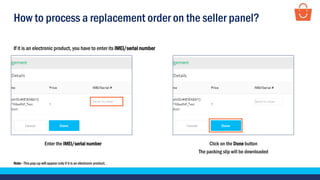
Enter the IMEI/serial number Click on the Done button
The packing slip will be downloaded
If it is an electronic product, you have to enter its IMEI/serial number
Note– This pop-up will appear only if it is an electronic product.
How to process a replacement order on the seller panel?
Click on the Request Pickup tab
Note– For Paytm Mall courier partner fulfilled sellers - orders will be dispatched and delivered from the assigned courier company to the buyer
For Self shipping - seller have to mark the status as Mark Shipped after shipping their orders from courier
Click on Request Pickup
When will you get the payout of your replaced order?
Case 1 – When a replacement is requested before the release of payout
Your Payout will be on hold until the
replaced order is not delivered
The Replacement order appears as a
new order in the Orders Tab, process the
order within timelines
Replaced order is shipped and
delivered to the buyer
Buyer requested replacement before
the release of payout
Payout initiated once the
replaced order is delivered
When will you get the payout of your replaced order?
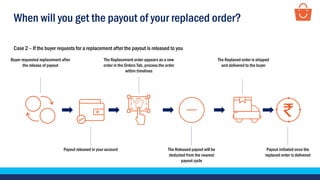
Case 2 – If the buyer requests for a replacement after the payout is released to you
The Replacement order appears as a new
order in the Orders Tab, process the order
within timelines
The Replaced order is shipped
and delivered to the buyer
Buyer requested replacement after
the release of payout
Payout initiated once the
replaced order is delivered
Payout released in your account The Released payout will be
deducted from the nearest
payout cycle
How to calculate the payout of your replaced order?
Let’s take an example of a product with having the selling price: Rs. 1000
Selling Price 1000
(-) Marketplace commission (12.43%) + GST 146.67
(-) Payment gateway fee (2.7%) + GST 31.86
(-) Logistics charges (500 gm) (Local) + GST 70.8
(-) TCS (1% on Base price) 7.51
Expected Payout 743.15
(-) Return logistics + GST (500 gm) (Local) 88.5
Subtotal 654.65
(-)Forward Logistics Charges (Replacement) (500 gm) (Local) + GST 70.8
Final Payout Rs.583.85
Note– The numbers are illustrative. Commissions and logistics vary across categories and zones respectively.
How to raise a query from the Support Tab?
For any query related to replacements, raise a query from the Support Tab -
Click on the Support tab
How to raise a query from the Support Tab?
Click on the Returns tab
How to raise a query from the Support Tab?
Click on Issue with returned order Click on Raise Return Dispute
How to raise a query from the Support Tab?
Fill all the mandatory details
How to raise a query from the Support Tab?
Click on Submit Ticket
Thankseveryone!
For any query, please raise a ticket using the Seller Helpdesk tab on your seller panel.

Replacement modules

  • 1.
    Replacements In this module,we will discuss:- 1. What are Replacements? 2. What are the reasons for replacements? 3. How does replacement work? 4. How do you get the benefits from replacements ? 5. How can you check a replacement order on the seller panel? 6. How can you process a replacement order on the seller panel? 7. When will you get the payout of your replaced order? 8. How to raise a query for replacements?
  • 2.
    What are Replacements? Whenthe delivered product is claimed to be incorrect in terms of size, color etc. (defective or damaged), then a new order is placed for the same product with the seller. This process is termed as Replacement Buyer receives order, asks for replacement Return request approved by Paytm Mall You receive return Courier assigned and return picked up Return & Replacement initiated in parallel Acknowledge the forward order from Orders Tab Process the forward order step by step Courier assigned and replacement picked up Buyer receives replacement ProcessDefinition Note – You will be able to process the replacement order only when the return is picked up from the customer.
  • 3.
    What are thereasons for returns? Following are some of the reasons due to which a buyer may ask for the replacement of a product - Defective Product Partial Product Packaging Issues Freebies Missing Note - This is illustrative not exhaustive
  • 4.
    How does replacementwork? • Buyer requests for replacement • Forward order created Replacement requested Return process initiated Return process initiated Confirm & Pack Process the replacement order as a forward order from Orders tab Courier assigned & order picked up Replacement order picked up by courier company Replacement delivered Replacement delivered and payout is initiated Request pickup Download manifest slip by clicking on Request pickup tab Note - This is illustrative not exhaustive
  • 5.
    How do youget the benefits from replacement? Improves Seller ratings No extra commission charges Preserves sales
  • 6.
    How to checka replacement order on the seller panel? To check the return order against the replacement is request, follow these steps- Note– Replacement will be approved with in 48 hrs after the order delivered. Click on Returns tab Click on Returns after delivery tab
  • 7.
    How to checka replacement order on the seller panel? Click on the Approved tab
  • 8.
    How to checka replacement order on the seller panel? Here you can check your return orders against the replacement is requested
  • 9.
    How to processa replacement order on the seller panel? Click on the Orders tab A new forward order ID will be generated against the previous order. Steps to process replacement orders -
  • 10.
    How to processa replacement order on the seller panel? The replacement orders visible in the Confirm & Pack tab. Process this order through forward order processing steps Note– Keep your inventory updated to ensure a smooth order processing.
  • 11.
    How to processa replacement order on the seller panel? Click on the Pack tab Click on the confirm button
  • 12.
    How to processa replacement order on the seller panel? Enter the IMEI/serial number Click on the Done button The packing slip will be downloaded If it is an electronic product, you have to enter its IMEI/serial number Note– This pop-up will appear only if it is an electronic product.
  • 13.
    How to processa replacement order on the seller panel? Click on the Request Pickup tab Note– For Paytm Mall courier partner fulfilled sellers - orders will be dispatched and delivered from the assigned courier company to the buyer For Self shipping - seller have to mark the status as Mark Shipped after shipping their orders from courier Click on Request Pickup
  • 14.
    When will youget the payout of your replaced order? Case 1 – When a replacement is requested before the release of payout Your Payout will be on hold until the replaced order is not delivered The Replacement order appears as a new order in the Orders Tab, process the order within timelines Replaced order is shipped and delivered to the buyer Buyer requested replacement before the release of payout Payout initiated once the replaced order is delivered
  • 15.
    When will youget the payout of your replaced order? Case 2 – If the buyer requests for a replacement after the payout is released to you The Replacement order appears as a new order in the Orders Tab, process the order within timelines The Replaced order is shipped and delivered to the buyer Buyer requested replacement after the release of payout Payout initiated once the replaced order is delivered Payout released in your account The Released payout will be deducted from the nearest payout cycle
  • 16.
    How to calculatethe payout of your replaced order? Let’s take an example of a product with having the selling price: Rs. 1000 Selling Price 1000 (-) Marketplace commission (12.43%) + GST 146.67 (-) Payment gateway fee (2.7%) + GST 31.86 (-) Logistics charges (500 gm) (Local) + GST 70.8 (-) TCS (1% on Base price) 7.51 Expected Payout 743.15 (-) Return logistics + GST (500 gm) (Local) 88.5 Subtotal 654.65 (-)Forward Logistics Charges (Replacement) (500 gm) (Local) + GST 70.8 Final Payout Rs.583.85 Note– The numbers are illustrative. Commissions and logistics vary across categories and zones respectively.
  • 17.
    How to raisea query from the Support Tab? For any query related to replacements, raise a query from the Support Tab - Click on the Support tab
  • 18.
    How to raisea query from the Support Tab? Click on the Returns tab
  • 19.
    How to raisea query from the Support Tab? Click on Issue with returned order Click on Raise Return Dispute
  • 20.
    How to raisea query from the Support Tab? Fill all the mandatory details
  • 21.
    How to raisea query from the Support Tab? Click on Submit Ticket
  • 22.
    Thankseveryone! For any query,please raise a ticket using the Seller Helpdesk tab on your seller panel.