Building Larger
                      Applications with IBM
                            Worklight
                               Andrew Ferrier
                          andrew.ferrier@uk.ibm.com


Monday, 25 March 13                                   1
Agenda
                      • Recap - Web, Mobile, and Worklight
                      • Development Time
                        • Toolkits and Frameworks
                        • Structuring Code
                      • RESTful Services and Worklight Adapters
                      • Lifecycle - Library Systems, Builds / Testing /
                          Deployment

                      •   Other Tips - Client-side, Server-side, and
                          Updating
Monday, 25 March 13                                                       2
Recap - How Has The
                         Web Changed?


Monday, 25 March 13                         3
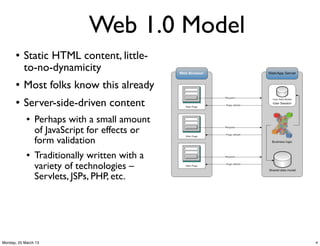
Web 1.0 Model
       l   Static HTML content, little-
            to-no-dynamicity
       l   Most folks know this already
       l   Server-side-driven content
            l   Perhaps with a small amount
                 of JavaScript for effects or
                 form validation
            l   Traditionally written with a
                 variety of technologies –
                 Servlets, JSPs, PHP, etc.


Monday, 25 March 13                             4
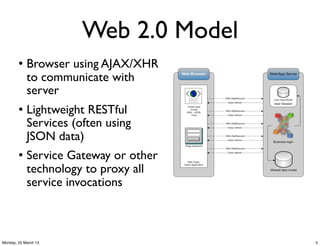
Web 2.0 Model
        l   Browser using AJAX/XHR
             to communicate with
             server
        l   Lightweight RESTful
             Services (often using
             JSON data)
        l   Service Gateway or other
             technology to proxy all
             service invocations


Monday, 25 March 13                     5
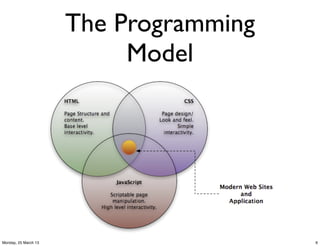
The Programming
                           Model


Monday, 25 March 13                     6
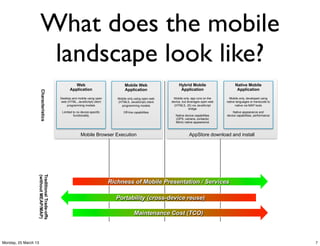
What does the mobile
                       landscape look like?
                                                    Web                             Mobile Web                   Hybrid Mobile                     Native Mobile
                                                 Application                        Application                   Application                       Application
                      Characteristics


                                           Desktop and mobile using open       Mobile only using open web    Mobile only, app runs on the      Mobile only, developed using
                                           web (HTML, JavaScript) client       (HTML5, JavaScript) client   device, but leverages open web   native languages or transcode to
                                               programming models                programming models           (HTML5, JS) via JavaScript           native via MAP tools
                                                                                                                          bridge
                                            Limited to no device-specific          Off-line capabilities                                         Native appearance and
                                                    functionality                                              Native device capabilities    device capabilities, performance
                                                                                                               (GPS, camera, contacts)
                                                                                                               Mimic native appearance


                                                          Mobile Browser Execution                                       AppStore download and install
                  Traditional Trade-offs
                  (without MEAP/MAP)


                                                                            Richness of Mobile Presentation / Services

                                                                              Portability (cross-device reuse)

                                                                                           Maintenance Cost (TCO)


Monday, 25 March 13                                                                                                                                                             7
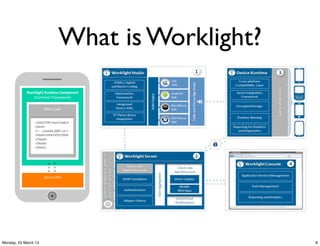
What is Worklight?
            Worklight*Run.me*Component
                                     *
               (Common&Framework) &

                      Web&Code&


                <!DOCTYPE&html&PUBLIC&
                <html>&
                <!&A&A&created&2003A12A1&
                <head><Gtle>XYZ</Gtle&
                </head>&
                </body>&
                </html>&


                      Device&APIs
                                &


Monday, 25 March 13                                  8
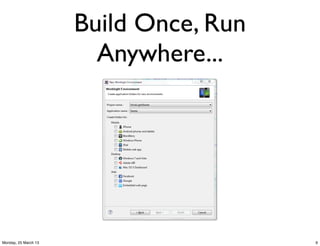
Build Once, Run
                        Anywhere...


Monday, 25 March 13                     9
Development Time


Monday, 25 March 13                      10
Toolkits vs.
                                Frameworks

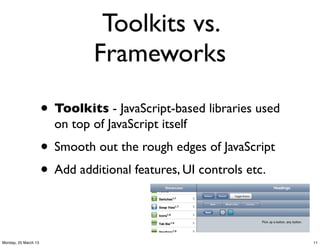
                      • Toolkits - JavaScript-based libraries used
                        on top of JavaScript itself
                      • Smooth out the rough edges of JavaScript
                      • Add additional features, UI controls etc.

Monday, 25 March 13                                                  11
Toolkits vs.
                               Frameworks

                      • Frameworks - used on top of toolkits
                      • Structure applications
                      • Provide large-application functionality


Monday, 25 March 13                                               12
Toolkit Options

                      • The largest players in the market are


                      • Generally, IBM ‘prefers’ Dojo

Monday, 25 March 13                                             13
Why Dojo?
                      • Enterprise-grade toolkit and feature set
                      • Stronger support for structuring large
                        applications

                        • e.g. Class system (dojo/declare)
                      • Better focus on internationalization,
                        accessibility, etc.
                      • But jQuery is a supported choice too for
                        Worklight
Monday, 25 March 13                                                14
Do we need a
                               framework?
                      • Coding without JS toolkit in 2013 is like
                        entering the program in binary
                      • You can code without a framework, but
                        you lose:
                       • Endpoint management (stubbing)
                       • State / session management
                       • (other application-level stuff)
Monday, 25 March 13                                                 15
Generally use views
                          for Mobile...
                      • Rather than multiple .html pages, have
                        one
                      • Less page startup pain for mobile web
                      • Dynamically insert views (HTML) into
                        DOM
                      • Dojo Mobile has this concept built in -
                        dojox.mobile.view
                      • Reuse this concept for Hybrid too
Monday, 25 March 13                                               16
Framework Options
                      • For Dojo:
                       • dojox/app
                       • issw.mobile/issw.pocMobile
                       • Your own custom framework
                         • Not as bad an idea as it sounds!
                      • For jQuery:
                       • mustache, RequireJS, Knockout JS,
                          Backbone, etc...
Monday, 25 March 13                                           17
dojox/app
                      • Can define “page controllers” for different
                        views in the application
                      • Manages loading of views and associated
                        page controllers via configuration
                      • Also allows for declarative MVC
                        framework where needed (working with
                        dojox/mvc)
                      • No endpoint management, etc...
Monday, 25 March 13                                                  18
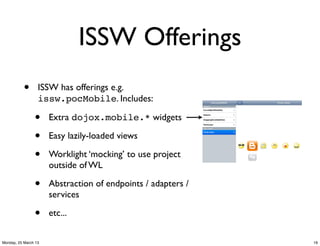
ISSW Offerings
           •      ISSW has offerings e.g.
                  issw.pocMobile. Includes:

                •     Extra dojox.mobile.* widgets

                •     Easy lazily-loaded views

                •     Worklight ‘mocking’ to use project
                      outside of WL

                •     Abstraction of endpoints / adapters /
                      services

                •     etc...


Monday, 25 March 13                                           19
Structuring Code
                      • Whatever framework you use, follow code
                        structuring practices:
                       • 1:1 mapping between View (‘page’) and
                          programmatic controller class for that
                          page
                       • Dynamically load views into the DOM
                          on-demand to avoid overloading it


Monday, 25 March 13                                                20
RESTful Services and
                         WL Adapters


Monday, 25 March 13                          21
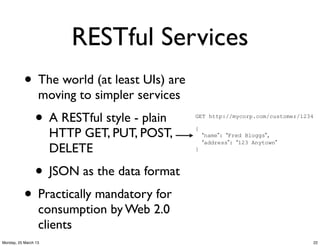
RESTful Services
           • The world (at least UIs) are
                  moving to simpler services
                •     A RESTful style - plain   GET http://mycorp.com/customer/1234


                      HTTP GET, PUT, POST,      {
                                                    “name”: “Fred Bloggs”,
                                                    “address”: “123 Anytown”
                      DELETE                    }


                • JSON as the data format
           • Practically mandatory for
                  consumption by Web 2.0
                  clients
Monday, 25 March 13                                                               22
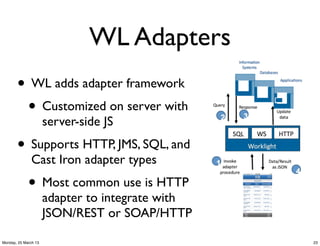
WL Adapters
       • WL adds adapter framework
        • Customized on server with
                      server-side JS
       • Supports HTTP, JMS, SQL, and
              Cast Iron adapter types
             • Most common use is HTTP
                      adapter to integrate with
                      JSON/REST or SOAP/HTTP

Monday, 25 March 13                               23
WL Adapters - REST &
                        HTTP
                      • You could use RESTful services directly
                        from WL container with conventional
                        XHRs, but you lose:
                        • The ability to use the WL server as a
                          “choke point”
                        • WL’s authentication mechanism for
                          services
                        • WL Logging/Auditing
Monday, 25 March 13                                               24
WL HTTP Adapter and
                       REST
                      • Even for services already exposed over
                        REST, we would re-expose them using the
                        WL HTTP Adapter.
                        • This is comparatively straightforward to
                          do.
                      • You can also use SOAP services from WL
                       • Abilities are limited at the moment so for
                          more sophisticated scenarios, consider an
                          ESB.
Monday, 25 March 13                                                   25
Lifecycle


Monday, 25 March 13               26
Library Systems

                      • WL can work with most version control
                        systems that integrate with Eclipse
                      • Common choices:
                       • Rational Team Concert
                       • Git
                       • Subversion
Monday, 25 March 13                                             27
Library Systems 2

          • There are files that must
                 be excluded as they are
                 part of WL generated
                 resources, see here:
                •     http://pic.dhe.ibm.com/infocenter/wrklight/v5r0m5/
                      index.jsp?topic=%2Fcom.ibm.worklight.help.doc
                      %2Fdevref%2Fr_integrating_with_source_contro.html


Monday, 25 March 13                                                        28
Building
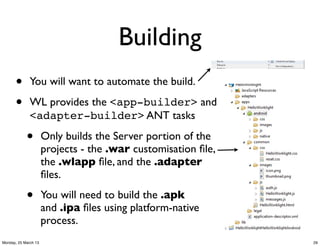
      •       You will want to automate the build.

      •       WL provides the <app-builder> and
              <adapter-builder> ANT tasks

            •         Only builds the Server portion of the
                      projects - the .war customisation file,
                      the .wlapp file, and the .adapter
                      files.

            •         You will need to build the .apk
                      and .ipa files using platform-native
                      process.
Monday, 25 March 13                                            29
Building
                      • During build, externalise certain things:
                       • worklightServerRootUrl in
                          application-descriptor.xml

                        •server/conf/
                          worklight.properties

                        • maxConcurrentConnectionsPerN
                          ode for adapters


Monday, 25 March 13                                                 30
Deploying

                      • Deploy the .war using relevant application
                        server method
                      • Deploy the .wlapp and .adapter server-
                        side portions of the application using
                        <app-deployer> and <adapter-
                        deployer> ANT tasks.


Monday, 25 March 13                                                  31
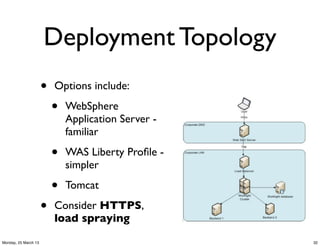
Deployment Topology
                      •   Options include:

                          •   WebSphere
                              Application Server -
                              familiar

                          •   WAS Liberty Profile -
                              simpler

                          •   Tomcat

                      •   Consider HTTPS,
                          load spraying
Monday, 25 March 13                                  32
Deploying to Phones
                      • You still need to get the native application
                        (.ipa, .apk, etc.) onto your user’s phones.
                        • Testing lifecycle: AppCenter - comes
                          with WL server editions
                        • B2C: public App Stores (Apple App
                          Store, Google Play Store)
                        • B2E: Tivoli Endpoint Manager or similar
Monday, 25 March 13                                                    33
Testing

                      • Typically you’ll want to test:
                       • Manual UI on physical phones
                         • Coverage across devices
                       • Automated UI - mocking framework
                         and automated test tool (e.g. Selenium)
                       • Adapters - load / performance /
                         functional tests - just HTTP

Monday, 25 March 13                                                34
Other Tips


Monday, 25 March 13                35
Client-side
                      • Don’t optimize for size of the client like
                        you would do for Mobile Web
                      • Nevertheless, there is still a browser
                        control underneath

                      • Use WL.Logger.{debug,error} API,
                        logging in development environment is
                        customizable, & log the username on errors


Monday, 25 March 13                                                  36
Client-side

                      • Understand handling errors on client-side,
                         in particular adapter invocations:
                        • http://www.ibm.com/developerworks/websphere/techjournal/1212_paris/
                            1212_paris.html?ca=drs-


                      • Use connectOnStartup:          false,
                        with WL.Client.Connect() after
                        startup - gives more startup control
                      • Write as little native code as possible
Monday, 25 March 13                                                                             37
Server-side

                      • Again, understand how to handle errors
                        from adapter invocations (same article).

                      • Again, use WL.Logger API - has various
                        levels of logging, can be configured on
                        server. Log the username on errors.


Monday, 25 March 13                                                38
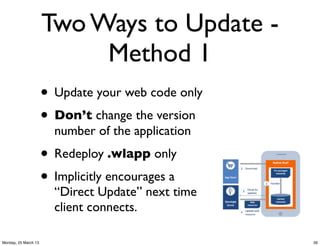
Two Ways to Update -
                           Method 1
                      • Update your web code only
                      • Don’t change the version
                        number of the application
                      • Redeploy .wlapp only
                      • Implicitly encourages a
                        “Direct Update” next time
                        client connects.

Monday, 25 March 13                                 39
Two Ways to Update -
                           Method 2
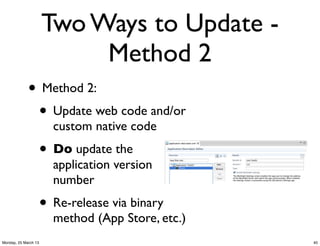
             • Method 2:
              • Update web code and/or
                        custom native code
                      • Do update the
                        application version
                        number
                      • Re-release via binary
                        method (App Store, etc.)
Monday, 25 March 13                                40
Updating Worklight

                      • Re-release an app using method 2
                       • Gets new Device Runtime onto end-
                          users’ phones
                      • But end-users can continue using old app;
                        wire protocol is backward-compatible


Monday, 25 March 13                                                 41
Summary
                      • Development Time
                        • Toolkits and Frameworks
                        • Structuring Code
                      • RESTful Services and Worklight Adapters
                      • Build Time - Library Systems, Builds / Testing /
                          Deployment

                      •   Other Tips


Monday, 25 March 13                                                        42

WebSphere User Group UK: Larger Applications with Worklight

  • 1.
    Building Larger Applications with IBM Worklight Andrew Ferrier andrew.ferrier@uk.ibm.com Monday, 25 March 13 1
  • 2.
    Agenda • Recap - Web, Mobile, and Worklight • Development Time • Toolkits and Frameworks • Structuring Code • RESTful Services and Worklight Adapters • Lifecycle - Library Systems, Builds / Testing / Deployment • Other Tips - Client-side, Server-side, and Updating Monday, 25 March 13 2
  • 3.
    Recap - HowHas The Web Changed? Monday, 25 March 13 3
  • 4.
    Web 1.0 Model l Static HTML content, little- to-no-dynamicity l Most folks know this already l Server-side-driven content l Perhaps with a small amount of JavaScript for effects or form validation l Traditionally written with a variety of technologies – Servlets, JSPs, PHP, etc. Monday, 25 March 13 4
  • 5.
    Web 2.0 Model l Browser using AJAX/XHR to communicate with server l Lightweight RESTful Services (often using JSON data) l Service Gateway or other technology to proxy all service invocations Monday, 25 March 13 5
  • 6.
    The Programming Model Monday, 25 March 13 6
  • 7.
    What does themobile landscape look like? Web Mobile Web Hybrid Mobile Native Mobile Application Application Application Application Characteristics Desktop and mobile using open Mobile only using open web Mobile only, app runs on the Mobile only, developed using web (HTML, JavaScript) client (HTML5, JavaScript) client device, but leverages open web native languages or transcode to programming models programming models (HTML5, JS) via JavaScript native via MAP tools bridge Limited to no device-specific Off-line capabilities Native appearance and functionality Native device capabilities device capabilities, performance (GPS, camera, contacts) Mimic native appearance Mobile Browser Execution AppStore download and install Traditional Trade-offs (without MEAP/MAP) Richness of Mobile Presentation / Services Portability (cross-device reuse) Maintenance Cost (TCO) Monday, 25 March 13 7
  • 8.
    What is Worklight? Worklight*Run.me*Component * (Common&Framework) & Web&Code& <!DOCTYPE&html&PUBLIC& <html>& <!&A&A&created&2003A12A1& <head><Gtle>XYZ</Gtle& </head>& </body>& </html>& Device&APIs & Monday, 25 March 13 8
  • 9.
    Build Once, Run Anywhere... Monday, 25 March 13 9
  • 10.
  • 11.
    Toolkits vs. Frameworks • Toolkits - JavaScript-based libraries used on top of JavaScript itself • Smooth out the rough edges of JavaScript • Add additional features, UI controls etc. Monday, 25 March 13 11
  • 12.
    Toolkits vs. Frameworks • Frameworks - used on top of toolkits • Structure applications • Provide large-application functionality Monday, 25 March 13 12
  • 13.
    Toolkit Options • The largest players in the market are • Generally, IBM ‘prefers’ Dojo Monday, 25 March 13 13
  • 14.
    Why Dojo? • Enterprise-grade toolkit and feature set • Stronger support for structuring large applications • e.g. Class system (dojo/declare) • Better focus on internationalization, accessibility, etc. • But jQuery is a supported choice too for Worklight Monday, 25 March 13 14
  • 15.
    Do we needa framework? • Coding without JS toolkit in 2013 is like entering the program in binary • You can code without a framework, but you lose: • Endpoint management (stubbing) • State / session management • (other application-level stuff) Monday, 25 March 13 15
  • 16.
    Generally use views for Mobile... • Rather than multiple .html pages, have one • Less page startup pain for mobile web • Dynamically insert views (HTML) into DOM • Dojo Mobile has this concept built in - dojox.mobile.view • Reuse this concept for Hybrid too Monday, 25 March 13 16
  • 17.
    Framework Options • For Dojo: • dojox/app • issw.mobile/issw.pocMobile • Your own custom framework • Not as bad an idea as it sounds! • For jQuery: • mustache, RequireJS, Knockout JS, Backbone, etc... Monday, 25 March 13 17
  • 18.
    dojox/app • Can define “page controllers” for different views in the application • Manages loading of views and associated page controllers via configuration • Also allows for declarative MVC framework where needed (working with dojox/mvc) • No endpoint management, etc... Monday, 25 March 13 18
  • 19.
    ISSW Offerings • ISSW has offerings e.g. issw.pocMobile. Includes: • Extra dojox.mobile.* widgets • Easy lazily-loaded views • Worklight ‘mocking’ to use project outside of WL • Abstraction of endpoints / adapters / services • etc... Monday, 25 March 13 19
  • 20.
    Structuring Code • Whatever framework you use, follow code structuring practices: • 1:1 mapping between View (‘page’) and programmatic controller class for that page • Dynamically load views into the DOM on-demand to avoid overloading it Monday, 25 March 13 20
  • 21.
    RESTful Services and WL Adapters Monday, 25 March 13 21
  • 22.
    RESTful Services • The world (at least UIs) are moving to simpler services • A RESTful style - plain GET http://mycorp.com/customer/1234 HTTP GET, PUT, POST, { “name”: “Fred Bloggs”, “address”: “123 Anytown” DELETE } • JSON as the data format • Practically mandatory for consumption by Web 2.0 clients Monday, 25 March 13 22
  • 23.
    WL Adapters • WL adds adapter framework • Customized on server with server-side JS • Supports HTTP, JMS, SQL, and Cast Iron adapter types • Most common use is HTTP adapter to integrate with JSON/REST or SOAP/HTTP Monday, 25 March 13 23
  • 24.
    WL Adapters -REST & HTTP • You could use RESTful services directly from WL container with conventional XHRs, but you lose: • The ability to use the WL server as a “choke point” • WL’s authentication mechanism for services • WL Logging/Auditing Monday, 25 March 13 24
  • 25.
    WL HTTP Adapterand REST • Even for services already exposed over REST, we would re-expose them using the WL HTTP Adapter. • This is comparatively straightforward to do. • You can also use SOAP services from WL • Abilities are limited at the moment so for more sophisticated scenarios, consider an ESB. Monday, 25 March 13 25
  • 26.
  • 27.
    Library Systems • WL can work with most version control systems that integrate with Eclipse • Common choices: • Rational Team Concert • Git • Subversion Monday, 25 March 13 27
  • 28.
    Library Systems 2 • There are files that must be excluded as they are part of WL generated resources, see here: • http://pic.dhe.ibm.com/infocenter/wrklight/v5r0m5/ index.jsp?topic=%2Fcom.ibm.worklight.help.doc %2Fdevref%2Fr_integrating_with_source_contro.html Monday, 25 March 13 28
  • 29.
    Building • You will want to automate the build. • WL provides the <app-builder> and <adapter-builder> ANT tasks • Only builds the Server portion of the projects - the .war customisation file, the .wlapp file, and the .adapter files. • You will need to build the .apk and .ipa files using platform-native process. Monday, 25 March 13 29
  • 30.
    Building • During build, externalise certain things: • worklightServerRootUrl in application-descriptor.xml •server/conf/ worklight.properties • maxConcurrentConnectionsPerN ode for adapters Monday, 25 March 13 30
  • 31.
    Deploying • Deploy the .war using relevant application server method • Deploy the .wlapp and .adapter server- side portions of the application using <app-deployer> and <adapter- deployer> ANT tasks. Monday, 25 March 13 31
  • 32.
    Deployment Topology • Options include: • WebSphere Application Server - familiar • WAS Liberty Profile - simpler • Tomcat • Consider HTTPS, load spraying Monday, 25 March 13 32
  • 33.
    Deploying to Phones • You still need to get the native application (.ipa, .apk, etc.) onto your user’s phones. • Testing lifecycle: AppCenter - comes with WL server editions • B2C: public App Stores (Apple App Store, Google Play Store) • B2E: Tivoli Endpoint Manager or similar Monday, 25 March 13 33
  • 34.
    Testing • Typically you’ll want to test: • Manual UI on physical phones • Coverage across devices • Automated UI - mocking framework and automated test tool (e.g. Selenium) • Adapters - load / performance / functional tests - just HTTP Monday, 25 March 13 34
  • 35.
  • 36.
    Client-side • Don’t optimize for size of the client like you would do for Mobile Web • Nevertheless, there is still a browser control underneath • Use WL.Logger.{debug,error} API, logging in development environment is customizable, & log the username on errors Monday, 25 March 13 36
  • 37.
    Client-side • Understand handling errors on client-side, in particular adapter invocations: • http://www.ibm.com/developerworks/websphere/techjournal/1212_paris/ 1212_paris.html?ca=drs- • Use connectOnStartup: false, with WL.Client.Connect() after startup - gives more startup control • Write as little native code as possible Monday, 25 March 13 37
  • 38.
    Server-side • Again, understand how to handle errors from adapter invocations (same article). • Again, use WL.Logger API - has various levels of logging, can be configured on server. Log the username on errors. Monday, 25 March 13 38
  • 39.
    Two Ways toUpdate - Method 1 • Update your web code only • Don’t change the version number of the application • Redeploy .wlapp only • Implicitly encourages a “Direct Update” next time client connects. Monday, 25 March 13 39
  • 40.
    Two Ways toUpdate - Method 2 • Method 2: • Update web code and/or custom native code • Do update the application version number • Re-release via binary method (App Store, etc.) Monday, 25 March 13 40
  • 41.
    Updating Worklight • Re-release an app using method 2 • Gets new Device Runtime onto end- users’ phones • But end-users can continue using old app; wire protocol is backward-compatible Monday, 25 March 13 41
  • 42.
    Summary • Development Time • Toolkits and Frameworks • Structuring Code • RESTful Services and Worklight Adapters • Build Time - Library Systems, Builds / Testing / Deployment • Other Tips Monday, 25 March 13 42