Web Runtime à la Symbian
sami.j.viita
            nen@noki
                     a.co              m
                                           Paris, 17.-
                                                       18   .1 1 .0 9


            © 2009 Nokia Corporation
Agenda
  Day1
     • Welcome!
     • Forum Nokia
     • WRT widget in nutshell
     • Towards an excellent UX
     • Going inside the widget

  Day2
     • Exercises
Web Runtime
 and Nokia
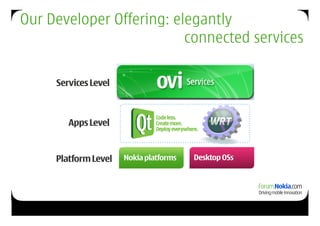
Our Developer Offering: elegantly
                          connected services

     Services Level


        Apps Level


     Platform Level   Nokia platforms   Desktop OSs
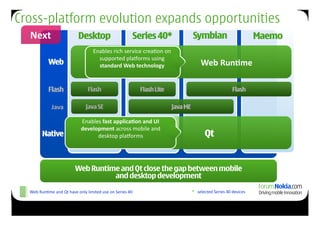
Cross-platform evolution expands opportunities
  Next	
                                  Desktop                                      Series 40*                                        Symbian                                               Maemo
                                                      Enables	
  rich	
  service	
  crea9on	
  on	
  
                                                        supported	
  pla2orms	
  using	
  
                 Web                                        	
  Web	
  eb	


                                                        standard	
  	
  W	


  technology	


  Web	
  Run.me	


                 Flash                            Flash                                      Flash Lite                                                                       Flash

                    Java	
                      Java SE                                                                Java ME

                                            Enables	
  fast	
  applica.on	
  and	
  UI	
  
                                            development	
  across	
  mobile	
  and	
  
            Native                                       Web
                                                  desktop	
  pla2orms	
                                                                             Qt


                                       Web Runtime and Qt close the gap between mobile
                                                 and desktop development
                                                                             5
  Web	
  Run9me	
  and	
  Qt	
  have	
  only	
  limited	
  use	
  on	
  Series	
  40	
                                                  *	
  	
  	
  selected	
  Series	
  40	
  devices	
  
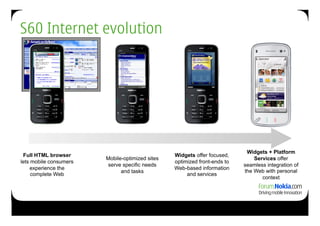
S60 Internet evolution


                                                                            Widgets + Platform
 Full HTML browser                               Widgets offer focused,
                        Mobile-optimized sites                                 Services offer
lets mobile consumers                            optimized front-ends to
                        serve specific needs                               seamless integration of
    experience the                               Web-based information
                              and tasks                                    the Web with personal
     complete Web                                     and services
                                                                                  context
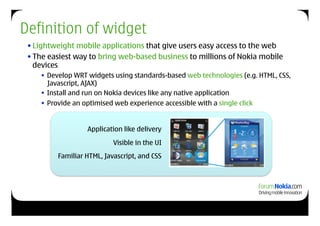
Definition of widget
 • Lightweight mobile applications that give users easy access to the web
 • The easiest way to bring web-based business to millions of Nokia mobile
   devices
       Develop WRT widgets using standards-based web technologies (e.g. HTML, CSS,
        Javascript, AJAX)
       Install and run on Nokia devices like any native application
       Provide an optimised web experience accessible with a single click


                    Application like delivery
                            Visible in the UI
          Familiar HTML, Javascript, and CSS
Platform services
Widgets and platform services
• Framework for abstracting access to a set of services
• Runtime specific bindings and security management
• Access Platform Services through JavaScript
• Example use cases:
   • Combine Web-based data with local context to deliver
     personalized, relevant services
   • Save critical Web-based contacts and events locally to
     create reliable, dependable reminders
Home screen
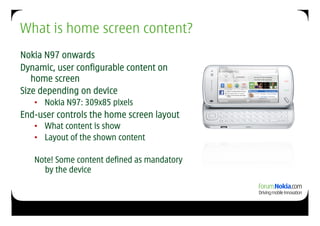
What is home screen content?
Nokia N97 onwards
Dynamic, user configurable content on
   home screen
Size depending on device
   •  Nokia N97: 309x85 pixels
End-user controls the home screen layout
   •  What content is show
   •  Layout of the shown content

   Note! Some content defined as mandatory
     by the device
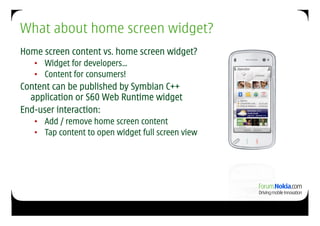
What about home screen widget?
Home screen content vs. home screen widget?
   •  Widget for developers…
   •  Content for consumers!
Content can be published by Symbian C++
  application or S60 Web Runtime widget
End-user interaction:
   •  Add / remove home screen content
   •  Tap content to open widget full screen view
Devices
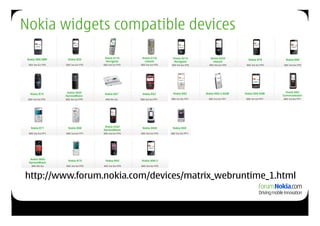
Nokia widgets compatible devices


http://www.forum.nokia.com/devices/matrix_webruntime_1.html
Towards an excellent UX
Designing widgets –
            usability guidelines for widgets

   How to design the widget so that it can best
                 serve its users?

• Various form factors:
    • Multiple screen sizes
    • Support for different input methods and ways to use
      (touch, non-touch, QWERTY, ITU-T…)
    • Home screen, sensors, tactile feedback…
Know your users
 •  Find out who will use the widget, what they will use it for, and which mobile
    devices they have?
     •  Analyse user and their tasks: combine data and platform services to provide perfect end-user
        experience
     •  Supported devices?
     •  Designing for a specific context of use


 •  More info? See also ’Usability in a mobile application development project’


                http://library.forum.nokia.com/topic/
    Design_and_User_Experience_Library/GUID-D4AFE068-97E8-487A-
                       A79B-CE1422127623.html
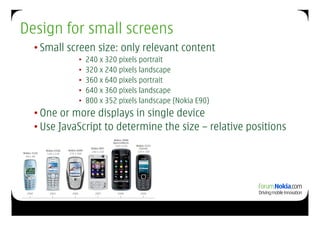
Design for small screens
  • Small screen size: only relevant content
            •  240 x 320 pixels portrait
            •  320 x 240 pixels landscape
            •  360 x 640 pixels portrait
            •  640 x 360 pixels landscape
            •  800 x 352 pixels landscape (Nokia E90)
  • One or more displays in single device
  • Use JavaScript to determine the size – relative positions
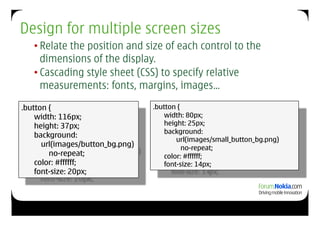
Design for multiple screen sizes
   • Relate the position and size of each control to the
     dimensions of the display.
   • Cascading style sheet (CSS) to specify relative
     measurements: fonts, margins, images…

.button {                         .button {
    width: 116px;                     width: 80px;
    height: 37px;                     height: 25px;
                                      background:
    background:
                                          url(images/small_button_bg.png)
      url(images/button_bg.png)             no-repeat;
        no-repeat;                    color: #ffffff;
    color: #ffffff;                   font-size: 14px;
    font-size: 20px;
Design for changing screen orientation
 • Support for screen rotation: adapt content to it’s best on
   portrait and landscape
 • Reacting to change: JavaScript ’onresize’ function
 • Calculate the effective area e.g. from ’window.innerHeight’
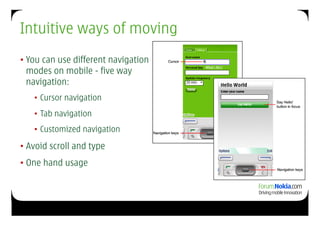
Intuitive ways of moving
• You can use different navigation
  modes on mobile - five way
  navigation:
   • Cursor navigation
   • Tab navigation
   • Customized navigation

• Avoid scroll and type
• One hand usage
Design for limited input methods
  •  eypad
   K
    • Softkeys (platform or custom)
    • Navigation on screen (cursor, tab or custom navigation)
    • Typing (text or numbers)
    • Selecting items in lists (e.g. HTML ’select’)
  •  ouch
   T
    • Checking touch support
    • Touch areas needs to be big enough: finger usability
    • JavaScript ’onClick’ handler (e.g. with image buttons)
    • Tactile feedback
Responsiveness and power management
Keep response times short
• Latency can cause delays in user interaction: frustrated end-
  user
• Indicators for progress

Save battery time
• Timers
• Network connections
S60 WebKit
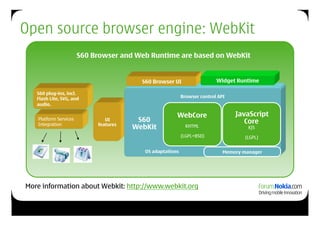
Open source browser engine: WebKit
                       S60 Browser and Web Runtime are based on WebKit


   Native C/C++                             Web       S60 Browser UI                   Widget Runtime
                          Widgets
   “Web Capable”                          Browser
   S60 plug-ins, incl.
   Flash Lite, SVG, and                                                 Browser control API
   audio.

                                                                    WebCore                   JavaScript
   Platform Services                   UI            S60                                         Core
   Integration                      features
                                                    WebKit                KHTML                    KJS
                                                                        (LGPL+BSD)                (LGPL)


                                                       OS adaptations                     Memory manager


More information about Webkit: http://www.webkit.org
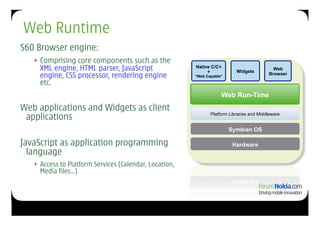
Web Runtime
S60 Browser engine:
   •  Comprising core components such as the
      XML engine, HTML parser, JavaScript                Native C/C+
                                                              +             Widgets
                                                                                             Web
      engine, CSS processor, rendering engine            “Web Capable”
                                                                                           Browser

      etc.
                                                                     Web Run-Time
                                                                      Web Tech
Web applications and Widgets as client
 applications                                                   Platform Libraries and Middleware


                                                                         Symbian OS

JavaScript as application programming                                     Hardware
  language
   •  Access to Platform Services (Calendar, Location,
      Media files…)
S60 WRT widget
   dissolved
WRT widget ingredients
                                               Widget
                                              properties
           info.plist (mandatory)                 +
           [name].html (mandatory)              HTML
                                              backbone
           icon.png
           [name].css
           [name].js              PNG icon
                                      +
                                 CSS layout        Root
                                       +          folder!
                                   js logic


28
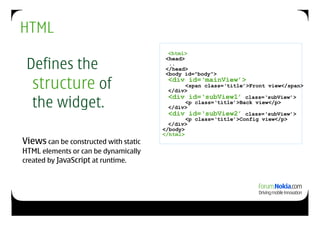
HTML
                                         <html>

 Defines the
                                        <head>
                                         ..
                                        </head>
                                        <body id="body">

  structure of                          <div id=‘mainView’>
                                         </div>
                                               <span class=‘title’>Front view</span>


  the widget.
                                         <div id=‘subView1’ class=‘subView’>
                                               <p class=‘title’>Back view</p>
                                         </div>
                                         <div id=‘subView2’ class=‘subView’>
                                               <p class=‘title’>Config view</p>
                                         </div>
                                       </body>
                                       </html>
Views can be constructed with static
HTML elements or can be dynamically
created by JavaScript at runtime.
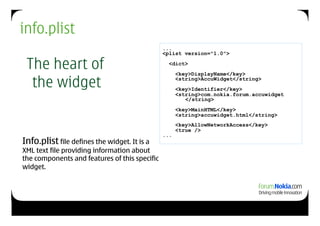
info.plist
                                               ...
                                               <plist version="1.0">

 The heart of                                    <dict>
                                                     <key>DisplayName</key>

  the widget                                         <string>AccuWidget</string>
                                                     <key>Identifier</key>
                                                     <string>com.nokia.forum.accuwidget
                                                        </string>
                                                     <key>MainHTML</key>
                                                     <string>accuwidget.html</string>
                                                     <key>AllowNetworkAccess</key>
                                                     <true />
                                               ...
Info.plist file defines the widget. It is a
XML text file providing information about
the components and features of this specific
widget.
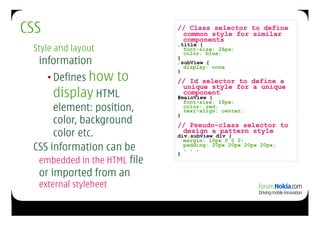
CSS                           // Class selector to define
                               common style for similar
                               components
                              .title {
 Style and layout               font-size: 26px;
                                color: blue;
  information                 }
                              .subView {
                                display: none

      • Defines how    to
                              }
                              // Id selector to define a
                               unique style for a unique
       display HTML            component
                              #mainView {
                                font-size: 16px;
      element: position,        color: red;
                                text-align: center;
                              }
      color, background       // Pseudo-class selector to
      color etc.               design a pattern style
                              div.subview div {
                                margin: 10px 0 0 0;
 CSS information can be       }
                                padding: 20px 20px 20px 20px;
                                . . .

  embedded in the HTML file
  or imported from an
  external styleheet
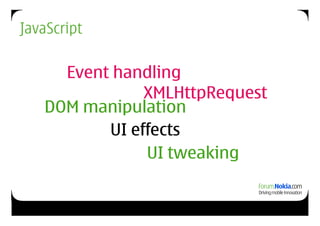
JavaScript

     Event handling
               XMLHttpRequest
   DOM manipulation
          UI effects
               UI tweaking
How do I code then?
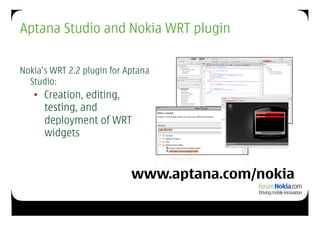
Aptana Studio and Nokia WRT plugin

Nokia’s WRT 2.2 plugin for Aptana
  Studio:
   •  Creation, editing,
      testing, and
      deployment of WRT
      widgets


                            www.aptana.com/nokia
WRT JavaScript extensions – widget object

      URL + application launching
    identifier    simple text key storing
      display orientation navigation model
              basic view switch animation
         show/hide events
   widget.openApplication(0x100058F8, "");
        widget.openURL("http://www.S60.com");
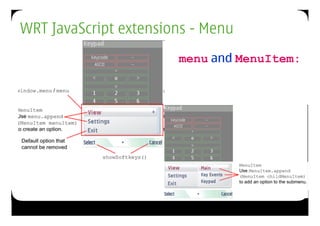
WRT JavaScript extensions - Menu
                       menu and MenuItem:
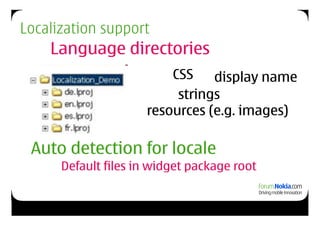
Localization support
    Language directories
                         CSS    display name
                          strings
                     resources (e.g. images)

 Auto detection for locale
      Default files in widget package root
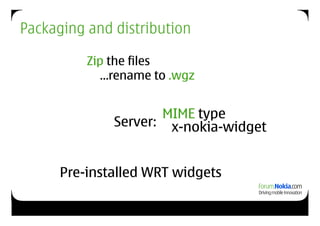
Packaging and distribution

          Zip the files
            …rename to .wgz


                     MIME type
              Server: x-nokia-widget


      Pre-installed WRT widgets
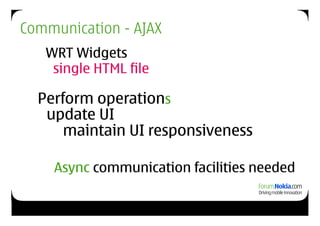
Communication - AJAX
   WRT Widgets
    single HTML file

  Perform operations
   update UI
      maintain UI responsiveness

    Async communication facilities needed
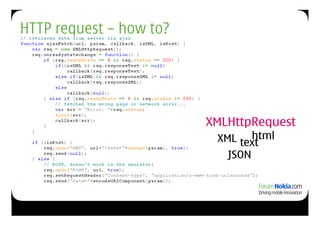
HTTP request – how to?


                         XMLHttpRequest
                                 html
                          XML text
                            JSON
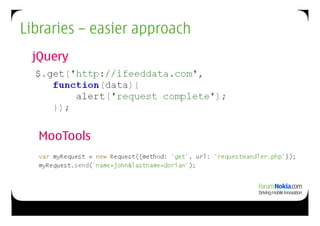
Libraries – easier approach
 jQuery


  MooTools
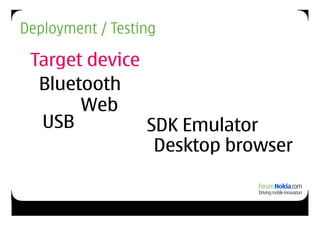
Deployment / Testing

 Target device
  Bluetooth
       Web
  USB          SDK Emulator
                Desktop browser
Home screen:
the implementation
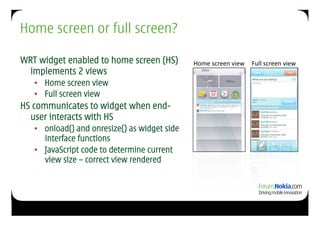
Home screen or full screen?

WRT widget enabled to home screen (HS)         Home	
  screen	
  view	
   Full	
  screen	
  view	
  
  implements 2 views
   •  Home screen view
   •  Full screen view
HS communicates to widget when end-
  user interacts with HS
   •  onload() and onresize() as widget side
      interface functions
   •  JavaScript code to determine current
      view size – correct view rendered
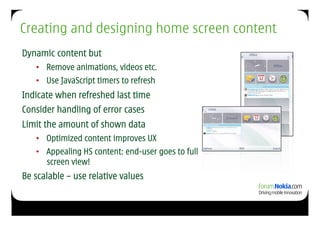
Creating and designing home screen content
Dynamic content but
   •  Remove animations, videos etc.
   •  Use JavaScript timers to refresh
Indicate when refreshed last time
Consider handling of error cases
Limit the amount of shown data
   •  Optimized content improves UX
   •  Appealing HS content: end-user goes to full
      screen view!
Be scalable – use relative values
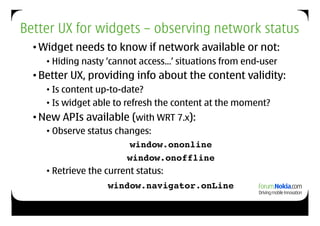
Better UX for widgets – observing network status
  • Widget needs to know if network available or not:
     • Hiding nasty ‘cannot access…’ situations from end-user
  • Better UX, providing info about the content validity:
     • Is content up-to-date?
     • Is widget able to refresh the content at the moment?
  • New APIs available (with WRT 7.x):
     • Observe status changes:
                          window.ononline!
                         window.onoffline
     • Retrieve the current status:
                   window.navigator.onLine
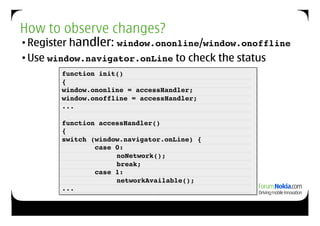
How to observe changes?
• Register handler: window.ononline/window.onoffline!
• Use window.navigator.onLine to check the status
       function init()!
       {!
       window.ononline = accessHandler;!
       window.onoffline = accessHandler;!
       ...!

       function accessHandler()!
       {!
       switch (window.navigator.onLine) {!
                case 0:!
       !      !       noNetwork();!
                    ! break;!
                case 1:!
                  ! networkAvailable();!
       ...!
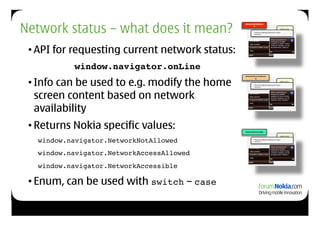
Network status – what does it mean?
                                                NetworkNotAllowe
                                                       d
                                                                                    info.pli
                                                                                    st!
                                                        <key>AllowNetworkAccess</key> !
                                                        <false/>!


 • API for requesting current network status:
           window.navigator.onLine!
 • Info can be used to e.g. modify the home
                                                NetworkAccessAllowe
                                                        d
                                                                                    info.pli
                                                                                    st!
                                                       <key>AllowNetworkAccess</key> !
                                                       <false/>!


   screen content based on network
   availability
 • Returns Nokia specific values:               NetworkAccessible

                                                                                    info.pli


  !window.navigator.NetworkNotAllowed !
                                                                                    st!
                                                        <key>AllowNetworkAccess</key> !
                                                        <false/>!


  !window.navigator.NetworkAccessAllowed !
  !window.navigator.NetworkAccessible!

 • Enum, can be used with switch – case
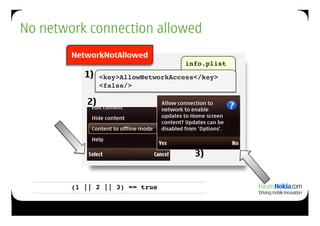
No network connection allowed
        NetworkNotAllowed
                                    info.plist!
           1)   <key>AllowNetworkAccess</key> !
                <false/>!

           2)


                                       3)


        (1 || 2 || 3) == true!
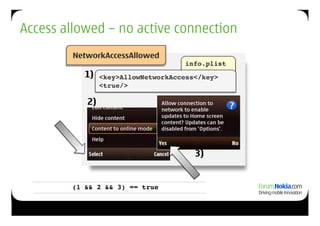
Access allowed – no active connection
        NetworkAccessAllowed
                                    info.plist!
          1)    <key>AllowNetworkAccess</key> !
                <true/>!

           2)


                                       3)


        (1 && 2 && 3) == true!
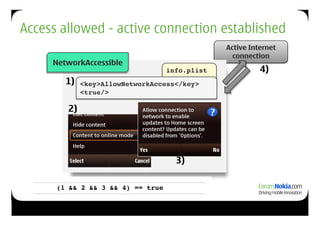
Access allowed - active connection established
                                               Active Internet
                                                 connection
     NetworkAccessible
                                 info.plist!             4)
        1)   <key>AllowNetworkAccess</key> !
             <true/>!

        2)


                                    3)

      (1 && 2 && 3 && 4) == true!
Platform Services
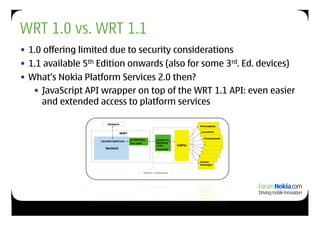
WRT 1.0 vs. WRT 1.1
• 1.0 offering limited due to security considerations
• 1.1 available 5th Edition onwards (also for some 3rd. Ed. devices)
• What’s Nokia Platform Services 2.0 then?
   • JavaScript API wrapper on top of the WRT 1.1 API: even easier
     and extended access to platform services
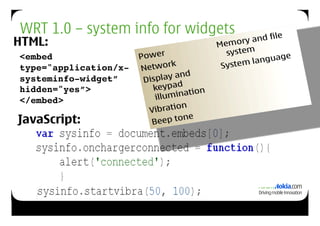
WRT 1.0 – system info for widgets
HTML:
<embed
type="application/x-
systeminfo-widget”
hidden="yes”>!
</embed>!

JavaScript:
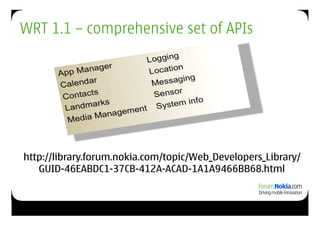
WRT 1.1 – comprehensive set of APIs


http://library.forum.nokia.com/topic/Web_Developers_Library/
   GUID-46EABDC1-37CB-412A-ACAD-1A1A9466BB68.html
Best of both worlds
      WRT+Qt
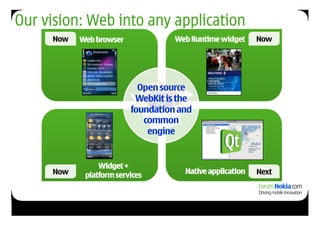
Our vision: Web into any application
     Now   Web browser             Web Runtime widget     Now


                           Open source
                          WebKit is the
                         foundation and
                            common
                             engine


                Widget +
     Now    platform services        Native application   Next
Interact with Web Services
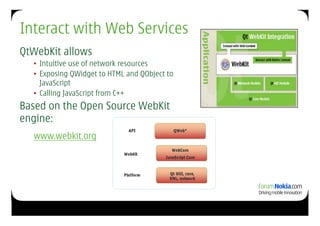
QtWebKit allows
  •  Intuitive use of network resources
  •  Exposing QWidget to HTML and QObject to
     JavaScript
  •  Calling JavaScript from C++
Based on the Open Source WebKit
engine:
  www.webkit.org
QWebView and QWebPage classes
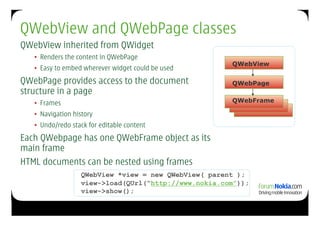
QWebView inherited from QWidget
   •  Renders the content in QWebPage
                                                       QWebView
   •  Easy to embed wherever widget could be used
QWebPage provides access to the document               QWebPage
structure in a page
   •  Frames                                           QWebFrame

   •  Navigation history
   •  Undo/redo stack for editable content
Each QWebpage has one QWebFrame object as its
main frame
HTML documents can be nested using frames
                   QWebView *view = new QWebView( parent );
                   view->load(QUrl(“http://www.nokia.com”));
                   view->show();
Hybrid - combining the best of both worlds
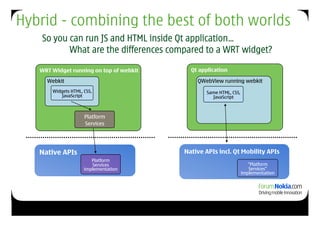
    So you can run JS and HTML inside Qt application…
           What are the differences compared to a WRT widget?

   WRT Widget running on top of webkit     Qt application

     Webkit                                  QWebView running webkit
       Widgets HTML, CSS,                       Same HTML, CSS,
          JavaScript                              JavaScript


                     Platform
                     Services


   Native APIs                           Native APIs incl. Qt Mobility APIs
                        Platform
                        Services                                     “Platform
                     implementation                                  Services”
                                                                  implementation
Webview demo
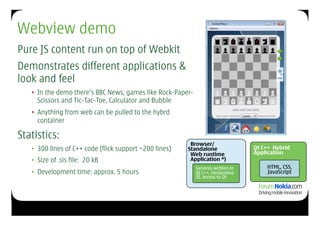
Pure JS content run on top of Webkit
Demonstrates different applications &
look and feel
   •  In the demo there’s BBC News, games like Rock-Paper-
      Scissors and Tic-Tac-Toe, Calculator and Bubble
   •  Anything from web can be pulled to the hybrd
      container

Statistics:
                                                          Browser/
   •  300 lines of C++ code (flick support ~200 lines)   Standalone                Qt C++ Hybrid
                                                          Web runtime              Application
   •  Size of .sis file: 20 kB                            Application *)
                                                             Services written in       HTML, CSS,
   •  Development time: approx. 5 hours                      Qt C++, Declarative       JavaScript
                                                             UI, Access to Qt
Examples and exercises


     62

Forum Nokia Dev. Camp - WRT training Paris_17&18 Nov.

  • 1.
    Web Runtime àla Symbian sami.j.viita nen@noki a.co m Paris, 17.- 18 .1 1 .0 9 © 2009 Nokia Corporation
  • 2.
    Agenda Day1 • Welcome! • Forum Nokia • WRT widget in nutshell • Towards an excellent UX • Going inside the widget Day2 • Exercises
  • 3.
  • 4.
    Our Developer Offering:elegantly connected services Services Level Apps Level Platform Level Nokia platforms Desktop OSs
  • 5.
    Cross-platform evolution expandsopportunities Next   Desktop Series 40* Symbian Maemo Enables  rich  service  crea9on  on   supported  pla2orms  using   Web  Web  eb                               standard    W        technology                                    Web  Run.me               Flash Flash Flash Lite Flash Java   Java SE Java ME Enables  fast  applica.on  and  UI   development  across  mobile  and   Native Web desktop  pla2orms   Qt Web Runtime and Qt close the gap between mobile and desktop development 5 Web  Run9me  and  Qt  have  only  limited  use  on  Series  40   *      selected  Series  40  devices  
  • 6.
    S60 Internet evolution Widgets + Platform Full HTML browser Widgets offer focused, Mobile-optimized sites Services offer lets mobile consumers optimized front-ends to serve specific needs seamless integration of experience the Web-based information and tasks the Web with personal complete Web and services context
  • 7.
    Definition of widget • Lightweight mobile applications that give users easy access to the web • The easiest way to bring web-based business to millions of Nokia mobile devices   Develop WRT widgets using standards-based web technologies (e.g. HTML, CSS, Javascript, AJAX)   Install and run on Nokia devices like any native application   Provide an optimised web experience accessible with a single click Application like delivery Visible in the UI Familiar HTML, Javascript, and CSS
  • 8.
  • 9.
    Widgets and platformservices • Framework for abstracting access to a set of services • Runtime specific bindings and security management • Access Platform Services through JavaScript • Example use cases: • Combine Web-based data with local context to deliver personalized, relevant services • Save critical Web-based contacts and events locally to create reliable, dependable reminders
  • 10.
  • 11.
    What is homescreen content? Nokia N97 onwards Dynamic, user configurable content on home screen Size depending on device •  Nokia N97: 309x85 pixels End-user controls the home screen layout •  What content is show •  Layout of the shown content Note! Some content defined as mandatory by the device
  • 12.
    What about homescreen widget? Home screen content vs. home screen widget? •  Widget for developers… •  Content for consumers! Content can be published by Symbian C++ application or S60 Web Runtime widget End-user interaction: •  Add / remove home screen content •  Tap content to open widget full screen view
  • 13.
  • 14.
    Nokia widgets compatibledevices http://www.forum.nokia.com/devices/matrix_webruntime_1.html
  • 15.
  • 16.
    Designing widgets – usability guidelines for widgets How to design the widget so that it can best serve its users? • Various form factors: • Multiple screen sizes • Support for different input methods and ways to use (touch, non-touch, QWERTY, ITU-T…) • Home screen, sensors, tactile feedback…
  • 17.
    Know your users •  Find out who will use the widget, what they will use it for, and which mobile devices they have? •  Analyse user and their tasks: combine data and platform services to provide perfect end-user experience •  Supported devices? •  Designing for a specific context of use •  More info? See also ’Usability in a mobile application development project’ http://library.forum.nokia.com/topic/ Design_and_User_Experience_Library/GUID-D4AFE068-97E8-487A- A79B-CE1422127623.html
  • 18.
    Design for smallscreens • Small screen size: only relevant content •  240 x 320 pixels portrait •  320 x 240 pixels landscape •  360 x 640 pixels portrait •  640 x 360 pixels landscape •  800 x 352 pixels landscape (Nokia E90) • One or more displays in single device • Use JavaScript to determine the size – relative positions
  • 19.
    Design for multiplescreen sizes • Relate the position and size of each control to the dimensions of the display. • Cascading style sheet (CSS) to specify relative measurements: fonts, margins, images… .button { .button { width: 116px; width: 80px; height: 37px; height: 25px; background: background: url(images/small_button_bg.png) url(images/button_bg.png) no-repeat; no-repeat; color: #ffffff; color: #ffffff; font-size: 14px; font-size: 20px;
  • 20.
    Design for changingscreen orientation • Support for screen rotation: adapt content to it’s best on portrait and landscape • Reacting to change: JavaScript ’onresize’ function • Calculate the effective area e.g. from ’window.innerHeight’
  • 21.
    Intuitive ways ofmoving • You can use different navigation modes on mobile - five way navigation: • Cursor navigation • Tab navigation • Customized navigation • Avoid scroll and type • One hand usage
  • 22.
    Design for limitedinput methods •  eypad K • Softkeys (platform or custom) • Navigation on screen (cursor, tab or custom navigation) • Typing (text or numbers) • Selecting items in lists (e.g. HTML ’select’) •  ouch T • Checking touch support • Touch areas needs to be big enough: finger usability • JavaScript ’onClick’ handler (e.g. with image buttons) • Tactile feedback
  • 23.
    Responsiveness and powermanagement Keep response times short • Latency can cause delays in user interaction: frustrated end- user • Indicators for progress Save battery time • Timers • Network connections
  • 24.
  • 25.
    Open source browserengine: WebKit S60 Browser and Web Runtime are based on WebKit Native C/C++ Web S60 Browser UI Widget Runtime Widgets “Web Capable” Browser S60 plug-ins, incl. Flash Lite, SVG, and Browser control API audio. WebCore JavaScript Platform Services UI S60 Core Integration features WebKit KHTML KJS (LGPL+BSD) (LGPL) OS adaptations Memory manager More information about Webkit: http://www.webkit.org
  • 26.
    Web Runtime S60 Browserengine: •  Comprising core components such as the XML engine, HTML parser, JavaScript Native C/C+ + Widgets Web engine, CSS processor, rendering engine “Web Capable” Browser etc. Web Run-Time Web Tech Web applications and Widgets as client applications Platform Libraries and Middleware Symbian OS JavaScript as application programming Hardware language •  Access to Platform Services (Calendar, Location, Media files…)
  • 27.
    S60 WRT widget dissolved
  • 28.
    WRT widget ingredients Widget properties info.plist (mandatory) + [name].html (mandatory) HTML backbone icon.png [name].css [name].js PNG icon + CSS layout Root + folder! js logic 28
  • 29.
    HTML <html> Defines the <head> .. </head> <body id="body"> structure of <div id=‘mainView’> </div> <span class=‘title’>Front view</span> the widget. <div id=‘subView1’ class=‘subView’> <p class=‘title’>Back view</p> </div> <div id=‘subView2’ class=‘subView’> <p class=‘title’>Config view</p> </div> </body> </html> Views can be constructed with static HTML elements or can be dynamically created by JavaScript at runtime.
  • 30.
    info.plist ... <plist version="1.0"> The heart of <dict> <key>DisplayName</key> the widget <string>AccuWidget</string> <key>Identifier</key> <string>com.nokia.forum.accuwidget </string> <key>MainHTML</key> <string>accuwidget.html</string> <key>AllowNetworkAccess</key> <true /> ... Info.plist file defines the widget. It is a XML text file providing information about the components and features of this specific widget.
  • 31.
    CSS // Class selector to define common style for similar components .title { Style and layout font-size: 26px; color: blue; information } .subView { display: none • Defines how to } // Id selector to define a unique style for a unique display HTML component #mainView { font-size: 16px; element: position, color: red; text-align: center; } color, background // Pseudo-class selector to color etc. design a pattern style div.subview div { margin: 10px 0 0 0; CSS information can be } padding: 20px 20px 20px 20px; . . . embedded in the HTML file or imported from an external styleheet
  • 32.
    JavaScript Event handling XMLHttpRequest DOM manipulation UI effects UI tweaking
  • 33.
    How do Icode then?
  • 34.
    Aptana Studio andNokia WRT plugin Nokia’s WRT 2.2 plugin for Aptana Studio: •  Creation, editing, testing, and deployment of WRT widgets www.aptana.com/nokia
  • 35.
    WRT JavaScript extensions– widget object URL + application launching identifier simple text key storing display orientation navigation model basic view switch animation show/hide events widget.openApplication(0x100058F8, ""); widget.openURL("http://www.S60.com");
  • 36.
    WRT JavaScript extensions- Menu menu and MenuItem:
  • 37.
    Localization support Language directories CSS display name strings resources (e.g. images) Auto detection for locale Default files in widget package root
  • 38.
    Packaging and distribution Zip the files …rename to .wgz MIME type Server: x-nokia-widget Pre-installed WRT widgets
  • 39.
    Communication - AJAX WRT Widgets single HTML file Perform operations update UI maintain UI responsiveness Async communication facilities needed
  • 40.
    HTTP request –how to? XMLHttpRequest html XML text JSON
  • 41.
    Libraries – easierapproach jQuery MooTools
  • 42.
    Deployment / Testing Target device Bluetooth Web USB SDK Emulator Desktop browser
  • 43.
  • 44.
    Home screen orfull screen? WRT widget enabled to home screen (HS) Home  screen  view   Full  screen  view   implements 2 views •  Home screen view •  Full screen view HS communicates to widget when end- user interacts with HS •  onload() and onresize() as widget side interface functions •  JavaScript code to determine current view size – correct view rendered
  • 45.
    Creating and designinghome screen content Dynamic content but •  Remove animations, videos etc. •  Use JavaScript timers to refresh Indicate when refreshed last time Consider handling of error cases Limit the amount of shown data •  Optimized content improves UX •  Appealing HS content: end-user goes to full screen view! Be scalable – use relative values
  • 46.
    Better UX forwidgets – observing network status • Widget needs to know if network available or not: • Hiding nasty ‘cannot access…’ situations from end-user • Better UX, providing info about the content validity: • Is content up-to-date? • Is widget able to refresh the content at the moment? • New APIs available (with WRT 7.x): • Observe status changes: window.ononline! window.onoffline • Retrieve the current status: window.navigator.onLine
  • 47.
    How to observechanges? • Register handler: window.ononline/window.onoffline! • Use window.navigator.onLine to check the status function init()! {! window.ononline = accessHandler;! window.onoffline = accessHandler;! ...! function accessHandler()! {! switch (window.navigator.onLine) {! case 0:! ! ! noNetwork();! ! break;! case 1:! ! networkAvailable();! ...!
  • 48.
    Network status –what does it mean? NetworkNotAllowe d info.pli st! <key>AllowNetworkAccess</key> ! <false/>! • API for requesting current network status: window.navigator.onLine! • Info can be used to e.g. modify the home NetworkAccessAllowe d info.pli st! <key>AllowNetworkAccess</key> ! <false/>! screen content based on network availability • Returns Nokia specific values: NetworkAccessible info.pli !window.navigator.NetworkNotAllowed ! st! <key>AllowNetworkAccess</key> ! <false/>! !window.navigator.NetworkAccessAllowed ! !window.navigator.NetworkAccessible! • Enum, can be used with switch – case
  • 49.
    No network connectionallowed NetworkNotAllowed info.plist! 1) <key>AllowNetworkAccess</key> ! <false/>! 2) 3) (1 || 2 || 3) == true!
  • 50.
    Access allowed –no active connection NetworkAccessAllowed info.plist! 1) <key>AllowNetworkAccess</key> ! <true/>! 2) 3) (1 && 2 && 3) == true!
  • 51.
    Access allowed -active connection established Active Internet connection NetworkAccessible info.plist! 4) 1) <key>AllowNetworkAccess</key> ! <true/>! 2) 3) (1 && 2 && 3 && 4) == true!
  • 52.
  • 53.
    WRT 1.0 vs.WRT 1.1 • 1.0 offering limited due to security considerations • 1.1 available 5th Edition onwards (also for some 3rd. Ed. devices) • What’s Nokia Platform Services 2.0 then? • JavaScript API wrapper on top of the WRT 1.1 API: even easier and extended access to platform services
  • 54.
    WRT 1.0 –system info for widgets HTML: <embed type="application/x- systeminfo-widget” hidden="yes”>! </embed>! JavaScript:
  • 55.
    WRT 1.1 –comprehensive set of APIs http://library.forum.nokia.com/topic/Web_Developers_Library/ GUID-46EABDC1-37CB-412A-ACAD-1A1A9466BB68.html
  • 56.
    Best of bothworlds WRT+Qt
  • 57.
    Our vision: Webinto any application Now Web browser Web Runtime widget Now Open source WebKit is the foundation and common engine Widget + Now platform services Native application Next
  • 58.
    Interact with WebServices QtWebKit allows •  Intuitive use of network resources •  Exposing QWidget to HTML and QObject to JavaScript •  Calling JavaScript from C++ Based on the Open Source WebKit engine: www.webkit.org
  • 59.
    QWebView and QWebPageclasses QWebView inherited from QWidget •  Renders the content in QWebPage QWebView •  Easy to embed wherever widget could be used QWebPage provides access to the document QWebPage structure in a page •  Frames QWebFrame •  Navigation history •  Undo/redo stack for editable content Each QWebpage has one QWebFrame object as its main frame HTML documents can be nested using frames QWebView *view = new QWebView( parent ); view->load(QUrl(“http://www.nokia.com”)); view->show();
  • 60.
    Hybrid - combiningthe best of both worlds So you can run JS and HTML inside Qt application… What are the differences compared to a WRT widget? WRT Widget running on top of webkit Qt application Webkit QWebView running webkit Widgets HTML, CSS, Same HTML, CSS, JavaScript JavaScript Platform Services Native APIs Native APIs incl. Qt Mobility APIs Platform Services “Platform implementation Services” implementation
  • 61.
    Webview demo Pure JScontent run on top of Webkit Demonstrates different applications & look and feel •  In the demo there’s BBC News, games like Rock-Paper- Scissors and Tic-Tac-Toe, Calculator and Bubble •  Anything from web can be pulled to the hybrd container Statistics: Browser/ •  300 lines of C++ code (flick support ~200 lines) Standalone Qt C++ Hybrid Web runtime Application •  Size of .sis file: 20 kB Application *) Services written in HTML, CSS, •  Development time: approx. 5 hours Qt C++, Declarative JavaScript UI, Access to Qt
  • 62.