Research Data
Management
for librarians
Michael Day and Marieke Guy
Digital Curation Centre (DCC)
About this course
 Short presentations with exercises and discussion
 Five main sections
― Research data and RDM (30 mins)
― Data Management Planning (30 mins)
― Data sharing (20 mins)
― Skills (30 mins)
― RDM at Cardiff (30 mins)
 Coffee break halfway through, after DMP
Introductions
Introduce yourself and offer a reflection on the questions:
 What is your understanding of research?
 Do you know anything about data management?
 What do you want to find out today?
 Do you see a role for librarians in supporting RDM?
Digital Curation Centre (DCC)
 Consortium comprising units from the Universities of Bath
(UKOLN), Edinburgh (DCC Centre) and Glasgow (HATII)
 Launched 1st March 2004 as a national centre for solving
challenges in digital curation that could not be tackled by any
single institution or discipline
 Funded by JISC with additional HEFCE funding from 2011 for
targeted institutional development
 Support selection of tools: DAF, CARDIO, DMP Online, tools
and metadata schema catalogues
 Offer advice and support through ‘How to Guides’, ‘Briefing
papers’ and Web site
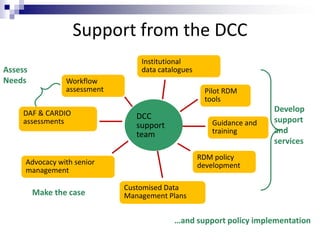
Assess
Needs
Make the case
Develop
support
and
services
RDM policy
development
DAF & CARDIO
assessments Guidance and
training
Workflow
assessment
DCC
support
team
Advocacy with senior
management
Institutional
data catalogues
Pilot RDM
tools
Customised Data
Management Plans
…and support policy implementation
Support from the DCC
Research data and RDM
Exercise: What are research data?
 In pairs, list as many types of data as you can, focusing
(if appropriate) on the subject areas you support
 You have 5 minutes
What are research data?
 http://www.youtube.com/watch?v=2JBQS0qKOBU
 Video from DCC – first 3.10 minutes
What are research data?
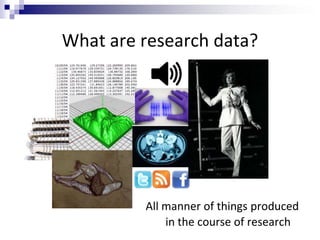
All manner of things produced
in the course of research
Defining research data
 Research data are collected, observed or created, for
the purposes of analysis to produce and validate
original research results
 Both analogue and digital materials are 'data'
 Lab notebooks and software may be classed as 'data'
 Digital data can be:
― created in a digital form ('born digital')
― converted to a digital form (digitised)
Types of research data
 Instrument measurements
 Experimental observations
 Still images, video and audio
 Text documents, spreadsheets, databases
 Quantitative data (e.g. household survey data)
 Survey results & interview transcripts
 Simulation data, models & software
 Slides, artefacts, specimens, samples
 Sketches, diaries, lab notebooks …
What is data management?
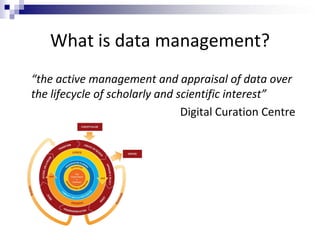
“the active management and appraisal of data over
the lifecycle of scholarly and scientific interest”
Digital Curation Centre
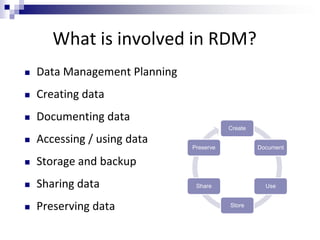
What is involved in RDM?
 Data Management Planning
 Creating data
 Documenting data
 Accessing / using data
 Storage and backup
 Sharing data
 Preserving data
Create
Document
Use
Store
Share
Preserve
RDM principles and advice
to share with researchers
See in particular:
UK Data Archive, Managing and sharing data: best practice for researchers
http://data-archive.ac.uk/media/2894/managingsharing.pdf
n.b. Data Management Planning and Data Sharing are
covered in separate sections
Data creation
 Decide what data will be created and how - this should
be communicated to the whole research team
 Develop procedures for consistency and data quality
 Choose appropriate software and formats - some are
better for long-term preservation and reuse
 Ensure consent forms, licences and partnership
agreements don’t limit options to share data if desired
Documentation
 Collect together all the information users would
need to understand and reuse the data
 Create metadata at the time - it’s hard to do later
 Use standards where possible
 Name, structure and version files clearly
Access and use
 Restrict access to those who need to read/edit data
 Consider the data security implications or where you
store data and from which devices you access files
 Choose appropriate methods to transfer / share data
― filestores & encrypted media rather than email & Dropbox
Storage and backup
 Use managed services where possible e.g. University
filestores rather than local or external hard drives
 Ask the local IT team for advice
 3… 2… 1… backup!
― at least 3 copies of a file
― on at least 2 different media
― with at least 1 offsite
Data selection
 It’s not possible to keep everything. Select based on:
― What has to be kept e.g. data underlying publications
― What legally must be destroyed
― What can’t be recreated e.g. environmental recordings
― What is potentially useful to others
― The scientific or historical value
― ...
How to select and appraise research data:
www.dcc.ac.uk/resources/how-guides/appraise-select-research-data
Data preservation
 Be aware of requirements to preserve data
 Consult and work with experts in this field
 Use available subject repositories, data centres and
structured databases
― http://databib.org
Data Management Planning
DMPs are written at the start of a project to define:
 What data will be collected or created?
 How the data will be documented and described?
 Where the data will be stored?
 Who will be responsible for data security and backup?
 Which data will be shared and/or preserved?
 How the data will be shared and with whom?
Why develop a DMP?
DMPs are often submitted with grant applications, but
are useful whenever researchers are creating data.
They can help researchers to:
 Make informed decisions to anticipate & avoid problems
 Avoid duplication, data loss and security breaches
 Develop procedures early on for consistency
 Ensure data are accurate, complete, reliable and secure
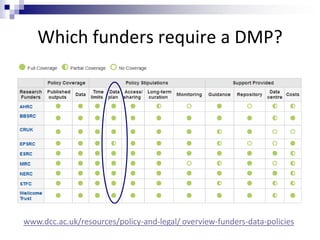
Which funders require a DMP?
www.dcc.ac.uk/resources/policy-and-legal/ overview-funders-data-policies
What do research funders want?
 A brief plan submitted in grant applications, and in the
case of NERC, a more detailed plan once funded
 1-3 sides of A4 as attachment or a section in Je-S form
 Typically a prose statement covering suggested themes
 Outline data management and sharing plans, justifying
decisions and any limitations
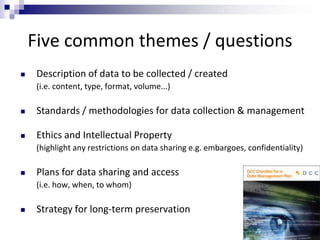
Five common themes / questions
 Description of data to be collected / created
(i.e. content, type, format, volume...)
 Standards / methodologies for data collection & management
 Ethics and Intellectual Property
(highlight any restrictions on data sharing e.g. embargoes, confidentiality)
 Plans for data sharing and access
(i.e. how, when, to whom)
 Strategy for long-term preservation
Exercise: My DMP - a satire
 Read through the satirical DMP
 Highlight examples of bad practice
 Suggest alternative methods / approaches
 You have 15 minutes
My Data Management Plan – a satire, Dr C. Titus Brown
http://ivory.idyll.org/blog/data-management.html
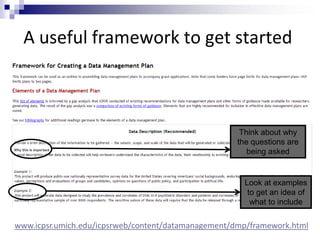
A useful framework to get started
Think about why
the questions are
being asked
Look at examples
to get an idea of
what to include
www.icpsr.umich.edu/icpsrweb/content/datamanagement/dmp/framework.html
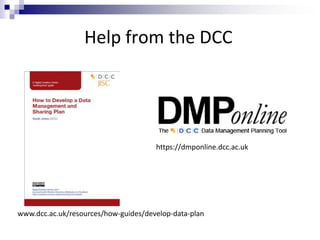
Help from the DCC
https://dmponline.dcc.ac.uk
www.dcc.ac.uk/resources/how-guides/develop-data-plan
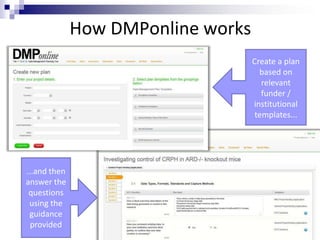
How DMPonline works
Create a plan
based on
relevant
funder /
institutional
templates...
...and then
answer the
questions
using the
guidance
provided
Supporting researchers with DMPs
Various types of support could be provided by libraries:
 Guidelines and templates on what to include in plans
 Example answers, guidance and links to local support
 A library of successful DMPs to reuse
 Training courses and guidance websites
 Tailored consultancy services
 Online tools (e.g. customised DMPonline)
Tips to share: writing DMPs
 Keep it simple, short and specific
 Seek advice - consult and collaborate
 Base plans on available skills and support
 Make sure implementation is feasible
 Justify any resources or restrictions needed
Also see: http://www.youtube.com/watch?v=7OJtiA53-Fk
Data sharing
What is data sharing?
“… the practice of making data used for scholarly
research available to others.” [Wikipedia]
Who’s involved?
 the data sharer
 the data repository
 the secondary data user
 support staff!
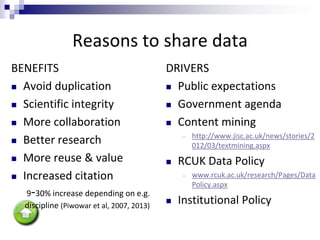
Reasons to share data
BENEFITS
 Avoid duplication
 Scientific integrity
 More collaboration
 Better research
 More reuse & value
 Increased citation
9-30% increase depending on e.g.
discipline (Piwowar et al, 2007, 2013)
DRIVERS
 Public expectations
 Government agenda
 Content mining
― http://www.jisc.ac.uk/news/stories/2
012/03/textmining.aspx
 RCUK Data Policy
― www.rcuk.ac.uk/research/Pages/Data
Policy.aspx
 Institutional Policy
The expectation of public access
The RCUK Common Principles state that:
“Publicly funded research data are a public good,
produced in the public interest, which should be
made openly available with as few restrictions as
possible in a timely and responsible manner that
does not harm intellectual property.”
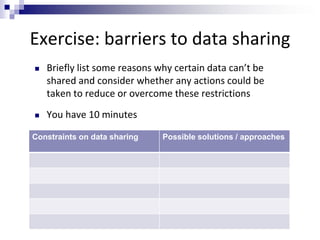
Exercise: barriers to data sharing
Constraints on data sharing Possible solutions / approaches
 Briefly list some reasons why certain data can’t be
shared and consider whether any actions could be
taken to reduce or overcome these restrictions
 You have 10 minutes
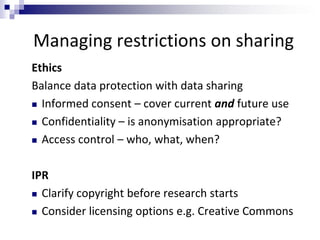
Managing restrictions on sharing
Ethics
Balance data protection with data sharing
 Informed consent – cover current and future use
 Confidentiality – is anonymisation appropriate?
 Access control – who, what, when?
IPR
 Clarify copyright before research starts
 Consider licensing options e.g. Creative Commons
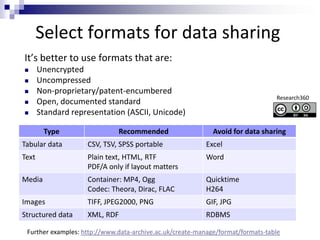
Select formats for data sharing
It’s better to use formats that are:
 Unencrypted
 Uncompressed
 Non-proprietary/patent-encumbered
 Open, documented standard
 Standard representation (ASCII, Unicode)
Type Recommended Avoid for data sharing
Tabular data CSV, TSV, SPSS portable Excel
Text Plain text, HTML, RTF
PDF/A only if layout matters
Word
Media Container: MP4, Ogg
Codec: Theora, Dirac, FLAC
Quicktime
H264
Images TIFF, JPEG2000, PNG GIF, JPG
Structured data XML, RDF RDBMS
Further examples: http://www.data-archive.ac.uk/create-manage/format/formats-table
Research360
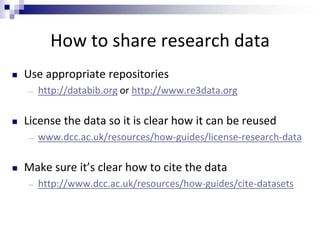
How to share research data
 Use appropriate repositories
― http://databib.org or http://www.re3data.org
 License the data so it is clear how it can be reused
― www.dcc.ac.uk/resources/how-guides/license-research-data
 Make sure it’s clear how to cite the data
― http://www.dcc.ac.uk/resources/how-guides/cite-datasets
Skills
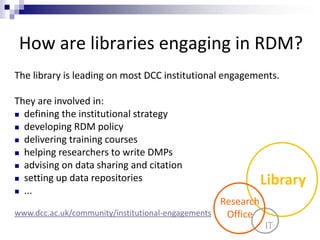
How are libraries engaging in RDM?
Library
IT
Research
Office
The library is leading on most DCC institutional engagements.
They are involved in:
 defining the institutional strategy
 developing RDM policy
 delivering training courses
 helping researchers to write DMPs
 advising on data sharing and citation
 setting up data repositories
 ...
www.dcc.ac.uk/community/institutional-engagements
Why should libraries support RDM?
RDM requires the input of all support services, but
libraries are taking the lead in the UK – why?
― existing data and open access leadership roles
― often run publication repositories
― have good relationships with researchers
― proven liaison and negotiation skills
― knowledge of information management, metadata etc
― highly relevant skill set
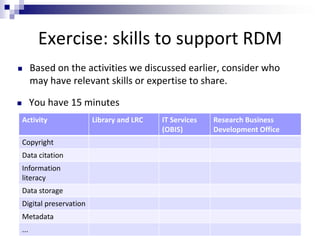
Exercise: skills to support RDM
 Based on the activities we discussed earlier, consider who
may have relevant skills or expertise to share.
 You have 15 minutes
Activity Library and LRC IT Services
(OBIS)
Research Business
Development Office
Copyright
Data citation
Information
literacy
Data storage
Digital preservation
Metadata
...
Possible Library RDM roles
 Leading on local (institutional) data policy
 Bringing data into undergraduate research-based learning
 Teaching data literacy to postgraduate students
 Developing researcher data awareness
 Providing advice, e.g. on writing DMPs or advice on RDM within a project
 Explaining the impact of sharing data, and how to cite data
 Signposting who in the Uni to consult in relation to a particular question
 Auditing to identify data sets for archiving or RDM needs
 Developing and managing access to data collections
 Documenting what datasets an institution has
 Developing local data curation capacity
 Promoting data reuse by making known what is available
RDMRose Lite
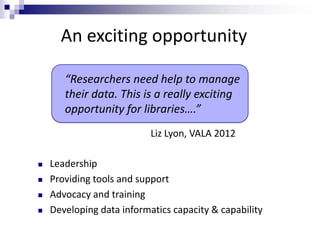
An exciting opportunity
 Leadership
 Providing tools and support
 Advocacy and training
 Developing data informatics capacity & capability
“Researchers need help to manage
their data. This is a really exciting
opportunity for libraries….”
Liz Lyon, VALA 2012
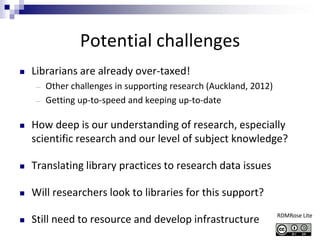
Potential challenges
 Librarians are already over-taxed!
― Other challenges in supporting research (Auckland, 2012)
― Getting up-to-speed and keeping up-to-date
 How deep is our understanding of research, especially
scientific research and our level of subject knowledge?
 Translating library practices to research data issues
 Will researchers look to libraries for this support?
 Still need to resource and develop infrastructure RDMRose Lite
RDM at Cardiff
Exercise: supporting RDM at Cardiff?
 In small groups, discuss which activities you think
should fall within your role and which shouldn’t.
 Do you feel confident to support RDM?
 How would you like to see things develop?
 You have 15 minutes
Conclusion
Summary
 In the light of external drivers, researchers at Cardiff
need support for RDM
 The library has a key role in shaping services for
researchers in this area
 Library staff have an opportunity to apply their skills
in a new and exciting way 
Feedback
 Has the event met your expectations?
― If not, what would you have liked to see more / less of?
 Was the content useful?
 Did you like the mix of exercises?
Acknowledgement
Ideas and content have been taken from various courses:
― Skills matrix, ADMIRe project, University of Nottingham
http://admire.jiscinvolve.org/wp/2012/09/18/rdmnottingham-training-event
― DIY Training Kit for Librarians, University of Edinburgh
http://datalib.edina.ac.uk/mantra/libtraining.html
― Managing your research data, Research360, University of Bath
http://opus.bath.ac.uk/32296
― RDMRose Lite, University of Sheffield
http://rdmrose.group.shef.ac.uk/?page_id=364
― RoaDMaP training materials, University of Leeds
http://library.leeds.ac.uk/roadmap-project-outputs
― SupportDM modules, University of East London
http://www.uel.ac.uk/trad/outputs/resources

RDM for Librarians

  • 1.
    Research Data Management for librarians MichaelDay and Marieke Guy Digital Curation Centre (DCC)
  • 2.
    About this course Short presentations with exercises and discussion  Five main sections ― Research data and RDM (30 mins) ― Data Management Planning (30 mins) ― Data sharing (20 mins) ― Skills (30 mins) ― RDM at Cardiff (30 mins)  Coffee break halfway through, after DMP
  • 3.
    Introductions Introduce yourself andoffer a reflection on the questions:  What is your understanding of research?  Do you know anything about data management?  What do you want to find out today?  Do you see a role for librarians in supporting RDM?
  • 4.
    Digital Curation Centre(DCC)  Consortium comprising units from the Universities of Bath (UKOLN), Edinburgh (DCC Centre) and Glasgow (HATII)  Launched 1st March 2004 as a national centre for solving challenges in digital curation that could not be tackled by any single institution or discipline  Funded by JISC with additional HEFCE funding from 2011 for targeted institutional development  Support selection of tools: DAF, CARDIO, DMP Online, tools and metadata schema catalogues  Offer advice and support through ‘How to Guides’, ‘Briefing papers’ and Web site
  • 5.
    Assess Needs Make the case Develop support and services RDMpolicy development DAF & CARDIO assessments Guidance and training Workflow assessment DCC support team Advocacy with senior management Institutional data catalogues Pilot RDM tools Customised Data Management Plans …and support policy implementation Support from the DCC
  • 6.
  • 7.
    Exercise: What areresearch data?  In pairs, list as many types of data as you can, focusing (if appropriate) on the subject areas you support  You have 5 minutes
  • 8.
    What are researchdata?  http://www.youtube.com/watch?v=2JBQS0qKOBU  Video from DCC – first 3.10 minutes
  • 9.
    What are researchdata? All manner of things produced in the course of research
  • 10.
    Defining research data Research data are collected, observed or created, for the purposes of analysis to produce and validate original research results  Both analogue and digital materials are 'data'  Lab notebooks and software may be classed as 'data'  Digital data can be: ― created in a digital form ('born digital') ― converted to a digital form (digitised)
  • 11.
    Types of researchdata  Instrument measurements  Experimental observations  Still images, video and audio  Text documents, spreadsheets, databases  Quantitative data (e.g. household survey data)  Survey results & interview transcripts  Simulation data, models & software  Slides, artefacts, specimens, samples  Sketches, diaries, lab notebooks …
  • 12.
    What is datamanagement? “the active management and appraisal of data over the lifecycle of scholarly and scientific interest” Digital Curation Centre
  • 13.
    What is involvedin RDM?  Data Management Planning  Creating data  Documenting data  Accessing / using data  Storage and backup  Sharing data  Preserving data Create Document Use Store Share Preserve
  • 14.
    RDM principles andadvice to share with researchers See in particular: UK Data Archive, Managing and sharing data: best practice for researchers http://data-archive.ac.uk/media/2894/managingsharing.pdf n.b. Data Management Planning and Data Sharing are covered in separate sections
  • 15.
    Data creation  Decidewhat data will be created and how - this should be communicated to the whole research team  Develop procedures for consistency and data quality  Choose appropriate software and formats - some are better for long-term preservation and reuse  Ensure consent forms, licences and partnership agreements don’t limit options to share data if desired
  • 16.
    Documentation  Collect togetherall the information users would need to understand and reuse the data  Create metadata at the time - it’s hard to do later  Use standards where possible  Name, structure and version files clearly
  • 17.
    Access and use Restrict access to those who need to read/edit data  Consider the data security implications or where you store data and from which devices you access files  Choose appropriate methods to transfer / share data ― filestores & encrypted media rather than email & Dropbox
  • 18.
    Storage and backup Use managed services where possible e.g. University filestores rather than local or external hard drives  Ask the local IT team for advice  3… 2… 1… backup! ― at least 3 copies of a file ― on at least 2 different media ― with at least 1 offsite
  • 19.
    Data selection  It’snot possible to keep everything. Select based on: ― What has to be kept e.g. data underlying publications ― What legally must be destroyed ― What can’t be recreated e.g. environmental recordings ― What is potentially useful to others ― The scientific or historical value ― ... How to select and appraise research data: www.dcc.ac.uk/resources/how-guides/appraise-select-research-data
  • 20.
    Data preservation  Beaware of requirements to preserve data  Consult and work with experts in this field  Use available subject repositories, data centres and structured databases ― http://databib.org
  • 21.
  • 22.
    Data Management Planning DMPsare written at the start of a project to define:  What data will be collected or created?  How the data will be documented and described?  Where the data will be stored?  Who will be responsible for data security and backup?  Which data will be shared and/or preserved?  How the data will be shared and with whom?
  • 23.
    Why develop aDMP? DMPs are often submitted with grant applications, but are useful whenever researchers are creating data. They can help researchers to:  Make informed decisions to anticipate & avoid problems  Avoid duplication, data loss and security breaches  Develop procedures early on for consistency  Ensure data are accurate, complete, reliable and secure
  • 24.
    Which funders requirea DMP? www.dcc.ac.uk/resources/policy-and-legal/ overview-funders-data-policies
  • 25.
    What do researchfunders want?  A brief plan submitted in grant applications, and in the case of NERC, a more detailed plan once funded  1-3 sides of A4 as attachment or a section in Je-S form  Typically a prose statement covering suggested themes  Outline data management and sharing plans, justifying decisions and any limitations
  • 26.
    Five common themes/ questions  Description of data to be collected / created (i.e. content, type, format, volume...)  Standards / methodologies for data collection & management  Ethics and Intellectual Property (highlight any restrictions on data sharing e.g. embargoes, confidentiality)  Plans for data sharing and access (i.e. how, when, to whom)  Strategy for long-term preservation
  • 27.
    Exercise: My DMP- a satire  Read through the satirical DMP  Highlight examples of bad practice  Suggest alternative methods / approaches  You have 15 minutes My Data Management Plan – a satire, Dr C. Titus Brown http://ivory.idyll.org/blog/data-management.html
  • 28.
    A useful frameworkto get started Think about why the questions are being asked Look at examples to get an idea of what to include www.icpsr.umich.edu/icpsrweb/content/datamanagement/dmp/framework.html
  • 29.
    Help from theDCC https://dmponline.dcc.ac.uk www.dcc.ac.uk/resources/how-guides/develop-data-plan
  • 30.
    How DMPonline works Createa plan based on relevant funder / institutional templates... ...and then answer the questions using the guidance provided
  • 31.
    Supporting researchers withDMPs Various types of support could be provided by libraries:  Guidelines and templates on what to include in plans  Example answers, guidance and links to local support  A library of successful DMPs to reuse  Training courses and guidance websites  Tailored consultancy services  Online tools (e.g. customised DMPonline)
  • 32.
    Tips to share:writing DMPs  Keep it simple, short and specific  Seek advice - consult and collaborate  Base plans on available skills and support  Make sure implementation is feasible  Justify any resources or restrictions needed Also see: http://www.youtube.com/watch?v=7OJtiA53-Fk
  • 33.
  • 34.
    What is datasharing? “… the practice of making data used for scholarly research available to others.” [Wikipedia] Who’s involved?  the data sharer  the data repository  the secondary data user  support staff!
  • 35.
    Reasons to sharedata BENEFITS  Avoid duplication  Scientific integrity  More collaboration  Better research  More reuse & value  Increased citation 9-30% increase depending on e.g. discipline (Piwowar et al, 2007, 2013) DRIVERS  Public expectations  Government agenda  Content mining ― http://www.jisc.ac.uk/news/stories/2 012/03/textmining.aspx  RCUK Data Policy ― www.rcuk.ac.uk/research/Pages/Data Policy.aspx  Institutional Policy
  • 36.
    The expectation ofpublic access The RCUK Common Principles state that: “Publicly funded research data are a public good, produced in the public interest, which should be made openly available with as few restrictions as possible in a timely and responsible manner that does not harm intellectual property.”
  • 37.
    Exercise: barriers todata sharing Constraints on data sharing Possible solutions / approaches  Briefly list some reasons why certain data can’t be shared and consider whether any actions could be taken to reduce or overcome these restrictions  You have 10 minutes
  • 38.
    Managing restrictions onsharing Ethics Balance data protection with data sharing  Informed consent – cover current and future use  Confidentiality – is anonymisation appropriate?  Access control – who, what, when? IPR  Clarify copyright before research starts  Consider licensing options e.g. Creative Commons
  • 39.
    Select formats fordata sharing It’s better to use formats that are:  Unencrypted  Uncompressed  Non-proprietary/patent-encumbered  Open, documented standard  Standard representation (ASCII, Unicode) Type Recommended Avoid for data sharing Tabular data CSV, TSV, SPSS portable Excel Text Plain text, HTML, RTF PDF/A only if layout matters Word Media Container: MP4, Ogg Codec: Theora, Dirac, FLAC Quicktime H264 Images TIFF, JPEG2000, PNG GIF, JPG Structured data XML, RDF RDBMS Further examples: http://www.data-archive.ac.uk/create-manage/format/formats-table Research360
  • 40.
    How to shareresearch data  Use appropriate repositories ― http://databib.org or http://www.re3data.org  License the data so it is clear how it can be reused ― www.dcc.ac.uk/resources/how-guides/license-research-data  Make sure it’s clear how to cite the data ― http://www.dcc.ac.uk/resources/how-guides/cite-datasets
  • 41.
  • 42.
    How are librariesengaging in RDM? Library IT Research Office The library is leading on most DCC institutional engagements. They are involved in:  defining the institutional strategy  developing RDM policy  delivering training courses  helping researchers to write DMPs  advising on data sharing and citation  setting up data repositories  ... www.dcc.ac.uk/community/institutional-engagements
  • 43.
    Why should librariessupport RDM? RDM requires the input of all support services, but libraries are taking the lead in the UK – why? ― existing data and open access leadership roles ― often run publication repositories ― have good relationships with researchers ― proven liaison and negotiation skills ― knowledge of information management, metadata etc ― highly relevant skill set
  • 44.
    Exercise: skills tosupport RDM  Based on the activities we discussed earlier, consider who may have relevant skills or expertise to share.  You have 15 minutes Activity Library and LRC IT Services (OBIS) Research Business Development Office Copyright Data citation Information literacy Data storage Digital preservation Metadata ...
  • 45.
    Possible Library RDMroles  Leading on local (institutional) data policy  Bringing data into undergraduate research-based learning  Teaching data literacy to postgraduate students  Developing researcher data awareness  Providing advice, e.g. on writing DMPs or advice on RDM within a project  Explaining the impact of sharing data, and how to cite data  Signposting who in the Uni to consult in relation to a particular question  Auditing to identify data sets for archiving or RDM needs  Developing and managing access to data collections  Documenting what datasets an institution has  Developing local data curation capacity  Promoting data reuse by making known what is available RDMRose Lite
  • 46.
    An exciting opportunity Leadership  Providing tools and support  Advocacy and training  Developing data informatics capacity & capability “Researchers need help to manage their data. This is a really exciting opportunity for libraries….” Liz Lyon, VALA 2012
  • 47.
    Potential challenges  Librariansare already over-taxed! ― Other challenges in supporting research (Auckland, 2012) ― Getting up-to-speed and keeping up-to-date  How deep is our understanding of research, especially scientific research and our level of subject knowledge?  Translating library practices to research data issues  Will researchers look to libraries for this support?  Still need to resource and develop infrastructure RDMRose Lite
  • 48.
  • 49.
    Exercise: supporting RDMat Cardiff?  In small groups, discuss which activities you think should fall within your role and which shouldn’t.  Do you feel confident to support RDM?  How would you like to see things develop?  You have 15 minutes
  • 50.
  • 51.
    Summary  In thelight of external drivers, researchers at Cardiff need support for RDM  The library has a key role in shaping services for researchers in this area  Library staff have an opportunity to apply their skills in a new and exciting way 
  • 52.
    Feedback  Has theevent met your expectations? ― If not, what would you have liked to see more / less of?  Was the content useful?  Did you like the mix of exercises?
  • 53.
    Acknowledgement Ideas and contenthave been taken from various courses: ― Skills matrix, ADMIRe project, University of Nottingham http://admire.jiscinvolve.org/wp/2012/09/18/rdmnottingham-training-event ― DIY Training Kit for Librarians, University of Edinburgh http://datalib.edina.ac.uk/mantra/libtraining.html ― Managing your research data, Research360, University of Bath http://opus.bath.ac.uk/32296 ― RDMRose Lite, University of Sheffield http://rdmrose.group.shef.ac.uk/?page_id=364 ― RoaDMaP training materials, University of Leeds http://library.leeds.ac.uk/roadmap-project-outputs ― SupportDM modules, University of East London http://www.uel.ac.uk/trad/outputs/resources

Editor's Notes

  • #9 For this we are just going to show the first 3 minutes of this video as we think most of you already know this and there is more information in the handbook