Raising your research profile
Steve McIndoe
University of Manchester Library
Aims of session
• Understanding your web presence
• Considering institutional, personal and social
  presence on the web
• Using social media to develop your research
  profile
Why develop your research profile?
•   Showcase your work
•   Showcase yourself!
•   Build professional networks
•   Reach a wider audience
•   Becoming an ‘expected’ academic activity..?
Your digital footprint
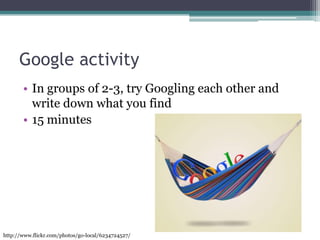
Google activity
       • In groups of 2-3, try Googling each other and
         write down what you find
       • 15 minutes


http://www.flickr.com/photos/go-local/6234724527/
Institutional web presence
• Institutional repository
  ▫ Manchester eScholar
• Faculty/ School
  ▫ Researcher profile pages?
• University website
  ▫ http://personalpages.manchester.ac.uk/
  ▫ Patrycja Strycharczuk
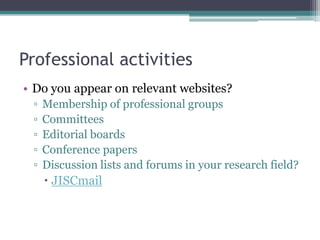
Professional activities
• Do you appear on relevant websites?
 ▫   Membership of professional groups
 ▫   Committees
 ▫   Editorial boards
 ▫   Conference papers
 ▫   Discussion lists and forums in your research field?
      JISCmail
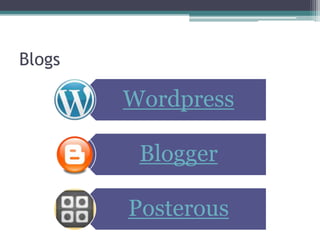
Blogs

        Wordpress

         Blogger

        Posterous
Personal research blogs
• Keep a research journal
• Practice writing for a specific audience
  ▫ Researchers in your field
  ▫ Interested academics
• Reach a wider audience
• Create a ‘hub’ for your activities
• Control content , design and updates
Researchers’ blogs
• Eljee Javier
  ▫ http://eljeejavier.com/

• Social Software, libraries and e-learning
  ▫ http://elearning.lse.ac.uk/blogs/socialsoftware/

• The Thesis Whisperer
  ▫ http://thethesiswhisperer.wordpress.com/
Blogging about your research
• Think about your audience
 ▫ Academic or general readers?
 ▫ Inter-disciplinary?
• Offer something new or different
 ▫ What makes your blog worth reading?
 ▫ What do you want readers to learn?
• Use examples
 ▫ Relate research to specific examples
 ▫ Demonstrate relevance and impact
Writing tips
• Keep it up-to-date, post regularly
• Be conversational and engaging
• Keep it focused, remove redundant words and
  avoid jargon
• Use headings, short paragraphs and lists
• Use links, images and tags (wordclouds etc)
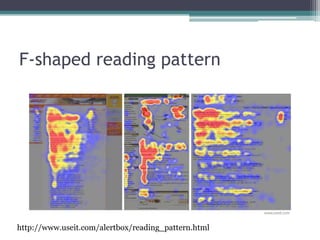
F-shaped reading pattern


http://www.useit.com/alertbox/reading_pattern.html
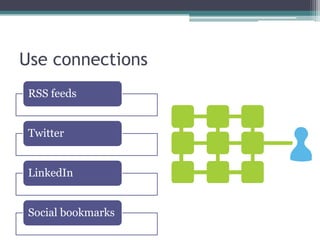
Use connections
 RSS feeds


 Twitter


 LinkedIn


 Social bookmarks
http://www.flickr.com/photos/pictureperfectpose/76138988/
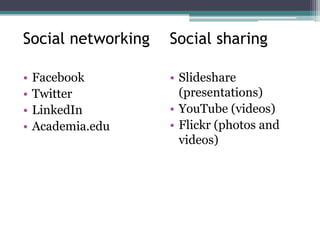
Social networking   Social sharing

•   Facebook        • Slideshare
•   Twitter           (presentations)
•   LinkedIn        • YouTube (videos)
•   Academia.edu    • Flickr (photos and
                      videos)
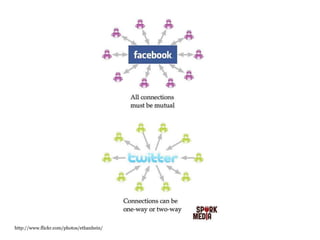
http://www.flickr.com/photos/ethanhein/
Twitter
•   Disseminate news about your research
•   Keep up-to-date with others in your field
•   Build networks of researchers
•   Follow conferences and get reactions to events
    as they happen
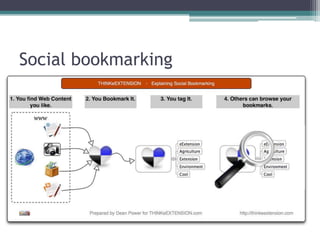
Social bookmarking
Social citations


  Networking, collaboration, find out who is
  reading the same things as you, and what
  else they’re reading!
Action plan
• Where am I?            • Where do I want to be?

 ▫ Do I have an online     ▫ Actions
   profile?
 ▫ Is it up-to-date?
 ▫ Is it connected?
Any questions?
         steve.mcindoe@manchester.ac.uk


            twitter.com/stevemcee


         twitter.com/jrulresearchers


         jrulresearchers.wordpress.com

Raising your research profile

  • 1.
    Raising your researchprofile Steve McIndoe University of Manchester Library
  • 2.
    Aims of session •Understanding your web presence • Considering institutional, personal and social presence on the web • Using social media to develop your research profile
  • 3.
    Why develop yourresearch profile? • Showcase your work • Showcase yourself! • Build professional networks • Reach a wider audience • Becoming an ‘expected’ academic activity..?
  • 5.
  • 6.
    Google activity • In groups of 2-3, try Googling each other and write down what you find • 15 minutes http://www.flickr.com/photos/go-local/6234724527/
  • 7.
    Institutional web presence •Institutional repository ▫ Manchester eScholar • Faculty/ School ▫ Researcher profile pages? • University website ▫ http://personalpages.manchester.ac.uk/ ▫ Patrycja Strycharczuk
  • 8.
    Professional activities • Doyou appear on relevant websites? ▫ Membership of professional groups ▫ Committees ▫ Editorial boards ▫ Conference papers ▫ Discussion lists and forums in your research field?  JISCmail
  • 9.
    Blogs Wordpress Blogger Posterous
  • 11.
    Personal research blogs •Keep a research journal • Practice writing for a specific audience ▫ Researchers in your field ▫ Interested academics • Reach a wider audience • Create a ‘hub’ for your activities • Control content , design and updates
  • 12.
    Researchers’ blogs • EljeeJavier ▫ http://eljeejavier.com/ • Social Software, libraries and e-learning ▫ http://elearning.lse.ac.uk/blogs/socialsoftware/ • The Thesis Whisperer ▫ http://thethesiswhisperer.wordpress.com/
  • 13.
    Blogging about yourresearch • Think about your audience ▫ Academic or general readers? ▫ Inter-disciplinary? • Offer something new or different ▫ What makes your blog worth reading? ▫ What do you want readers to learn? • Use examples ▫ Relate research to specific examples ▫ Demonstrate relevance and impact
  • 14.
    Writing tips • Keepit up-to-date, post regularly • Be conversational and engaging • Keep it focused, remove redundant words and avoid jargon • Use headings, short paragraphs and lists • Use links, images and tags (wordclouds etc)
  • 15.
  • 16.
    Use connections RSSfeeds Twitter LinkedIn Social bookmarks
  • 17.
  • 18.
    Social networking Social sharing • Facebook • Slideshare • Twitter (presentations) • LinkedIn • YouTube (videos) • Academia.edu • Flickr (photos and videos)
  • 19.
  • 20.
    Twitter • Disseminate news about your research • Keep up-to-date with others in your field • Build networks of researchers • Follow conferences and get reactions to events as they happen
  • 21.
  • 22.
    Social citations Networking, collaboration, find out who is reading the same things as you, and what else they’re reading!
  • 23.
    Action plan • Wheream I? • Where do I want to be? ▫ Do I have an online ▫ Actions profile? ▫ Is it up-to-date? ▫ Is it connected?
  • 24.
    Any questions? steve.mcindoe@manchester.ac.uk twitter.com/stevemcee twitter.com/jrulresearchers jrulresearchers.wordpress.com

Editor's Notes

  • #3 Not looking at raising profile through getting published, conference attendance etc. Other support and training available in these areas.
  • #5 Some idea of the scope of social media. Impossible to be doing it all but need to think about which ones suit your needs, how you want to manage it.
  • #6 Your ‘digital footprint’ is a record of all your online interactions and contributions. Can have both POSITIVE and NEGATIVE impact.Can be both ACTIVE (contacts you establish, blogs and tweets you post) and PASSIVE (data harvested by Google, Facebook etc). Important to make sure you take control of your own digital profile.
  • #7 People reading on the web want quick results. Most will spend only a few minutes searching for something. In groups of 2-3, try Googling each other and write down what you find. 15 minutesFeedback from group – as expected? Any surprises? YouTube and Twitter get high rankings on Google searches. Very visible profile if people are looking for you.Google behaves differently if you are signed in to a Google account.
  • #8 Do you deposit material into Manchester eScholar?Do you appear on the University website? If yes, is there anything you can do to edit your entries?
  • #10 Three of the main services. There are others. Wordpress is very quick to set up and easy to use. http://jrulsocialmedia.wordpress.com/
  • #12 Helps to improve writing, chance to practice writing for a specific audience. Link out to other services (Twitter, LinkedIn, conferences, papers, institutional repository etc)Blogs are very easy to set up and use.
  • #14 Try to reach a wider audience by thinking outside your own field – transferable ideas, skills, methods.Don’t have to reveal your research findings, use blog as a record of your research process, tool for collaboration, sharing ideas.
  • #15 Write several short blog posts rather than one long one. Some software will let you set release dates for the post automatically.
  • #18 Copyright and plagiarism rules still apply. If anything even easier to be caught out online!Creative Commons. Flickr. Different types of licence.
  • #20 Facebook possibly better for social networking. Think about security settings. Twitter increasingly used in academia.
  • #21 Fastest-growing social network in the world. Micro-blogging site140 characters or lessGood for following trends, not reading every post. Evolve techniques to manage it. Eljee Javier recommends it as a tool for networking but it does take practice. Best to find like-minded researchers (conferences, papers, blogs) and follow them.
  • #22 Organise websites you are interested in; accessible from anywhere. Very useful for collaborating with other researchers. Tagging bookmarks allows others to find your bookmarks. You can create groups and allow invited people to add bookmarks to them. Can set up feeds to your blog to create dynamic content, show your blog readers what websites you are readingMany services out there, Delicious is probably the main one at the moment BUT it is public. Diigo is good for research as it allows you to highlight and add notes to webpages.
  • #24 Spend five minutes thinking about your research presence on the web and at least ONE action you intend to take. Feedback to group.
  • #25 steve.mcindoe@manchester.ac.uk @stevemceeTwitter.com/jrulresearchersjrulresearchers.wordpress.com/