Presenter: Nikhil Kumar
RAC- Installing your First Cluster and
Database
WHO AM I ?
 Nikhil Kumar (DBA Manager)
6 Years of Experience in Oracle Databases
and Apps.
Oracle Certified Professional Oracle 9i and
11g.
Worked on Mission critical Telecom,
Financial ERP, Manufacturing and
Government Domain.
Agenda
 Introduction of RAC
 Installation of Clusterware.
 Creating diskgroup / Adding disk to Diskgroup using ASMCA.
 Creation of ACFS Volume.
 Installation of RAC Database using DBCA.
Introduction of RAC
A medium to provide high availability to database.
Why RAC?
High availability and scalability without any limitation:-
 OS Patching or Schedule bounce of OS.
 Database maintenance patch(CPU or PSU) .
 Static database parameter change (Due to bug or any
requirement by system).
 Hardware upgrade or change.
 Harddisk failure, power failure or system failure.
 Prevention from Single point of failure?
Identity`Home
Node
Host NodeGiven NameTypeAddressAddress
Assigned
By
Address
Resolved By
Node 1
Public
Node 1racnode1racnode1Public192.168.7.71FixedDNS
Node 1
VIP
Node 1Selected by
Oracle
Clusterware
racnode1-vipVirtual192.168.7.41FixedDNS and hosts
file
Node 1
Private
Node 1racnode1racnode1-privPrivate192.168.71.40FixedDNS and hosts
file, or none
Node 2
Public
Node 2racnode2racnode2Public192.168.7.72FixedDNS
Node 2
VIP
Node 2Selected by
Oracle
Clusterware
racnode2-vipVirtual192.168.7.41FixedDNS and hosts
file
Node 2
Private
Node 2racnode2racnode2-privPrivate192.168.71.41FixedDNS and hosts
file, or none
SCANNoneSelected by
Oracle
Clusterware
Racnode.linuxdc.comVirtual192.168.7.43
192.168.7.44
192.168.7.45
FixedDNS
Network Configuration:
For racnode1 and racnode2
Note : Manually assigning the proper IPs in /etc/host file is mandatory. Even if it resolved
through DNS. This is Oracle Requirement.
Cluster Overview
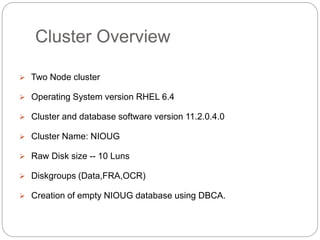
 Two Node cluster
 Operating System version RHEL 6.4
 Cluster and database software version 11.2.0.4.0
 Cluster Name: NIOUG
 Raw Disk size -- 10 Luns
 Diskgroups (Data,FRA,OCR)
 Creation of empty NIOUG database using DBCA.
Prerequisite
Prerequisite to followed by System/Network
Admin before delivering the server to DBA.
1.
Prerequisite Cont..
2. Verify that SELinux is running and set to ENFORCING:
As the root user,
# getenforce
Enforcing
If the system is running in PERMISSIVE or DISABLED mode, modify the
/etc/sysconfig/selinux file and set SELinux to enforcing as shown
below.
SELINUX=enforcing
The modification of the /etc/sysconfig/selinux file takes effect after a
reboot. To change the setting of SELinux immediately without a
reboot, run the following command:
# setenforce 1
Prerequisite Cont..
3. Need to upgrade selinux-policy rpm to make
SELINUX work current version of RPM Deliver with
RHEL 6.4
[root@STGW2 ~]# rpm -qa selinux-policy*
selinux-policy-3.7.19-195.el6.noarch
selinux-policy-targeted-3.7.19-195.el6.noarch
Need to upgrade with below mentioned package:-
[root@racnode1 ~]# rpm -qa selinux-policy*
selinux-policy-3.7.19-231.el6.noarch
selinux-policy-targeted-3.7.19-231.el6.noarch
Prerequisite Cont..
4. Make sure the shared memory file system is big
enough for Automatic Memory Manager to work.
EXAMPLES:
# umount tmpfs
# mount -t tmpfs tmpfs -o size=12g /dev/shm
( size is based upon 90% of physical memory)
Make the setting permanent by amending the "tmpfs" setting of the
"/etc/fstab" file to look like this.
tmpfs /dev/shm tmpfs defaults,size=12g 0 0
Prerequisite Cont..
5. Put the below entry in /etc/hosts of both node
[root@racnode1 bin]# cat /etc/hosts
127.0.0.1 localhost localhost.localdomain localhost4 localhost4.localdomain4
::1 localhost localhost.localdomain localhost6 localhost6.localdomain6
192.168.7.71 racnode1
192.168.7.72 racnode2
192.168.71.40 racnode1-priv
192.168.71.41 racnode2-priv
192.168.7.41 racnode1-vip
192.168.7.42 racnode2-vip
Prerequisite Cont..
6. Kernel Parameters:
Add the kernel parameters in
/etc/sysctl.conf file.
(Apply it using command sysctl -p
/etc/sysctl.conf)
kernel.shmall = shmmax / 4096
kernel.shmmax= 90% of physical memory
net.ipv4.ip_forward = 0
net.ipv4.conf.default.rp_filter = 1
net.ipv4.conf.default.accept_source_route
= 0
kernel.sysrq = 0
kernel.core_uses_pid = 1
net.ipv4.tcp_syncookies = 1
fs.aio-max-nr= 3145728
fs.file-max = 6815744
kernel.msgmax = 8192
kernel.msgmnb= 65536
kernel.msgmni = 2878
kernel.sem = 250 32000 100 142
kernel.shmall = 2097152
kernel.shmmax= 7730941132
kernel.sysrq= 1
net.core.rmem_default=4194304
net.core.rmem_max=4194304
net.core.wmem_default=262144
net.core.wmem_max=1048576
net.ipv4.ip_local_port_range=9000
65500
Prerequisite Cont..
7. Adding Groups and users:
#groupadd -g 2011 asmdba
#groupadd -g 2012 asmadmin
#groupadd -g 2013 asmoper
#groupadd -g 2014 oper
#groupadd –g 2015 oinstall
#groupadd –g 2016 dba
#useradd -s /bin/bash -d /home/grid -g oinstall -G asmdba,asmadmin,asmoper,dba grid
#useradd -s /bin/bash -d /home/oracle -g oinstall -G asmdba,asmadmin,asmoper,dba oracle
#usermod -a -G asmdba,oper oracle
For example:
# id grid
uid=3010(grid) gid=2004(oinstall)
groups=2000(dba),2004(oinstall),2011(asmdba),2012(asmadmin),2013(asmoper)
#id oracle
uid=3000(oracle) gid=2004(oinstall) groups=2000(dba),2004(oinstall),2011(asmdba),2014(oper)
Prerequisite Cont..
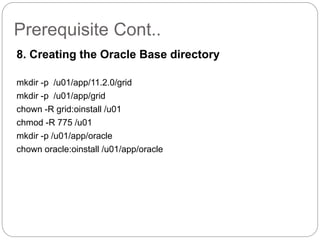
8. Creating the Oracle Base directory
mkdir -p /u01/app/11.2.0/grid
mkdir -p /u01/app/grid
chown -R grid:oinstall /u01
chmod -R 775 /u01
mkdir -p /u01/app/oracle
chown oracle:oinstall /u01/app/oracle
Prerequisite Cont..
9. Network Time Protocol Setting:
If you are using NTP, you must add the "-x" option into the following line in
the "/etc/sysconfig/ntpd" file.
OPTIONS="-x -u ntp:ntp -p /var/run/ntpd.pid"
Then restart NTP.
# chkconfig --level 2345 ntpd on
Start the Name Service Cache Daemon (nscd).
# chkconfig --level 2345 nscd on
# service nscd start
Prerequisite Cont..
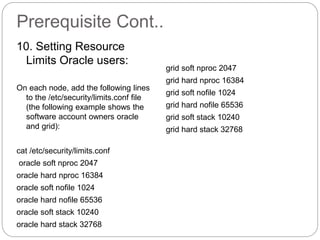
10. Setting Resource
Limits Oracle users:
On each node, add the following lines
to the /etc/security/limits.conf file
(the following example shows the
software account owners oracle
and grid):
cat /etc/security/limits.conf
oracle soft nproc 2047
oracle hard nproc 16384
oracle soft nofile 1024
oracle hard nofile 65536
oracle soft stack 10240
oracle hard stack 32768
grid soft nproc 2047
grid hard nproc 16384
grid soft nofile 1024
grid hard nofile 65536
grid soft stack 10240
grid hard stack 32768
Prerequisite Cont..
11. Setting login file:
As the root user, create a backup of /etc/pam.d/login
# cp /etc/pam.d/login /etc/pam.d/login.bkup
As the root user, add the following line within the /etc/pam.d/login file
session required pam_limits.so
12 .To install and configure ASMLib software packages:
1. Download the ASMLib packages to each node in your cluster.
2. Change to the directory where the package files were downloaded.
3. As the root user, use the rpm command to install the packages. For example:
# rpm -Uvh kmod-oracleasm
# rpm -Uvh oracleasmlib-2.0.4-1.el6.x86_64.rpm
# rpm -Uvh oracleasm-support-2.1.8-1.el6.x86_64.rpm
Prerequisite Cont..
After you have completed these commands, ASMLib is installed on the
system.
4.Repeat steps 2 and 3 on each node in your cluster.
Configuring asmlib:
a.) /usr/sbin/oracleasm configure -i (as root user run on all the nodes)
b.) oracleasm init (Load and initialize the ASMLib driver)
Load the kernel module using the following command.
# /usr/sbin/oracleasm init
Loading module "oracleasm": oracleasm
Mounting ASMlib driver filesystem: /dev/oracleasm
Prerequisite Cont..
Using ASMLib to Create ASM Disks
c.) createdisk (only on the first node)
# /usr/sbin/oracleasm createdisk
disk_name device_partition_name
Mark the five shared disks as follows.
# /usr/sbin/oracleasm createdisk DISK1
/dev/sdb1
Writing disk header: done
Instantiating disk: done
If you need to unmark a disk that was
used in a createdisk command, you
can
use the following syntax:
# /usr/sbin/oracleasm deletedisk
disk_name
Prerequisite Cont..
d.) oracleasm scandisks ( on all
the nodes)
It is unnecessary, but we can run the
"scandisks" command to refresh
the ASM disk configuration.
# /usr/sbin/oracleasm scandisks
Reloading disk partitions: done
Cleaning any stale ASM disks...
Scanning system for ASM disks...
e.) oracleasm listdisks
We can see the disk are now visible
to ASM using the "listdisks"
command.
# /usr/sbin/oracleasm listdisks
Prerequisite Cont..
13. Ping to check the communication between each
node in cluster
ping racnode1
ping racnode2
ping racnode1-priv
ping racnode2-priv
Run the Cluvfy to check the prerequisite of cluster
installation. (Run from Grid user)
/software/grid/runcluvfy.sh stage -pre crsinst -n racnode1,racnode2 –
verbose
Prerequisite Cont..
14. SCAN name should be configured by network admin
before starting the installation.
SCAN can be verified by two ways:-
# host scan_name (It should show 3 ip address)
# nslookup scan_name (Run this command 2-3 times IP should
interchange)
Installation of Grid Infrastructure
Clusterware
Go to /software_directory/grid
run this on grid user
./runInstaller
Download Software Updates
Select the "Install and Configure Grid Infrastructure for
a Cluster" option, then click the "Next" button.
Select the "Advanced Installation" option, then
click the "Next" button.
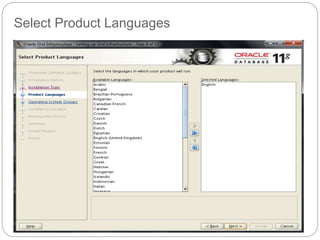
Select Product Languages
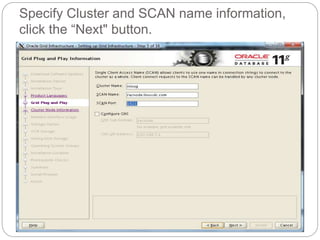
Specify Cluster and SCAN name information,
click the “Next" button.
Enter the details of the second node in the
cluster, then click the "OK" button.
Provide password of grid to configure SSH
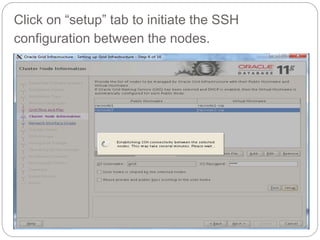
Click on “setup” tab to initiate the SSH
configuration between the nodes.
Check the Network interface and its segment
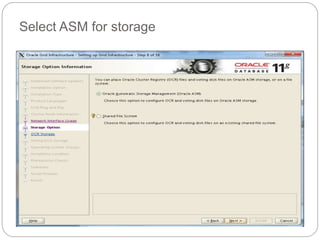
Select ASM for storage
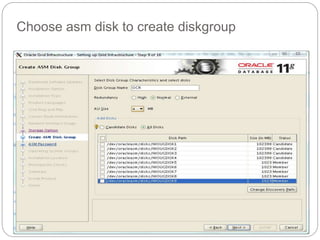
Choose asm disk to create diskgroup
Provide password for ASM account
Skipping IPMI, Since we don’t have hardware to support this feature
Group information for ASM
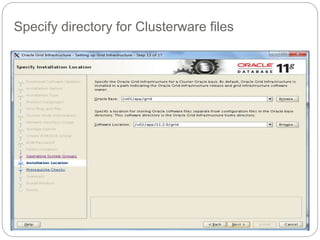
Specify directory for Clusterware files
Specify the directory for central inventory
Prerequisite check is being performed
Result from prerequisite check
Ignoring some prerequisite checks
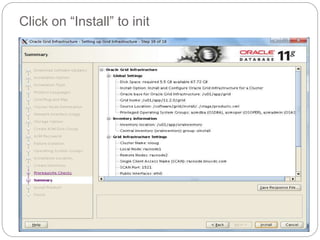
Click on “Install” to init
Installation is in process
Run root.sh scripts one at a time on the node
Setting permission for orainventory
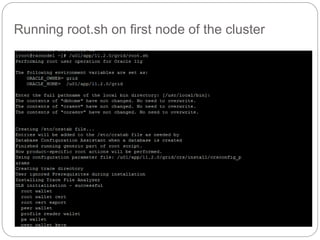
Running root.sh on first node of the cluster
root.sh on node one is complete
root.sh on node2 complete
Go back to OUI screen and click “OK”
Check Clusterware services on both nodes.
Grid Clusterware installation is complete
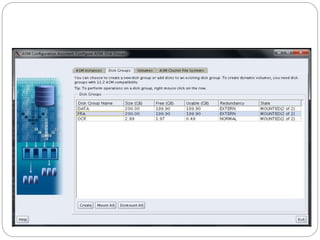
Creating Diskgroup using ASMCA
Invoking ASMCA Utility on grid user:-
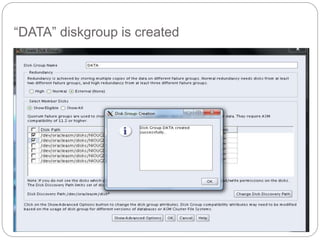
Create new “DATA” diskgroup
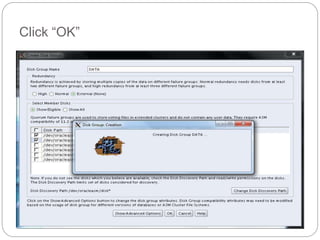
Click “OK”
“DATA” diskgroup is created
Creating ACFS Volume
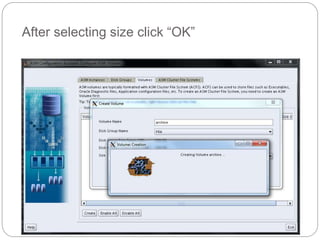
Create “archive” volume using “FRA” diskgroup
After selecting size click “OK”
Volume “archive” created
Now click “ASM Cluster File System” Tab
Now after clicking on “Create” tab, Select Volume
“Archive Which we created earlier. Provide the input
to “General Purpose File System” Which will be
mount on the Operating System.
/archive mountpoint of OS is created
Status of ACFS mount point
Check the “/archive” mountpoint on both node
Installation of Oracle Binaries
& Database Creation
Invoke “runInstaller” from Oracle user
Skipping Software Update
Use “Create and configure database” option to
install database binaries and dummy database
Select “Server Class” type for installation
Select both node for installation
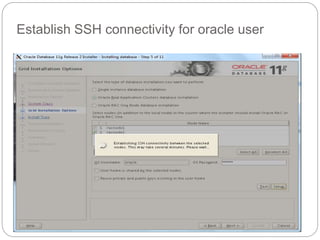
Establish SSH connectivity for oracle user
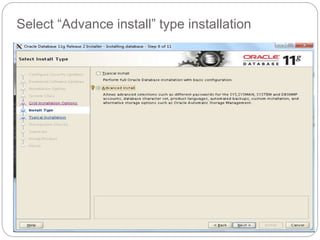
Select “Advance install” type installation
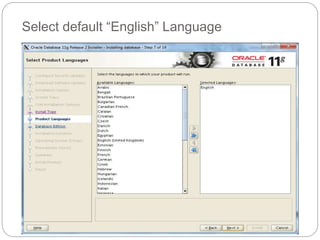
Select default “English” Language
Select “Enterprise Edition” for database
Define directory structure for database binaries
Select the type of database
Provide input to Global database name and SID
Provide memory to Instance
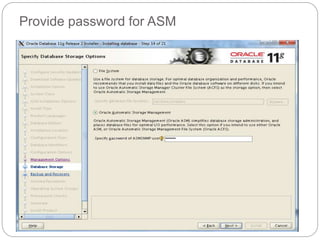
Provide password for ASM
Skipping the backup part
Select diskgroup where database files needs to
be placed
Provide password to admin account of database
Group information
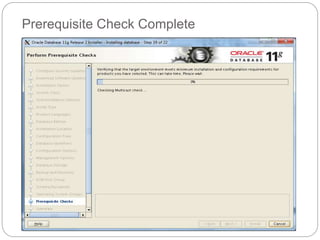
Prerequisite Check Complete
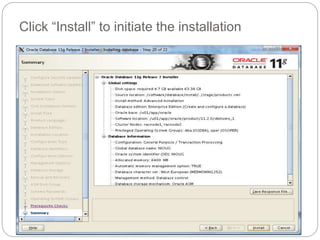
Click “Install” to initiate the installation
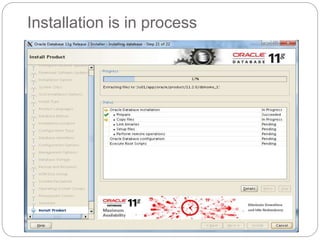
Installation is in process
Database creation is in process
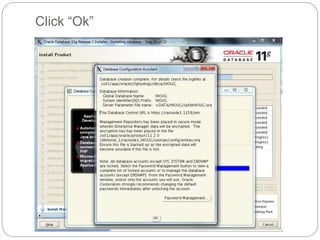
Click “Ok”
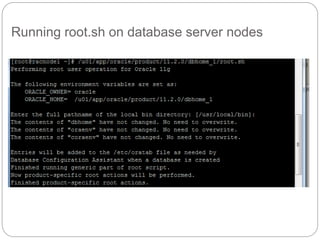
Run root.sh script on both node of cluster
Running root.sh on database server nodes
Software installation and software creation is done
Checking Database Resource
RAC-Installing your First Cluster and Database

RAC-Installing your First Cluster and Database

  • 1.
    Presenter: Nikhil Kumar RAC-Installing your First Cluster and Database
  • 2.
    WHO AM I?  Nikhil Kumar (DBA Manager) 6 Years of Experience in Oracle Databases and Apps. Oracle Certified Professional Oracle 9i and 11g. Worked on Mission critical Telecom, Financial ERP, Manufacturing and Government Domain.
  • 3.
    Agenda  Introduction ofRAC  Installation of Clusterware.  Creating diskgroup / Adding disk to Diskgroup using ASMCA.  Creation of ACFS Volume.  Installation of RAC Database using DBCA.
  • 4.
    Introduction of RAC Amedium to provide high availability to database. Why RAC? High availability and scalability without any limitation:-  OS Patching or Schedule bounce of OS.  Database maintenance patch(CPU or PSU) .  Static database parameter change (Due to bug or any requirement by system).  Hardware upgrade or change.  Harddisk failure, power failure or system failure.  Prevention from Single point of failure?
  • 5.
    Identity`Home Node Host NodeGiven NameTypeAddressAddress Assigned By Address ResolvedBy Node 1 Public Node 1racnode1racnode1Public192.168.7.71FixedDNS Node 1 VIP Node 1Selected by Oracle Clusterware racnode1-vipVirtual192.168.7.41FixedDNS and hosts file Node 1 Private Node 1racnode1racnode1-privPrivate192.168.71.40FixedDNS and hosts file, or none Node 2 Public Node 2racnode2racnode2Public192.168.7.72FixedDNS Node 2 VIP Node 2Selected by Oracle Clusterware racnode2-vipVirtual192.168.7.41FixedDNS and hosts file Node 2 Private Node 2racnode2racnode2-privPrivate192.168.71.41FixedDNS and hosts file, or none SCANNoneSelected by Oracle Clusterware Racnode.linuxdc.comVirtual192.168.7.43 192.168.7.44 192.168.7.45 FixedDNS Network Configuration: For racnode1 and racnode2 Note : Manually assigning the proper IPs in /etc/host file is mandatory. Even if it resolved through DNS. This is Oracle Requirement.
  • 6.
    Cluster Overview  TwoNode cluster  Operating System version RHEL 6.4  Cluster and database software version 11.2.0.4.0  Cluster Name: NIOUG  Raw Disk size -- 10 Luns  Diskgroups (Data,FRA,OCR)  Creation of empty NIOUG database using DBCA.
  • 7.
    Prerequisite Prerequisite to followedby System/Network Admin before delivering the server to DBA. 1.
  • 8.
    Prerequisite Cont.. 2. Verifythat SELinux is running and set to ENFORCING: As the root user, # getenforce Enforcing If the system is running in PERMISSIVE or DISABLED mode, modify the /etc/sysconfig/selinux file and set SELinux to enforcing as shown below. SELINUX=enforcing The modification of the /etc/sysconfig/selinux file takes effect after a reboot. To change the setting of SELinux immediately without a reboot, run the following command: # setenforce 1
  • 9.
    Prerequisite Cont.. 3. Needto upgrade selinux-policy rpm to make SELINUX work current version of RPM Deliver with RHEL 6.4 [root@STGW2 ~]# rpm -qa selinux-policy* selinux-policy-3.7.19-195.el6.noarch selinux-policy-targeted-3.7.19-195.el6.noarch Need to upgrade with below mentioned package:- [root@racnode1 ~]# rpm -qa selinux-policy* selinux-policy-3.7.19-231.el6.noarch selinux-policy-targeted-3.7.19-231.el6.noarch
  • 10.
    Prerequisite Cont.. 4. Makesure the shared memory file system is big enough for Automatic Memory Manager to work. EXAMPLES: # umount tmpfs # mount -t tmpfs tmpfs -o size=12g /dev/shm ( size is based upon 90% of physical memory) Make the setting permanent by amending the "tmpfs" setting of the "/etc/fstab" file to look like this. tmpfs /dev/shm tmpfs defaults,size=12g 0 0
  • 11.
    Prerequisite Cont.. 5. Putthe below entry in /etc/hosts of both node [root@racnode1 bin]# cat /etc/hosts 127.0.0.1 localhost localhost.localdomain localhost4 localhost4.localdomain4 ::1 localhost localhost.localdomain localhost6 localhost6.localdomain6 192.168.7.71 racnode1 192.168.7.72 racnode2 192.168.71.40 racnode1-priv 192.168.71.41 racnode2-priv 192.168.7.41 racnode1-vip 192.168.7.42 racnode2-vip
  • 12.
    Prerequisite Cont.. 6. KernelParameters: Add the kernel parameters in /etc/sysctl.conf file. (Apply it using command sysctl -p /etc/sysctl.conf) kernel.shmall = shmmax / 4096 kernel.shmmax= 90% of physical memory net.ipv4.ip_forward = 0 net.ipv4.conf.default.rp_filter = 1 net.ipv4.conf.default.accept_source_route = 0 kernel.sysrq = 0 kernel.core_uses_pid = 1 net.ipv4.tcp_syncookies = 1 fs.aio-max-nr= 3145728 fs.file-max = 6815744 kernel.msgmax = 8192 kernel.msgmnb= 65536 kernel.msgmni = 2878 kernel.sem = 250 32000 100 142 kernel.shmall = 2097152 kernel.shmmax= 7730941132 kernel.sysrq= 1 net.core.rmem_default=4194304 net.core.rmem_max=4194304 net.core.wmem_default=262144 net.core.wmem_max=1048576 net.ipv4.ip_local_port_range=9000 65500
  • 13.
    Prerequisite Cont.. 7. AddingGroups and users: #groupadd -g 2011 asmdba #groupadd -g 2012 asmadmin #groupadd -g 2013 asmoper #groupadd -g 2014 oper #groupadd –g 2015 oinstall #groupadd –g 2016 dba #useradd -s /bin/bash -d /home/grid -g oinstall -G asmdba,asmadmin,asmoper,dba grid #useradd -s /bin/bash -d /home/oracle -g oinstall -G asmdba,asmadmin,asmoper,dba oracle #usermod -a -G asmdba,oper oracle For example: # id grid uid=3010(grid) gid=2004(oinstall) groups=2000(dba),2004(oinstall),2011(asmdba),2012(asmadmin),2013(asmoper) #id oracle uid=3000(oracle) gid=2004(oinstall) groups=2000(dba),2004(oinstall),2011(asmdba),2014(oper)
  • 14.
    Prerequisite Cont.. 8. Creatingthe Oracle Base directory mkdir -p /u01/app/11.2.0/grid mkdir -p /u01/app/grid chown -R grid:oinstall /u01 chmod -R 775 /u01 mkdir -p /u01/app/oracle chown oracle:oinstall /u01/app/oracle
  • 15.
    Prerequisite Cont.. 9. NetworkTime Protocol Setting: If you are using NTP, you must add the "-x" option into the following line in the "/etc/sysconfig/ntpd" file. OPTIONS="-x -u ntp:ntp -p /var/run/ntpd.pid" Then restart NTP. # chkconfig --level 2345 ntpd on Start the Name Service Cache Daemon (nscd). # chkconfig --level 2345 nscd on # service nscd start
  • 16.
    Prerequisite Cont.. 10. SettingResource Limits Oracle users: On each node, add the following lines to the /etc/security/limits.conf file (the following example shows the software account owners oracle and grid): cat /etc/security/limits.conf oracle soft nproc 2047 oracle hard nproc 16384 oracle soft nofile 1024 oracle hard nofile 65536 oracle soft stack 10240 oracle hard stack 32768 grid soft nproc 2047 grid hard nproc 16384 grid soft nofile 1024 grid hard nofile 65536 grid soft stack 10240 grid hard stack 32768
  • 17.
    Prerequisite Cont.. 11. Settinglogin file: As the root user, create a backup of /etc/pam.d/login # cp /etc/pam.d/login /etc/pam.d/login.bkup As the root user, add the following line within the /etc/pam.d/login file session required pam_limits.so 12 .To install and configure ASMLib software packages: 1. Download the ASMLib packages to each node in your cluster. 2. Change to the directory where the package files were downloaded. 3. As the root user, use the rpm command to install the packages. For example: # rpm -Uvh kmod-oracleasm # rpm -Uvh oracleasmlib-2.0.4-1.el6.x86_64.rpm # rpm -Uvh oracleasm-support-2.1.8-1.el6.x86_64.rpm
  • 18.
    Prerequisite Cont.. After youhave completed these commands, ASMLib is installed on the system. 4.Repeat steps 2 and 3 on each node in your cluster. Configuring asmlib: a.) /usr/sbin/oracleasm configure -i (as root user run on all the nodes) b.) oracleasm init (Load and initialize the ASMLib driver) Load the kernel module using the following command. # /usr/sbin/oracleasm init Loading module "oracleasm": oracleasm Mounting ASMlib driver filesystem: /dev/oracleasm
  • 19.
    Prerequisite Cont.. Using ASMLibto Create ASM Disks c.) createdisk (only on the first node) # /usr/sbin/oracleasm createdisk disk_name device_partition_name Mark the five shared disks as follows. # /usr/sbin/oracleasm createdisk DISK1 /dev/sdb1 Writing disk header: done Instantiating disk: done If you need to unmark a disk that was used in a createdisk command, you can use the following syntax: # /usr/sbin/oracleasm deletedisk disk_name
  • 20.
    Prerequisite Cont.. d.) oracleasmscandisks ( on all the nodes) It is unnecessary, but we can run the "scandisks" command to refresh the ASM disk configuration. # /usr/sbin/oracleasm scandisks Reloading disk partitions: done Cleaning any stale ASM disks... Scanning system for ASM disks... e.) oracleasm listdisks We can see the disk are now visible to ASM using the "listdisks" command. # /usr/sbin/oracleasm listdisks
  • 21.
    Prerequisite Cont.. 13. Pingto check the communication between each node in cluster ping racnode1 ping racnode2 ping racnode1-priv ping racnode2-priv Run the Cluvfy to check the prerequisite of cluster installation. (Run from Grid user) /software/grid/runcluvfy.sh stage -pre crsinst -n racnode1,racnode2 – verbose
  • 22.
    Prerequisite Cont.. 14. SCANname should be configured by network admin before starting the installation. SCAN can be verified by two ways:- # host scan_name (It should show 3 ip address) # nslookup scan_name (Run this command 2-3 times IP should interchange)
  • 23.
    Installation of GridInfrastructure Clusterware
  • 24.
    Go to /software_directory/grid runthis on grid user ./runInstaller
  • 25.
  • 26.
    Select the "Installand Configure Grid Infrastructure for a Cluster" option, then click the "Next" button.
  • 27.
    Select the "AdvancedInstallation" option, then click the "Next" button.
  • 28.
  • 29.
    Specify Cluster andSCAN name information, click the “Next" button.
  • 30.
    Enter the detailsof the second node in the cluster, then click the "OK" button.
  • 31.
    Provide password ofgrid to configure SSH
  • 32.
    Click on “setup”tab to initiate the SSH configuration between the nodes.
  • 34.
    Check the Networkinterface and its segment
  • 35.
  • 36.
    Choose asm diskto create diskgroup
  • 37.
  • 38.
    Skipping IPMI, Sincewe don’t have hardware to support this feature
  • 39.
  • 40.
    Specify directory forClusterware files
  • 41.
    Specify the directoryfor central inventory
  • 42.
    Prerequisite check isbeing performed
  • 43.
  • 44.
  • 45.
  • 46.
  • 47.
    Run root.sh scriptsone at a time on the node
  • 48.
    Run root.sh scriptsone at a time on the node
  • 49.
  • 50.
    Running root.sh onfirst node of the cluster
  • 51.
    root.sh on nodeone is complete
  • 52.
  • 53.
    Go back toOUI screen and click “OK”
  • 54.
  • 55.
  • 56.
  • 57.
    Invoking ASMCA Utilityon grid user:-
  • 58.
  • 59.
  • 60.
  • 61.
  • 63.
    Create “archive” volumeusing “FRA” diskgroup
  • 64.
    After selecting sizeclick “OK”
  • 65.
  • 66.
    Now click “ASMCluster File System” Tab
  • 67.
    Now after clickingon “Create” tab, Select Volume “Archive Which we created earlier. Provide the input to “General Purpose File System” Which will be mount on the Operating System.
  • 68.
  • 69.
    Status of ACFSmount point
  • 70.
    Check the “/archive”mountpoint on both node
  • 71.
    Installation of OracleBinaries & Database Creation
  • 72.
  • 73.
  • 74.
    Use “Create andconfigure database” option to install database binaries and dummy database
  • 75.
    Select “Server Class”type for installation
  • 76.
    Select both nodefor installation
  • 77.
  • 78.
  • 79.
  • 80.
  • 81.
    Define directory structurefor database binaries
  • 82.
    Select the typeof database
  • 83.
    Provide input toGlobal database name and SID
  • 84.
  • 86.
  • 87.
  • 88.
    Select diskgroup wheredatabase files needs to be placed
  • 89.
    Provide password toadmin account of database
  • 90.
  • 91.
  • 92.
  • 93.
    Click “Install” toinitiate the installation
  • 94.
  • 95.
  • 96.
  • 97.
    Run root.sh scripton both node of cluster
  • 98.
    Running root.sh ondatabase server nodes
  • 99.
    Software installation andsoftware creation is done
  • 100.