What have you learnt about technologies from the process of constructing this
product?
For the construct of my magazine front cover, contents page and feature article I used a range of
different websites and programmes; also I used a range of different equipment when capturing my
images. I have used websites and programmes such as Blogger, Flickr, Survey Monkey, Photoshop
and Microsoft Word. I have also used equipment such as light boxes and a DSLR camera.
I used the various websites such as Blogger, Flickr and Survey Monkey to storage data and to get
responses from people. I mostly used Blogger to storage all of my work from start to finish, by using
Blogger you are able to understand the processes and planning that I have done in order to
construct my final product. I have uploaded images onto Flickr so that I could annotate them neatly;
I found this website easy to use and had no problems uploading my annotated image onto my blog. I
used Survey Monkey to construct a questionnaire and post it onto the internet so that people could
answer it, by doing this I have gathered useful information regarding the making of my final product.
I used the websites Flickr, Wix, Slideshare, Prezi and Issuu to upload the answers to the seven
questions I have answered before embedding them onto my blog. I had no problem learning how to
operate these websites.
Before making my final product I did not know much about using Photoshop, but I can now work
confidently on the programme.
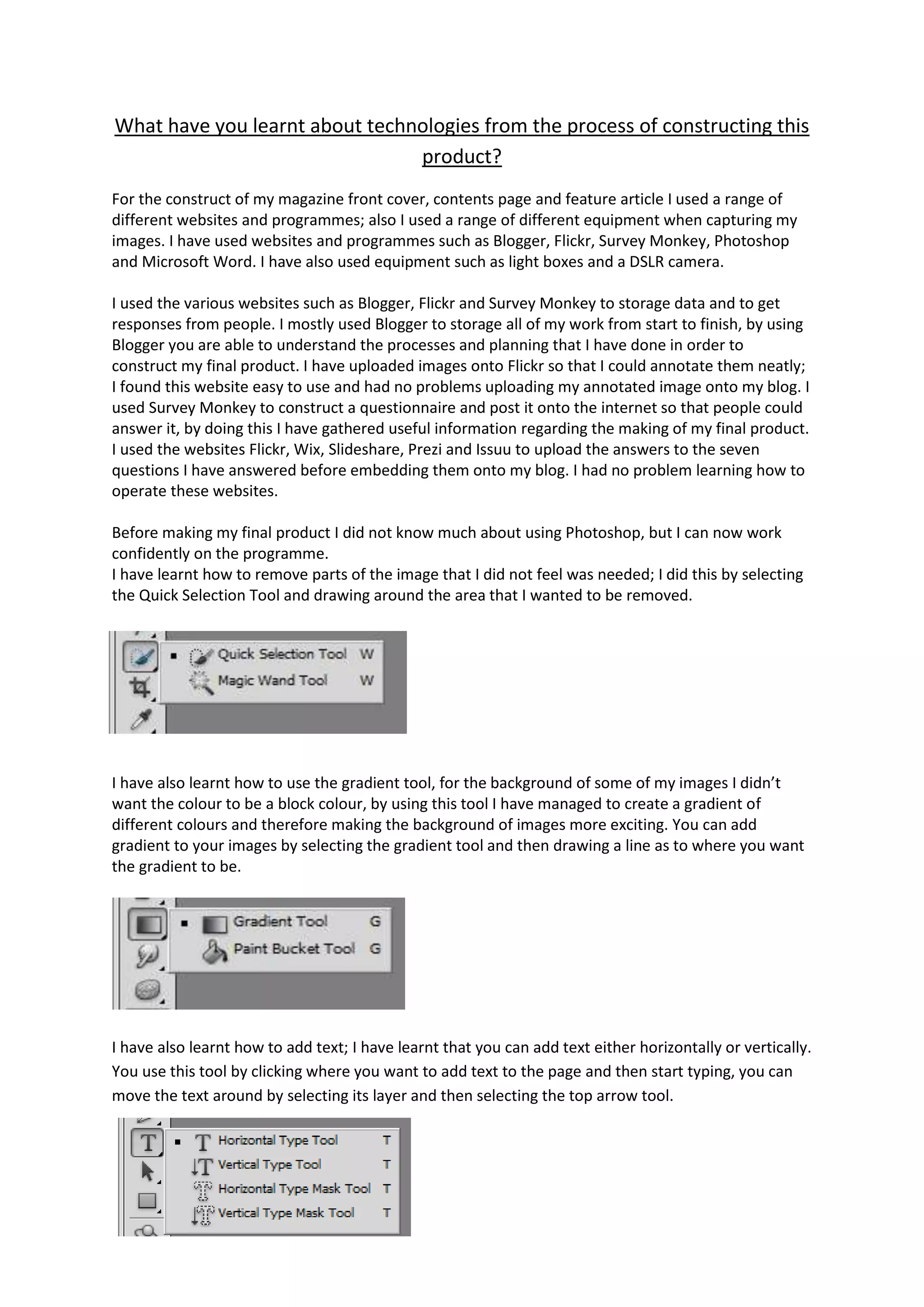
I have learnt how to remove parts of the image that I did not feel was needed; I did this by selecting
the Quick Selection Tool and drawing around the area that I wanted to be removed.

I have also learnt how to use the gradient tool, for the background of some of my images I didn’t
want the colour to be a block colour, by using this tool I have managed to create a gradient of
different colours and therefore making the background of images more exciting. You can add
gradient to your images by selecting the gradient tool and then drawing a line as to where you want
the gradient to be.

I have also learnt how to add text; I have learnt that you can add text either horizontally or vertically.
You use this tool by clicking where you want to add text to the page and then start typing, you can
move the text around by selecting its layer and then selecting the top arrow tool.
Blogger – I have used blogger to store all of my work that I have done over the past couple of
months. Blogger is a neat, easy accessible website that is perfect for storing all of your work on. The
cons of using Blogger are that if you forget your sign in information, you cannot access the website
to make changes; also it is only accessible if you have internet connection.
Issuu – I have used Issuu to upload two out of the seven evaluation questions that I have answered. I
had a little trouble uploading my first question onto Issuu because I didn’t say that you had to
change the format to a PDF when uploading a word document, apart from that I found it easy to
work and it presented my work in a nice manor.
Survey Monkey – I used Survey Monkey to upload a questionnaire so that I could get feedback to
help me construct my front cover, contents page and feature article. The pros of using Survey
Monkey is that it presents the questions that I wanted answered in a nice way, it was also easy to
work when I wanted someone with little computer experience to answer the questions. The cons of
using Survey Monkey is that you can only answer it once on one computer, this means that if I
wanted two people to fill in the questionnaire on the same computer it could not happen.
Flickr – I used Flickr as a place to store my images that I wanted to annotate. I stored them in Flickr
because it is easy to use and helped the person that is reading my work to know which part of the
image that I am referring too.
Wix – I used Wix to upload one of my questions on it, it was quite a long question so I wanted to
present it in a way that didn’t make it look boring. By uploading the question and answer onto Wix it
made it look interesting to read. I did have a little trouble using Wix, I found it hard to organise the
separate paragraphs into the order that they needed to be, eventually I figured out how to do it.
Prezi – I also used Prezi to upload one of the questions on to. I found Prezi easy to use and it made
the answer to my question look fun and interesting.
Slideshare – I used Slideshare to present the answers to the questionnaire, as well as one of my
evaluation questions. I like using Slideshare because it has a different layout compared to the other
websites.

Question 6

  • 1.
    What have youlearnt about technologies from the process of constructing this product? For the construct of my magazine front cover, contents page and feature article I used a range of different websites and programmes; also I used a range of different equipment when capturing my images. I have used websites and programmes such as Blogger, Flickr, Survey Monkey, Photoshop and Microsoft Word. I have also used equipment such as light boxes and a DSLR camera. I used the various websites such as Blogger, Flickr and Survey Monkey to storage data and to get responses from people. I mostly used Blogger to storage all of my work from start to finish, by using Blogger you are able to understand the processes and planning that I have done in order to construct my final product. I have uploaded images onto Flickr so that I could annotate them neatly; I found this website easy to use and had no problems uploading my annotated image onto my blog. I used Survey Monkey to construct a questionnaire and post it onto the internet so that people could answer it, by doing this I have gathered useful information regarding the making of my final product. I used the websites Flickr, Wix, Slideshare, Prezi and Issuu to upload the answers to the seven questions I have answered before embedding them onto my blog. I had no problem learning how to operate these websites. Before making my final product I did not know much about using Photoshop, but I can now work confidently on the programme. I have learnt how to remove parts of the image that I did not feel was needed; I did this by selecting the Quick Selection Tool and drawing around the area that I wanted to be removed. I have also learnt how to use the gradient tool, for the background of some of my images I didn’t want the colour to be a block colour, by using this tool I have managed to create a gradient of different colours and therefore making the background of images more exciting. You can add gradient to your images by selecting the gradient tool and then drawing a line as to where you want the gradient to be. I have also learnt how to add text; I have learnt that you can add text either horizontally or vertically. You use this tool by clicking where you want to add text to the page and then start typing, you can move the text around by selecting its layer and then selecting the top arrow tool.
  • 2.
    Blogger – Ihave used blogger to store all of my work that I have done over the past couple of months. Blogger is a neat, easy accessible website that is perfect for storing all of your work on. The cons of using Blogger are that if you forget your sign in information, you cannot access the website to make changes; also it is only accessible if you have internet connection. Issuu – I have used Issuu to upload two out of the seven evaluation questions that I have answered. I had a little trouble uploading my first question onto Issuu because I didn’t say that you had to change the format to a PDF when uploading a word document, apart from that I found it easy to work and it presented my work in a nice manor. Survey Monkey – I used Survey Monkey to upload a questionnaire so that I could get feedback to help me construct my front cover, contents page and feature article. The pros of using Survey Monkey is that it presents the questions that I wanted answered in a nice way, it was also easy to work when I wanted someone with little computer experience to answer the questions. The cons of using Survey Monkey is that you can only answer it once on one computer, this means that if I wanted two people to fill in the questionnaire on the same computer it could not happen. Flickr – I used Flickr as a place to store my images that I wanted to annotate. I stored them in Flickr because it is easy to use and helped the person that is reading my work to know which part of the image that I am referring too. Wix – I used Wix to upload one of my questions on it, it was quite a long question so I wanted to present it in a way that didn’t make it look boring. By uploading the question and answer onto Wix it made it look interesting to read. I did have a little trouble using Wix, I found it hard to organise the separate paragraphs into the order that they needed to be, eventually I figured out how to do it. Prezi – I also used Prezi to upload one of the questions on to. I found Prezi easy to use and it made the answer to my question look fun and interesting. Slideshare – I used Slideshare to present the answers to the questionnaire, as well as one of my evaluation questions. I like using Slideshare because it has a different layout compared to the other websites.