Jordan Payne
Technologies used in music video project
 Blogger
 HD video camera
 Premier Pro video editing software
 Photoshop
 Google maps (locations)

 Internet (research)
 Prezi
 Slideshare

 YouTube
Blogger
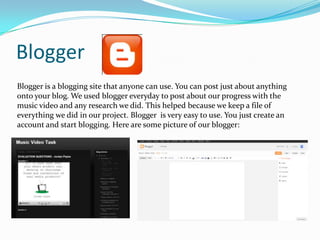
Blogger is a blogging site that anyone can use. You can post just about anything
onto your blog. We used blogger everyday to post about our progress with the
music video and any research we did. This helped because we keep a file of
everything we did in our project. Blogger is very easy to use. You just create an
account and start blogging. Here are some picture of our blogger:
HD Video camera
We used a HD video camera to record all of our footage. This meant that
our footage could look super professional in HD. Using the camera was
very easy. We just turn it on and hit record. We could record for hours
as the camera had a good battery life and a lot of storage space. After all
of the footage was collected we just uploaded it all to the computer
using a USB to camera input lead. We would then just drag and drop all
of the footage into our video editing software and start editing away.
Using a HD video camera gave us the edge when it came to capturing
fine detail. We were able to get all the footage we needed within the
time period and upload it all to the computer to start cutting and
editing it all.
Premier Pro
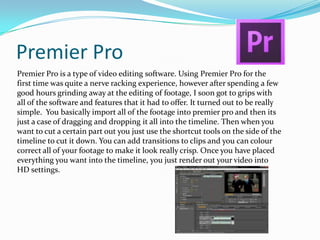
Premier Pro is a type of video editing software. Using Premier Pro for the
first time was quite a nerve racking experience, however after spending a few
good hours grinding away at the editing of footage, I soon got to grips with
all of the software and features that it had to offer. It turned out to be really
simple. You basically import all of the footage into premier pro and then its
just a case of dragging and dropping it all into the timeline. Then when you
want to cut a certain part out you just use the shortcut tools on the side of the
timeline to cut it down. You can add transitions to clips and you can colour
correct all of your footage to make it look really crisp. Once you have placed
everything you want into the timeline, you just render out your video into
HD settings.
Adobe Photoshop
I have had some experience with Photoshop before. We used it in our first year of
media studies to edit photos. I have all had experience with it outside of school.
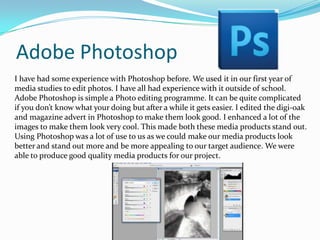
Adobe Photoshop is simple a Photo editing programme. It can be quite complicated
if you don’t know what your doing but after a while it gets easier. I edited the digi-oak
and magazine advert in Photoshop to make them look good. I enhanced a lot of the
images to make them look very cool. This made both these media products stand out.
Using Photoshop was a lot of use to us as we could make our media products look
better and stand out more and be more appealing to our target audience. We were
able to produce good quality media products for our project.
Google Maps
Google maps is very simple and easy to use. You can search for places and plan
routes and find places to eat. We used Google Maps to find good locations for the
shooting of our music video. We managed to track down a good location on Google
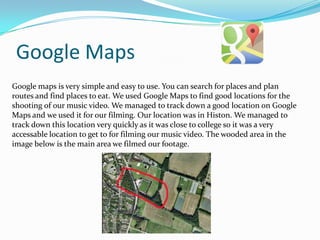
Maps and we used it for our filming. Our location was in Histon. We managed to
track down this location very quickly as it was close to college so it was a very
accessable location to get to for filming our music video. The wooded area in the
image below is the main area we filmed our footage.
Internet
We used the internet to do all of our research on our artists and the
locations we would use to film our music video. We also used the internet
to blog all of our posts onto blogger. We used the internet to Google
images to give us inspiration for the ancillary tasks and we also used the
internet to go onto YouTube to watch videos related to our artists and we
watched the Music video that our artist performed in.
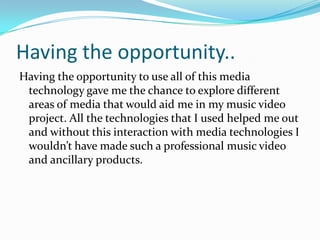
Prezi
Prezi is a cloud based presentation making site. You can choose your structure of
presentation and type in all of your information and put images in and put
YouTube videos in the presentation. You can edit it all to suit you. I used Prezi for
one of my evaluation tasks. I found it very easy to use and it was very easy to
embed the presentation onto my blog. The simple look of the presentations gives
Prezi the edge over any other presentation cloud site. With Prezi I was able to
write up all of my evaluation into a professional looking presentation.
YouTube
YouTube is a Massive online video site where you can upload videos for
people to watch and then comment and favourite and share and like. I
used YouTube to upload all of my Premier Pro edits to then embed onto
blogger. If I didn’t have YouTube then I wouldn’t be able to put my
Music video onto the blog and any other video that I created in the
music video project. YouTube made it very easy for me to embed videos
onto the blog but it also gave us the opportunity to receive feedback on
our music video from members of the YouTube community.
Having the opportunity..
Having the opportunity to use all of this media
technology gave me the chance to explore different
areas of media that would aid me in my music video
project. All the technologies that I used helped me out
and without this interaction with media technologies I
wouldn’t have made such a professional music video
and ancillary products.

Question 4 Evaluation - Jordan Payne

  • 1.
  • 2.
    Technologies used inmusic video project  Blogger  HD video camera  Premier Pro video editing software  Photoshop  Google maps (locations)  Internet (research)  Prezi  Slideshare  YouTube
  • 3.
    Blogger Blogger is ablogging site that anyone can use. You can post just about anything onto your blog. We used blogger everyday to post about our progress with the music video and any research we did. This helped because we keep a file of everything we did in our project. Blogger is very easy to use. You just create an account and start blogging. Here are some picture of our blogger:
  • 4.
    HD Video camera Weused a HD video camera to record all of our footage. This meant that our footage could look super professional in HD. Using the camera was very easy. We just turn it on and hit record. We could record for hours as the camera had a good battery life and a lot of storage space. After all of the footage was collected we just uploaded it all to the computer using a USB to camera input lead. We would then just drag and drop all of the footage into our video editing software and start editing away. Using a HD video camera gave us the edge when it came to capturing fine detail. We were able to get all the footage we needed within the time period and upload it all to the computer to start cutting and editing it all.
  • 5.
    Premier Pro Premier Prois a type of video editing software. Using Premier Pro for the first time was quite a nerve racking experience, however after spending a few good hours grinding away at the editing of footage, I soon got to grips with all of the software and features that it had to offer. It turned out to be really simple. You basically import all of the footage into premier pro and then its just a case of dragging and dropping it all into the timeline. Then when you want to cut a certain part out you just use the shortcut tools on the side of the timeline to cut it down. You can add transitions to clips and you can colour correct all of your footage to make it look really crisp. Once you have placed everything you want into the timeline, you just render out your video into HD settings.
  • 6.
    Adobe Photoshop I havehad some experience with Photoshop before. We used it in our first year of media studies to edit photos. I have all had experience with it outside of school. Adobe Photoshop is simple a Photo editing programme. It can be quite complicated if you don’t know what your doing but after a while it gets easier. I edited the digi-oak and magazine advert in Photoshop to make them look good. I enhanced a lot of the images to make them look very cool. This made both these media products stand out. Using Photoshop was a lot of use to us as we could make our media products look better and stand out more and be more appealing to our target audience. We were able to produce good quality media products for our project.
  • 7.
    Google Maps Google mapsis very simple and easy to use. You can search for places and plan routes and find places to eat. We used Google Maps to find good locations for the shooting of our music video. We managed to track down a good location on Google Maps and we used it for our filming. Our location was in Histon. We managed to track down this location very quickly as it was close to college so it was a very accessable location to get to for filming our music video. The wooded area in the image below is the main area we filmed our footage.
  • 8.
    Internet We used theinternet to do all of our research on our artists and the locations we would use to film our music video. We also used the internet to blog all of our posts onto blogger. We used the internet to Google images to give us inspiration for the ancillary tasks and we also used the internet to go onto YouTube to watch videos related to our artists and we watched the Music video that our artist performed in.
  • 9.
    Prezi Prezi is acloud based presentation making site. You can choose your structure of presentation and type in all of your information and put images in and put YouTube videos in the presentation. You can edit it all to suit you. I used Prezi for one of my evaluation tasks. I found it very easy to use and it was very easy to embed the presentation onto my blog. The simple look of the presentations gives Prezi the edge over any other presentation cloud site. With Prezi I was able to write up all of my evaluation into a professional looking presentation.
  • 10.
    YouTube YouTube is aMassive online video site where you can upload videos for people to watch and then comment and favourite and share and like. I used YouTube to upload all of my Premier Pro edits to then embed onto blogger. If I didn’t have YouTube then I wouldn’t be able to put my Music video onto the blog and any other video that I created in the music video project. YouTube made it very easy for me to embed videos onto the blog but it also gave us the opportunity to receive feedback on our music video from members of the YouTube community.
  • 11.
    Having the opportunity.. Havingthe opportunity to use all of this media technology gave me the chance to explore different areas of media that would aid me in my music video project. All the technologies that I used helped me out and without this interaction with media technologies I wouldn’t have made such a professional music video and ancillary products.