1
ISA 235: SQL Walk-Throughs
Stefanie W.
Question 2B: Three Joins
In which year, based on when the order was taken, was the total number of units of all products sold in the
Dairy Products greater than 3000 units?
Your question: In which year, based upon when the order was taken, was the total number of units of all
products sold in Confections greater than 3000?
*note: Some of the results of some stages of your code will look different than mine due to the different
questions.
Step 1: Determine the tables and information needed. For instance, ‘Dairy Products’ is a category and when the order was taken is
the same as the order date.
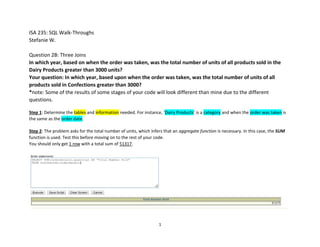
Step 2: The problem asks for the total number of units, which infers that an aggregate function is necessary. In this case, the SUM
function is used. Test this before moving on to the rest of your code.
You should only get 1 row with a total sum of 51317.
2
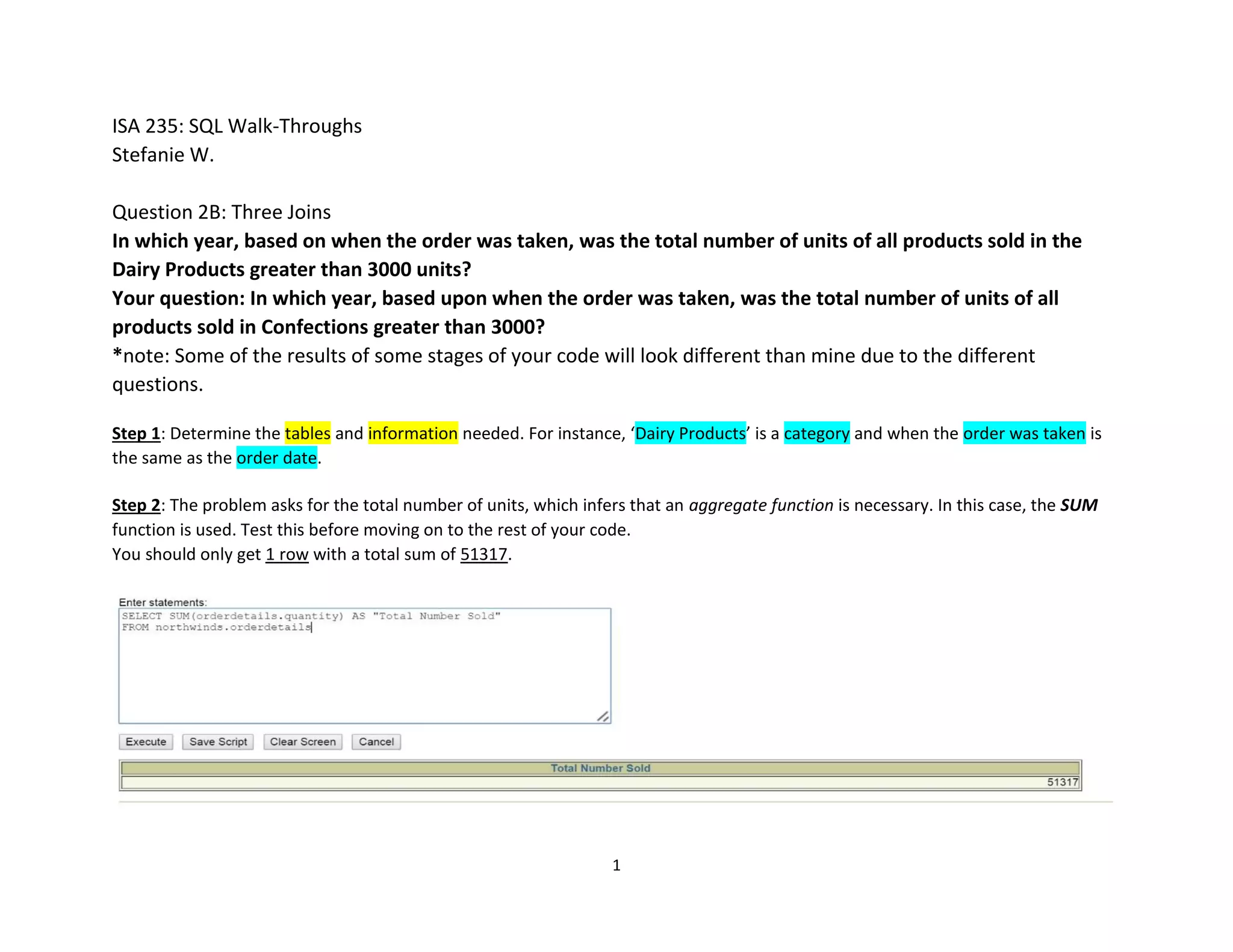
Step 3: Because you know what tables you need, you can JOIN them now and make sure they work. The end result should be the
same as the step above.
Based upon your question, you should get 1 row with the total number as 51317.
*Note: The order of your JOINs of your tables does not really matter, just be wary about what the unique key of each table and
which keys are associated with which tables.
3
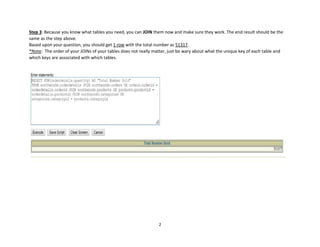
Step 4: Add your WHERE function to the code you already have.
You want to put category name here, but not in your SELECT function. It limits the rows which are brought back, but is not displayed
in those rows. I do not have category name in my select but if it make it easier for you to understand your code visually, include it.
We will discuss why we only have the aggregate function (SUM) in the SELECT function at the beginning.
Based upon your code, you should get a result of 1 row with a total sum of 7906.
4
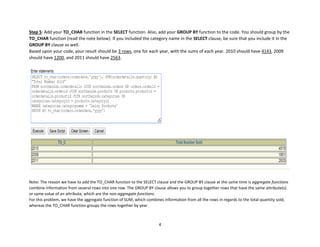
Step 5: Add your TO_CHAR function in the SELECT function. Also, add your GROUP BY function to the code. You should group by the
TO_CHAR function (read the note below). If you included the category name in the SELECT clause, be sure that you include it in the
GROUP BY clause as well.
Based upon your code, your result should be 3 rows, one for each year, with the sums of each year. 2010 should have 4143, 2009
should have 1200, and 2011 should have 2563.
Note: The reason we have to add the TO_CHAR function to the SELECT clause and the GROUP BY clause at the same time is aggregate functions
combine information from several rows into one row. The GROUP BY clause allows you to group together rows that have the same attribute(s)
or same value of an attribute, which are the non-aggregate functions.
For this problem, we have the aggregate function of SUM, which combines information from all the rows in regards to the total quantity sold,
whereas the TO_CHAR function groups the rows together by year.
5
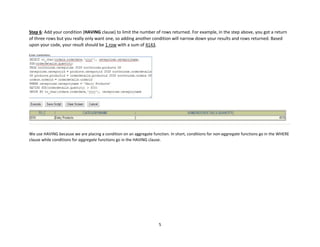
Step 6: Add your condition (HAVING clause) to limit the number of rows returned. For example, in the step above, you got a return
of three rows but you really only want one, so adding another condition will narrow down your results and rows returned. Based
upon your code, your result should be 1 row with a sum of 4143.
We use HAVING because we are placing a condition on an aggregate function. In short, conditions for non-aggregate functions go in the WHERE
clause while conditions for aggregate functions go in the HAVING clause.
6
Mistakes to Look for:
1. Not having a GROUP BY: this is necessary to have if you have an aggregate function in your code. As explained earlier, aggregate
functions combine information from many rows into one row unless otherwise directed (through a GROUP BY function).
2. Not having a working JOIN: same as problem 1, make sure you have clearly identified the correct unique key and the tables it is
associated with (which tables does it link together?). Also, be sure you are using the correct name for the keys in the table when
joining; sometimes they are listed under different names. For example, on the Shippers table, Shipper ID is simply Shipper ID;
however, on the Orders table, Shipper ID is called Ship Via.
3. Make sure the WHERE clause is placed before the GROUP BY clause. The principle in SQL is that we limit the number of rows we
extract from the database before grouping them to create and use the SUM.
Troubleshooting Guide:
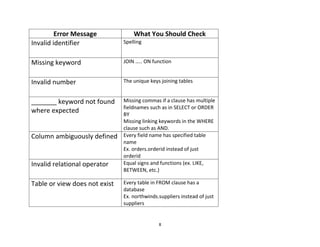
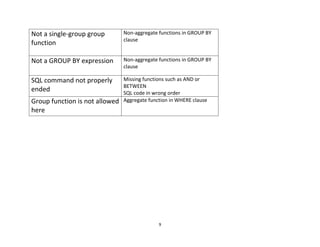
1. Read the error message that shows up. Generally, it will tell you where the error is and what is wrong. See appendix for more help.
2. Check your spelling. This is one of the smallest yet most common mistakes. For example, you might have order.orderid instead of
orders.orderid, the latter being correct because the table name is orders.
3. Check to make sure you are referencing the correct information. For instance, if you need category names, make sure you have
category name in your code and not category ID. Another example would if a problem says to reference the date an order was taken,
you should be referencing the order date. Similar issues would be using supplier information instead of shipper information, etc.
4. Check your quotes. Some functions and clauses only need single quotes and others need double quotes depending on how you
want the information to be executed.
5. If none of the above seemed to help or to not make sense and you still have a problem with your code, start by deleting code line
by line and click ‘Execute’ each time. Repeat as necessary until you reach your code functions. From here, continue your code line by
line to figure out where you have problems.
7
Appendix
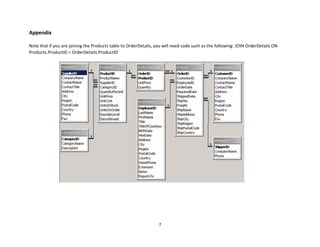
Note that if you are joining the Products table to OrderDetails, you will need code such as the following: JOIN OrderDetails ON
Products.ProductID = OrderDetails.ProductID
8
Error Message What You Should Check
Invalid identifier Spelling
Missing keyword JOIN ….. ON function
Invalid number The unique keys joining tables
_______ keyword not found
where expected
Missing commas if a clause has multiple
fieldnames such as in SELECT or ORDER
BY
Missing linking keywords in the WHERE
clause such as AND.
Column ambiguously defined Every field name has specified table
name
Ex. orders.orderid instead of just
orderid
Invalid relational operator Equal signs and functions (ex. LIKE,
BETWEEN, etc.)
Table or view does not exist Every table in FROM clause has a
database
Ex. northwinds.suppliers instead of just
suppliers
9
Not a single-group group
function
Non-aggregate functions in GROUP BY
clause
Not a GROUP BY expression Non-aggregate functions in GROUP BY
clause
SQL command not properly
ended
Missing functions such as AND or
BETWEEN
SQL code in wrong order
Group function is not allowed
here
Aggregate function in WHERE clause

Question 2B

  • 1.
    1 ISA 235: SQLWalk-Throughs Stefanie W. Question 2B: Three Joins In which year, based on when the order was taken, was the total number of units of all products sold in the Dairy Products greater than 3000 units? Your question: In which year, based upon when the order was taken, was the total number of units of all products sold in Confections greater than 3000? *note: Some of the results of some stages of your code will look different than mine due to the different questions. Step 1: Determine the tables and information needed. For instance, ‘Dairy Products’ is a category and when the order was taken is the same as the order date. Step 2: The problem asks for the total number of units, which infers that an aggregate function is necessary. In this case, the SUM function is used. Test this before moving on to the rest of your code. You should only get 1 row with a total sum of 51317.
  • 2.
    2 Step 3: Becauseyou know what tables you need, you can JOIN them now and make sure they work. The end result should be the same as the step above. Based upon your question, you should get 1 row with the total number as 51317. *Note: The order of your JOINs of your tables does not really matter, just be wary about what the unique key of each table and which keys are associated with which tables.
  • 3.
    3 Step 4: Addyour WHERE function to the code you already have. You want to put category name here, but not in your SELECT function. It limits the rows which are brought back, but is not displayed in those rows. I do not have category name in my select but if it make it easier for you to understand your code visually, include it. We will discuss why we only have the aggregate function (SUM) in the SELECT function at the beginning. Based upon your code, you should get a result of 1 row with a total sum of 7906.
  • 4.
    4 Step 5: Addyour TO_CHAR function in the SELECT function. Also, add your GROUP BY function to the code. You should group by the TO_CHAR function (read the note below). If you included the category name in the SELECT clause, be sure that you include it in the GROUP BY clause as well. Based upon your code, your result should be 3 rows, one for each year, with the sums of each year. 2010 should have 4143, 2009 should have 1200, and 2011 should have 2563. Note: The reason we have to add the TO_CHAR function to the SELECT clause and the GROUP BY clause at the same time is aggregate functions combine information from several rows into one row. The GROUP BY clause allows you to group together rows that have the same attribute(s) or same value of an attribute, which are the non-aggregate functions. For this problem, we have the aggregate function of SUM, which combines information from all the rows in regards to the total quantity sold, whereas the TO_CHAR function groups the rows together by year.
  • 5.
    5 Step 6: Addyour condition (HAVING clause) to limit the number of rows returned. For example, in the step above, you got a return of three rows but you really only want one, so adding another condition will narrow down your results and rows returned. Based upon your code, your result should be 1 row with a sum of 4143. We use HAVING because we are placing a condition on an aggregate function. In short, conditions for non-aggregate functions go in the WHERE clause while conditions for aggregate functions go in the HAVING clause.
  • 6.
    6 Mistakes to Lookfor: 1. Not having a GROUP BY: this is necessary to have if you have an aggregate function in your code. As explained earlier, aggregate functions combine information from many rows into one row unless otherwise directed (through a GROUP BY function). 2. Not having a working JOIN: same as problem 1, make sure you have clearly identified the correct unique key and the tables it is associated with (which tables does it link together?). Also, be sure you are using the correct name for the keys in the table when joining; sometimes they are listed under different names. For example, on the Shippers table, Shipper ID is simply Shipper ID; however, on the Orders table, Shipper ID is called Ship Via. 3. Make sure the WHERE clause is placed before the GROUP BY clause. The principle in SQL is that we limit the number of rows we extract from the database before grouping them to create and use the SUM. Troubleshooting Guide: 1. Read the error message that shows up. Generally, it will tell you where the error is and what is wrong. See appendix for more help. 2. Check your spelling. This is one of the smallest yet most common mistakes. For example, you might have order.orderid instead of orders.orderid, the latter being correct because the table name is orders. 3. Check to make sure you are referencing the correct information. For instance, if you need category names, make sure you have category name in your code and not category ID. Another example would if a problem says to reference the date an order was taken, you should be referencing the order date. Similar issues would be using supplier information instead of shipper information, etc. 4. Check your quotes. Some functions and clauses only need single quotes and others need double quotes depending on how you want the information to be executed. 5. If none of the above seemed to help or to not make sense and you still have a problem with your code, start by deleting code line by line and click ‘Execute’ each time. Repeat as necessary until you reach your code functions. From here, continue your code line by line to figure out where you have problems.
  • 7.
    7 Appendix Note that ifyou are joining the Products table to OrderDetails, you will need code such as the following: JOIN OrderDetails ON Products.ProductID = OrderDetails.ProductID
  • 8.
    8 Error Message WhatYou Should Check Invalid identifier Spelling Missing keyword JOIN ….. ON function Invalid number The unique keys joining tables _______ keyword not found where expected Missing commas if a clause has multiple fieldnames such as in SELECT or ORDER BY Missing linking keywords in the WHERE clause such as AND. Column ambiguously defined Every field name has specified table name Ex. orders.orderid instead of just orderid Invalid relational operator Equal signs and functions (ex. LIKE, BETWEEN, etc.) Table or view does not exist Every table in FROM clause has a database Ex. northwinds.suppliers instead of just suppliers
  • 9.
    9 Not a single-groupgroup function Non-aggregate functions in GROUP BY clause Not a GROUP BY expression Non-aggregate functions in GROUP BY clause SQL command not properly ended Missing functions such as AND or BETWEEN SQL code in wrong order Group function is not allowed here Aggregate function in WHERE clause