• Select Statement
• Select command is used to fetch the data in a set of records from a
table, view or a group of tables, views by making use of SQL joins.
• Retrieval of data using SQL statements can be done by using
different predicates like −
• Where
• Group By
• Having
• Order By
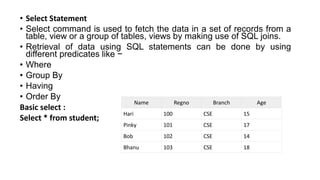
Basic select :
Select * from student;
Name Regno Branch Age
Hari 100 CSE 15
Pinky 101 CSE 17
Bob 102 CSE 14
Bhanu 103 CSE 18
Where clause
• Where clause is used with the data manipulation language (DML)
statement to check for a condition being met in row.
• Example 1
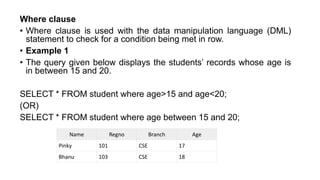
• The query given below displays the students’ records whose age is
in between 15 and 20.
SELECT * FROM student where age>15 and age<20;
(OR)
SELECT * FROM student where age between 15 and 20;
Name Regno Branch Age
Pinky 101 CSE 17
Bhanu 103 CSE 18
Example 2
• Consider another example to know more about where clause −
• Like operator is used to search for a specified pattern in a column.
The percent sign (%) represents zero, one, or multiple characters
The underscore sign (_) represents one, single character
The following SQL statement selects all students with a student Name that have
"or" in any position:
SELECT *FROM student where name LIKE '%or%’;
The following SQL statement selects all students with a student name that have "r"
in the second position
SELECT *FROM student where name LIKE '_r%’;
The following SQL statement selects all customers with a ContactName that starts
with "a" and ends with "o":
SELECT * FROM Customers
WHERE ContactName LIKE 'a%o';
The following SQL statement selects all customers with a CustomerName that does
NOT start with "a":
SELECT * FROM Customers
WHERE CustomerName NOT LIKE 'a%’;
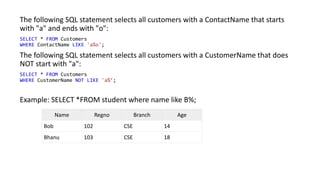
Example: SELECT *FROM student where name like B%;
Name Regno Branch Age
Bob 102 CSE 14
Bhanu 103 CSE 18
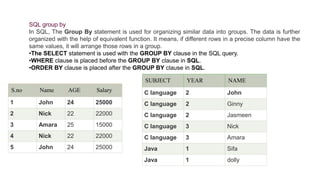
SQL group by
In SQL, The Group By statement is used for organizing similar data into groups. The data is further
organized with the help of equivalent function. It means, if different rows in a precise column have the
same values, it will arrange those rows in a group.
•The SELECT statement is used with the GROUP BY clause in the SQL query.
•WHERE clause is placed before the GROUP BY clause in SQL.
•ORDER BY clause is placed after the GROUP BY clause in SQL.
S.no Name AGE Salary
1 John 24 25000
2 Nick 22 22000
3 Amara 25 15000
4 Nick 22 22000
5 John 24 25000
SUBJECT YEAR NAME
C language 2 John
C language 2 Ginny
C language 2 Jasmeen
C language 3 Nick
C language 3 Amara
Java 1 Sifa
Java 1 dolly
1.SELECT NAME, SUM (SALARY) FROM Employee
2.GROUP BY NAME;
S.no Name AGE Salary
1 John 24 25000
2 Nick 22 22000
3 Amara 25 15000
4 Nick 22 22000
5 John 24 25000
NAME SALARY
John 50000
Nick 44000
Amara 15000
SUBJECT YEAR NAME
C language 2 John
C language 2 Ginny
C language 2 Jasmeen
C language 3 Nick
C language 3 Amara
Java 1 Sifa
Java 1 dolly
1.SELECT SUBJECT, YEAR, Count (*)
2.FROM Student
3.Group BY SUBJECT, YEAR;
SUBJECT YEAR Count
C language 2 3
C language 3 2
Java 1 2
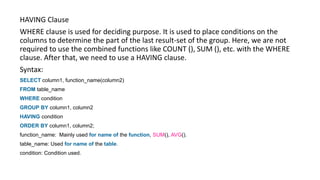
HAVING Clause
WHERE clause is used for deciding purpose. It is used to place conditions on the
columns to determine the part of the last result-set of the group. Here, we are not
required to use the combined functions like COUNT (), SUM (), etc. with the WHERE
clause. After that, we need to use a HAVING clause.
Syntax:
SELECT column1, function_name(column2)
FROM table_name
WHERE condition
GROUP BY column1, column2
HAVING condition
ORDER BY column1, column2;
function_name: Mainly used for name of the function, SUM(), AVG().
table_name: Used for name of the table.
condition: Condition used.
HAVING Clause
SELECT NAME, SUM(SALARY) FROM Employee
GROUP BY NAME
HAVING SUM(SALARY)>=50000;
Name SUM(SALARY)
John 50000
Aggregate Functions in SQL
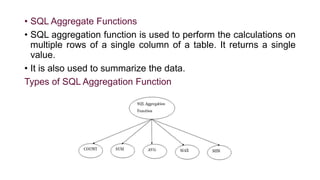
• SQL Aggregate Functions
• SQL aggregation function is used to perform the calculations on
multiple rows of a single column of a table. It returns a single
value.
• It is also used to summarize the data.
Types of SQL Aggregation Function
COUNT FUNCTION
• COUNT function is used to Count the number of rows in a
database table. It can work on both numeric and non-numeric
data types.
• COUNT function uses the COUNT(*) that returns the count of
all the rows in a specified table. COUNT(*) considers duplicate
and Null.
Syntax:
COUNT(*)
or
COUNT( [ALL|DISTINCT] expression )
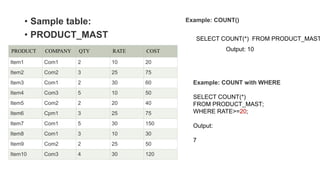
• Sample table:
• PRODUCT_MAST
Output: 10
PRODUCT COMPANY QTY RATE COST
Item1 Com1 2 10 20
Item2 Com2 3 25 75
Item3 Com1 2 30 60
Item4 Com3 5 10 50
Item5 Com2 2 20 40
Item6 Cpm1 3 25 75
Item7 Com1 5 30 150
Item8 Com1 3 10 30
Item9 Com2 2 25 50
Item10 Com3 4 30 120
Example: COUNT()
SELECT COUNT(*) FROM PRODUCT_MAST
Example: COUNT with WHERE
SELECT COUNT(*)
FROM PRODUCT_MAST;
WHERE RATE>=20;
Output:
7
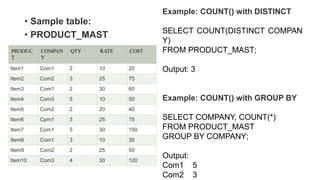
• Sample table:
• PRODUCT_MAST
PRODUC
T
COMPAN
Y
QTY RATE COST
Item1 Com1 2 10 20
Item2 Com2 3 25 75
Item3 Com1 2 30 60
Item4 Com3 5 10 50
Item5 Com2 2 20 40
Item6 Cpm1 3 25 75
Item7 Com1 5 30 150
Item8 Com1 3 10 30
Item9 Com2 2 25 50
Item10 Com3 4 30 120
Example: COUNT() with DISTINCT
SELECT COUNT(DISTINCT COMPAN
Y)
FROM PRODUCT_MAST;
Output: 3
Example: COUNT() with GROUP BY
SELECT COMPANY, COUNT(*)
FROM PRODUCT_MAST
GROUP BY COMPANY;
Output:
Com1 5
Com2 3
• Sample table:
• PRODUCT_MAST
PRODUC
T
COMPAN
Y
QTY RATE COST
Item1 Com1 2 10 20
Item2 Com2 3 25 75
Item3 Com1 2 30 60
Item4 Com3 5 10 50
Item5 Com2 2 20 40
Item6 Cpm1 3 25 75
Item7 Com1 5 30 150
Item8 Com1 3 10 30
Item9 Com2 2 25 50
Item10 Com3 4 30 120
Example: COUNT() with HAVING
SELECT COMPANY, COUNT(*)
FROM PRODUCT_MAST
GROUP BY COMPANY
HAVING COUNT(*)>2;
Output:
Com1 5
Com2 3
2. SUM Function
• Sum function is used to calculate the sum of all selected
columns. It works on numeric fields only.
Syntax
SUM()
or
SUM( [ALL|DISTINCT] expression )
Example: SUM()
SELECT SUM(COST)
FROM PRODUCT_MAST;
Output: 670
PROD
UCT
COM
PANY
QTY RATE COST
Item1 Com1 2 10 20
Item2 Com2 3 25 75
Item3 Com1 2 30 60
Item4 Com3 5 10 50
Item5 Com2 2 20 40
Item6 Cpm1 3 25 75
Item7 Com1 5 30 150
Item8 Com1 3 10 30
Item9 Com2 2 25 50
Item10 Com3 4 30 120
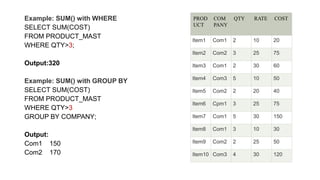
Example: SUM() with WHERE
SELECT SUM(COST)
FROM PRODUCT_MAST
WHERE QTY>3;
Output:320
Example: SUM() with GROUP BY
SELECT SUM(COST)
FROM PRODUCT_MAST
WHERE QTY>3
GROUP BY COMPANY;
Output:
Com1 150
Com2 170
PROD
UCT
COM
PANY
QTY RATE COST
Item1 Com1 2 10 20
Item2 Com2 3 25 75
Item3 Com1 2 30 60
Item4 Com3 5 10 50
Item5 Com2 2 20 40
Item6 Cpm1 3 25 75
Item7 Com1 5 30 150
Item8 Com1 3 10 30
Item9 Com2 2 25 50
Item10 Com3 4 30 120
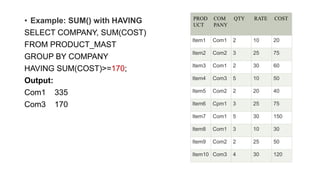
• Example: SUM() with HAVING
SELECT COMPANY, SUM(COST)
FROM PRODUCT_MAST
GROUP BY COMPANY
HAVING SUM(COST)>=170;
Output:
Com1 335
Com3 170
PROD
UCT
COM
PANY
QTY RATE COST
Item1 Com1 2 10 20
Item2 Com2 3 25 75
Item3 Com1 2 30 60
Item4 Com3 5 10 50
Item5 Com2 2 20 40
Item6 Cpm1 3 25 75
Item7 Com1 5 30 150
Item8 Com1 3 10 30
Item9 Com2 2 25 50
Item10 Com3 4 30 120
• 3. AVG function
• The AVG function is used to calculate the average value of the
numeric type. AVG function returns the average of all non-Null
values.
• Syntax
AVG()
or
AVG( [ALL|DISTINCT] expression )
Example:
SELECT AVG(COST)
FROM PRODUCT_MAST;
Output: 67.00
4. MAX Function
• The MAX function is used to find the maximum value of a certain
column. This function determines the largest value of all selected
values of a column.
• Syntax
MAX()
or
MAX( [ALL|DISTINCT] expression )
Example:
SELECT MAX(RATE)
FROM PRODUCT_MAST;
Output:30
5. MIN Function
• MIN function is used to find the minimum value of a certain column.
This function determines the smallest value of all selected values of
a column.
• Syntax
MIN()
or
MIN( [ALL|DISTINCT] expression )
• Example:
SELECT MIN(RATE)
FROM PRODUCT_MAST;
Output: 10

Unit 3-Select Options and Aggregate Functions in SQL (1).pptx

  • 1.
    • Select Statement •Select command is used to fetch the data in a set of records from a table, view or a group of tables, views by making use of SQL joins. • Retrieval of data using SQL statements can be done by using different predicates like − • Where • Group By • Having • Order By Basic select : Select * from student; Name Regno Branch Age Hari 100 CSE 15 Pinky 101 CSE 17 Bob 102 CSE 14 Bhanu 103 CSE 18
  • 2.
    Where clause • Whereclause is used with the data manipulation language (DML) statement to check for a condition being met in row. • Example 1 • The query given below displays the students’ records whose age is in between 15 and 20. SELECT * FROM student where age>15 and age<20; (OR) SELECT * FROM student where age between 15 and 20; Name Regno Branch Age Pinky 101 CSE 17 Bhanu 103 CSE 18
  • 3.
    Example 2 • Consideranother example to know more about where clause − • Like operator is used to search for a specified pattern in a column. The percent sign (%) represents zero, one, or multiple characters The underscore sign (_) represents one, single character The following SQL statement selects all students with a student Name that have "or" in any position: SELECT *FROM student where name LIKE '%or%’; The following SQL statement selects all students with a student name that have "r" in the second position SELECT *FROM student where name LIKE '_r%’;
  • 4.
    The following SQLstatement selects all customers with a ContactName that starts with "a" and ends with "o": SELECT * FROM Customers WHERE ContactName LIKE 'a%o'; The following SQL statement selects all customers with a CustomerName that does NOT start with "a": SELECT * FROM Customers WHERE CustomerName NOT LIKE 'a%’; Example: SELECT *FROM student where name like B%; Name Regno Branch Age Bob 102 CSE 14 Bhanu 103 CSE 18
  • 5.
    SQL group by InSQL, The Group By statement is used for organizing similar data into groups. The data is further organized with the help of equivalent function. It means, if different rows in a precise column have the same values, it will arrange those rows in a group. •The SELECT statement is used with the GROUP BY clause in the SQL query. •WHERE clause is placed before the GROUP BY clause in SQL. •ORDER BY clause is placed after the GROUP BY clause in SQL. S.no Name AGE Salary 1 John 24 25000 2 Nick 22 22000 3 Amara 25 15000 4 Nick 22 22000 5 John 24 25000 SUBJECT YEAR NAME C language 2 John C language 2 Ginny C language 2 Jasmeen C language 3 Nick C language 3 Amara Java 1 Sifa Java 1 dolly
  • 6.
    1.SELECT NAME, SUM(SALARY) FROM Employee 2.GROUP BY NAME; S.no Name AGE Salary 1 John 24 25000 2 Nick 22 22000 3 Amara 25 15000 4 Nick 22 22000 5 John 24 25000 NAME SALARY John 50000 Nick 44000 Amara 15000 SUBJECT YEAR NAME C language 2 John C language 2 Ginny C language 2 Jasmeen C language 3 Nick C language 3 Amara Java 1 Sifa Java 1 dolly 1.SELECT SUBJECT, YEAR, Count (*) 2.FROM Student 3.Group BY SUBJECT, YEAR; SUBJECT YEAR Count C language 2 3 C language 3 2 Java 1 2
  • 7.
    HAVING Clause WHERE clauseis used for deciding purpose. It is used to place conditions on the columns to determine the part of the last result-set of the group. Here, we are not required to use the combined functions like COUNT (), SUM (), etc. with the WHERE clause. After that, we need to use a HAVING clause. Syntax: SELECT column1, function_name(column2) FROM table_name WHERE condition GROUP BY column1, column2 HAVING condition ORDER BY column1, column2; function_name: Mainly used for name of the function, SUM(), AVG(). table_name: Used for name of the table. condition: Condition used.
  • 8.
    HAVING Clause SELECT NAME,SUM(SALARY) FROM Employee GROUP BY NAME HAVING SUM(SALARY)>=50000; Name SUM(SALARY) John 50000
  • 9.
  • 10.
    • SQL AggregateFunctions • SQL aggregation function is used to perform the calculations on multiple rows of a single column of a table. It returns a single value. • It is also used to summarize the data. Types of SQL Aggregation Function
  • 11.
    COUNT FUNCTION • COUNTfunction is used to Count the number of rows in a database table. It can work on both numeric and non-numeric data types. • COUNT function uses the COUNT(*) that returns the count of all the rows in a specified table. COUNT(*) considers duplicate and Null. Syntax: COUNT(*) or COUNT( [ALL|DISTINCT] expression )
  • 12.
    • Sample table: •PRODUCT_MAST Output: 10 PRODUCT COMPANY QTY RATE COST Item1 Com1 2 10 20 Item2 Com2 3 25 75 Item3 Com1 2 30 60 Item4 Com3 5 10 50 Item5 Com2 2 20 40 Item6 Cpm1 3 25 75 Item7 Com1 5 30 150 Item8 Com1 3 10 30 Item9 Com2 2 25 50 Item10 Com3 4 30 120 Example: COUNT() SELECT COUNT(*) FROM PRODUCT_MAST Example: COUNT with WHERE SELECT COUNT(*) FROM PRODUCT_MAST; WHERE RATE>=20; Output: 7
  • 13.
    • Sample table: •PRODUCT_MAST PRODUC T COMPAN Y QTY RATE COST Item1 Com1 2 10 20 Item2 Com2 3 25 75 Item3 Com1 2 30 60 Item4 Com3 5 10 50 Item5 Com2 2 20 40 Item6 Cpm1 3 25 75 Item7 Com1 5 30 150 Item8 Com1 3 10 30 Item9 Com2 2 25 50 Item10 Com3 4 30 120 Example: COUNT() with DISTINCT SELECT COUNT(DISTINCT COMPAN Y) FROM PRODUCT_MAST; Output: 3 Example: COUNT() with GROUP BY SELECT COMPANY, COUNT(*) FROM PRODUCT_MAST GROUP BY COMPANY; Output: Com1 5 Com2 3
  • 14.
    • Sample table: •PRODUCT_MAST PRODUC T COMPAN Y QTY RATE COST Item1 Com1 2 10 20 Item2 Com2 3 25 75 Item3 Com1 2 30 60 Item4 Com3 5 10 50 Item5 Com2 2 20 40 Item6 Cpm1 3 25 75 Item7 Com1 5 30 150 Item8 Com1 3 10 30 Item9 Com2 2 25 50 Item10 Com3 4 30 120 Example: COUNT() with HAVING SELECT COMPANY, COUNT(*) FROM PRODUCT_MAST GROUP BY COMPANY HAVING COUNT(*)>2; Output: Com1 5 Com2 3
  • 15.
    2. SUM Function •Sum function is used to calculate the sum of all selected columns. It works on numeric fields only. Syntax SUM() or SUM( [ALL|DISTINCT] expression ) Example: SUM() SELECT SUM(COST) FROM PRODUCT_MAST; Output: 670 PROD UCT COM PANY QTY RATE COST Item1 Com1 2 10 20 Item2 Com2 3 25 75 Item3 Com1 2 30 60 Item4 Com3 5 10 50 Item5 Com2 2 20 40 Item6 Cpm1 3 25 75 Item7 Com1 5 30 150 Item8 Com1 3 10 30 Item9 Com2 2 25 50 Item10 Com3 4 30 120
  • 16.
    Example: SUM() withWHERE SELECT SUM(COST) FROM PRODUCT_MAST WHERE QTY>3; Output:320 Example: SUM() with GROUP BY SELECT SUM(COST) FROM PRODUCT_MAST WHERE QTY>3 GROUP BY COMPANY; Output: Com1 150 Com2 170 PROD UCT COM PANY QTY RATE COST Item1 Com1 2 10 20 Item2 Com2 3 25 75 Item3 Com1 2 30 60 Item4 Com3 5 10 50 Item5 Com2 2 20 40 Item6 Cpm1 3 25 75 Item7 Com1 5 30 150 Item8 Com1 3 10 30 Item9 Com2 2 25 50 Item10 Com3 4 30 120
  • 17.
    • Example: SUM()with HAVING SELECT COMPANY, SUM(COST) FROM PRODUCT_MAST GROUP BY COMPANY HAVING SUM(COST)>=170; Output: Com1 335 Com3 170 PROD UCT COM PANY QTY RATE COST Item1 Com1 2 10 20 Item2 Com2 3 25 75 Item3 Com1 2 30 60 Item4 Com3 5 10 50 Item5 Com2 2 20 40 Item6 Cpm1 3 25 75 Item7 Com1 5 30 150 Item8 Com1 3 10 30 Item9 Com2 2 25 50 Item10 Com3 4 30 120
  • 18.
    • 3. AVGfunction • The AVG function is used to calculate the average value of the numeric type. AVG function returns the average of all non-Null values. • Syntax AVG() or AVG( [ALL|DISTINCT] expression ) Example: SELECT AVG(COST) FROM PRODUCT_MAST; Output: 67.00
  • 19.
    4. MAX Function •The MAX function is used to find the maximum value of a certain column. This function determines the largest value of all selected values of a column. • Syntax MAX() or MAX( [ALL|DISTINCT] expression ) Example: SELECT MAX(RATE) FROM PRODUCT_MAST; Output:30
  • 20.
    5. MIN Function •MIN function is used to find the minimum value of a certain column. This function determines the smallest value of all selected values of a column. • Syntax MIN() or MIN( [ALL|DISTINCT] expression ) • Example: SELECT MIN(RATE) FROM PRODUCT_MAST; Output: 10