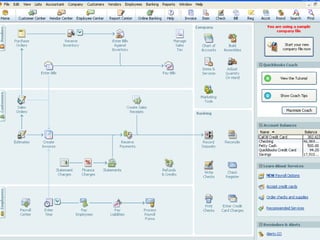
QuickBooks Unlimited Strategies for the Retail Environment
Agenda QuickBooks “Know-How” WASP Bar-Code Scanners MS Retail Mgmt Solutions dESCO Dispatch and    Service Scheduling
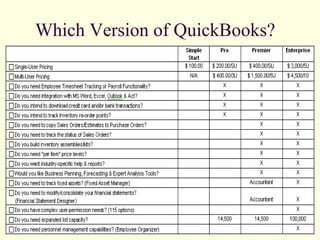
Which Version of QuickBooks?
 
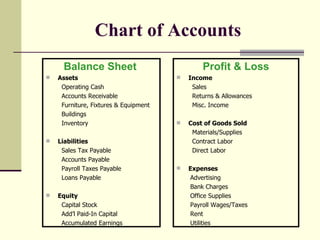
Chart of Accounts Balance Sheet   Assets Operating Cash Accounts Receivable Furniture, Fixtures & Equipment Buildings Inventory Liabilities Sales Tax Payable Accounts Payable Payroll Taxes Payable Loans Payable Equity Capital Stock Add’l Paid-In Capital Accumulated Earnings Profit & Loss Income Sales Returns & Allowances Misc. Income Cost of Goods Sold Materials/Supplies Contract Labor Direct Labor Expenses Advertising Bank Charges Office Supplies Payroll Wages/Taxes Rent Utilities
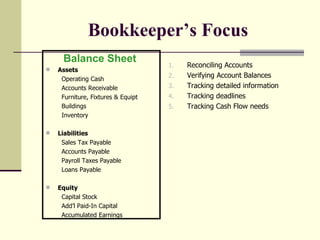
Bookkeeper’s Focus Reconciling Accounts Verifying Account Balances Tracking detailed information Tracking deadlines Tracking Cash Flow needs Balance Sheet   Assets Operating Cash Accounts Receivable Furniture, Fixtures & Equipt Buildings Inventory Liabilities Sales Tax Payable Accounts Payable Payroll Taxes Payable Loans Payable Equity Capital Stock Add’l Paid-In Capital Accumulated Earnings
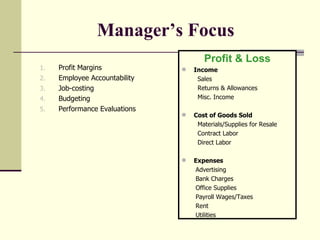
Manager’s Focus   Profit Margins Employee Accountability  Job-costing Budgeting  Performance Evaluations Profit & Loss Income Sales Returns & Allowances Misc. Income Cost of Goods Sold Materials/Supplies for Resale Contract Labor Direct Labor Expenses Advertising Bank Charges Office Supplies Payroll Wages/Taxes Rent Utilities
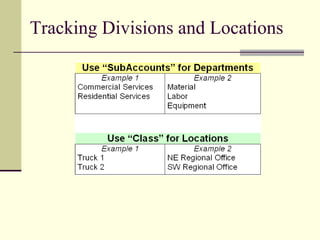
Tracking Divisions and Locations
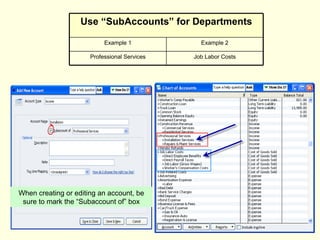
When creating or editing an account, be sure to mark the “Subaccount of” box Job Labor Costs Professional Services Example 2 Example 1 Use “SubAccounts” for Departments
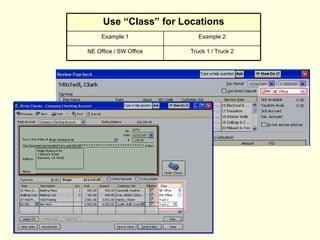
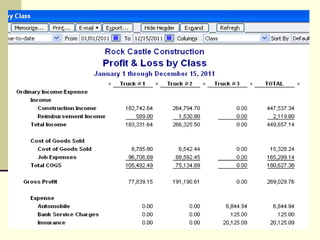
Truck 1 / Truck 2 NE Office / SW Office Example 2 Example 1 Use “Class” for Locations
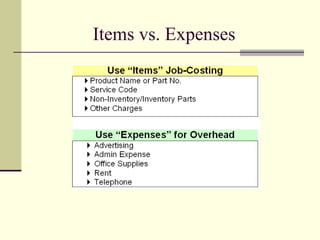
Items vs. Expenses
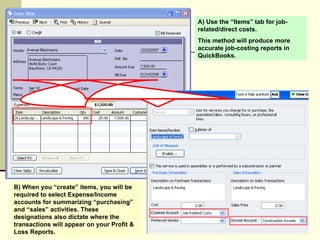
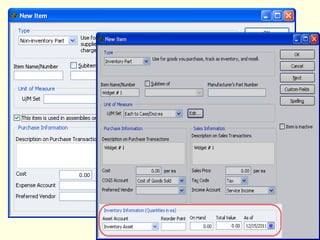
B) When you “create” items, you will be required to select Expense/Income accounts for summarizing “purchasing” and “sales” activities. These designations also dictate where the transactions will appear on your Profit & Loss Reports.  A) Use the “Items” tab for job-related/direct costs.  This method will produce more accurate job-costing reports in QuickBooks.
 
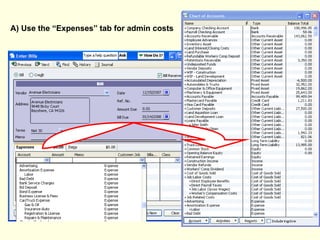
A) Use the “Expenses” tab for admin costs
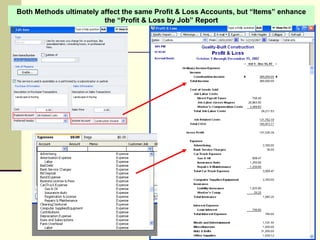
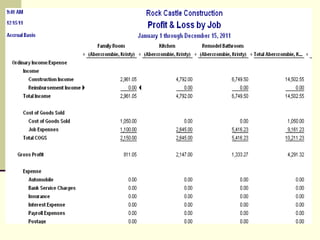
Both Methods ultimately affect the same Profit & Loss Accounts, but “Items” enhance the “Profit & Loss by Job” Report
 
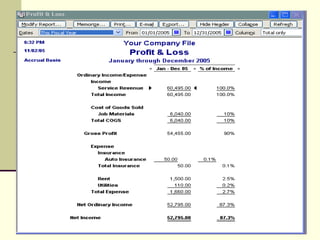
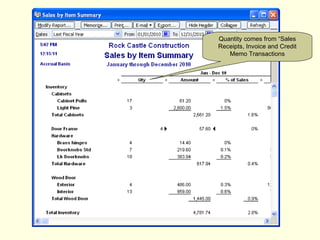
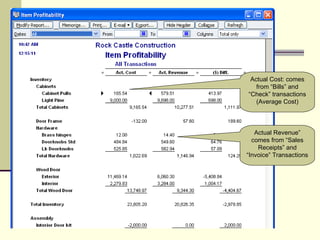
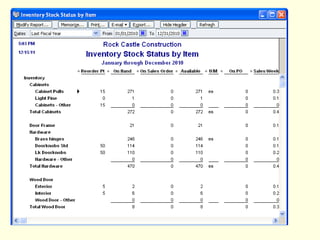
Reporting Profit & Loss (Standard) Profit & Loss by Division (Class) Profit & Loss by Job Sales (by Item)  Inventory – Item Profitability Inventory - Stock Status (by Item)


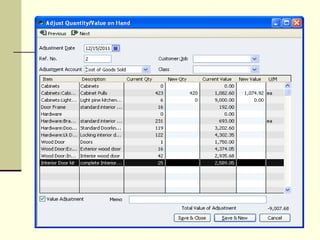
Quantity comes from “Sales Receipts, Invoice and Credit Memo Transactions
Actual Cost: comes from “Bills” and “Check” transactions (Average Cost) Actual Revenue” comes from “Sales Receipts” and “Invoice” Transactions
 
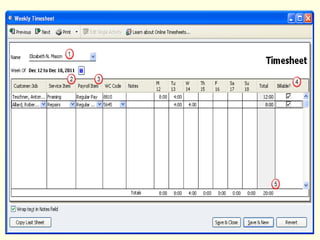
Employees & Sub-Contractors Employee: Subject to Employment Taxes Wages Reportable on a W-2 Sub-Contractor (Vendor): Not Subject to Employment Taxes Earnings Reportable on a 1099 Use “Timesheets” to track labor “job-costs” for employees AND sub-contractors. Use “Timesheets” to track/bill for equipment hours
 
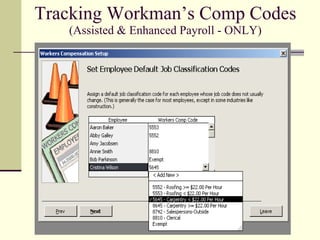
Tracking Workman’s Comp Codes (Assisted & Enhanced Payroll - ONLY)
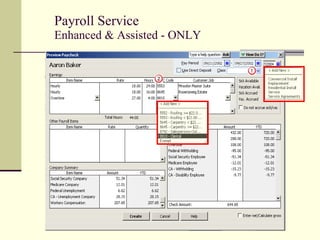
Payroll Service Enhanced & Assisted - ONLY
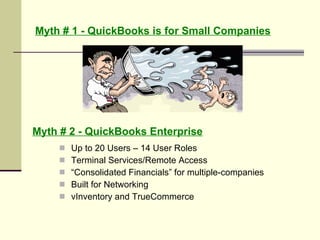
Myth # 1 - QuickBooks is for Small Companies Up to 20 Users – 14 User Roles Terminal Services/Remote Access “ Consolidated Financials” for multiple-companies Built for Networking vInventory and TrueCommerce Myth # 2 - QuickBooks Enterprise
Managing or Manipulating Progress ? What does your business-process cost ? Trace the steps of any transaction Who is held accountable ?  Create job-descriptions that define attainable numbers Why invest in Technology ?   Access to Real-Time Data, Avoid Duplication, Sync. Front to Back When will I be Profitable ? Assess Return on Investment, little things can mean allot Where do I start ?   Ask staff to create a “wish list”
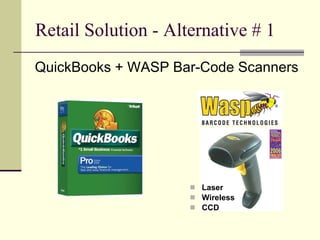
Retail Solution - Alternative # 1 Laser Wireless CCD QuickBooks + WASP Bar-Code Scanners
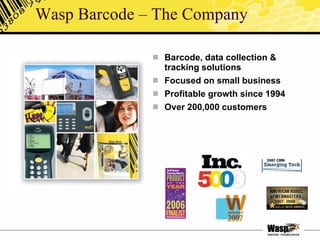
Wasp Barcode – The Company Barcode, data collection & tracking solutions Focused on small business Profitable growth since 1994 Over 200,000 customers
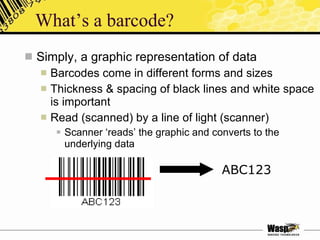
What’s a barcode? Simply, a graphic representation of data Barcodes come in different forms and sizes Thickness & spacing of black lines and white space is important Read (scanned) by a line of light (scanner) Scanner ‘reads’ the graphic and converts to the underlying data ABC123
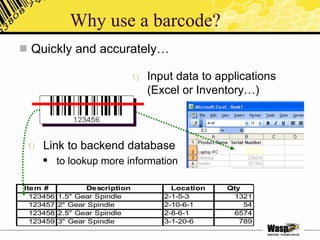
Why use a barcode?  Quickly and accurately… Link to backend database to lookup more information Input data to applications (Excel or Inventory…)
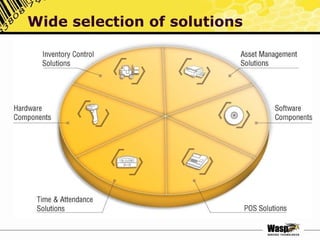
Wide selection of solutions
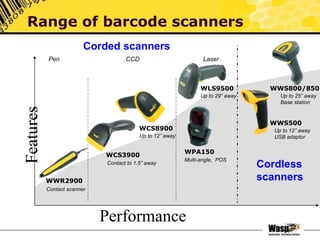
Features Performance Range of barcode scanners WWR2900 Contact scanner Contact to 1.5” away WCS8900 Up to 12” away WLS9500 Up to 29” away WWS800/850 Up to 25” away Base station Corded scanners Cordless scanners WCS3900 WWS500 Up to 12” away USB adaptor Multi-angle,  POS WPA150 Pen CCD Laser
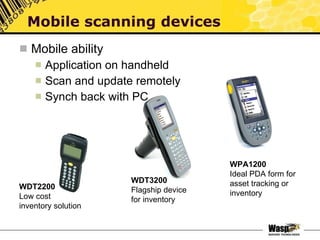
Mobile ability Application on handheld Scan and update remotely Synch back with PC Mobile scanning devices WDT2200 Low cost inventory solution WDT3200 Flagship device for inventory WPA1200 Ideal PDA form for asset tracking or inventory
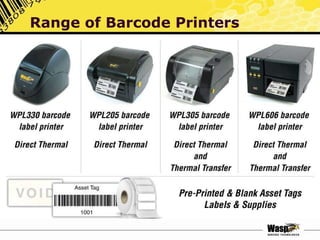
Range of Barcode Printers
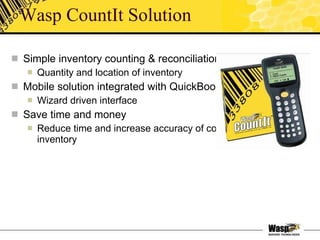
Wasp CountIt Solution Simple inventory counting & reconciliation Quantity and location of inventory Mobile solution integrated with QuickBooks Wizard driven interface  Save time and money Reduce time and increase accuracy of counting inventory
How it works with QB Easy process: Download inventory data from QuickBooks Create barcode labels (from application) Load onto Wasp mobile scanning device Scan, count & verify on-hand inventory & location Synch with PC and send accurate inventory level to QuickBooks  Create exception report if needed Eliminate the inefficiency of a paper system
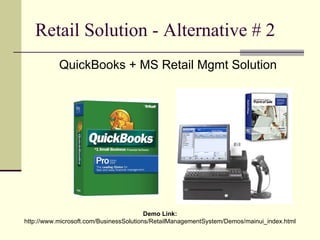
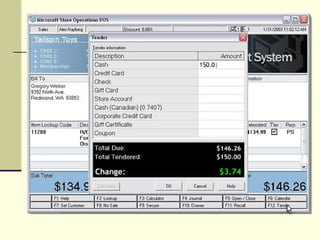
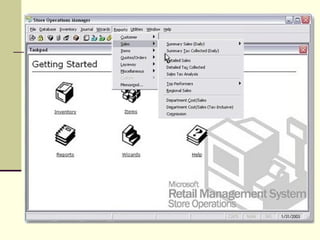
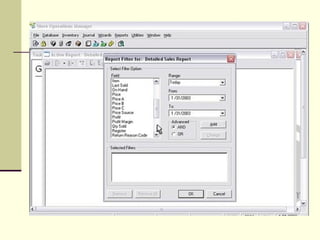
Retail Solution - Alternative # 2 QuickBooks + MS Retail Mgmt Solution Demo Link:  http://www.microsoft.com/BusinessSolutions/RetailManagementSystem/Demos/mainui_index.html
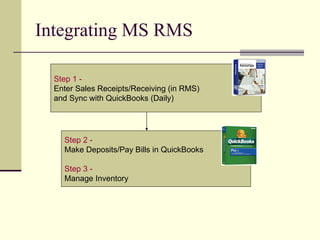
Integrating MS RMS Step 2 -   Make Deposits/Pay Bills in QuickBooks Step 3 -   Manage Inventory Step 1 -   Enter Sales Receipts/Receiving (in RMS)  and Sync with QuickBooks (Daily)
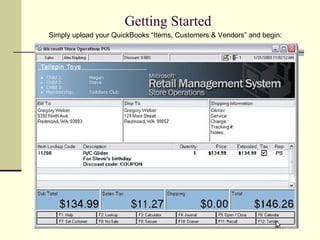
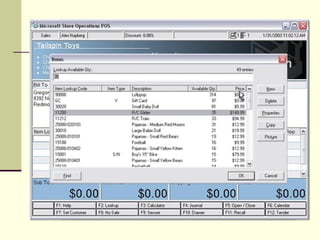
Getting Started Simply upload your QuickBooks “Items, Customers & Vendors” and begin:


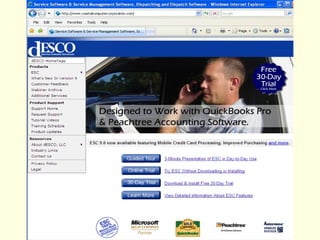
Professional Svcs - Alternative # 3 QuickBooks + Electronic Service Control
 
 
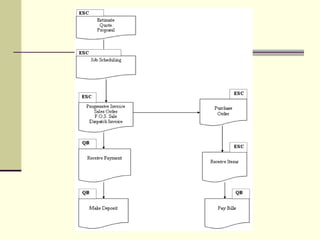
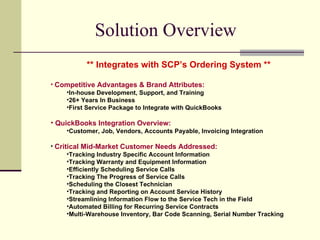
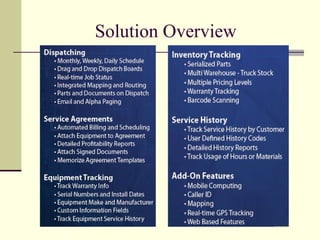
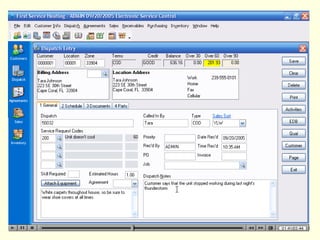
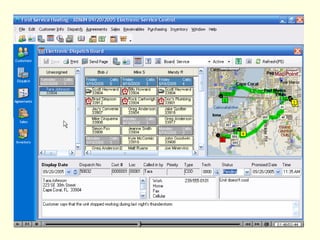
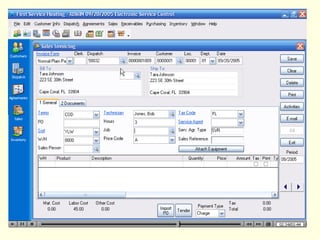
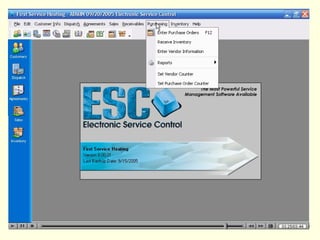
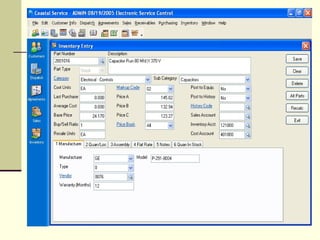
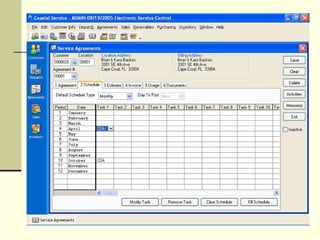
Solution Overview  ** Integrates with SCP’s Ordering System ** Competitive Advantages & Brand Attributes: In-house Development, Support, and Training 26+ Years In Business First Service Package to Integrate with QuickBooks QuickBooks Integration Overview: Customer, Job, Vendors, Accounts Payable, Invoicing Integration Critical Mid-Market Customer Needs Addressed: Tracking Industry Specific Account Information Tracking Warranty and Equipment Information Efficiently Scheduling Service Calls Tracking The Progress of Service Calls Scheduling the Closest Technician Tracking and Reporting on Account Service History Streamlining Information Flow to the Service Tech in the Field Automated Billing for Recurring Service Contracts Multi-Warehouse Inventory, Bar Code Scanning, Serial Number Tracking
Solution Overview


"Building Complete Business Solutions for QuickBooks Users" Dawn Scranton CQA [email_address] www.accountingdirectors.com 5121 Palo Verde Pl West Palm Beach, FL 33415 (O) 561.683.3497 (F) 561.683.1191   QUESTIONS ? * QuickBooks Support/Review * QuickBooks Training * Data File Repair/Split/Merge * Technology Evaluations * Boxed/Custom Solutions

Sharing Microsoft RMS Data with QuickBooks

  • 1.
    QuickBooks Unlimited Strategiesfor the Retail Environment
  • 2.
    Agenda QuickBooks “Know-How”WASP Bar-Code Scanners MS Retail Mgmt Solutions dESCO Dispatch and Service Scheduling
  • 3.
    Which Version ofQuickBooks?
  • 4.
  • 5.
    Chart of AccountsBalance Sheet Assets Operating Cash Accounts Receivable Furniture, Fixtures & Equipment Buildings Inventory Liabilities Sales Tax Payable Accounts Payable Payroll Taxes Payable Loans Payable Equity Capital Stock Add’l Paid-In Capital Accumulated Earnings Profit & Loss Income Sales Returns & Allowances Misc. Income Cost of Goods Sold Materials/Supplies Contract Labor Direct Labor Expenses Advertising Bank Charges Office Supplies Payroll Wages/Taxes Rent Utilities
  • 6.
    Bookkeeper’s Focus ReconcilingAccounts Verifying Account Balances Tracking detailed information Tracking deadlines Tracking Cash Flow needs Balance Sheet Assets Operating Cash Accounts Receivable Furniture, Fixtures & Equipt Buildings Inventory Liabilities Sales Tax Payable Accounts Payable Payroll Taxes Payable Loans Payable Equity Capital Stock Add’l Paid-In Capital Accumulated Earnings
  • 7.
    Manager’s Focus Profit Margins Employee Accountability Job-costing Budgeting Performance Evaluations Profit & Loss Income Sales Returns & Allowances Misc. Income Cost of Goods Sold Materials/Supplies for Resale Contract Labor Direct Labor Expenses Advertising Bank Charges Office Supplies Payroll Wages/Taxes Rent Utilities
  • 8.
  • 9.
    When creating orediting an account, be sure to mark the “Subaccount of” box Job Labor Costs Professional Services Example 2 Example 1 Use “SubAccounts” for Departments
  • 10.
    Truck 1 /Truck 2 NE Office / SW Office Example 2 Example 1 Use “Class” for Locations
  • 11.
  • 12.
    B) When you“create” items, you will be required to select Expense/Income accounts for summarizing “purchasing” and “sales” activities. These designations also dictate where the transactions will appear on your Profit & Loss Reports. A) Use the “Items” tab for job-related/direct costs. This method will produce more accurate job-costing reports in QuickBooks.
  • 13.
  • 14.
    A) Use the“Expenses” tab for admin costs
  • 15.
    Both Methods ultimatelyaffect the same Profit & Loss Accounts, but “Items” enhance the “Profit & Loss by Job” Report
  • 16.
  • 17.
    Reporting Profit &Loss (Standard) Profit & Loss by Division (Class) Profit & Loss by Job Sales (by Item) Inventory – Item Profitability Inventory - Stock Status (by Item)
  • 18.
  • 19.
  • 20.
  • 21.
    Quantity comes from“Sales Receipts, Invoice and Credit Memo Transactions
  • 22.
    Actual Cost: comesfrom “Bills” and “Check” transactions (Average Cost) Actual Revenue” comes from “Sales Receipts” and “Invoice” Transactions
  • 23.
  • 24.
    Employees & Sub-ContractorsEmployee: Subject to Employment Taxes Wages Reportable on a W-2 Sub-Contractor (Vendor): Not Subject to Employment Taxes Earnings Reportable on a 1099 Use “Timesheets” to track labor “job-costs” for employees AND sub-contractors. Use “Timesheets” to track/bill for equipment hours
  • 25.
  • 26.
    Tracking Workman’s CompCodes (Assisted & Enhanced Payroll - ONLY)
  • 27.
    Payroll Service Enhanced& Assisted - ONLY
  • 28.
    Myth # 1- QuickBooks is for Small Companies Up to 20 Users – 14 User Roles Terminal Services/Remote Access “ Consolidated Financials” for multiple-companies Built for Networking vInventory and TrueCommerce Myth # 2 - QuickBooks Enterprise
  • 29.
    Managing or ManipulatingProgress ? What does your business-process cost ? Trace the steps of any transaction Who is held accountable ? Create job-descriptions that define attainable numbers Why invest in Technology ? Access to Real-Time Data, Avoid Duplication, Sync. Front to Back When will I be Profitable ? Assess Return on Investment, little things can mean allot Where do I start ? Ask staff to create a “wish list”
  • 30.
    Retail Solution -Alternative # 1 Laser Wireless CCD QuickBooks + WASP Bar-Code Scanners
  • 31.
    Wasp Barcode –The Company Barcode, data collection & tracking solutions Focused on small business Profitable growth since 1994 Over 200,000 customers
  • 32.
    What’s a barcode?Simply, a graphic representation of data Barcodes come in different forms and sizes Thickness & spacing of black lines and white space is important Read (scanned) by a line of light (scanner) Scanner ‘reads’ the graphic and converts to the underlying data ABC123
  • 33.
    Why use abarcode? Quickly and accurately… Link to backend database to lookup more information Input data to applications (Excel or Inventory…)
  • 34.
  • 35.
    Features Performance Rangeof barcode scanners WWR2900 Contact scanner Contact to 1.5” away WCS8900 Up to 12” away WLS9500 Up to 29” away WWS800/850 Up to 25” away Base station Corded scanners Cordless scanners WCS3900 WWS500 Up to 12” away USB adaptor Multi-angle, POS WPA150 Pen CCD Laser
  • 36.
    Mobile ability Applicationon handheld Scan and update remotely Synch back with PC Mobile scanning devices WDT2200 Low cost inventory solution WDT3200 Flagship device for inventory WPA1200 Ideal PDA form for asset tracking or inventory
  • 37.
  • 38.
    Wasp CountIt SolutionSimple inventory counting & reconciliation Quantity and location of inventory Mobile solution integrated with QuickBooks Wizard driven interface Save time and money Reduce time and increase accuracy of counting inventory
  • 39.
    How it workswith QB Easy process: Download inventory data from QuickBooks Create barcode labels (from application) Load onto Wasp mobile scanning device Scan, count & verify on-hand inventory & location Synch with PC and send accurate inventory level to QuickBooks Create exception report if needed Eliminate the inefficiency of a paper system
  • 40.
    Retail Solution -Alternative # 2 QuickBooks + MS Retail Mgmt Solution Demo Link: http://www.microsoft.com/BusinessSolutions/RetailManagementSystem/Demos/mainui_index.html
  • 41.
    Integrating MS RMSStep 2 - Make Deposits/Pay Bills in QuickBooks Step 3 - Manage Inventory Step 1 - Enter Sales Receipts/Receiving (in RMS) and Sync with QuickBooks (Daily)
  • 42.
    Getting Started Simplyupload your QuickBooks “Items, Customers & Vendors” and begin:
  • 43.
  • 44.
  • 45.
  • 46.
  • 47.
    Professional Svcs -Alternative # 3 QuickBooks + Electronic Service Control
  • 48.
  • 49.
  • 50.
    Solution Overview ** Integrates with SCP’s Ordering System ** Competitive Advantages & Brand Attributes: In-house Development, Support, and Training 26+ Years In Business First Service Package to Integrate with QuickBooks QuickBooks Integration Overview: Customer, Job, Vendors, Accounts Payable, Invoicing Integration Critical Mid-Market Customer Needs Addressed: Tracking Industry Specific Account Information Tracking Warranty and Equipment Information Efficiently Scheduling Service Calls Tracking The Progress of Service Calls Scheduling the Closest Technician Tracking and Reporting on Account Service History Streamlining Information Flow to the Service Tech in the Field Automated Billing for Recurring Service Contracts Multi-Warehouse Inventory, Bar Code Scanning, Serial Number Tracking
  • 51.
  • 52.
  • 53.
  • 54.
  • 55.
  • 56.
  • 57.
  • 58.
    "Building Complete BusinessSolutions for QuickBooks Users" Dawn Scranton CQA [email_address] www.accountingdirectors.com 5121 Palo Verde Pl West Palm Beach, FL 33415 (O) 561.683.3497 (F) 561.683.1191 QUESTIONS ? * QuickBooks Support/Review * QuickBooks Training * Data File Repair/Split/Merge * Technology Evaluations * Boxed/Custom Solutions

Editor's Notes

  • #39 No location tracking in QB, so if do track location, can’t push back into general